CRM requirement
CRM requirement: audit user activity
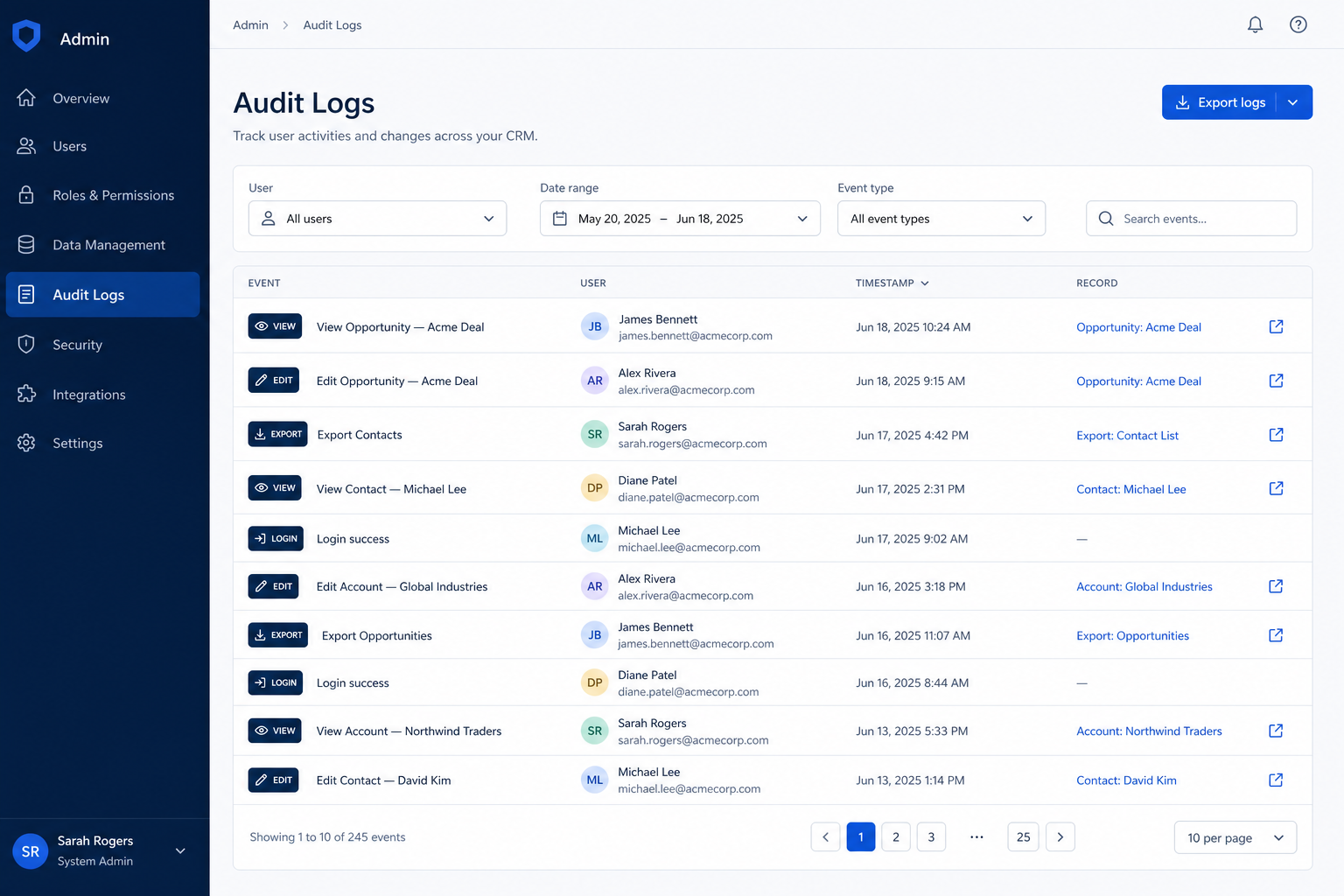
Keep a reviewable trail of who viewed, changed, exported, or deleted CRM data — long enough to investigate incidents and departures.
- Evidence-backed evaluations
- Same criteria across products
- Affiliate relationships never affect scores
Requirement at a glance
Requirement type
Governance / accountability
Primary capability
Security
Typical importance
Medium (higher where data is sensitive)
2
Core features
2
Supporting features
5
Products covered
Last reviewed 14 Aug 2026
Requirement snapshot
Overview
Auditing user activity means the CRM records security-relevant actions — sign-ins, record changes, configuration edits, exports, and deletions — in a form administrators or security can review and export. Record-level “last modified by” is not enough when you need to know who exported a list or changed sharing rules. This requirement rises sharply in regulated financial services, any team with bulk export risk, and departure forensics when someone leaves under a cloud.
Who this is for
Security, compliance, and CRM admins who must answer “who did what, when?” after an incident, access review, or employee departure. It also matters for multi-admin orgs where configuration drift needs ownership, and for leadership that must prove customer data access was controlled — not merely hoped for.
Worked examples
How teams satisfy “audit user activity” in practice
- 1
Example 1
departure forensics on a mid-market sales team
Before CRM
audit logs, a departed AE’s list exports were invisible; IT only saw that the laptop was returned
After CRM
audit with export events retained, security reconstructs which views were exported and when — then tightens export permissions for remaining roles
- 2
Example 2
a regulated FS CRM with multiple administrators. Before usable audit, configuration changes were tribal knowledge and rollback was guesswork. After CRM audit covering permission and field-config changes, admins can attribute who widened sharing last Thursday and reverse it with evidence.
Challenges without audit user activity
These are the operating problems that usually push teams to require “audit user activity” from a CRM — not feature wish lists.
Exports leave no trail
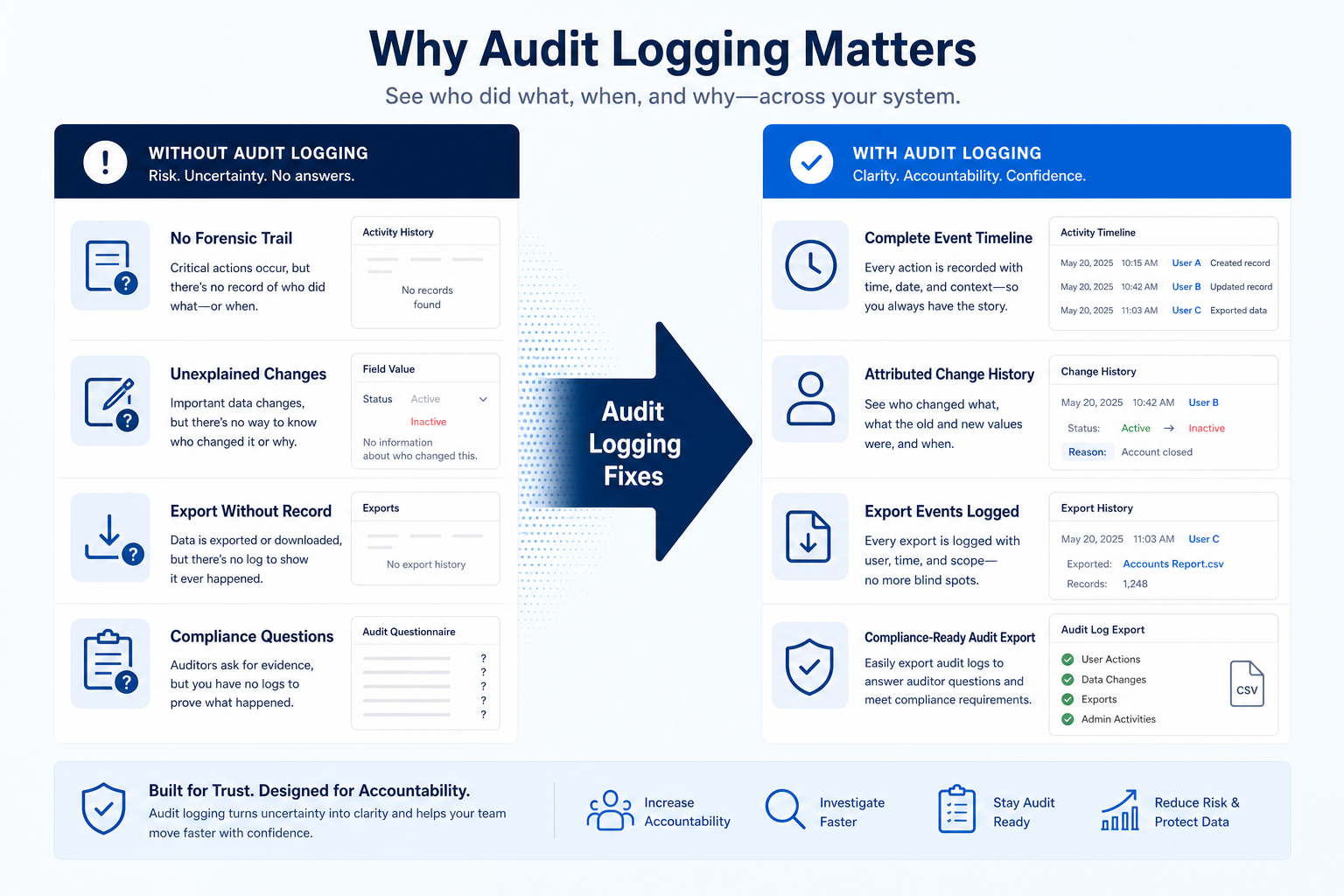
Without this capability in CRM: Someone downloads the customer list and nothing records that it happened.
Logs expire before investigations finish
Without this capability in CRM: A quarterly review or delayed incident finds the trail already gone.
Only ‘last modified by’ exists
Without this capability in CRM: You see the latest editor, not the full change or access history you need.
Only super-admins can read logs
Without this capability in CRM: Security cannot investigate without sharing break-glass credentials.
How satisfying this requirement helps
A CRM only satisfies “audit user activity” when the team keeps owners, history, and next steps current. Here is what “good” looks like once the requirement is met.
Exports leave no trail
When this requirement is satisfied: Audit events for exports and bulk actions make exfiltration investigable.
Logs expire before investigations finish
When this requirement is satisfied: Retention long enough for your review cycle — or export to long-term storage.
Only ‘last modified by’ exists
When this requirement is satisfied: Dedicated audit logs cover actions beyond a single modified-by stamp.
Only super-admins can read logs
When this requirement is satisfied: Scoped auditor access lets the right people review without full configuration power.
Outcomes teams aim for
Investigable incidents
You can reconstruct who changed or exported data within the retention window.
Departure-ready forensics
Offboarding reviews include CRM activity, not only IdP disablement.
Configuration accountability
Permission and field changes have owners when something breaks.
Exportable evidence
Logs can leave the CRM for SIEM, tickets, or compliance archives.
What “audit user activity” usually needs
Start with must-haves your team will use weekly to accept this requirement as met. Treat nice-to-haves as later upgrades — not day-one blockers.
Must-have
Coverage of security-relevant events
Sign-ins, record edits, deletions, exports, and configuration changes are in scope — confirm each category.
Learn more →Retention that matches review cycles
Logs remain available long enough for incident response and periodic access review.
Auditor access without full admin
Security or compliance can review logs without receiving unrestricted CRM configuration rights.
Learn more →Log export or streaming
You can export logs or send them to your own systems for longer retention.
Nice-to-have
Field-level change history
For sensitive objects, before/after values help investigations beyond “record updated.”
Alerting on suspicious patterns
Optional alerts for bulk export or unusual admin changes — after core logging works.
How to validate “audit user activity”
A simple validation loop beats a long checklist nobody runs during a trial.
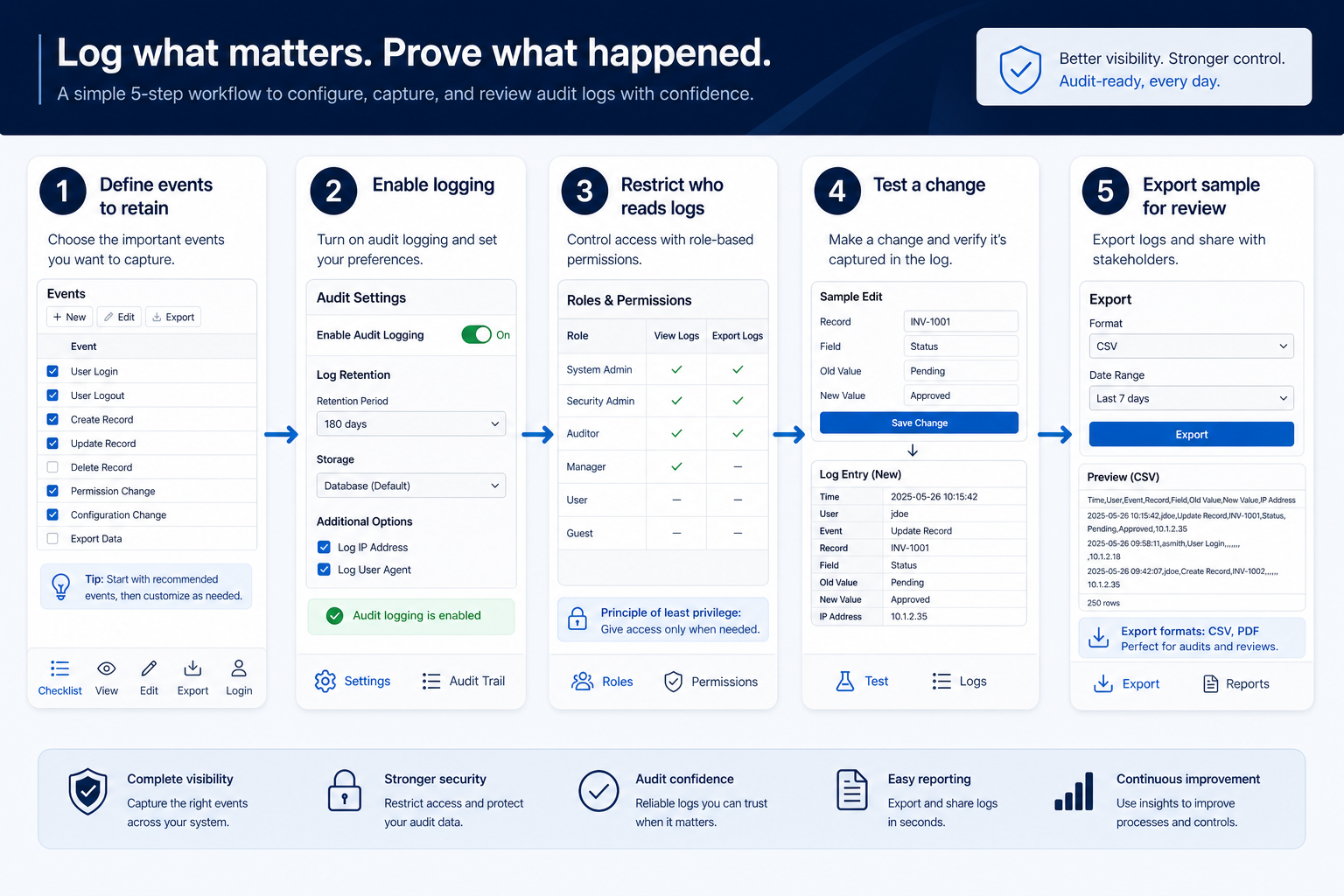
- 1
List investigation scenarios
Write the top cases: departure export, permission drift, mass delete, and unusual sign-in.
- 2
Build a coverage matrix
For each scenario, mark whether the CRM logs the event, for how long, and who can read it.
- 3
Generate test events in trial
Edit a record, change a permission, export a list, and delete a sample — as separate actors.
- 4
Read logs as a non-super-admin
Confirm the security role can find those events without break-glass credentials.
- 5
Export or forward a sample
Pull a file or API sample into the tool you would use in a real investigation.
The short answer
The useful question is not whether logs exist but what they cover and for how long. Look for coverage of exports and deletions, retention long enough to investigate, and the ability to export logs. Full audit logging is usually a higher-tier feature.
Do you need this requirement?
You probably need this if
- You must be able to investigate data access
- Internal policy requires periodic access review
- Bulk export of the customer database is a real risk
- Several administrators can change configuration
You may not need this if
- A very small team with complete mutual visibility
- Record-level change history already answers your questions
Why this requirement matters
Investigation
Questions about access can be answered with evidence rather than assumption.
Deterrence
Visible logging changes behaviour around bulk access and export.
Access review
Periodic reviews need a record of who actually used their access.
Configuration history
Knowing who changed a setting shortens debugging after a change.
Where this requirement fits
Use cases
3 linkedCapability
SecurityRequirement
Audit User ActivityFeatures
4 relatedProducts
5 evaluated
What good support looks like
- required
Event coverage
Are sign-ins, edits, deletions, exports, and config changes captured?
- required
Retention period
Are logs kept long enough to investigate an incident?
- important
Reviewer access
Can the right people review logs without full admin rights?
- important
Log export
Can logs be exported or streamed to your own systems?
- supporting
Preventive controls
Are there permissions that stop the actions you would otherwise only detect?
Features that satisfy this requirement
Core features
- ▶ See examples
Audit Logs
CriticalProvides the access and change record itself.
Evidence across catalogue products: Docs · Screenshots · Official demos
Explore feature → - ▶ See examples
Role Permissions
ImportantLogs show what happened; permissions are what limit it happening.
Evidence across catalogue products: Docs · Screenshots · Official demos
Explore feature →
Supporting features
Single Sign-On
SupportingCentral identity makes sign-in records more meaningful.
Evidence across catalogue products: Docs · Screenshots · Official demos
Explore feature →API Access
OptionalSometimes the only way to export logs into your own tooling.
Evidence across catalogue products: Docs · Screenshots · Official demos
Explore feature →
Which CRMs satisfy this requirement?
Fit reflects feature support for this requirement — not affiliate status. Insufficient evidence is never treated as failure.

Pipedrive
Strong support- Core features
- 0/2
- Supporting
- 1/1
- Evidence
- 2 sources · 1 screenshots
- Plan
- Not verified
- Confidence
- Medium
Visual evidence available
Key strength: API Access: supported
Why this fit?
folk
Good support- Core features
- 1/1
- Supporting
- 1/1
- Evidence
- 4 sources
- Plan
- Premium
- Confidence
- High
Key strength: Role Permissions: available on higher plans
Why this fit?
HubSpot
Good support- Core features
- 1/1
- Supporting
- 1/1
- Evidence
- 2 sources
- Plan
- Enterprise
- Confidence
- Medium
Key strength: Role Permissions: available on higher plans
Why this fit?
Salesflare
Good support- Core features
- 1/1
- Supporting
- 0/2
- Evidence
- 2 sources
- Plan
- Pro
- Confidence
- Medium
Key strength: Role Permissions: available on higher plans
Why this fit?
Freshsales
Good support- Core features
- 1/1
- Supporting
- 0/2
- Evidence
- 1 sources
- Plan
- Enterprise
- Confidence
- Low
Key strength: Audit Logs: available on higher plans
Why this fit?
Requirement scorecard
Each cell reflects feature support for that criterion. Open Why? for documentation, screenshots, and official videos mapped to that criterion only — video counts never change the assessment.
| Criterion | Pipedrive | folk | HubSpot | Salesflare | Freshsales |
|---|---|---|---|---|---|
| Event coverage | Insufficient evidence 1 screenshots | Insufficient evidence | Insufficient evidence 1 screenshots | Insufficient evidence | Good 1 docs |
| Retention period | Insufficient evidence | Insufficient evidence | Insufficient evidence | Insufficient evidence | Good 1 docs |
| Reviewer access | Insufficient evidence | Good 2 docs | Good 1 docs | Good 2 docs | Good 1 docs |
| Log export | Strong 2 docs | Good 2 docs | Insufficient evidence | Insufficient evidence | Good 1 docs |
| Preventive controls | Insufficient evidence | Good 2 docs | Good 1 docs | Good 2 docs | Insufficient evidence |
| Overall / plan | StrongPlan not verifiedConfidence: Medium | GoodPremiumConfidence: High | GoodEnterpriseConfidence: Medium | GoodProConfidence: Medium | GoodEnterpriseConfidence: Low |
Compare products against this requirement
Structured evaluation — not media-driven. Video helps illustrate implementation; it does not determine who ranks higher.
| Criterion | Pipedrive | folk | HubSpot |
|---|---|---|---|
| Event coverage | Insufficient evidence | Insufficient evidence | Insufficient evidence |
| Retention period | Insufficient evidence | Insufficient evidence | Insufficient evidence |
| Reviewer access | Insufficient evidence | Good support | Good support |
| Log export | Strong support | Good support | Insufficient evidence |
| Preventive controls | Insufficient evidence | Good support | Good support |
Compare how products meet this requirement
Unknown / not verified is never treated as unsupported.
| Feature | |||||
|---|---|---|---|---|---|
| Audit logs | ◐ | ||||
| Role permissions | ◐ | ◐ | ◐ | ||
| Single sign-on | ◐ | ||||
| API access | ◐ |
How each CRM meets this requirement
Pipedrive for audit user activity
Strong supportEvidence confidence: Medium
Why
- API Access: supported
Trade-offs
- API access documented with plan-based API limits.
folk for audit user activity
Good supportEvidence confidence: High
Plan required: Premium
Plan availability comes from official pricing / plan documentation — not from feature demos.
Why
- Role Permissions: available on higher plans
- API Access: available on higher plans
Trade-offs
- Role Permissions may require a higher plan
- Workspace roles start on Premium per Folk plan research notes.
- API Access may require a higher plan
- API access starts on Premium per Folk plan research notes.
HubSpot for audit user activity
Good supportEvidence confidence: Medium
Plan required: Enterprise
Plan availability comes from official pricing / plan documentation — not from feature demos.
Why
- Role Permissions: available on higher plans
- Single Sign-On: available on higher plans
Trade-offs
- Role Permissions may require a higher plan
- Field-level permissions documented alongside SSO on Enterprise materials.
- Single Sign-On may require a higher plan
- Single sign-on and field-level permissions documented on Enterprise CRM product materials.
Salesflare for audit user activity
Good supportEvidence confidence: Medium
Plan required: Pro
Plan availability comes from official pricing / plan documentation — not from feature demos.
Why
- Role Permissions: available on higher plans
Trade-offs
- Role Permissions may require a higher plan
- User permissions start on Pro per Salesflare plan research notes.
Freshsales for audit user activity
Good supportEvidence confidence: Low
Plan required: Enterprise
Plan availability comes from official pricing / plan documentation — not from feature demos.
Why
- Audit Logs: available on higher plans
Trade-offs
- Audit Logs may require a higher plan
- Audit logs listed as Enterprise on Freshsales pricing research.
Still needs verification
Incomplete evidence for specific criteria — not a claim that the product lacks support. Missing video is never treated as missing support.
Pipedrive
Event coverage
Not sufficiently verified
Pipedrive
Retention period
Not sufficiently verified
Pipedrive
Reviewer access
Not sufficiently verified
Pipedrive
Preventive controls
Not sufficiently verified
folk
Event coverage
Not sufficiently verified
folk
Retention period
Not sufficiently verified
HubSpot
Event coverage
Not sufficiently verified
HubSpot
Retention period
Not sufficiently verified
What plan do you need to satisfy this requirement?
Plan names come from feature entitlements on the features that support this requirement. Pricing estimates appear only when verified — otherwise use the Cost Calculator.
| Product | Minimum qualifying plan | Core coverage | Confidence |
|---|---|---|---|
| Pipedrive | Not verified | 0/2 | Medium |
| folk | Premium | 1/1 | High |
| HubSpot | Enterprise | 1/1 | Medium |
| Salesflare | Pro | 1/1 | Medium |
| Freshsales | Enterprise | 1/1 | Low |
See how products handle this requirement
Verified product captures only — never stock imagery or mockups.
How to verify this requirement in a vendor demo
Take this checklist into every vendor session and ask each product to demonstrate the same scenario. Your results stay in your vendor scorecard — they do not rewrite SoftwareGlimpse recommendations.
Objective
Verify that the product can satisfy: Maintain a reviewable record of user access and changes in the CRM, so it is possible to establish who did what and when.
Preconditions
- Live product environment (not slides only)
- Admin or configuration access for the features under test
- Sample data that matches your real process
Ask the vendor to demonstrate
- Write the top cases: departure export, permission drift, mass delete, and unusual sign-in.
- For each scenario, mark whether the CRM logs the event, for how long, and who can read it.
- Edit a record, change a permission, export a list, and delete a sample — as separate actors.
- Confirm the security role can find those events without break-glass credentials.
- Pull a file or API sample into the tool you would use in a real investigation.
What good support looks like
- Event coverage
- Retention period
- Reviewer access
- Log export
- Preventive controls
Failure signals
- Vendor cannot demonstrate the requirement live
- Behavior depends on undocumented custom work
- Critical controls only exist on an unexpected plan
- Outcome cannot be verified by a second user/role
Follow-up questions
- What events are captured in the audit log?
- Are exports and deletions logged?
- How long are logs retained on our plan?
- Who can view the audit log?
- Can logs be exported or streamed externally?
- Are configuration changes attributed to a user?
- Which plan includes full audit logging?
Your demo result
Record what happened in the live session. This is your evaluation — not SoftwareGlimpse recommendations.
Best fit depends on your scenario
Sensitive client data
Access to certain records must be reviewable after the fact.
Priorities: Event coverage · Retention · Reviewer access
Best recommended fit: Pipedrive
Investigating a departure
You need to know what was viewed or exported before someone left.
Priorities: Export logging · Retention · Log export
Best recommended fit: Pipedrive
Several administrators
Configuration changes need attribution to avoid guesswork.
Priorities: Config change logging · Reviewer access
Best recommended fit: Pipedrive
What to watch out for
Coverage vs noise
Comprehensive logs answer more questions and are harder to review manually.
Retention vs plan tier
Short retention windows on lower plans limit what can be investigated.
Detection vs prevention
Logs tell you afterwards; permissions are what stop it happening.
Use cases where this requirement matters
Account management
HighLong-lived customer data needs accountable access and change history.
Explore use case →Reporting
HighSensitive report and list exports are a common audit hotspot.
Explore use case →Complex sales processes
MediumMulti-stakeholder deals often sit in environments that demand investigable trails.
Explore use case →
Questions to ask CRM vendors
- What events are captured in the audit log?
- Are exports and deletions logged?
- How long are logs retained on our plan?
- Who can view the audit log?
- Can logs be exported or streamed externally?
- Are configuration changes attributed to a user?
- Which plan includes full audit logging?
Compare CRMs for this requirement


Related products
Related use cases
Need your CRM to audit user activity?
Add this requirement to CRM Finder and personalize for team size, budget, and other priorities.
Add this requirement to CRM FinderLoading evidence explorer…
Evidence behind this requirement
SoftwareGlimpse assesses whether products satisfy a requirement by evaluating the specific criteria and features needed to meet that buyer need. Official vendor demonstrations may be used as evidence of visible product behavior, but video availability does not influence product ranking and videos are not used alone to establish pricing, plan entitlement, security or comparative superiority.
5
Products covered
4
Supporting features
560
Evidence records
4
Screenshots
0
Official videos
How we evaluate this requirement
Buyer need
Audit User Activity
Capability
Security
Criteria
5 evaluation criteria
Features
2 core · 2 supporting
Products
5 researched
Frequently asked questions
Is activity timeline the same as an audit log?
Not always. Sales activity timelines show calls and notes; audit logs should cover security-relevant actions like exports, deletions, and permission changes. Ask for both explicitly.
How long should we retain CRM audit logs?
Match your incident and access-review cycles — many teams need months, not days. If native retention is short, require export to your archive or SIEM as part of acceptance.
Does SSO remove the need for CRM audit logs?
No. SSO improves authentication and offboarding; audit explains what an authenticated user did inside the CRM after sign-in.
What should we pair with audit logging?
Role permissions and export controls. Logging without least privilege only tells you about damage after it happens; use both detect and prevent.
Need a CRM that can audit user activity?
Compare catalogue CRM products based on this requirement plus your other needs, team size and budget.
- Free to use
- No signup required
- Independent recommendation model