
This video is hosted on YouTube
This content is hosted by YouTube. The player loads only after you allow marketing cookies.
CRM feature
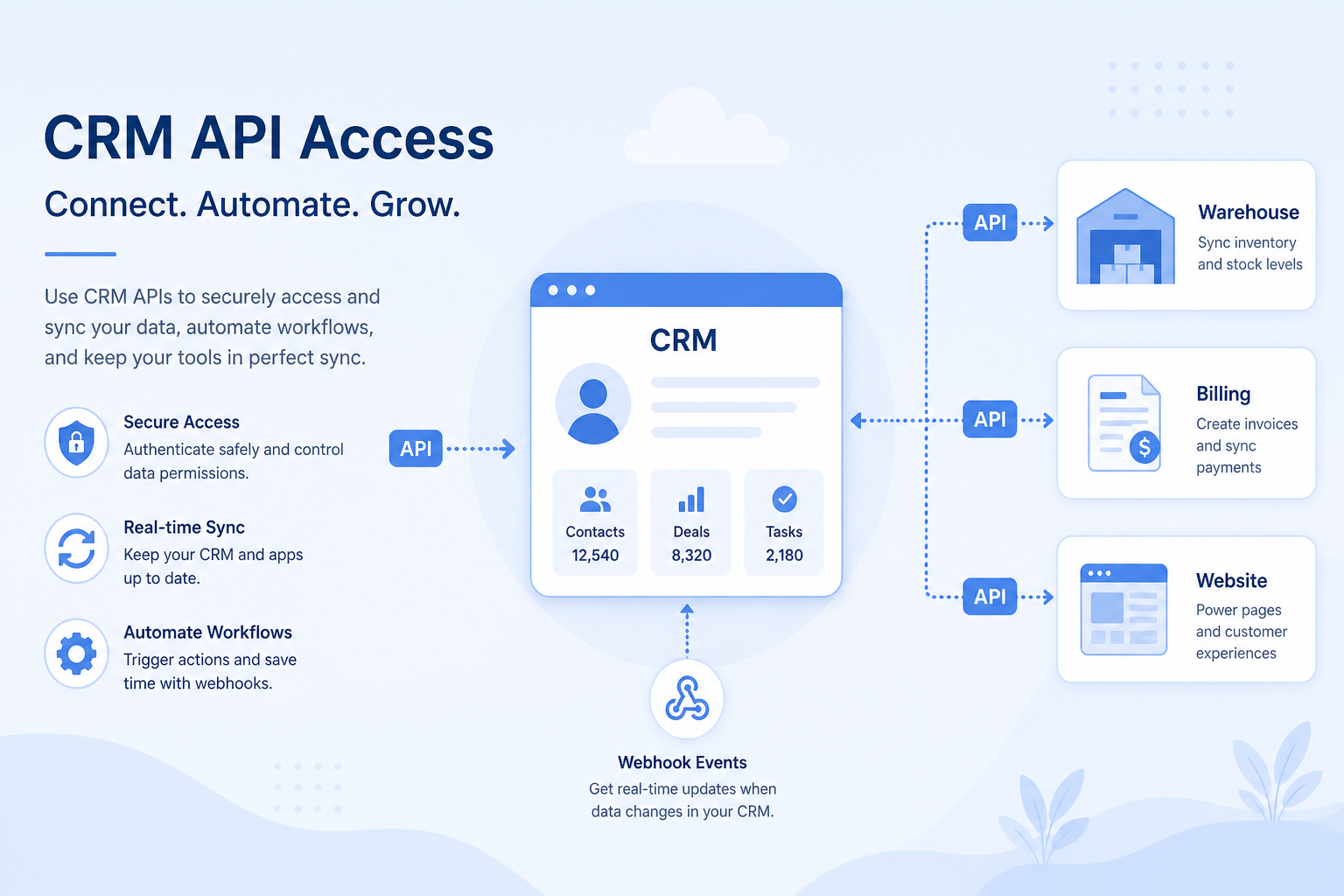
Connect the CRM to your stack programmatically — sync data, build integrations, and automate across systems when native connectors are not enough.
Feature at a glance
Feature type
Platform / developer access
Primary capability
Integrations
Typical buyer need
The CRM must connect to systems that have no adequate native connector
Common limitation
API access, webhook support, and rate limits are frequently plan-restricted
Products covered
10
Evidence records
560
Reviewed 15 Aug 2026
Fit snapshot
API access is the CRM feature that exposes programmatic interfaces (REST, GraphQL, webhooks, or similar) so engineering or iPaaS tools can read and write CRM data. It underpins custom integrations, data warehouses, and product-led workflows. Native app-marketplace connectors are related but different: the API is what you use when a connector does not exist or is too shallow. Evaluate auth, rate limits, webhooks, and plan gating carefully.
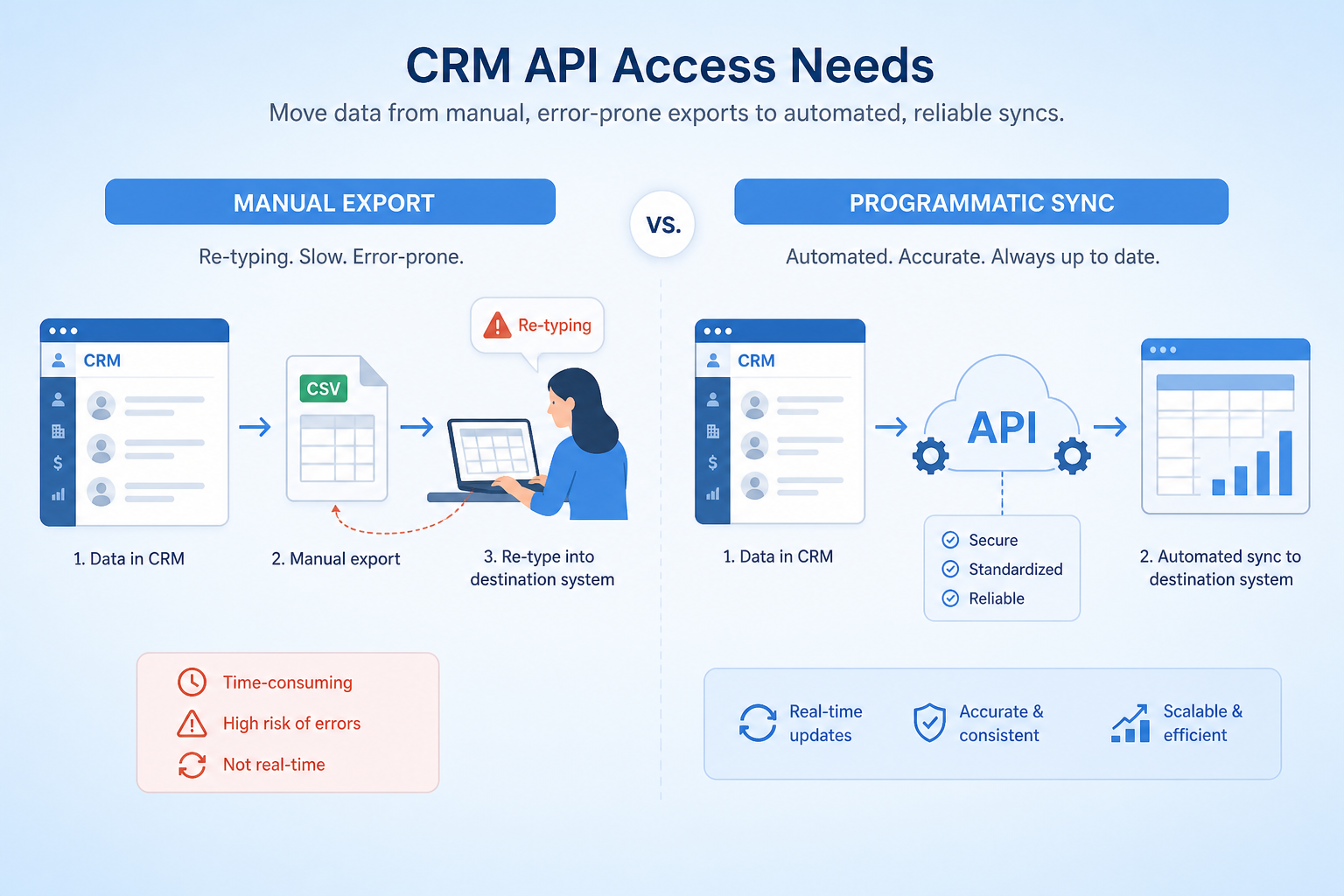
Technical founders, RevOps with iPaaS, and engineering teams that must sync CRM with billing, product analytics, data warehouse, or internal tools — especially mid-market B2B SaaS and firms with bespoke advisor portals.
Evaluate authentication (OAuth/keys), objects covered, webhooks vs polling, rate limits, sandbox, and whether API access is plan-gated — not a marketing claim of “open platform.” A crippled API on your tier is a dead end mid-project.
API access is the ability for other systems to read and write CRM data programmatically — typically via REST APIs, webhooks, and developer credentials — so custom integrations and exports are possible beyond the native connector directory.
API Access is NOT the same as
Pressure points
Pain: Billing or product usage never reaches the CRM; reps work half-blind.
How the feature helps: API and webhooks let you build or buy the sync that marketplace apps miss.
Pain: Weekly exports/imports drift and create duplicate records.
How the feature helps: Scheduled API syncs replace fragile manual bridges.
Pain: A sync works in trial then throttles when the team scales.
How the feature helps: Documented limits and bulk endpoints inform architecture before go-live.
Pain: Integration design assumes API access that the affordable plan excludes.
How the feature helps: Confirm API entitlements and webhook support on the exact plan you will buy.
Results
Billing, product, and support data can update CRM records without CSV rituals.
Events in one system can create tasks or opportunities in the CRM.
Engineering can land CRM data alongside finance and product for deeper analysis.
Integrations absorb the busywork that formerly lived in spreadsheets.
How it runs
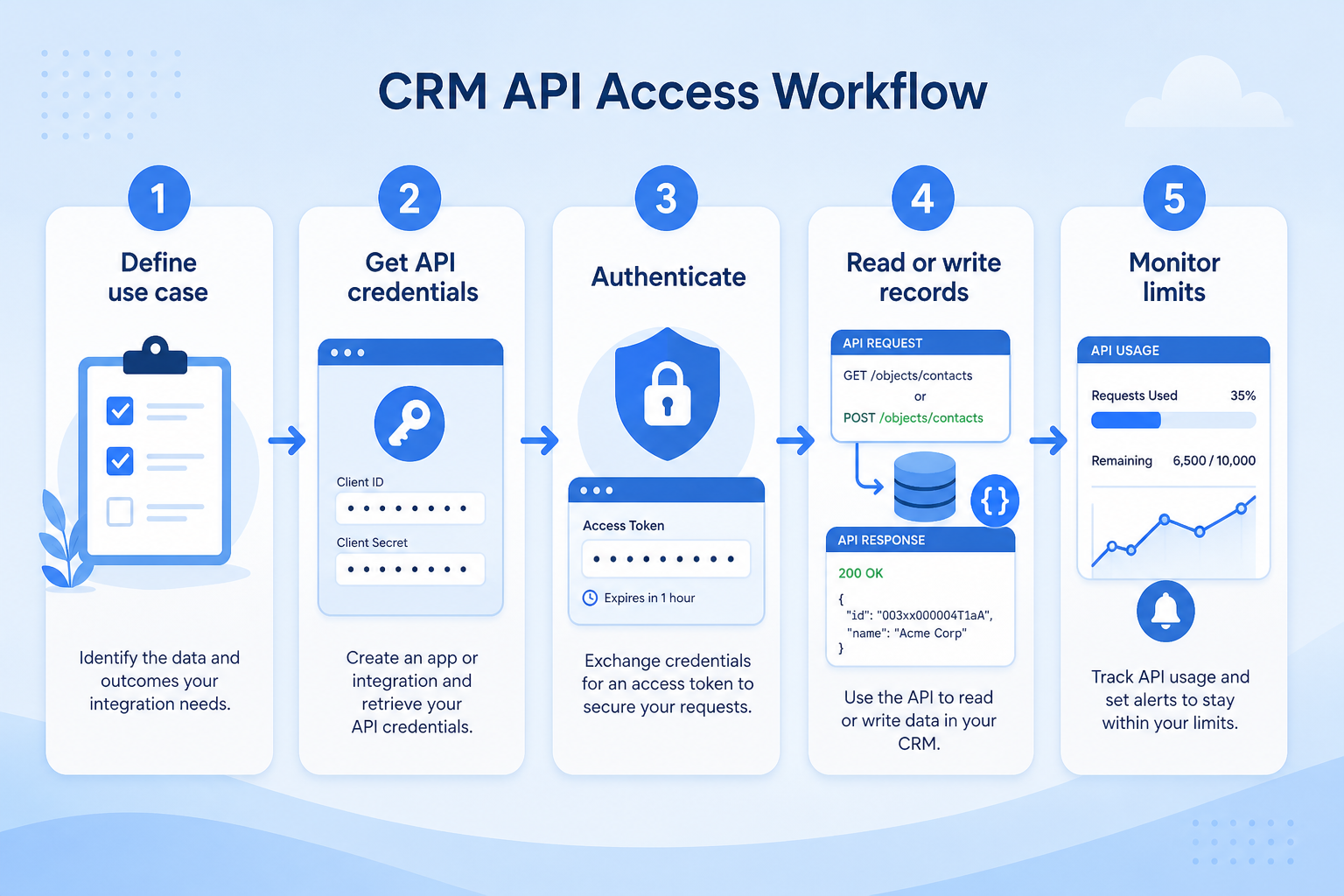
List systems that must read/write CRM data and whether a native connector exists.
Verify API, webhook, and sandbox access on the target plan.
Choose direction, conflict rules, identity keys, and error handling.
Implement via iPaaS or custom code; use webhooks where freshness matters.
Alert on failures, auth expiry, and rate-limit responses.
Concrete buyer situations — not product recommendations. Use them to test whether a CRM’s implementation matches how your team works.
B2B SaaS: product usage on accounts
Situation
AEs ask CS for usage screenshots before renewal calls. Product data lives in the app database; CRM accounts have no usage fields.
What good looks like
Nightly job writes seats-active and last-seen to CRM account custom fields via API. Renewal views sort by usage risk. Webhooks create a task when usage drops sharply.
Ask vendors
Can we update custom fields via API? Are webhooks available on our plan? What are daily rate limits and bulk APIs?
RIA: custodian and CRM household sync
Situation
Ops copies AUM from custodian reports into CRM weekly. Numbers disagree during reviews; advisors lose trust in the record.
What good looks like
Middleware syncs household identifiers and AUM into CRM fields on a schedule. Exceptions queue for human review. Role permissions keep raw custodian IDs off junior layouts; audit logs capture bulk updates.
Ask vendors
Is there a sandbox for integration testing? How is API authentication rotated? Can bulk upserts be performed safely without duplicates?
You probably need it if
You may not need it if
Capability
Integrations
Requirement
Manage integrations
Feature
API Access
Feature availability
criticalMinimum plan
highNative connectors
highAudit log export
importantRate or call limits
highOfficial product demonstrations can help show how vendors implement the same feature differently. SoftwareGlimpse evaluates these alongside documentation, screenshots and other product evidence. Absence of a video does not mean a product lacks the feature.

Pipedrive
The CRM Automations That Save Us 10 Hours A Week
This video is hosted on YouTube
This content is hosted by YouTube. The player loads only after you allow marketing cookies.
What this demonstrates
Not established by this video
Source: Pipedrive · Verified 15 Aug 2026
Open source ↗Not verified means insufficient evidence — not the same as unsupported.
Pipedrive

folk
Cells use feature support. Unknown is never treated as No. Official videos open from evidence — they are never embedded in the matrix.
| Dimension | |||||
|---|---|---|---|---|---|
| Feature availability | Supported | ◐Plan dependent | Not verified | Not verified | Not verified |
| Minimum plan | Lite | Premium | Not verified | Not verified | Not verified |
| Native connectors | Supported | Supported | Supported | Supported | Supported |
| Audit log export | Not verified | Not verified | ◐Plan dependent | Not verified | Not verified |
| Rate or call limits | Not verified | Not verified | Not verified | Not verified | Not verified |
Plan names come from feature entitlements — not inferred from marketing tier labels alone.
| Product | Feature starts at | Notes |
|---|---|---|
| Pipedrive | Lite | — |
| folk | Premium | Higher-plan gated (researched) |
Two products can both support the feature while differing in depth. Official demos below are supplementary — the comparison matrix remains the structured source of truth.
Native connectors
Compare how products differ on native connectors rather than assuming parity.
Audit log export
Compare how products differ on audit log export rather than assuming parity.
Rate or call limits
Compare how products differ on rate or call limits rather than assuming parity.
Loading evidence explorer…
Pipedrive api access
Supported · GoodEvidence: 4 · High confidence
Available from: Lite
API access documented with plan-based API limits.
Strengths
Limitations
Best for: SMB and mid-market sales teams prioritizing pipeline visibility
See it in action
This video is hosted on YouTube
This content is hosted by YouTube. The player loads only after you allow marketing cookies.
Official vendor tutorial
Official vendor demonstration — complementary evidence, not a substitute for the comparison matrix.
View all feature evidencefolk api access
Plan dependent · LimitedEvidence: 4 · High confidence
Available from: Premium
API access starts on Premium per Folk plan research notes.
Strengths
Limitations
Best for: Founders and SMB teams running relationship-led sales from LinkedIn/email
Flexibility vs maintenance
Custom API integrations fit precisely and become your team's responsibility to keep working.
Capability vs rate limits
Plan rate limits often bind before the documented endpoint list does.
Plan restrictions
Availability and depth often differ by plan tier, so check where this feature starts.
Feature availability alone does not tell you whether the implementation fits your workflow. Compare depth, plan gating, and related dimensions before shortlisting.
Add this as a requirement in your CRM shortlist and personalize for team size, budget, and other priorities.
Find My CRM10
Products covered
560
Evidence items
277
Screenshots
2
Plan records
Capability
Integrations
Requirement
Manage integrations
Feature
API Access
Products
10 researched
Evidence
560 records
It is programmatic access — typically REST or similar, often with webhooks — so other systems can read and write CRM data under authenticated credentials.
Native integrations are prebuilt connectors you configure. The API is the platform interface you (or an iPaaS) use to build connections when a connector is missing or too shallow.
Often yes — or rate limits differ by plan. Confirm entitlements on the exact tier you will buy before committing to an integration design.
Compare catalogue CRM products based on this feature plus your other requirements, team size and budget.
Explore the official documentation, screenshots and product demonstrations used to understand how each CRM implements this feature.
26 items
Official video · HubSpot
Supports
Demonstrates

This video is hosted on YouTube
This content is hosted by YouTube. The player loads only after you allow marketing cookies.
Official vendor tutorial
Lead management workflow — capture through assignment and follow-up
Verified: 14 Aug 2026
Open source ↗Official video · Microsoft Dynamics 365
Supports
Demonstrates

This video is hosted on YouTube
This content is hosted by YouTube. The player loads only after you allow marketing cookies.
Official vendor tutorial
Verified: 15 Aug 2026
Open source ↗Official video · Microsoft Dynamics 365
Supports
Demonstrates

This video is hosted on YouTube
This content is hosted by YouTube. The player loads only after you allow marketing cookies.
Official vendor video
Verified: 15 Aug 2026
Open source ↗Official video · Pipedrive
Supports
Demonstrates
This video is hosted on YouTube
This content is hosted by YouTube. The player loads only after you allow marketing cookies.
Official vendor tutorial
Verified: 15 Aug 2026
Open source ↗Official video · Salesforce
Supports
Demonstrates

This video is hosted on YouTube
This content is hosted by YouTube. The player loads only after you allow marketing cookies.
Official vendor video
Verified: 15 Aug 2026
Open source ↗Official video · Zoho
Supports
Demonstrates

This video is hosted on YouTube
This content is hosted by YouTube. The player loads only after you allow marketing cookies.
Official vendor tutorial
How Zoho CRM workflow rules automate sales steps after setup.
Verified: 15 Aug 2026
Open source ↗
Official documentation · ACT!
Supports
Verified: —
Open source ↗Official documentation · ACT!
Supports
Verified: —
Open source ↗
Official documentation · Affinity
Supports
Verified: —
Open source ↗Official documentation · Affinity
Supports
Verified: —
Open source ↗
Official documentation · Agile CRM
Supports
Verified: —
Open source ↗Official documentation · Agile CRM
Supports
Verified: —
Open source ↗
Official documentation · Apptivo
Supports
Verified: —
Open source ↗Official documentation · Apptivo
Supports
Verified: —
Open source ↗
Official documentation · Attio
Supports
Verified: —
Open source ↗Official documentation · Attio
Supports
Verified: —
Open source ↗
Official documentation · Bitrix24
Supports
Verified: —
Open source ↗Official documentation · Bitrix24
Supports
Verified: —
Open source ↗
Official documentation · Capsule
Supports
Verified: —
Open source ↗Official documentation · folk
Supports
Verified: —
Open source ↗Official documentation · folk
Supports
Verified: —
Open source ↗
Official documentation · Freshsales
Supports
Verified: —
Open source ↗Official documentation · Freshsales
Supports
Verified: —
Open source ↗Official documentation · Pipedrive
Supports
Verified: —
Open source ↗Official documentation · Pipedrive
Supports
Verified: —
Open source ↗Official documentation · Pipedrive
Supports
Verified: —
Open source ↗