
This video is hosted on YouTube
This content is hosted by YouTube. The player loads only after you allow marketing cookies.
Industries / Retail & e-commerce
Connect store, support, and wholesale conversations so customer context survives the channel handoff.
▶ See CRM workflows for retail & e-commerce
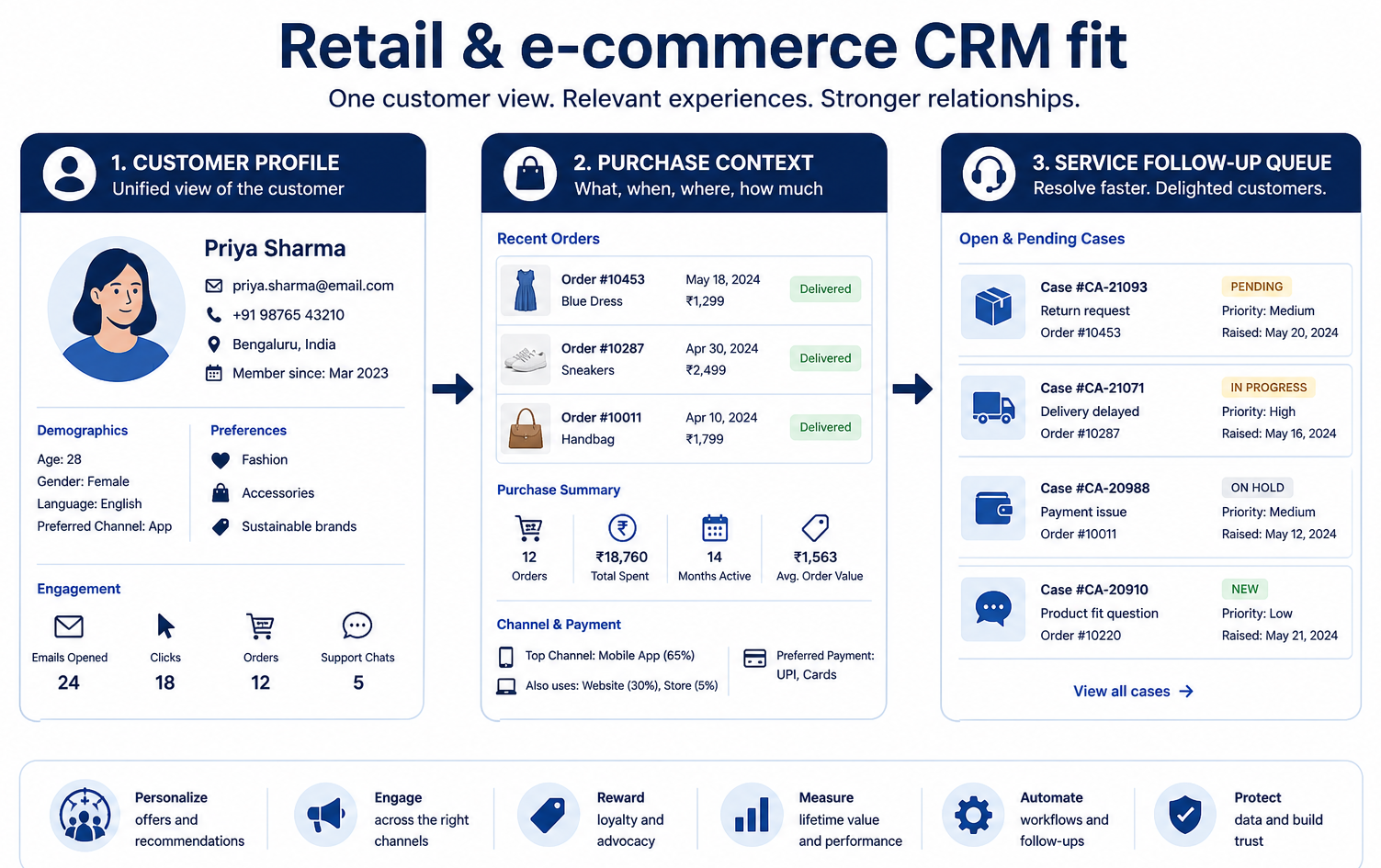
Retail & e-commerce CRM at a glance
Customer context across channels and wholesale accounts
Customer profile continuity · Wholesale / VIP pipelines · Support handoffs · Segmentation fields · Integrations with commerce / helpdesk
Ecommerce / CX ops · Wholesale sales · Store leadership · VIP / retention
37 catalogue CRM products
Aug 17, 2026
Fit snapshot
Retail and ecommerce CRM work focuses on customer identity across channels, post-purchase relationships, and often B2B wholesale or partnership pipelines alongside DTC. The operational goal is shared customer context for service and sales — not replacing your commerce platform as the order system of record.
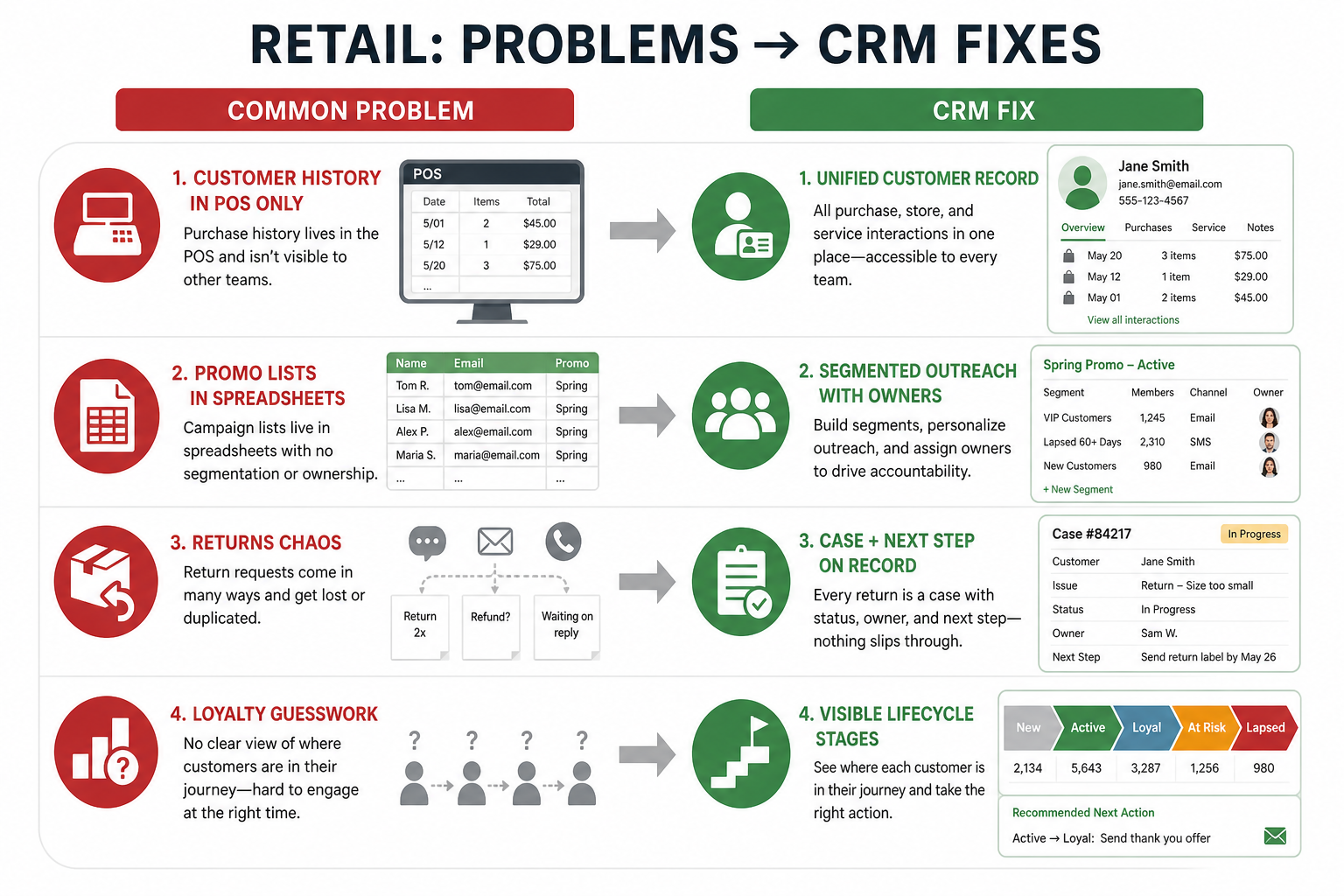
Omnichannel retailers, DTC brands with a sales or VIP motion, wholesale teams, and customer-experience leads who need history beyond the order admin. Buyers usually sit in CX, ecommerce ops, or wholesale sales.
How Retail & e-commerce teams put CRM to work
Example 1
a DTC brand with a VIP outreach pod
Before CRM
high-value customers were flagged only in support tickets
After CRM
VIP accounts have owners, preferences, and outreach history that marketing and CX both see
Example 2
a wholesale team selling into boutiques
Before CRM
reorder conversations lived in rep inboxes
After CRM
each retailer account has stages, contacts, and next buy windows for Friday pipeline reviews
These are the operating problems that usually push retail & e-commerce teams toward CRM — not feature wish lists.
Without CRM discipline: Each channel keeps partial history; VIP treatment feels random.
Without CRM discipline: Reps manage boutique accounts in spreadsheets disconnected from brand CX.
Without CRM discipline: Relationship context disappears when a ticket closes.
Without CRM discipline: Customers get promos while a complaint is still open.
A CRM only helps when the team keeps owners, history, and next steps current. Here is what “good” looks like in retail & e-commerce.
With CRM discipline: A shared customer record aggregates interactions while orders remain in commerce systems.
With CRM discipline: Account pipelines and contacts make reorder and outreach reviewable.
With CRM discipline: CRM stores ongoing preferences and owners beyond a single case.
With CRM discipline: Shared fields and owners let teams suppress or retarget based on real status — when integrations and process support it.
A more consistent customer view
CX and sales stop reinventing context per channel.
Visible wholesale opportunities
Boutique and partner accounts get stages and next steps.
Clear VIP ownership
High-touch customers have named owners and history.
Cleaner support-to-sales handoffs
Escalations carry context instead of “see last ticket.”
Prioritize a durable customer profile, clear ownership for high-touch accounts, and handoffs between support, store, and sales. Verify commerce and helpdesk integrations with vendors; order truth should stay with the commerce system unless you deliberately design otherwise.
Support and sales see purchase history context without living only inside the storefront admin.
Explore capability →Cart, browse, and post-purchase follow-ups are owned — not random email blasts.
Wholesale or partnership deals get stages and owners separate from DTC tickets.
Explore capability →Shopify/order, helpdesk, and email tools can sync without spreadsheet glue.
Explore capability →Teams can group customers by behavior for outreach without a data-science project.
Marketing, CX, and sales stop arguing from three different dashboards.
Explore capability →Start with must-haves your team will use weekly. Treat nice-to-haves as later upgrades — not day-one blockers.
Must-have
Preferences and conversations that outlive a single ticket.
Named follow-ups for VIP and wholesale outreach.
Nice-to-have
Verify sync direction and field ownership with vendors.
Support targeted outreach without building a CDP on day one.
Understand this industry’s operating loop first. Product demonstrations are optional examples for each step — they do not change product rankings.
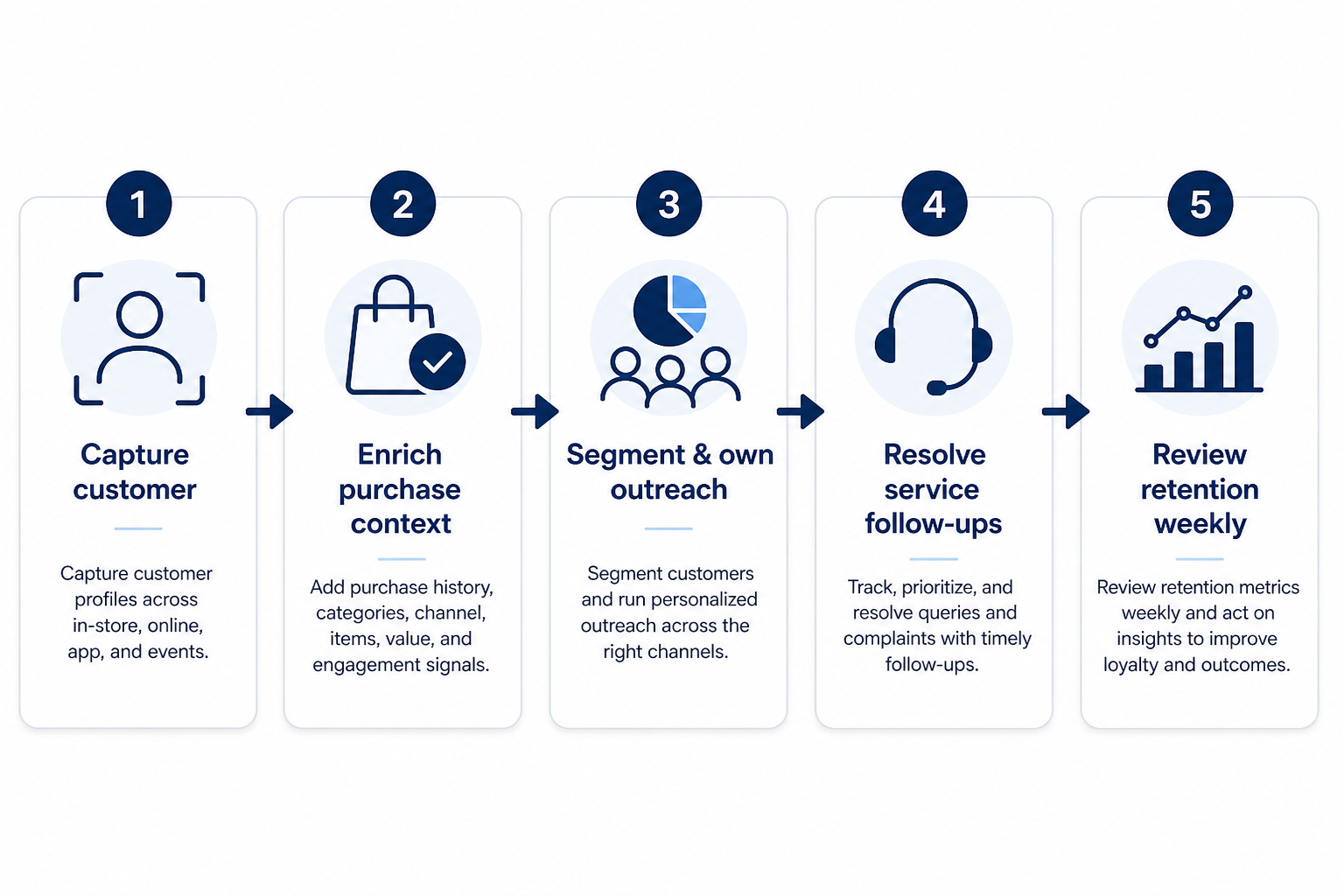
Support labels come from structured feature research — not from videos.
Objective
Resolve the customer or retailer account before logging high-touch work.
In this step
Requirements
Next step
Next step
Next step
Next step
These are buyer scenarios — not product recommendations. Start from how your team works, then compare capabilities.
Best when High-intent shoppers need owned follow-up beyond the cart email.
Explore use case →Best when Repeatable post-purchase or win-back steps should run consistently.
Explore use case →Best when B2B buyers need relationship owners and renewal rhythm.
Explore use case →Best when Brand partnerships or marketplace deals need stages.
Explore use case →Best when CX and growth need one customer timeline.
Explore use case →Explore catalogue CRM products and compare their capabilities against your requirements.

Freshsales
SMB and mid-market teams wanting CRM + phone/email engagement
$9.00/user/month

HubSpot
SMB and mid-market teams wanting free CRM now and room to expand into hubs later
$15.00/user/month

Salesforce
Mid-market and enterprise sales orgs needing deep customization and reporting
$25.00/user/month

Attio
Startups and GTM teams wanting flexible CRM
$0.00/user/month

Pipedrive
SMB and mid-market sales teams prioritizing pipeline visibility
$14.00/user/month

Capsule
Small businesses wanting a simple CRM
$18.00/user/month
Official vendor demonstrations can help show how CRM products are used in retail & e-commerce workflows. SoftwareGlimpse evaluates these alongside independent research, documentation and product evidence.
Official vendor videos illustrate industry workflow context. They do not change product rankings, industry fit, regulatory compliance conclusions, or pricing assessments. Vendor-published customer stories are not independent proof of typical outcomes.
Freshsales
How to create Multiple Sales Pipeline | Freshsales CRM
General CRM workflow relevant to retail ecommerce — not an industry-specific product demo.
This video is hosted on YouTube
This content is hosted by YouTube. The player loads only after you allow marketing cookies.
Industry context
What to notice for this industry
Capabilities demonstrated
HubSpot
Lead management workflow — capture through assignment and follow-up
General CRM workflow relevant to retail ecommerce — not an industry-specific product demo.

This video is hosted on YouTube
This content is hosted by YouTube. The player loads only after you allow marketing cookies.
Industry context
What to notice for this industry
Capabilities demonstrated
Requirements visible / relevant
Salesforce
How Salesforce explains lead management from capture through qualification.
General CRM workflow relevant to retail ecommerce — not an industry-specific product demo.
This video is hosted on YouTube
This content is hosted by YouTube. The player loads only after you allow marketing cookies.
Industry context
What to notice for this industry
Attio
Attio | How to build your sales pipelines
General CRM workflow relevant to retail ecommerce — not an industry-specific product demo.

This video is hosted on YouTube
This content is hosted by YouTube. The player loads only after you allow marketing cookies.
Industry context
What to notice for this industry
Capabilities demonstrated
Products we recommend evaluating for this industry’s workflows — based on editorial fit, not vendor demos or affiliate relationships.
20 evidence items backing this recommendation (features, screenshots, or documentation). Official video is optional context and does not change fit.
Workflows: Inbound customer conversationsLifecycle automationWholesale account management
Recommendation confidence: High. Industry fit reflects SoftwareGlimpse recommendations on use cases, capabilities, requirements, and product evidence. Official demos illustrate workflow context only — they do not determine rankings, compliance, or pricing.
20 evidence items backing this recommendation (features, screenshots, or documentation). Official video is optional context and does not change fit.
Workflows: Inbound customer conversationsLifecycle automationWholesale account management
Recommendation confidence: High. Industry fit reflects SoftwareGlimpse recommendations on use cases, capabilities, requirements, and product evidence. Official demos illustrate workflow context only — they do not determine rankings, compliance, or pricing.
20 evidence items backing this recommendation (features, screenshots, or documentation). Official video is optional context and does not change fit.
Workflows: Inbound customer conversationsLifecycle automationWholesale account management
Recommendation confidence: High. Industry fit reflects SoftwareGlimpse recommendations on use cases, capabilities, requirements, and product evidence. Official demos illustrate workflow context only — they do not determine rankings, compliance, or pricing.
Select products to compare
| Product | Starting price | Pipeline | Automation | Reporting | Integrations | Best suited to |
|---|---|---|---|---|---|---|
| $9.00/user/month | SMB and mid-market teams wanting CRM + phone/email engagement | |||||
| $15.00/user/month | SMB and mid-market teams wanting free CRM now and room to expand into hubs later | |||||
| $25.00/user/month | Mid-market and enterprise sales orgs needing deep customization and reporting | |||||
| $0.00/user/month | Startups and GTM teams wanting flexible CRM | |||||
| $14.00/user/month | ~ | SMB and mid-market sales teams prioritizing pipeline visibility |
Select two products to open a side-by-side comparison.
Answer a few questions about your team, requirements, integrations and budget to create a personalized shortlist.
Personalized shortlist
Finder uses structured answers and CRM evidence — not affiliate incentives — to build your shortlist.
Cells reflect product evidence. Unknown support is shown as a dash — never as a hard “no”.
Estimates use verified list prices for a sample team configuration. Adjust seats and billing in the calculator for a tailored view.
Team size
10 users
Billing
monthly
Estimated catalogue range
Lowest
$13.00
Typical
$380.00
Highest
$1,666.67
Verified USD catalogue range for this team size — midpoint is the catalogue median, not a market average.
Name the customer job
DTC support context, lifecycle outreach, wholesale, or all three?
Contact management →List must-connect systems
Storefront, email, and helpdesk come first.
Integrations →Define one pilot journey
Pick a single automated follow-up to prove hygiene.
Sales automation →Estimate cost
Model seats for CX + growth + sales owners.
CRM Cost Calculator →Shortlist with Finder
Filter for integrations and lifecycle needs.
Start CRM Finder →Use these prompts in vendor conversations. They are educational — not claims about any specific product.
Ask the vendor to demonstrate this with your workflow, plans, and data requirements — and request documentation where relevant.
Ask the vendor to demonstrate this with your workflow, plans, and data requirements — and request documentation where relevant.
Ask the vendor to demonstrate this with your workflow, plans, and data requirements — and request documentation where relevant.
Ask the vendor to demonstrate this with your workflow, plans, and data requirements — and request documentation where relevant.
Ask the vendor to demonstrate this with your workflow, plans, and data requirements — and request documentation where relevant.
Ask the vendor to demonstrate this with your workflow, plans, and data requirements — and request documentation where relevant.
Use these dimensions when evaluating vendors. We do not claim specific regulatory compliance unless verified evidence exists.
Data access controls
Who can see and change customer, deal, and activity records.
Explore requirement →
User permissions
Role-based permissions so reps, managers, and admins see different fields.
Explore requirement →
Auditability
Visibility into who changed records and when.
Explore requirement →
Data retention & export
How you retain, export, and delete customer data when you leave.
Explore requirement →
Identity / SSO
How users sign in — especially if IT requires SSO.
Explore requirement →
Integration security
How connected tools exchange data without leaking credentials.
Explore requirement →
Data residency
Where customer data is stored and processed.
Explore requirement →
Vendor security documentation
What the vendor publishes for a security review (trust center, SOC reports).
Explore requirement →
Decide the customer identity key
Example: email vs customer ID — so storefront and CRM do not create duplicate people.
Start with one journey
Automate post-purchase or VIP outreach first; do not rebuild every marketing flow on day one.
Pick sync direction
Document which system wins when order status and CRM fields disagree.
Respect consent & suppression
Wire unsubscribe and preference rules before launching sequences.
Vendor-published customer stories can show real-world context. They are not independent SoftwareGlimpse recommendations and do not prove typical outcomes, ROI, or product superiority.
Customer Spotlight: Blue Nile

This video is hosted on YouTube
This content is hosted by YouTube. The player loads only after you allow marketing cookies.
Official vendor video
What this story illustrates
 vs
vs
ACT! vs Affinity
Side-by-side comparison on shared CRM criteria.
Compare →vs
ACT! vs Agile CRM
Side-by-side comparison on shared CRM criteria.
Compare →vs
ACT! vs Apptivo
Side-by-side comparison on shared CRM criteria.
Compare →vsACT! vs Attio
Side-by-side comparison on shared CRM criteria.
Compare →vs
ACT! vs Bitrix24
Side-by-side comparison on shared CRM criteria.
Compare →vsACT! vs Capsule
Side-by-side comparison on shared CRM criteria.
Compare →A practical decision framework for picking CRM software: needs, features, size fit, integrations, true cost, adoption, and growth — without vendor hype.
Evaluate CRM options fairly with weighted criteria, a shared trial script, and a scorecard — so you compare evidence instead of demo theater.
Write demo-ready CRM requirements from 90-day outcomes, must vs nice features, stakeholders, and hard constraints — without feature-wishlist shopping.
Learn what CRM software is, how it works for sales and customer teams, and how to choose one without drowning in vendor marketing.
Evidence
Product capabilities and pricing are tied to recorded evidence.
Evaluation
Products are compared using consistent category criteria.
Independence
Affiliate relationships never determine rankings or recommendations.
Commerce platforms own orders and catalogs. CRM becomes useful when humans run VIP, wholesale, or relationship follow-up that needs owners and stages beyond order status.
Helpdesk tools often remain the case system. Connect or mirror key context into CRM when sales or VIP teams need lasting relationship memory.
Usually email/calendar for high-touch teams, then commerce identity and helpdesk — confirm each with vendors and define which system wins when fields conflict.
Continue from retail & e-commerce CRM research with decision tools and related hubs. Affiliate relationships never change recommendations.
Compare catalogue CRM products based on your team size, requirements, integrations and budget.