
This video is hosted on YouTube
This content is hosted by YouTube. The player loads only after you allow marketing cookies.
Industries / Real estate
Track leads, listings-side relationships, and transaction follow-through without losing context between showings.
▶ See CRM workflows for real estate
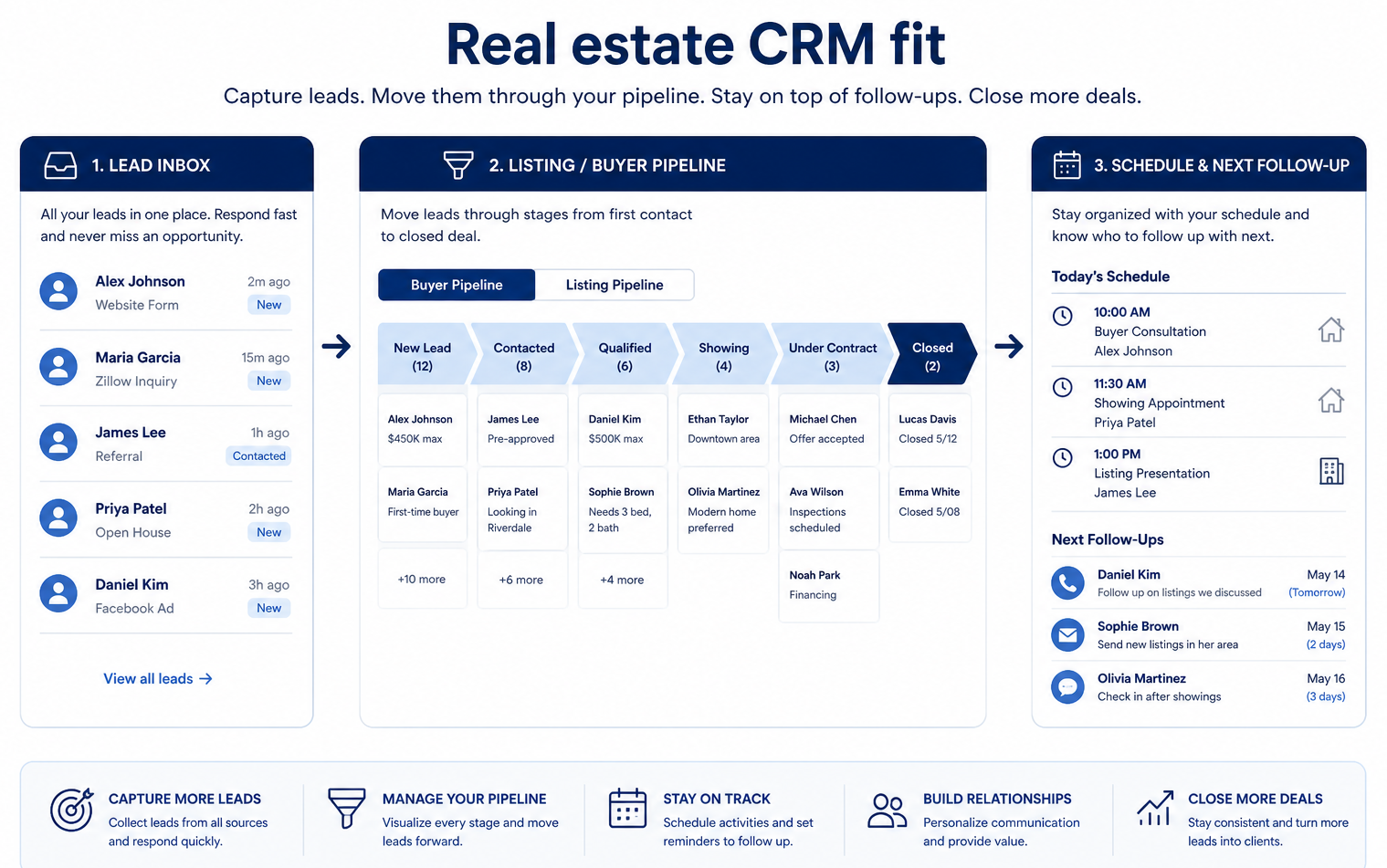
Real estate CRM at a glance
Owned lead follow-up and transaction continuity
Lead capture & routing · Contact history · Tasks & reminders · Mobile logging · Transaction milestones
Agents / teams · Inside sales / ISA · Brokerage ops · Transaction coordinators
37 catalogue CRM products
Aug 17, 2026
Fit snapshot
Real-estate CRM work revolves around lead capture, nurture through long cycles, and coordination across agents, brokers, and transaction partners. The operational need is owned follow-up and shared property/client context — not a generic sales board alone.
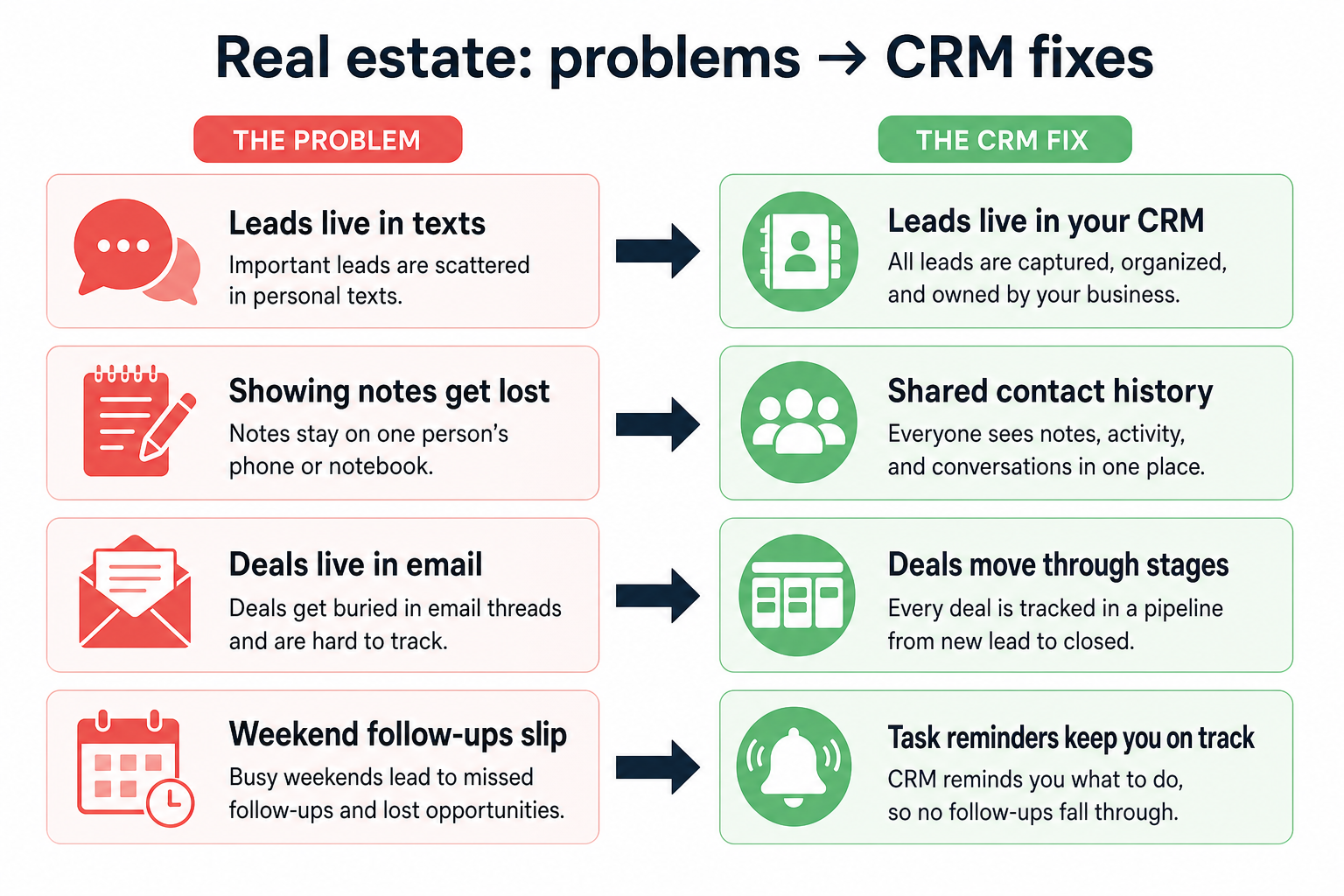
Agents, teams, brokerages, and transaction coordinators who juggle inbound leads, active buyers/sellers, and post-agreement tasks. Buyers need mobile-friendly logging and clear ownership across a high-touch, appointment-heavy week.
How Real estate teams put CRM to work
Example 1
a four-agent residential team
Before CRM
portal leads sat in individual inboxes and died over weekends
After CRM
every lead has an owner, source, and next touch — the ISA or team lead can see unanswered inquiries Monday morning
Example 2
a brokerage transaction desk
Before CRM
contract dates lived in personal calendars
After CRM
key milestones and partner contacts sit on the deal so coverage does not depend on one coordinator’s phone
These are the operating problems that usually push real estate teams toward CRM — not feature wish lists.
Without CRM discipline: Speed-to-lead collapses when inquiries land in personal inboxes.
Without CRM discipline: Buyers months from purchase fall off personal reminder systems.
Without CRM discipline: Notes from conversations never make it back to a shared record.
Without CRM discipline: Lenders, inspectors, and coordinators restart from incomplete threads.
A CRM only helps when the team keeps owners, history, and next steps current. Here is what “good” looks like in real estate.
With CRM discipline: Central capture with assignment and SLA-style next steps keeps warm inquiries owned.
With CRM discipline: Tasks and stage-based nurture keep future clients visible without daily inbox archaeology.
With CRM discipline: Mobile-friendly notes and tasks on the contact preserve context between appointments.
With CRM discipline: Transaction records carry stakeholders, dates, and open items into the next seat.
Faster owned lead response
Inquiries stop dying in personal inboxes over weekends.
Visible long-cycle nurture
Future buyers and sellers stay on a board with next touches.
Shared client context across the team
Coverage works when an agent is in showings all day.
Cleaner path into transaction work
Key dates and partners are not trapped in one person’s calendar.
Prioritize lead routing, contact history tied to properties or transactions, reminders that survive showing days, and handoffs to transaction coordination. Treat any MLS or marketing integrations as requirements to verify with vendors — depth varies.
Portal and web leads get a named agent response before they go cold.
Property interest, budget, and timeline sit on the contact — not only in chat apps.
Explore capability →Stages reflect showing → offer → under contract → closed, with clear owners.
Explore capability →Buyers who are 6–18 months out still get timely, relevant follow-up.
Agents log notes and next steps from the car without waiting for desktop.
Managers see coverage and stalled deals without chasing individual inboxes.
Explore capability →Start with must-haves your team will use weekly. Treat nice-to-haves as later upgrades — not day-one blockers.
Must-have
Next touches and milestone dates on the record.
Update records between showings without waiting for a desk.
Nice-to-have
Verify portal, email, and related connections with vendors.
Understand this industry’s operating loop first. Product demonstrations are optional examples for each step — they do not change product rankings.
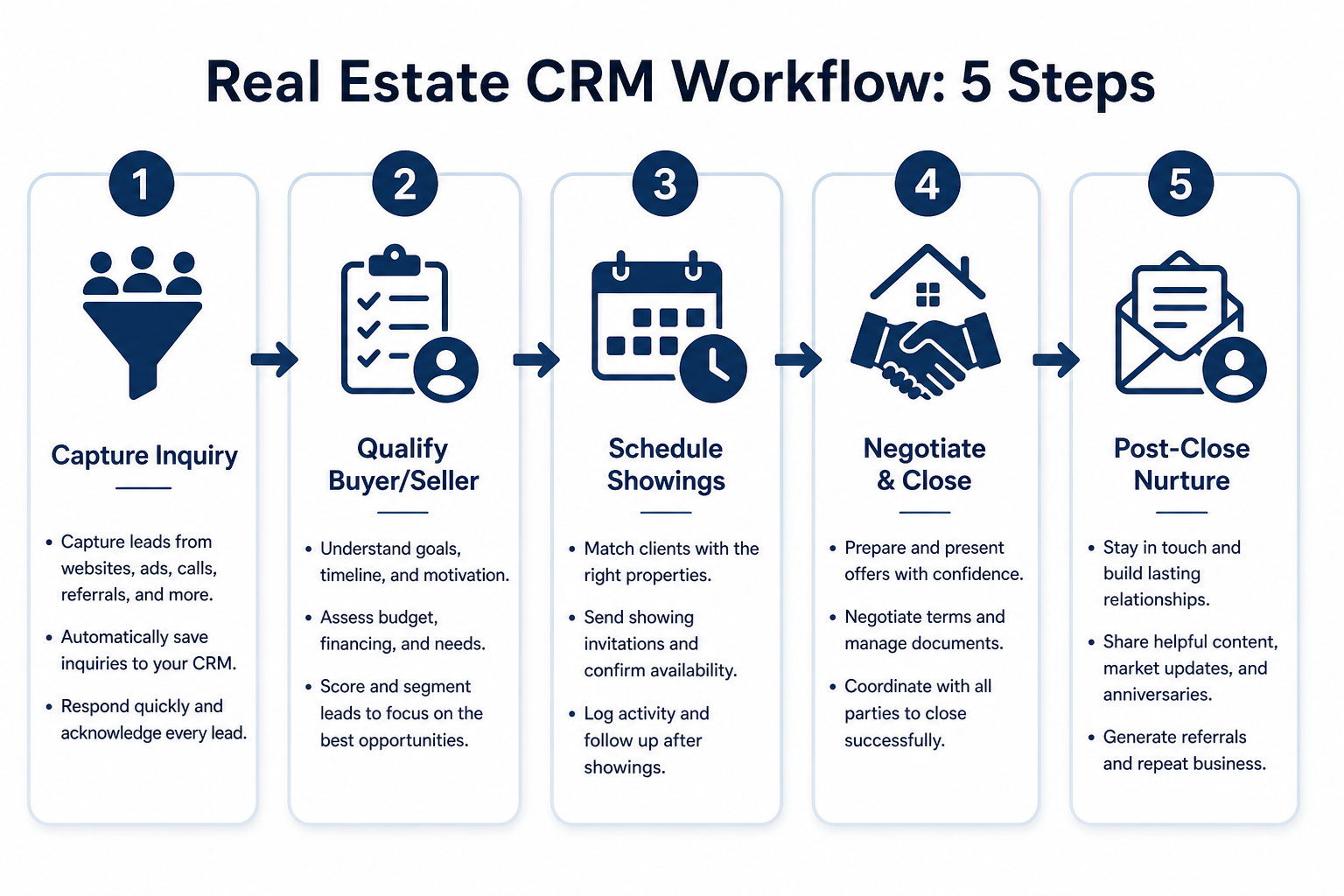
Support labels come from structured feature research — not from videos.
Objective
Every inquiry lands in a shared system with source and owner.
In this step
Requirements
Next step
Next step
Next step
Next step
These are buyer scenarios — not product recommendations. Start from how your team works, then compare capabilities.
Best when Portal leads arrive faster than agents can triage manually.
Explore use case →Best when Transactions need stage discipline across a team.
Explore use case →Best when Most client work happens off-desk.
Explore use case →Best when Long buying cycles need scheduled touches.
Explore use case →Best when Past clients and partners drive repeat business.
Explore use case →Explore catalogue CRM products and compare their capabilities against your requirements.

Freshsales
SMB and mid-market teams wanting CRM + phone/email engagement
$9.00/user/month

HubSpot
SMB and mid-market teams wanting free CRM now and room to expand into hubs later
$15.00/user/month

Salesforce
Mid-market and enterprise sales orgs needing deep customization and reporting
$25.00/user/month

Attio
Startups and GTM teams wanting flexible CRM
$0.00/user/month

Pipedrive
SMB and mid-market sales teams prioritizing pipeline visibility
$14.00/user/month

Capsule
Small businesses wanting a simple CRM
$18.00/user/month
Official vendor demonstrations can help show how CRM products are used in real estate workflows. SoftwareGlimpse evaluates these alongside independent research, documentation and product evidence.
Official vendor videos illustrate industry workflow context. They do not change product rankings, industry fit, regulatory compliance conclusions, or pricing assessments. Vendor-published customer stories are not independent proof of typical outcomes.
Freshsales
How to create Multiple Sales Pipeline | Freshsales CRM
General CRM workflow relevant to real estate — not an industry-specific product demo.
This video is hosted on YouTube
This content is hosted by YouTube. The player loads only after you allow marketing cookies.
Industry context
What to notice for this industry
Capabilities demonstrated
HubSpot
Lead management workflow — capture through assignment and follow-up
General CRM workflow relevant to real estate — not an industry-specific product demo.

This video is hosted on YouTube
This content is hosted by YouTube. The player loads only after you allow marketing cookies.
Industry context
What to notice for this industry
Capabilities demonstrated
Requirements visible / relevant
Salesforce
How Salesforce explains lead management from capture through qualification.
General CRM workflow relevant to real estate — not an industry-specific product demo.

This video is hosted on YouTube
This content is hosted by YouTube. The player loads only after you allow marketing cookies.
Industry context
What to notice for this industry
Attio
Attio | How to build your sales pipelines
General CRM workflow relevant to real estate — not an industry-specific product demo.

This video is hosted on YouTube
This content is hosted by YouTube. The player loads only after you allow marketing cookies.
Industry context
What to notice for this industry
Capabilities demonstrated
Products we recommend evaluating for this industry’s workflows — based on editorial fit, not vendor demos or affiliate relationships.
20 evidence items backing this recommendation (features, screenshots, or documentation). Official video is optional context and does not change fit.
Workflows: High-volume lead responseListing-to-close pipelineField / showing activity
Recommendation confidence: High. Industry fit reflects SoftwareGlimpse recommendations on use cases, capabilities, requirements, and product evidence. Official demos illustrate workflow context only — they do not determine rankings, compliance, or pricing.
20 evidence items backing this recommendation (features, screenshots, or documentation). Official video is optional context and does not change fit.
Workflows: High-volume lead responseListing-to-close pipelineField / showing activity
Recommendation confidence: High. Industry fit reflects SoftwareGlimpse recommendations on use cases, capabilities, requirements, and product evidence. Official demos illustrate workflow context only — they do not determine rankings, compliance, or pricing.
20 evidence items backing this recommendation (features, screenshots, or documentation). Official video is optional context and does not change fit.
Workflows: High-volume lead responseListing-to-close pipelineField / showing activity
Recommendation confidence: High. Industry fit reflects SoftwareGlimpse recommendations on use cases, capabilities, requirements, and product evidence. Official demos illustrate workflow context only — they do not determine rankings, compliance, or pricing.
Select products to compare
| Product | Starting price | Pipeline | Automation | Reporting | Integrations | Best suited to |
|---|---|---|---|---|---|---|
| $9.00/user/month | SMB and mid-market teams wanting CRM + phone/email engagement | |||||
| $15.00/user/month | SMB and mid-market teams wanting free CRM now and room to expand into hubs later | |||||
| $25.00/user/month | Mid-market and enterprise sales orgs needing deep customization and reporting | |||||
| $0.00/user/month | Startups and GTM teams wanting flexible CRM | |||||
| $14.00/user/month | ~ | SMB and mid-market sales teams prioritizing pipeline visibility |
Select two products to open a side-by-side comparison.
Answer a few questions about your team, requirements, integrations and budget to create a personalized shortlist.
Personalized shortlist
Finder uses structured answers and CRM evidence — not affiliate incentives — to build your shortlist.
Cells reflect product evidence. Unknown support is shown as a dash — never as a hard “no”.
Estimates use verified list prices for a sample team configuration. Adjust seats and billing in the calculator for a tailored view.
Team size
10 users
Billing
monthly
Estimated catalogue range
Lowest
$13.00
Typical
$380.00
Highest
$1,666.67
Verified USD catalogue range for this team size — midpoint is the catalogue median, not a market average.
Map lead sources
List where inquiries arrive and who responds today.
High-volume leads →Define deal stages
Write the stages from first inquiry to closed.
Pipeline use case →Check mobile reality
Trial the mobile experience with two agents for a week.
Mobile capability →Estimate seats
Model agents + admin seats with researched list prices.
CRM Cost Calculator →Shortlist with Finder
Filter for lead speed, mobile, and team visibility.
Start CRM Finder →Use these prompts in vendor conversations. They are educational — not claims about any specific product.
Ask the vendor to demonstrate this with your workflow, plans, and data requirements — and request documentation where relevant.
Ask the vendor to demonstrate this with your workflow, plans, and data requirements — and request documentation where relevant.
Ask the vendor to demonstrate this with your workflow, plans, and data requirements — and request documentation where relevant.
Ask the vendor to demonstrate this with your workflow, plans, and data requirements — and request documentation where relevant.
Ask the vendor to demonstrate this with your workflow, plans, and data requirements — and request documentation where relevant.
Ask the vendor to demonstrate this with your workflow, plans, and data requirements — and request documentation where relevant.
Use these dimensions when evaluating vendors. We do not claim specific regulatory compliance unless verified evidence exists.
Data access controls
Who can see and change customer, deal, and activity records.
Explore requirement →
User permissions
Role-based permissions so reps, managers, and admins see different fields.
Explore requirement →
Auditability
Visibility into who changed records and when.
Explore requirement →
Data retention & export
How you retain, export, and delete customer data when you leave.
Explore requirement →
Identity / SSO
How users sign in — especially if IT requires SSO.
Explore requirement →
Integration security
How connected tools exchange data without leaking credentials.
Explore requirement →
Data residency
Where customer data is stored and processed.
Explore requirement →
Vendor security documentation
What the vendor publishes for a security review (trust center, SOC reports).
Explore requirement →
Tag every lead source
Example: Zillow vs website vs referral — so you stop arguing which channel works.
Set a response SLA
Agree that new portal leads get a call/SMS within a fixed window, tracked in CRM.
Decide shared vs private contacts
Brokerage policy on who can see whom prevents quiet lead-poaching fights later.
Train on mobile first
If agents will not open a laptop between showings, desktop-only habits will fail.
Vendor-published customer stories can show real-world context. They are not independent SoftwareGlimpse recommendations and do not prove typical outcomes, ROI, or product superiority.
Customer Spotlight: Blue Nile

This video is hosted on YouTube
This content is hosted by YouTube. The player loads only after you allow marketing cookies.
Official vendor video
What this story illustrates
 vs
vs
ACT! vs Affinity
Side-by-side comparison on shared CRM criteria.
Compare →vs
ACT! vs Agile CRM
Side-by-side comparison on shared CRM criteria.
Compare →vs
ACT! vs Apptivo
Side-by-side comparison on shared CRM criteria.
Compare →vsACT! vs Attio
Side-by-side comparison on shared CRM criteria.
Compare →vs
ACT! vs Bitrix24
Side-by-side comparison on shared CRM criteria.
Compare →vsACT! vs Capsule
Side-by-side comparison on shared CRM criteria.
Compare →A practical decision framework for picking CRM software: needs, features, size fit, integrations, true cost, adoption, and growth — without vendor hype.
Evaluate CRM options fairly with weighted criteria, a shared trial script, and a scorecard — so you compare evidence instead of demo theater.
Write demo-ready CRM requirements from 90-day outcomes, must vs nice features, stakeholders, and hard constraints — without feature-wishlist shopping.
Learn what CRM software is, how it works for sales and customer teams, and how to choose one without drowning in vendor marketing.
Evidence
Product capabilities and pricing are tied to recorded evidence.
Evaluation
Products are compared using consistent category criteria.
Independence
Affiliate relationships never determine rankings or recommendations.
Many teams start with a general CRM configured for leads, tasks, and pipelines. Choose a vertical tool when listing-centric workflows or required integrations are must-haves — confirm those capabilities with vendors.
CRM owns people, deals, and next actions. Marketing tools can feed leads; they should not become a second system of record for active clients.
Require a next step on every active lead, prefer mobile logging, and review unanswered new leads on a fixed cadence — not only when someone remembers.
Continue from real estate CRM research with decision tools and related hubs. Affiliate relationships never change recommendations.
Compare catalogue CRM products based on your team size, requirements, integrations and budget.