
This video is hosted on YouTube
This content is hosted by YouTube. The player loads only after you allow marketing cookies.
Industries / Education
Coordinate enrollment inquiries, partnerships, and stakeholder follow-up across long decision cycles.
▶ See CRM workflows for education
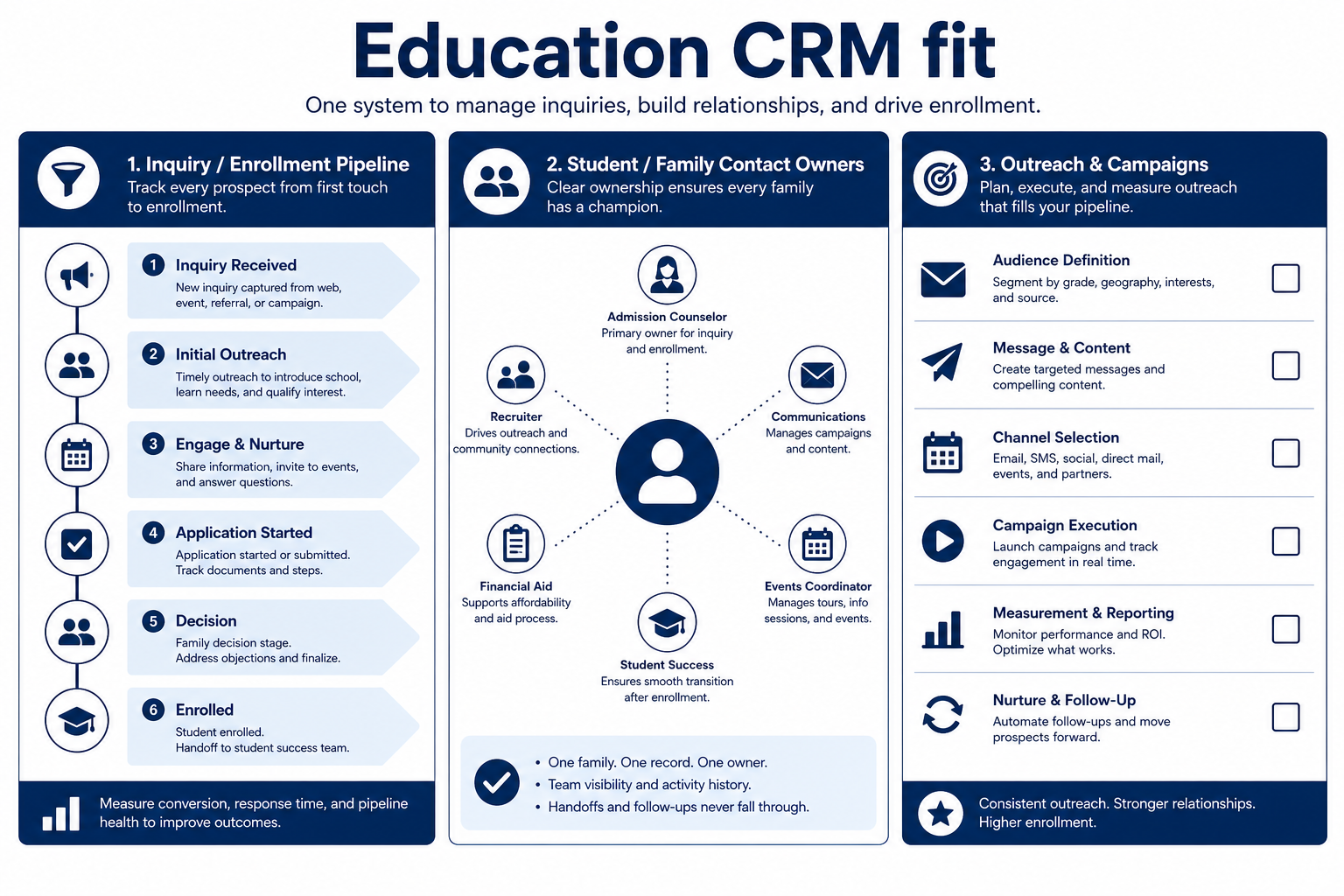
Education CRM at a glance
Owned inquiry-to-enrollment (or partnership) pipelines
Inquiry capture · Counselor / recruiter ownership · Nurture stages · Event follow-up · SIS / marketing connections
Admissions / enrollment · Program marketing · Partnerships · Student outreach ops
37 catalogue CRM products
Aug 17, 2026
Fit snapshot
Education CRM supports inquiry-to-enrollment (or recruitment) pipelines, partner and alumni relationship work, and internal handoffs between admissions, advising, and outreach teams. Student information systems remain the academic system of record — CRM complements recruitment and relationship ops.
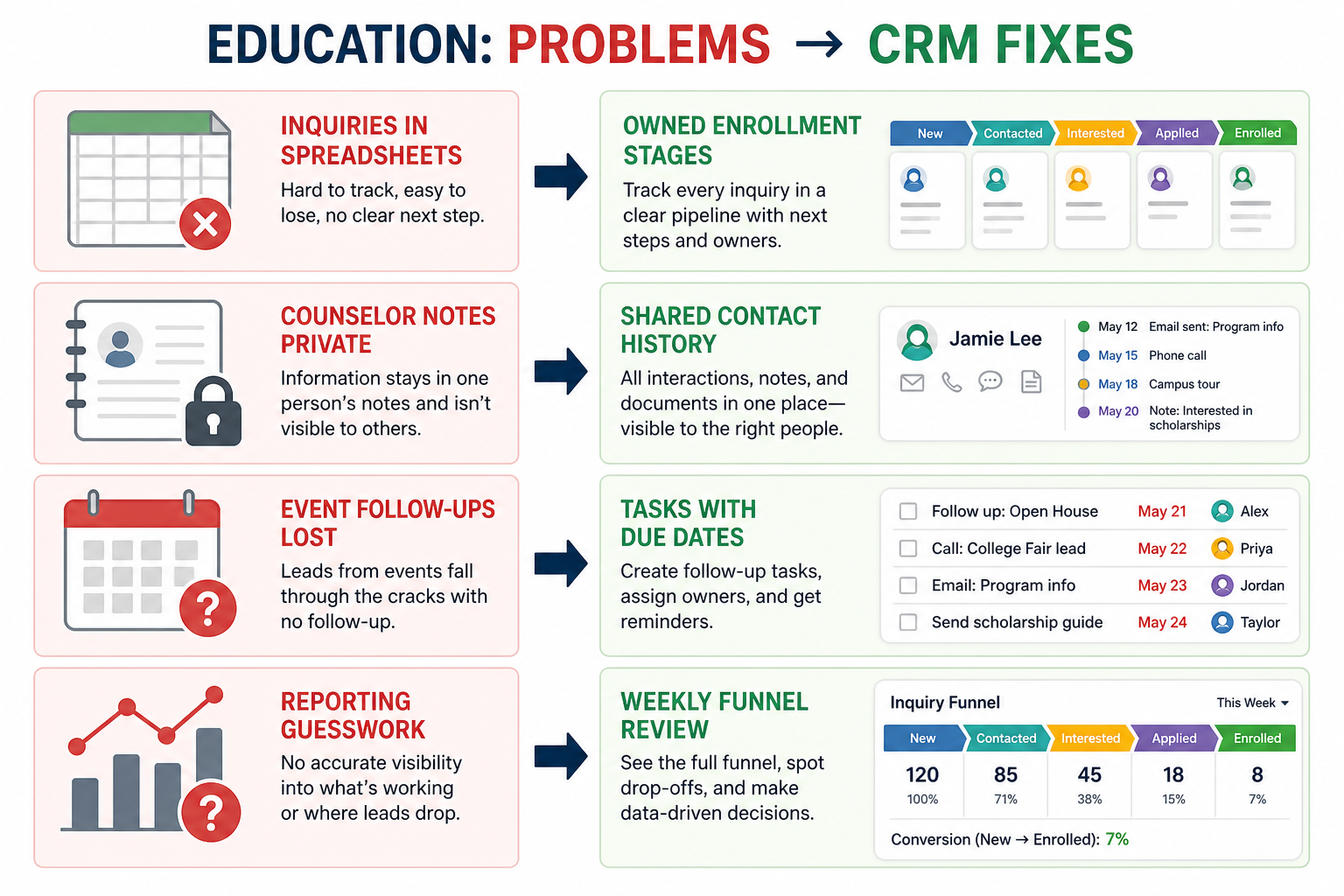
Admissions and enrollment teams, continuing-education and program marketers, partnership/development roles, and schools or training providers coordinating long nurture cycles. Buyers need owned inquiries and clear stages without replacing the SIS.
How Education teams put CRM to work
Example 1
a continuing-education program office
Before CRM
web inquiries sat in a shared inbox and response times slid during peak terms
After CRM
every inquiry has an owner and stage — weekly reviews focus on unanswered applicants
Example 2
a B2B training provider selling to employers
Before CRM
company partnerships lived in individual spreadsheets
After CRM
each employer account shows contacts, open cohorts, and next renewal conversations
These are the operating problems that usually push education teams toward CRM — not feature wish lists.
Without CRM discipline: Peak seasons overwhelm personal follow-up habits.
Without CRM discipline: Prospective students or partners fall off between events and terms.
Without CRM discipline: Yield and onboarding teams rebuild student stories from email.
Without CRM discipline: Two systems disagree on status after enrollment.
A CRM only helps when the team keeps owners, history, and next steps current. Here is what “good” looks like in education.
With CRM discipline: Central capture with owners and stages keeps response work visible.
With CRM discipline: Tasks and stage-based nurture keep future starts on a reviewable board.
With CRM discipline: Won or enrolled transitions carry notes and stakeholders forward — within your SIS/CRM design.
With CRM discipline: Define CRM for recruitment/relationships and SIS for academic records; sync only with clear ownership.
Faster owned inquiry response
Peak-season leads stop sitting unowned in shared inboxes.
Visible long-cycle nurture
Future terms and cohorts stay on stages with next touches.
Clearer employer or partner accounts
B2B education motions get the same ownership discipline as B2C inquiries.
Cleaner CRM–SIS boundaries
Teams know which system wins after enrollment.
Prioritize inquiry capture, counselor or recruiter ownership, nurture stages, and event/visit follow-up. Verify SIS and marketing-tool integrations carefully; define which system owns the enrolled student record.
Prospects and applicants move through owned stages instead of shared inboxes.
Multiple contacts per household or school relationship stay connected.
Seasonal recruitment still gets timely, relevant follow-up.
Leaders see where inquiries stall week to week.
Explore capability →Staff see only the relationship books they need.
Connect carefully; CRM is not a student information system replacement.
Explore capability →Start with must-haves your team will use weekly. Treat nice-to-haves as later upgrades — not day-one blockers.
Must-have
Counselor follow-ups and event next steps on the record.
Reduce double entry during high-volume seasons.
Nice-to-have
Verify carefully; avoid dual systems of record.
Understand this industry’s operating loop first. Product demonstrations are optional examples for each step — they do not change product rankings.
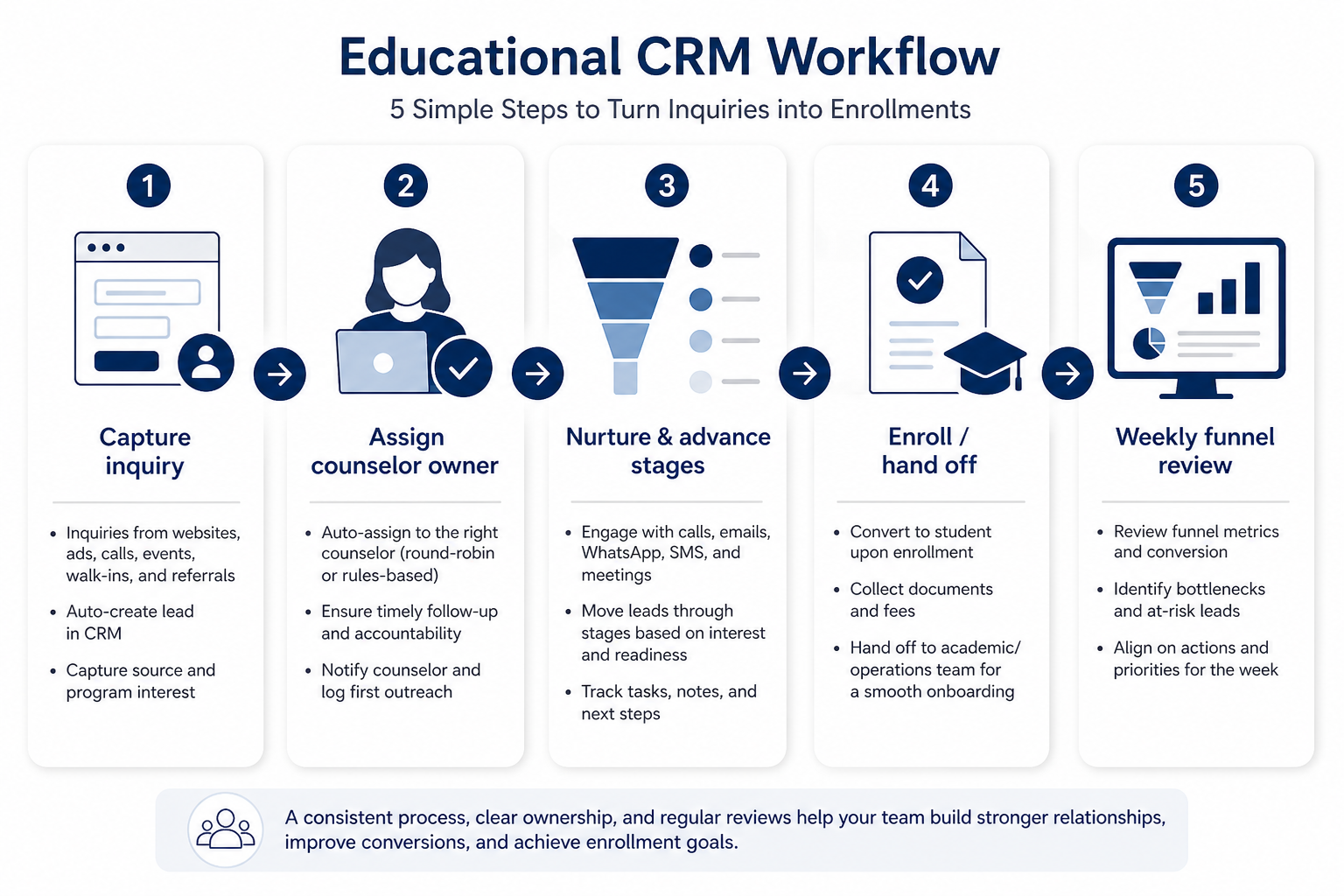
Support labels come from structured feature research — not from videos.
Objective
Capture student, parent, or partner inquiries with source and owner.
In this step
Requirements
Next step
Next step
Next step
Next step
These are buyer scenarios — not product recommendations. Start from how your team works, then compare capabilities.
Best when Web and event inquiries need fast owners.
Explore use case →Best when Stages from inquiry to enrolled must be visible.
Explore use case →Best when Open days and campaigns create long follow-up lists.
Explore use case →Best when Schools and counselors need stewardship over years.
Explore use case →Best when Leadership reviews need one trusted board.
Explore use case →Explore catalogue CRM products and compare their capabilities against your requirements.

Freshsales
SMB and mid-market teams wanting CRM + phone/email engagement
$9.00/user/month

HubSpot
SMB and mid-market teams wanting free CRM now and room to expand into hubs later
$15.00/user/month

Salesforce
Mid-market and enterprise sales orgs needing deep customization and reporting
$25.00/user/month

Attio
Startups and GTM teams wanting flexible CRM
$0.00/user/month

Pipedrive
SMB and mid-market sales teams prioritizing pipeline visibility
$14.00/user/month

Capsule
Small businesses wanting a simple CRM
$18.00/user/month
Official vendor demonstrations can help show how CRM products are used in education workflows. SoftwareGlimpse evaluates these alongside independent research, documentation and product evidence.
Official vendor videos illustrate industry workflow context. They do not change product rankings, industry fit, regulatory compliance conclusions, or pricing assessments. Vendor-published customer stories are not independent proof of typical outcomes.
Freshsales
How to create Multiple Sales Pipeline | Freshsales CRM
General CRM workflow relevant to education — not an industry-specific product demo.
This video is hosted on YouTube
This content is hosted by YouTube. The player loads only after you allow marketing cookies.
Industry context
What to notice for this industry
Capabilities demonstrated
HubSpot
Lead management workflow — capture through assignment and follow-up
General CRM workflow relevant to education — not an industry-specific product demo.

This video is hosted on YouTube
This content is hosted by YouTube. The player loads only after you allow marketing cookies.
Industry context
What to notice for this industry
Capabilities demonstrated
Requirements visible / relevant
Salesforce
How Salesforce explains lead management from capture through qualification.
General CRM workflow relevant to education — not an industry-specific product demo.
This video is hosted on YouTube
This content is hosted by YouTube. The player loads only after you allow marketing cookies.
Industry context
What to notice for this industry
Attio
Attio | How to build your sales pipelines
General CRM workflow relevant to education — not an industry-specific product demo.

This video is hosted on YouTube
This content is hosted by YouTube. The player loads only after you allow marketing cookies.
Industry context
What to notice for this industry
Capabilities demonstrated
Products we recommend evaluating for this industry’s workflows — based on editorial fit, not vendor demos or affiliate relationships.
18 evidence items backing this recommendation (features, screenshots, or documentation). Official video is optional context and does not change fit.
Workflows: Inquiry managementEnrollment / admissions pipelineNurture & event follow-up
Recommendation confidence: High. Industry fit reflects SoftwareGlimpse recommendations on use cases, capabilities, requirements, and product evidence. Official demos illustrate workflow context only — they do not determine rankings, compliance, or pricing.
18 evidence items backing this recommendation (features, screenshots, or documentation). Official video is optional context and does not change fit.
Workflows: Inquiry managementEnrollment / admissions pipelineNurture & event follow-up
Recommendation confidence: High. Industry fit reflects SoftwareGlimpse recommendations on use cases, capabilities, requirements, and product evidence. Official demos illustrate workflow context only — they do not determine rankings, compliance, or pricing.
18 evidence items backing this recommendation (features, screenshots, or documentation). Official video is optional context and does not change fit.
Workflows: Inquiry managementEnrollment / admissions pipelineNurture & event follow-up
Recommendation confidence: High. Industry fit reflects SoftwareGlimpse recommendations on use cases, capabilities, requirements, and product evidence. Official demos illustrate workflow context only — they do not determine rankings, compliance, or pricing.
Select products to compare
| Product | Starting price | Pipeline | Automation | Reporting | Integrations | Best suited to |
|---|---|---|---|---|---|---|
| $9.00/user/month | SMB and mid-market teams wanting CRM + phone/email engagement | |||||
| $15.00/user/month | SMB and mid-market teams wanting free CRM now and room to expand into hubs later | |||||
| $25.00/user/month | Mid-market and enterprise sales orgs needing deep customization and reporting | |||||
| $0.00/user/month | Startups and GTM teams wanting flexible CRM | |||||
| $14.00/user/month | ~ | SMB and mid-market sales teams prioritizing pipeline visibility |
Select two products to open a side-by-side comparison.
Answer a few questions about your team, requirements, integrations and budget to create a personalized shortlist.
Personalized shortlist
Finder uses structured answers and CRM evidence — not affiliate incentives — to build your shortlist.
Cells reflect product evidence. Unknown support is shown as a dash — never as a hard “no”.
Estimates use verified list prices for a sample team configuration. Adjust seats and billing in the calculator for a tailored view.
Team size
10 users
Billing
monthly
Estimated catalogue range
Lowest
$13.00
Typical
$380.00
Highest
$1,666.67
Verified USD catalogue range for this team size — midpoint is the catalogue median, not a market average.
Map the intake journey
From first inquiry to enrolled decision.
Pipeline use case →Draw system boundaries
CRM vs SIS vs marketing tools.
Requirements guide →Set privacy expectations
Access, retention, and vendor docs.
Security capability →Estimate seats
Admissions, counselors, and managers.
CRM Cost Calculator →Shortlist with Finder
Filter for pipeline and relationship needs.
Start CRM Finder →Use these prompts in vendor conversations. They are educational — not claims about any specific product.
Ask the vendor to demonstrate this with your workflow, plans, and data requirements — and request documentation where relevant.
Ask the vendor to demonstrate this with your workflow, plans, and data requirements — and request documentation where relevant.
Ask the vendor to demonstrate this with your workflow, plans, and data requirements — and request documentation where relevant.
Ask the vendor to demonstrate this with your workflow, plans, and data requirements — and request documentation where relevant.
Ask the vendor to demonstrate this with your workflow, plans, and data requirements — and request documentation where relevant.
Ask the vendor to demonstrate this with your workflow, plans, and data requirements — and request documentation where relevant.
Use these dimensions when evaluating vendors. We do not claim specific regulatory compliance unless verified evidence exists.
Data access controls
Who can see and change customer, deal, and activity records.
Explore requirement →
User permissions
Role-based permissions so reps, managers, and admins see different fields.
Explore requirement →
Auditability
Visibility into who changed records and when.
Explore requirement →
Data retention & export
How you retain, export, and delete customer data when you leave.
Explore requirement →
Identity / SSO
How users sign in — especially if IT requires SSO.
Explore requirement →
Integration security
How connected tools exchange data without leaking credentials.
Explore requirement →
Data residency
Where customer data is stored and processed.
Explore requirement →
Vendor security documentation
What the vendor publishes for a security review (trust center, SOC reports).
Explore requirement →
CRM vs SIS boundary
Example: CRM tracks recruitment; official academic records stay in the SIS.
Seasonal stage design
Build stages that match your intake calendar, not a generic B2B template.
Privacy & retention rules
Align with institutional policy before importing historical inquiries.
Counselor ownership
Every active inquiry has a named owner before go-live week.
Vendor-published customer stories can show real-world context. They are not independent SoftwareGlimpse recommendations and do not prove typical outcomes, ROI, or product superiority.
Customer Spotlight: Blue Nile

This video is hosted on YouTube
This content is hosted by YouTube. The player loads only after you allow marketing cookies.
Official vendor video
What this story illustrates
 vs
vs
ACT! vs Affinity
Side-by-side comparison on shared CRM criteria.
Compare →vs
ACT! vs Agile CRM
Side-by-side comparison on shared CRM criteria.
Compare →vs
ACT! vs Apptivo
Side-by-side comparison on shared CRM criteria.
Compare →vsACT! vs Attio
Side-by-side comparison on shared CRM criteria.
Compare →vs
ACT! vs Bitrix24
Side-by-side comparison on shared CRM criteria.
Compare →vsACT! vs Capsule
Side-by-side comparison on shared CRM criteria.
Compare →A practical decision framework for picking CRM software: needs, features, size fit, integrations, true cost, adoption, and growth — without vendor hype.
Evaluate CRM options fairly with weighted criteria, a shared trial script, and a scorecard — so you compare evidence instead of demo theater.
Write demo-ready CRM requirements from 90-day outcomes, must vs nice features, stakeholders, and hard constraints — without feature-wishlist shopping.
Learn what CRM software is, how it works for sales and customer teams, and how to choose one without drowning in vendor marketing.
Evidence
Product capabilities and pricing are tied to recorded evidence.
Evaluation
Products are compared using consistent category criteria.
Independence
Affiliate relationships never determine rankings or recommendations.
No. Use CRM for recruitment, inquiries, and relationship pipelines. Keep academic records in the SIS and define sync rules if systems connect.
Inquiry sources, counselor ownership, a short stage set, and a weekly unanswered-inquiry review. Add automation after response discipline exists.
Yes — treat employers as accounts and cohorts as opportunities or pipelines, with the same ownership and stage discipline.
Continue from education CRM research with decision tools and related hubs. Affiliate relationships never change recommendations.
Compare catalogue CRM products based on your team size, requirements, integrations and budget.