
This video is hosted on YouTube
This content is hosted by YouTube. The player loads only after you allow marketing cookies.
Education CRM capability
Evaluate CRM platforms on how well they support pipeline management for education teams — the requirements that matter, the trade-offs involved, and researched product evidence.
Pipeline management
What we evaluate
Capability at a glance
High importancePipeline management is where a education sales or business-development process becomes visible. Stages, ownership, and next actions turn individual effort into a process that a manager can inspect.
Without structured stages, education teams lose deals to silence rather than to competitors — nobody notices an opportunity that simply stopped moving.
The right setup mirrors how your team actually sells, not a generic template. Compare products on stage flexibility, ownership rules, activity tracking, and whether separate processes can coexist.
Use these requirements to evaluate products against your workflow — not popularity alone.
Adapt stages to your real process instead of a default funnel.
Explore feature →Track value, expected close, and linked contacts on each opportunity.
Explore feature →Give every opportunity a named owner and clear handoffs.
Explore feature →Keep the next action visible and assigned on every deal.
Explore feature →Run distinct processes separately when they differ materially.
Explore requirement →Trigger tasks or updates as opportunities change stage.
Explore requirement →Turn pipeline data into a forward view for planning.
Explore requirement →Essential
Advanced
See which official demonstrations and screenshots support each requirement. Support labels come from feature assessments — not from media counts.
Requirement
Adapt stages to your real process instead of a default funnel.
Explore requirement →
Salesforce
Evidence:

Pipedrive
Evidence:

Creatio
Evidence:
Requirement
Track value, expected close, and linked contacts on each opportunity.
Explore requirement →Salesforce
Evidence:
Pipedrive
Evidence:
Creatio
Evidence:
Requirement
Give every opportunity a named owner and clear handoffs.
Explore requirement →Salesforce
Evidence:
Pipedrive
Evidence:
Creatio
Evidence:
Requirement
Keep the next action visible and assigned on every deal.
Explore requirement →Salesforce
Evidence:
Pipedrive
Evidence:
Creatio
Evidence:
Requirement
Run distinct processes separately when they differ materially.
Explore requirement →Salesforce
Evidence:
Pipedrive
Evidence:
Creatio
Evidence:
Requirement
Trigger tasks or updates as opportunities change stage.
Explore requirement →Salesforce
Evidence:
Pipedrive
Evidence:
Creatio
Evidence:
Requirement
Turn pipeline data into a forward view for planning.
Explore requirement →Salesforce
Evidence:
Pipedrive
Evidence:
Creatio
Evidence:
Overall labels use approved criterion assessments when available; otherwise they reflect feature-support coverage — not an industry ranking.
| Product | Overall | Stages / pipelines | Ownership | Workflow support | Forecasting | Reporting | Best suited to |
|---|---|---|---|---|---|---|---|
Strong · 9/10 Evidence: 7 sources · 5 screenshots · 9 official videos | ~ | Mid-market and enterprise sales orgs needing deep customization and reporting | |||||
Strong · 9/10 Evidence: 7 sources · 6 screenshots · 8 official videos | ~ | ~ | SMB and mid-market sales teams prioritizing pipeline visibility | ||||
Strong · 8/10 Evidence: 7 sources · 3 screenshots · 3 official videos | Mid-market teams needing no-code CRM + workflows | ||||||
Strong · 8/10 Evidence: 7 sources · 3 screenshots · 4 official videos | Oracle-centric mid-market/enterprise sales orgs | ||||||
Strong · 8/10 Evidence: 7 sources · 3 screenshots · 2 official videos | Mid-market sales orgs wanting CX CRM | ||||||
Strong · 8/10 Evidence: 7 sources · 4 screenshots · 5 official videos | ~ | Startups and GTM teams wanting flexible CRM | |||||
Strong · 8/10 Evidence: 6 sources · 3 screenshots · 5 official videos | Inside sales and outbound teams that live on phone/email/SMS | ||||||
Strong · 8/10 Evidence: 7 sources · 2 screenshots · 5 official videos | ~ | SMB teams standardized on Google Workspace |
Select two products for a side-by-side comparison.
Salesforce
$25.00/user/month
Pipeline and opportunity management are core Sales Cloud capabilities, with Advanced Pipeline Management & Deal Insights explicitly called out from Enterprise. Official feature assets document pipeline and opportunity workflows suitable for complex sales motions.
Evidence confidence: Medium
Pipedrive
$14.00/user/month
Pipeline management is Pipedrive’s core product story: customizable stages, multiple pipelines, deal visualization, activity tracking, and Insights metrics are all first-party documented strengths. This is the criterion where Pipedrive most clearly leads for SMB sales buyers.
Evidence confidence: Medium
Creatio
$40.00/user/month
Sales module pipelines/deals are first-class when Sales is licensed.
Evidence confidence: Medium
Need help choosing?
Answer a few questions about team size, requirements, integrations and budget for a personalized CRM shortlist.
Find My CRM →✓ Supported · ~ Partial / plan dependent · — Not evidenced. Unknown is never shown as “No”.
| Requirement | Salesforce | Pipedrive | Creatio |  Oracle CX Oracle CX |  SugarCRM SugarCRM |
|---|---|---|---|---|---|
| Pipeline management | |||||
| Custom pipelines | |||||
| Deal management | |||||
| Lead management | |||||
| Workflow automation | ~ | ||||
| Forecasting | ~ | ~ | |||
| Reporting |
Official vendor demonstrations help show how different CRM platforms approach the workflows, features and interactions that make up pipeline management. Absence of a video does not mean a product lacks the capability.
Salesforce
Specialized Retail Banking with Agentforce Financial Services
Focus: Financial Services Cloud overview — client/account relationships and advisor workflows
This video is hosted on YouTube
This content is hosted by YouTube. The player loads only after you allow marketing cookies.
What this shows
What to notice
What this does not establish
Features visible in this demo
Requirements illustrated
Visual presence does not by itself confirm requirement satisfaction — see the product assessment.
Particularly relevant to
Source: Salesforce · Verified 14 Aug 2026
Pipedrive
The Easy and Effective CRM for Closing Deals
Focus: Pipeline-first workspace with stage movement and activities

This video is hosted on YouTube
This content is hosted by YouTube. The player loads only after you allow marketing cookies.
What this shows
What to notice
What this does not establish
Features visible in this demo
Requirements illustrated
Visual presence does not by itself confirm requirement satisfaction — see the product assessment.
Particularly relevant to
Source: Pipedrive · Verified 14 Aug 2026
SugarCRM
How to Create an Opportunity in SugarCRM | Setup, Pricing & Deal Splits Tutorial
Focus: SugarCRM opportunity setup

This video is hosted on YouTube
This content is hosted by YouTube. The player loads only after you allow marketing cookies.
What this shows
What this does not establish
Features visible in this demo
Source: SugarAI · Verified 15 Aug 2026

Attio
Attio | How to build your sales pipelines
Focus: Attio sales pipeline setup

This video is hosted on YouTube
This content is hosted by YouTube. The player loads only after you allow marketing cookies.
What this shows
What this does not establish
Features visible in this demo
Source: Attio · Verified 15 Aug 2026
Evidence-backed workflow comparison using official vendor demos and screenshots — not a ranking or entertainment gallery. Absence of media does not mean a product lacks the capability.
Salesforce
Salesforce emphasizes
Pipedrive
Pipedrive emphasizes
SoftwareGlimpse take
Salesforce evidence emphasizes client / account relationship surfaces in Financial Services Cloud; Pipedrive evidence emphasizes opportunity visible in pipeline. These are observations from official sources, not inferred brand philosophy.
One best official workflow demonstration per product when available — not a gallery of every video.
Pipeline and opportunity management are core Sales Cloud capabilities, with Advanced Pipeline Management & Deal Insights explicitly called out from Enterprise. Official feature assets document pipeline and opportunity workflows suitable for complex sales motions.
Key strengths
Limitations
See it in action
This video is hosted on YouTube
This content is hosted by YouTube. The player loads only after you allow marketing cookies.
Official vendor video
Financial Services Cloud overview — client/account relationships and advisor workflows
Pipeline management is Pipedrive’s core product story: customizable stages, multiple pipelines, deal visualization, activity tracking, and Insights metrics are all first-party documented strengths. This is the criterion where Pipedrive most clearly leads for SMB sales buyers.
Key strengths
Limitations
See it in action
This video is hosted on YouTube
This content is hosted by YouTube. The player loads only after you allow marketing cookies.
Official vendor video
Pipeline-first workspace with stage movement and activities
Sales module pipelines/deals are first-class when Sales is licensed.
Key strengths
See it in action

This video is hosted on YouTube
This content is hosted by YouTube. The player loads only after you allow marketing cookies.
Official vendor tutorial
Verified product captures only — never stock imagery or mockups.
Loading evidence explorer…
Your exact requirements depend on your sales or advisory process.
Simplicity vs customization
Highly configurable pipelines fit complex processes but need ongoing administration.
Ease of adoption vs process depth
A simple board is quicker to adopt; deeper process controls take longer to land.
Automation vs control
Automating stage actions improves consistency but needs someone owning the rules.
Capability vs plan tier
Multiple pipelines, automation, and forecasting are often gated to higher plans.
Relationship-led teams
MediumTrack the opportunities that sit alongside ongoing relationships.
Explore use case →Pipeline-led sales teams
Very highConfigure stages, ownership, and next actions on every opportunity.
Explore use case →High-volume lead handling
HighQualify and progress leads through a lightweight, fast pipeline.
Explore use case →Complex sales processes
Very highModel multi-stage opportunities with ownership and handoffs.
Explore use case →Growing teams
Very highA simple pipeline everyone understands and keeps up to date.
Explore use case →Ask the vendor to demonstrate this with your workflow, plans, and data requirements — and request documentation where relevant.
Ask the vendor to demonstrate this with your workflow, plans, and data requirements — and request documentation where relevant.
Ask the vendor to demonstrate this with your workflow, plans, and data requirements — and request documentation where relevant.
Ask the vendor to demonstrate this with your workflow, plans, and data requirements — and request documentation where relevant.
Ask the vendor to demonstrate this with your workflow, plans, and data requirements — and request documentation where relevant.
Ask the vendor to demonstrate this with your workflow, plans, and data requirements — and request documentation where relevant.
Ask the vendor to demonstrate this with your workflow, plans, and data requirements — and request documentation where relevant.
Ask the vendor to demonstrate this with your workflow, plans, and data requirements — and request documentation where relevant.
Design the process first
Define stages and exit criteria before configuring software.
Decide ownership rules
Agree who owns deals at each stage and after a handover.
Make next actions mandatory
A stage without a next action is where deals go quiet.
Agree the management view
Decide what leadership needs to see weekly.
Automate last
Add automation once the process is stable.
Contact management
Evaluate CRM platforms on how well they support contact management for education teams — the requirements that matter, the trade-offs involved, and researched product evidence.
Explore →Workflow automation
Evaluate CRM platforms on how well they support workflow automation for education teams — the requirements that matter, the trade-offs involved, and researched product evidence.
Explore →Reporting and forecasting
Evaluate CRM platforms on how well they support reporting and forecasting for education teams — the requirements that matter, the trade-offs involved, and researched product evidence.
Explore →Integrations
Evaluate CRM platforms on how well they support integrations for education teams — the requirements that matter, the trade-offs involved, and researched product evidence.
Explore →See the category-wide capability hub: Pipeline management CRM capability.
Tell us your team size, requirements, integrations and budget. We will use structured answers — not affiliate incentives — to build your shortlist.
Find My CRM →It is how a CRM tracks opportunities through stages, with ownership, activities, and visibility, so work progresses consistently and can be reported on.
Education opportunities usually pass through several steps and people. Structured stages keep ownership and next actions explicit instead of implicit.
Enough to reflect real decision points and no more. Stages that nobody can define an exit criterion for tend to become parking spaces.
Only when processes genuinely differ in their stages. Many teams start with one well-designed pipeline and split it later.
Pipeline management structures the stages and ownership. Workflow automation reacts to changes in those records by creating tasks or updates.
No. Fit depends on how your team works, which requirements are must-haves, and what the CRM has to integrate with. Use the requirement matrix and CRM Finder to build a shortlist rather than starting from a ranking.
Choose products based on the pipeline management capabilities your team actually needs.
Explore the official documentation, screenshots and product demonstrations used to understand how each CRM implements pipeline management.
18 items
Official video · Attio
Supports
Demonstrates
This video is hosted on YouTube
This content is hosted by YouTube. The player loads only after you allow marketing cookies.
Official vendor tutorial
Verified: 15 Aug 2026
Open source ↗Official video · Bitrix24
Supports
Demonstrates

This video is hosted on YouTube
This content is hosted by YouTube. The player loads only after you allow marketing cookies.
Official vendor tutorial
Verified: 15 Aug 2026
Open source ↗
Official video · Close
Supports
Demonstrates

This video is hosted on YouTube
This content is hosted by YouTube. The player loads only after you allow marketing cookies.
Official vendor tutorial
Verified: 15 Aug 2026
Open source ↗Official video · Close
Supports
Demonstrates

This video is hosted on YouTube
This content is hosted by YouTube. The player loads only after you allow marketing cookies.
Official vendor tutorial
Verified: 15 Aug 2026
Open source ↗Official video · HubSpot
Supports
Demonstrates

This video is hosted on YouTube
This content is hosted by YouTube. The player loads only after you allow marketing cookies.
Official vendor tutorial
Lead management workflow — capture through assignment and follow-up
Verified: 14 Aug 2026
Open source ↗Official video · Insightly CRM by Unbounce
Supports
Demonstrates

This video is hosted on YouTube
This content is hosted by YouTube. The player loads only after you allow marketing cookies.
Official vendor tutorial
Verified: 15 Aug 2026
Open source ↗Official video · monday.com
Supports
Demonstrates

This video is hosted on YouTube
This content is hosted by YouTube. The player loads only after you allow marketing cookies.
Official vendor tutorial
Verified: 15 Aug 2026
Open source ↗Official video · monday.com
Supports
Demonstrates

This video is hosted on YouTube
This content is hosted by YouTube. The player loads only after you allow marketing cookies.
Official vendor tutorial
Verified: 15 Aug 2026
Open source ↗Official video · Pipedrive
Supports
Demonstrates
This video is hosted on YouTube
This content is hosted by YouTube. The player loads only after you allow marketing cookies.
Official vendor video
Pipeline-first workspace with stage movement and activities
Verified: 14 Aug 2026
Open source ↗Official video · Salesforce
Supports
Demonstrates
This video is hosted on YouTube
This content is hosted by YouTube. The player loads only after you allow marketing cookies.
Official vendor video
Financial Services Cloud overview — client/account relationships and advisor workflows
Verified: 14 Aug 2026
Open source ↗Official video · Streak
Supports
Demonstrates

This video is hosted on YouTube
This content is hosted by YouTube. The player loads only after you allow marketing cookies.
Official vendor tutorial
Verified: 15 Aug 2026
Open source ↗Official video · Zoho CRM
Supports
Demonstrates

This video is hosted on YouTube
This content is hosted by YouTube. The player loads only after you allow marketing cookies.
Official vendor tutorial
Verified: 15 Aug 2026
Open source ↗Screenshot · ACT!
Supports
Demonstrates
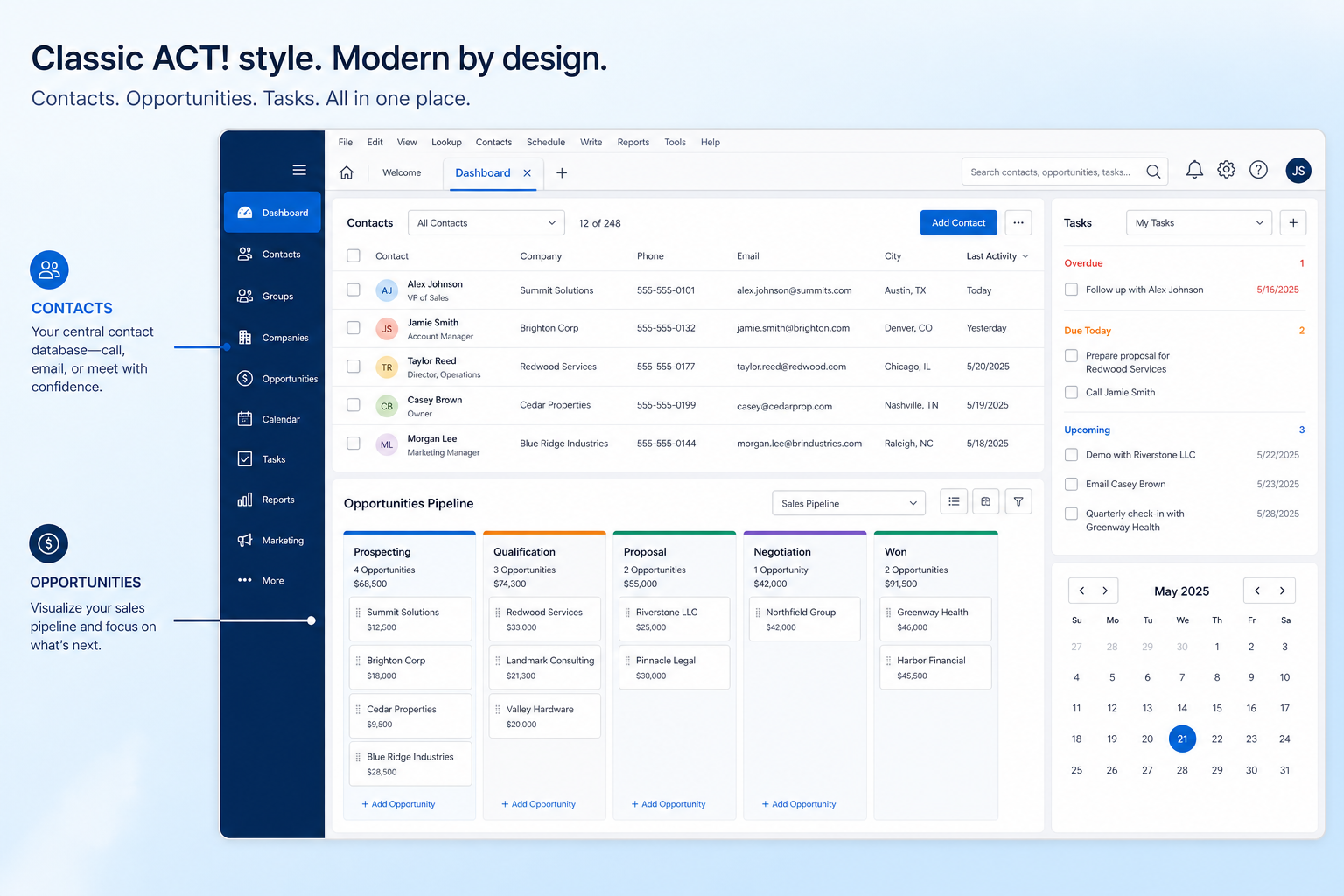
Verified: 16 Aug 2026
Open source ↗Screenshot · Affinity
Supports
Demonstrates
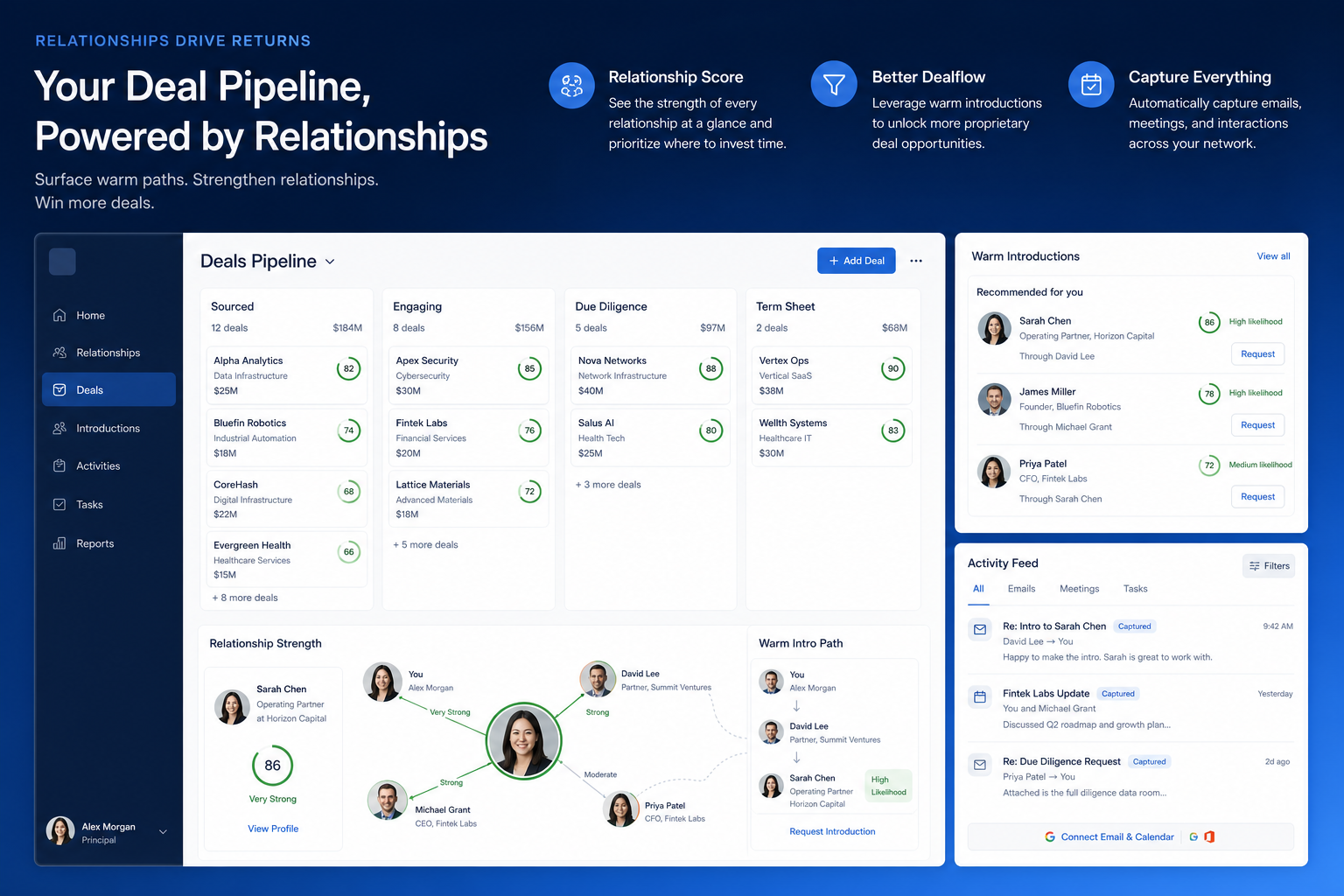
Verified: 16 Aug 2026
Open source ↗Screenshot · Agile CRM
Supports
Demonstrates
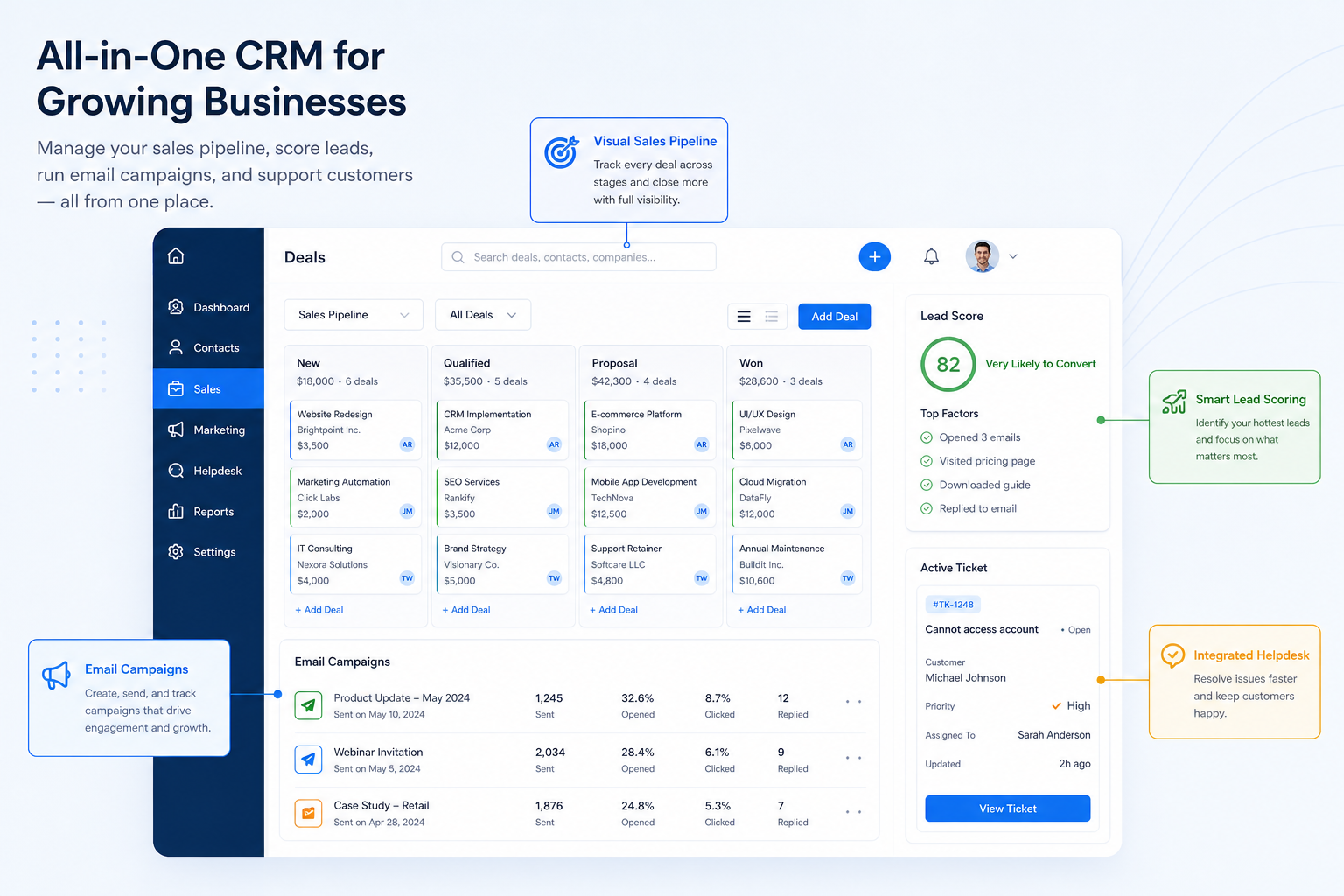
Verified: 16 Aug 2026
Open source ↗Screenshot · Apptivo
Supports
Demonstrates
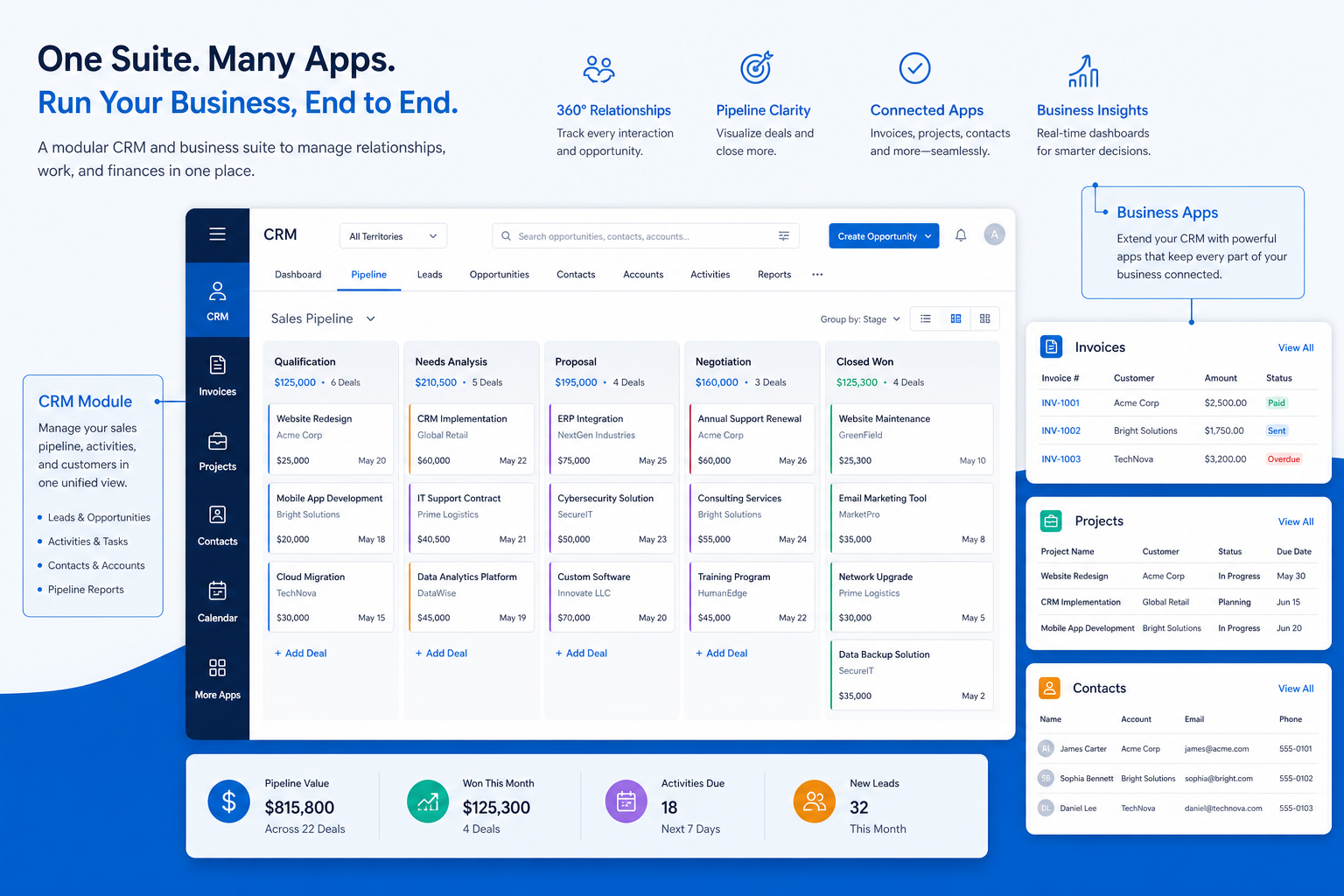
Verified: 16 Aug 2026
Open source ↗Screenshot · Attio
Supports
Demonstrates
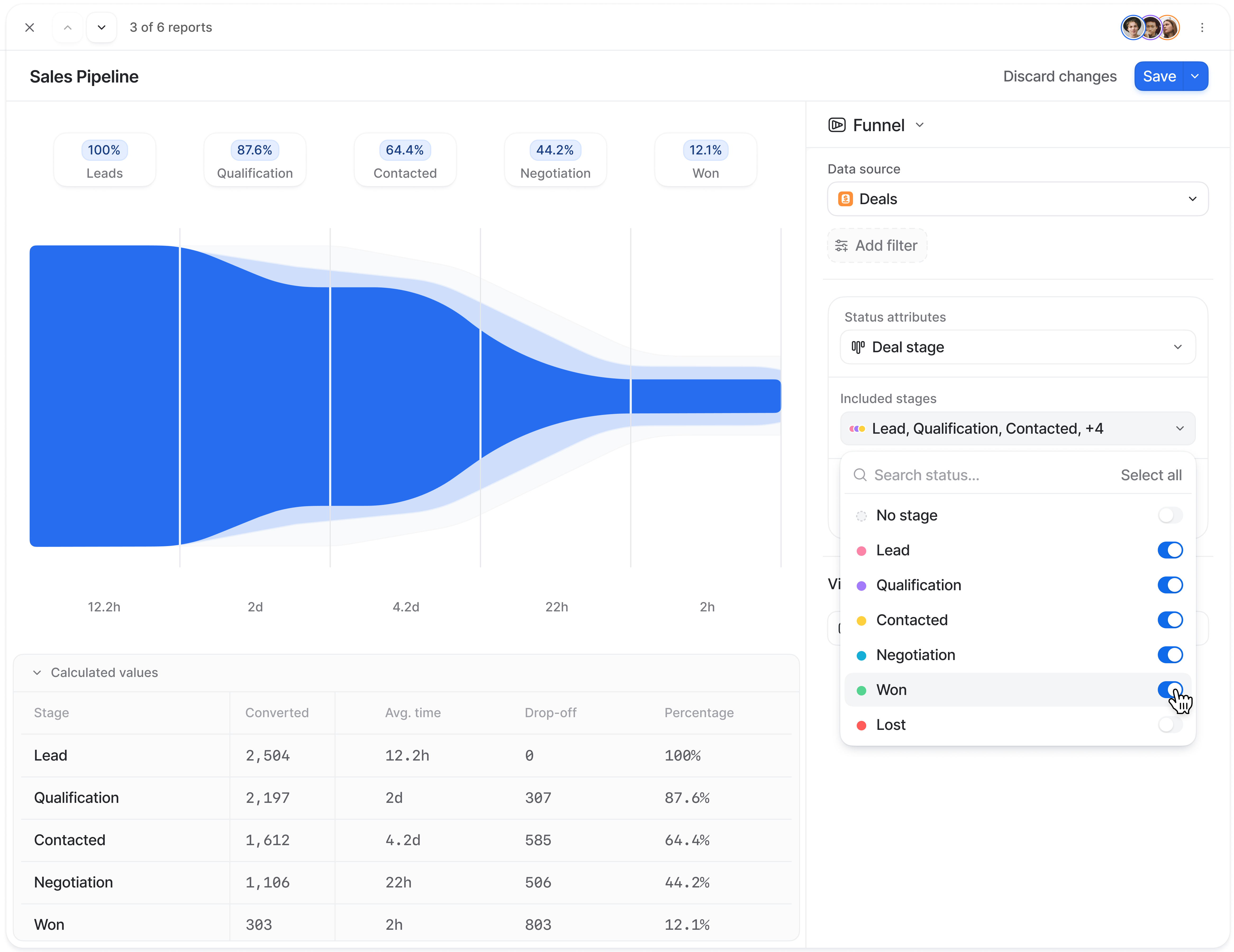
Verified: 15 Aug 2026
Open source ↗Screenshot · Attio
Supports
Demonstrates
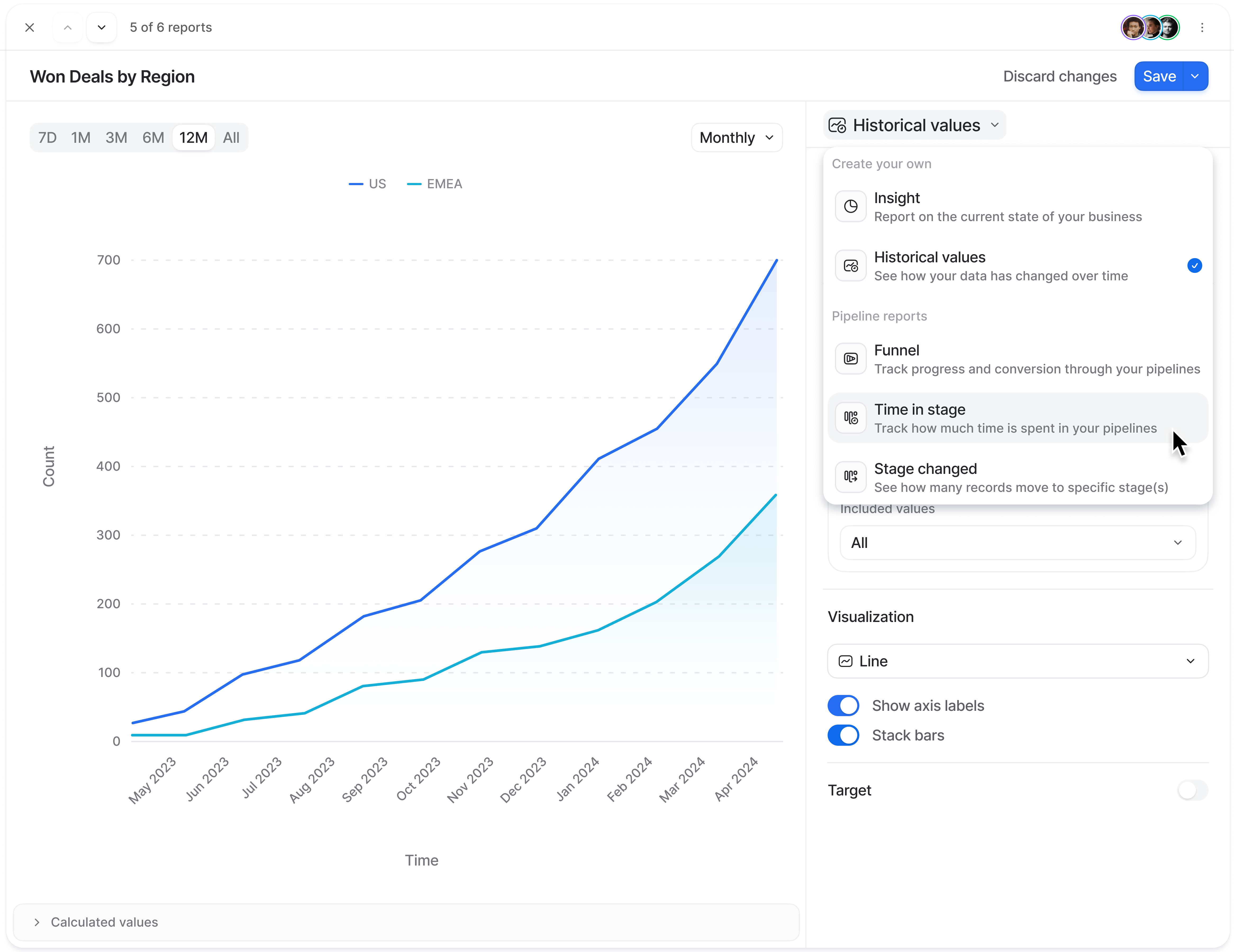
Verified: 15 Aug 2026
Open source ↗
