
Crm
Pipeline-first sales CRM for visual deal management, activity-based selling, and growing sales teams.
Business type / Growing teams
Graduate from spreadsheets with process light enough to adopt — and structured enough to scale.
At a glance
Scale process without killing adoption
Teams expanding past informal selling
Adoption · Pipeline · Onboarding new hires · Reporting
9 products to explore
Fit snapshot
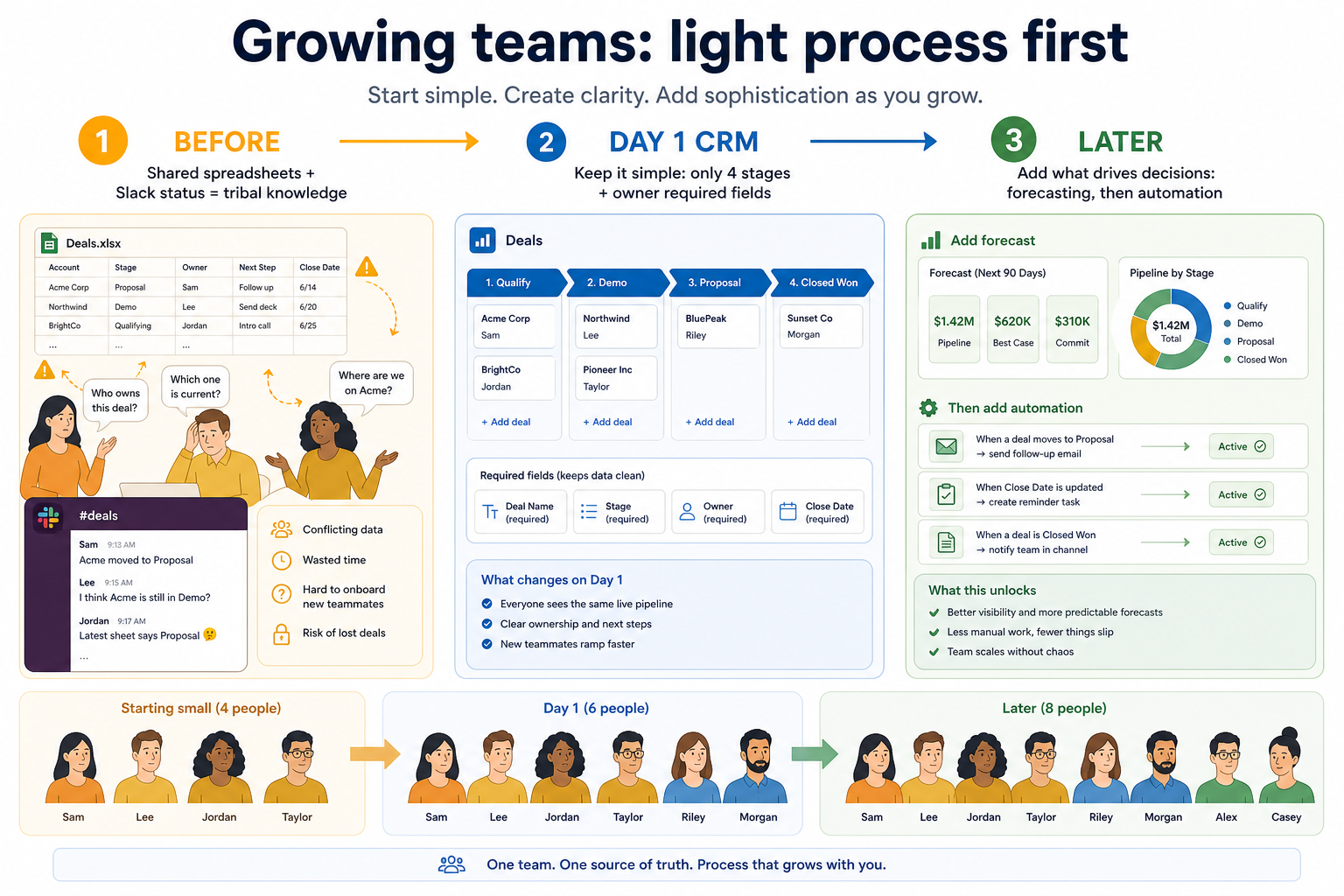
Growing teams hit a tipping point: informal ownership stops working. CRM should introduce stages and visibility without freezing the team in process bureaucracy.
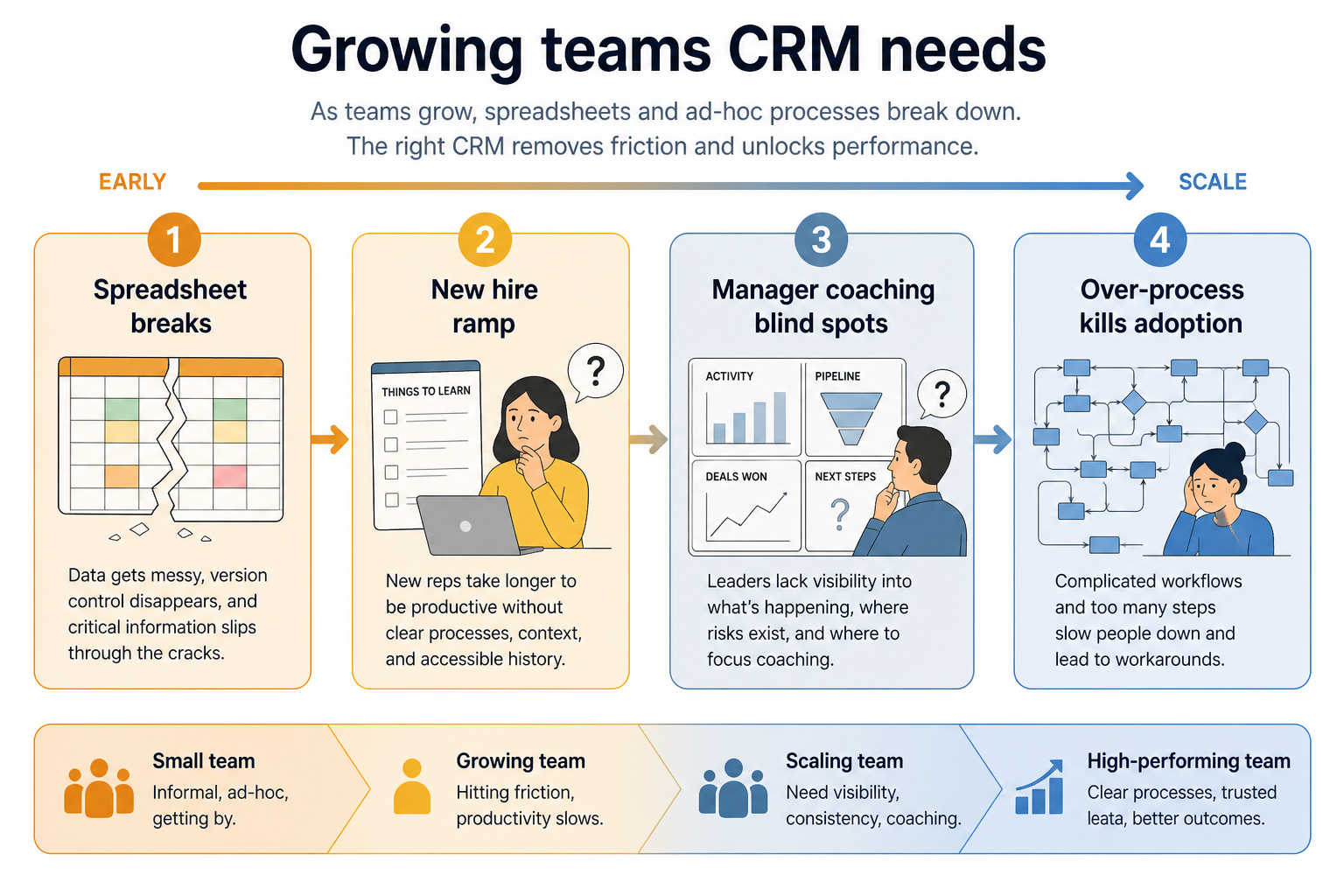
Teams that outgrew informal selling — spreadsheets, Slack status, and hallway updates no longer scale. You need light process that new hires can learn quickly, without freezing the team in bureaucracy.
How growing teams put CRM to work
Example 1
a team of eight
Before CRM
two new hires could not see deal status on the shared sheet
After CRM
four stages and mandatory next steps stick — forecasts come three months later, once hygiene is real
Example 2
an eight-person sales pod
Before CRM
two hires could not see deal status on the sheet
After CRM
four stages and mandatory next steps stick — forecast categories wait until hygiene is real for a month
These are the operating problems that usually push growing teams toward CRM — not feature wish lists.
Without CRM discipline: Conflicts, lost rows, and no single owner per deal.
Without CRM discipline: Ramp depends on shadowing and Slack archaeology.
Without CRM discipline: No shared board means no consistent pipeline review.
Without CRM discipline: Too many fields on day one; people revert to old habits.
A CRM only helps when the team keeps owners, history, and next steps current. Here is what “good” looks like for growing teams.
With a maintained CRM: CRM becomes the system of record with required ownership fields.
With a maintained CRM: History and next steps are visible on day one.
With a maintained CRM: A trusted board supports coaching without status theater.
With a maintained CRM: Launch tiny; expand configuration only after habits stick.
Everyone sees the same stages and owners.
Context is in the system, not only in people’s heads.
Automation and forecast come after hygiene.
Start with the minimum process that creates shared truth, then add automation and reporting as volume grows.
Missed handoffs and reconstruction meetings are the signal.
Explore →
Fewer fields, clearer owners, weekly hygiene.
Stages everyone can explain in one sentence.
Explore →
Do not demand forecasts before activity is trusted.
Explore →
Automate only workflows people already follow.
Explore →
Start with must-haves that match day-to-day work. Nice-to-haves can wait until the basics are trusted.
No orphan deals.
How a growing team leaves spreadsheets: light stages first, then reporting as hygiene sticks.
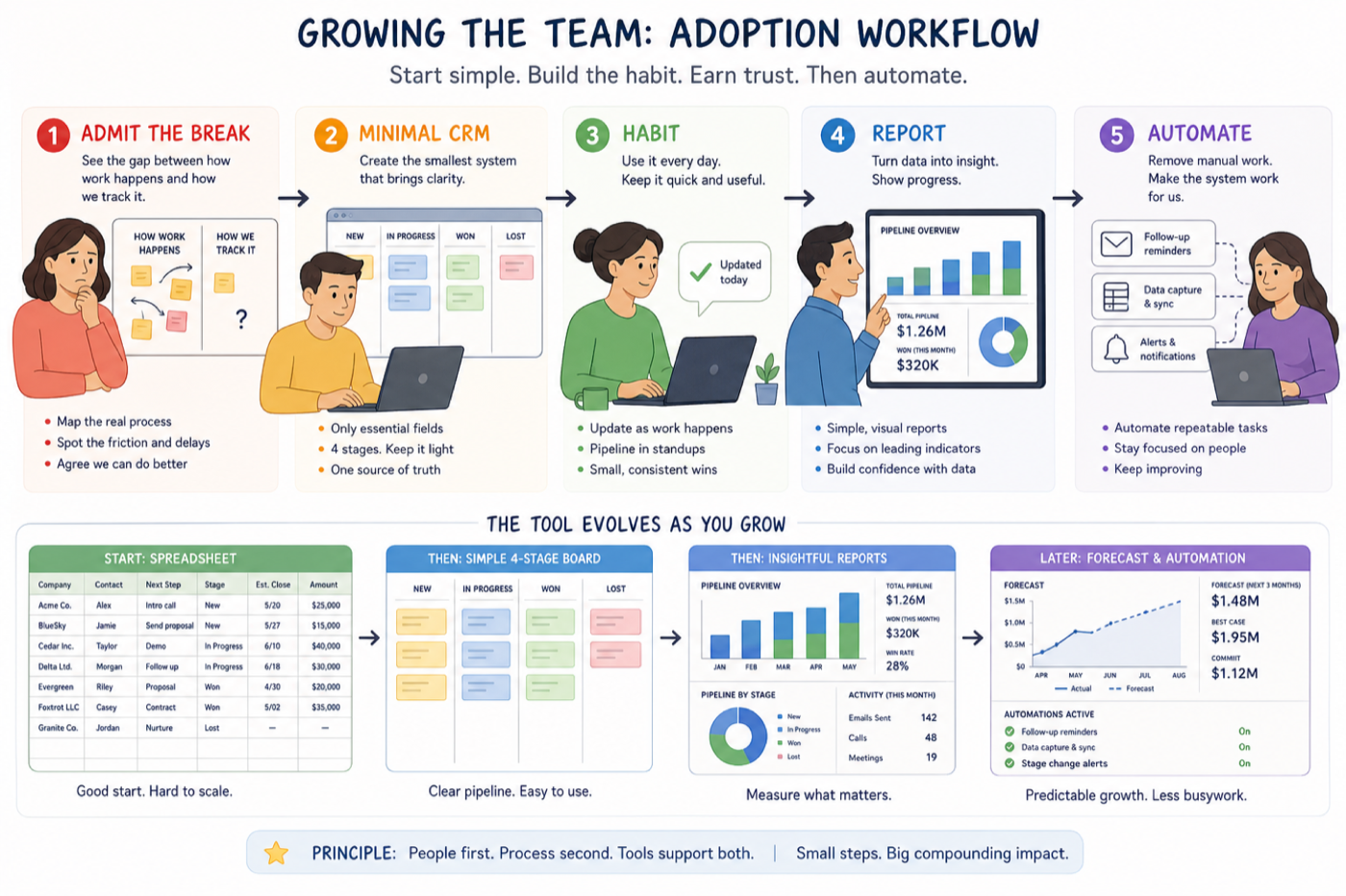
Name the spreadsheet / Slack failure modes.
Four stages, owner required, weekly review.
Measure logging and next-step completeness.
Add forecast only when data is trusted.
Layer automation on stable workflows.
Use these as decision checks — not as product rankings.
Good fit when
Team agrees on a short stage list
Good fit when
Someone will own weekly CRM hygiene
Usually avoid
Big-bang process redesign with no champions
Best when: Multiple editors and lost follow-ups are common.
Best when: New sellers need inherited context on day one.
Best when: Coaching needs a shared pipeline view.
These CRM products commonly fit growing teams. This is a starting shortlist to review — not a ranked best-of list. Affiliate relationships never change what appears here.
Crm
Pipeline-first sales CRM for visual deal management, activity-based selling, and growing sales teams.

Crm
Enterprise CRM platform for sales, service, marketing, and customer data across large and mid-market teams.

Crm
AI-powered customer platform with free forever CRM, plus paid Smart CRM seats and Sales/Marketing/Service hubs for growing teams.

Crm
Microsoft Dynamics 365 Sales CRM for pipeline management, forecasting, and Microsoft 365 / Copilot workflows.

Crm
Affordable multi-edition sales CRM with free tier, automation, and Zia AI across Standard through Ultimate.

Crm
Modern, flexible CRM for startups and GTM teams with a data-model-first workspace and AI assistance.

Crm
Google Workspace-native CRM for pipeline and relationship management inside Gmail and Google apps.
Work OS–style sales CRM from monday.com for visual pipelines, automations, and team collaboration.

Crm
Small-business CRM with pipelines, marketing add-ons, and AI assistance on a clear per-user ladder.
Lost follow-ups, unclear ownership, or forecast chaos — pick one primary pain.
Contacts, pipeline stages, email/calendar sync, reporting — skip vanity features.
Someone must own fields, users, and hygiene weekly. No owner → no CRM value.
Import a slice of live data and run a week of actual follow-ups — not a demo script.
Trial evaluation guide →Straightforward CRM for owners and small teams who need shared contacts and a simple pipeline.
CRM for early-stage teams that need speed, light process, and room to grow.
CRM for distributed sales teams that need shared pipeline visibility and activity discipline.
Track deals through stages, keep ownership clear, and see where opportunities stall.
Capture, qualify, and route leads before they become pipeline deals.
Reduce repetitive follow-ups with workflows that still need human judgment.
Next steps for growing teams evaluating CRM — decision tools and pages. Affiliate relationships never change recommendations.
Use Finder for a fit-based shortlist, compare catalogue products, or build a requirements checklist before demos. Affiliate relationships never change order.
Want clearer software shortlists? Get buying guides and comparisons by email.
Newsletter coming soon.