This video is hosted on YouTube
This content is hosted by YouTube. The player loads only after you allow marketing cookies.
CRM requirement
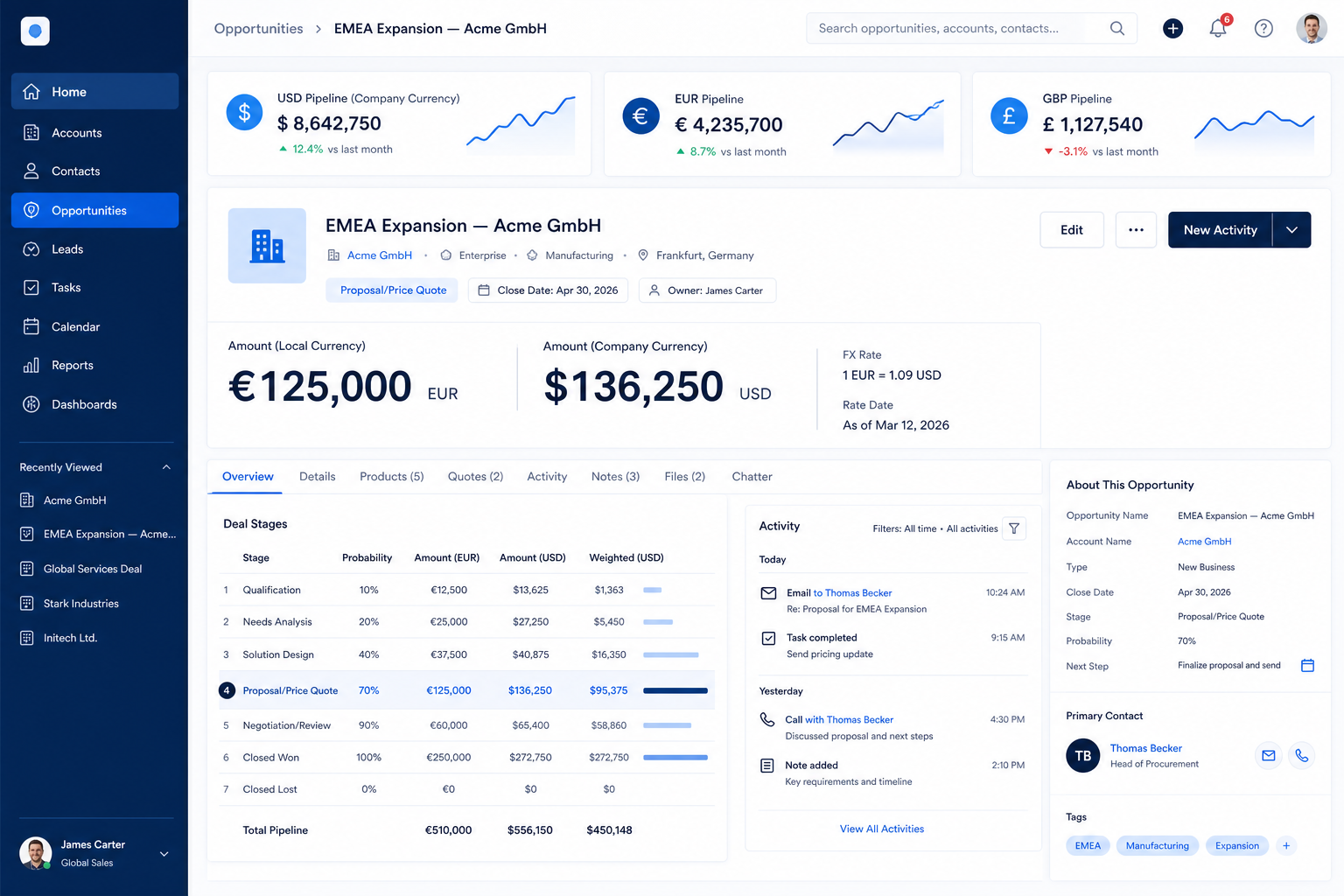
Price deals in local currency and still roll pipeline and forecast into one leadership number without a reconciliation spreadsheet.
Requirement at a glance
Requirement type
Administration / pricing
Primary capability
Pipeline management
Typical importance
Medium–High (context-dependent)
3
Core features
3
Supporting features
10
Products covered
Last reviewed 14 Aug 2026
Requirement snapshot
Multi-currency support means each opportunity can store value in the currency it is sold in, while reporting and forecasting can still produce totals in a chosen reporting currency. The hard part is not a currency dropdown — it is exchange-rate handling, when conversion is applied, and whether mixed-currency pipelines remain trustworthy in weekly reviews. Teams that fake this with notes or separate boards spend every forecast cycle reconciling instead of coaching.
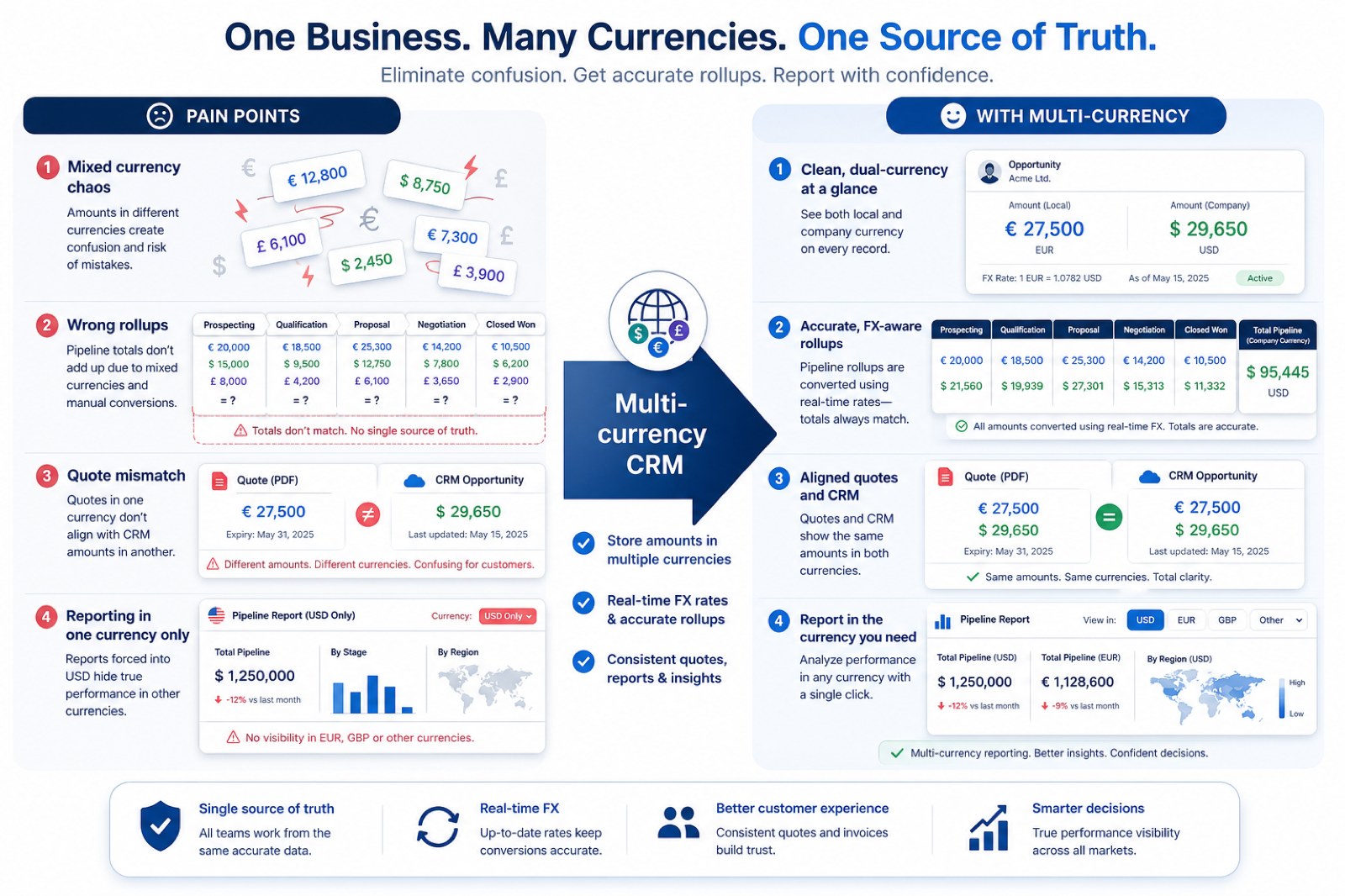
Global SaaS sales leaders, multi-country agencies, and exporters whose AEs close in EUR, GBP, USD, and local currencies while finance and leadership need one pipeline view. It matters once mixed currencies appear in the same forecast meeting — not when every deal is already in one home currency.
How teams satisfy “support multiple currencies” in practice
Example 1
a SaaS company with US, UK, and DACH AEs
Before CRM
EUR and GBP deals were typed as USD “equivalents” in a sheet; Monday forecast changed whenever someone updated FX
After CRM
each deal stores native currency and reporting converts to USD with a documented rate policy — reviews argue about stages, not spreadsheet math
Example 2
a multi-country agency billing retainers in local currency
Before CRM
pipeline boards were split by office so leadership never saw one book of business
After CRM
one pipeline shows native amounts with a reporting-currency total, and finance can reconcile without re-keying deals
These are the operating problems that usually push teams to require “support multiple currencies” from a CRM — not feature wish lists.
Without this capability in CRM: Leadership sums EUR and USD as if they were the same unit and trusts a nonsense number.
Without this capability in CRM: Forecast meetings stall while someone pastes rates from a browser tab.
Without this capability in CRM: Managers lose cross-region visibility and duplicate hygiene work.
Without this capability in CRM: Commit numbers shift when someone “updates FX” without changing deal reality.
A CRM only satisfies “support multiple currencies” when the team keeps owners, history, and next steps current. Here is what “good” looks like once the requirement is met.
When this requirement is satisfied: Deal currency plus reporting conversion or grouping keeps totals on an explicit basis.
When this requirement is satisfied: Configurable or synced rates with a clear policy make conversion repeatable.
When this requirement is satisfied: One pipeline with currency on the deal replaces fragmented regional lists.
When this requirement is satisfied: Forecast views that declare reporting currency reduce accidental restatement.
Deals priced in the currency sold
AEs stop translating locally won amounts into approximate home-currency guesses.
One leadership rollup
Pipeline and forecast meetings share a documented reporting-currency total.
Less weekly FX reconciliation
Finance and sales argue about stages and risk — not paste errors.
Clearer historical amounts
You know whether past deals keep entry-time conversion or restate with new rates.
Start with must-haves your team will use weekly to accept this requirement as met. Treat nice-to-haves as later upgrades — not day-one blockers.
Must-have
Deal value and currency are first-class fields — not a note or a custom text hack.
Learn more →Reports can group by currency and/or convert into a chosen reporting currency.
Learn more →Forecast views declare how mixed-currency deals contribute to the commit number.
Learn more →You can see how rates are set, how often they update, and when conversion applies.
Nice-to-have
Administrators can enable the currencies you sell in without a custom engineering project.
Learn more →You can keep CRM amounts coherent with invoicing or ERP currency rules where required.
Learn more →A simple validation loop beats a long checklist nobody runs during a trial.
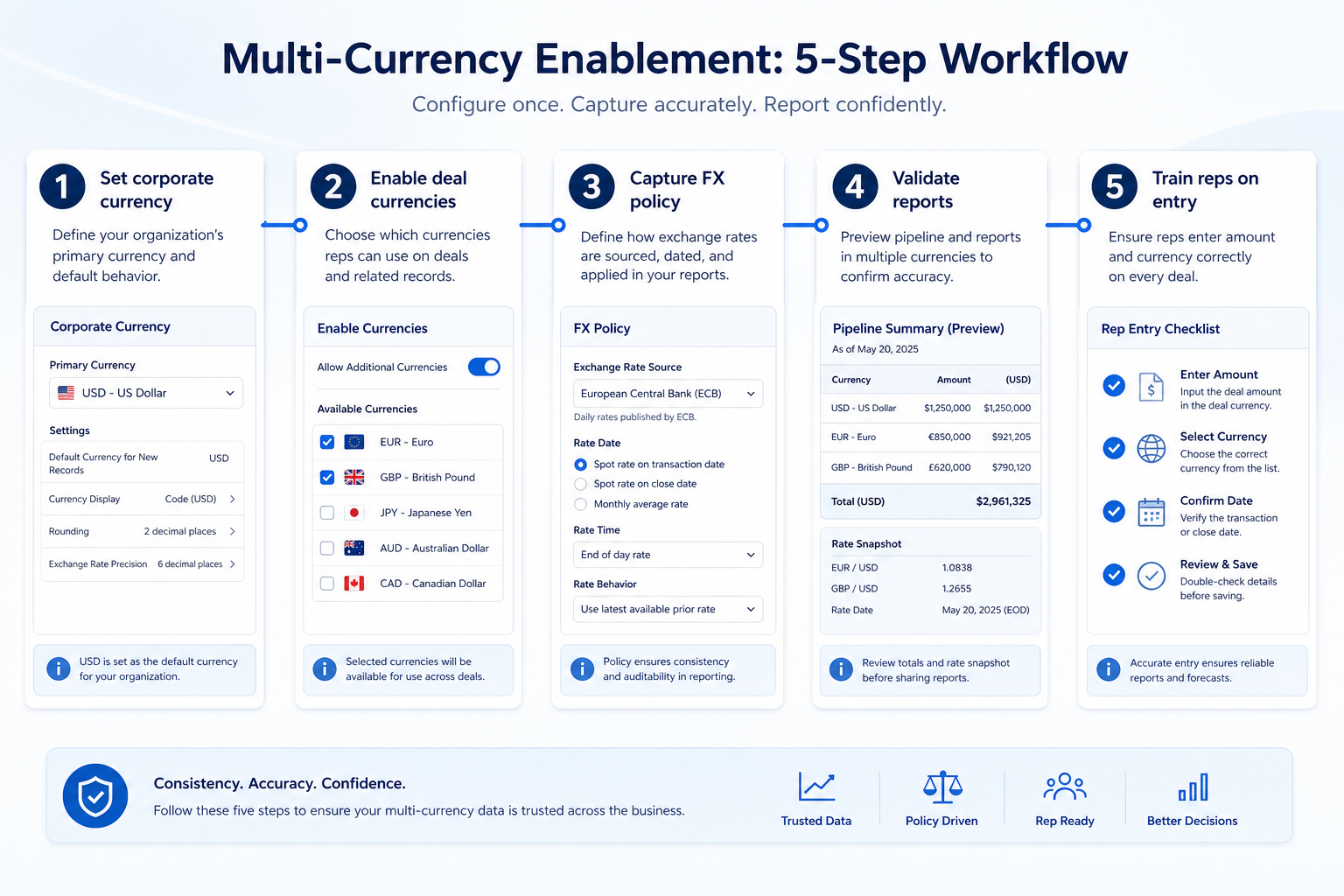
Name every currency that appears on real quotes today — including edge regional deals.
Decide home currency, who owns rates, and whether historical deals restate when rates move.
In trial, create deals in at least two currencies with realistic amounts and stages.
Open the same views leadership will use; confirm totals and currency labels match the policy.
Update a rate (or wait for a sync) and observe whether open vs closed amounts behave as expected.
Multi-currency matters when deals are priced in different currencies and leadership still needs one pipeline or forecast number. Check whether currency is a first-class deal field, whether reporting can convert or group by currency, and which plan includes that behaviour — then confirm exchange-rate handling rather than assuming it.
You probably need this if
You may not need this if
Trustworthy totals
Mixed currencies without a conversion or grouping rule produce pipeline numbers nobody should plan against.
Regional selling
Local teams can price in the currency buyers expect without breaking company-wide reporting.
Forecast quality
Forward views inherit deal currency; a shared basis keeps commitments comparable.
Finance alignment
CRM opportunity values that ignore currency create reconciliation work later.
Use cases
3 linkedCapability
Pipeline managementRequirement
Support Multiple CurrenciesFeatures
6 relatedProducts
10 evaluatedDeal-level currency
Can each opportunity store a currency alongside its value?
Reporting across currencies
Can reports group by currency or convert amounts into a reporting currency?
Forecast currency basis
Can forecasts use a consistent currency when deals are mixed?
Exchange-rate handling
Are rates configurable, synced, or left to the buyer — and when do they apply?
Plan and object limits
Is multi-currency available on the intended plan, and on which objects?
Core features
Deal Management
CriticalDeal value and currency live on the opportunity record the requirement depends on.
Evidence across catalogue products: Docs · Screenshots · Official demos
Explore feature →Reporting
ImportantLeadership needs totals that group or convert across currencies, not a list of mixed amounts.
Evidence across catalogue products: Docs · Screenshots · Official demos
Explore feature →Forecasting
ImportantForward revenue views inherit deal currency; inconsistent basis makes forecasts unusable.
Evidence across catalogue products: Docs · Screenshots · Official demos
Explore feature →Supporting features
Custom Fields
SupportingTeams sometimes add currency or FX-related fields when native multi-currency options are limited.
Evidence across catalogue products: Docs · Screenshots · Official demos
Explore feature →Integrations
OptionalAccounting or ERP systems may own rates and invoices that must stay aligned with CRM values.
Evidence across catalogue products: Docs · Screenshots · Official demos
Explore feature →Analytics
OptionalHelps review conversion assumptions and historical revenue by currency over time.
Evidence across catalogue products: Docs · Screenshots · Official demos
Explore feature →See how CRM products support support multiple currencies. Official product demonstrations can help show how supporting features work in practice. SoftwareGlimpse evaluates these alongside documentation, screenshots and plan evidence — video availability does not change rankings.

Official video · Creatio
Source: Creatio
This video is hosted on YouTube
This content is hosted by YouTube. The player loads only after you allow marketing cookies.
What this demonstrates
Features demonstrated
Not established by this video
Verified: 2026-08-15
Open official source ↗
Official video · Oracle CX
Source: Oracle

This video is hosted on YouTube
This content is hosted by YouTube. The player loads only after you allow marketing cookies.
What this demonstrates
Features demonstrated
Not established by this video
Verified: 2026-08-15
Open official source ↗
Official video · SugarCRM
Source: SugarAI

This video is hosted on YouTube
This content is hosted by YouTube. The player loads only after you allow marketing cookies.
What this demonstrates
Features demonstrated
Not established by this video
Verified: 2026-08-15
Open official source ↗Fit reflects feature support for this requirement — not affiliate status. Insufficient evidence is never treated as failure.
Creatio
Strong supportVisual evidence available
Key strength: Deal Management: supported
Why this fit?Oracle CX
Strong supportVisual evidence available
Key strength: Deal Management: supported
Why this fit?SugarCRM
Strong supportVisual evidence available
Key strength: Deal Management: supported
Why this fit?
Close
Strong supportVisual evidence available
Key strength: Deal Management: supported
Why this fit?
Affinity
Strong supportVisual evidence available
Key strength: Deal Management: supported
Why this fit?
Agile CRM
Strong supportKey strength: Deal Management: supported
Why this fit?Each cell reflects feature support for that criterion. Open Why? for documentation, screenshots, and official videos mapped to that criterion only — video counts never change the assessment.
| Criterion | Creatio | Oracle CX | SugarCRM | Close | Affinity | Agile CRM |
|---|---|---|---|---|---|---|
| Deal-level currency | Strong 2 docs · 2 videos | Strong 2 docs · 2 videos | Strong 2 docs · 2 videos | Strong 1 docs · 2 videos | Strong 2 docs · 1 video | Strong 2 docs |
| Reporting across currencies | Strong 2 docs | Strong 2 docs | Strong 2 docs | Strong 2 docs · 2 screenshots | Strong 2 docs | Strong 2 docs |
| Forecast currency basis | Strong 4 docs · 2 videos | Strong 4 docs · 2 videos | Strong 4 docs · 2 videos | Strong 2 docs · 2 videos | Strong 2 docs · 1 video | Strong 2 docs |
| Exchange-rate handling | Strong 4 docs · 2 videos | Strong 4 docs · 2 videos | Strong 4 docs · 2 videos | Strong 2 docs · 2 videos | Strong 4 docs · 1 video | Strong 4 docs |
| Plan and object limits | Strong 4 docs · 2 videos | Strong 4 docs · 2 videos | Strong 4 docs · 2 videos | Strong 2 docs · 1 screenshots · 2 videos | Strong 4 docs · 1 video | Strong 4 docs |
| Overall / plan | StrongGrowthConfidence: High | StrongProfessionalConfidence: High | StrongStandardConfidence: High | StrongSoloConfidence: High | StrongEssentialConfidence: High | StrongFreeConfidence: High |
Structured evaluation — not media-driven. Video helps illustrate implementation; it does not determine who ranks higher.
| Criterion | Creatio | Oracle CX | SugarCRM |
|---|---|---|---|
| Deal-level currency | Strong support | Strong support | Strong support |
| Reporting across currencies | Strong support | Strong support | Strong support |
| Forecast currency basis | Strong support | Strong support | Strong support |
| Exchange-rate handling | Strong support | Strong support | Strong support |
| Plan and object limits | Strong support | Strong support | Strong support |
Official video · Creatio
Source: Creatio
This video is hosted on YouTube
This content is hosted by YouTube. The player loads only after you allow marketing cookies.
What this demonstrates
Features demonstrated
Not established by this video
Verified: 2026-08-15
Open official source ↗Official video · Oracle CX
Source: Oracle
This video is hosted on YouTube
This content is hosted by YouTube. The player loads only after you allow marketing cookies.
What this demonstrates
Features demonstrated
Not established by this video
Verified: 2026-08-15
Open official source ↗SoftwareGlimpse interpretation
These official demos illustrate visible product behavior for mapped criteria and features. Fit and ranking still come from structured feature assessments — not from which demo looks smoother.
Unknown / not verified is never treated as unsupported.
| Feature | |||||
|---|---|---|---|---|---|
| Deal management | |||||
| Reporting | |||||
| Forecasting | |||||
| Custom fields | |||||
| Integrations | |||||
| Analytics |
Creatio for support multiple currencies
Strong supportEvidence confidence: High
Plan required: Growth
Plan availability comes from official pricing / plan documentation — not from feature demos.
Why
Trade-offs
See it in action
View all evidence →Oracle CX for support multiple currencies
Strong supportEvidence confidence: High
Plan required: Professional
Plan availability comes from official pricing / plan documentation — not from feature demos.
Why
Trade-offs
See it in action
View all evidence →SugarCRM for support multiple currencies
Strong supportEvidence confidence: High
Plan required: Standard
Plan availability comes from official pricing / plan documentation — not from feature demos.
Why
Trade-offs
See it in action
View all evidence →Close for support multiple currencies
Strong supportEvidence confidence: High
Plan required: Solo
Plan availability comes from official pricing / plan documentation — not from feature demos.
Why
Trade-offs
See it in action
View all evidence →Affinity for support multiple currencies
Strong supportEvidence confidence: High
Plan required: Essential
Plan availability comes from official pricing / plan documentation — not from feature demos.
Why
Trade-offs
See it in action
View all evidence →Plan names come from feature entitlements on the features that support this requirement. Pricing estimates appear only when verified — otherwise use the Cost Calculator.
| Product | Minimum qualifying plan | Core coverage | Confidence |
|---|---|---|---|
| Creatio | Growth | 3/3 | High |
| Oracle CX | Professional | 3/3 | High |
| SugarCRM | Standard | 3/3 | High |
| Close | Solo | 3/3 | High |
| Affinity | Essential | 2/2 | High |
| Agile CRM | Free | 2/2 | High |
Take this checklist into every vendor session and ask each product to demonstrate the same scenario. Your results stay in your vendor scorecard — they do not rewrite SoftwareGlimpse recommendations.
Objective
Verify that the product can satisfy: Record opportunity values in more than one currency and still produce trustworthy pipeline, reporting, and forecast totals for leadership.
Preconditions
Ask the vendor to demonstrate
What good support looks like
Failure signals
Follow-up questions
Official vendor example
An official product video can show an example of the behavior — it does not substitute for your own vendor demo.
Official video · Creatio
Source: Creatio
This video is hosted on YouTube
This content is hosted by YouTube. The player loads only after you allow marketing cookies.
What this demonstrates
Features demonstrated
Not established by this video
Verified: 2026-08-15
Open official source ↗Record what happened in the live session. This is your evaluation — not SoftwareGlimpse recommendations.
Multi-region pipeline
Teams sell in local currencies and leadership wants one weekly pipeline review.
Priorities: Deal currency field · Reporting conversion or grouping · Shared dashboards
Best recommended fit: Creatio
One reporting currency
Finance requires all CRM totals in a home currency even when quotes are local.
Priorities: Exchange-rate rules · Converted reports · Auditability
Best recommended fit: Creatio
Forecast across currencies
Period commitments must combine deals priced in several currencies without double-counting or silent FX drift.
Priorities: Forecast basis · Rate timing · Accuracy review
Best recommended fit: Creatio
Native multi-currency vs custom fields
Native currency fields and conversion are safer for reporting; custom fields are flexible but easy to misuse in totals.
Live rates vs locked rates
Live conversion keeps reports current; locking at quote or close preserves the commercial number that was agreed.
Plan impact
Multi-currency support is commonly plan-limited and may apply only to certain objects.
Pipeline management
CriticalOne board only works globally when deal currency does not corrupt stage totals.
Explore use case →Sales forecasting
CriticalCommit numbers need a declared currency basis when regions price differently.
Explore use case →Reporting
HighRevenue and pipeline reports must group or convert — not sum mixed symbols.
Explore use case →Add this requirement to CRM Finder and personalize for team size, budget, and other priorities.
Add this requirement to CRM FinderLoading evidence explorer…
SoftwareGlimpse assesses whether products satisfy a requirement by evaluating the specific criteria and features needed to meet that buyer need. Official vendor demonstrations may be used as evidence of visible product behavior, but video availability does not influence product ranking and videos are not used alone to establish pricing, plan entitlement, security or comparative superiority.
10
Products covered
6
Supporting features
560
Evidence records
0
Screenshots
6
Official videos
Buyer need
Support Multiple Currencies
Capability
Pipeline management
Criteria
5 evaluation criteria
Features
3 core · 3 supporting
Products
10 researched
Usually not for leadership reporting. A text or picklist without conversion-aware reporting still forces spreadsheet rollups. Treat native deal currency plus reporting behavior as the bar.
If leadership still wants one number, yes at small volume — exceptions are where reconciliation pain starts. If foreign deals are rare and reviewed separately, you may defer until mix grows.
Not always. Many teams let finance own rates and need CRM either to accept admin-set rates or to stay clearly labeled as approximate for sales. Align the policy before go-live.
Forecast commit views inherit deal currency. If conversion is unclear, forecast meetings become FX debates. Validate forecasting on the same mixed sample set as pipeline reporting.
Compare catalogue CRM products based on this requirement plus your other needs, team size and budget.
Browse documentation, screenshots, and official vendor videos by requirement criterion and feature. Video quantity does not change product fit.
SoftwareGlimpse assesses whether products satisfy a requirement by evaluating the specific criteria and features needed to meet that buyer need. Official vendor demonstrations may be used as evidence of visible product behavior, but video availability does not influence product ranking and videos are not used alone to establish pricing, plan entitlement, security or comparative superiority.
6 items
Official video · attio
Source: Attio
Evidence chain
Support Multiple Currencies → attio
Supports
Demonstrates
Does not establish
Official video may support visible behavior for mapped criteria only — not pricing, plan entitlement, or full requirement support.

This video is hosted on YouTube
This content is hosted by YouTube. The player loads only after you allow marketing cookies.
Official vendor tutorial
Verified: 15 Aug 2026
Open source ↗Official video · bitrix24
Source: Bitrix24
Evidence chain
Support Multiple Currencies → bitrix24
Supports
Demonstrates
Does not establish
Official video may support visible behavior for mapped criteria only — not pricing, plan entitlement, or full requirement support.

This video is hosted on YouTube
This content is hosted by YouTube. The player loads only after you allow marketing cookies.
Official vendor tutorial
Verified: 15 Aug 2026
Open source ↗Official video · capsule
Source: Capsule
Evidence chain
Support Multiple Currencies → capsule
Supports
Demonstrates
Does not establish
Official video may support visible behavior for mapped criteria only — not pricing, plan entitlement, or full requirement support.

This video is hosted on YouTube
This content is hosted by YouTube. The player loads only after you allow marketing cookies.
Official vendor tutorial
Verified: 15 Aug 2026
Open source ↗Official video · capsule
Source: Capsule
Evidence chain
Support Multiple Currencies → capsule
Supports
Demonstrates
Does not establish
Official video may support visible behavior for mapped criteria only — not pricing, plan entitlement, or full requirement support.

This video is hosted on YouTube
This content is hosted by YouTube. The player loads only after you allow marketing cookies.
Official vendor tutorial
Verified: 15 Aug 2026
Open source ↗Official video · capsule
Source: Capsule
Evidence chain
Support Multiple Currencies → capsule
Supports
Demonstrates
Does not establish
Official video may support visible behavior for mapped criteria only — not pricing, plan entitlement, or full requirement support.

This video is hosted on YouTube
This content is hosted by YouTube. The player loads only after you allow marketing cookies.
Official vendor tutorial
Verified: 15 Aug 2026
Open source ↗Official video · capsule
Source: Capsule
Evidence chain
Support Multiple Currencies → capsule
Supports
Demonstrates
Does not establish
Official video may support visible behavior for mapped criteria only — not pricing, plan entitlement, or full requirement support.
This video is hosted on YouTube
This content is hosted by YouTube. The player loads only after you allow marketing cookies.
Official vendor tutorial
Verified: 15 Aug 2026
Open source ↗