
This video is hosted on YouTube
This content is hosted by YouTube. The player loads only after you allow marketing cookies.
Give the company real phone numbers, shared answering, and a call record — instead of routing customers to personal mobiles.
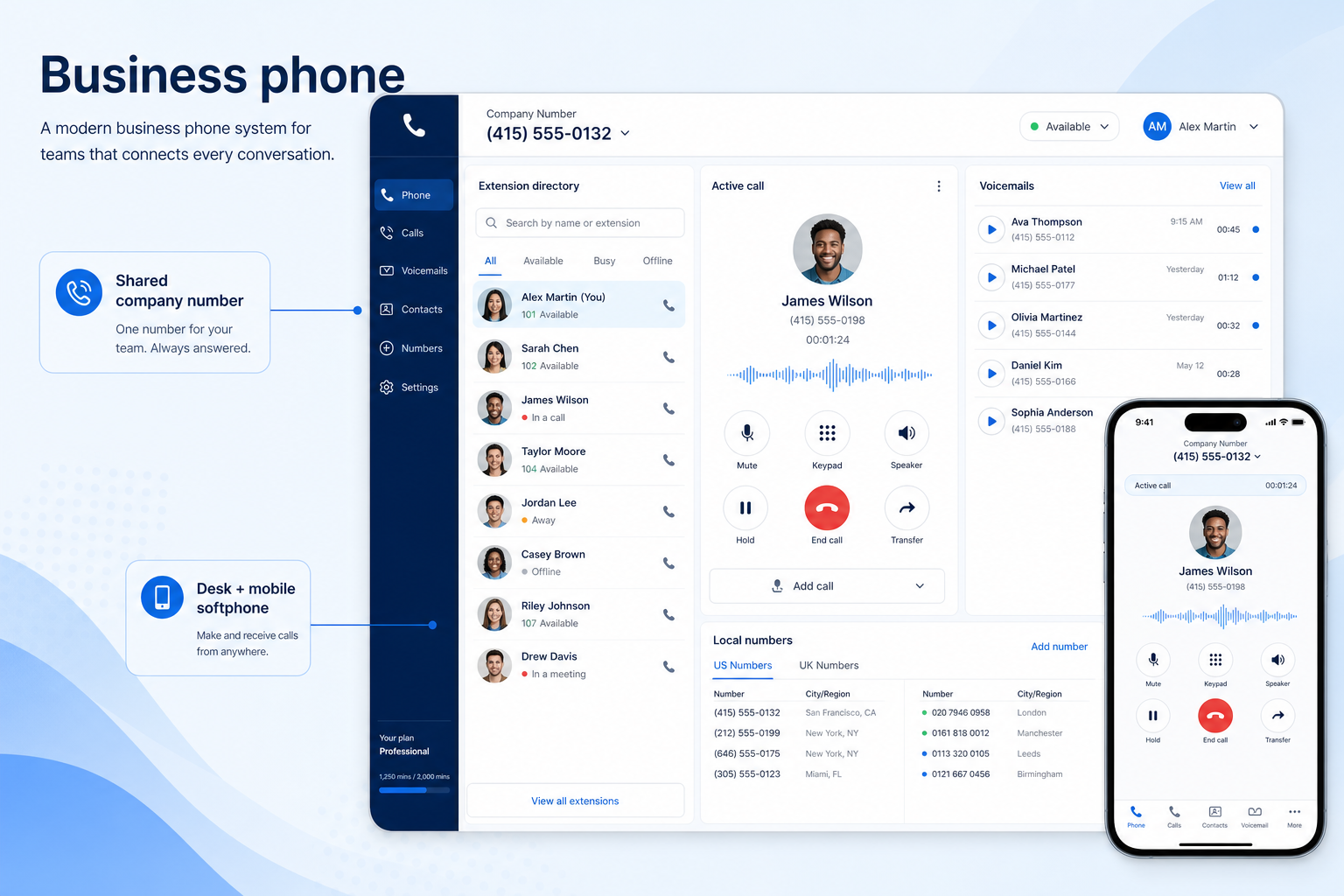
At a glance
Reliable business numbers with shared answering and complete call records
Small businesses, agencies, professional services, multi-site operations
Number coverage · Licence minimums · Call quality · Shared answering
9 products to explore
Fit snapshot
Business phone is the job of running company phone lines on software: provisioning or porting numbers, answering from a softphone or mobile app, sharing calls across a team, and logging every conversation somewhere the business can see it. It replaces the arrangement most small companies start with, where one person's mobile is effectively the customer service line.
Small and mid-sized businesses moving off personal mobiles or a legacy PBX, and teams that have grown past the point where one person can reasonably answer everything. You need numbers, shared answering, and a record — not necessarily a full contact centre.
How teams put business communications software to work for business phone
Example 1
Harbor Studio, an eight-person agency. Before a phone system, the office manager's mobile was the published number and holidays meant missed client calls. After, one main number rings a shared queue, voicemails land in a list with an owner, and every call appears against the client record — so cover is a rota question rather than a crisis.
Example 2
a two-person consultancy that only needs business numbers separate from personal ones. A licence minimum of three would mean paying for a seat nobody uses — which is why minimums belong on the requirements sheet, not the negotiation.
These are the operating problems that usually push teams toward business communications software for business phone — not feature wish lists.
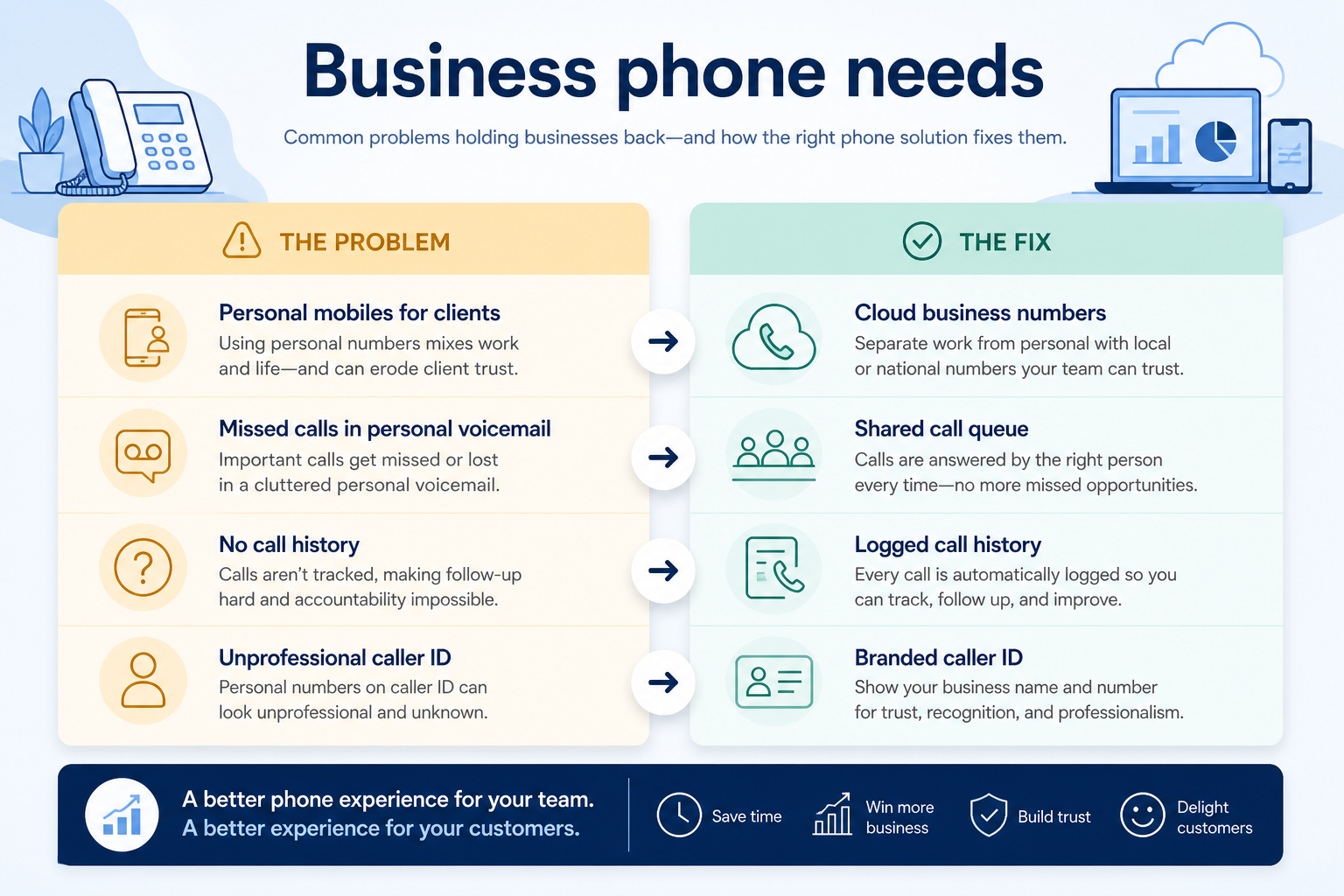
Without communications discipline: Customer relationships leave with the phone, and nobody else can pick up.
Without communications discipline: Missed calls become lost work with no trace they happened.
Without communications discipline: Follow-ups get duplicated or dropped between colleagues.
Without communications discipline: Answer rates drop when the number does not look local.
Fit depends on operating the business communications software with clear owners and hygiene. Here is what “good” looks like for business phone.
With the right communications setup: Company-owned numbers and softphone licences keep the line with the business.
With the right communications setup: Shared answering, queues, and after-hours rules give every call a destination.
With the right communications setup: Automatic logging attaches calls to the customer record without retyping.
With the right communications setup: Local number provisioning gives regional presence without regional offices.
Calls survive absence
Cover is a rota, not a personal favour.
Every call leaves a record
History lives with the customer, not in a call log on someone's phone.
Professional presence
Published numbers, greetings, and voicemail that match the business.
Numbers belong to the company
Staff changes no longer put a customer line at risk.
Prioritise number coverage in the countries you operate in, licence minimums against your real headcount, call quality on the networks your team actually uses, and whether calls log into your CRM without manual entry.
A missing country ends the evaluation before features matter.
Test on the networks your team really uses.
Automatic write-back prevents a second system to maintain.
Start with must-haves your team will use weekly. Treat nice-to-haves as later upgrades — not day-one blockers.
Must-have
Nice-to-have
Understand what needs to happen before comparing how products implement each step. Support overlays use structured research — never video inference.
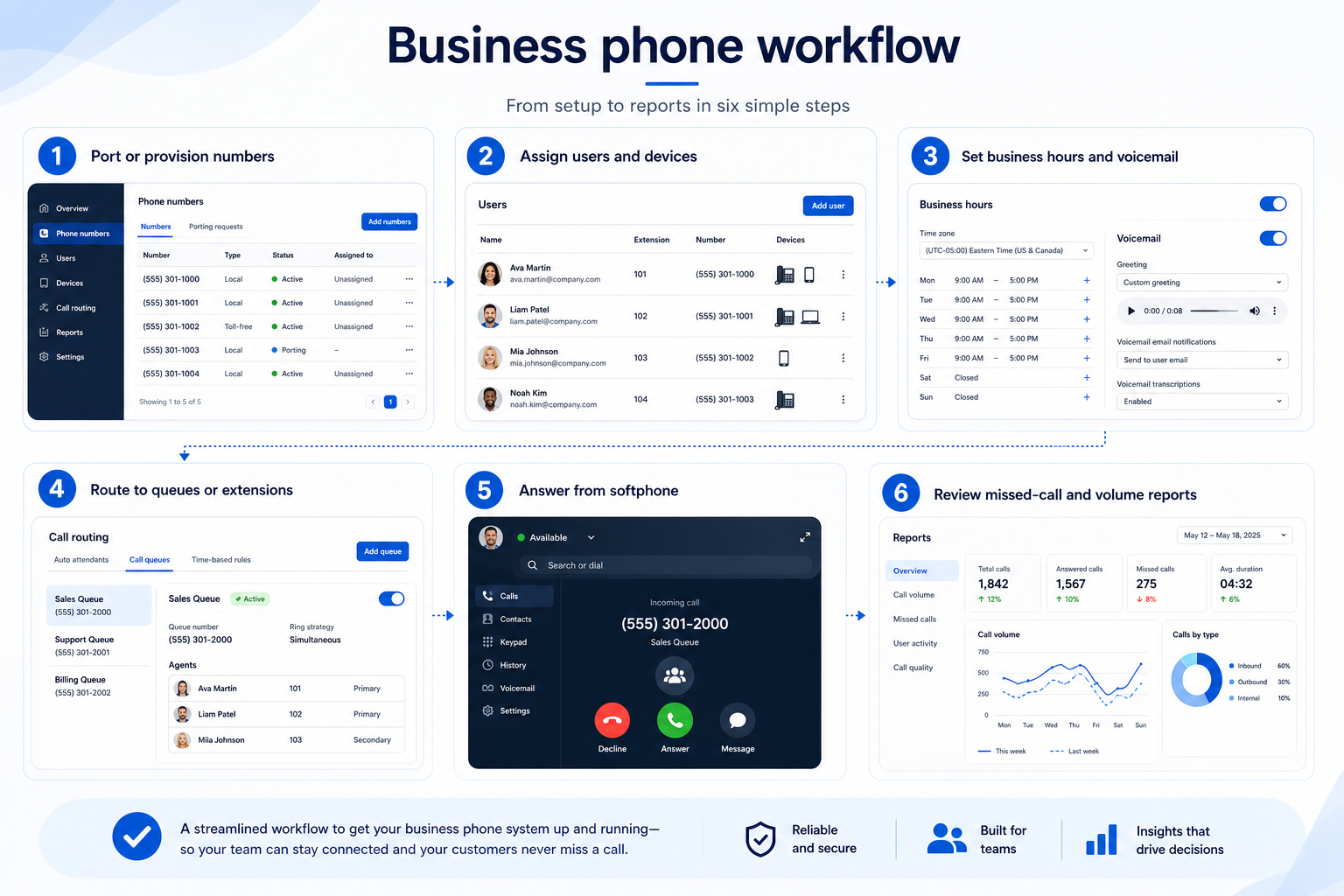
Support labels come from structured feature research — not from videos.
Objective
Working business numbers customers can reach.
Next step
Next step
Next step
Next step
Official product demonstrations can help show how different communications platforms handle the business phone workflow. Absence of a video does not mean a product lacks support for this use case.

HubSpot
The Official HubSpot Sales Hub Tutorial
Lead management workflow — capture through assignment and follow-up
This video is hosted on YouTube
This content is hosted by YouTube. The player loads only after you allow marketing cookies.
What this demonstrates
Workflow coverage
Coverage describes what the demo shows — not product support status.
What to notice
This demonstration does not establish
Related capabilities
Features visible in this demo
Source: HubSpot · Verified 14 Aug 2026
Compare two products against the same workflow using researched assessments. Official demos help you see the workflow — they do not change support status.
HubSpot
This video is hosted on YouTube
This content is hosted by YouTube. The player loads only after you allow marketing cookies.
What to notice
Not shown in this demo

Pipedrive

Pipedrive’s sales CRM product view as shown on the official site.
What to notice
Not shown in this demo
Canonical feature assessments for this workflow — not inferred from demos.
| Step | HubSpot | Pipedrive |
|---|---|---|
| Provision numbers | Unknown | Unknown |
| Set answering rules | Unknown | Unknown |
| Connect the CRM | Unknown | Unknown |
| Roll out to the team | Unknown | Unknown |
| Review weekly | Unknown | Unknown |
Based on the business phone workflow, buyers commonly evaluate the checklist below. Nothing is written to your decision profile until you confirm in the tool.
Context: useCase=business-phone — tools apply this only after your confirmation.
Best when
Client calls must be shared and logged against the account.
Best when
One published number needs to route to the right location.
Best when
Staff work across countries and need local numbers.
If the blocking channel is WhatsApp, evaluate a messaging platform instead.
Learn more →Coverage and minimums decide feasibility before features.
Learn more →Catalogue products that list business phone as a supported use case. Inclusion here is not a ranking. Official demo counts never change ranking.

Voip Business Phone
AI-powered sales dialer and business phone platform for CRM-connected outbound calling, SMS, and coaching.

Voip Business Phone
Mid-market cloud phone and customer-conversation platform with deep CRM/helpdesk CTI, IVR, power dialer on Professional, and paid AI add-ons — 3-licence minimum.

Voip Business Phone
SMB cloud phone system with a $0 starter rung, Starter from $18/user/month annual (2-user minimum), call recording and IVR from Professional, plus a separate call-centre plan ladder.

Voip Business Phone
Budget global cloud telephony with virtual numbers across 100+ countries and a unified callbox — Essential from $12/user/month annual (up to 5 users); calls and SMS are pay-as-you-go.

Voip Business Phone
Freshworks cloud PBX for inbound voice support: a $0 agent plan plus pay-per-minute, Growth from $15/agent/month annual with 2,000 included incoming minutes, and routing automation higher up.

Business Communications
Enterprise-grade UCaaS / cloud phone platform (RingEX) with deep call routing, video, team messaging and contact-centre options — Core from ~$20/user/month annual.

Business Communications
AI-first cloud phone (Dialpad Connect) with included transcription/summaries — Standard from $15/user/month annual; Sell and Support are separate product ladders.

Business Communications
Meetings-first Workplace suite plus Zoom Phone UCaaS — Phone US/CA Unlimited research floor ~$15–16/user/month; free meetings/chat exist but Phone is paid.

Business Communications
SMB-friendly unified business communications — Core $15, Engage $25, Scale $75 per user/month annual, with messaging apps including WhatsApp and a Contact Center ladder from $75/agent.
Usually yes, through porting — but support varies by country and number type, and timelines run from days to weeks. Confirm porting for your specific number before committing, and keep the old line active until the port completes.
If a handful of people answer calls and a simple ring group or menu covers routing, a cloud phone system is enough. Contact-centre features earn their cost when you have queues, service-level expectations, and agent performance to manage.
CRM calling features log activity against records and suit occasional outbound calls. A phone system owns the numbers, routing, and inbound experience — then integrates back into the CRM.
Route inbound volume through IVR menus and queues with reporting managers can act on.
Run outbound call volume with dialing tools and automatic CRM logging instead of hand-typed numbers.
Answer customer SMS and chat as a team, with assignment and history instead of one person's phone.
Move internal coordination out of personal messaging apps into channels the business controls.
Use Finder for a fit-based shortlist, compare products, or build a requirements checklist before demos.
How we review
Evaluation, verification, and refresh — no fake testing claims.
Editorial methodology
Category criteria and scores grounded in evidence.
Editorial policy
Authorship, evidence levels, scoring, and disclosures.
Corrections
Spot something outdated? Tell us.
Want clearer software shortlists? Get buying guides and comparisons by email.
Newsletter coming soon.