
This video is hosted on YouTube
This content is hosted by YouTube. The player loads only after you allow marketing cookies.
Turn a day of dialing into logged conversations — without hand-typing numbers or updating the CRM twice.
At a glance
More logged conversations per rep-day with clean CRM data
SDR teams, account executives, founder-led sales
Dialer on the target tier · CRM write-back · Call dispositions · Local presence numbers
9 products to explore
Fit snapshot
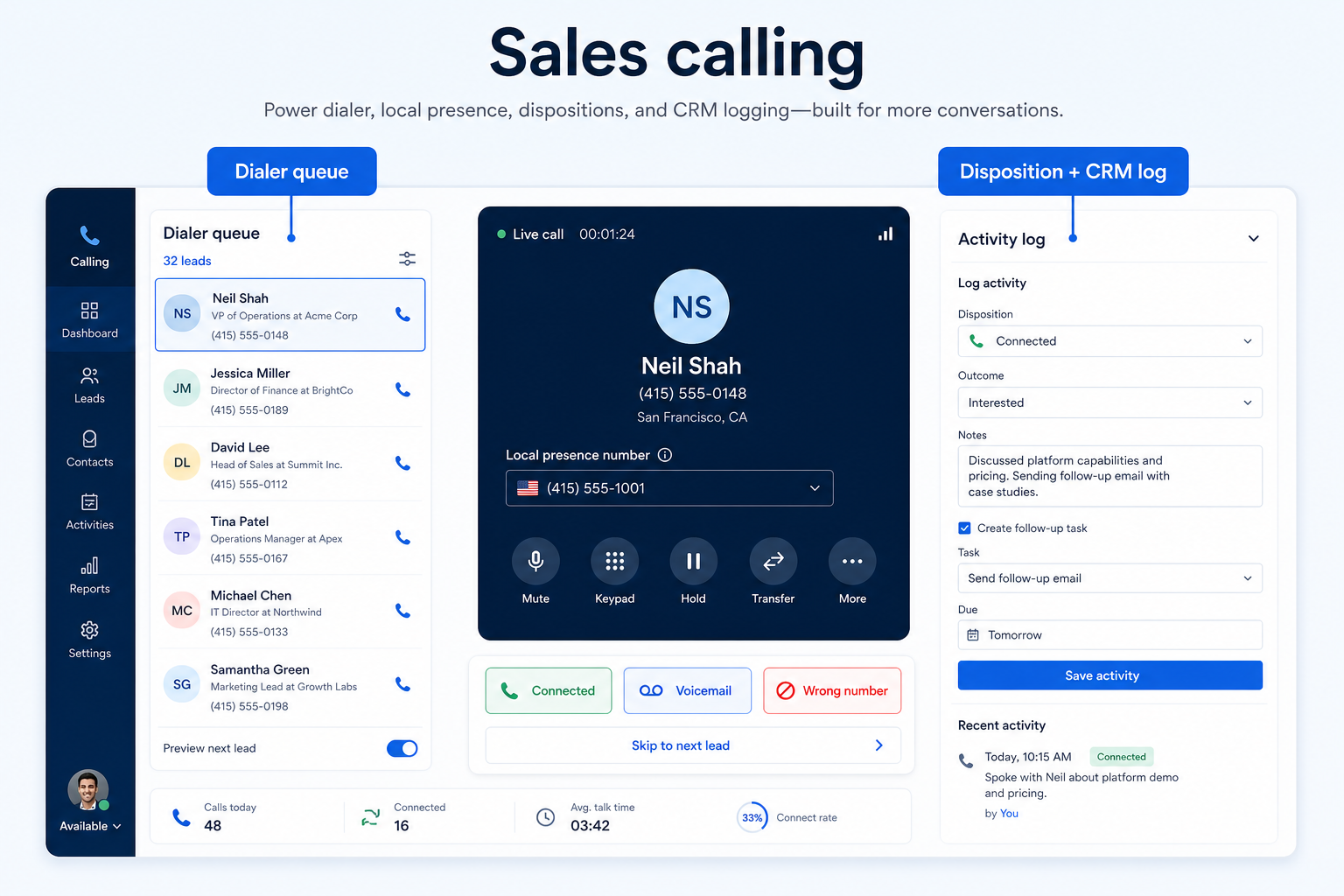
Sales calling is the outbound job: working a list, reaching decision-makers, recording what happened, and keeping the CRM current without a second data-entry pass. The tooling that matters is dialing throughput, call dispositions, and automatic write-back — not IVR depth.
Sales teams whose day is measured in conversations attempted: SDRs working outbound lists, account executives following up, and founder-led sales teams making enough calls that manual dialing has become the bottleneck.
How teams put business communications software to work for sales calling
Example 1
a three-person SDR team at Northline Sales. Before, reps copied numbers from the CRM into a mobile and logged outcomes at the end of the day — badly. After a dialer with CRM write-back, the list dials in sequence, each call closes with a disposition, and the manager reviews attempts per rep on Monday instead of reconstructing them.
Example 2
a founder selling into two countries who needs local numbers so prospects recognise the caller. Local presence is a number-coverage requirement, not a dialer feature — worth separating on the requirements sheet.
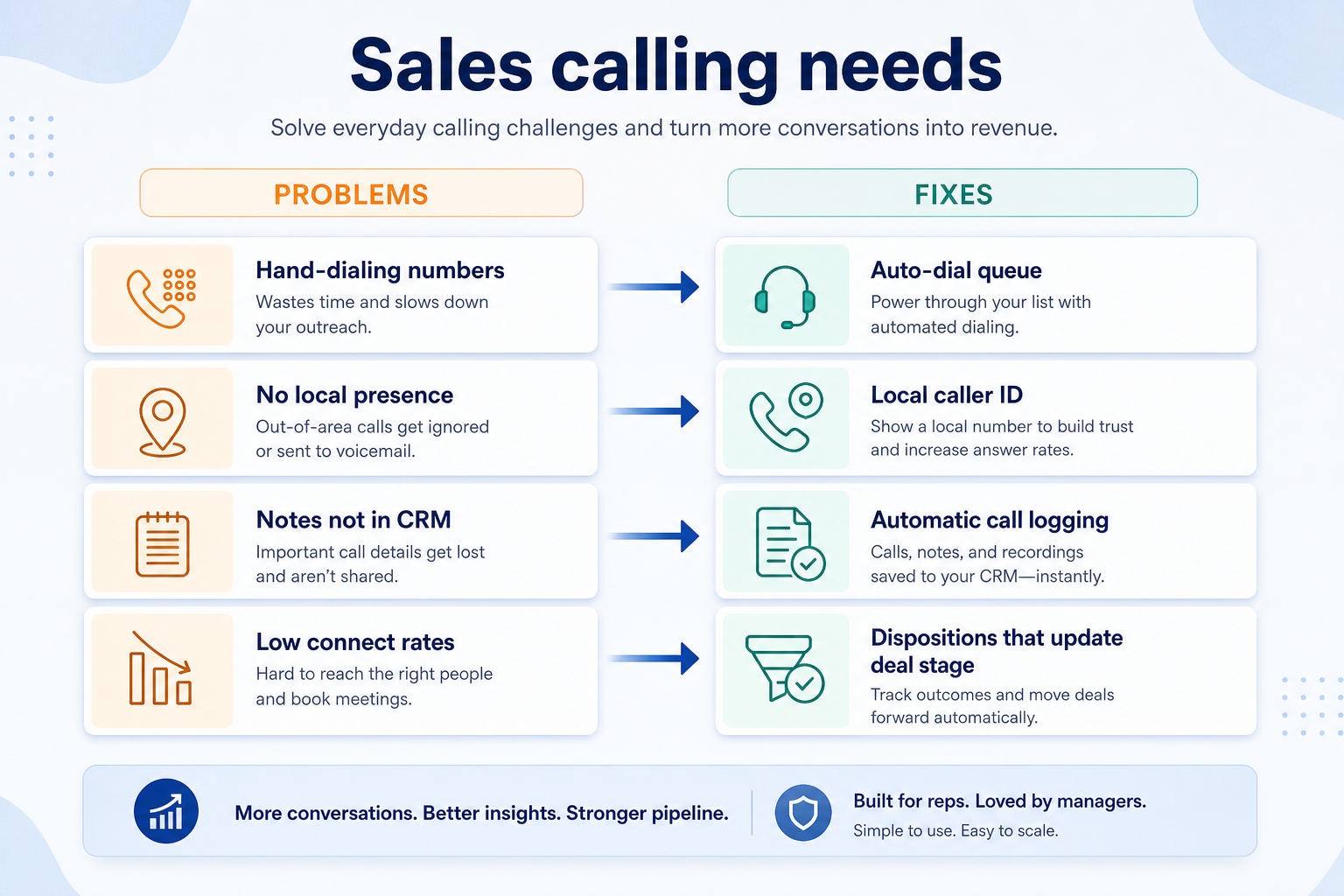
These are the operating problems that usually push teams toward business communications software for sales calling — not feature wish lists.
Without communications discipline: Dial time replaces talk time and attempts stay low.
Without communications discipline: Detail is lost and pipeline data drifts from reality.
Without communications discipline: Answer rates fall, especially across regions.
Without communications discipline: Feedback is anecdotal and hard to act on.
Fit depends on operating the business communications software with clear owners and hygiene. Here is what “good” looks like for sales calling.
With the right communications setup: Power dialing and click-to-dial remove the manual step.
With the right communications setup: Dispositions captured at call end write straight to the record.
With the right communications setup: Local numbers give recognisable presence where you sell.
With the right communications setup: Recording and call analytics make coaching specific.
More attempts per hour
Dial mechanics stop eating selling time.
CRM that reflects reality
Dispositions land at the moment of the call.
Specific coaching
Managers review real calls instead of recollections.
Comparable activity data
Attempts and connects measured the same way for everyone.
Check whether the dialer is included on the tier you would buy, how dispositions map to your CRM fields, what local-presence numbers cost, and whether recording is available where you need it for coaching.
Confirm the dialer exists on the plan you will actually buy.
Logging that needs cleanup is not logging.
Number coverage where you sell affects answer rates.
Start with must-haves your team will use weekly. Treat nice-to-haves as later upgrades — not day-one blockers.
Must-have
Nice-to-have
Understand what needs to happen before comparing how products implement each step. Support overlays use structured research — never video inference.
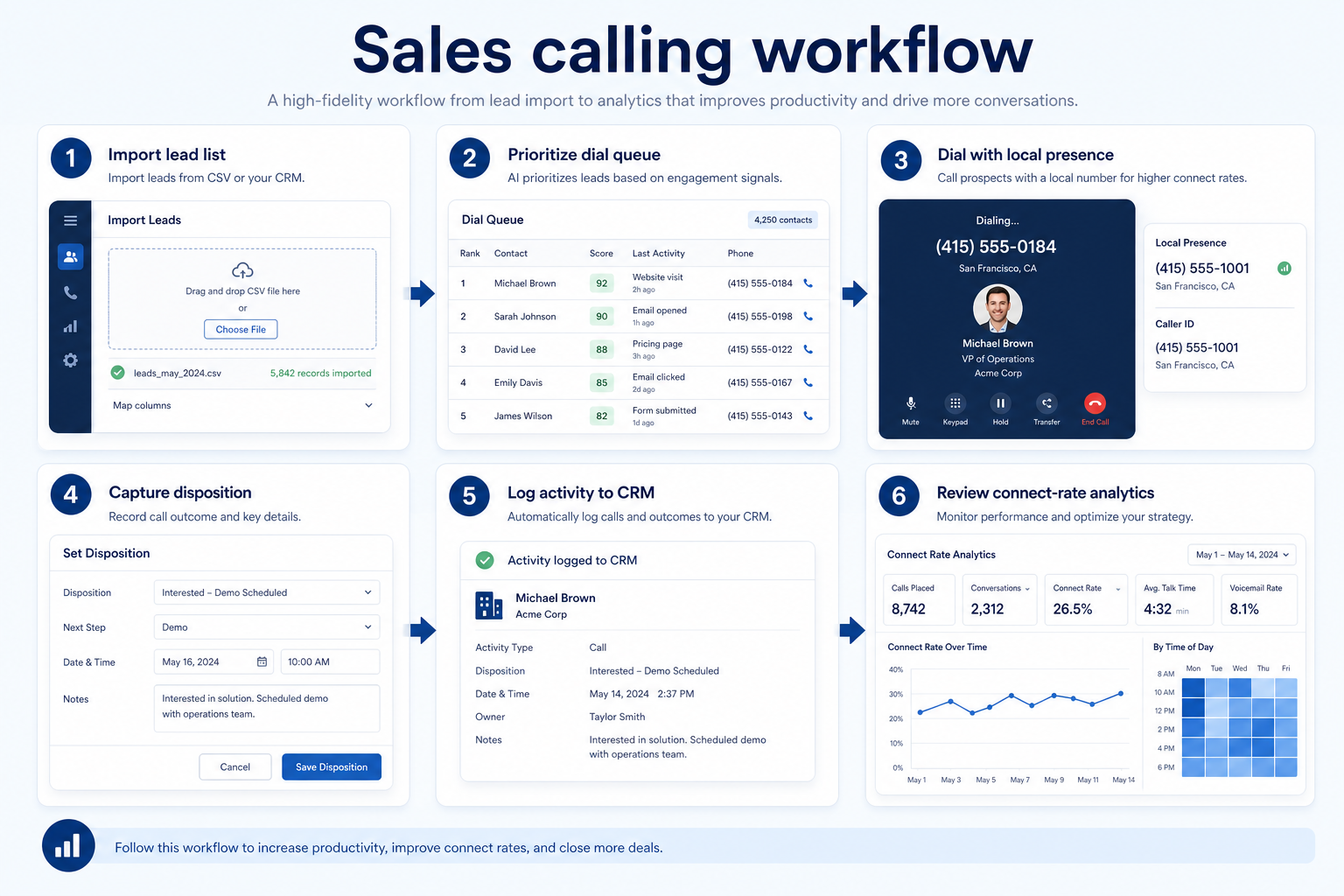
Support labels come from structured feature research — not from videos.
Objective
One source of truth for who gets called.
Next step
Next step
Next step
Next step
Official product demonstrations can help show how different communications platforms handle the sales calling workflow. Absence of a video does not mean a product lacks support for this use case.

HubSpot
HubSpot Sales Hub Overview Demo
How Sales Hub surfaces pipeline, deals, and prospecting in one workspace.
This video is hosted on YouTube
This content is hosted by YouTube. The player loads only after you allow marketing cookies.
What this demonstrates
Workflow coverage
Coverage describes what the demo shows — not product support status.
What to notice
This demonstration does not establish
Related capabilities
Features visible in this demo
Source: HubSpot · Verified 14 Aug 2026

Pipedrive
The Easy and Effective CRM for Closing Deals
Pipeline-first workspace with stage movement and activities

This video is hosted on YouTube
This content is hosted by YouTube. The player loads only after you allow marketing cookies.
What this demonstrates
Workflow coverage
Coverage describes what the demo shows — not product support status.
What to notice
This demonstration does not establish
Related capabilities
Features visible in this demo
Source: Pipedrive · Verified 14 Aug 2026
Compare two products against the same workflow using researched assessments. Official demos help you see the workflow — they do not change support status.
HubSpot
This video is hosted on YouTube
This content is hosted by YouTube. The player loads only after you allow marketing cookies.
What to notice
Not shown in this demo
Pipedrive
This video is hosted on YouTube
This content is hosted by YouTube. The player loads only after you allow marketing cookies.
What to notice
Not shown in this demo
Canonical feature assessments for this workflow — not inferred from demos.
| Step | HubSpot | Pipedrive |
|---|---|---|
| Build the call list | Unknown | Unknown |
| Dial the list | Unknown | Unknown |
| Disposition every call | Unknown | Unknown |
| Set the next step | Unknown | Unknown |
| Review and coach | Unknown | Unknown |
Based on the sales calling workflow, buyers commonly evaluate the checklist below. Nothing is written to your decision profile until you confirm in the tool.
Context: useCase=sales-calling — tools apply this only after your confirmation.
Best when
Volume dialing is the daily motion and attempts are a tracked metric.
Best when
Fewer calls, but every one must log against an opportunity.
Best when
One or two people calling across regions and needing local numbers.
Inbound-shaped products may lack a usable dialer entirely.
Learn more →Catalogue products that list sales calling & dialing as a supported use case. Inclusion here is not a ranking. Official demo counts never change ranking.

Voip Business Phone
AI-powered sales dialer and business phone platform for CRM-connected outbound calling, SMS, and coaching.

Voip Business Phone
Mid-market cloud phone and customer-conversation platform with deep CRM/helpdesk CTI, IVR, power dialer on Professional, and paid AI add-ons — 3-licence minimum.

Voip Business Phone
SMB cloud phone system with a $0 starter rung, Starter from $18/user/month annual (2-user minimum), call recording and IVR from Professional, plus a separate call-centre plan ladder.

Voip Business Phone
Budget global cloud telephony with virtual numbers across 100+ countries and a unified callbox — Essential from $12/user/month annual (up to 5 users); calls and SMS are pay-as-you-go.

Business Communications
Enterprise-grade UCaaS / cloud phone platform (RingEX) with deep call routing, video, team messaging and contact-centre options — Core from ~$20/user/month annual.

Business Communications
AI-first cloud phone (Dialpad Connect) with included transcription/summaries — Standard from $15/user/month annual; Sell and Support are separate product ladders.

Business Communications
Modern SMB shared business phone (also branded Quo) with shared numbers, SMS and Sona AI — Starter from $15/user/month annual.

Business Communications
Global UCaaS + contact-centre platform (8x8 Work / X Series) — Work X2 research floor ~$24/user/month annual; CC tiers custom/higher.

Business Communications
SMB/mid VoIP business phone (VBC) — Mobile from $13.99/line/mo on 12-month promo; Premium/Advanced higher.
If reps make a handful of calls a day, click-to-dial from the CRM is usually enough. Once dial mechanics measurably limit attempts, a power dialer starts to pay — but check which plan tier includes it before assuming it is standard.
Recording is valuable for coaching, but consent rules vary by jurisdiction and sometimes require notifying the other party. Decide the policy, retention period, and who can access recordings before switching it on.
Sales engagement platforms orchestrate multi-channel sequences including email and tasks. Business communications tools own the calling layer — numbers, dialing, and call quality. Some products overlap; the question is which one is the core product.
Give the business real phone numbers, shared answering, and call logging instead of personal mobiles.
Route inbound volume through IVR menus and queues with reporting managers can act on.
Answer customer SMS and chat as a team, with assignment and history instead of one person's phone.
Run targeted outbound sequences with ownership, logging, and clear next steps in CRM.
Use Finder for a fit-based shortlist, compare products, or build a requirements checklist before demos.
How we review
Evaluation, verification, and refresh — no fake testing claims.
Editorial methodology
Category criteria and scores grounded in evidence.
Editorial policy
Authorship, evidence levels, scoring, and disclosures.
Corrections
Spot something outdated? Tell us.
Want clearer software shortlists? Get buying guides and comparisons by email.
Newsletter coming soon.