What Is Business Communications Software? Beginner's Guide
What is business communications software? A clear definition of cloud phone, call routing, customer messaging, and team chat — and how each differs from CRM and helpdesk tools.
Quick answer
Business communications software carries the conversations a company has with customers and with itself — cloud phone and VoIP, call routing and contact-centre queues, WhatsApp and customer messaging, and internal team chat. Decision rule: if the blocking job is “our customers need to reach a business number and our team needs to route those calls,” you need a cloud phone system; if the job is “customers message us on WhatsApp and nobody owns the replies,” you need a messaging platform — these are different products that rarely belong on the same shortlist.
- Cloud phone / VoIP
- Call routing & IVR
- Customer messaging
- Team chat
- Not a CRM
- Not a helpdesk
Key takeaways
- The category holds three separate jobs — Business phone, customer messaging, and internal team chat are bought by different people for different reasons. Naming the job first prevents most bad shortlists.
- A phone system is not a CRM module — CRMs with a calling feature log activity on records. A phone system owns numbers, routing, queues, and call quality — and then integrates back into the CRM.
- Seat price is only part of the cost — Licence minimums, calling minutes, phone numbers, and WhatsApp conversation fees all sit on top of the per-user tile. Budget the whole stack.
- Integration depth decides daily friction — Click-to-dial and automatic call logging either remove admin work or create a second system to update by hand.
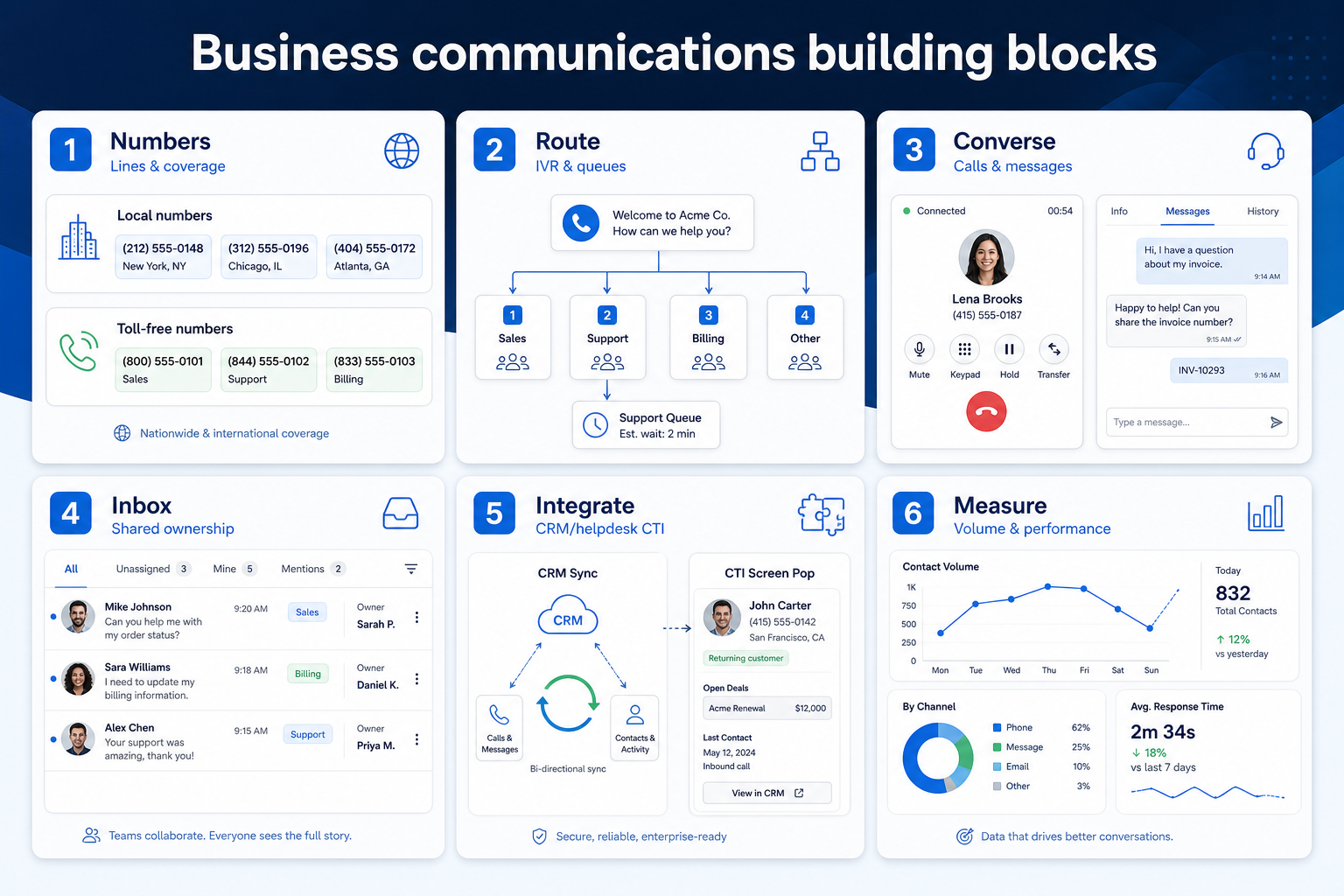
Business communications building blocks
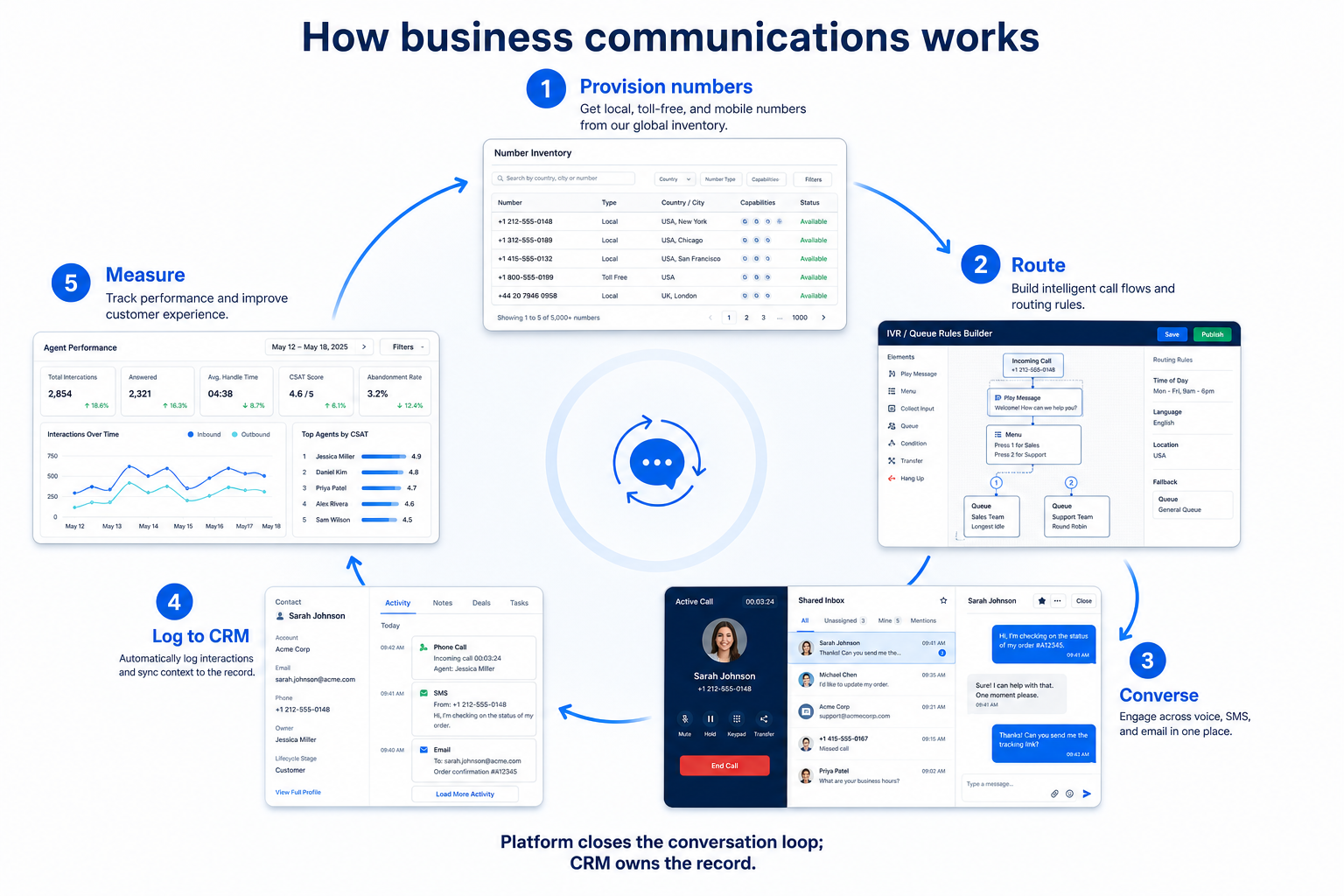
1. How does business communications software work?
Numbers
Provision local, toll-free, or international numbers and port existing lines.
Route
IVR menus, queues, business hours, and skills-based rules decide who answers.
Converse
Agents take calls from a softphone or handle messages in a shared inbox.
Integrate
Click-to-dial and automatic logging keep the CRM current without retyping.
Measure
Call volume, wait time, missed calls, and agent activity feed weekly reviews.
Most platforms share a loop: provision business numbers or connect a messaging channel, define routing rules that decide who receives what, let agents converse from a softphone or shared inbox, sync activity into the CRM or helpdesk, then report on volume, response time, and agent performance.
Example: Harbor Clinic, a four-site medical practice, moves from three mobile phones to one cloud phone system. Patients call a single number, an IVR routes by site, missed calls land in a shared queue instead of a personal voicemail, and every call logs against the patient record. Nothing about their record-keeping system changed — only how conversations arrive and where they are answered.
2. What business communications software typically includes
Core products cover business numbers, inbound and outbound calling, call routing and IVR, call recording, shared inboxes, and CRM or helpdesk integration. Many add SMS, WhatsApp Business messaging, power dialing for outbound sales, analytics dashboards, and AI features such as transcription, call summaries, or chatbots.
Job clusters matter more than brand names: cloud phone / UCaaS (RingCentral, Dialpad, Zoom Phone, Nextiva, Aircall class), team messaging (Slack, Microsoft Teams), and WhatsApp / shared-inbox messaging (Wati class) rarely belong on the same shortlist. Catalogue examples are shapes to compare by primary job and by which capabilities sit on the tier you would actually buy — not a ranking.
Common business communications shapes (not rankings)
Cloud phone / VoIP system
Best for: Teams that need business numbers, routing, and call logging as the core daily job.
Avoid when: Your customers only reach you by chat and nobody expects a phone line.
Contact-centre / queue platform
Best for: Support operations with queues, service levels, and agent performance reporting.
Avoid when: A handful of people share one line and a simple IVR would do.
Customer messaging / WhatsApp platform
Best for: Businesses whose customers already message them, needing a shared inbox, templates, and broadcasts.
Avoid when: Voice is the primary channel and messaging is an occasional extra.
Team messaging app
Best for: Internal coordination across shifts, sites, or frontline staff without customer-facing channels.
Avoid when: The problem is customers reaching you, not colleagues reaching each other.
3. Name the job business communications software should own
Business communications products own the conversation path: provision a number or channel, route, have a human (or bot) reply, assign ownership, log into CRM, then review quality.
Example: Harbor Clinics (eight front-desk staff) needs missed-call callbacks on a published business number. A cloud phone with voicemail-to-task beats a WhatsApp inbox they do not staff.
4. Next: freeze requirements and compare fairly
Move to /guides/how-to-choose-business-communications-software/ once the job cluster is clear. Compare finalists with the same assumptions — not affiliate-ordered lists.
Frequently asked questions
Is business communications software the same as a CRM?
No. A CRM stores customers, deals, and history. Business communications software owns numbers, routing, and conversation channels — then syncs activity into the CRM. Some CRMs include a calling module, but it is usually a convenience feature rather than a full phone system with IVR, queues, and number coverage.
Do I need a phone system if we already use WhatsApp?
It depends on how customers reach you. A WhatsApp Business platform gives you a shared inbox, templates, and broadcasts for messaging — it does not give you phone numbers, IVR, or call queues. If people also call, those are two purchases, not one.
Is VoIP reliable enough for a business line?
For most teams, yes — cloud phone systems are the mainstream way businesses run voice now. Reliability depends on your internet connection and the vendor's number coverage in your region, which is worth verifying for each country you operate in before committing.
What should I do next?
If you have confirmed which job is blocking, use How to Choose Business Communications Software and the Best Business Communications Software shortlist — methodology-first, not affiliate-ordered.
Was this article helpful?
Have more questions? Contact our support team.
Part of Software buying guides · How to Choose Business Communications Software: Job-First Framework
Related guides
Supporting reading in this topic — not a generic related-posts dump.
- SaneBox Plans: Seats, Numbers, and Qualifying TiersChoose your SaneBox plan by mapping must-haves to seats, numbers/minutes, and qualifying features — not homepage “from” tiles — then confirm on the pricing page.
- Wati Plans: Seats, Numbers, and Qualifying TiersChoose your Wati plan by mapping must-haves to seats, numbers/minutes, and qualifying features — not homepage “from” tiles — then confirm on the pricing page.
- Is Wati Worth It? Fit Scenarios Before You BuyDecide if Wati is worth it for your sales and support team — fit scenarios, seat/number economics, and when to keep looking — without invented ROI percentages.
- Zenzap Plans: Seats, Numbers, and Qualifying TiersChoose your Zenzap plan by mapping must-haves to seats, numbers/minutes, and qualifying features — not homepage “from” tiles — then confirm on the pricing page.
- Is Zenzap Worth It? Fit Scenarios Before You BuyDecide if Zenzap is worth it for your sales and support team — fit scenarios, seat/number economics, and when to keep looking — without invented ROI percentages.
- Is SaneBox Worth It? Fit Scenarios Before You BuyDecide if SaneBox is worth it for your sales and support team — fit scenarios, seat/number economics, and when to keep looking — without invented ROI percentages.
- Business Communications Evaluation Guide: Two-Week Trial ScorecardEvaluate business communications platforms fairly with weighted criteria and a shared two-week trial — number provisioning, CRM logging, call quality, and a routing build — without demo theatre.
- Business Communications Pricing Guide: Seats, Minutes & Message FeesHow business communications pricing really works — per-seat licences, licence minimums, number rental, calling minutes, and WhatsApp conversation fees — with a method for building comparable totals.
Related products
Related comparisons
- Dialpad vs Microsoft Teamsdialpad vs microsoft-teams — product-context comparison for /guides/what-is-business-communications-software/
- Dialpad vs Slackdialpad vs slack — product-context comparison for /guides/what-is-business-communications-software/
- Dialpad vs Twiliodialpad vs twilio — product-context comparison for /guides/what-is-business-communications-software/
- Microsoft Teams vs Nextivamicrosoft-teams vs nextiva — product-context comparison for /guides/what-is-business-communications-software/
SoftwareGlimpse Updates
Want clearer software shortlists? Get buying guides and comparisons by email.
Newsletter coming soon.