Business Communications Requirements Guide: Numbers, Routing & Must-Haves
Write demo-ready business communications requirements from the primary job, number coverage, routing rules, must vs nice features, and CRM logging — without feature-wishlist shopping.
Quick answer
Write business communications requirements from the primary job, the numbers you must have, the routing rules your team actually needs, and the systems calls must log into — not from a feature list copied off vendor sites. Decision rule: if a capability would disqualify the platform when missing, it is a must-have and needs a pass/fail test you can run in a trial; everything else stays a nice-to-have until the shortlist is frozen.
- Primary job + outcomes
- Numbers & countries
- Routing rules
- Must vs nice with tests
- CRM / helpdesk logging
- Demo-ready sheet
Key takeaways
- Outcomes before features — “No inbound call goes unanswered during business hours” beats a forty-row feature matrix nobody will score.
- Number coverage is a hard gate — Put required countries and number types at the top of the sheet. A missing country ends the evaluation regardless of features.
- Every must-have needs a test — Write the pass/fail check you will run in a trial — “IVR routes to the right queue after hours,” not “has IVR.”
- Name the system of record — Decide which system owns customer history and what the phone platform is allowed to write into it, before integrations get configured.
- Freeze the sheet before demos — Vendors will expand scope. A written sheet keeps three demos comparable.
Requirements path
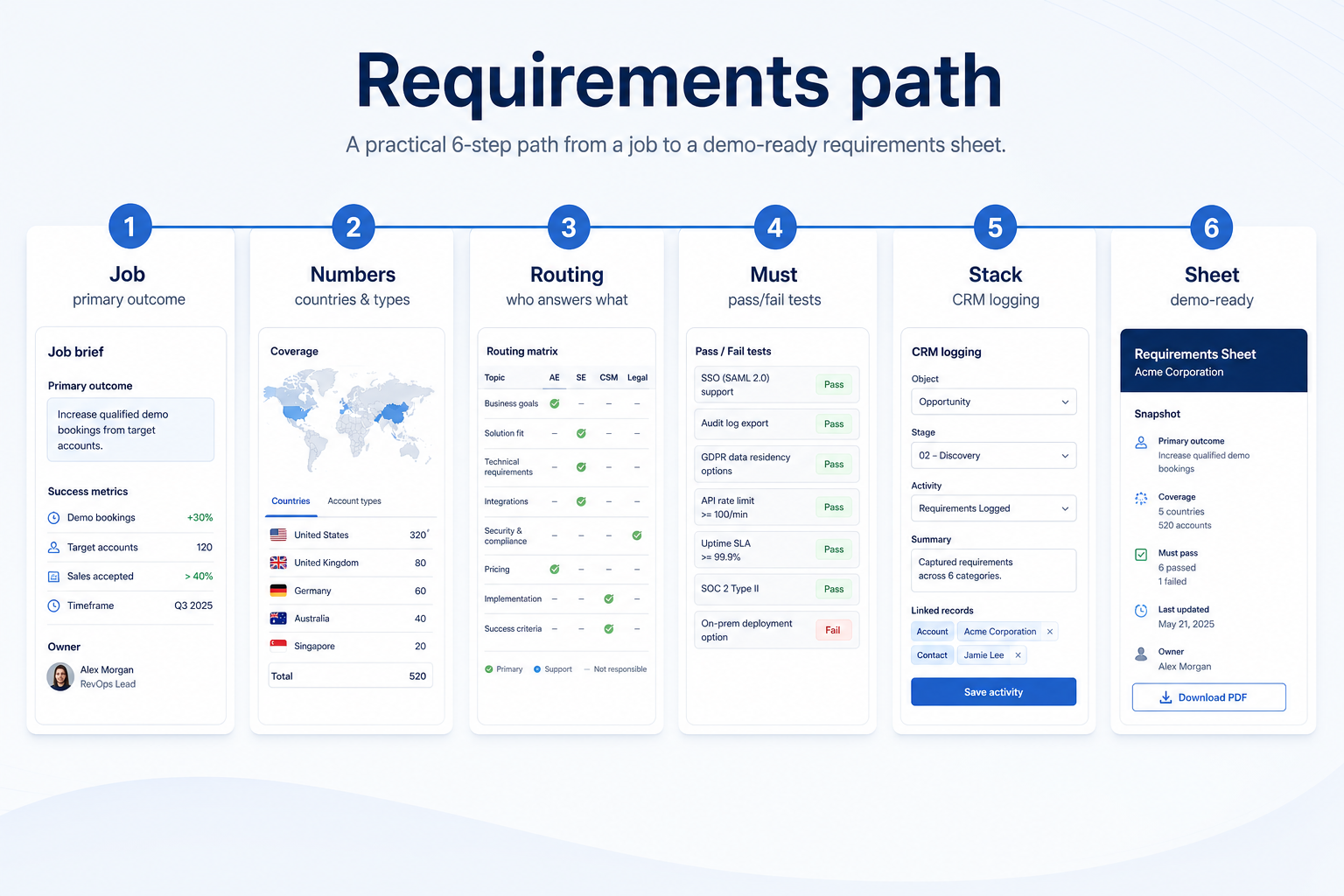
1. Name the primary job and three observable outcomes
Phone job
Number coverage, routing rules, and call logging tests — UCaaS and cloud-phone shapes.
Outbound sales job
Dialer availability on the target tier, call disposition, and CRM write-back.
Messaging / collab job
Shared inbox or team channels — not the same sheet as a phone shortlist.
Write the job in one sentence, then three outcomes visible in a weekly review — for example: every inbound call reaches a named queue during business hours; missed calls appear in a shared list with an owner; every customer call is logged against the right record without manual entry.
Example: Harbor Clinic's job is “patients reach the right site on the first call.” Outcomes: an IVR with three site options live; after-hours calls routed to a single voicemail box that is checked each morning; call volume per site visible without exporting anything.
Keep clusters explicit on the sheet: cloud phone / UCaaS (RingCentral, Dialpad, Zoom Phone, Nextiva, Aircall class), customer messaging (Wati class), and team collab (Slack, Microsoft Teams) fail different must-have tests — do not merge them into one undifferentiated wishlist.
2. Split must vs nice and freeze the logging rules
List must-haves with pass/fail tests: provision a number in each required country, build the routing rule, place an inbound and outbound call, confirm the CRM record shows the call without cleanup. Keep nice-to-haves on a separate list so a demo cannot silently redefine scope.
Then freeze integration rules: which system is the customer record of truth, which fields the phone platform may write, who owns recordings and for how long, and what happens to call data if you change vendors. Example: Northline Retail marks IVR routing and CRM call logging as must; AI call summaries as nice. The phone platform may create activity records but never edits customer contact details.
Must-have vs nice-to-have (starter by job)
- Business numbers in required countries
- Inbound and outbound calling
- Call routing / IVR
- CRM or helpdesk call logging
- Call recording
- Power dialer
- WhatsApp Business messaging
- Shared team inbox
- Analytics & queue reporting
- AI transcription / summaries
3. Split must-haves from nice-to-haves in writing
List day-one workflows for business communications software in two columns: must work before go-live vs can wait until adoption proves out. Must-haves drive plan gates and integrations; nice-to-haves belong on a phase-two sheet so demos do not inflate scope.
Worked example: Harbor People Ops marks SSO and audit logs as must-have, AI summaries as phase-two. Demos that skip the must column get cut from the shortlist early.
4. Map integrations and data boundaries
Name systems that must sync or stay out of scope: identity, payroll, CRM, ecommerce, chat, or data warehouse. For each integration, note whether it is native, API, or manual export — and who owns the connection when it breaks.
Worked example: Northline Finance requires HRIS sync to payroll and refuses tools that need nightly CSV babysitting unless IT signs off.
5. Get a one-page sign-off before trials
Share the must-have sheet with finance, IT, and the team lead who owns the weekly job. Trials should test the signed sheet — not a fresh wishlist from each demo.
Next: /guides/how-to-choose-business-communications-software/
Frequently asked questions
How many must-haves should we have?
Prefer a short list you can genuinely test in a trial. If everything is a must-have, you are collecting features rather than writing requirements.
Should compliance sit on the requirements sheet?
Yes. Call recording consent, retention periods, and any regional rules for recording or messaging belong on the sheet before the first call — not in a legal thread after go-live.
Do we need number porting on day one?
If customers already call an existing number, treat porting as a must-have with its own test: confirm the vendor supports porting for that number type and country, and get the timeline in writing.
What should I do next?
Run the evaluation guide's trial script against the frozen sheet, then shortlist on Best Business Communications Software.
Was this article helpful?
Have more questions? Contact our support team.
Part of Software buying guides · How to Choose Business Communications Software: Job-First Framework
Related guides
Supporting reading in this topic — not a generic related-posts dump.
- What Is Business Communications Software? Beginner's GuideWhat is business communications software? A clear definition of cloud phone, call routing, customer messaging, and team chat — and how each differs from CRM and helpdesk tools.
- SaneBox Plans: Seats, Numbers, and Qualifying TiersChoose your SaneBox plan by mapping must-haves to seats, numbers/minutes, and qualifying features — not homepage “from” tiles — then confirm on the pricing page.
- Wati Plans: Seats, Numbers, and Qualifying TiersChoose your Wati plan by mapping must-haves to seats, numbers/minutes, and qualifying features — not homepage “from” tiles — then confirm on the pricing page.
- Is Wati Worth It? Fit Scenarios Before You BuyDecide if Wati is worth it for your sales and support team — fit scenarios, seat/number economics, and when to keep looking — without invented ROI percentages.
- Zenzap Plans: Seats, Numbers, and Qualifying TiersChoose your Zenzap plan by mapping must-haves to seats, numbers/minutes, and qualifying features — not homepage “from” tiles — then confirm on the pricing page.
- Is Zenzap Worth It? Fit Scenarios Before You BuyDecide if Zenzap is worth it for your sales and support team — fit scenarios, seat/number economics, and when to keep looking — without invented ROI percentages.
- Business Communications Evaluation Guide: Two-Week Trial ScorecardEvaluate business communications platforms fairly with weighted criteria and a shared two-week trial — number provisioning, CRM logging, call quality, and a routing build — without demo theatre.
- Business Communications Pricing Guide: Seats, Minutes & Message FeesHow business communications pricing really works — per-seat licences, licence minimums, number rental, calling minutes, and WhatsApp conversation fees — with a method for building comparable totals.
Related products
Related comparisons
- Nextiva vs Slacknextiva vs slack — product-context comparison for /guides/business-communications-requirements-guide/
- RingCentral vs Slackringcentral vs slack — product-context comparison for /guides/business-communications-requirements-guide/
- Nextiva vs Twilionextiva vs twilio — product-context comparison for /guides/business-communications-requirements-guide/
- Slack vs Cisco Webexslack vs webex — product-context comparison for /guides/business-communications-requirements-guide/
SoftwareGlimpse Updates
Want clearer software shortlists? Get buying guides and comparisons by email.
Newsletter coming soon.