Business Communications Evaluation Guide: Two-Week Trial Scorecard
Evaluate business communications platforms fairly with weighted criteria and a shared two-week trial — number provisioning, CRM logging, call quality, and a routing build — without demo theatre.
Quick answer
Evaluate business communications platforms with weighted criteria and a shared two-week trial — provision a number, build the routing rule, connect the CRM, place real calls in both directions, and check the logs — so you compare evidence instead of demo theatre. Decision rule: freeze the weights before any demo, run the identical script on every finalist, and have a non-admin score each tool the same day it finishes.
- Freeze weights first
- Same two-week script
- Real number provisioning
- Routing rule test
- CRM logging check
- Non-admin scorecard
Key takeaways
- Demo theatre lies — Vendors demo a clean IVR on an unlimited tier. Your own number provisioning and CRM mapping expose the friction.
- Test on the tier you will buy — Recording, IVR, and analytics often sit above the quoted plan. A trial on the enterprise sandbox scores a product you are not purchasing.
- Call quality is measured on your network — Test from the connections your team really uses — office, home, and mobile — not only a demo call from the vendor.
- Non-admins must score — If only the vendor's engineer can build the routing rule, your team will not maintain it.
- Number availability can end an evaluation — Check coverage in week one. A missing country is a feasibility failure, not a scoring deduction.
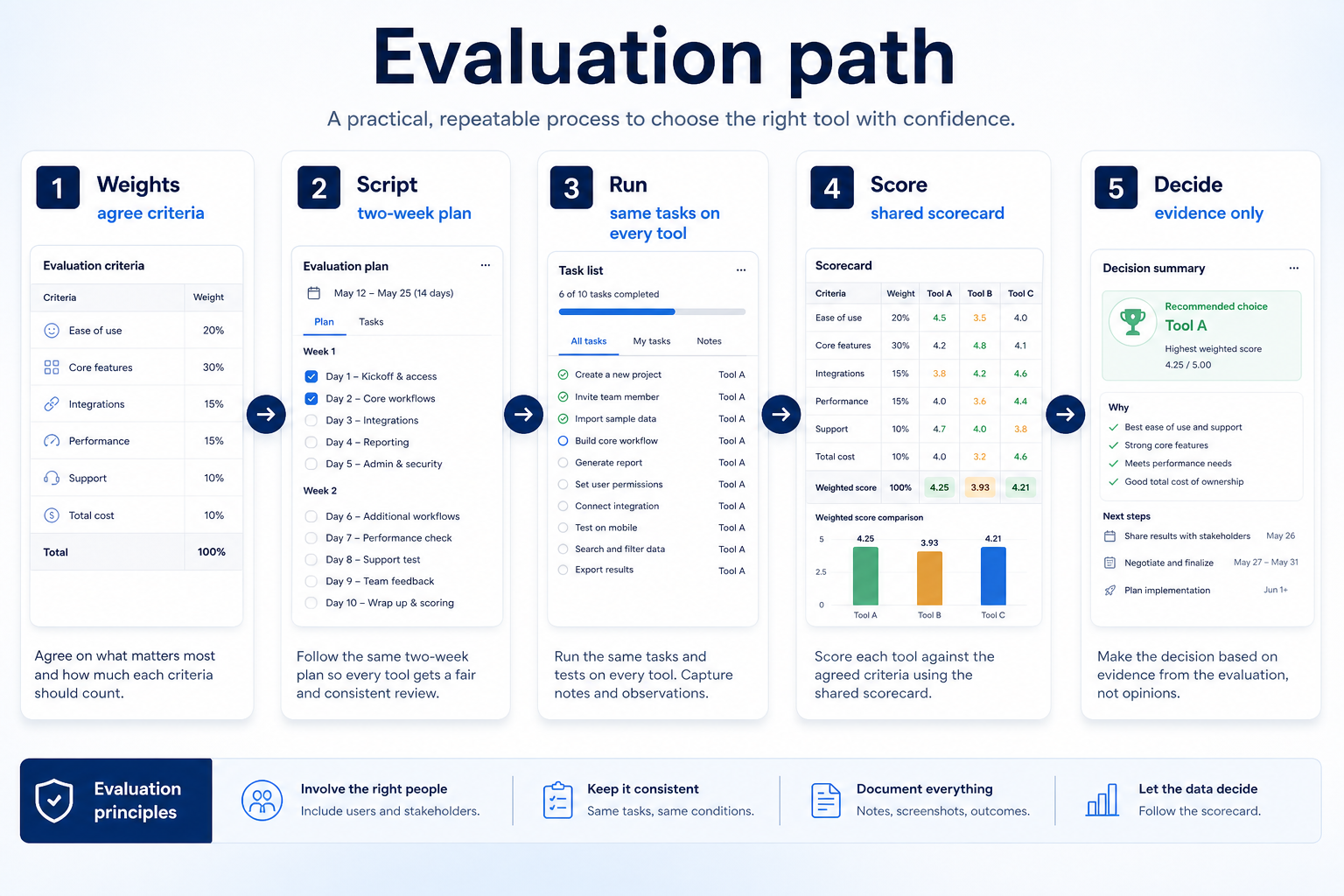
Evaluation path
1. Freeze weighted criteria before any demo
Support-led team
Routing, queues, and queue reporting dominate the weights.
Outbound sales team
Dialer throughput and CRM logging dominate.
Messaging-led team
Shared inbox assignment and template workflow dominate.
Agree weights for call and message quality, routing depth on the target tier, CRM or helpdesk integration, analytics you will genuinely use, outbound tooling if relevant, ease of daily use, and value at your seat count. Do not reweight after a persuasive demo.
Example: Harbor Clinic weights routing and call quality highest because patients must reach the right site. Northline Sales weights dialer throughput and CRM write-back highest. Same category, different cards — both legitimate if frozen early.
2. Run the same two-week trial script on every platform
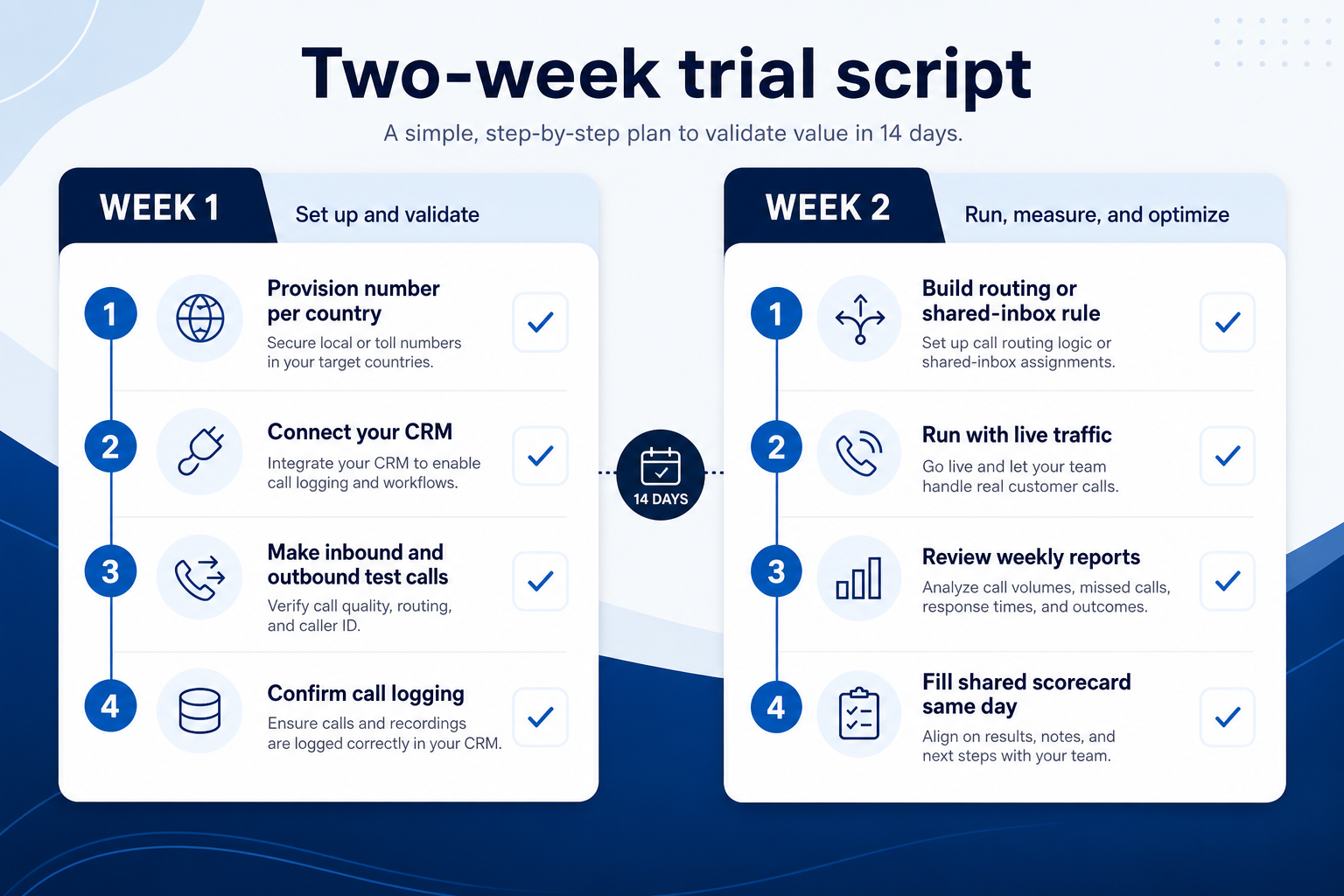
Week 1: provision a number in each required country, connect the CRM or helpdesk, place inbound and outbound test calls, and confirm they log correctly. Week 2: build the routing rule or shared-inbox workflow from your requirements sheet, run it with real traffic, check the reports you would review weekly, and fill the shared scorecard the same day.
Example: three shortlisted platforms. Tool A wins the interface demo but the IVR builder is gated one tier above the quote. Tool B routes correctly but writes calls to the wrong CRM object until a field is remapped — recoverable, and worth a note rather than elimination. Tool C cannot supply a number in one required country and is dropped on day two. Run this script inside one job cluster only — phone against phone (RingCentral, Dialpad, Zoom Phone, Nextiva, Aircall, CallHippo, KrispCall, Freshcaller class), messaging against messaging (Wati class), collab against collab (Slack, Microsoft Teams). Catalogue names illustrate shapes; they are not ranked winners on this page.
Business communications evaluation scorecard (weights)
Score each shortlisted platform 1–5 on the same criteria after the two-week script. Multiply by weight and compare totals — do not invent ROI percentages or affiliate-ordered rankings.
- Call / message quality on your network (weight 5)
- Routing and workflow build on target tier (weight 5)
- CRM / helpdesk logging accuracy (weight 5)
- Ease of daily use for non-admins (weight 4)
- Outbound tooling (if outbound is the job) (weight 3)
- Reporting you will use weekly (weight 3)
- Value at your seat count and usage (weight 4)
Two-week trial plan (same for each platform)
Day 1: Setup & tier freeze
- Confirm the exact plan tier under evaluation
- Invite one non-admin agent plus an ops observer
- Freeze the seat count and country list
Day 2: Number provisioning
- Provision a number in each required country
- Confirm porting support and timeline for existing numbers
- Record any country the vendor cannot serve
Day 3: CRM / helpdesk connection
- Connect the integration you will use daily
- Place one call and inspect the logged record
- Note fields that need remapping
Day 4: Call quality
- Place inbound and outbound calls from office, home, and mobile networks
- Log any dropped audio or latency
- Test the softphone and mobile app
Day 5: Week-1 score snapshot
- Fill quality and integration rows
- Do not change weights
- Capture tier-gate surprises
Day 8: Routing build
- Build the IVR, queue, or shared-inbox rule from the requirements sheet
- Confirm it works on the target tier
- Time how long a non-admin needs
Day 10: Live traffic & reporting
- Route a day of real calls or messages through the rule
- Check missed-call handling and after-hours behaviour
- Review the reports you would read weekly
Day 14: Score & decide
- Non-admin completes the shared card
- Compare weighted totals
- Advance the top scorer to diligence — or revisit requirements
3. Run one trial script on every finalist
Pick the workflow that blocked work last quarter. Run it on every shortlist tool the same week: same data shape, same users, same success criteria. Score completion, time-to-done, and where an admin had to rescue the task.
Worked example: Harbor Labs runs the same refactor ticket on three coding tools. Tool C fails SSO on the quoted tier and is dropped before a second meeting.
4. Score on one card the same day
Use the same rubric for every vendor: must-have gates, adoption risk, integration fit, and modeled total cost band. Record who attended and which plan tier was shown — demos often run above the tier you can afford.
5. Write a one-page decision memo
Name the primary job, the qualifying configuration, the winner, and what you are explicitly not buying yet. Link to pricing and requirements guides so finance can audit assumptions later.
Next: /guides/how-to-choose-business-communications-software/
6. Use a one-page checklist before demos
For Business Communications Evaluation Guide: Two-Week Trial Scorecard, list must-haves, owners, integrations, and the weekly ritual this purchase must improve. Share the sheet with finance and IT before you schedule a second demo.
- Name the primary job in one sentence.
- List must-have gates (plans, SSO, data residency, usage caps).
- Name integrations that must work on day one.
- Assign an admin owner and a weekly user champion.
- Define non-admin proof — what a sceptic completes without rescue.
Worked example: Harbor Ops refuses demos until the checklist is signed — cutting evaluation time in half.
7. Avoid the usual buying mistakes
Common failures in business-communications: buying for brand familiarity, comparing entry tiles across different usage units, skipping a fair trial script, and adding scope before adoption proves out.
Run one trial script on every finalist the same week. Score on the same card. Write a one-paragraph decision memo that names what you are not buying yet.
8. Hand off to the category shortlist
When assumptions are frozen, continue on /best/business-communications-software/ with the same headcount, usage band, and must-have gates on every quote.
Frequently asked questions
How long should a phone system trial be?
Two weeks is enough for provisioning, integration, a routing build, and live traffic — if the script is frozen. Longer trials without a script mostly extend demo theatre.
Should we evaluate on a free tier?
Only if free is what you intend to run. If your must-haves unlock on a paid tier, evaluate there; free-tier scores do not transfer to the plan you would buy.
How do we test call quality fairly?
Place calls from every network your team actually uses, at different times of day, and record any dropped audio or latency in the same log for each vendor. One clean demo call proves very little.
What should I do next?
Move the top-scoring platform into vendor diligence, or return to How to Choose Business Communications Software and the Best Business Communications shortlist if you still need a constrained list.
Was this article helpful?
Have more questions? Contact our support team.
Part of Software buying guides · Business Communications Requirements Guide: Numbers, Routing & Must-Haves
Related guides
Supporting reading in this topic — not a generic related-posts dump.
- What Is Business Communications Software? Beginner's GuideWhat is business communications software? A clear definition of cloud phone, call routing, customer messaging, and team chat — and how each differs from CRM and helpdesk tools.
- SaneBox Plans: Seats, Numbers, and Qualifying TiersChoose your SaneBox plan by mapping must-haves to seats, numbers/minutes, and qualifying features — not homepage “from” tiles — then confirm on the pricing page.
- Wati Plans: Seats, Numbers, and Qualifying TiersChoose your Wati plan by mapping must-haves to seats, numbers/minutes, and qualifying features — not homepage “from” tiles — then confirm on the pricing page.
- Is Wati Worth It? Fit Scenarios Before You BuyDecide if Wati is worth it for your sales and support team — fit scenarios, seat/number economics, and when to keep looking — without invented ROI percentages.
- Zenzap Plans: Seats, Numbers, and Qualifying TiersChoose your Zenzap plan by mapping must-haves to seats, numbers/minutes, and qualifying features — not homepage “from” tiles — then confirm on the pricing page.
- Is Zenzap Worth It? Fit Scenarios Before You BuyDecide if Zenzap is worth it for your sales and support team — fit scenarios, seat/number economics, and when to keep looking — without invented ROI percentages.
- Business Communications Pricing Guide: Seats, Minutes & Message FeesHow business communications pricing really works — per-seat licences, licence minimums, number rental, calling minutes, and WhatsApp conversation fees — with a method for building comparable totals.
Related products
Related comparisons
- Slack vs Vonageslack vs vonage — product-context comparison for /guides/business-communications-evaluation-guide/
- Nextiva vs Talkdesknextiva vs talkdesk — product-context comparison for /guides/business-communications-evaluation-guide/
- Microsoft Teams vs Vonagemicrosoft-teams vs vonage — product-context comparison for /guides/business-communications-evaluation-guide/
- Microsoft Teams vs OpenPhonemicrosoft-teams vs openphone — product-context comparison for /guides/business-communications-evaluation-guide/
SoftwareGlimpse Updates
Want clearer software shortlists? Get buying guides and comparisons by email.
Newsletter coming soon.