How to Choose Business Communications Software: Job-First Framework
Choose business communications software by primary job — business phone, support routing, outbound calling, or customer messaging — then map seats, number coverage, feature gates, and a shared trial script.
Quick answer
Choose business communications software by the job that is blocking work — business phone, inbound support routing, outbound sales calling, WhatsApp customer messaging, or internal team chat — then confirm the numbers you need exist, the licence minimum fits your headcount, and the CRM integration you rely on is native rather than a Zapier bridge. Shortlist only tools whose core product is your job; a WhatsApp platform and an IVR-driven phone system are different purchases even when both live in this category.
- Primary job to be done
- Seats vs licence minimum
- Country / number coverage
- Routing depth needed
- Native CRM or helpdesk CTI
- Usage costs beyond the seat
- Trial with real calls
What matters most
- “Business communications” is several products — Cloud phone, contact-centre routing, WhatsApp messaging, and team chat fail for different reasons. Pick the shape before you pick a brand.
- Licence minimums change the real price — A $30 seat with a three-licence minimum costs more than a $18 seat with a two-user minimum, whatever the pricing tile says.
- Recording and IVR often sit a tier up — Entry plans frequently exclude call recording, IVR, or analytics. Map must-have features to the qualifying plan before the demo convinces you.
- Number coverage is a feasibility gate — If you need a local number in a country the vendor does not serve, no other feature matters. Check coverage per country, per plan.
- Native CTI beats connector counts — Click-to-dial, screen pops, and automatic logging in your actual CRM save more time than a directory of hundreds of shallow integrations.
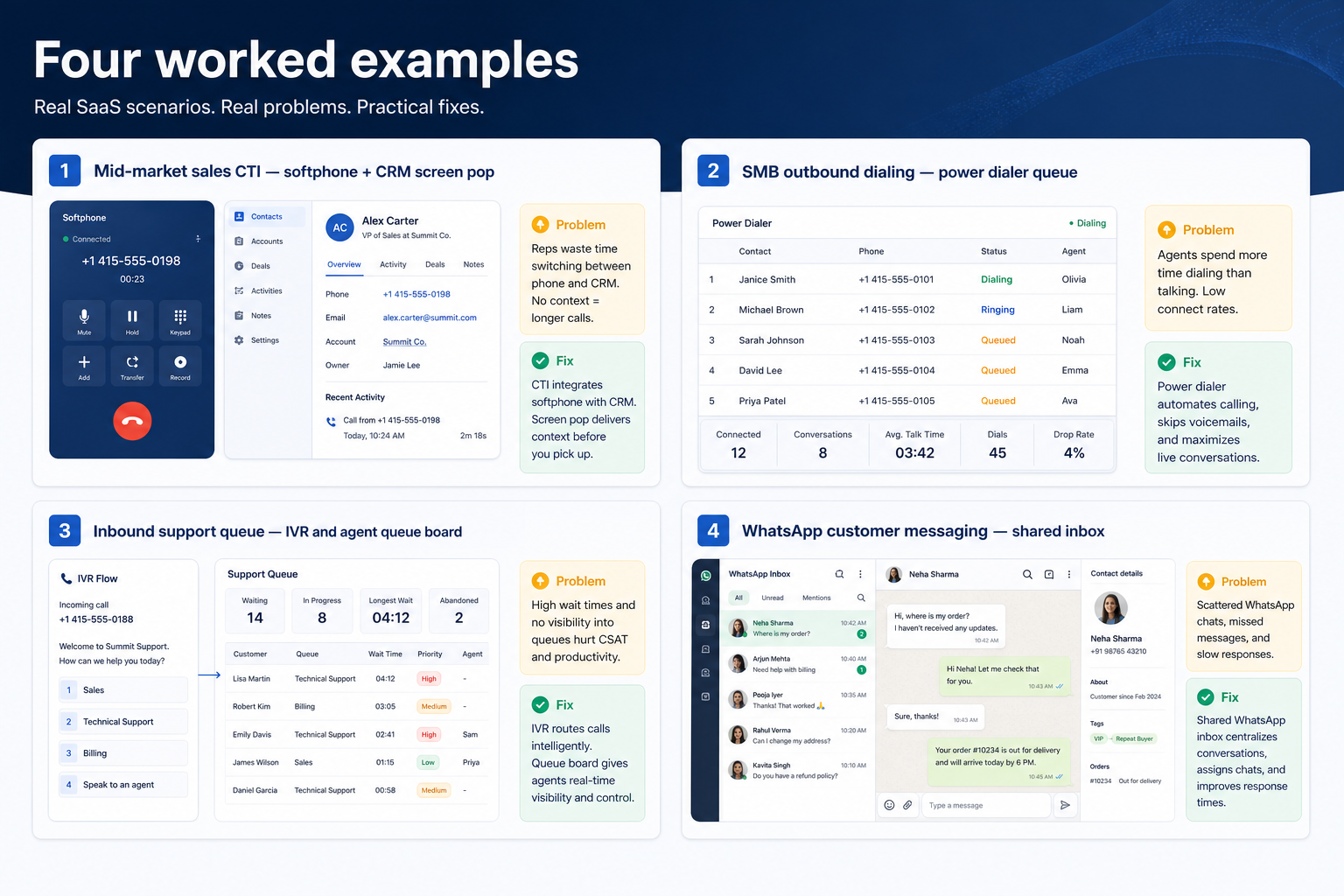
Four worked examples
Interactive business communications selection checklist
0/5 dimensions noted — saved in this browser only.
Primary job
Users needing a licence
Number coverage needed
Must integrate with
Budget posture
Selection workflow
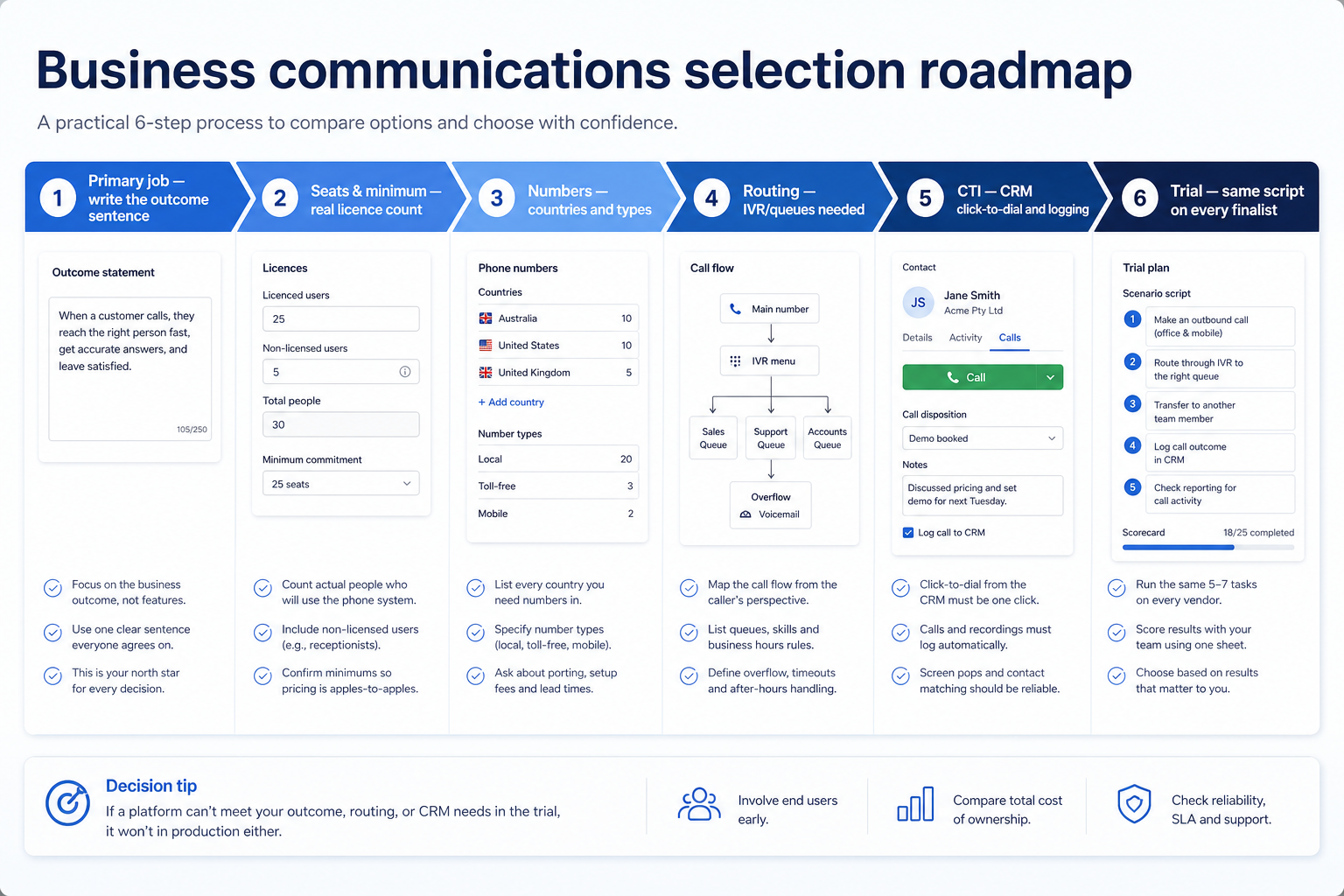
1. Name the primary job before you name a vendor
Phone job
Numbers, routing, and call logging beat dialer throughput and chatbots.
Outbound sales job
Power dialer availability on the tier you will buy is the deciding gate.
Messaging job
Shared inbox, templates, and conversation fees matter more than IVR depth.
Write one sentence: “We are blocked because we cannot ___ this quarter.” Examples: give every rep a business number that logs calls to the CRM; route inbound support calls to the right site instead of one voicemail; run 80 outbound dials a day without hand-typing numbers; answer WhatsApp messages as a team instead of on one person's phone.
Example: Harbor Studio (eight-person agency) needs shared client numbers and call logging more than dialer throughput. Northline Retail needs an IVR that routes to three stores. Same category — different shortlists. Keep clusters separate: cloud phone / UCaaS (RingCentral, Dialpad, Zoom Phone, Nextiva, Aircall class), team messaging / collab (Slack, Microsoft Teams), and WhatsApp / customer messaging (Wati class). Catalogue names such as CallHippo, KrispCall, and Freshcaller illustrate the phone landscape further — shapes to compare by job, not ranked winners on this page.
2. Map seats, licence minimums, numbers, and feature gates
Count the people who genuinely need a licence, then check the vendor's minimum — some require three licences, some two, some none. Confirm each country where you need a number is available on the plan you intend to buy, and note which tier unlocks call recording, IVR, analytics, and AI features.
Then add usage. Calling minutes may be bundled, metered, or fully pay-as-you-go; phone numbers are often billed separately; WhatsApp platforms add Meta per-conversation charges the vendor does not control. Do not invent totals — collect the vendor's own written figures for the same seat count and compare like for like.
3. Run the same trial script on every shortlisted platform
Provision a number, build the routing rule your team actually needs, connect the CRM or helpdesk, place real calls in both directions, and check that they log correctly without manual cleanup. Have a non-admin do the daily tasks, and score every tool on the same card the same day.
Worked example: Harbor Studio trials three platforms. Tool A wins the interface demo but its IVR builder is gated one tier above quote. Tool B routes correctly but logs calls to the wrong CRM object until a field is remapped. Tool C cannot provide a local number in one of their two markets and is dropped on day two — a feasibility failure no feature list would have surfaced.
Frequently asked questions
Should we start on a free tier?
Free tiers are useful for learning the interface, but scores from a free plan rarely transfer. If your must-haves — recording, IVR, dialer — unlock on a paid tier, evaluate on that tier or you are testing a different product.
How many vendors should we trial?
Three is usually enough if your requirements are frozen. More finalists tend to extend demo theatre rather than sharpen the decision.
Is the cheapest per-seat price the best value?
Not automatically. Add the licence minimum, per-number charges, and usage billing before comparing. A cheaper seat with fully metered calling can cost more than a bundled plan for a high-volume team.
What should I do next?
Freeze must-haves with the requirements guide, run a fair trial with the evaluation guide, then shortlist on Best Business Communications Software.
Was this article helpful?
Have more questions? Contact our support team.
Part of Software buying guides · Business Communications Requirements Guide: Numbers, Routing & Must-Haves
Related guides
Supporting reading in this topic — not a generic related-posts dump.
- What Is Business Communications Software? Beginner's GuideWhat is business communications software? A clear definition of cloud phone, call routing, customer messaging, and team chat — and how each differs from CRM and helpdesk tools.
- SaneBox Plans: Seats, Numbers, and Qualifying TiersChoose your SaneBox plan by mapping must-haves to seats, numbers/minutes, and qualifying features — not homepage “from” tiles — then confirm on the pricing page.
- Wati Plans: Seats, Numbers, and Qualifying TiersChoose your Wati plan by mapping must-haves to seats, numbers/minutes, and qualifying features — not homepage “from” tiles — then confirm on the pricing page.
- Is Wati Worth It? Fit Scenarios Before You BuyDecide if Wati is worth it for your sales and support team — fit scenarios, seat/number economics, and when to keep looking — without invented ROI percentages.
- Zenzap Plans: Seats, Numbers, and Qualifying TiersChoose your Zenzap plan by mapping must-haves to seats, numbers/minutes, and qualifying features — not homepage “from” tiles — then confirm on the pricing page.
- Is Zenzap Worth It? Fit Scenarios Before You BuyDecide if Zenzap is worth it for your sales and support team — fit scenarios, seat/number economics, and when to keep looking — without invented ROI percentages.
- Business Communications Evaluation Guide: Two-Week Trial ScorecardEvaluate business communications platforms fairly with weighted criteria and a shared two-week trial — number provisioning, CRM logging, call quality, and a routing build — without demo theatre.
- Business Communications Pricing Guide: Seats, Minutes & Message FeesHow business communications pricing really works — per-seat licences, licence minimums, number rental, calling minutes, and WhatsApp conversation fees — with a method for building comparable totals.
Related products
Related comparisons
- Dialpad vs Microsoft Teamsdialpad vs microsoft-teams — product-context comparison for /guides/how-to-choose-business-communications-software/
- Dialpad vs Slackdialpad vs slack — product-context comparison for /guides/how-to-choose-business-communications-software/
- Dialpad vs Twiliodialpad vs twilio — product-context comparison for /guides/how-to-choose-business-communications-software/
- Microsoft Teams vs Nextivamicrosoft-teams vs nextiva — product-context comparison for /guides/how-to-choose-business-communications-software/
SoftwareGlimpse Updates
Want clearer software shortlists? Get buying guides and comparisons by email.
Newsletter coming soon.