
Voip Business Phone
AI-powered sales dialer and business phone platform for CRM-connected outbound calling, SMS, and coaching.
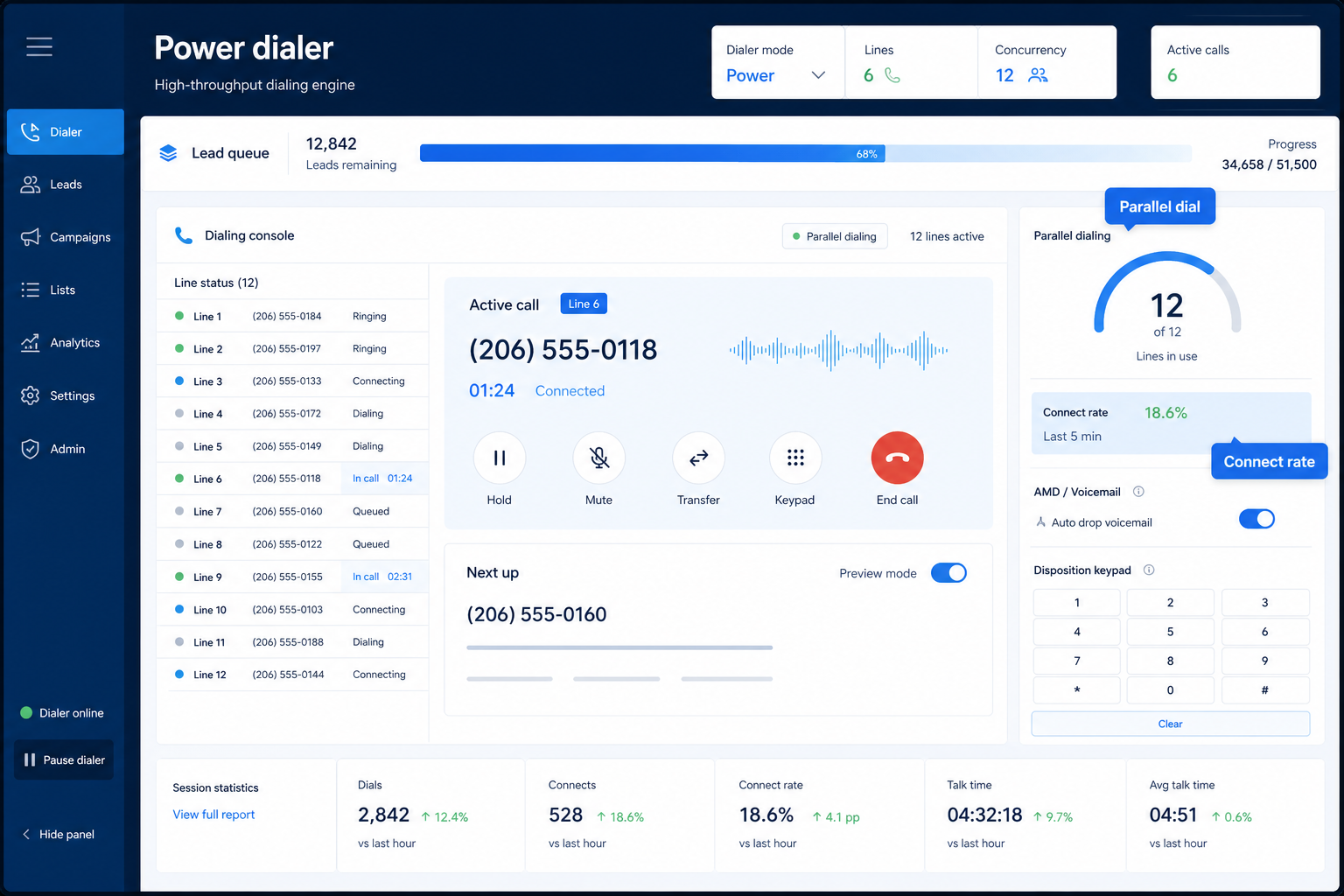
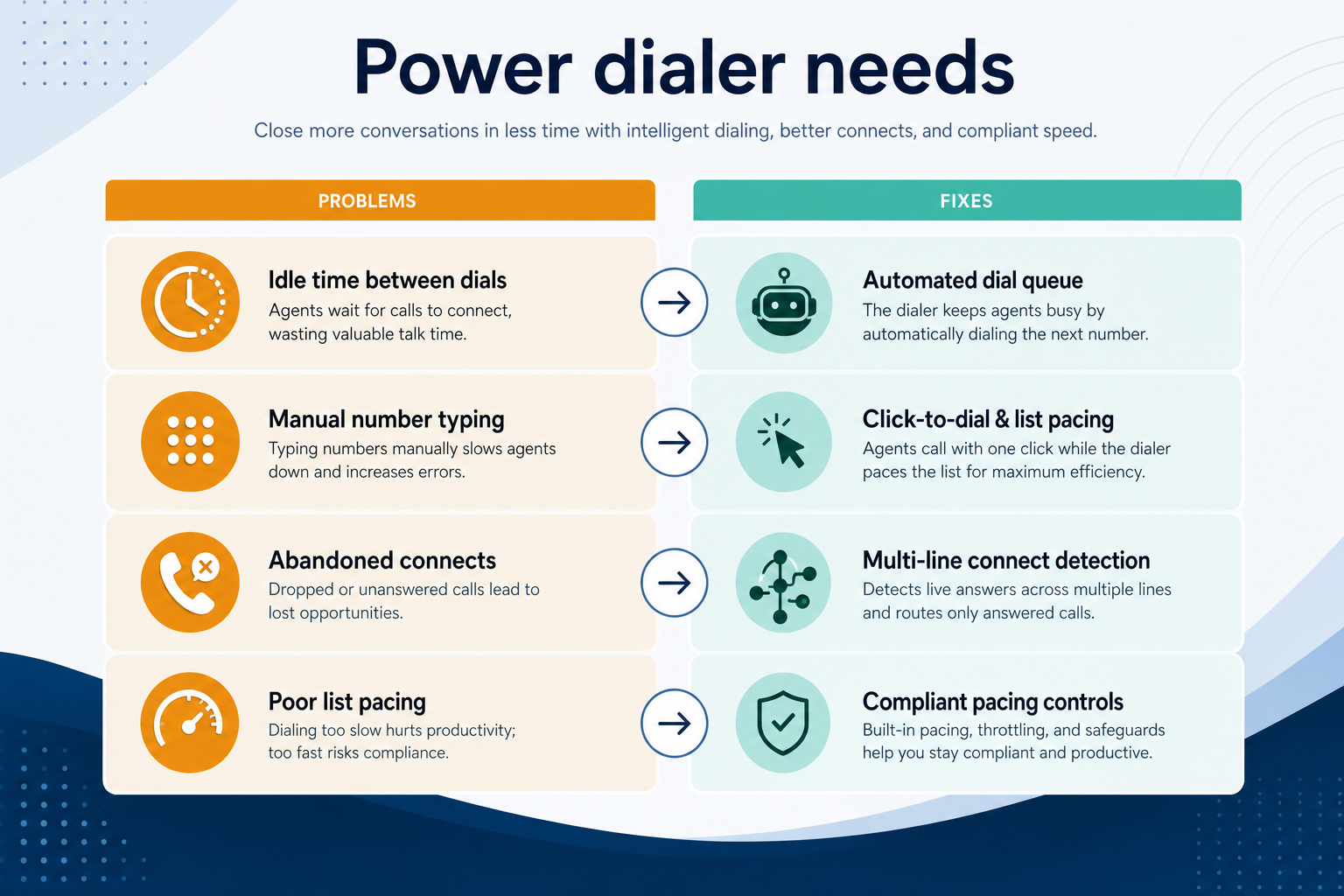
Automated outbound dialing that removes hand-typed numbers from high-volume calling days.
At a glance
Higher talk time with trustworthy attempt logging
SDRs, inside sales, founder-led outbound
Available on target plan · List / CRM dialing · Dispositions · Pacing controls
9 products to explore
Fit snapshot
Power dialer capability covers list-based automatic dialing, pacing, dispositions, and often CRM write-back for outbound sales teams. It is commonly gated to higher plan tiers — verify the feature on the plan you will buy.
SDR/BDR pods and inside-sales teams measured on conversations attempted, where manual dialing is the bottleneck.
How teams put CRM to work for power dialer
Example 1
a six-person SDR team runs morning blocks from a CRM list. Dispositions are mandatory before the next dial, so Monday reviews show real connect rates.
Example 2
a founder’s two-hour outbound block uses power dialing with local presence. The block ends with logged outcomes instead of a sticky-note pile.
These are the operating problems that usually push teams toward CRM for power dialer — not feature wish lists.
Without CRM discipline: Talk time collapses.
Without CRM discipline: You bought the wrong tier.
Without CRM discipline: Managers cannot coach volume.
Without CRM discipline: Risk rises with volume.
A CRM only helps when the team keeps owners, history, and next steps current. Here is what “good” looks like for power dialer.
With CRM discipline: List-driven dialing removes repetitive entry.
With CRM discipline: Trial on the exact plan you will purchase.
With CRM discipline: Forced dispositions and CRM write-back.
With CRM discipline: Do-not-call and consent checks stay in the loop.
Faster dialing blocks
More conversations per hour.
Attempt truth in CRM
Activity matches reality.
Coachable metrics
Connect rates become visible.
Reps stay in flow
Less admin between dials.
Evaluate list ingestion, pacing controls, disposition requiredness, CRM logging, and tier gates — not demo-only dialer modes.
Available on target plan as a buying lens for this capability.
List / CRM dialing as a buying lens for this capability.
Dispositions as a buying lens for this capability.
Start with must-haves your team will use weekly. Treat nice-to-haves as later upgrades — not day-one blockers.
Must-have
Nice-to-have
A simple operating loop beats a complex board nobody updates.
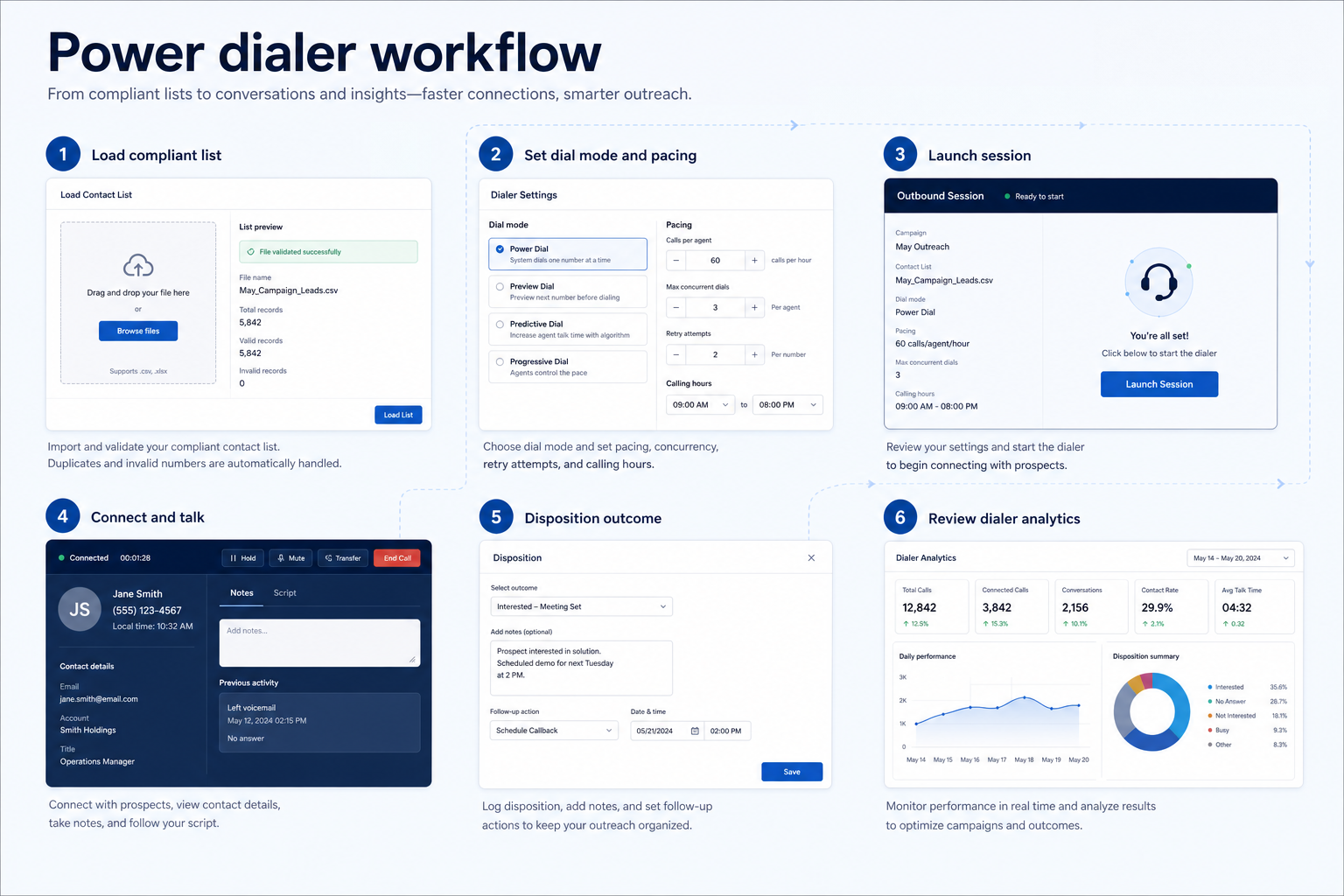
CRM view; suppress DNC.
Match team skill and compliance.
Require dispositions.
CRM write-back accuracy.
Weekly connect-rate coaching.
Best when
You need this capability without enterprise complexity.
Best when
Volume or multi-agent coverage makes this capability blocking.
Catalogue products tagged to related use cases for power dialer. Inclusion here is not a ranking.
Voip Business Phone
AI-powered sales dialer and business phone platform for CRM-connected outbound calling, SMS, and coaching.

Voip Business Phone
Mid-market cloud phone and customer-conversation platform with deep CRM/helpdesk CTI, IVR, power dialer on Professional, and paid AI add-ons — 3-licence minimum.

Voip Business Phone
SMB cloud phone system with a $0 starter rung, Starter from $18/user/month annual (2-user minimum), call recording and IVR from Professional, plus a separate call-centre plan ladder.
Voip Business Phone
Budget global cloud telephony with virtual numbers across 100+ countries and a unified callbox — Essential from $12/user/month annual (up to 5 users); calls and SMS are pay-as-you-go.

Voip Business Phone
Freshworks cloud PBX for inbound voice support: a $0 agent plan plus pay-per-minute, Growth from $15/agent/month annual with 2,000 included incoming minutes, and routing automation higher up.

Business Communications
Enterprise-grade UCaaS / cloud phone platform (RingEX) with deep call routing, video, team messaging and contact-centre options — Core from ~$20/user/month annual.

Business Communications
AI-first cloud phone (Dialpad Connect) with included transcription/summaries — Standard from $15/user/month annual; Sell and Support are separate product ladders.

Business Communications
Meetings-first Workplace suite plus Zoom Phone UCaaS — Phone US/CA Unlimited research floor ~$15–16/user/month; free meetings/chat exist but Phone is paid.

Business Communications
SMB-friendly unified business communications — Core $15, Engage $25, Scale $75 per user/month annual, with messaging apps including WhatsApp and a Contact Center ladder from $75/agent.
No. Fit depends on your primary communications job (phone, dialing, messaging, WhatsApp, or contact center), seat count, and which requirements are must-haves. Use the Best Business Communications shortlist and requirements guide rather than starting from a single ranking.
CRM capabilities store relationships and pipeline on records. Business communications capabilities place and route calls or messages — often writing activity back into CRM via CTI. Many teams need both connected; buy for the communications job that is blocking first.
Business numbers, inbound and outbound calling, and softphone apps delivered over the internet.
Click-to-dial, screen pops, and automatic call logging in the system your team already uses.
Recording, storage, and playback controls for coaching and compliance.
Call and message volume, wait times, and agent activity in reports managers act on.
Part of CRM capabilities · CRM Software hub
Want clearer software shortlists? Get buying guides and comparisons by email.
Newsletter coming soon.