
This video is hosted on YouTube
This content is hosted by YouTube. The player loads only after you allow marketing cookies.
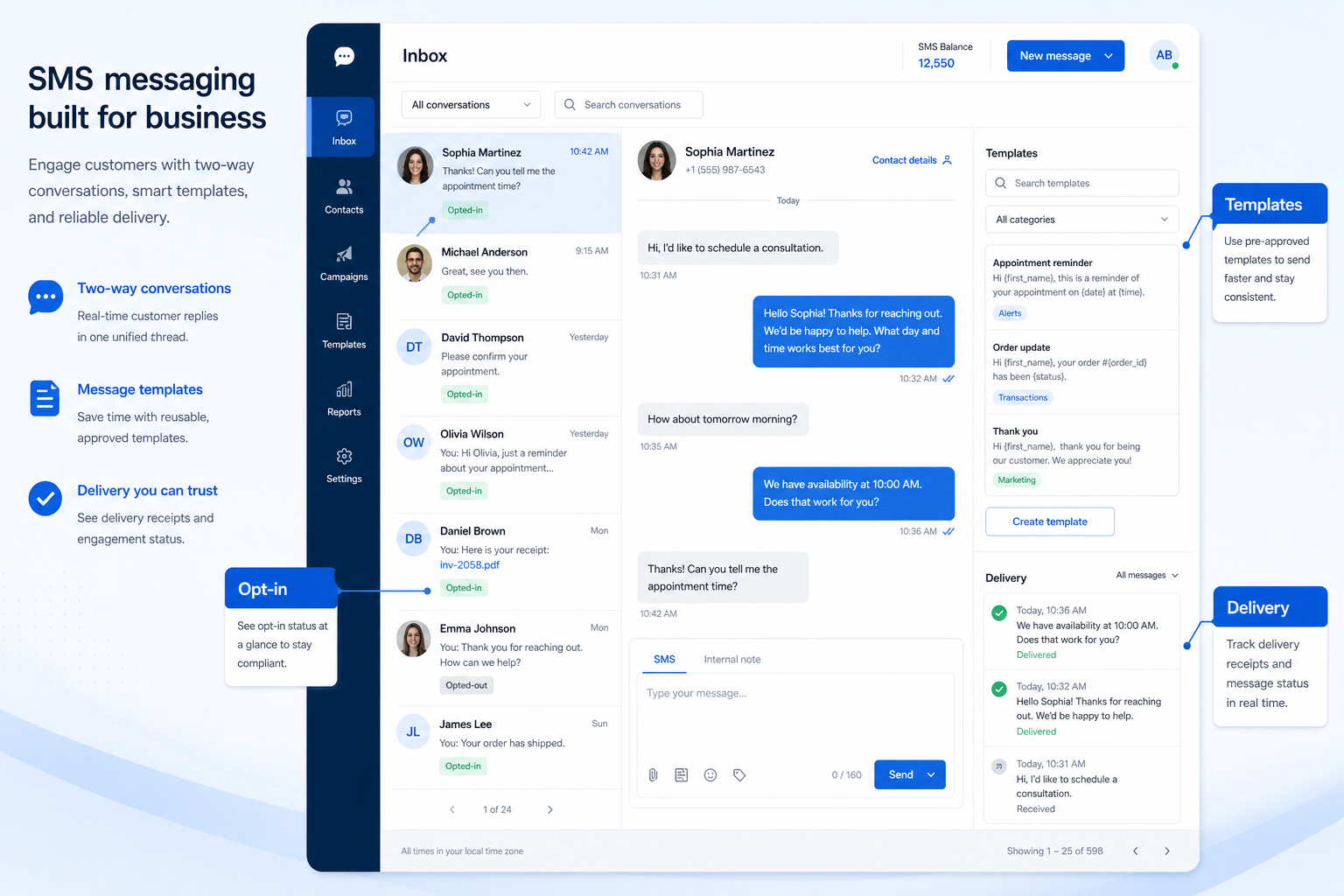
Send and receive business SMS on company numbers — with delivery handling and registration rules.
At a glance
Company-owned two-way SMS customers can trust
Ops, support, sales, and SMB operators running business voice or messaging
Business numbers · Two-way history · Registration / compliance · Templates
9 products to explore
Fit snapshot
SMS messaging capability covers two-way business texting tied to virtual numbers, delivery handling, templates, and the regional registration rules that govern commercial SMS. It is customer-facing messaging — not internal team chat.
Support, success, and front-desk teams whose customers already text — especially when personal phones are today’s unofficial channel.
How teams put CRM to work for sms
Example 1
a clinic moves appointment texts off a coordinator’s phone onto a business number with shared history so any teammate can continue the thread.
Example 2
a services firm sends job-status SMS from the same numbers used for voice, keeping context in one customer timeline.
These are the operating problems that usually push teams toward CRM for sms — not feature wish lists.
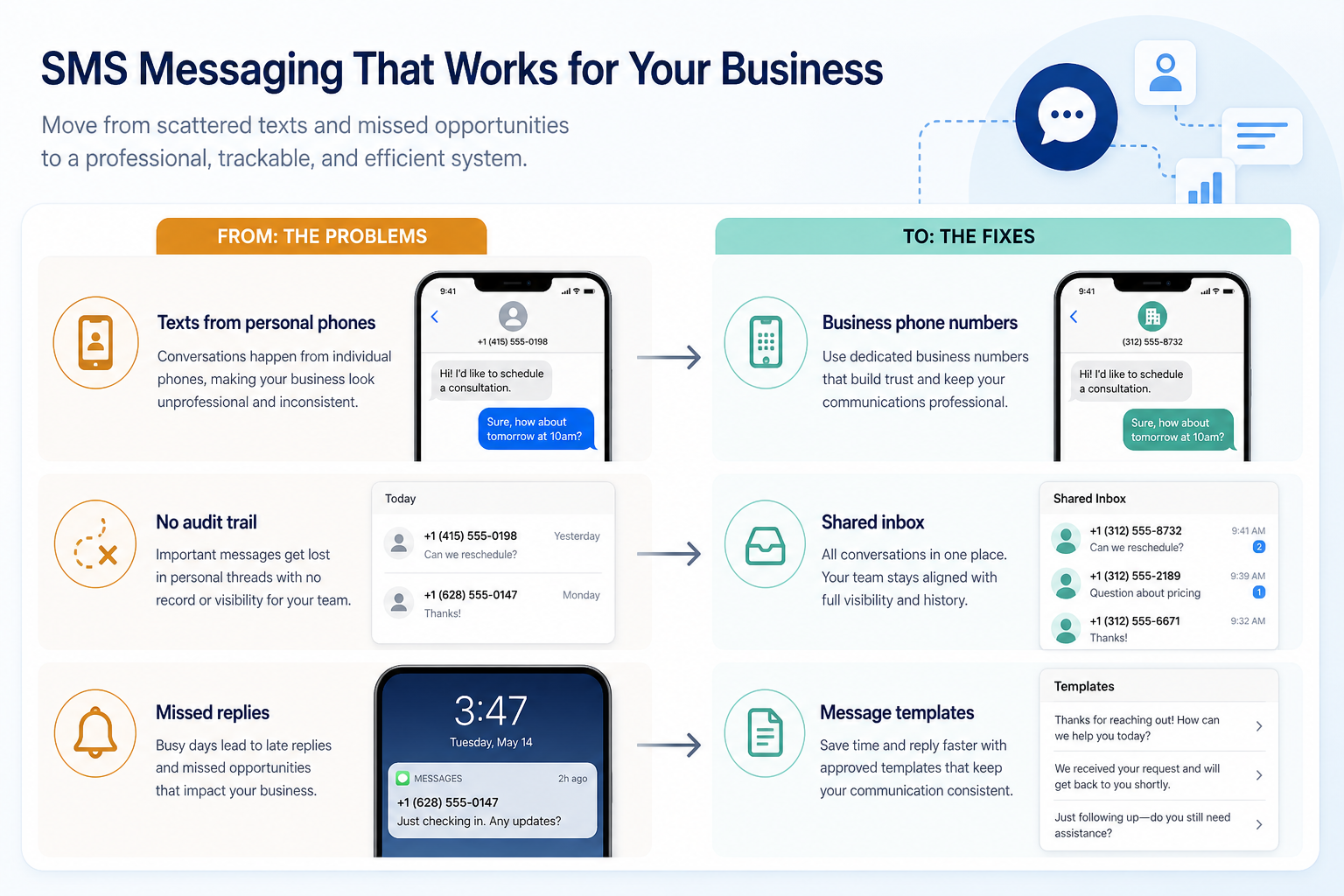
Without CRM discipline: Coverage and compliance fail.
Without CRM discipline: Deliverability collapses after launch.
Without CRM discipline: Customers reply into a void.
Without CRM discipline: Shift changes restart conversations.
A CRM only helps when the team keeps owners, history, and next steps current. Here is what “good” looks like for sms.
With CRM discipline: Business numbers keep threads company-owned.
With CRM discipline: Registration workflows are part of setup.
With CRM discipline: Two-way messaging with ownership.
With CRM discipline: Shared inbox preserves context.
Company-owned texting
Threads survive staffing changes.
Real conversations
Replies are handled, not ignored.
Registration-aware sends
Fewer surprise blocks.
Team handoffs
Any agent can continue with context.
Evaluate number association, two-way history, registration/compliance support, and shared inbox fit — not raw send volume marketing.
Business numbers as a buying lens for this capability.
Two-way history as a buying lens for this capability.
Registration / compliance as a buying lens for this capability.
Start with must-haves your team will use weekly. Treat nice-to-haves as later upgrades — not day-one blockers.
Must-have
Nice-to-have
A simple operating loop beats a complex board nobody updates.
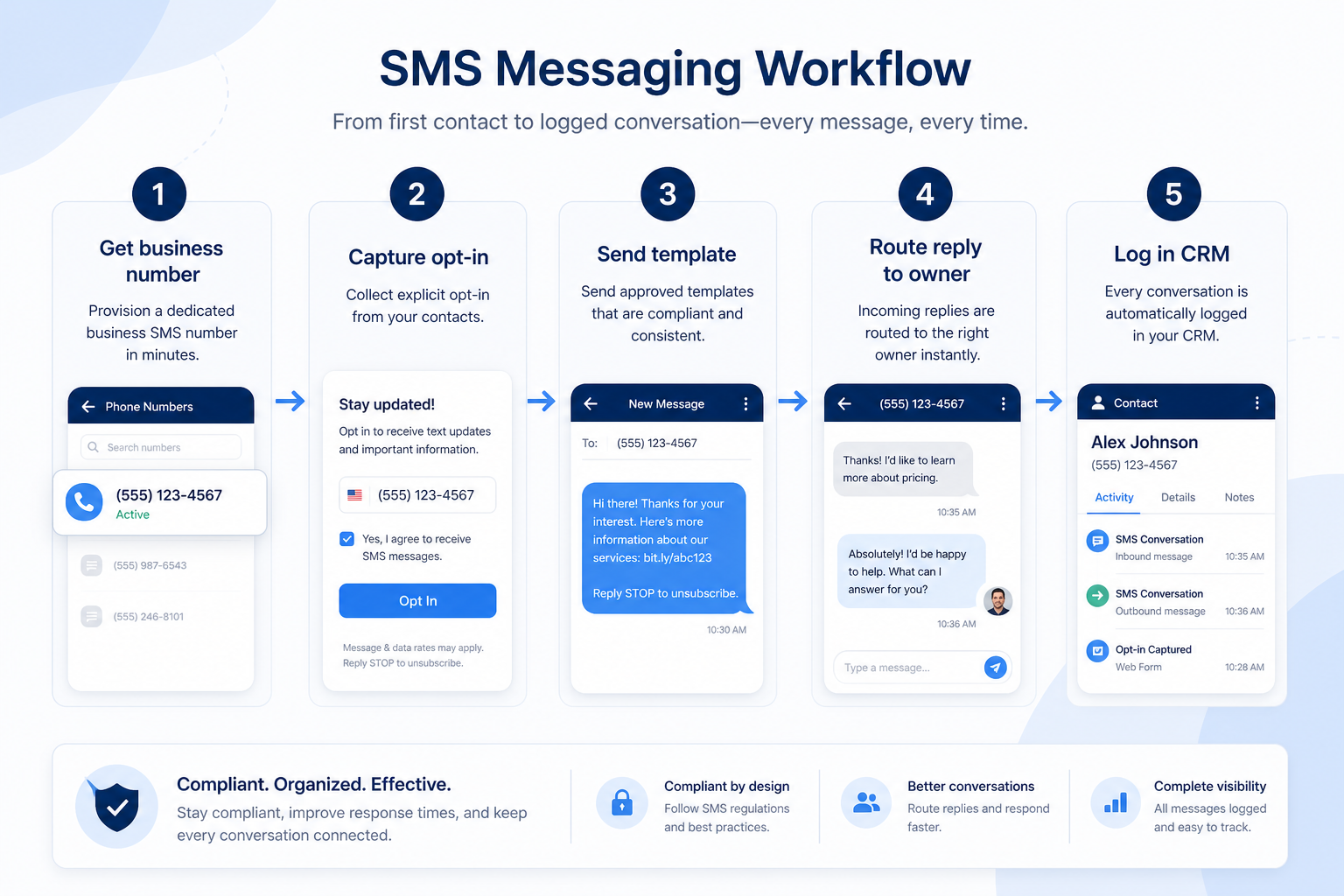
Follow regional SMS rules.
Assignment and ownership.
Common replies + personalization.
Resolve with status discipline.
Weekly open-thread hygiene.
Broader capability workflow demos for sms — distinct from narrow feature walkthroughs.
Official vendor demonstrations help show how different CRM platforms approach the workflows, features and interactions that make up sms. Absence of a video does not mean a product lacks the capability.

Twilio
Sending your first message with Twilio
Focus: Official Twilio developer tutorial for sending a first message
This video is hosted on YouTube
This content is hosted by YouTube. The player loads only after you allow marketing cookies.
What this shows
What this does not establish
Features visible in this demo
Source: Twilio Inc. · Verified 18 Aug 2026

ManyChat
What is Manychat? How to Automate DMs & Boost your Engagement
Focus: Manychat product introduction for automated DMs

This video is hosted on YouTube
This content is hosted by YouTube. The player loads only after you allow marketing cookies.
What this shows
What this does not establish
Features visible in this demo
Source: ManyChat, Inc. · Verified 18 Aug 2026
Evidence-backed workflow comparison using official vendor demos and screenshots — not a ranking or entertainment gallery. Absence of media does not mean a product lacks the capability.
Twilio
Twilio emphasizes
ManyChat
ManyChat emphasizes
SoftwareGlimpse take
Twilio evidence emphasizes Official Twilio developer tutorial for sending a first message; ManyChat evidence emphasizes Manychat product introduction for automated DMs. These are observations from official sources, not inferred brand philosophy.
Best when
You need this capability without enterprise complexity.
Best when
Volume or multi-agent coverage makes this capability blocking.
Catalogue products tagged to related use cases for sms messaging. Inclusion here is not a ranking.

Business Communications
Official WhatsApp Business API platform with a shared team inbox, broadcasts, chatbots and AI co-pilot — platform subscription (Growth/Pro/Business) plus Meta per-message charges.

Business Communications
SMB-friendly unified business communications — Core $15, Engage $25, Scale $75 per user/month annual, with messaging apps including WhatsApp and a Contact Center ladder from $75/agent.

Business Communications
Omnichannel customer messaging platform (WhatsApp + other channels) with shared inbox and AI — Starter from $79/month annual-equivalent.

Business Communications
Cloud contact center (CCaaS) — Digital Essentials from $85/user/mo; Voice $105; Elite $165; Industry Clouds from $225.

Business Communications
Enterprise CCaaS (Genesys Cloud CX) — CX 1 from $75/user/mo annual; CX 2 $115; CX 3 $155; CX 4 $240.

Business Communications
Cloud contact center (CCaaS) — Digital from $119/concurrent seat/mo; Core $159; Plus/Pro/Enterprise quote — 50-seat minimum.
Business Communications
Programmable voice/SMS/WhatsApp platform (CPaaS) — pay-as-you-go usage; Flex contact center from $150/named user/mo or $1/active user hour.
Business Communications
Messenger / Instagram / WhatsApp marketing chatbot — Free 25 Active Contacts; Essential from $14/mo annual; Pro $29/mo annual.
Live Chat
Customer messaging / shared inbox with Fin AI — Essential from $29/seat/mo + Fin from $0.99/outcome. Primary live-chat; BC + CS secondary.
Loading evidence explorer…
No. Fit depends on your primary communications job (phone, dialing, messaging, WhatsApp, or contact center), seat count, and which requirements are must-haves. Use the Best Business Communications shortlist and requirements guide rather than starting from a single ranking.
CRM capabilities store relationships and pipeline on records. Business communications capabilities place and route calls or messages — often writing activity back into CRM via CTI. Many teams need both connected; buy for the communications job that is blocking first.
One queue several agents can work with assignment, tags, and internal notes.
Official WhatsApp Business API messaging with a shared inbox, templates, and broadcasts.
Calls, SMS, and chat in one agent workspace instead of three separate tools.
Business numbers, inbound and outbound calling, and softphone apps delivered over the internet.
Part of CRM capabilities · CRM Software hub
Want clearer software shortlists? Get buying guides and comparisons by email.
Newsletter coming soon.
Explore the official documentation, screenshots and product demonstrations used to understand how each CRM implements sms.
2 items
Official video · ManyChat
Supports
Demonstrates
This video is hosted on YouTube
This content is hosted by YouTube. The player loads only after you allow marketing cookies.
Official vendor video
Verified: 18 Aug 2026
Open source ↗Official video · Twilio
Supports
Demonstrates
This video is hosted on YouTube
This content is hosted by YouTube. The player loads only after you allow marketing cookies.
Official vendor tutorial
Verified: 18 Aug 2026
Open source ↗