This video is hosted on YouTube
This content is hosted by YouTube. The player loads only after you allow marketing cookies.
Venture capital CRM capability
Evaluate CRM platforms on how well they support reporting and forecasting for venture capital teams — the requirements that matter, the trade-offs involved, and researched product evidence.
Reporting and forecasting
What we evaluate
Capability at a glance
Medium–High importanceReporting is what makes CRM data useful beyond the person who entered it. For venture capital teams it answers whether pipeline coverage, activity, and conversion are healthy — or only look busy.
Weak reporting pushes venture capital managers back into spreadsheets, which means the numbers in a review are stale and nobody trusts them.
Compare how reports are built, what can be grouped and filtered, whether dashboards can be shared, and how much of it needs an analyst rather than a manager.
Use these requirements to evaluate products against your workflow — not popularity alone.
Give each role a standing view of the numbers they own.
Explore feature →Build reports on your own fields, filters, and groupings.
Explore feature →Measure stage movement and conversion, not just current totals.
Explore feature →Produce a forward revenue view from pipeline data.
Explore requirement →Report on calls, emails, and meetings to explain pipeline changes.
Explore feature →Get data out for finance or a warehouse when reporting needs outgrow the CRM.
Explore requirement →Essential
Advanced
See which official demonstrations and screenshots support each requirement. Support labels come from feature assessments — not from media counts.

Salesforce
Evidence:

Oracle CX
Evidence:

Dynamics 365
Evidence:
Requirement
Build reports on your own fields, filters, and groupings.
Explore requirement →Salesforce
Evidence:
Oracle CX
Evidence:
Dynamics 365
Evidence:
Requirement
Measure stage movement and conversion, not just current totals.
Explore requirement →Salesforce
Evidence:
Dynamics 365
Evidence:

HubSpot
Evidence:
Salesforce
Evidence:
Oracle CX
Evidence:
Dynamics 365
Evidence:
Requirement
Report on calls, emails, and meetings to explain pipeline changes.
Explore requirement →Salesforce
Evidence:
Dynamics 365
Evidence:
HubSpot
Evidence:
Requirement
Get data out for finance or a warehouse when reporting needs outgrow the CRM.
Explore requirement →Salesforce
Evidence:
Dynamics 365
Evidence:
HubSpot
Evidence:
Overall labels use approved criterion assessments when available; otherwise they reflect feature-support coverage — not an industry ranking.
| Product | Overall | Reporting | Best suited to |
|---|---|---|---|
Strong · 9/10 Evidence: 6 sources · 2 screenshots · 1 official videos | Mid-market and enterprise sales orgs needing deep customization and reporting | ||
Strong · 8/10 Evidence: 6 sources · 0 screenshots · 0 official videos | Oracle-centric mid-market/enterprise sales orgs | ||
Strong · 8/10 Evidence: 6 sources · 1 screenshots · 2 official videos | Mid-market and enterprise teams standardized on Microsoft 365 | ||
Strong · 8/10 Evidence: 6 sources · 0 screenshots · 0 official videos | SMB and mid-market teams wanting CRM + phone/email engagement | ||
Strong · 8/10 Evidence: 6 sources · 1 screenshots · 0 official videos | SMB and mid-market teams wanting free CRM now and room to expand into hubs later | ||
Strong · 8/10 Evidence: 5 sources · 0 screenshots · 0 official videos | NetSuite ERP customers needing native CRM | ||
Strong · 8/10 Evidence: 5 sources · 0 screenshots · 0 official videos | Large enterprises with complex case/CRM processes | ||
Strong · 8/10 Evidence: 5 sources · 0 screenshots · 0 official videos | SAP ERP-centric enterprises |
Select two products for a side-by-side comparison.
Salesforce
$25.00/user/month
Reports and dashboards are first-class Sales Cloud features. Forecasting arrives from Pro Suite, with Predictive AI on Unlimited and optional Revenue Intelligence add-on for deeper analytics — a clear enterprise reporting ladder.
Evidence confidence: Medium
Oracle CX
$65.00/user/month
Enterprise analytics/forecasting depth expected of Oracle CX Sales.
Evidence confidence: Medium
Dynamics 365
$65.00/user/month
Reporting/dashboards, Power BI analytics, forecasting charts, and Copilot metric queries are first-party strengths for sales managers.
Evidence confidence: Medium
Need help choosing?
Answer a few questions about team size, requirements, integrations and budget for a personalized CRM shortlist.
Find My CRM →✓ Supported · ~ Partial / plan dependent · — Not evidenced. Unknown is never shown as “No”.
| Requirement | Salesforce | Oracle CX | Dynamics 365 |  Freshsales Freshsales | HubSpot |
|---|---|---|---|---|---|
| Reporting | |||||
| Forecasting | ~ | ~ | ~ | ~ | |
| Analytics | |||||
| Pipeline management | |||||
| Deal management | |||||
| Custom fields | |||||
| Integrations |
Official vendor demonstrations help show how different CRM platforms approach the workflows, features and interactions that make up reporting and forecasting. Absence of a video does not mean a product lacks the capability.
Salesforce
What is Lead Management & How Does It Work? | Salesforce Explained
Focus: How Salesforce explains lead management from capture through qualification.
This video is hosted on YouTube
This content is hosted by YouTube. The player loads only after you allow marketing cookies.
What this shows
What to notice
What this does not establish
Features visible in this demo
Particularly relevant to
Source: Salesforce · Verified 15 Aug 2026
Dynamics 365
Scale Your Sales Team with Sales Development Agent
Focus: How Dynamics 365 Sales Development Agent scales lead qualification workflows.

This video is hosted on YouTube
This content is hosted by YouTube. The player loads only after you allow marketing cookies.
What this shows
What to notice
What this does not establish
Features visible in this demo
Particularly relevant to
Source: Microsoft · Verified 15 Aug 2026
Evidence-backed workflow comparison using official vendor demos and screenshots — not a ranking or entertainment gallery. Absence of media does not mean a product lacks the capability.
Salesforce
Salesforce emphasizes
Dynamics 365
Dynamics 365 emphasizes
SoftwareGlimpse take
Salesforce evidence emphasizes Lead management concepts and Sales Cloud lead workflow as Salesforce presents them; Dynamics 365 evidence emphasizes Lead development and scaling workflow as presented by Microsoft Dynamics 365. These are observations from official sources, not inferred brand philosophy.
One best official workflow demonstration per product when available — not a gallery of every video.
Reports and dashboards are first-class Sales Cloud features. Forecasting arrives from Pro Suite, with Predictive AI on Unlimited and optional Revenue Intelligence add-on for deeper analytics — a clear enterprise reporting ladder.
Key strengths
Limitations
See it in action
This video is hosted on YouTube
This content is hosted by YouTube. The player loads only after you allow marketing cookies.
Official vendor tutorial
How Salesforce explains lead management from capture through qualification.
Reporting/dashboards, Power BI analytics, forecasting charts, and Copilot metric queries are first-party strengths for sales managers.
Key strengths
Limitations
See it in action
This video is hosted on YouTube
This content is hosted by YouTube. The player loads only after you allow marketing cookies.
Official vendor video
How Dynamics 365 Sales Development Agent scales lead qualification workflows.
Verified product captures only — never stock imagery or mockups.
Loading evidence explorer…
Your exact requirements depend on your sales or advisory process.
Ready-made vs custom reports
Prebuilt reports are quick to use; custom builders are more capable but need someone to learn them.
In-CRM reporting vs BI
Native reporting is convenient; a warehouse handles cross-system analysis better.
Reporting depth vs plan tier
Custom reports, dashboards, and forecasting are common upgrade triggers.
Reporting quality vs data discipline
No report compensates for missing close dates or unmaintained stages.
Relationship-led teams
Medium–HighReport on coverage, activity, and accounts that have gone quiet.
Explore use case →Pipeline-led sales teams
HighMeasure conversion, pipeline coverage, and expected outcomes.
Explore use case →High-volume lead handling
Medium–HighMeasure response times and which sources actually convert.
Explore use case →Complex sales processes
HighReport across pipelines, stages, and long cycles with confidence.
Explore use case →Growing teams
MediumSee pipeline and activity without building a reporting practice.
Explore use case →Ask the vendor to demonstrate this with your workflow, plans, and data requirements — and request documentation where relevant.
Ask the vendor to demonstrate this with your workflow, plans, and data requirements — and request documentation where relevant.
Ask the vendor to demonstrate this with your workflow, plans, and data requirements — and request documentation where relevant.
Ask the vendor to demonstrate this with your workflow, plans, and data requirements — and request documentation where relevant.
Ask the vendor to demonstrate this with your workflow, plans, and data requirements — and request documentation where relevant.
Ask the vendor to demonstrate this with your workflow, plans, and data requirements — and request documentation where relevant.
Ask the vendor to demonstrate this with your workflow, plans, and data requirements — and request documentation where relevant.
Ask the vendor to demonstrate this with your workflow, plans, and data requirements — and request documentation where relevant.
Start from the questions
List the decisions reports must support, then build back.
Agree definitions
Define qualified, won, and close date once, in writing.
Fix data hygiene first
Reports expose data problems rather than solving them.
Set a review cadence
A dashboard nobody opens weekly will not stay accurate.
Decide who sees what
Agree which reports are open and which are restricted.
Pipeline management
Evaluate CRM platforms on how well they support pipeline management for venture capital teams — the requirements that matter, the trade-offs involved, and researched product evidence.
Explore →Workflow automation
Evaluate CRM platforms on how well they support workflow automation for venture capital teams — the requirements that matter, the trade-offs involved, and researched product evidence.
Explore →Contact management
Evaluate CRM platforms on how well they support contact management for venture capital teams — the requirements that matter, the trade-offs involved, and researched product evidence.
Explore →Integrations
Evaluate CRM platforms on how well they support integrations for venture capital teams — the requirements that matter, the trade-offs involved, and researched product evidence.
Explore →See the category-wide capability hub: Reporting and forecasting CRM capability.
Tell us your team size, requirements, integrations and budget. We will use structured answers — not affiliate incentives — to build your shortlist.
Find My CRM →At minimum pipeline by stage, conversion between stages, activity levels, and a forward view. Anything else should answer a question someone actually asks in a review.
It replaces opinion with evidence. For venture capital teams, reporting is what shows whether the pipeline supports the target or only looks full.
Reporting describes what has happened or is happening now. Forecasting projects a future outcome from that data, using stage probability, dates, or manual commitments.
Only as far as the underlying data. Forecasts inherit whatever discipline exists around close dates, deal values, and stage hygiene.
Usually not at first. It becomes worthwhile when you need CRM data joined to finance or product data, or history beyond what the CRM retains.
No. Fit depends on how your team works, which requirements are must-haves, and what the CRM has to integrate with. Use the requirement matrix and CRM Finder to build a shortlist rather than starting from a ranking.
Choose products based on the reporting and forecasting capabilities your team actually needs.
Explore the official documentation, screenshots and product demonstrations used to understand how each CRM implements reporting and forecasting.
12 items
Official video · Dynamics 365
Supports
Demonstrates
This video is hosted on YouTube
This content is hosted by YouTube. The player loads only after you allow marketing cookies.
Official vendor video
How Dynamics 365 Sales Development Agent scales lead qualification workflows.
Verified: 15 Aug 2026
Open source ↗Official video · Dynamics 365
Supports
Demonstrates

This video is hosted on YouTube
This content is hosted by YouTube. The player loads only after you allow marketing cookies.
Official vendor video
How Dynamics 365 Sales Development Agent supports pipeline and lead development workflows.
Verified: 15 Aug 2026
Open source ↗Official video · Pipedrive
Supports
Demonstrates
This video is hosted on YouTube
This content is hosted by YouTube. The player loads only after you allow marketing cookies.
Official vendor tutorial
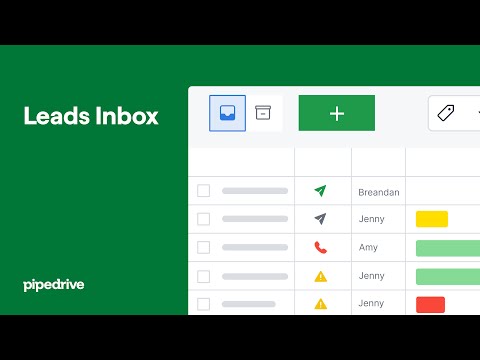
How Pipedrive Leads Inbox qualifies inbound leads before creating deals.
Verified: 15 Aug 2026
Open source ↗Official video · Pipedrive
Supports
Demonstrates

This video is hosted on YouTube
This content is hosted by YouTube. The player loads only after you allow marketing cookies.
Official vendor video
How Pipedrive presents pipeline as the shared sales system of record.
Verified: 15 Aug 2026
Open source ↗Official video · Salesforce
Supports
Demonstrates
This video is hosted on YouTube
This content is hosted by YouTube. The player loads only after you allow marketing cookies.
Official vendor tutorial
How Salesforce explains lead management from capture through qualification.
Verified: 15 Aug 2026
Open source ↗Official video · Zoho
Supports
Demonstrates

This video is hosted on YouTube
This content is hosted by YouTube. The player loads only after you allow marketing cookies.
Official vendor tutorial
How Zoho CRM manages leads from capture through conversion.
Verified: 15 Aug 2026
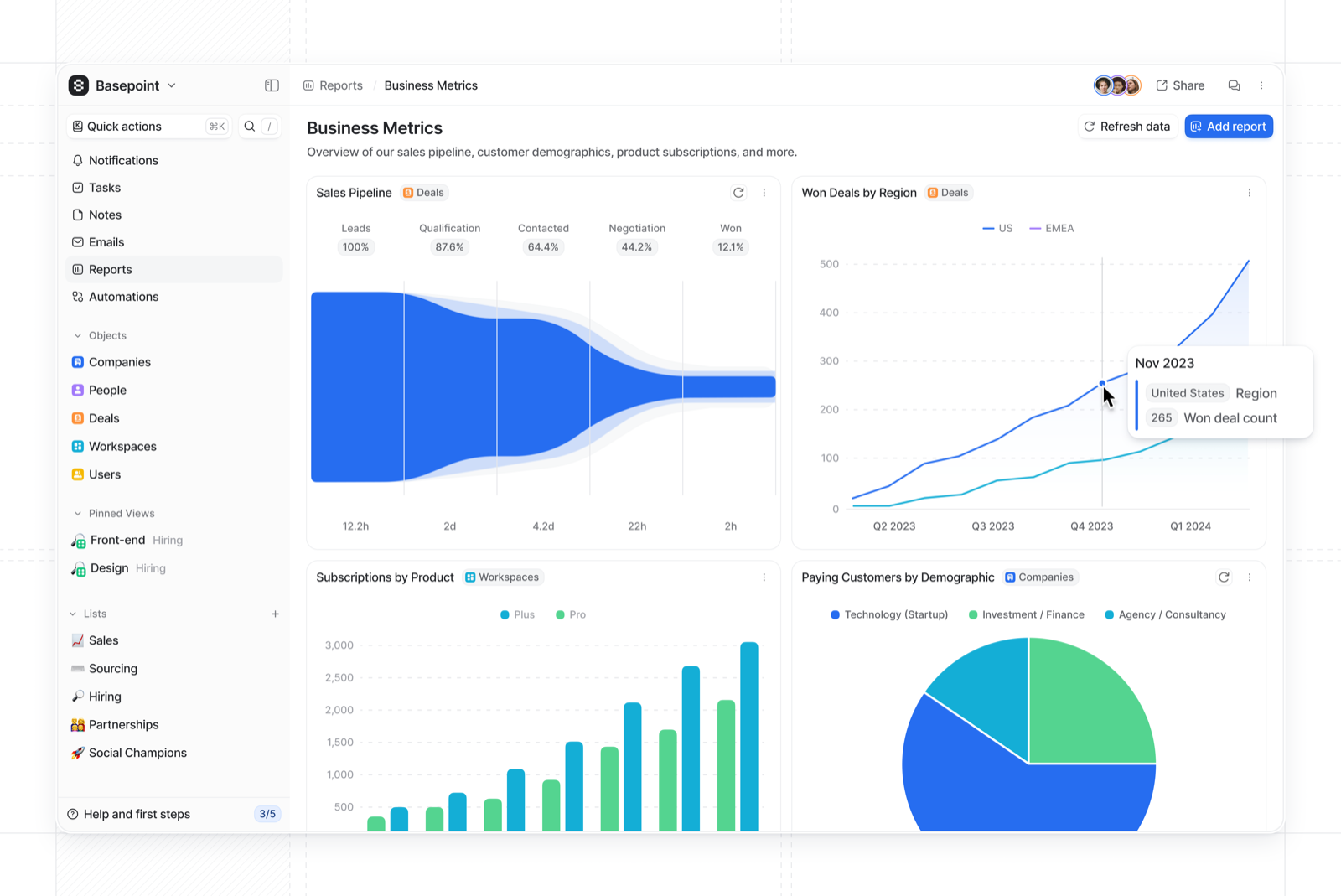
Open source ↗Screenshot · Attio
Supports
Demonstrates
Verified: 15 Aug 2026
Open source ↗Screenshot · Attio
Supports
Demonstrates
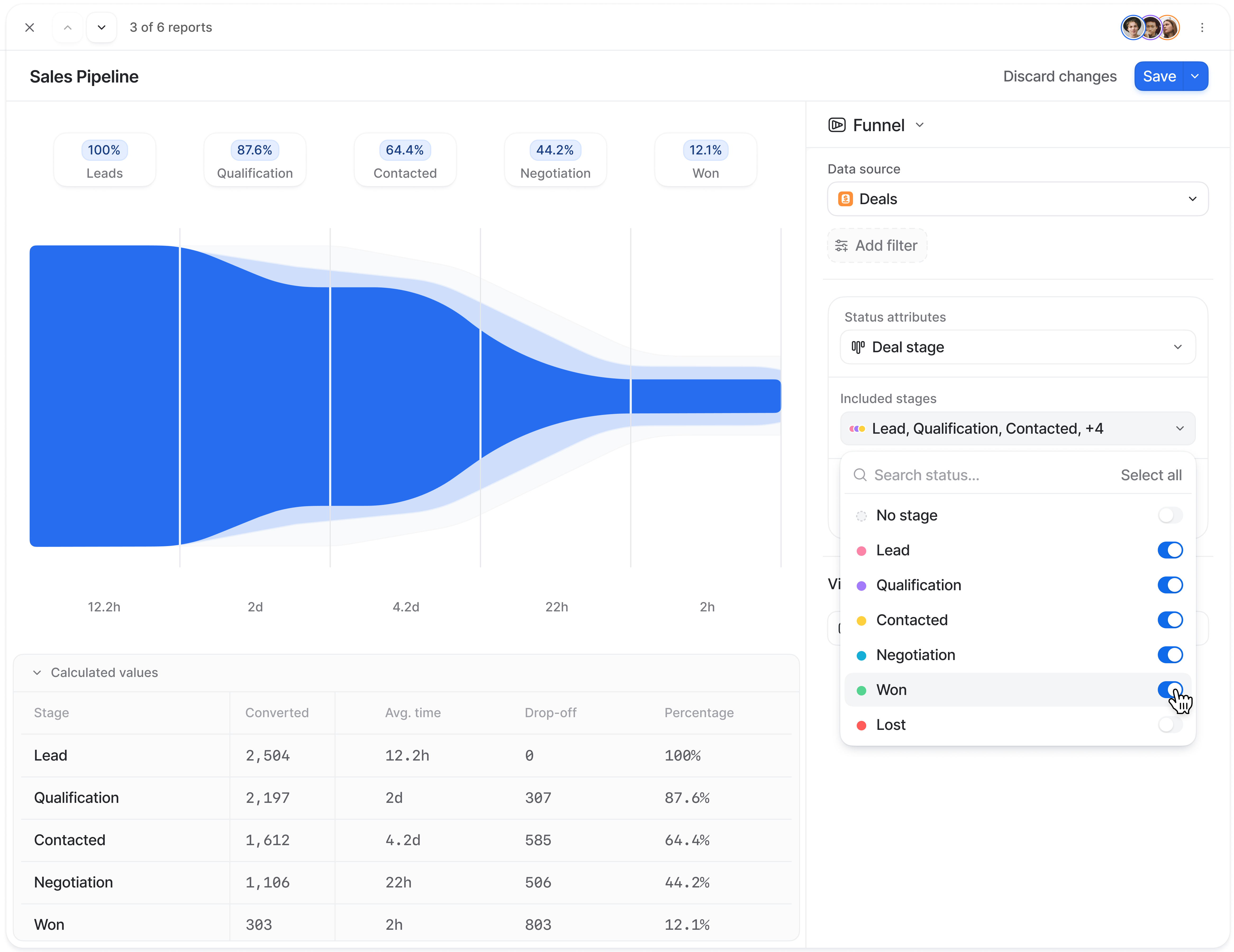
Verified: 15 Aug 2026
Open source ↗Screenshot · Close
Supports
Demonstrates
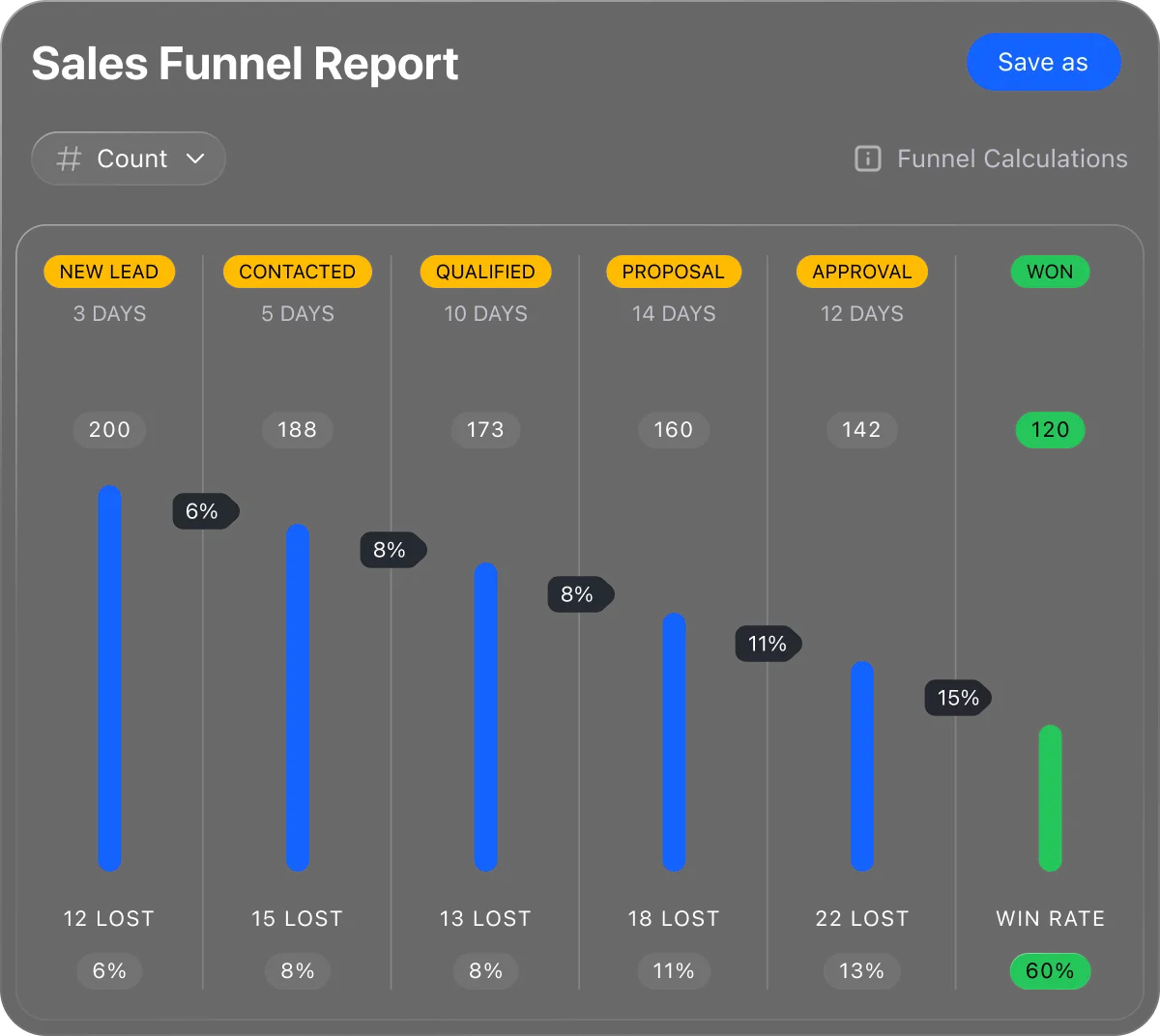
Verified: 13 Aug 2026
Open source ↗Screenshot · Close
Supports
Demonstrates
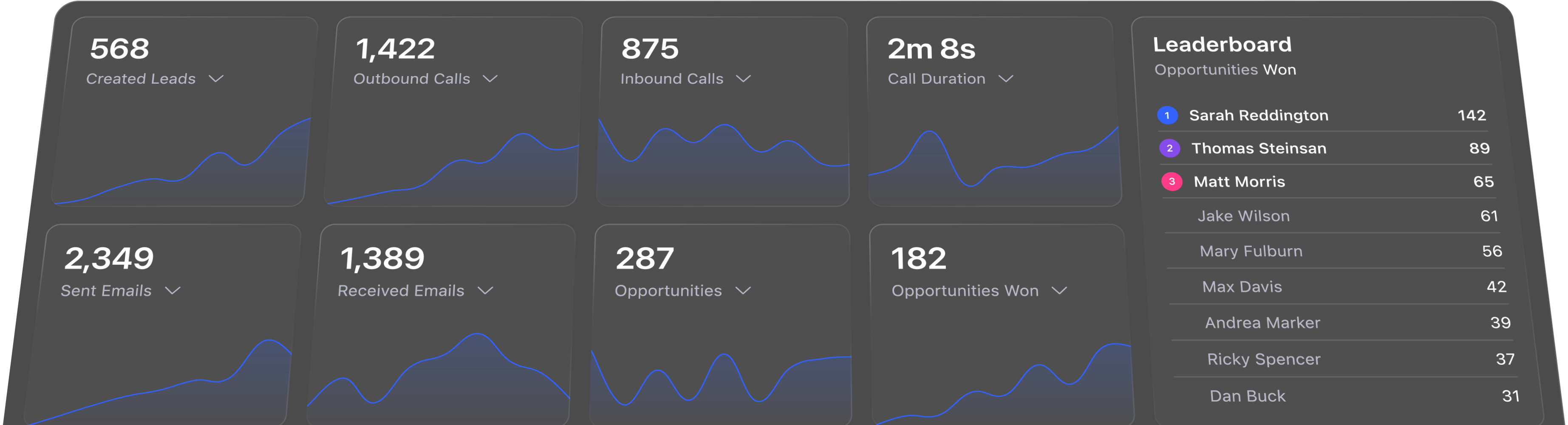
Verified: 13 Aug 2026
Open source ↗Screenshot · Dynamics 365
Supports
Demonstrates

Verified: 14 Aug 2026
Open source ↗Screenshot · HubSpot
Supports
Demonstrates
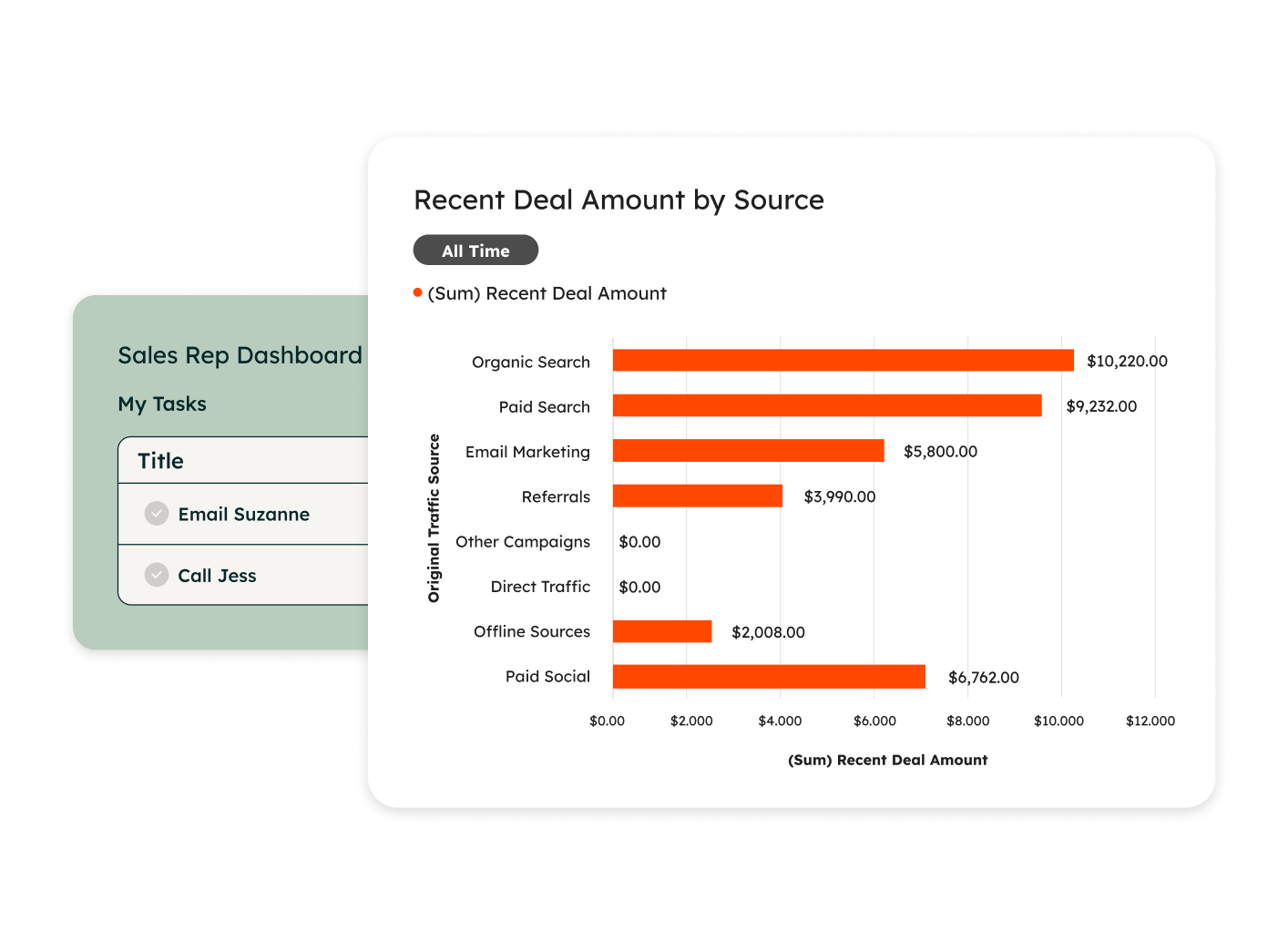
Verified: 14 Aug 2026
Open source ↗