
This video is hosted on YouTube
This content is hosted by YouTube. The player loads only after you allow marketing cookies.
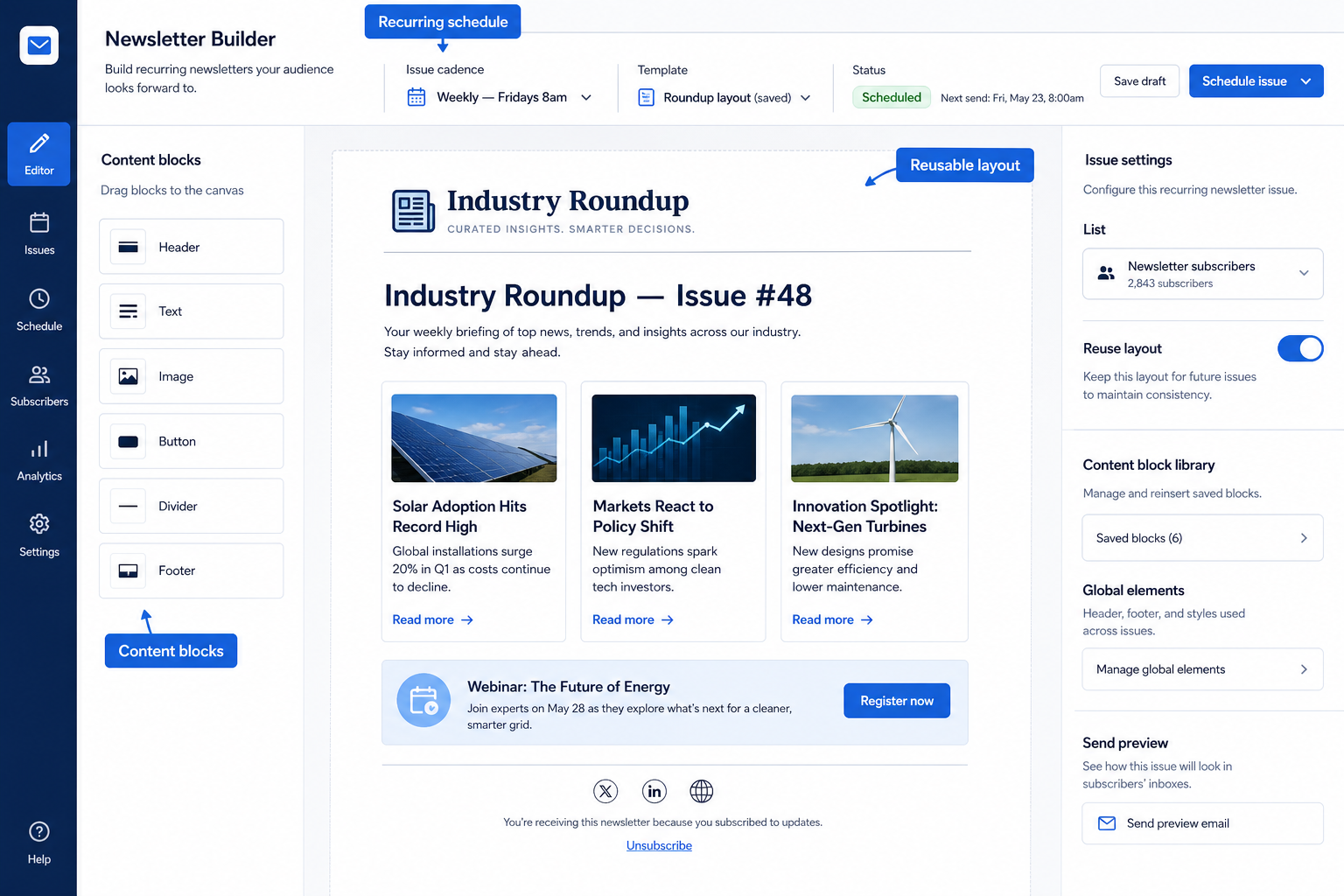
Compose and schedule recurring newsletters with reusable structure — not a new design every week.
At a glance
Sustainable recurring newsletter production
Marketers, creators, and SMB operators running permission-based email
Reusable layouts · Scheduling · Content blocks · List targeting
9 products to explore
Fit snapshot
Newsletter builder capability covers recurring composition, scheduling, and often template systems tuned for editorial or promo newsletters inside an ESP.
Creators and content marketers whose primary cadence is a newsletter.
How teams put CRM to work for newsletters
Example 1
a weekly industry roundup. A saved layout and content blocks cut production from a day to an hour.
Example 2
an SMB monthly update. Scheduling and a shared template keep the cadence alive when the owner travels.
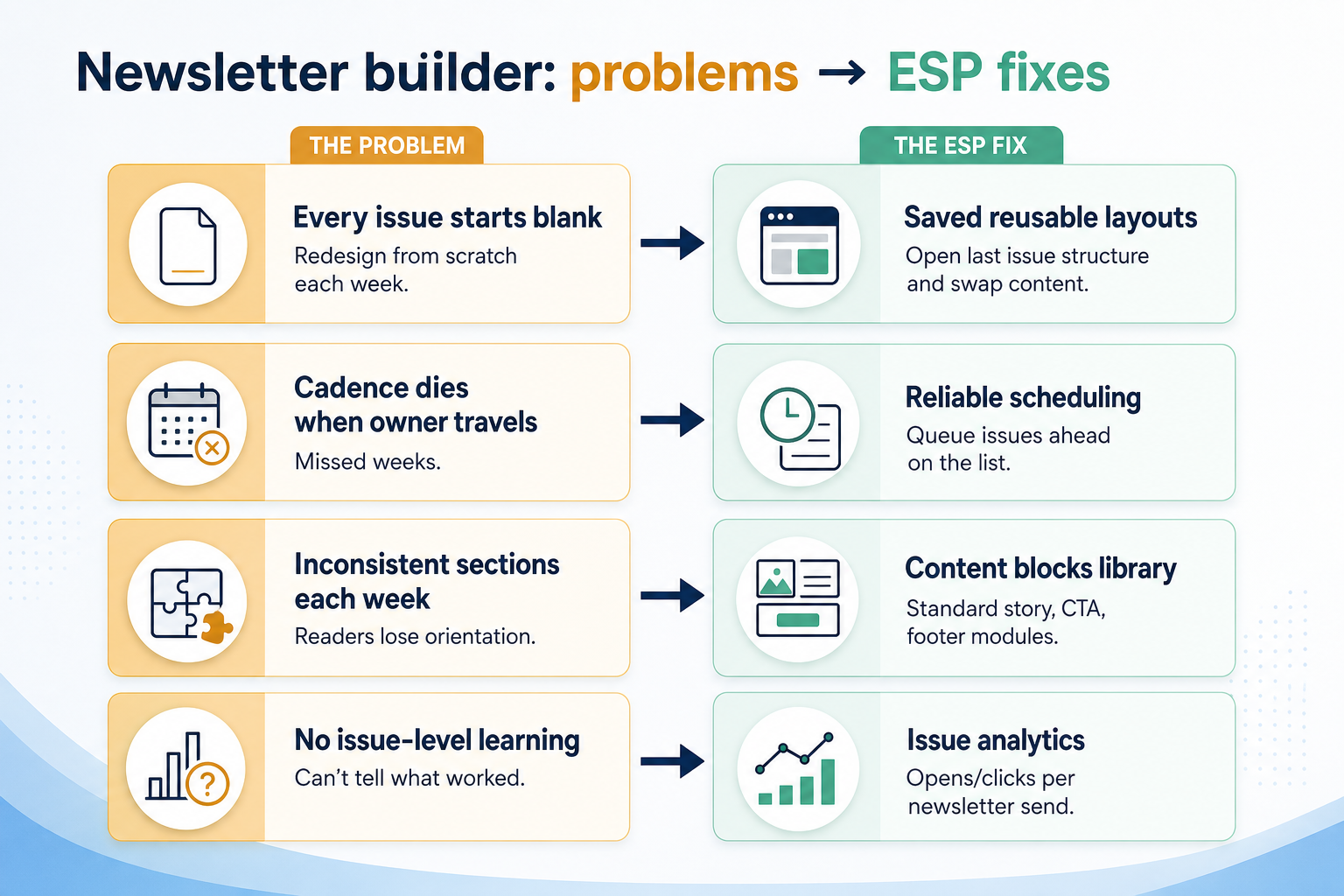
These are the operating problems that usually push teams toward CRM for newsletters — not feature wish lists.
Without CRM discipline: Cadence dies under redesign tax.
Without CRM discipline: No schedule, no owner, no backup.
Without CRM discipline: Editorial quality and promo urgency collide.
Without CRM discipline: You cannot tell if the format is working.
A CRM only helps when the team keeps owners, history, and next steps current. Here is what “good” looks like for newsletters.
With CRM discipline: Saved newsletter structures make weekly production feasible.
With CRM discipline: Scheduling and shared drafts keep issues shipping.
With CRM discipline: Treat newsletters as a first-class recurring object when the product supports it.
With CRM discipline: Analytics tied to recurring sends show trends.
A keepable cadence
Production time drops enough to stay consistent.
More consistent quality
Layouts stay on-brand week to week.
Clearer ownership
Drafts and schedules are visible to the team.
Format improvement over time
Issue metrics guide structural changes.
Evaluate reuse, scheduling reliability, and list targeting — not novelty blocks you will never use.
Reusable layouts as a buying lens for this capability.
Scheduling as a buying lens for this capability.
Content blocks as a buying lens for this capability.
Start with must-haves your team will use weekly. Treat nice-to-haves as later upgrades — not day-one blockers.
Must-have
Nice-to-have
A simple operating loop beats a complex board nobody updates.
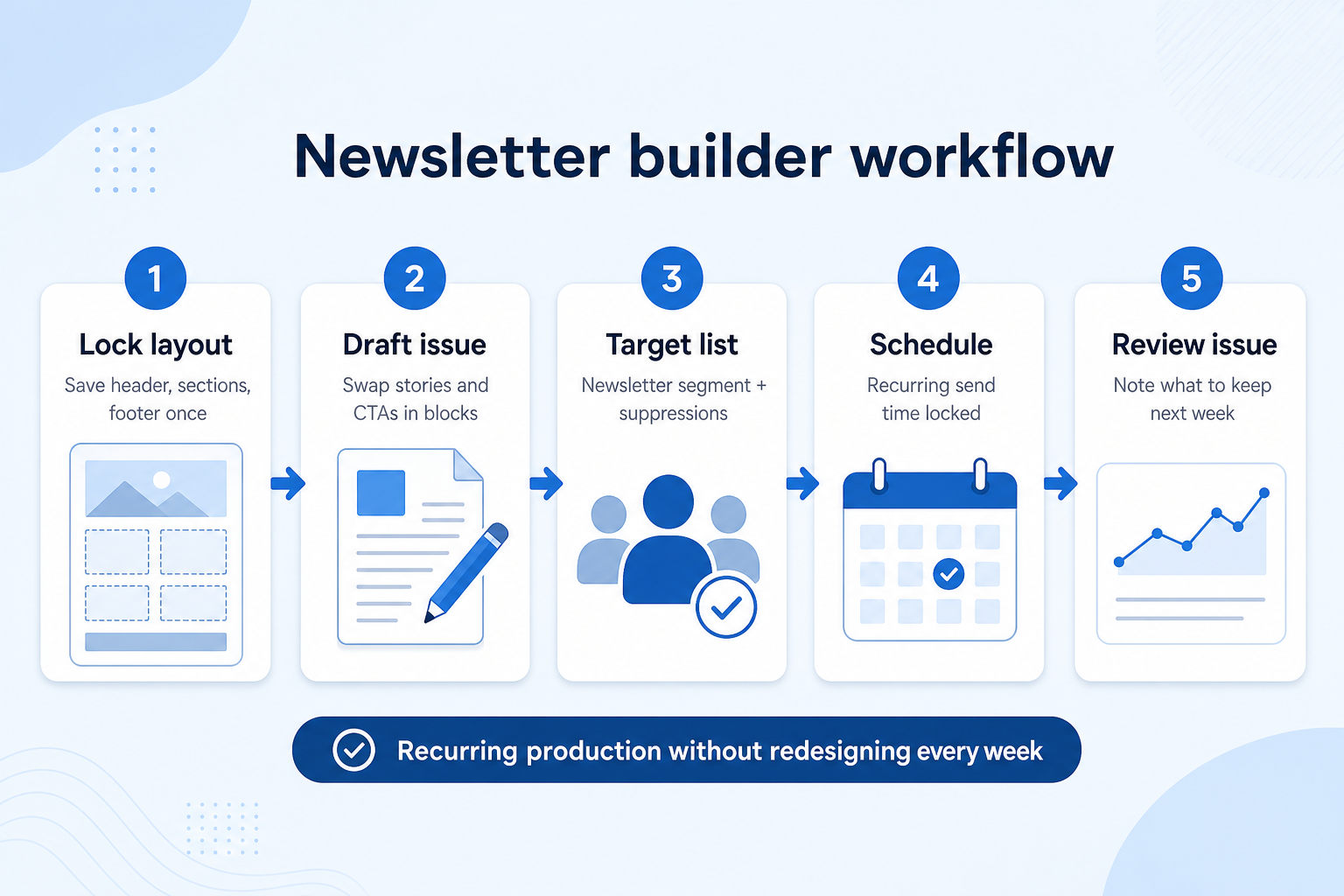
Choose the recurring layout.
Swap stories/offers; keep structure.
Full list or engaged segment.
Same day/time when possible.
Compare to last issue.
Broader capability workflow demos for newsletters — distinct from narrow feature walkthroughs.
Official vendor demonstrations help show how different CRM platforms approach the workflows, features and interactions that make up newsletters. Absence of a video does not mean a product lacks the capability.

Campaign Monitor
Email Marketing Solutions | Campaign Monitor Product Overview
Focus: How Marigold (Campaign Monitor by Marigold) presents the product in an official vendor video.
This video is hosted on YouTube
This content is hosted by YouTube. The player loads only after you allow marketing cookies.
What this shows
What to notice
What this does not establish
Features visible in this demo
Particularly relevant to
Source: Marigold (Campaign Monitor by Marigold) · Verified 17 Aug 2026

GetResponse
GetResponse is THE complete online marketing software!
Focus: How GetResponse presents the product in an official vendor video.

This video is hosted on YouTube
This content is hosted by YouTube. The player loads only after you allow marketing cookies.
What this shows
What to notice
What this does not establish
Features visible in this demo
Source: GetResponse · Verified 17 Aug 2026

AWeber
AI Sign-Up Form Builder: Personality Quiz, Postcard Flip, and a Playable Game / The Shift AI Show
Focus: How AWeber Systems, Inc. presents the product in an official vendor video.

This video is hosted on YouTube
This content is hosted by YouTube. The player loads only after you allow marketing cookies.
What this shows
What to notice
What this does not establish
Features visible in this demo
Particularly relevant to
Source: AWeber Systems, Inc. · Verified 17 Aug 2026
Evidence-backed workflow comparison using official vendor demos and screenshots — not a ranking or entertainment gallery. Absence of media does not mean a product lacks the capability.
Campaign Monitor
Campaign Monitor emphasizes
GetResponse
GetResponse emphasizes
SoftwareGlimpse take
Campaign Monitor evidence emphasizes Official product walkthrough: lists/segments; GetResponse evidence emphasizes GetResponse platform overview as marketed by GetResponse. These are observations from official sources, not inferred brand philosophy.
Best when
You need this capability without enterprise complexity.
Best when
Volume and journey depth make this capability blocking.
Catalogue products tagged to related use cases for newsletter builder. Inclusion here is not a ranking.

Email Marketing
Email marketing automation ESP with multi-step journeys; CRM pipelines strongest on Plus+; contact-based pricing.
Email Marketing
GetResponse is an AI-driven email marketing and lifecycle automation platform with newsletters, automation workflows, landing pages, funnels, webinars (higher plans), and ecommerce tools. Paid plans use contact-list tiers with unlimited monthly email sends; a forever-free plan an
Email Marketing
Creator- and SMB-focused email marketing with free forever, Lite/Plus tiers, and landing pages.
Email Marketing
Design-led email marketing by Marigold with contact-tier Lite, Essentials, Premier, and Enterprise.

Email Marketing
Email verification and list hygiene platform for cleaner sends and stronger sender reputation.

Email Marketing
Email deliverability and reputation repair via seed engagement and inbox placement tooling.

Email Marketing
Ecommerce email + SMS platform with Shopify-native flows, revenue attribution, and active-profile billing.

Email Marketing
Multi-channel email marketing with send-based pricing, a generous free plan, and CRM-lite tools — formerly Sendinblue.

Email Marketing
Simple email marketing for SMBs and creators with a free tier and approachable Comfort/Power subscriber plans.
Loading evidence explorer…
No. Fit depends on your primary email job, list size, and which requirements are must-haves. Use the Best Email Marketing shortlist and requirements guide rather than starting from a single ranking.
CRM capabilities often log sales activity on records. Email marketing capabilities support permission-based campaigns and journeys at list scale. Many teams use both connected.
Create, schedule, and measure permission-based marketing email campaigns.
Reusable layouts and modules for on-brand marketing emails.
Campaign and journey reporting for delivery, engagement, and improvement decisions.
Part of CRM capabilities · CRM Software hub
Want clearer software shortlists? Get buying guides and comparisons by email.
Newsletter coming soon.
Explore the official documentation, screenshots and product demonstrations used to understand how each CRM implements newsletters.
3 items
Official video · AWeber
Supports
Demonstrates
This video is hosted on YouTube
This content is hosted by YouTube. The player loads only after you allow marketing cookies.
Official vendor video
How AWeber Systems, Inc. presents the product in an official vendor video.
Verified: 17 Aug 2026
Open source ↗Official video · Campaign Monitor
Supports
Demonstrates
This video is hosted on YouTube
This content is hosted by YouTube. The player loads only after you allow marketing cookies.
Official vendor video
How Marigold (Campaign Monitor by Marigold) presents the product in an official vendor video.
Verified: 17 Aug 2026
Open source ↗Official video · GetResponse
Supports
Demonstrates
This video is hosted on YouTube
This content is hosted by YouTube. The player loads only after you allow marketing cookies.
Official vendor video
How GetResponse presents the product in an official vendor video.
Verified: 17 Aug 2026
Open source ↗