Email Marketing Requirements Guide: Must-Haves, Consent & Stack Rules
Write demo-ready email marketing requirements from the primary job, must vs nice features, consent posture, and integrations — without feature-wishlist shopping.
Quick answer
Write email marketing requirements from the primary job, must vs nice features, list/consent posture, and stack integrations — not from a feature wishlist copied from vendor sites. Decision rule: if a capability would disqualify the tool when missing, it is a must-have with a pass/fail test; everything else is nice-to-have until the shortlist is frozen.
- Primary job + outcomes
- Must vs nice with tests
- List & consent rules
- Integrations & data sync
- Deliverability owners
- Demo-ready sheet
Key takeaways
- Outcomes before features — “Ship weekly newsletter + one nurture path” beats a 40-row feature matrix nobody will score.
- Must-haves need tests — Each must-have gets a pass/fail check you can run in a trial — not a marketing checkbox.
- Consent and suppression are day-one — Unsubscribe handling, suppression lists, and lawful basis are requirements — not afterthoughts.
- Freeze the sheet before demos — Vendors will expand scope; your written sheet keeps demos comparable.
Requirements path
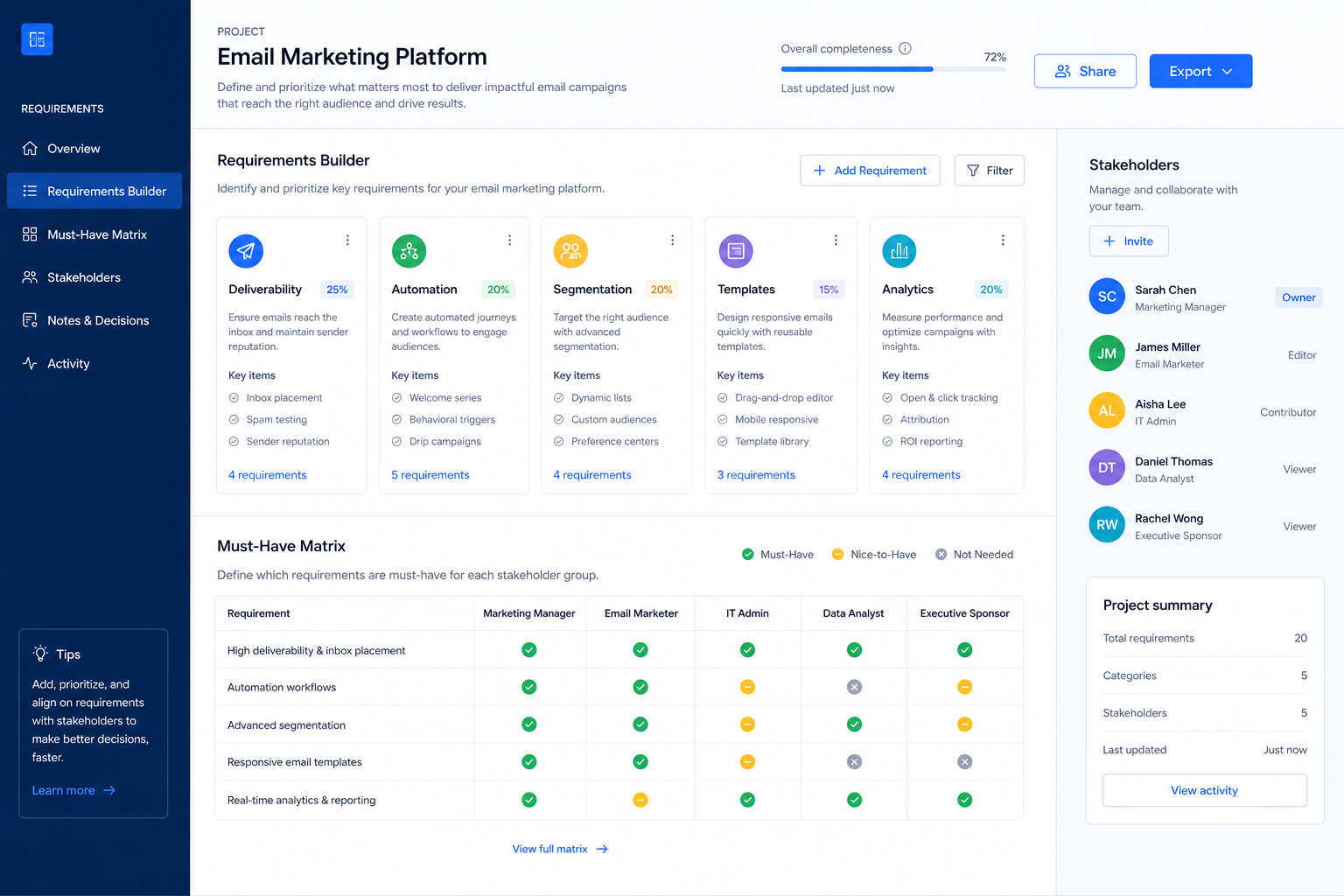
1. Name primary job and three observable outcomes
Newsletter job
Template reuse, scheduling, and list hygiene tests.
Automation job
Trigger types, branching, and workflow limits on the target plan.
Ecommerce job
Store events, product blocks, and revenue reporting hooks.
Write the job in one sentence, then three outcomes you can see in weekly reviews (for example: newsletter ships every Tuesday; cart-abandon journey live; unsubscribe and bounce rates stay within agreed bands).
Example: Harbor Studio’s job is “multi-brand newsletter production without template chaos.” Outcomes: two client brands live on shared templates, one approval workflow, and send logs a coordinator can audit without logging into each mailbox tool.
2. Split must vs nice and freeze stack rules
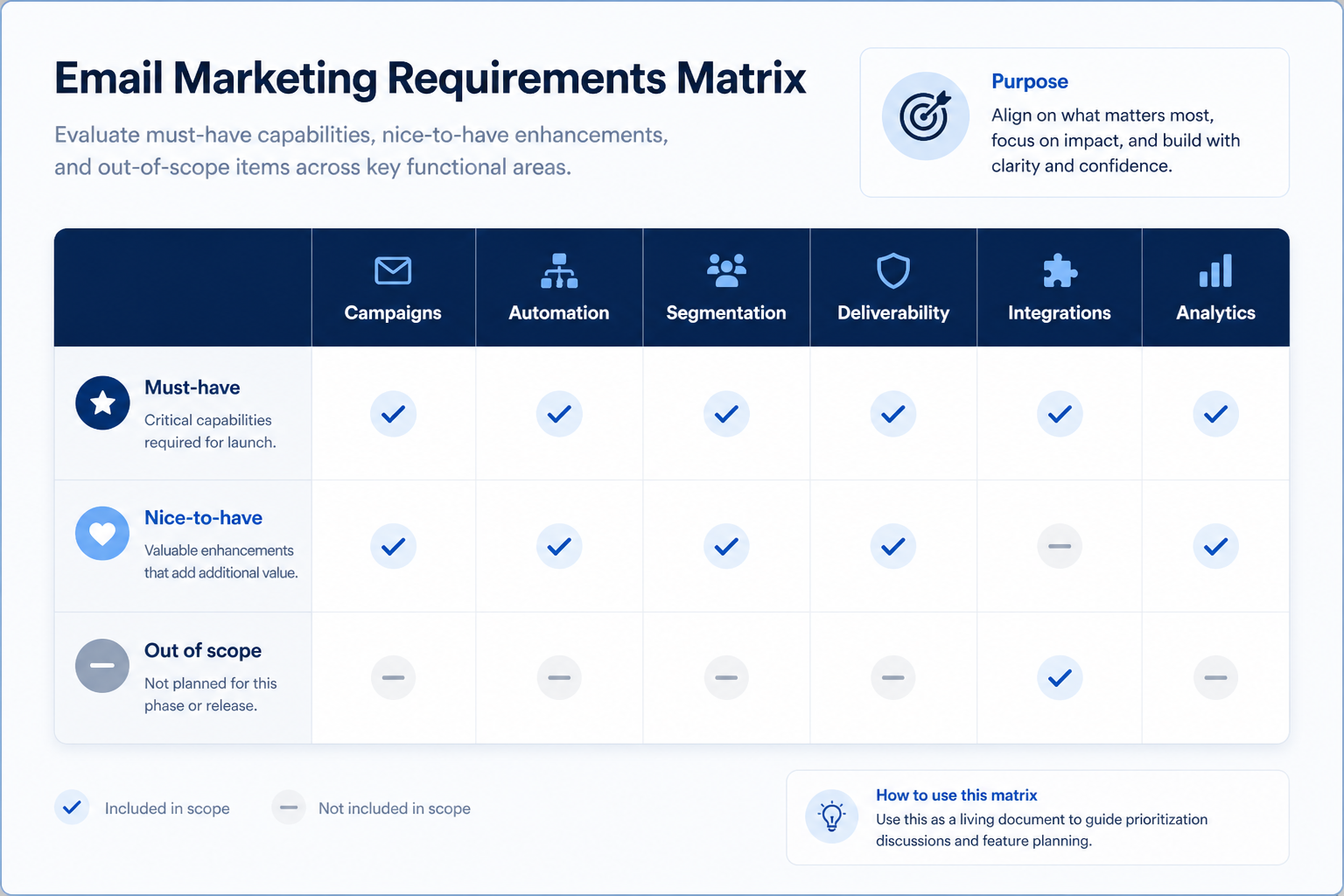
List must-haves with pass/fail tests (import list, authenticate domain, build one journey, connect CRM or shop). Add nice-to-haves separately so demos cannot redefine scope. Freeze integration owners: which system is source of truth for email, which fields sync, and who owns suppression.
Example: Northline Goods marks Shopify sync and cart triggers as must; AI subject-line assist as nice. CRM may receive campaign tags; ESP never overwrites order history.
Must-have vs nice-to-have (starter by job)
- Campaign / newsletter send
- Subscriber management + unsubscribe
- Domain authentication guidance
- Segmentation by attributes/behavior
- Multi-step automation workflows
- Ecommerce / cart triggers
- Landing pages / forms
- AI content assistance
3. Split must-haves from nice-to-haves in writing
List day-one workflows for email marketing software in two columns: must work before go-live vs can wait until adoption proves out. Must-haves drive plan gates and integrations; nice-to-haves belong on a phase-two sheet so demos do not inflate scope.
Worked example: Harbor People Ops marks SSO and audit logs as must-have, AI summaries as phase-two. Demos that skip the must column get cut from the shortlist early.
4. Map integrations and data boundaries
Name systems that must sync or stay out of scope: identity, payroll, CRM, ecommerce, chat, or data warehouse. For each integration, note whether it is native, API, or manual export — and who owns the connection when it breaks.
Worked example: Northline Finance requires HRIS sync to payroll and refuses tools that need nightly CSV babysitting unless IT signs off.
5. Get a one-page sign-off before trials
Share the must-have sheet with finance, IT, and the team lead who owns the weekly job. Trials should test the signed sheet — not a fresh wishlist from each demo.
Next: /guides/how-to-choose-email-marketing/
6. Use a one-page checklist before demos
For Email Marketing Requirements Guide: Must-Haves, Consent & Stack Rules, list must-haves, owners, integrations, and the weekly ritual this purchase must improve. Share the sheet with finance and IT before you schedule a second demo.
- Name the primary job in one sentence.
- List must-have gates (plans, SSO, data residency, usage caps).
- Name integrations that must work on day one.
- Assign an admin owner and a weekly user champion.
- Define non-admin proof — what a sceptic completes without rescue.
Worked example: Harbor Ops refuses demos until the checklist is signed — cutting evaluation time in half.
7. Avoid the usual buying mistakes
Common failures in email-marketing: buying for brand familiarity, comparing entry tiles across different usage units, skipping a fair trial script, and adding scope before adoption proves out.
Run one trial script on every finalist the same week. Score on the same card. Write a one-paragraph decision memo that names what you are not buying yet.
8. Hand off to the category shortlist
When assumptions are frozen, continue on /best/email-marketing-software/ with the same headcount, usage band, and must-have gates on every quote.
9. Use a one-page checklist before demos
For Email Marketing Requirements Guide: Must-Haves, Consent & Stack Rules, list must-haves, owners, integrations, and the weekly ritual this purchase must improve. Share the sheet with finance and IT before you schedule a second demo.
- Name the primary job in one sentence.
- List must-have gates (plans, SSO, data residency, usage caps).
- Name integrations that must work on day one.
- Assign an admin owner and a weekly user champion.
- Define non-admin proof — what a sceptic completes without rescue.
Worked example: Harbor Ops refuses demos until the checklist is signed — cutting evaluation time in half.
10. Avoid the usual buying mistakes
Common failures in email-marketing: buying for brand familiarity, comparing entry tiles across different usage units, skipping a fair trial script, and adding scope before adoption proves out.
Run one trial script on every finalist the same week. Score on the same card. Write a one-paragraph decision memo that names what you are not buying yet.
11. Hand off to the category shortlist
When assumptions are frozen, continue on /best/email-marketing-software/ with the same headcount, usage band, and must-have gates on every quote.
Frequently asked questions
How many must-haves should we have?
Prefer a short list you can actually test. If everything is must-have, you are collecting features — not writing requirements.
Should compliance live on the requirements sheet?
Yes. Consent basis, unsubscribe handling, and regional constraints belong on the sheet before first send — not in a separate legal thread after go-live.
What should I do next?
Run the evaluation guide’s shared trial script against the frozen sheet, then shortlist on Best Email Marketing Software.
Was this article helpful?
Have more questions? Contact our support team.
Part of Software buying guides · How to Choose Email Marketing Software: Job-First Framework
Related guides
Supporting reading in this topic — not a generic related-posts dump.
- Is InboxAlly Worth It? Fit Scenarios Before You BuyDecide if InboxAlly is worth it for your marketing team — fit scenarios, contact economics, and when to keep looking — without invented ROI percentages.
- Is Bouncer Worth It? Fit Scenarios Before You BuyDecide if Bouncer is worth it for your marketing team — fit scenarios, contact economics, and when to keep looking — without invented ROI percentages.
- Is AWeber Worth It? Fit Scenarios Before You BuyDecide if AWeber is worth it for your marketing team — fit scenarios, contact economics, and when to keep looking — without invented ROI percentages.
- Is Kit Worth It? Fit Scenarios Before You BuyDecide if Kit is worth it for your marketing team — fit scenarios, contact economics, and when to keep looking — without invented ROI percentages.
- What Is Email Marketing Software? Beginner’s GuideWhat is email marketing software? A clear definition of permission-based ESPs — campaigns, newsletters, and automation — and how they differ from CRM and cold outreach.
- Is ActiveCampaign Worth It? Fit Scenarios Before You BuyDecide if ActiveCampaign is worth it for your marketing team — fit scenarios, contact economics, and when to keep looking — without invented ROI percentages.
- ActiveCampaign Plans: Contacts, Sends, and Qualifying TiersChoose your ActiveCampaign plan by mapping must-haves to contact tiers, send limits, and qualifying features — not homepage “from” tiles — then confirm on the pricing page.
- AWeber Plans: Contacts, Sends, and Qualifying TiersChoose your AWeber plan by mapping must-haves to contact tiers, send limits, and qualifying features — not homepage “from” tiles — then confirm on the pricing page.
SoftwareGlimpse Updates
Want clearer software shortlists? Get buying guides and comparisons by email.
Newsletter coming soon.