How to Choose Email Marketing Software: Job-First Framework
Choose email marketing software by primary job — newsletters, automation, ecommerce, or all-in-one — then map contact tiers, feature gates, and a shared trial script.
Quick answer
Choose email marketing software by the primary job you need done — recurring newsletters, design-led campaigns, multi-step automation, ecommerce journeys, or an all-in-one creator stack — not by brand familiarity or an “all-in-one” badge alone. Name the one job blocking list growth or revenue this quarter, then shortlist only tools whose core product is that job and whose contact tiers, send limits, and automation depth survive your real workflow.
- Primary job to be done
- Contact / subscriber tier
- Automation depth needed
- Editor & template quality
- Integrations (CRM / shop)
- Deliverability basics
- Trial on your real list shape
What matters most
- “Email marketing” is several products — Newsletter tools, automation platforms, ecommerce email, and funnel suites fail for different reasons. Pick the shape first.
- Contact tiers are the real price — Compare published floors for your list size and send caps — not marketing “from” tiles for a tiny starter list.
- Automation gates hide on higher plans — Entry tiers often cap journeys, branching, or AI. Map must-have workflows to the qualifying plan before you fall in love with a demo.
- Integrations decide daily work — CRM, ecommerce, and form tools must sync cleanly or you will rebuild segments by hand every week.
- Deliverability is yours to operate — Vendors help with SPF/DKIM/DMARC guidance; list hygiene and send reputation still need a team owner.
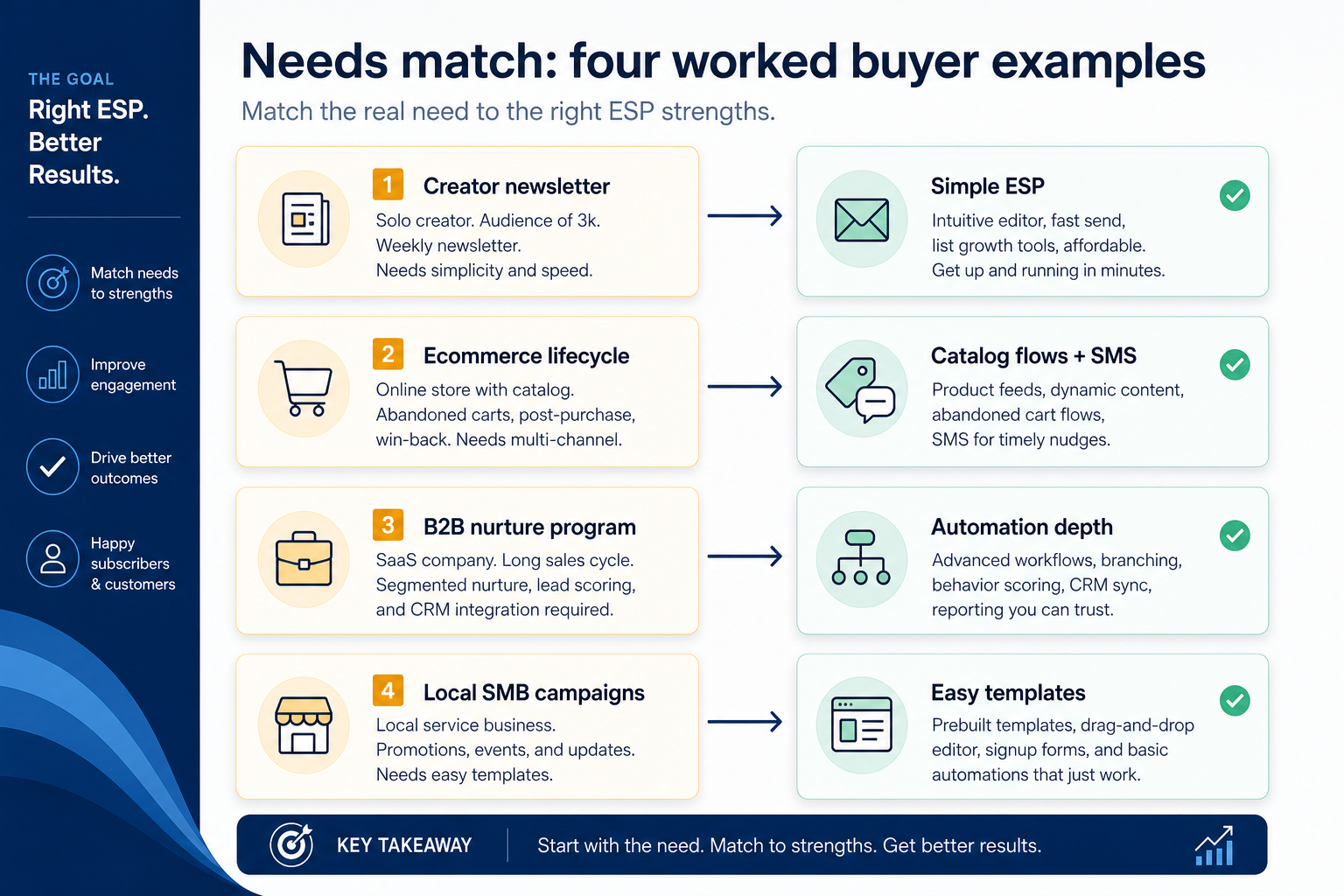
Four worked examples
Interactive email marketing selection checklist
0/5 dimensions noted — saved in this browser only.
Primary job
Approximate list size
Who runs email
Must connect to
Budget posture
Selection workflow
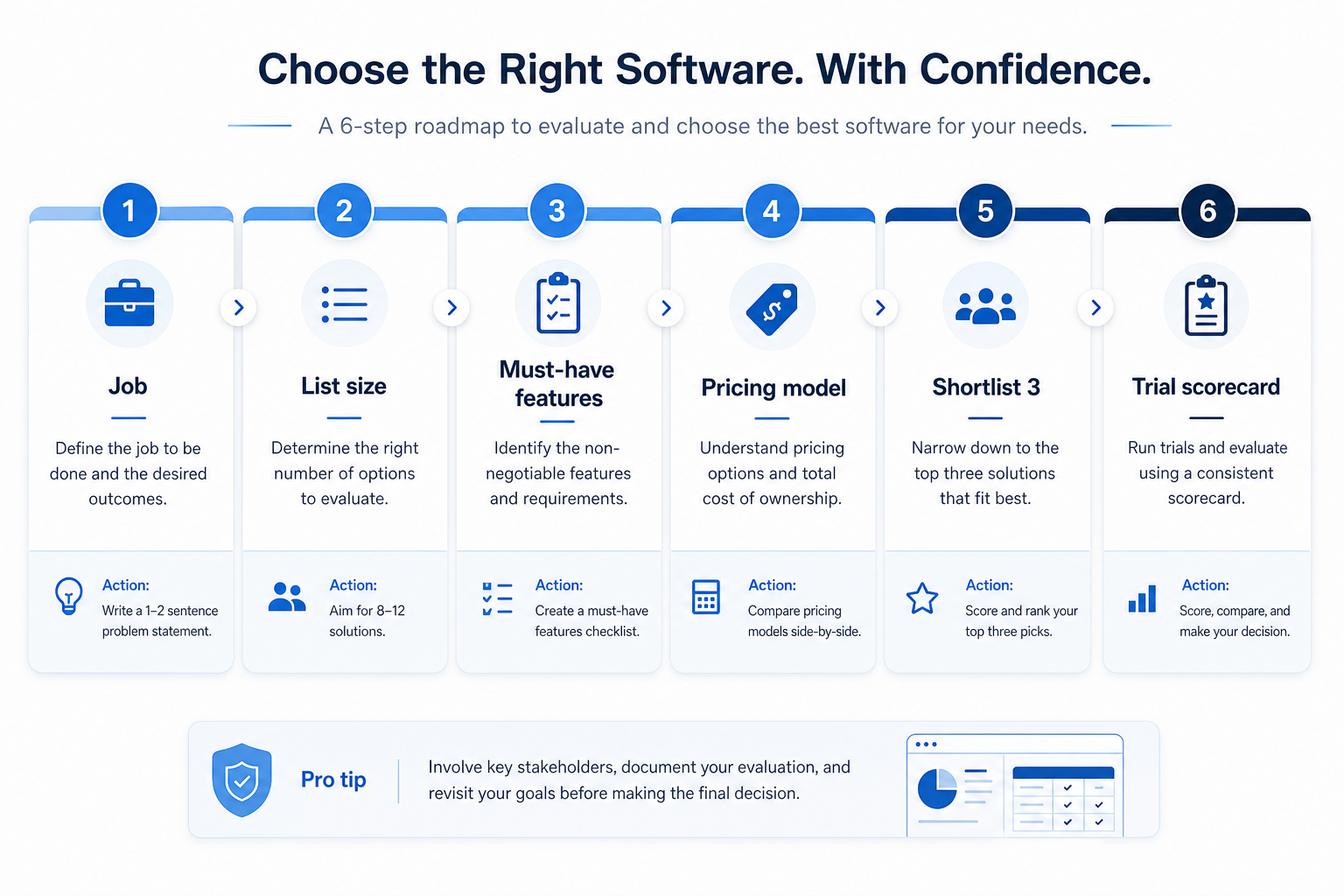
1. Name the primary job before you name a vendor
Newsletter job
Recurring editorial sends, templates, and list hygiene beat journey complexity.
Automation job
Triggers, branching, and workflow limits decide the qualifying plan.
Ecommerce job
Product blocks, cart events, and store sync matter more than fancy broadcast UI.
Write one sentence: “We are blocked because we cannot ___ with email this quarter.” Examples: ship a weekly newsletter without design chaos; run cart-abandon and post-purchase journeys; nurture trial leads with branching automations; consolidate funnels and email for a course launch.
Example: Harbor Studio (8-person agency) needs multi-brand templates and client-safe sending more than deepest automation. Northline Goods needs Shopify-connected journeys. Same category — different shortlists. Catalogue ESPs such as GetResponse, Campaign Monitor, AWeber, ActiveCampaign, and Mailchimp are examples of shapes you might shortlist — not ranked winners on this page.
2. Map contact tier, send caps, and feature gates
Estimate active subscribers (not every email you ever collected). Check published contact-tier floors, monthly send limits, and which automation / landing-page features unlock on which plan. Screenshot the exact plan shown in demos — demos often use higher tiers than the “from” tile.
Do not invent dollar totals. Compare vendor-written quotes and pricing pages for the same list-size assumption.
3. Run the same trial script on every shortlisted ESP
Import a sample list (or use a staging list), build one campaign and one automation your team actually needs, authenticate the sending domain, send to a seed group, and check reporting you will use weekly. Score every tool on the same card the same day.
Worked example: Harbor Studio scores three finalists. Tool A wins the design demo but caps client subaccounts on the affordable tier. Tool B clears automation with slower templates. Tool C fails domain auth guidance and is dropped — all from one scorecard.
4. Run one trial script on every finalist
Pick the workflow that blocked work last quarter. Run it on every shortlist tool the same week: same data shape, same users, same success criteria. Score completion, time-to-done, and where an admin had to rescue the task.
Worked example: Harbor Labs runs the same refactor ticket on three coding tools. Tool C fails SSO on the quoted tier and is dropped before a second meeting.
5. Score on one card the same day
Use the same rubric for every vendor: must-have gates, adoption risk, integration fit, and modeled total cost band. Record who attended and which plan tier was shown — demos often run above the tier you can afford.
6. Write a one-page decision memo
Name the primary job, the qualifying configuration, the winner, and what you are explicitly not buying yet. Link to pricing and requirements guides so finance can audit assumptions later.
Next: /guides/how-to-choose-email-marketing/
7. Use a one-page checklist before demos
For How to Choose Email Marketing Software: Job-First Framework, list must-haves, owners, integrations, and the weekly ritual this purchase must improve. Share the sheet with finance and IT before you schedule a second demo.
- Name the primary job in one sentence.
- List must-have gates (plans, SSO, data residency, usage caps).
- Name integrations that must work on day one.
- Assign an admin owner and a weekly user champion.
- Define non-admin proof — what a sceptic completes without rescue.
Worked example: Harbor Ops refuses demos until the checklist is signed — cutting evaluation time in half.
8. Avoid the usual buying mistakes
Common failures in email-marketing: buying for brand familiarity, comparing entry tiles across different usage units, skipping a fair trial script, and adding scope before adoption proves out.
Run one trial script on every finalist the same week. Score on the same card. Write a one-paragraph decision memo that names what you are not buying yet.
9. Hand off to the category shortlist
When assumptions are frozen, continue on /best/email-marketing-software/ with the same headcount, usage band, and must-have gates on every quote.
Frequently asked questions
Should beginners start on a free plan?
Yes for learning workflows — then verify list/send caps and which automation features unlock on paid tiers before you build a program you cannot grow into.
Is the most popular ESP the right choice?
Popularity is not a requirements sheet. Match job, contact tier, and stack integrations first; brand familiarity is a secondary convenience.
What should I do next?
Freeze must-haves with the requirements guide, run a fair trial with the evaluation guide, then shortlist on Best Email Marketing Software.
Was this article helpful?
Have more questions? Contact our support team.
Part of Software buying guides · Email Marketing Requirements Guide: Must-Haves, Consent & Stack Rules
Related guides
Supporting reading in this topic — not a generic related-posts dump.
- Is InboxAlly Worth It? Fit Scenarios Before You BuyDecide if InboxAlly is worth it for your marketing team — fit scenarios, contact economics, and when to keep looking — without invented ROI percentages.
- Is Bouncer Worth It? Fit Scenarios Before You BuyDecide if Bouncer is worth it for your marketing team — fit scenarios, contact economics, and when to keep looking — without invented ROI percentages.
- Is AWeber Worth It? Fit Scenarios Before You BuyDecide if AWeber is worth it for your marketing team — fit scenarios, contact economics, and when to keep looking — without invented ROI percentages.
- Is Kit Worth It? Fit Scenarios Before You BuyDecide if Kit is worth it for your marketing team — fit scenarios, contact economics, and when to keep looking — without invented ROI percentages.
- What Is Email Marketing Software? Beginner’s GuideWhat is email marketing software? A clear definition of permission-based ESPs — campaigns, newsletters, and automation — and how they differ from CRM and cold outreach.
- Is ActiveCampaign Worth It? Fit Scenarios Before You BuyDecide if ActiveCampaign is worth it for your marketing team — fit scenarios, contact economics, and when to keep looking — without invented ROI percentages.
- ActiveCampaign Plans: Contacts, Sends, and Qualifying TiersChoose your ActiveCampaign plan by mapping must-haves to contact tiers, send limits, and qualifying features — not homepage “from” tiles — then confirm on the pricing page.
- AWeber Plans: Contacts, Sends, and Qualifying TiersChoose your AWeber plan by mapping must-haves to contact tiers, send limits, and qualifying features — not homepage “from” tiles — then confirm on the pricing page.
Related products
SoftwareGlimpse Updates
Want clearer software shortlists? Get buying guides and comparisons by email.
Newsletter coming soon.