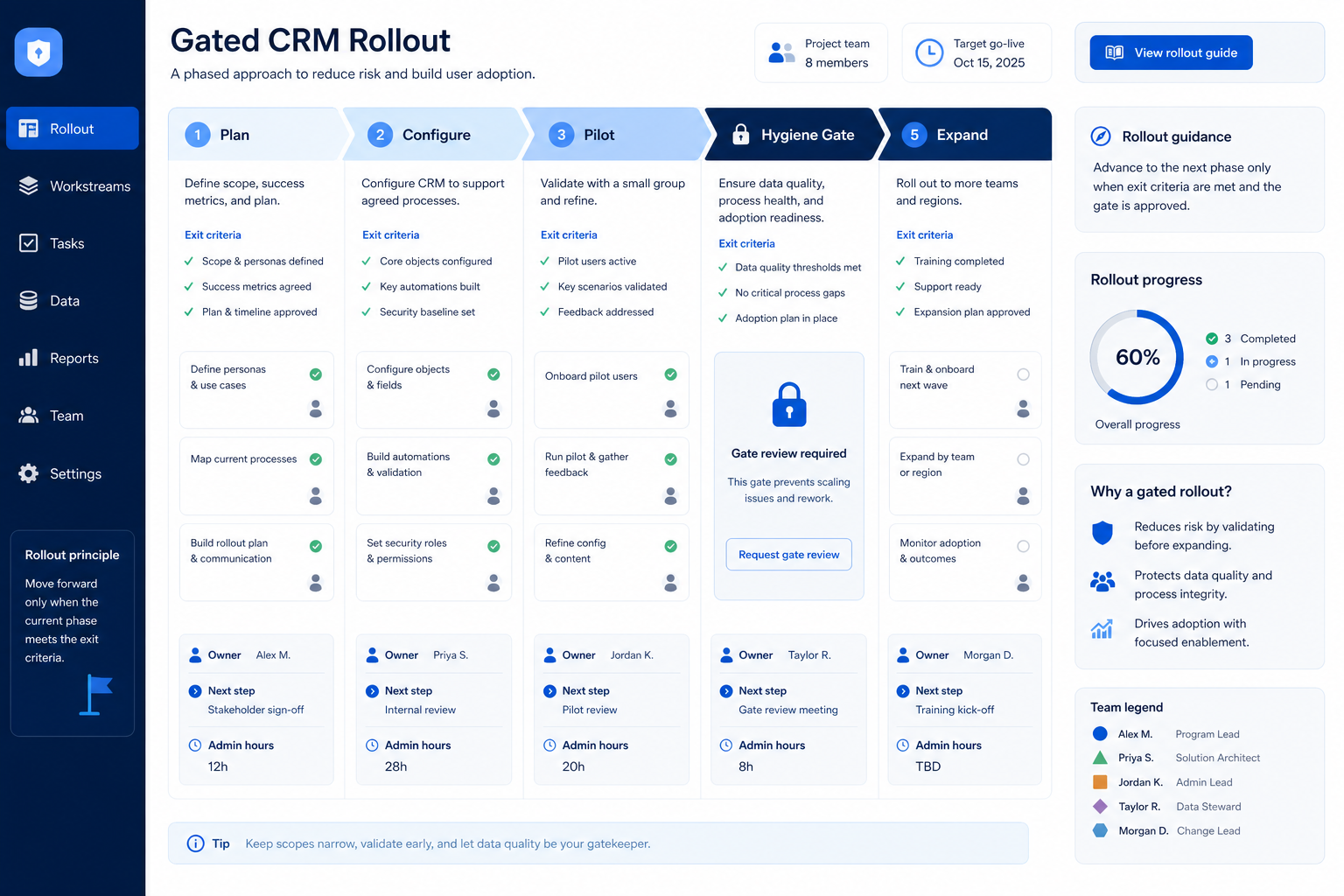
Implement CRM as a gated operating change — plan outcomes and owners, configure a core loop, prove hygiene in weekly reviews, then expand seats and light automation.
CRM implementation succeeds when you treat it as a gated operating change — plan outcomes and owners, pilot one segment on a core loop, prove hygiene in weekly reviews, then expand seats and light automation. Decision rule: do not calendar firm-wide go-live until one real team runs Friday reviews from the board for two consecutive weeks without a side spreadsheet.
Plan outcomes
Name owners
Pilot core loop
Prove hygiene
Expand seats
Automate last
Key takeaways
Implementation is change work — Configuration without owners and review habits is decoration.
Pilot beats big-bang — One pod or territory proves the loop before you inherit every messy process.
Hygiene before automation — Task spam on dishonest stages trains people to ignore the CRM.
Deep-link the hard parts — Planning, timeline ranges, and cost categories each deserve their own guide.
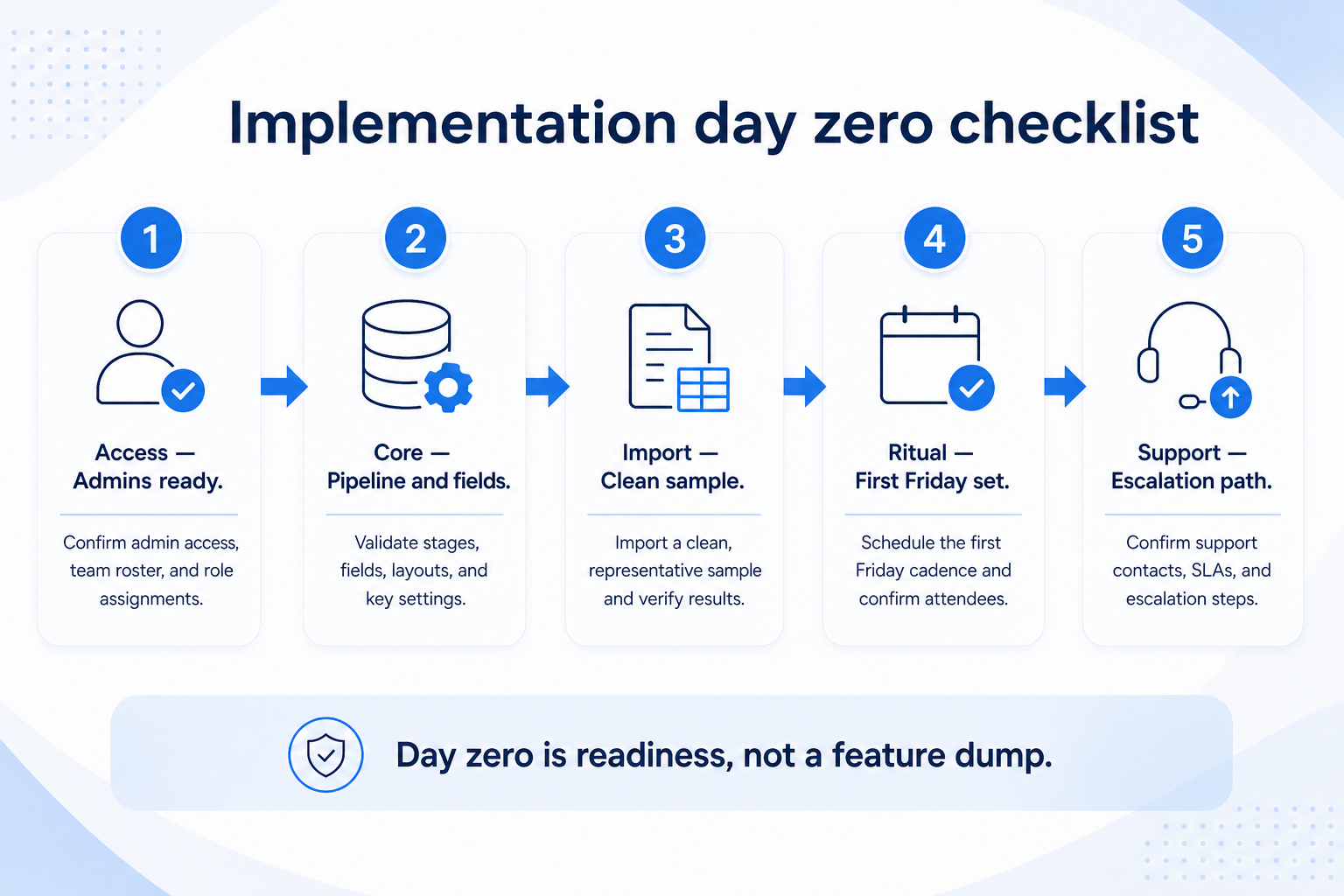
Shared SoftwareGlimpse day-zero kit — access → objects → pipeline → pilot import → first live workflow. Expand only after two clean Friday reviews.
Day-zero vs later configuration
Must-have
✓Users, roles, and permissions
✓Accounts, contacts, pipelines matching real work
✓Required owner + next-step fields
✓Email / calendar sync for the pilot pod
Nice-to-have
•Marketplace apps and AI add-ons
•Multi-branch automation and scoring models
•Full historical import of every note
Before implementation starts
Bring these questions to every demo
Ask vendors to show the workflow live, not just describe it.
1Three 90-day outcomes frozenWhat “working” looks like in reviews — not a feature wishlist.
2Admin / ops owner named with hoursFields, users, duplicates, and permission exceptions.
3Executive sponsor namedUnblocks scope fights and protects pilot time.
4Pilot segment chosenOne pod, book, or territory — not the whole company.
5Pilot exit criteria writtenTwo Friday reviews from the board without a side sheet.
6Cost categories listedSubscription, admin time, migration, training — no invented totals.
1. Plan outcomes, owners, and pilot scope
Implementation is a gated board — plan and ownership come before firm-wide seats.
Services / agency
Pilot one client-delivery pod plus related opportunities.
Sales-led SaaS
Pilot one AE territory with manager coaching from the board.
Founder-led
Pilot the founder’s book plus first hire — prove handoffs early.
Freeze three 90-day outcomes, a RACI-ish map (who is Responsible / Accountable for fields, users, data, training), and a pilot segment large enough to feel real. Build the phase plan in the Implementation Planner — do not start from a vendor “week 1–12” slide as truth.
Example: Northline Ops, a 12-person B2B services team, freezes outcomes as (1) every open opportunity has an owner and next-step date, (2) Monday pipeline reviews run from the board, (3) delivery handoffs stop living in Slack threads. Ops lead Jordan owns admin ~3 hours/week; sales manager Priya is accountable for stage honesty; founder Sam sponsors scope. They pilot Priya’s four-person delivery+sales pod first.
2. Configure the core loop only
Roles first
Permissions match the access matrix before bulk data entry.
Stages match reality
Remove vendor defaults your process never uses.
Sync that feeds records
One proven activity attachment beats ten empty integrations.
Day-zero setup: users/roles, account and contact essentials, pipelines that match how you actually sell or deliver, required owner + next-step fields, and email/calendar sync for the pilot. Defer marketplace apps, scoring models, and multi-branch automations.
Example: Northline configures Accounts, Contacts, one New Business pipeline (Discovery → Proposal → Negotiation → Won/Lost), and a Delivery Handoff checklist field. Jordan bans custom fields not on the requirements sheet and runs a weekly field-request triage. They prove one logged email on a live deal before inviting the rest of the pod.
3. Migrate a pilot slice — not the whole archive
Spreadsheet exit
Clean open rows first; archive stale tabs.
Tool-to-tool
Map fields and owners; test import before cutover.
Greenfield
Enter live work only — skip fake sample data for the pilot.
Import or enter what the pilot needs to trust coverage and open work: active accounts, open opportunities, and key contacts. Prefer a clean pilot over dumping years of unowned notes on day one. Use the Migration Planner for inventory, field mapping, and cutover gates when history matters.
Example: Northline imports ~90 active client accounts and 34 open opportunities from Sheets. They leave closed-lost notes older than 18 months in archive until after two clean Fridays. Jordan runs a dedupe pass and assigns owners before Priya’s first board review.
4. Prove hygiene before you expand
Owner + next step
No open deal or delivery item without both.
Stage honesty
Managers reject stage jumps that skip real checkpoints.
Access exceptions
Temporary broader access has an expiry and a named approver.
Hygiene means every open item has an owner and next-step date, stages only move when exit criteria are met, duplicates are merged on a schedule, and permission exceptions are rare and reviewed. Gate expansion on two consecutive clean Friday (or Monday) reviews from the board.
Example: Northline’s first Monday review fails — seven deals lack next steps. Priya and Jordan run a 20-minute hygiene huddle twice a week until the overdue view is empty. Only then does Sam approve inviting the second pod.
5. Expand seats, then add light automation
Clone what worked
Same stages, fields, and review ritual — do not reinvent per team.
Automate proven pain
Reminders after hygiene holds; never to “force adoption.”
Measure adoption
Track empty next steps and side-sheet usage — not login vanity.
After the hygiene gate passes, invite the next segment with the same core configuration and train on the pilot’s real records. Add only automations that remove proven repetitive work (stale-deal alerts, missing next-step reminders). Park AI features and complex multi-branch flows until the board stays trusted.
Example: Northline expands to the second pod after two clean Mondays. Jordan clones roles, imports the next account slice carefully, and adds one automation: notify owner when next-step date is blank for seven days. Scoring and marketplace dialers stay parked for a quarter.
High-cost implementation mistakes
Firm-wide go-live on week one
You inherit every messy process at once and lose the ability to fix the loop quickly.
Configuring everything before anyone works
Empty decorated workspaces do not create trust; one complete core loop does.
Automating before hygiene
Task spam on dishonest stages trains people to ignore the CRM.
No admin hours on the calendar
Without a named owner, fields and permissions drift and teams return to sheets.
Treating vendor timelines as guarantees
Week ranges are planning aids — gate on evidence, not slide numbers.
Inventing cost totals from seat tiles
List categories (subscription, time, migration, training) and use calculators — never fake dollar sums.
Example official vendor setup videos
Optional · 2 examples · collapse if you don’t need them
These are verified vendor tutorials and product demos from the CRM catalogue — examples of how vendors present setup and workflows. They are not SoftwareGlimpse rankings, and they do not replace the independent guidance on this page.
Official vendor tutorial · example
Attio — Attio | How to build your sales pipelines
This video is hosted on YouTube
This content is hosted by YouTube. The player loads only after you allow marketing cookies.
The operating change of configuring a CRM, migrating a usable data slice, training a pilot team, proving hygiene in weekly reviews, and expanding. It is not “turning the product on.” Decision rule: if reviews still rebuild status in spreadsheets, implementation is incomplete.
How long does CRM implementation take?
Ranges vary by scope — a focused pod can prove a core loop in a few weeks; multi-team rollouts often span months. See the Implementation Timeline guide for phase ranges. Never treat a vendor kickoff calendar as a guarantee.
What should we configure on day zero?
Users/roles, account and contact essentials, pipelines that match real work, owner + next-step fields, and email/calendar sync for the pilot. Defer marketplace apps and heavy automation.
When should we migrate historical data?
Import what the pilot needs to trust coverage and open opportunities. Prefer a clean pilot over dumping years of unowned notes. Use the Migration Planner for bulk history projects.
How do we estimate implementation cost?
List categories — qualifying subscription, admin time, migration/cleanup, training, add-ons — without inventing totals. Use the Cost Calculator and TCO Calculator for researched bands; see the Implementation Cost guide for decision rules.
Who should own CRM implementation?
An executive sponsor for scope, an ops/admin owner for configuration and hygiene, and a business owner (sales/delivery lead) for stage honesty and adoption. RACI details belong in the Planning guide.
What should I do next?
Build a phase plan in the CRM Implementation Planner, then deep-dive Planning, Timeline, and Cost guides as needed. If the product choice is still open, use CRM Finder first.