CRM Implementation Mistakes: Fixes Before You Expand
The highest-cost CRM implementation mistakes — big-bang cutover, dirty migration, day-one over-customization, no training, no admin, skipped pilot — each with a concrete fix artifact.
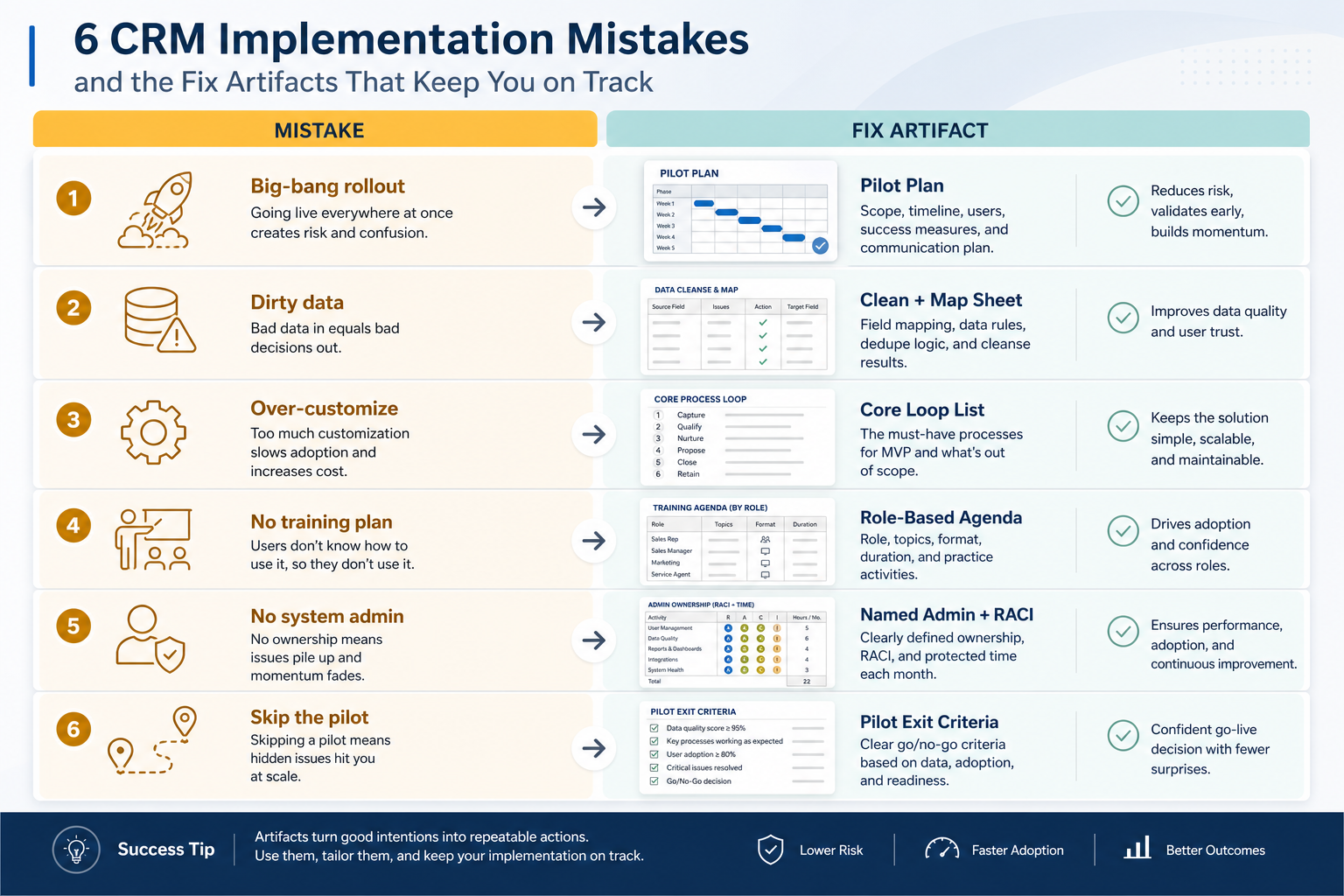
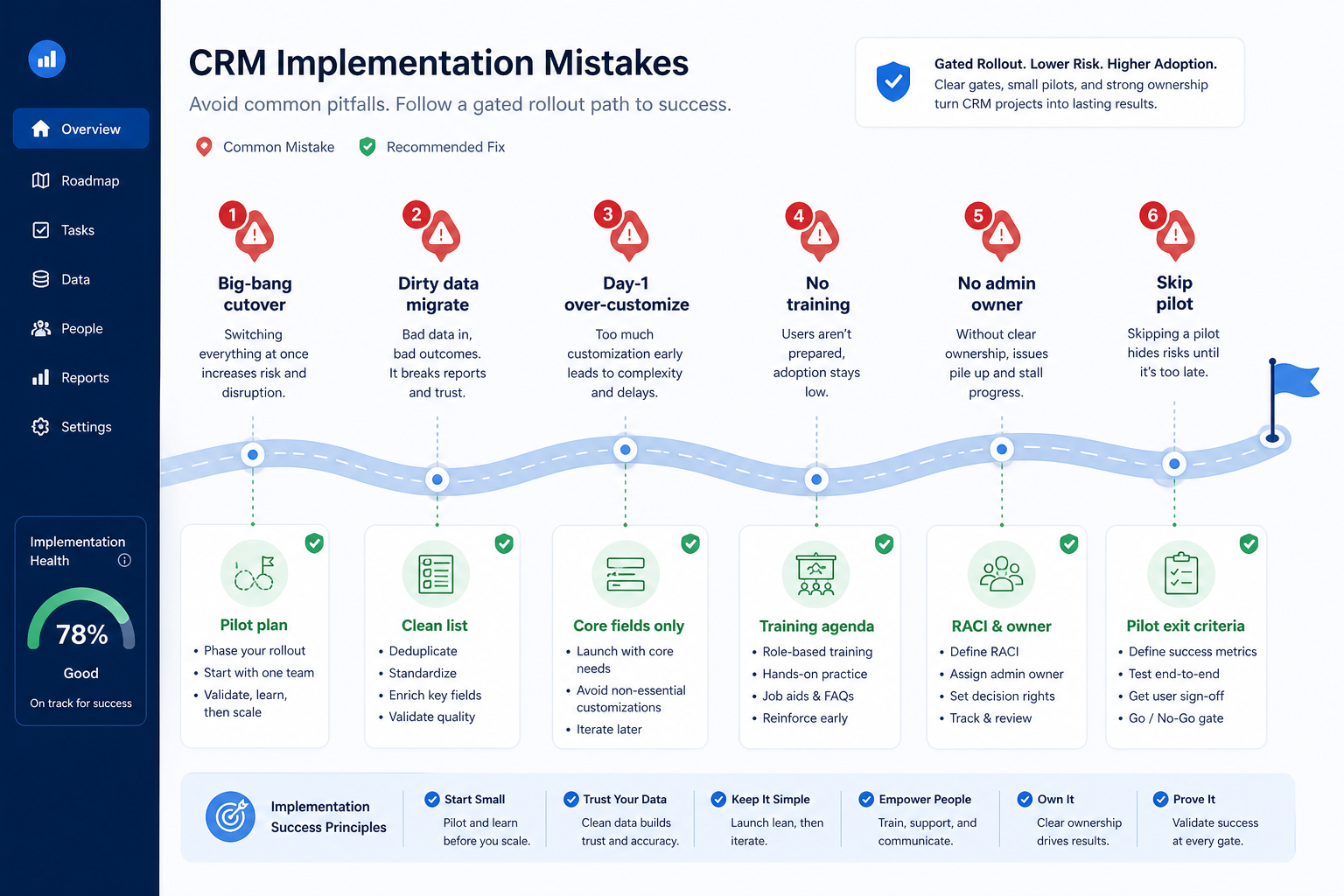
The highest-cost CRM implementation mistakes are big-bang cutover, migrating dirty data, over-customizing on day one, skipping training, leaving admin ownership empty, and skipping a pilot. Decision rule: if any of those six gaps is still open, pause expansion — fix the matching artifact first (pilot plan, clean+map sheet, core-loop list, role training agenda, named admin RACI, written pilot exit criteria).
Big-bang
Dirty migrate
Over-customize
No training
No admin
Skip pilot
Key takeaways
Mistakes are missing artifacts — Each failure maps to a concrete fix — not “try harder.”
Pilot is a risk control — A bounded segment lets you repair the loop before firm-wide pain.
Dirty data multiplies — Imports amplify duplicates, empty owners, and stage fiction.
Automation without hygiene trains ignore — Task spam on bad stages teaches people to leave the CRM.
Each common failure maps to a concrete artifact — pause expansion until the matching fix exists.
Go-live gates: must vs defer
Must-have
✓Written pilot segment + exit criteria
✓Clean + field map before full import
✓Named admin with hours
✓Role-based training on real records
Nice-to-have
•Marketplace apps on day one
•Complex multi-branch automation
Before you expand seats
Bring these questions to every demo
Ask vendors to show the workflow live, not just describe it.
1Pilot exit criteria passedWeekly review from the board without a side sheet.
2Open items have owners + next stepsNo knowingly dirty full import.
3Core loop only in production configCustom fields and apps deferred with a triage owner.
4Admin RACI live with hoursFields, merges, permissions have a Responsible name.
5Pilot cohort trained on real recordsRole agendas complete; questions logged.
6Cutover is phased or freeze-windowedNot “everyone Monday with every historical field.”
1. Big-bang cutover and skipping the pilot
Pause at open gates — expansion is not a substitute for pilot proof.
Big-bang cutover
Fix: freeze window + phased seats after pilot pass.
Skip pilot
Fix: one pod/territory with written exit criteria.
Pilot theater
Fix: success = trusted Friday board, not feature checklist.
Big-bang invites every team and every historical record on the same Monday. Skipping the pilot is the same risk in a quieter outfit: you never prove the core loop on a bounded segment. Fix artifacts: a written pilot plan (who, which records, success criteria) and an exit gate before expansion.
Example: Northfield Advisory, a 22-person B2B services firm, almost flipped all sellers into a new CRM overnight. Ops paused, piloted one pod (six people, open opportunities only), and required two consecutive Friday reviews from the board. Mapping bugs and empty next steps surfaced in the pilot — not across twenty-two inboxes at once.
2. Migrating dirty data and over-customizing day one
Fix: core loop list; triage queue for field requests.
Automate early
Fix: hygiene first; light alerts only after clean Fridays.
Importing duplicates, blank owners, and fictional stages teaches distrust on day one. Over-customizing — dozens of unused fields, marketplace apps, and branching automations before anyone sells — hides the core loop. Fix artifacts: a clean+map sheet (see Data Cleaning and Field Mapping) and a one-page “core loop only” list of fields and stages allowed in pilot.
Example: Northfield’s first export had three contact rows per client and stages nobody could define. They ran a cleaning week (dedupe, owner, next step), collapsed stages to five honest ones, and banned new custom fields without admin triage. Only then did the Migration Planner cutover sequence get a date.
3. No training and no admin owner
No training
Fix: role agenda + practice on real open deals.
Admin vacuum
Fix: RACI + hours band before configure.
Already live with gaps
Fix: stabilize core loop; pause new fields/apps.
A vendor webinar is not role training. An empty admin seat means field sprawl, unresolved duplicates, and permission drift — regardless of product quality. Fix artifacts: role agendas on real pilot records, and a named admin with qualitative hours on the calendar (see Implementation Roles).
Example: Northfield’s first week failed because AEs never practiced updating next steps on their own deals. Change lead Sam ran 45-minute role sessions on the pilot board; admin Devon owned merges twice weekly. Adoption recovered when people knew which buttons mattered for Friday review — not when more apps were installed.
4. If you already shipped a mistake
Early post-buy chaos
Shrink scope; prove one pod; then re-expand.
Dirty history already in
Hygiene sprint on open items; archive inactive.
Renewal looming
Export test + admin RACI before you extend term.
Do not silently add complexity hoping it cures process debt. Re-open the missing artifact: shrink to a recovery pilot segment, clean open items, freeze custom field creation, name admin hours, and retrain on the records people actually touch.
Example: eight weeks post go-live, Northfield still rebuilt pipeline in Sheets. They declared a two-week recovery: one pod “source of truth,” mandatory owner+next-step, admin triage only, no new automations. When that pod’s Fridays ran clean, they expanded the recovery pattern — treating the original big-bang as debt to repay, not as sunk cost to defend.
High-cost implementation mistakes
Big-bang cutover
Every team and every historical field on day one — fix with pilot + freeze window.
Migrating dirty data
Duplicates and empty owners become institutional truth — fix with clean+map.
Over-customizing day one
Unused fields and apps hide the core loop — fix with a core-loop list.
No role training
Generic tours do not create Friday discipline — fix with real-record agendas.
No admin owner
Hygiene and permissions drift — fix with named RACI hours.
Skipping the pilot
You learn mapping bugs firm-wide — fix with bounded exit criteria.
Example official vendor setup videos
Optional · 2 examples · collapse if you don’t need them
These are verified vendor tutorials and product demos from the CRM catalogue — examples of how vendors present setup and workflows. They are not SoftwareGlimpse rankings, and they do not replace the independent guidance on this page.
Official vendor tutorial · example
Attio — Attio | How to build your sales pipelines
This video is hosted on YouTube
This content is hosted by YouTube. The player loads only after you allow marketing cookies.
Usually big-bang go-live without a pilot that proves the core loop. Decision rule: do not expand seats until a bounded segment runs weekly review from the CRM board without a side spreadsheet.
Should we migrate all historical data on day one?
No. Clean and map first; pilot import a sample; migrate what open work needs to trust. Archive inactive history instead of importing years of unowned notes. See the Data Migration and Data Cleaning guides.
How much customization is safe at launch?
Only the core loop: people, accounts/contacts, honest stages, owner + next step, and email/calendar sync you already use. Defer marketplace apps and complex automation until hygiene holds.
We already went live poorly — now what?
Treat it as recovery: shrink to a pilot pod, clean open items, freeze new fields, name an admin, retrain on real records, then re-expand on evidence.
How do roles relate to these mistakes?
Admin vacuum and missing change ownership cause several of them. Use the Implementation Roles guide to name RACI seats and hours before you re-plan phases.
What should I do next?
Walk the pre-expand checklist, fix any open artifacts, then sequence work in the CRM Implementation Planner. Use Migration Planner when data movement is the risk.