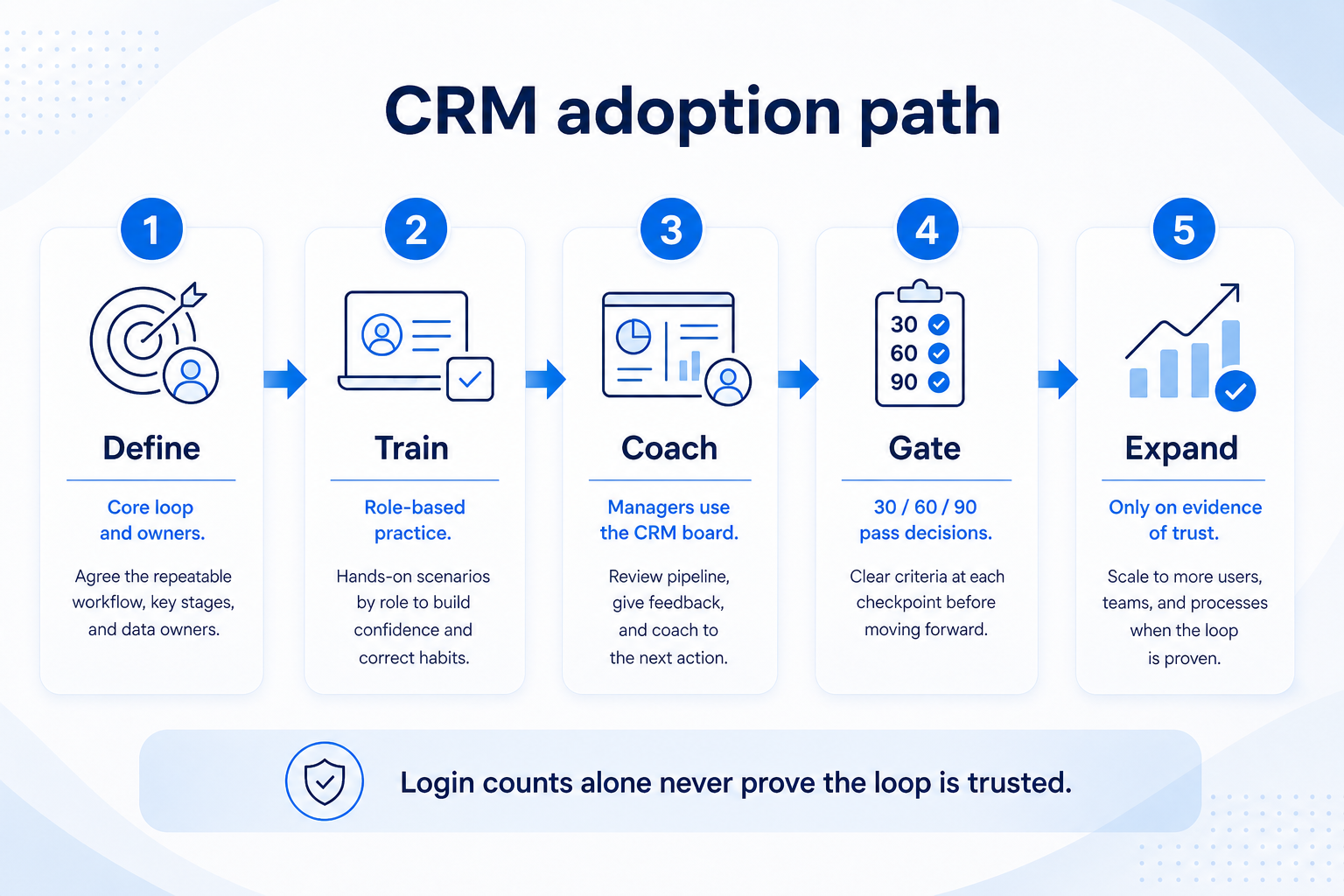
CRM adoption is core-loop usage under manager coaching — not seat logins. Decision rule: treat adoption as healthy only when open work has owners and dated next steps, weekly reviews run from the CRM board (not a side sheet), and managers coach from CRM views. If any of those fail at a 30/60/90 gate, pause expansion and fix training or process — do not add fields or automations.
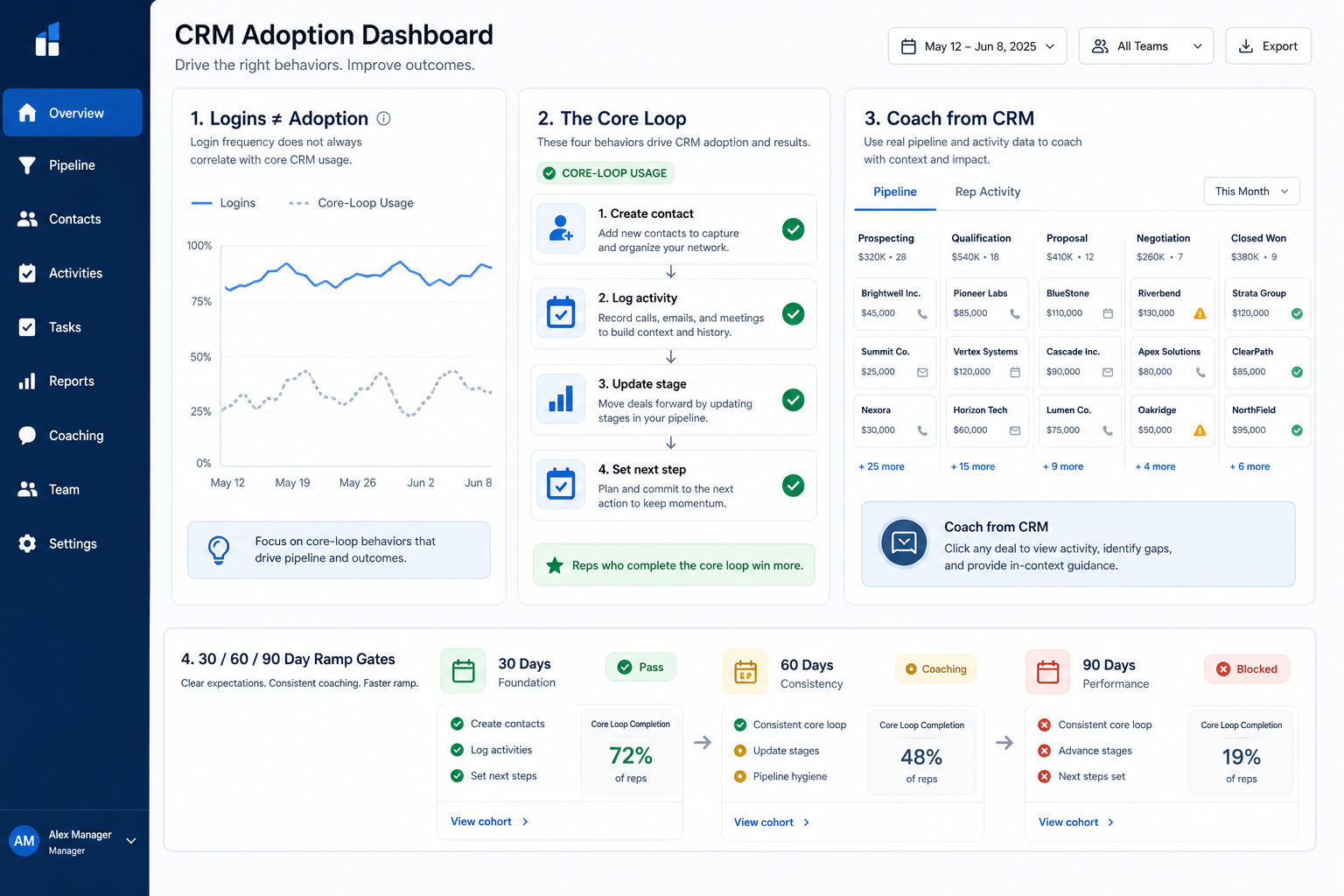
Login ≠ adoption
Core-loop usage
Coach from CRM
30/60/90 gates
Train + mistakes
Expand on evidence
Key takeaways
Measure the loop, not the login — Contacts/deals updated with next steps beat vanity active-user charts.
Managers are the adoption system — If coaching still happens in Slack or sheets, the CRM is optional.
Adoption is gated operating change — expand only when the loop and coaching ritual are proven.
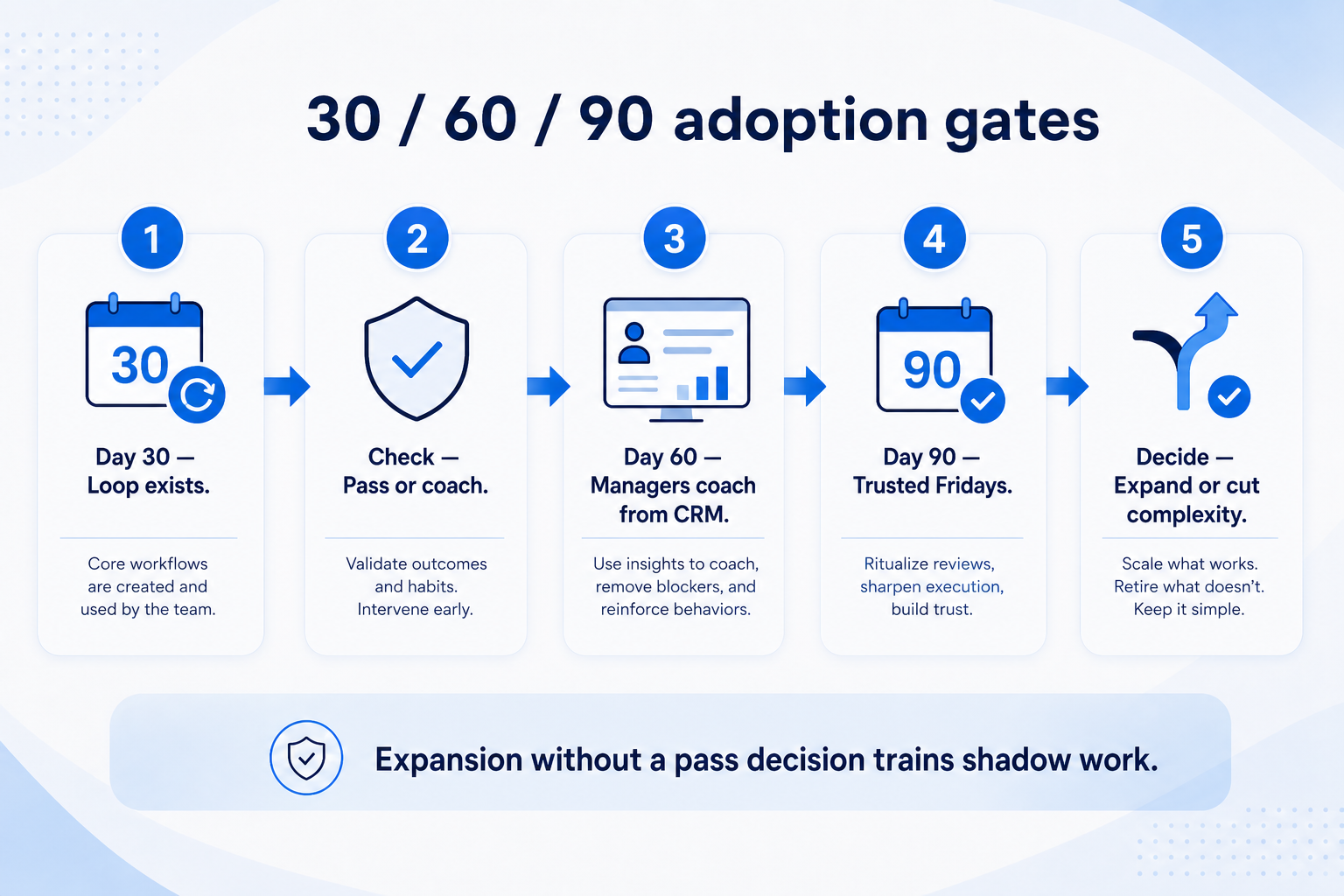
30 / 60 / 90 adoption gates
Each gate is a decision — expand, coach, or simplify — not a calendar decoration.
Define adoption before you measure it
Bring these questions to every demo
Ask vendors to show the workflow live, not just describe it.
1Name the core objectsUsually accounts/contacts + opportunities (or tickets) for this team.
2Write the core loop in one sentenceCreate/update → log activity → move stage honestly → set next step.
3Name the manager coaching viewThe board or list used in the weekly review — no side sheet allowed.
4List non-adoption signalsLogin-only, notes in email, Friday rebuild in Sheets.
5Assign 30/60/90 gate ownersOps + sales/service lead jointly sign pass/fail.
1. Separate logins from adoption
Logins can look healthy while the core loop and coaching ritual are still broken.
High login, low trust
People browse dashboards but update deals elsewhere — coach the loop.
Low login, high shadow work
Sheets and inboxes still win — simplify fields and retrain the ritual.
Manager bypass
Managers accept verbal updates — make CRM the only accepted review surface.
Seat activity proves people can open the app. Adoption proves the system of record is where work lives. Track whether open items have owners and next-step dates, whether stage changes happen in CRM, and whether the weekly review starts from a CRM view.
Example: Northwind Field Services rolled out CRM to twelve estimators. Week three showed strong daily logins, but Friday still rebuilt a shared Sheet because next-step dates were empty and managers asked for updates in chat. Ops lead Priya redefined success as “board-native Friday review” and stopped reporting login counts to leadership.
2. Instrument the core loop
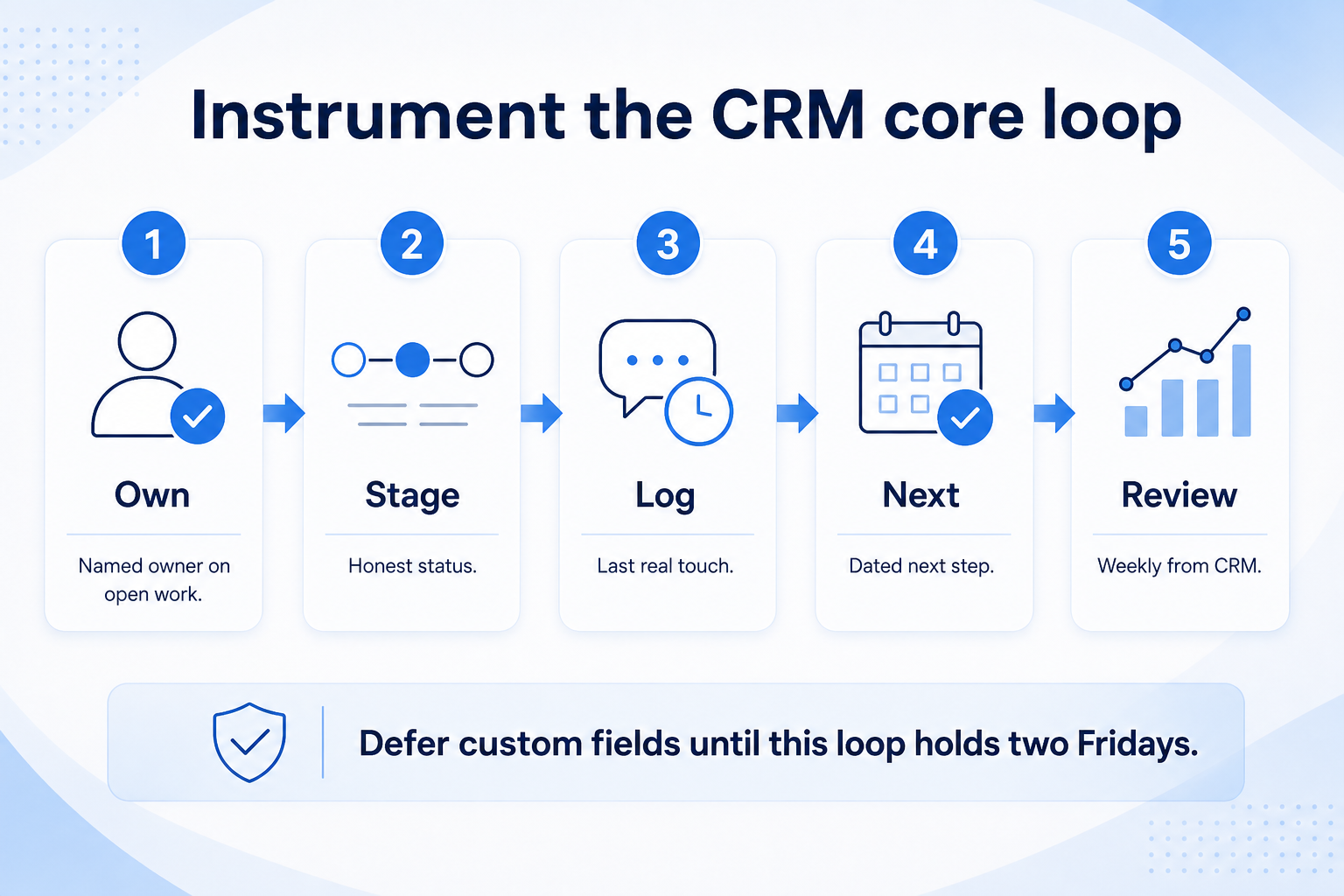
Instrument this minimum loop before you add custom fields or automation.
Sales loop
Deal owner, stage, activity, next step — reviewed weekly.
Account management loop
Account owner, open risks/opportunities, next review date.
Service-adjacent loop
Case/ticket owner, status, customer next action date.
Pick the minimum loop every role must complete for open work. For sales pods that is usually: own the opportunity, keep stage honest, log the last meaningful touch, and set a dated next step. Defer custom fields and automation until that loop holds for two consecutive weekly reviews.
Example: Meridian Specialty Finance pilots six sellers. Admin Ana requires owner + next-step on every open deal and bans new custom fields for thirty days. Sellers practice the loop on live deals in a ninety-minute role workshop — not a vendor feature tour.
3. Make managers coach from CRM
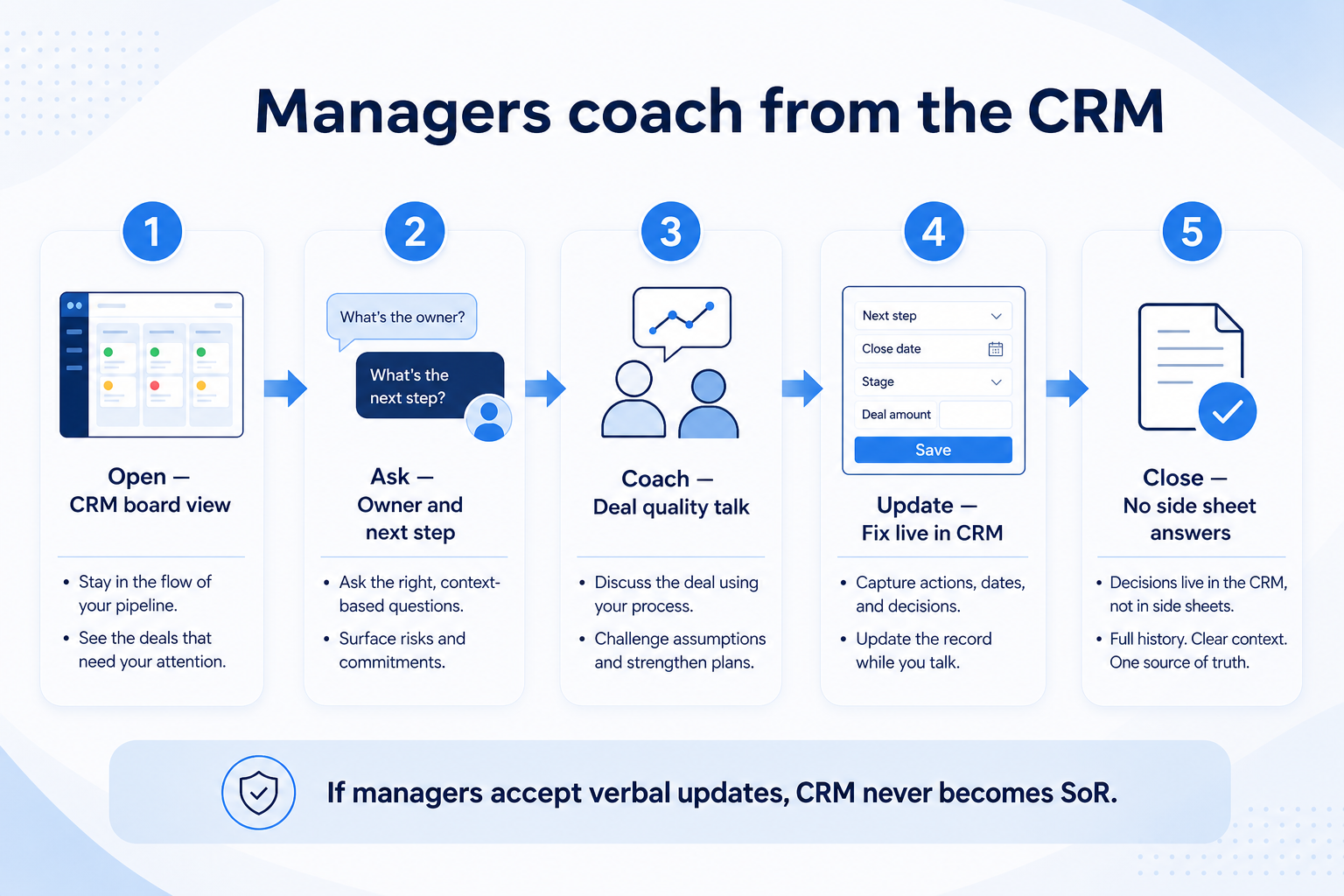
If managers accept verbal updates, the CRM will never become the system of record.
New manager
Shadow one CRM-native review before leading alone.
Founder-led team
Founder models the same rule: no Slack-only pipeline answers.
Multi-pod rollout
Each pod lead owns the same agenda template; ops audits empty next steps.
Adoption collapses when managers run reviews from memory, Slack threads, or personal sheets. Publish one coaching agenda: stuck deals, empty next steps, stage jumps without evidence, and coverage gaps. Managers prepare from saved CRM views before the meeting.
Example: Harborline Advisory’s practice lead refuses status updates that are not on Maya’s board. After two Fridays, estimators stop dual-entering because the Sheet no longer influences coaching or forecast conversations.
4. Run 30 / 60 / 90 gates
Each gate is a decision — expand, coach, or simplify — not a calendar decoration.
Pass
Expand the next pod with the same core config and coaching agenda.
Coach
Hold seats steady; run hygiene huddles and manager practice.
Simplify
Remove unused stages/fields; rewrite the one-sentence loop.
Day 30: core loop trained, owners assigned, no uncontrolled field sprawl. Day 60: managers coach from CRM; next-step fill and open-item ownership meet your team-defined targets for two weeks; side sheets retired from the review. Day 90: expand seats or segments only if gates passed — otherwise intervene (simplify, retrain, or reset ownership).
Example: Crestview Wealth fails Day 60 because partners still rebuild household lists for Monday. They freeze new users, cut unused fields, and retrain the coverage ritual for three weeks before retrying the gate.
5. Link training to common failure modes
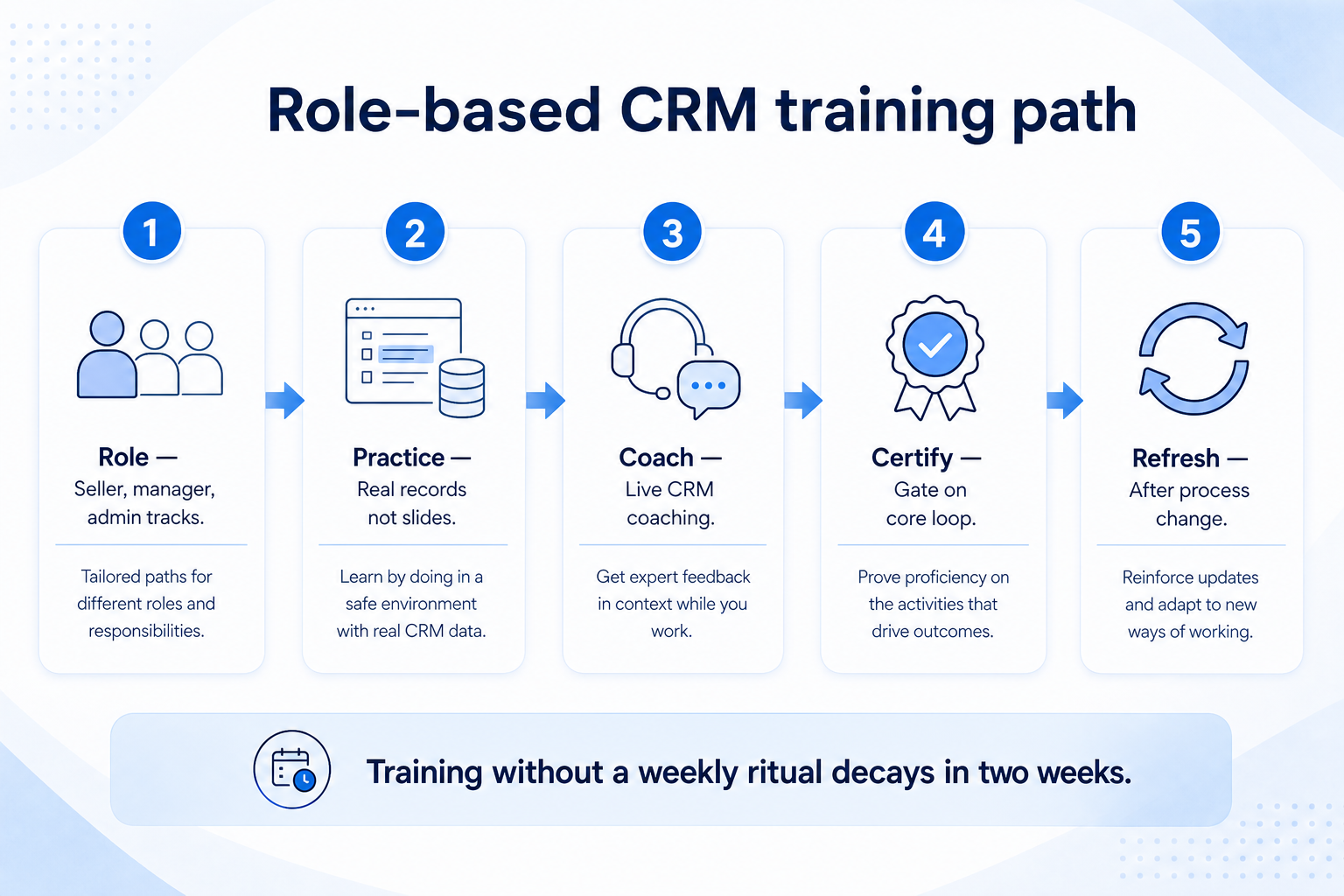
Labs tied to missed next-steps and stage lies change behavior — one webinar does not.
Role-based labs
Seller, manager, and admin paths — not one generic webinar.
Refresh after drift
When a gate fails, retrain the ritual on live records within one week.
Champion assist
Pilot champions run office hours using the mistakes checklist.
Training that only demos navigation does not create adoption. Practice the mistakes you will actually see: empty next steps, dishonest stage jumps, duplicate creation, and dual-running sheets. Pair each mistake with a coaching response and an owner.
Example: Northwind’s Day-30 workshop uses three real stuck jobs from last week. Reps update them live while the manager scores the board afterward — training and the mistakes guide become the same conversation.
Adoption mistakes
Celebrating login dashboards
Activity without core-loop completion trains leadership to ignore the real risk.
Expanding before managers change
More seats amplify Slack coaching and sheet rebuilds.
Training as a one-time webinar
Without live-record practice and gate reviews, habits snap back.
Adding fields to “drive adoption”
Complexity usually reduces updates; simplify the loop first.
No named gate owners
Without R/A for 30/60/90, go-live dates drift into permanent dual-running.
Ignoring change resistance
Shadow sheets are a change-management signal — handle with the change guide, not more alerts.
Example official vendor setup videos
Optional · 2 examples · collapse if you don’t need them
These are verified vendor tutorials and product demos from the CRM catalogue — examples of how vendors present setup and workflows. They are not SoftwareGlimpse rankings, and they do not replace the independent guidance on this page.
Official vendor tutorial · example
Attio — Attio | How to build your sales pipelines
This video is hosted on YouTube
This content is hosted by YouTube. The player loads only after you allow marketing cookies.
Adoption means the team completes the core work loop in CRM and managers coach from CRM views. Logins alone are not adoption. Decision rule: if Friday status still depends on a side sheet or Slack archaeology, adoption is incomplete.
How do we measure adoption without fake benchmarks?
Track leading signals you define for your team — open-item ownership, next-step fill, core-object usage, and whether reviews run from CRM. Set team targets and intervene when they miss for two consecutive weeks. Do not treat invented industry percentages as facts.
What should a 30-day adoption gate include?
Core loop trained on live records, owners named, required owner + next-step fields in use, and a scheduled manager review that uses a CRM view. Pass only if dual-running is shrinking, not growing.
We have high logins but low trust — what now?
Pause expansion, audit empty next steps and dishonest stages, force manager coaching from CRM, and retrain the ritual. See Implementation KPIs for intervention rules and Common CRM Mistakes for failure patterns.
How does training connect to adoption?
Train the loop and the mistakes you will coach against. Role-based labs on live records beat feature tours. Refresh training whenever a 60/90 gate fails.
What should I do next?
Write your one-sentence core loop, schedule the first CRM-native manager review, and set Day 30/60/90 gate owners. Use Implementation KPIs to pick signals, and Change Management if resistance shows up as shadow sheets.