SoftwareGlimpse
CRM Software

CRM Implementation KPIs: Leading Signals & Intervene Rules

Track CRM implementation with leading hygiene and adoption signals, lagging trust outcomes, and clear intervene/hold/expand rules — without invented industry benchmark percentages.

By Lee M.Updated Aug 14, 20267 min readFact-checked

Quick answer

Track leading implementation signals (hygiene, next-step fill, time-to-first-value, core-object adoption) before lagging outcomes (forecast trust, side-sheet retirement, board-native reviews). Decision rule: if leading signals miss your team-defined targets for two consecutive weeks, intervene — coach, simplify, or freeze expansion — even if lagging metrics still look “fine.” Do not treat invented industry benchmark percentages as verified facts.

  • Leading first
  • Lagging second
  • Team-defined targets
  • Two-week intervene
  • Core-object adoption
  • No fake benchmarks

Key takeaways

  • Leading signals predict collapse Empty next steps show up before forecast trust dies.
  • Lagging without leading is late Waiting for revenue stories misses the operable window.
  • Targets are yours to set Use qualitative thresholds or internal goals — not invented industry % facts.
  • Intervene is a decision Two-week miss → coach / simplify / freeze — not another dashboard tile.

KPI operating path

  1. 1Leading set
  2. 2Team-defined
  3. 3Same views
  4. 4Intervene / hold / expand
  5. 5Trust outcomes

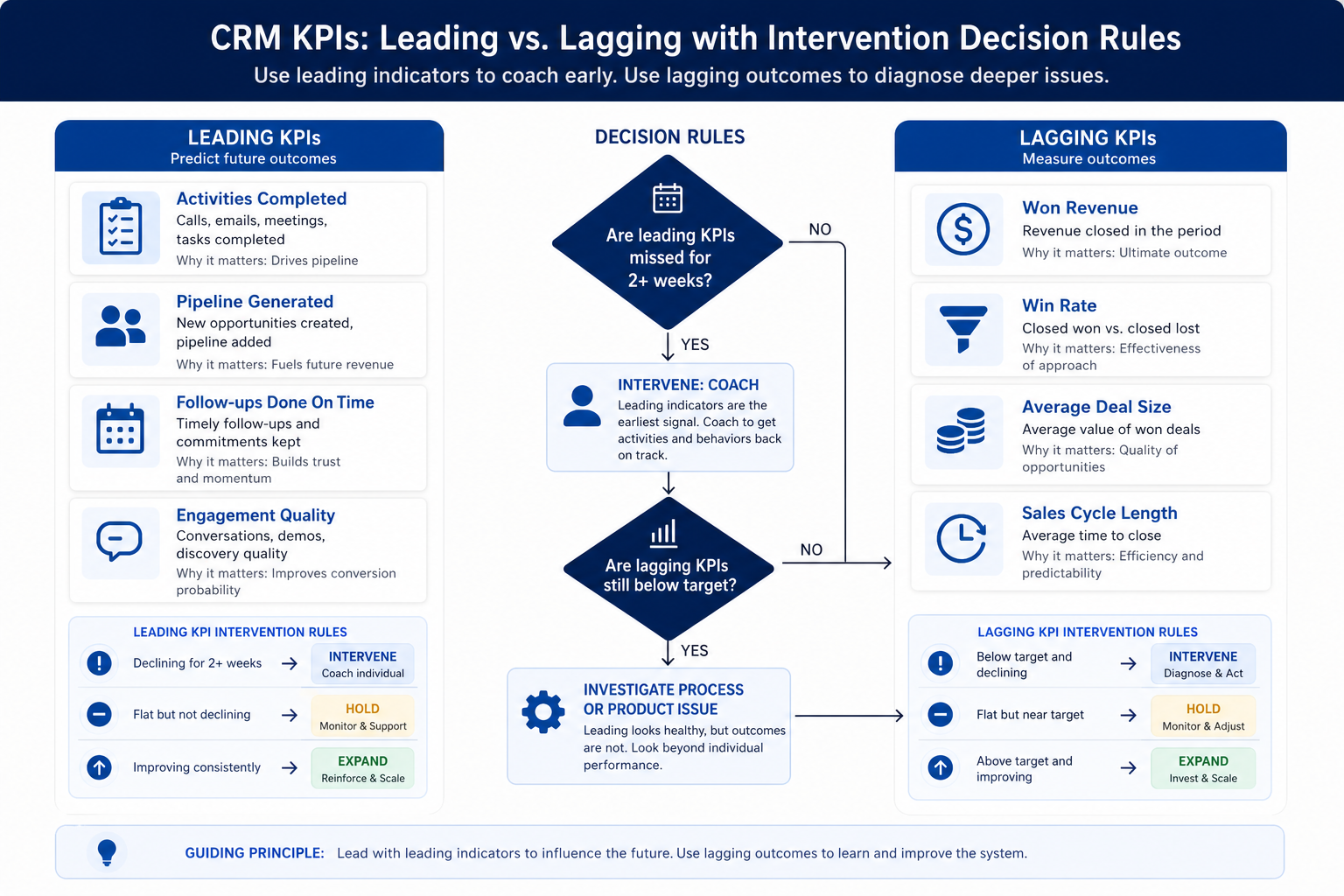
Leading vs lagging with intervene rules

Teaching diagram of CRM leading versus lagging KPIs with intervene, hold, and expand decision paths.
Leading misses trigger action; lagging confirms whether trust actually moved.

Stand up implementation KPIs

Bring these questions to every demo

Ask vendors to show the workflow live, not just describe it.

  • 1Choose 4 leading signalsHygiene, next-step fill, time-to-first-value, core-object adoption.
  • 2Choose 2–3 lagging outcomesBoard-native review, side-sheet retired, forecast/trust proxy.
  • 3Write team-defined targetsQualitative bands or internal goals — cite no fake industry %.
  • 4Name KPI review ownerOps + business lead; same views each week.
  • 5Publish intervene ruleTwo consecutive leading misses → freeze expansion.

1. Instrument leading signals

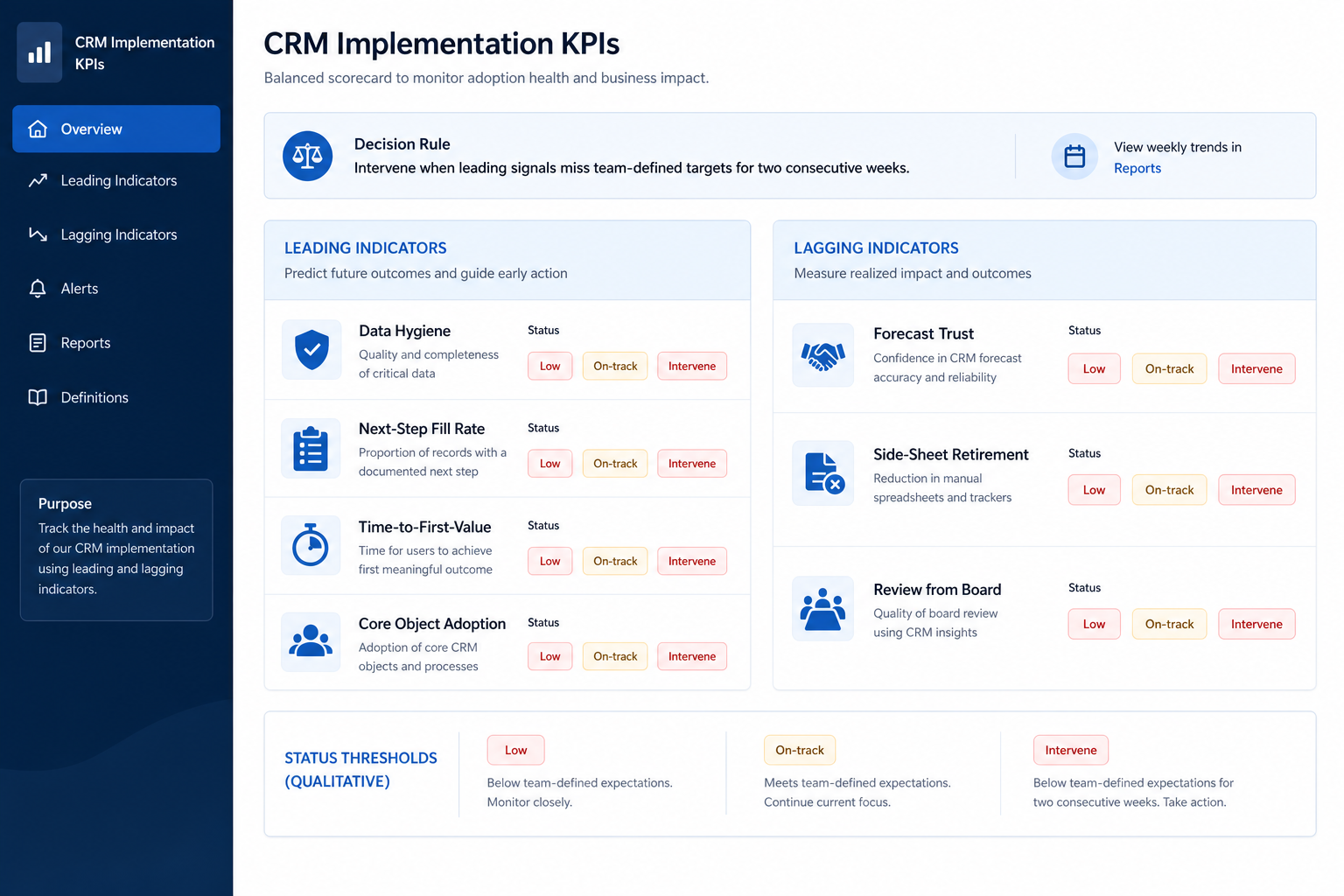
CRM implementation KPIs hero dashboard splitting leading indicators and lagging outcomes with intervene decision callouts.
Leading panels drive weekly action; lagging panels confirm trust — with Low / On-track / Intervene bands, not fake industry percentages.
  • Hygiene %

    Team-defined completeness on owner + required hygiene fields.

  • Next-step fill

    Open work with a dated next action — queue the empties.

  • Time-to-first-value

    Invite → first complete core loop on a live record.

  • Core-object adoption

    Primary objects updated; unused objects stay out of the score.

Leading signals are operable weekly: hygiene completeness on open work (owners filled), next-step fill rate on open items, time-to-first-value (how quickly a new user completes the core loop on a real record), and adoption of core objects (contacts/accounts/opportunities actually used — not unused modules). Define each signal in plain language so managers can act without a BI project.

Example: Meridian Specialty Finance tracks (1) open deals missing owner or next step, (2) days from seat invite to first complete loop, (3) share of sellers with at least one updated opportunity this week. Ana reviews the same three saved lists every Monday — no vanity login chart.

2. Watch lagging outcomes without waiting on them

  • Board-native review

    Meeting starts from CRM views — not a pasted export.

  • Sheet retirement

    Shadow list gone from the ritual (policy date met).

  • Trust proxy

    Leaders stop asking for parallel status rebuilds.

Lagging outcomes confirm trust: Friday reviews run from the CRM board, side sheets retired from the coaching ritual, and leadership accepts CRM-sourced status (forecast or coverage) without a rebuild. These move slower — use them to validate, not to notice problems late.

Example: Harborline’s lagging check is simple: two consecutive Friday coverage meetings with no household spreadsheet open. Leading next-step fill had to stabilize first; the lagging win arrived afterward.

3. Set targets without invented benchmarks

  • Queue-based targets

    Overdue or empty queues must shrink week over week.

  • Band-based targets

    On-track / Watch / Intervene on a written rubric.

  • Pilot vs scale

    Tighter targets for pilot; revisit before firm-wide expand.

Use team-defined targets and qualitative bands (for example On-track / Watch / Intervene) based on your process and capacity. You may set internal numeric goals for queues or fill rates — but do not present unverified “industry average” percentages as facts. Document how each target was chosen and when you will revisit it.

Example: Crestview sets Intervene when the empty next-step queue is still growing at the second weekly quality review, and On-track when the queue is empty before Monday coverage. They explicitly refuse to cite a made-up industry fill-rate percentage in the exec update.

4. Publish intervene / hold / expand rules

  • Intervene

    Coach ritual, cut fields, pause automation and seats.

  • Hold

    Keep WIP steady; no new required fields or stages.

  • Expand

    Next pod with same core config and KPI pack.

Write the decision rules before emotions run hot. Default: two consecutive weekly misses on leading signals → Intervene (freeze seat expansion and new automation; coach or simplify). Mixed signals → Hold. Leading on-track for two weeks and lagging moving the right way → Expand. If leading is healthy but lagging stays broken, dig into manager bypass or product/process fit — not more vanity metrics.

Example: Blue Harbor hits Intervene when next-step fill misses for two Mondays. They cancel a marketplace app install, run manager coaching, and only reopen expansion after two On-track weeks.

5. Run a weekly KPI ritual

  • Pilot phase

    Emphasize time-to-first-value and next-step fill.

  • Scale phase

    Add core-object adoption by cohort; keep intervene rule.

  • Optimize phase

    Keep leading pack; use lagging to judge trust, not vanity.

Same day, same views, same decision: read leading signals, skim lagging, apply the rule, assign actions. Tie actions to adoption coaching, data-quality queues, and governance change control. Keep the pack small enough to finish in thirty minutes.

Example: Northwind’s Monday pack is three lists and one decision cell (Intervene/Hold/Expand). Priya posts the decision in the pilot channel so sellers see that metrics change behavior — not just slides.

Implementation KPI mistakes

  • Login vanity as the north star

    High activity can coexist with empty next steps and sheet rebuilds.

  • Citing unverified industry percentages

    Fake benchmarks create false confidence and bad exec debates.

  • Only lagging metrics

    You notice failure after the dual-run culture hardens.

  • No intervene owner

    Red metrics without a freeze decision train people to ignore dashboards.

  • Too many KPIs

    A wall of charts replaces the thirty-minute decision ritual.

  • Expanding while in Intervene

    Seat growth amplifies the miss instead of fixing the loop.

Example official vendor setup videos

Optional · 2 examples · collapse if you don’t need them

These are verified vendor tutorials and product demos from the CRM catalogue — examples of how vendors present setup and workflows. They are not SoftwareGlimpse rankings, and they do not replace the independent guidance on this page.

  • Official vendor tutorial · example

    Attio — Attio | How to build your sales pipelines

    This video is hosted on YouTube

    This content is hosted by YouTube. The player loads only after you allow marketing cookies.

    Official vendor tutorial

    Attio | How to build your sales pipelines

    What this shows

    • Attio sales pipeline setup
    • pipeline building as presented by Attio
    Attio research →
  • Official vendor tutorial · example

    Bitrix24 — Get started with Bitrix24 CRM | Bitrix24 CRM

    This video is hosted on YouTube

    This content is hosted by YouTube. The player loads only after you allow marketing cookies.

    Official vendor tutorial

    Get started with Bitrix24 CRM | Bitrix24 CRM

    What this shows

    • Bitrix24 CRM getting started
    • CRM orientation as presented by Bitrix24
    Bitrix24 research →

Frequently asked questions

  • What KPIs should we track during CRM implementation?

    Prioritize leading signals: hygiene completeness, next-step fill on open work, time-to-first-value for new users, and core-object adoption. Use lagging outcomes (board-native reviews, side-sheet retirement, leadership trust) to confirm — not as your only early warning.

  • What is a good benchmark percentage?

    There is no universal verified percentage you should treat as fact here. Set team-defined targets and qualitative bands (On-track / Watch / Intervene) from your process. Revisit targets as the pilot matures.

  • When should we intervene?

    When leading signals miss your targets for two consecutive weekly reviews — freeze expansion and new automation, then coach or simplify. Name who owns that call.

  • What is time-to-first-value in CRM?

    Elapsed time from invite (or go-live for a user) until they complete the core loop on a real record — create/update, activity, honest stage, dated next step. Long times usually mean training or complexity problems.

  • How do KPIs relate to adoption and data quality?

    Adoption defines the loop and coaching ritual; data quality runs hygiene queues; KPIs are the shared signals and decision rules that connect them to expand/intervene choices.

  • What should I do next?

    Pick four leading signals, write On-track/Intervene bands, schedule the weekly pack, and link actions to Adoption, Data Quality, and Governance owners.

Was this article helpful?

Have more questions? Contact our support team.

SoftwareGlimpse Updates

Want clearer software shortlists? Get buying guides and comparisons by email.

Newsletter coming soon.