CRM Implementation Roles: Who Owns What on the Team
Staff CRM rollout with RACI owners — sponsor, admin, sales lead, IT/security, change lead — including small-team hat stacking and qualitative hours/week bands.
Staff CRM implementation with named RACI owners for five seats: executive sponsor, CRM admin, sales (or delivery) lead, IT/security, and change lead. Decision rule: do not start configure or migrate until admin Responsible hours are on the calendar and a sponsor is Accountable for pilot exit criteria — if roles are “everyone’s job,” the project has no owner.
Name five seats
Admin hours booked
Sponsor owns gates
Sales lead owns loop
IT owns access
Change owns training
Key takeaways
Roles beat job titles — A founder can wear sponsor + change; an ops manager can be admin — as long as each seat has a name.
Admin is non-optional — Fields, users, duplicates, and permissions need a Responsible person with weekly hours.
Hours are qualitative bands — Use light / moderate / heavy weekly bands — not invented salary or FTE claims.
Size changes stacking, not the seats — Small teams combine hats; mid-market separates them — the RACI jobs stay the same.
5Change/training owner namedPilot agenda, training on real records, adoption nudges.
6RACI written for configure / migrate / go-liveNo seat left as “the team.”
1. Define the five RACI seats
Name seats and qualitative hours bands before configure day — not after the first messy Friday.
Sponsor
Unblocks scope fights; owns go/no-go on expansion.
Admin
Owns field requests, merges, and permission exceptions.
Sales lead
Rejects stage fiction; coaches from the board.
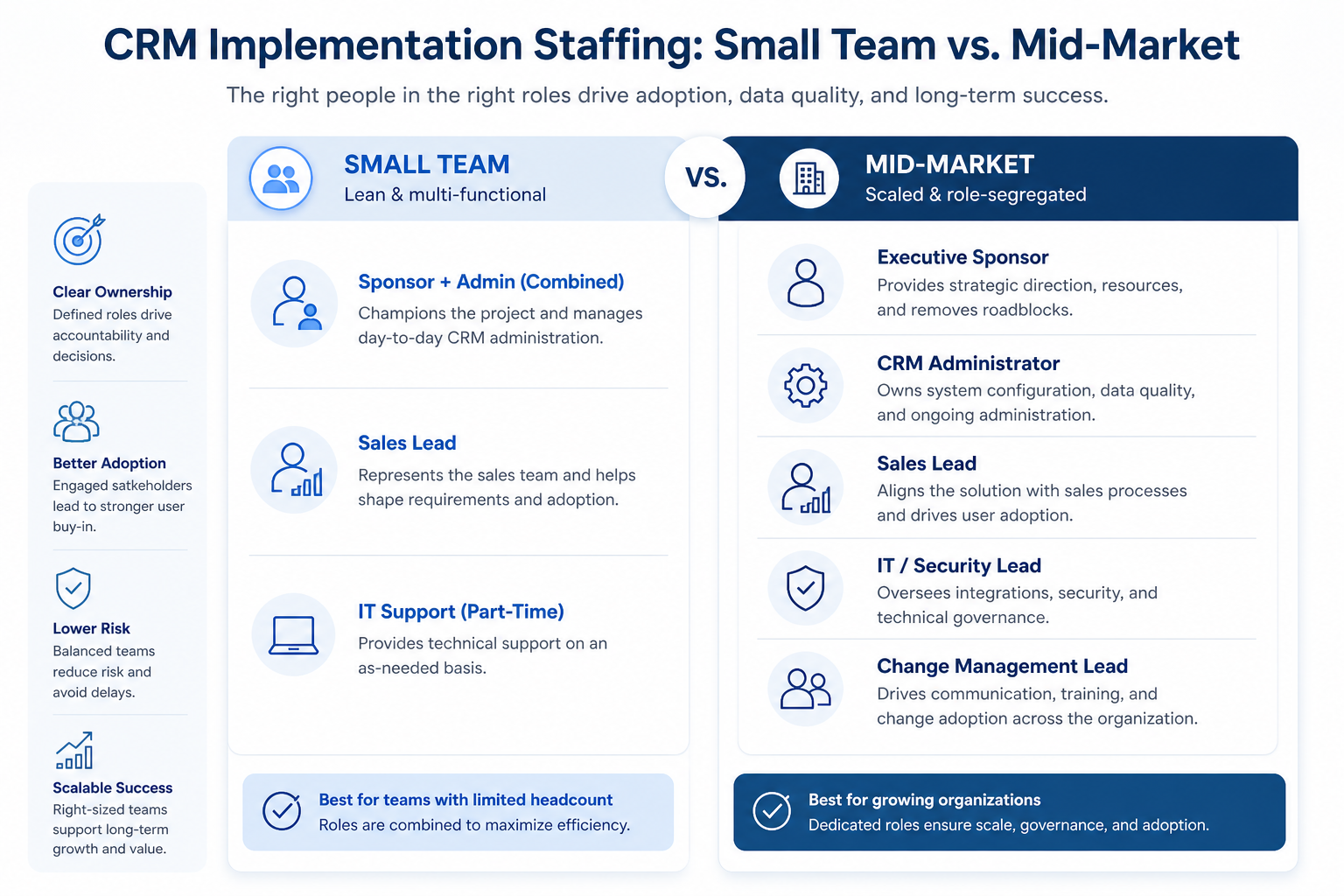
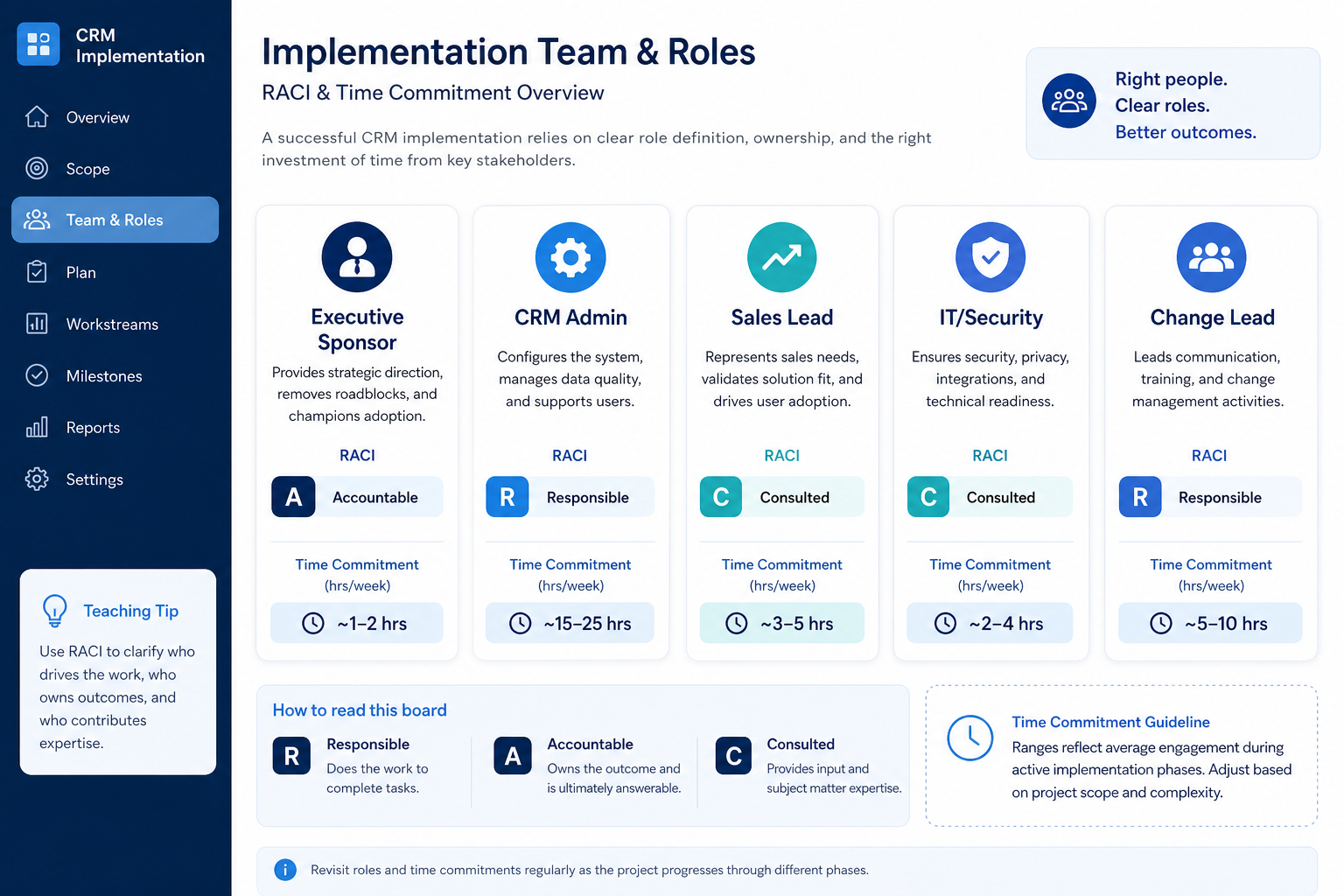
Write five seats before you touch configuration: (1) Executive sponsor — Accountable for scope and pilot exit; typically light hours after kickoff. (2) CRM admin — Responsible for fields, roles, duplicates, and integrations; usually the heaviest ongoing band. (3) Sales or delivery lead — Responsible for stage honesty and Friday reviews. (4) IT/security — Responsible for access matrix, identity, and export path. (5) Change lead — Responsible for training agendas and adoption follow-ups.
Example: Brightline Creative, an 11-person B2B design agency, names founder Priya as sponsor + change lead, ops manager Devon as CRM admin (~3–5 hrs/week during pilot), sales lead Maya for pipeline stages, and their MSP contact Jordan for SSO and export checks. Hats are stacked on purpose — and written on a one-page RACI so Friday reviews still have a single admin owner.
2. Set qualitative hours/week bands
Pilot weeks
Admin + sales lead moderate; sponsor light.
Cutover week
Admin heavier; IT available; change lead active.
Steady state
Admin light–moderate hygiene; others light.
Assign a band per seat — light (~1–2 hrs/week), moderate (~3–5), or heavy (more during pilot/cutover) — without inventing salaries or headcount math. Admin usually spikes during configure, pilot, and migration hygiene; sponsor stays light unless gates slip; sales lead peaks around stage design and training weeks.
Example: Brightline books Devon’s admin band as moderate through pilot (fields + hygiene huddles), Maya’s sales-lead band as moderate for two weeks of stage workshops then light for Friday reviews, and Priya’s sponsor band as light check-ins plus Accountable sign-off on pilot exit. When cutover week arrives, Devon temporarily moves to a heavier band and the MSP is on-call for access — then bands drop again once hygiene holds.
3. Staff small teams vs mid-market
Agency / studio
Ops admin + founder sponsor; sales lead owns pipeline.
B2B services mid-market
Dedicated admin; IT owns SSO; change owns training waves.
External implementer
Vendor can be R for build; internal admin remains A.
Small teams (roughly under ~15 people) almost always stack hats: founder = sponsor + change; ops = admin; sales lead stays separate if you sell as a team. Mid-market separates sponsor, dedicated admin, sales lead, IT/security, and change so no single person becomes the bottleneck and the silent veto.
Example: Brightline stacks sponsor+change. Six months later, after hiring three AEs, they split change to HR/ops associate Sam and keep Devon as dedicated admin. Decision rule: when Friday reviews fail because the admin was in client work all week, separate the admin seat — do not add more custom fields hoping process will appear.
4. Map RACI across configure, migrate, go-live
Configure
Admin R; sales lead C on stages; sponsor A on scope.
Migrate
Admin R; IT R on export; sales lead validates sample.
Go-live
Change R for training; sponsor A for cut line.
One static org chart is not enough. For each phase — configure, data migrate, pilot, go-live — write Responsible / Accountable / Consulted / Informed. Typical pattern: admin R for configure; sales lead C on stages; IT R for access before invites; change R for training; sponsor A for go-live.
Example: Brightline’s migrate phase lists Devon R for clean+import, Maya C for open-deal validation, Jordan R for export sample and role model, Priya A for freeze-window go/no-go, and the AE pod Informed on Monday cutover. When a duplicate fight appears, the RACI already says Devon decides merges — no Slack democracy.
Role-staffing mistakes
No named admin
Fields and duplicates become everyone’s problem — which means nobody’s.
Sponsor in name only
Without Accountable go/no-go, pilots never end and expansion never gates.
IT invited after mass user load
Access models harden around temporary wide-open seats.
Training owned by “the vendor webinar”
Generic tours do not teach your stages on your records.
External partner as the only admin
When the SOW ends, hygiene debt has no internal owner.
Inventing FTE or salary math as a gate
Use qualitative hours bands and outcomes — not fake headcount totals.
Example official vendor setup videos
Optional · 2 examples · collapse if you don’t need them
These are verified vendor tutorials and product demos from the CRM catalogue — examples of how vendors present setup and workflows. They are not SoftwareGlimpse rankings, and they do not replace the independent guidance on this page.
Official vendor tutorial · example
Attio — Attio | How to build your sales pipelines
This video is hosted on YouTube
This content is hosted by YouTube. The player loads only after you allow marketing cookies.
At minimum: executive sponsor, CRM admin, sales or delivery lead, IT/security contact, and a change/training owner. Small teams may stack hats; mid-market should separate them. Decision rule: admin Responsible hours and sponsor Accountable gates must be named before configure starts.
How many hours per week does a CRM admin need?
Use qualitative bands, not invented salaries: light for steady hygiene, moderate during pilot and field design, heavier during cutover week. Book the band on the calendar; if Friday reviews fail because admin work lost to billable work, raise the band or separate the seat.
Can one person be sponsor and admin?
On a very small team, yes — write it explicitly. As soon as field requests and duplicate merges compete with sponsorship decisions, split the seats so Accountable and Responsible are not the same bottleneck.
Do we need a dedicated change manager?
Not always. Someone must own training agendas, pilot communications, and adoption follow-ups. On small teams the sponsor or ops lead can wear that hat; mid-market usually benefits from a separate change owner across waves.
Where does IT fit if we are an SMB on SaaS CRM?
Even without a large IT department, name who owns identity (SSO/MFA), export samples, and the access matrix before invites. An MSP or technical founder can fill the seat — the job still exists.
What should I do next?
Write the five-seat RACI, book admin hours, then plan phases in the CRM Implementation Planner. Pair with Implementation Mistakes, Data Migration, and the CRM Implementation pillar for the full rollout path.