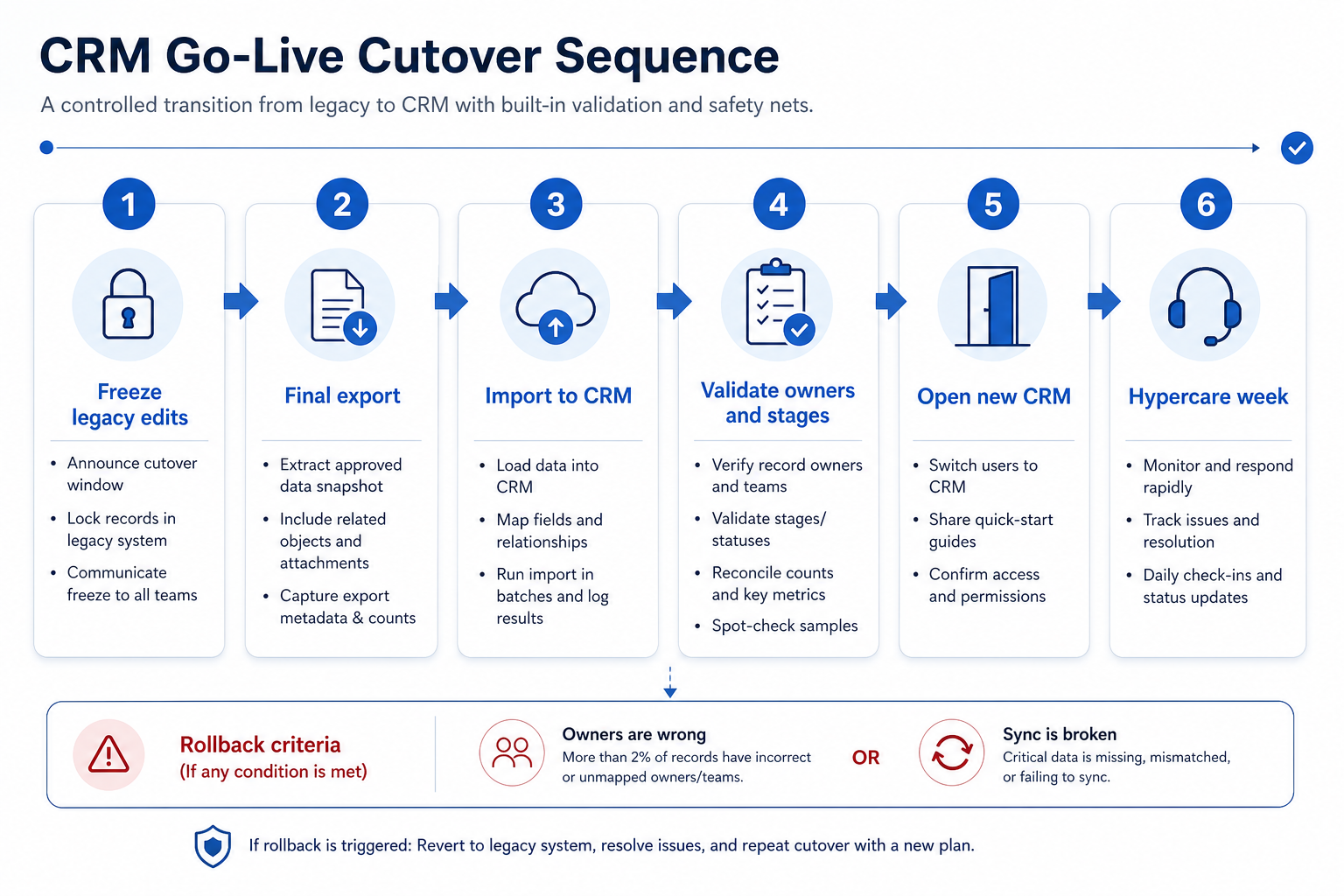
CRM go-live is a controlled cutover: freeze legacy edits, run the final import, validate owners and stages, open the new CRM, then run a hypercare week with named support. Decision rule: do not cut over until UAT exit criteria pass and you have written rollback criteria — if owners, stages, or sync fail validation in the cutover window, stop and roll back rather than “push through” and hope hypercare fixes trust.
UAT passed
Freeze window
Cutover checklist
Validate
Rollback ready
Hypercare week
Key takeaways
Freeze is non-negotiable — Edits in two systems during cutover guarantee conflict.
Cutover is a checklist, not a vibe — Ordered steps with owners beat a weekend dump.
Rollback criteria before you need them — Decide the fail triggers while everyone is calm.
Hypercare is staffing, not a slogan — Named hours and escalation paths keep week one usable.
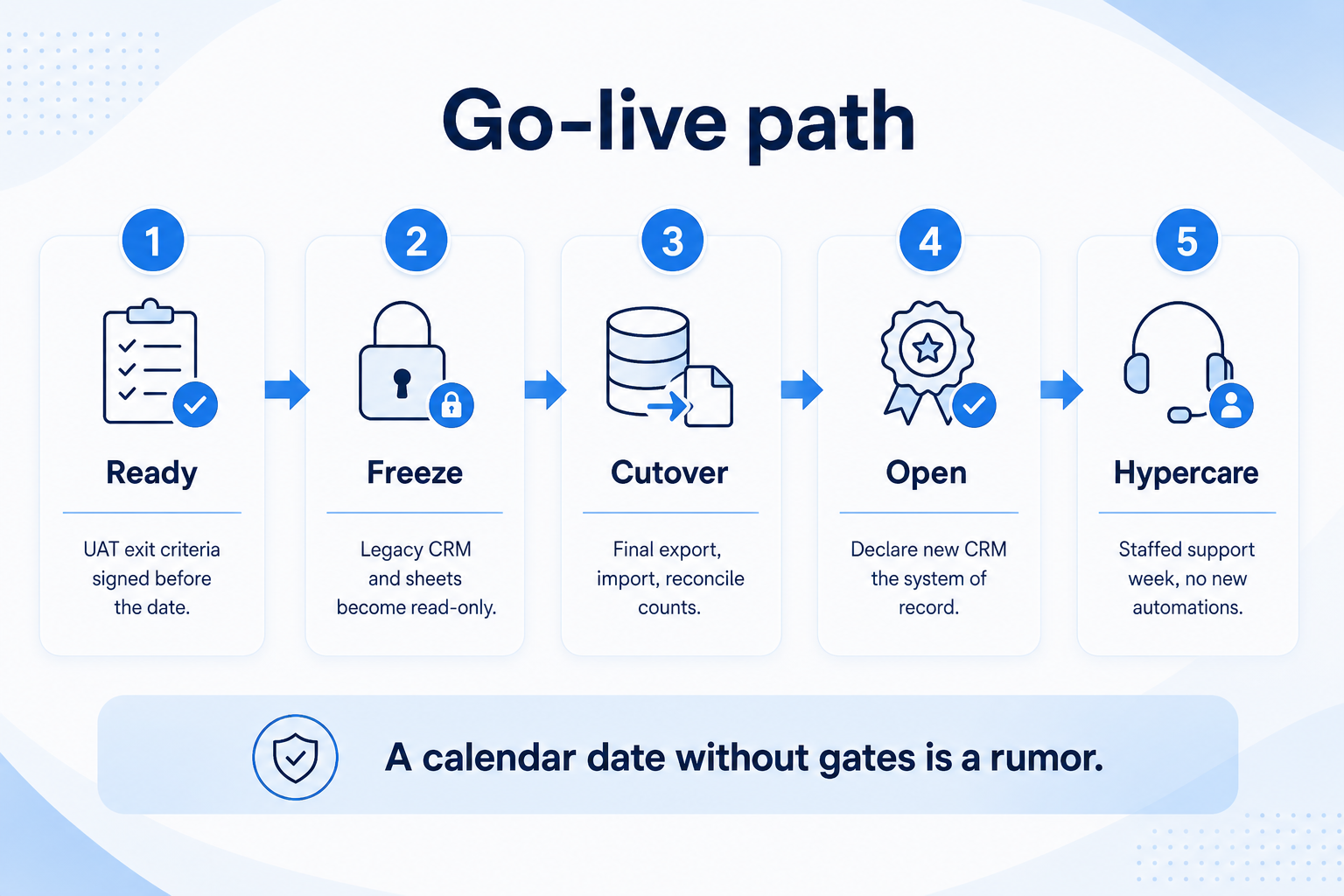
Ready gates before the calendar date — freeze, cutover, open, then staffed hypercare.
Cutover sequence
Six controlled stages — with rollback triggers — keep launch from becoming an irreversible dump.
Cutover checklist
Bring these questions to every demo
Ask vendors to show the workflow live, not just describe it.
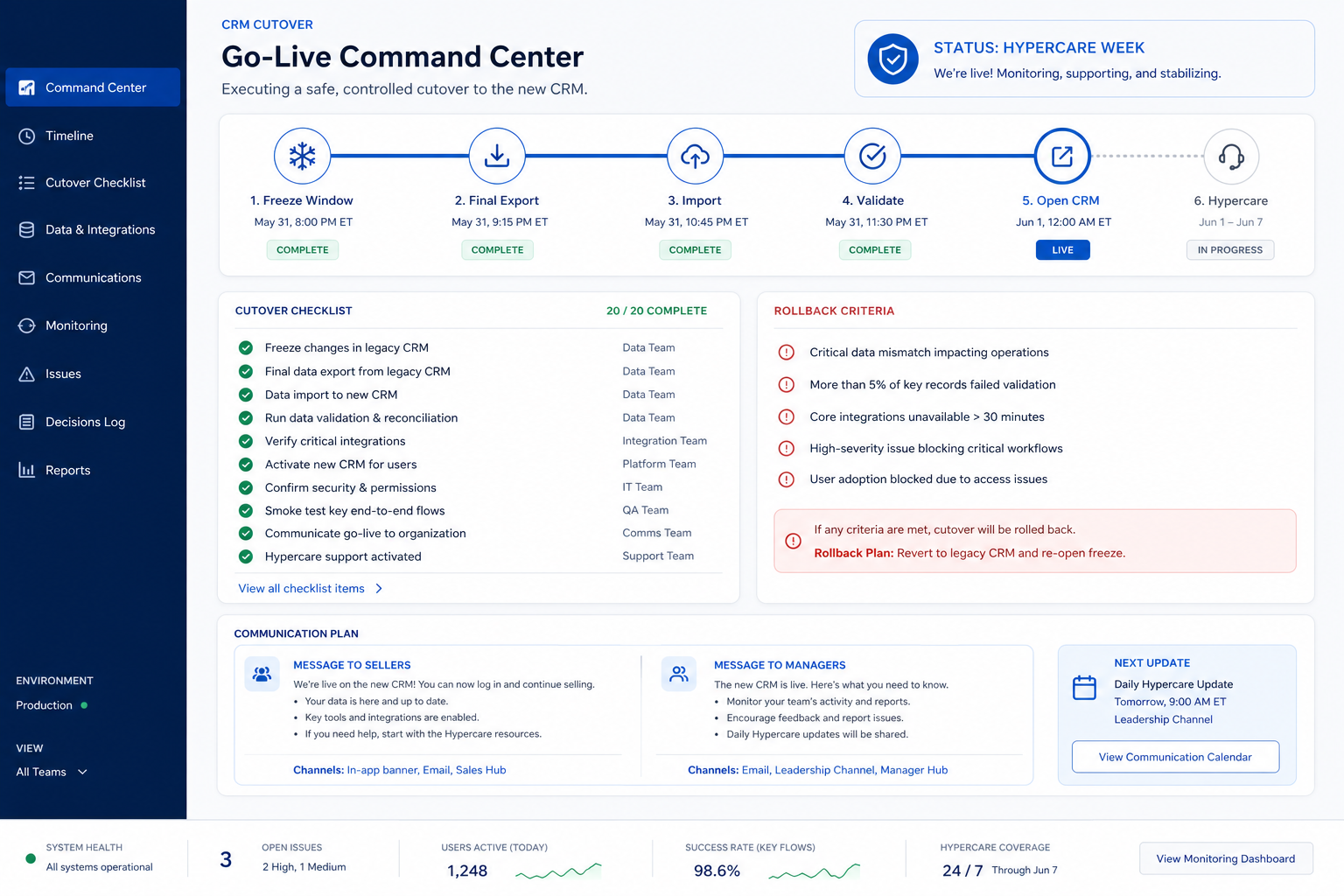
1UAT exit criteria signedP0 scripts green; no open blockers.
2Communication plan sentFreeze time, new login URL, who to ping.
3Freeze window startedLegacy CRM/sheets read-only or offline for edits.
4Final export capturedVersioned files; mapping sheet version recorded.
5Import completedCounts checked against export; quarantine reviewed.
6Owners, stages, sync spot-checkedSeller + manager sample of open deals.
7New CRM declared system of recordLegacy edit path closed; bookmarks updated.
8Hypercare roster liveHours, channel, escalation owner for the week.
1. Confirm readiness before you announce a date
Command-center view of freeze, cutover, validation, and hypercare — not a silent weekend import.
Green ready
UAT + map + training + rollback doc complete.
Amber
One deferred P2 with owner; P0 still green.
Red — delay
Open P0 on sync or owners; do not freeze yet.
Go-live is allowed only when UAT exit criteria pass, the field map version is frozen, pilot data (if any) is trusted, training for week-one roles is scheduled or complete, and rollback criteria are written. A calendar date without those gates is a rumor.
Example: Crestline Commerce (B2B e-commerce sales, 14 sellers) sets go-live for a Tuesday only after Devon’s UAT sign-off and Mara’s mapping version NLB-MAP-v3 (adapted for Crestline’s export) are in the shared folder. The VP had wanted “this Friday”; the project lead refused until P0 sync scripts passed.
2. Run the freeze window and communication plan
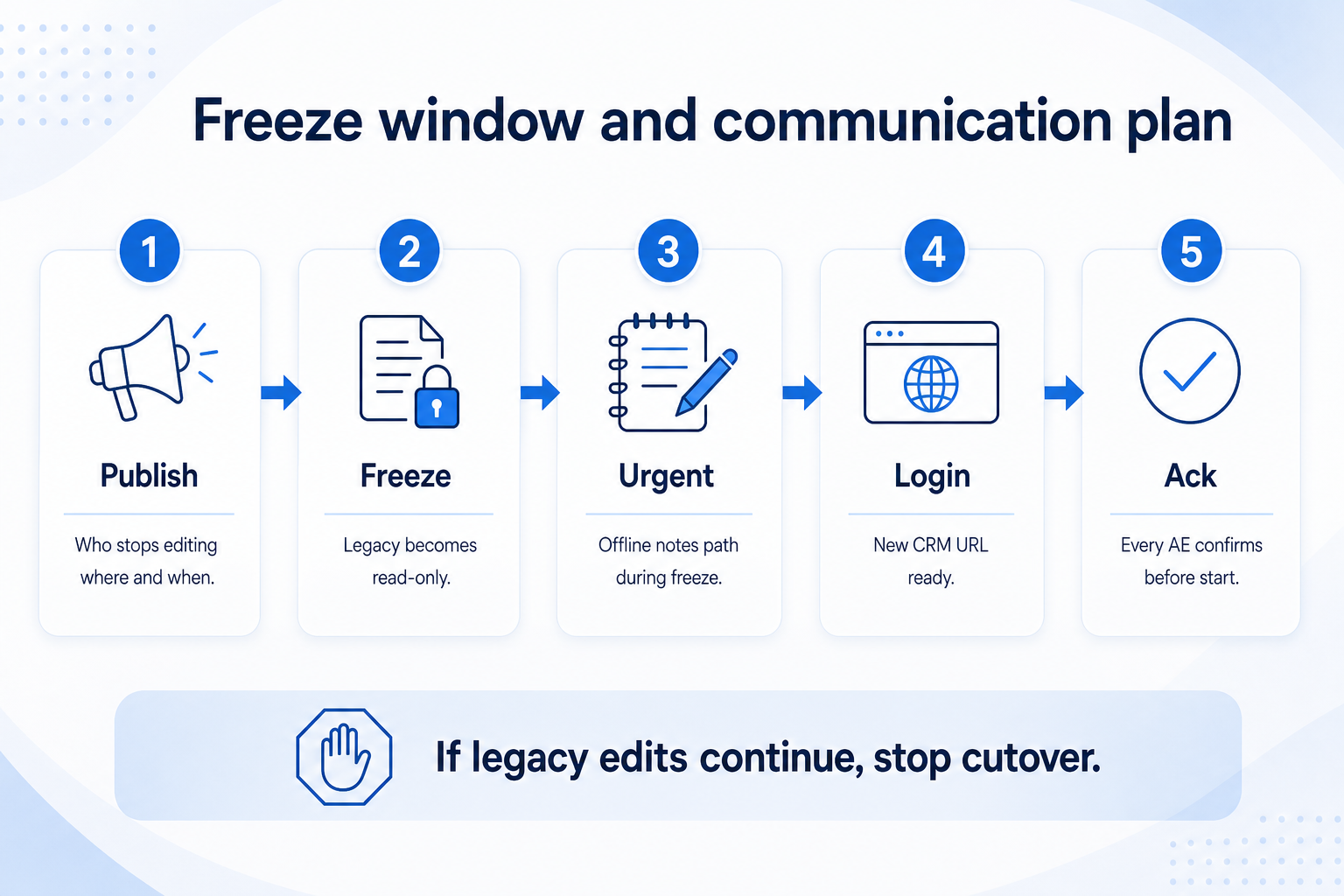
Freeze without acknowledgements is theater — stop cutover if legacy edits continue.
Seller comms
Freeze time, login link, hypercare channel.
Manager comms
How Friday review runs from the new board.
Exec comms
Success = trusted board, not “system is live.”
Publish who stops editing where, when the freeze starts/ends, how to handle urgent deals during freeze (usually note offline, enter after open), and where to log in after cutover. Message sellers, managers, and adjacent teams (CS, finance) that still touch accounts.
Example: Crestline sends a Monday note: freeze starts Tuesday 08:00, legacy CRM becomes read-only, urgent orders go to a Slack thread owned by ops, new CRM opens after validation ping. Managers confirm every AE acknowledged the note before freeze.
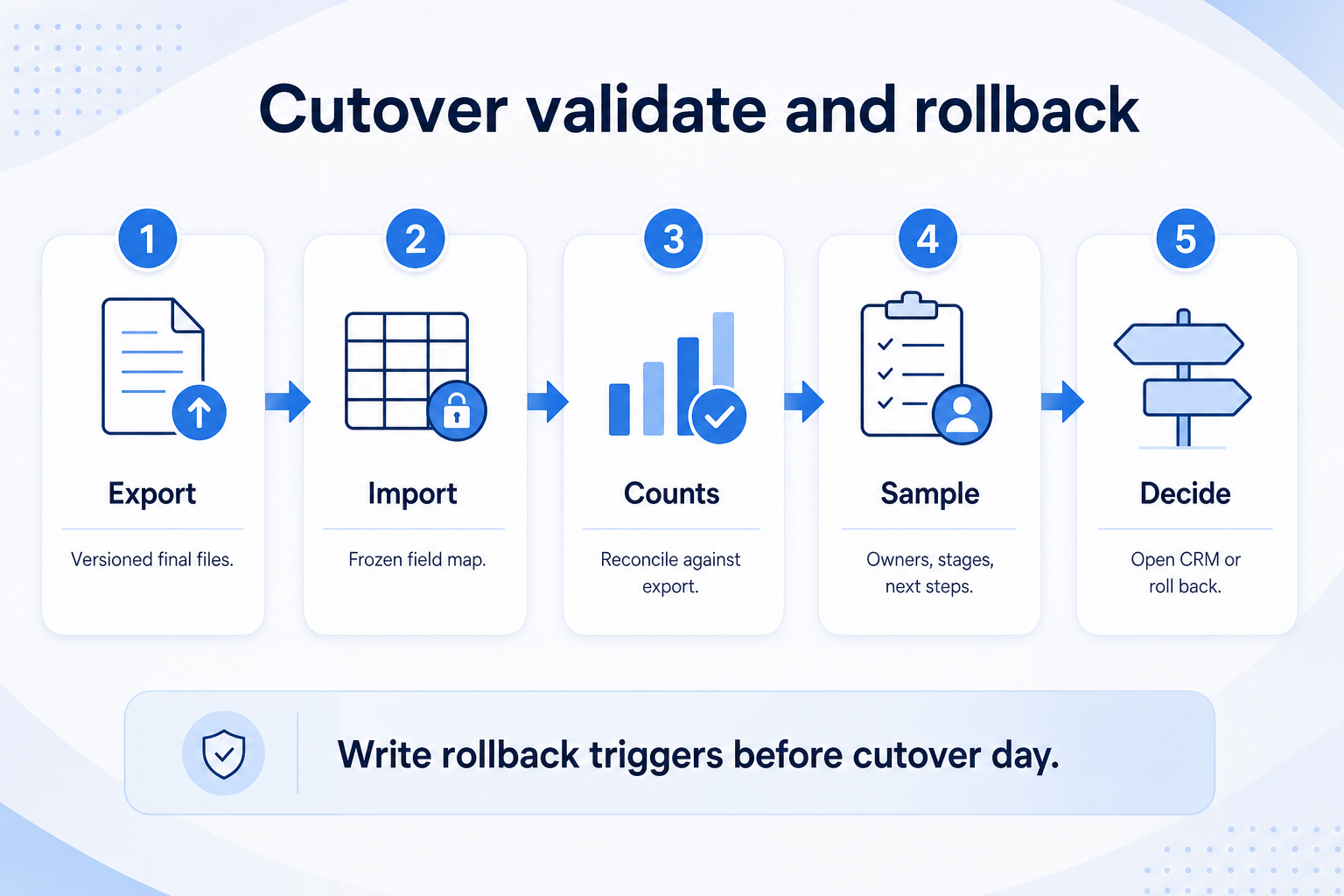
Written rollback triggers before cutover day — do not negotiate them mid-incident.
Pass validation
Sample clean; declare system of record.
Partial rollback
Re-import failed object only; keep freeze.
Full rollback
Restore legacy edit path; schedule new window.
Ordered runbook: final export → import with frozen map → reconcile counts → spot-check owners/stages/next steps on a sample of open deals → prove sync on one production seat → open CRM or roll back. Rollback criteria examples: >X% owner mismatch on sample, stage map wrong on open pipeline, sync broken for pilot users, import quarantine larger than agreed threshold.
Example: Crestline imports, finds three deals with blank owners in the sample of twenty. That trips their written rule (“any blank owners on open sample = pause”). They fix the owner lookup, re-import the quarantine set, re-validate, then declare open. They do not “fix in hypercare.”
4. Staff hypercare week and protect the core loop
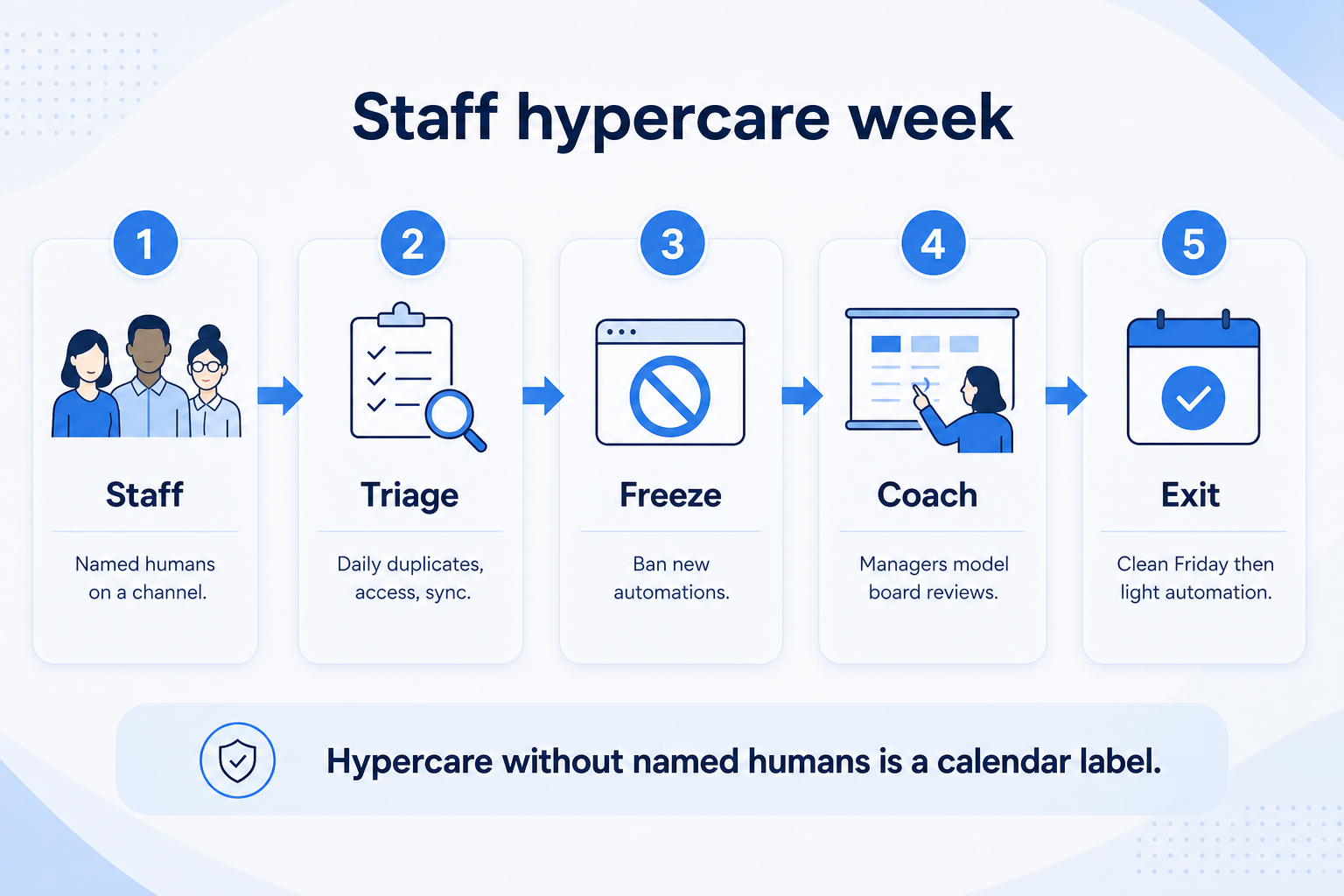
Staffed channel and a ban on new automations until the board is trusted.
Daily triage
Duplicates, access, sync, missing next steps.
Coach from board
Managers model reviews in CRM, not Slack rebuilds.
Exit hypercare
No open P0; one clean weekly review; then light automation.
Hypercare is a staffed support window (often five to ten business days): named channel, response expectations, daily triage of duplicates/permissions/sync, and a ban on new automations until the board is trusted. End hypercare when open P0 issues are empty and managers run one review from CRM without a side sheet.
Example: Crestline runs a #crm-hypercare channel with Mara (ops) and Devon (UAT lead) covering business hours. Day two: duplicate merge queue. Day four: one AE mailbox reconnect. They refuse a marketing automation install until Friday’s pipeline meeting runs clean from the board.
Go-live mistakes
Big-bang with no freeze
Two systems stay editable and nobody knows which is true.
Skipping UAT because “we’re out of time”
You trade a delay for a credibility crater.
No written rollback criteria
Teams argue while sellers wait for a working board.
Silent cutover with no communication plan
People keep working in legacy and poison the import.
Unstaffed “hypercare”
Issues pile in email; adoption dies in week one.
Adding automations on day one
Noise on shaky data trains everyone to ignore the CRM.
Example official vendor setup videos
Optional · 2 examples · collapse if you don’t need them
These are verified vendor tutorials and product demos from the CRM catalogue — examples of how vendors present setup and workflows. They are not SoftwareGlimpse rankings, and they do not replace the independent guidance on this page.
Official vendor tutorial · example
Attio — Attio | How to build your sales pipelines
This video is hosted on YouTube
This content is hosted by YouTube. The player loads only after you allow marketing cookies.
A defined period when legacy CRM or sheets become read-only (or offline for edits) so the final export and import are not racing new changes. Urgent work is parked and entered after the new CRM opens.
What belongs on a cutover checklist?
UAT sign-off, communications, freeze start, final export, import, count reconcile, owner/stage/sync validation, declare system of record, and hypercare roster live.
What are sensible rollback criteria?
Binary triggers such as blank owners on the open-deal sample, wrong stage mapping on active pipeline, broken email sync for go-live seats, or quarantine volume above the pre-agreed threshold. If triggered, pause or roll back — do not “hope through.”
How long should hypercare last?
Long enough to clear P0 issues and complete at least one trusted weekly review — often about a week for a focused sales team. End on evidence, not on the calendar alone.
Should we go live on a Friday?
Prefer a day when support staff are available the next morning. Friday launches often strand sellers over a weekend with no hypercare coverage.
What if some teams are not ready?
Cut over the ready segment only (pilot-style) and keep others on legacy until their UAT and training gates pass. Partial honesty beats firm-wide fiction.
What should I do next?
Finish role-based training if not done, run hypercare discipline, then follow the CRM Adoption Guide so the board stays trusted after the launch spike fades.