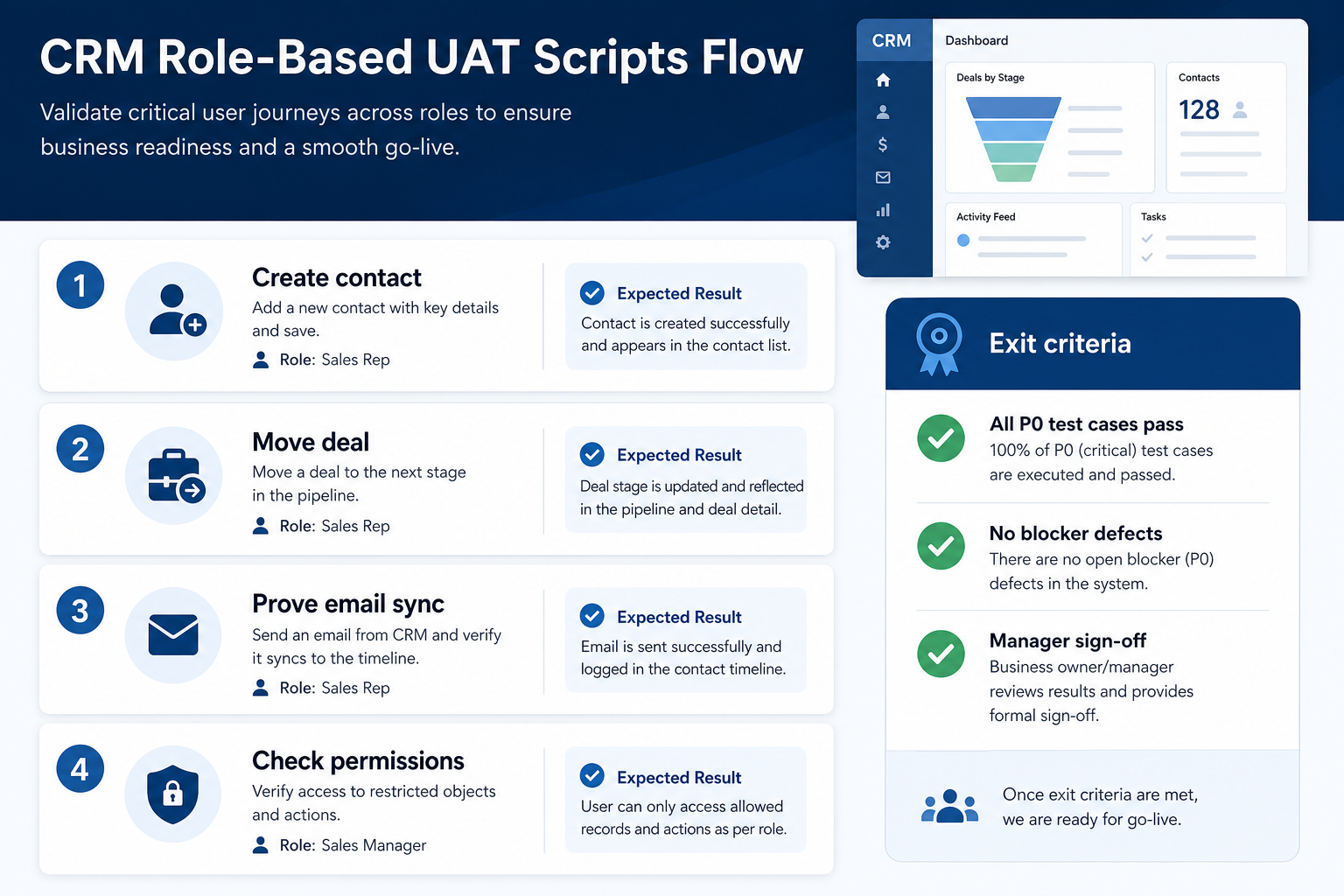
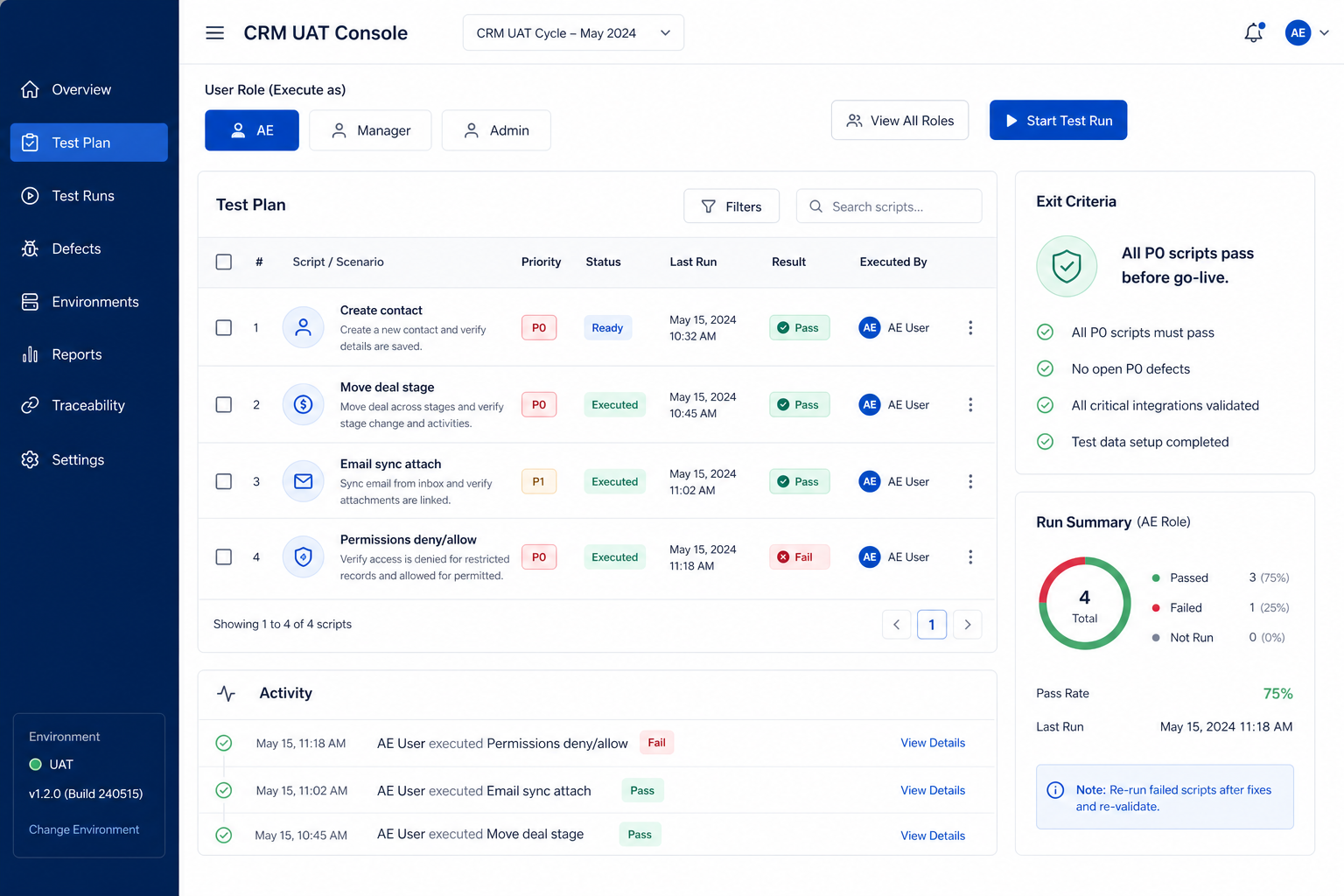
CRM testing means role-based UAT scripts that prove the core loop — create contact, move deal, email sync, permissions — before you invite the whole company. Decision rule: do not go live until every P0 script passes for AE, manager, and admin personas, with written exit criteria and no open blocker defects on owners, stages, sync, or access.
P0 scripts
Role-based
Core loop
Sync proof
Permissions
Exit criteria
Key takeaways
Scripts beat click-arounds — Named steps with expected results catch gaps demos hide.
Test as each role — Admin success does not prove AE or manager reality.
Exit criteria are binary — Pass/fail on P0 — not “mostly fine for launch.”
Blockers stop the clock — Owner, stage, sync, or permission failures delay go-live.
2AE, manager, and admin each ran their scriptsNot only the implementer on an admin seat.
3No open P0 defectsOwner, stage, sync, or access blockers closed or deferred with written risk.
4Evidence attachedScreenshots or links to test records for each P0 script.
5Manager + admin sign-off recordedDate, names, and “ready for cutover” or “blocked.”
6Rollback triggers reviewedSame failures that would stop go-live (see go-live guide).
1. Scope P0 scripts — core loop only
Role tabs and pass/fail on P0 scripts — the gate between sandbox and cutover.
Sales-led P0
Contact, deal, sync, manager board view.
CS-adjacent P0
Account ownership + activity log if support shares CRM.
Defer
Complex automations and AI features after hypercare.
Write a short P0 list tied to how the team will work in week one: create/update contact and company, create and stage-move a deal with owner + next step, prove one email or meeting attaches to a record, and prove a permission denial (AE cannot edit another territory / sensitive field). Park reporting polish, automations, and marketplace apps for post-hypercare.
Example: Apex Relay (eight-person B2B sales) freezes four P0 scripts. UAT lead Devon rejects “test every dashboard widget” as out of scope. Anything that would stop Friday pipeline review is P0; nice charts are P2.
2. Write role-based scripts with expected results
AE create contact
New person + company link; required fields enforced.
AE move deal
Stage change only when exit criteria fields are present.
Manager coach view
Board shows stuck deals without rebuilding in Sheets.
Each script needs: persona, preconditions, numbered steps, expected result, and evidence to capture. AE script: create contact, open deal, set next step, log activity. Manager script: open board, filter by owner, reject a dishonest stage jump (if your process requires it). Admin script: invite user, assign role, confirm field visibility, run a duplicate check view.
Example: Apex AE script expects “deal appears on board with owner = tester and next step date filled.” Manager script expects “can see team deals, cannot edit admin settings.” Admin script expects “AE role cannot export all contacts” if that is the access matrix rule.
3. Prove email sync and permissions on real seats
Inbound attach
Customer reply appears on the right record.
Outbound log
Sent mail from the approved client shows on the deal.
Deny path
Wrong-role user is blocked and the message is clear.
Run sync tests on the same mailbox provider you will use in production: send or receive one message, confirm it attaches to the correct contact/deal, and note latency. For permissions, test both allow and deny paths — a role that can do everything has not been tested.
Example: Apex seller Lena connects Microsoft 365 in sandbox, emails a prospect from her client, and confirms the thread lands on the deal. Devon then logs in as AE and confirms she cannot open Finance’s private notes field. Both results go in the evidence folder before sign-off.
4. Apply exit criteria and hand off to go-live
Pass → go-live
All P0 green; cutover checklist unlocked.
Blocker → delay
Fix config/data; re-run failed scripts only.
Defer with risk
Written exception, owner, and hypercare watch item.
Score each P0 script pass/fail. Open defects as blocker vs defer. Blockers (cannot create deals, owners missing, sync broken, permissions wrong) stop cutover. Deferrals need an owner and a date after hypercare. Record manager + admin sign-off, then move to the go-live freeze window.
Example: Apex fails one script when next-step date is optional and sellers leave it blank. They make the field required, re-run AE and manager scripts, pass all P0s, and only then schedule the Friday freeze for go-live.
CRM testing mistakes
Only the implementer tests as admin
AEs discover broken permissions on day one of go-live.
No expected results on scripts
Everything “kind of works” and nothing is decidable.
Skipping the deny path
Over-permissioned roles pass every click and fail compliance intent.
Testing automations before the core loop
You automate a process nobody can execute manually yet.
Going live with open P0 defects
Hypercare becomes firefighting instead of coaching.
No retest after a “small” config change
Field and role edits invalidate prior passes — re-run affected scripts.
Example official vendor setup videos
Optional · 2 examples · collapse if you don’t need them
These are verified vendor tutorials and product demos from the CRM catalogue — examples of how vendors present setup and workflows. They are not SoftwareGlimpse rankings, and they do not replace the independent guidance on this page.
Official vendor tutorial · example
Attio — Attio | How to build your sales pipelines
This video is hosted on YouTube
This content is hosted by YouTube. The player loads only after you allow marketing cookies.
What UAT scripts should every CRM run before go-live?
At minimum: create/update a contact, create and move a deal with owner and next step, prove email or calendar sync on a real seat, and verify allow/deny permissions for AE vs manager vs admin.
Who should execute the scripts?
At least one person per role (AE, manager, admin) — not only the project lead on an admin account. Capture evidence from those seats.
What are good exit criteria before go-live?
All P0 scripts pass, no open blocker defects on owners/stages/sync/access, evidence attached, and manager + admin written sign-off. Anything less is a delay or a documented risk exception.
How long should UAT take?
Long enough to run and retest P0 scripts after fixes — often days for a focused sales pod, not weeks of unbounded exploration. Scope keeps duration honest.
Should we test in production?
Prefer a sandbox or isolated pilot org that mirrors production roles and sync. If you must use production, use clearly labeled test records and a cleanup owner.
What if email sync fails only for some users?
Treat it as a P0 blocker for those seats. Do not go live assuming “they’ll reconnect later” without a named fix owner and retest.
What should I do next?
When P0 exit criteria pass, follow the CRM Go-Live Guide for freeze and cutover. Use Training so roles practice the same scripts in sandbox before launch day.