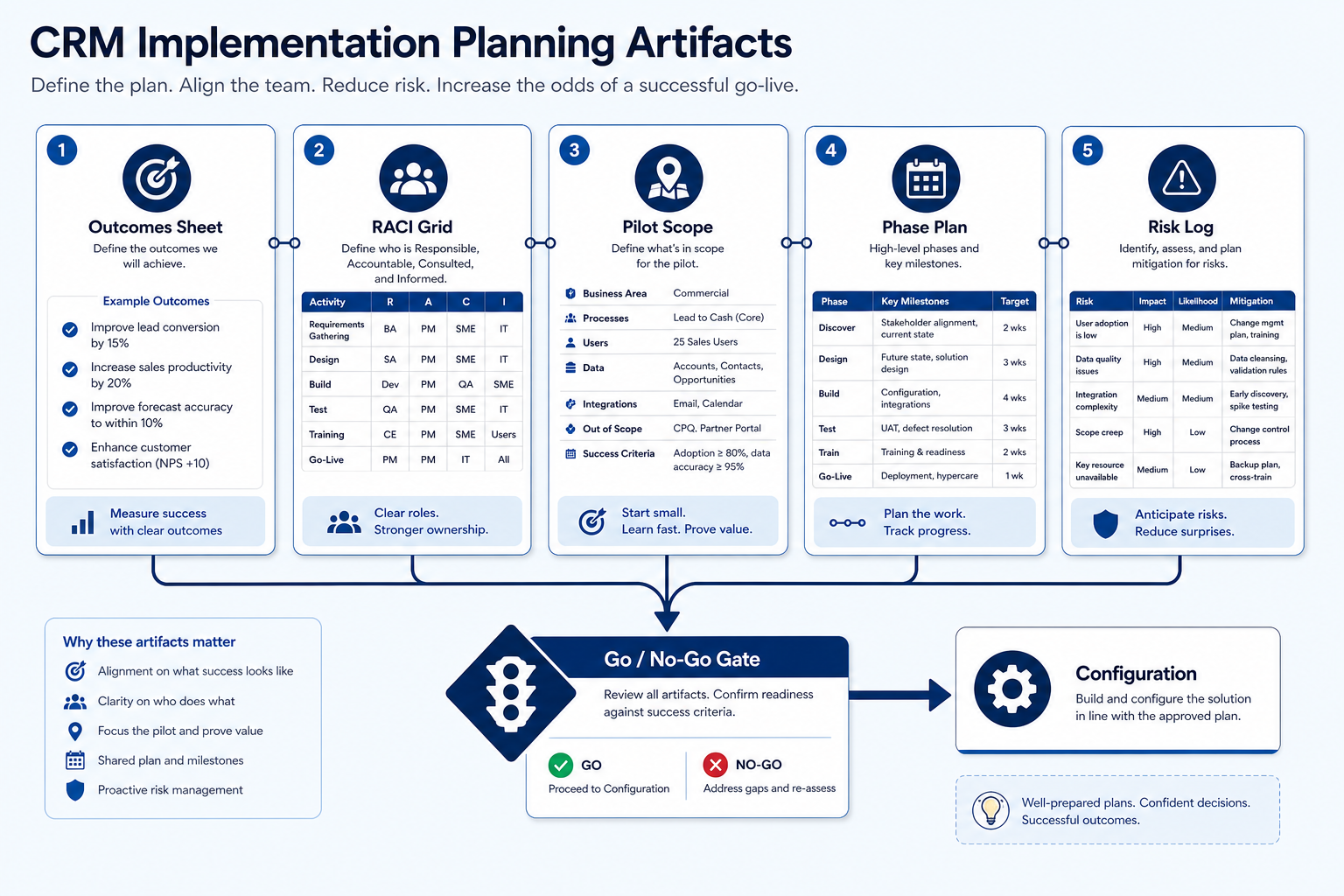
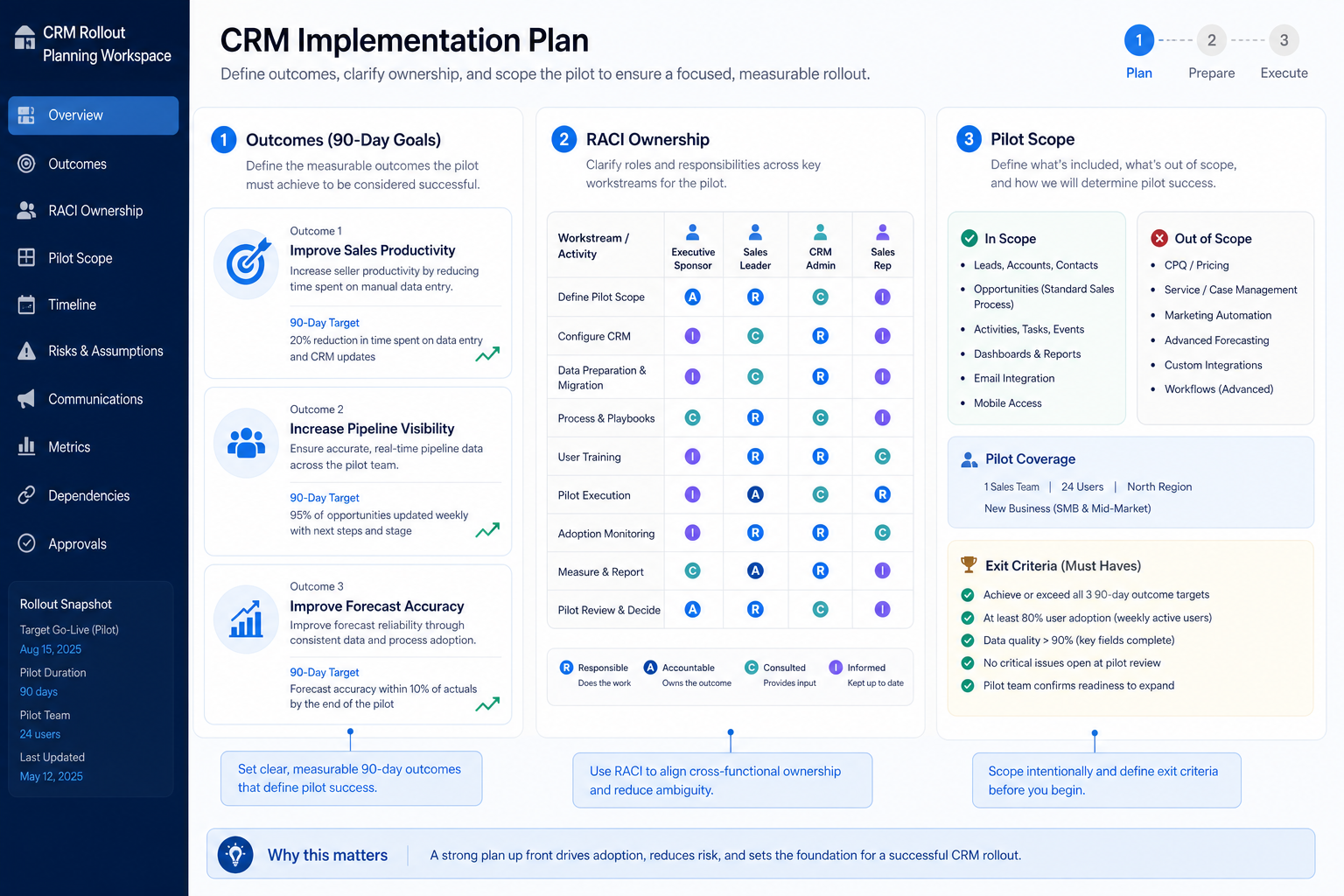
Plan CRM rollout by freezing outcomes, RACI ownership, pilot exit criteria, and phased work before configuration — so go-live is gated on evidence, not wishful calendars.
Plan CRM implementation by freezing three 90-day outcomes, a RACI-ish ownership map, a pilot segment with written exit criteria, and a phase list (configure → migrate slice → pilot → expand) before anyone builds fields. Decision rule: if outcomes, admin owner, and pilot exit criteria are still vague, pause configuration — planning debt becomes go-live debt.
Freeze outcomes
Name RACI
Pick pilot
Write exit criteria
List phases
Then configure
Key takeaways
Outcomes beat feature lists — “Monday reviews run from the board” is a plan; “enable AI insights” is not.
Ownership is the plan — Without Responsible/Accountable names, fields and hygiene drift.
Pilot scope is a decision — Write who is in, who is out, and what proves readiness to expand.
Planner is a scaffold — Use the Implementation Planner for phases/tasks — gate on evidence, not slide weeks.
Five artifacts before day-zero config: outcomes, RACI, pilot scope, phases, and risks.
Must-have planning artifacts
Must-have
✓Written 90-day outcomes (≤3)
✓Admin / ops owner with hours
✓Business owner for stage honesty
✓Pilot segment + exit criteria
✓Phase list with dependencies
✓Risk & readiness log
Nice-to-have
•Vendor-provided Gantt as sole plan
Planning complete when…
Bring these questions to every demo
Ask vendors to show the workflow live, not just describe it.
1Three outcomes written and sharedSponsor + pilot lead agree on wording.
2RACI named for fields, users, data, trainingOne Accountable per row — not a committee.
3Pilot in/out list frozenSegment size and who stays on old tools.
4Pilot exit criteria measurableTwo clean Fridays / Mondays without side sheets.
5Phases entered in Implementation PlannerTasks, risks, and go-live checklist scaffolded.
6Cost categories listed for sponsorLink Cost / TCO calculators — no invented totals.
1. Freeze three 90-day outcomes
Planning is a workspace of artifacts — outcomes and owners before fields.
Sales pod
Board trust + owned next steps + honest stages.
Services delivery
Account coverage + handoff checklist + next review date.
Founder + first hire
Shared pipeline so coverage survives vacation.
Write outcomes as observable operating changes — shared board reviews, owned next steps, cleaner handoffs — not as product feature checklists. Share them with the sponsor and pilot lead until wording is stable.
Example: Brightfield Partners, a 4-AE B2B sales pod plus one manager (Maya), freezes: (1) every open opportunity has owner + next-step date, (2) Tuesday pipeline reviews start from stuck deals on the board, (3) SDR→AE handoffs include context on the record. They reject “roll out forecasting AI” as an outcome because it does not change how Tuesday works.
2. Name RACI for the work that keeps CRM alive
Admin / ops
Fields, permissions, duplicates, import hygiene.
Business lead
Stage definitions and review coaching.
Sponsor
Scope fights, pilot protection, expansion go/no-go.
At minimum assign Responsible and Accountable for: field model, user/roles, data quality & duplicates, migration decisions, training, and weekly hygiene. Informed/Consulted lists can be short — avoid ownership by committee.
Example: At Brightfield, ops coordinator Devon is Responsible for fields/users (~2–3 hrs/week). Maya is Accountable for stage honesty and review ritual. Founder Alex is Accountable for scope and budget gates. Each AE is Responsible for updating their own deals; nobody is “Accountable for CRM” as a vague shared duty.
3. Define pilot segment and exit criteria
One manager’s team
Natural coaching loop and shared stages.
One territory / book
Clear account boundaries for import scope.
One workflow only
New business first; renewals later.
Pick a segment large enough to feel real and small enough to fix quickly. Write who is in, who stays on old tools, what data enters, and the exit criteria that unlock expansion.
Example: Brightfield pilots Maya’s full 4-AE pod (≈60 open opportunities) and parks the customer-success team on existing trackers until two consecutive Tuesdays run from the board with zero side sheets and fewer than five overdue next steps. Exit criteria are written before Devon starts configuring stages.
4. Phase the work and log risks
Dependencies first
Do not train on empty pipelines.
Risk log live
Update weekly — do not bury issues in Slack.
Handoffs written
Migration → admin; admin → business lead for reviews.
List phases with dependencies: plan freeze → configure core loop → migrate pilot slice → train pilot → run hygiene gate → expand. Capture risks (dirty sources, missing admin hours, integration unknowns) with owners. Enter the scaffold in the Implementation Planner; use Timeline and Cost guides for ranges and categories.
Example: Brightfield’s plan puts configure (roles, stages, sync) before import, blocks training until sample deals exist, and lists “Sheets have duplicate company names” as a risk owned by Devon with a dedupe pass before go-live of the pilot board. They refuse to schedule firm-wide training until the Tuesday gate passes.
5. Get sponsor go / no-go before configuration
Go
Artifacts complete; hours on calendar; pilot frozen.
Conditional go
Fix one risk (e.g. admin hours) within a dated window.
No-go
Product still undecided or outcomes still feature-wishlists.
Walk the sponsor through outcomes, RACI, pilot exit criteria, phase list, and cost categories (qualitative). Configuration starts only after go. If product choice is still open, pause and use CRM Finder — do not plan implementation for an undecided shortlist.
Example: Alex signs the Brightfield plan in a 30-minute review: outcomes accepted, Devon’s hours protected on the calendar, pilot exit criteria printed. Only then does Devon open the sandbox and rename stages. Cost categories are listed with links to Cost and TCO calculators — no invented dollar totals in the memo.
Planning mistakes that sink rollouts
Starting in the product before outcomes exist
You decorate a workspace nobody can evaluate.
RACI by committee
Shared “Accountable” means hygiene never has an owner.
Pilot = whole company
You lose the ability to fix the loop quickly.
Vendor timeline as the only plan
Week numbers without exit criteria become fake certainty.
Skipping cost categories
Sponsors later shock at admin time and migration effort.
Planning while still choosing a vendor
Implementation plans for three finalists waste cycles — shortlist first.
Example official vendor setup videos
Optional · 2 examples · collapse if you don’t need them
These are verified vendor tutorials and product demos from the CRM catalogue — examples of how vendors present setup and workflows. They are not SoftwareGlimpse rankings, and they do not replace the independent guidance on this page.
Official vendor tutorial · example
Attio — Attio | How to build your sales pipelines
This video is hosted on YouTube
This content is hosted by YouTube. The player loads only after you allow marketing cookies.
Outcomes, RACI ownership, pilot scope and exit criteria, phased work with dependencies, risks, and cost categories. Decision rule: if those artifacts are missing, do not start day-zero configuration.
How detailed should RACI be?
Detailed enough that fields, users, data quality, migration, training, and weekly hygiene each have one Accountable person. Avoid large Informed lists that create noise without ownership.
How big should the pilot be?
Large enough that reviews feel real (a full pod or territory) and small enough that you can fix hygiene in days, not quarters. Write the in/out list explicitly.
Should we use the vendor’s implementation methodology?
Use it as input for tasks and training assets. Keep your outcomes, RACI, and hygiene gates as the decision system — vendor week ranges are not guarantees.
How do planning and timeline guides differ?
Planning freezes artifacts and owners. The Timeline guide translates phases into week ranges and sequencing. Use both; do not substitute a Gantt for outcomes.
What if we lack an admin owner?
Treat that as a no-go risk. Implementation without protected admin hours almost always returns to spreadsheets — fix capacity before configuring.
What should I do next?
Enter phases and risks in the CRM Implementation Planner, then use the Timeline and Cost guides. Return to the pillar Implementation Guide for the full journey.