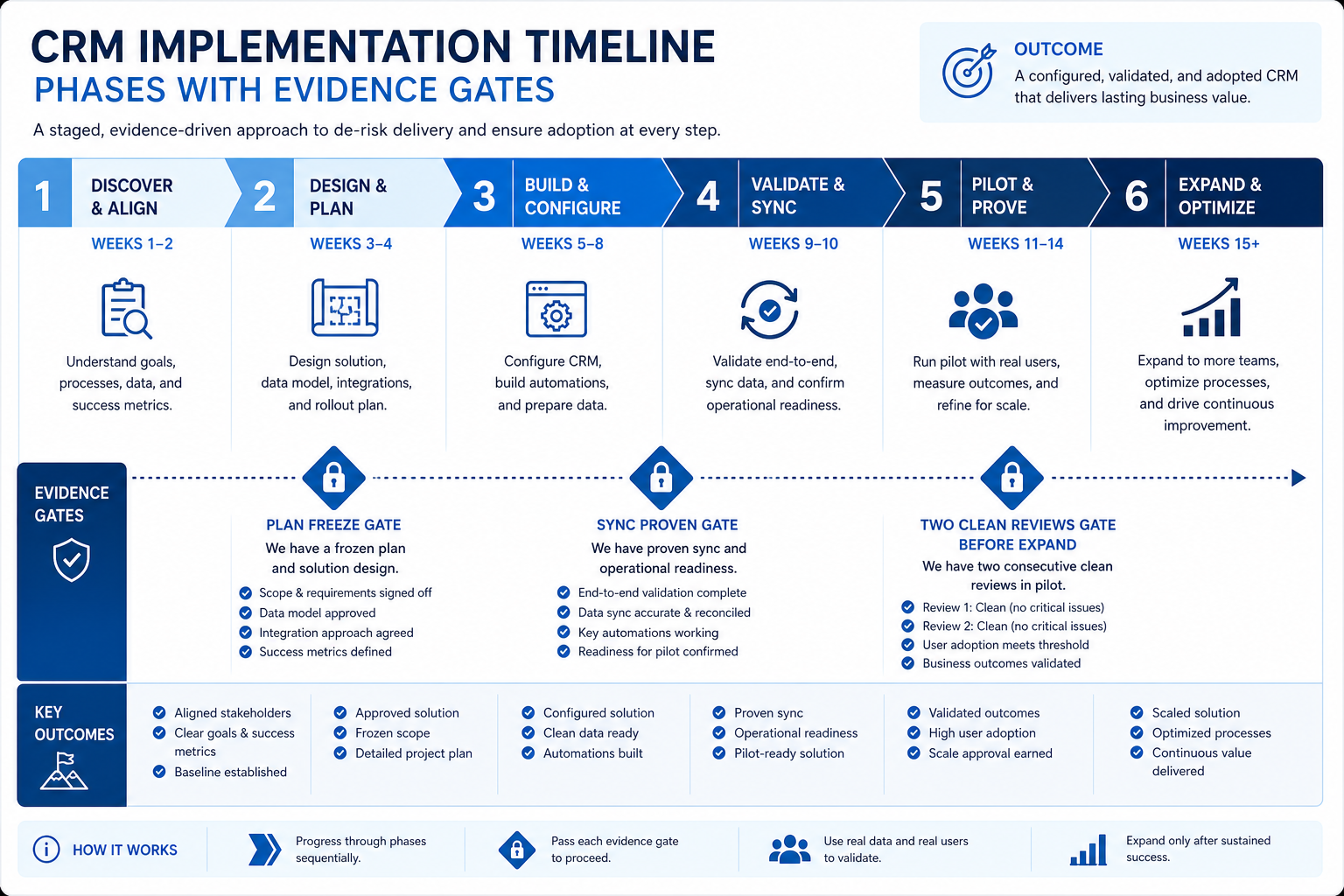
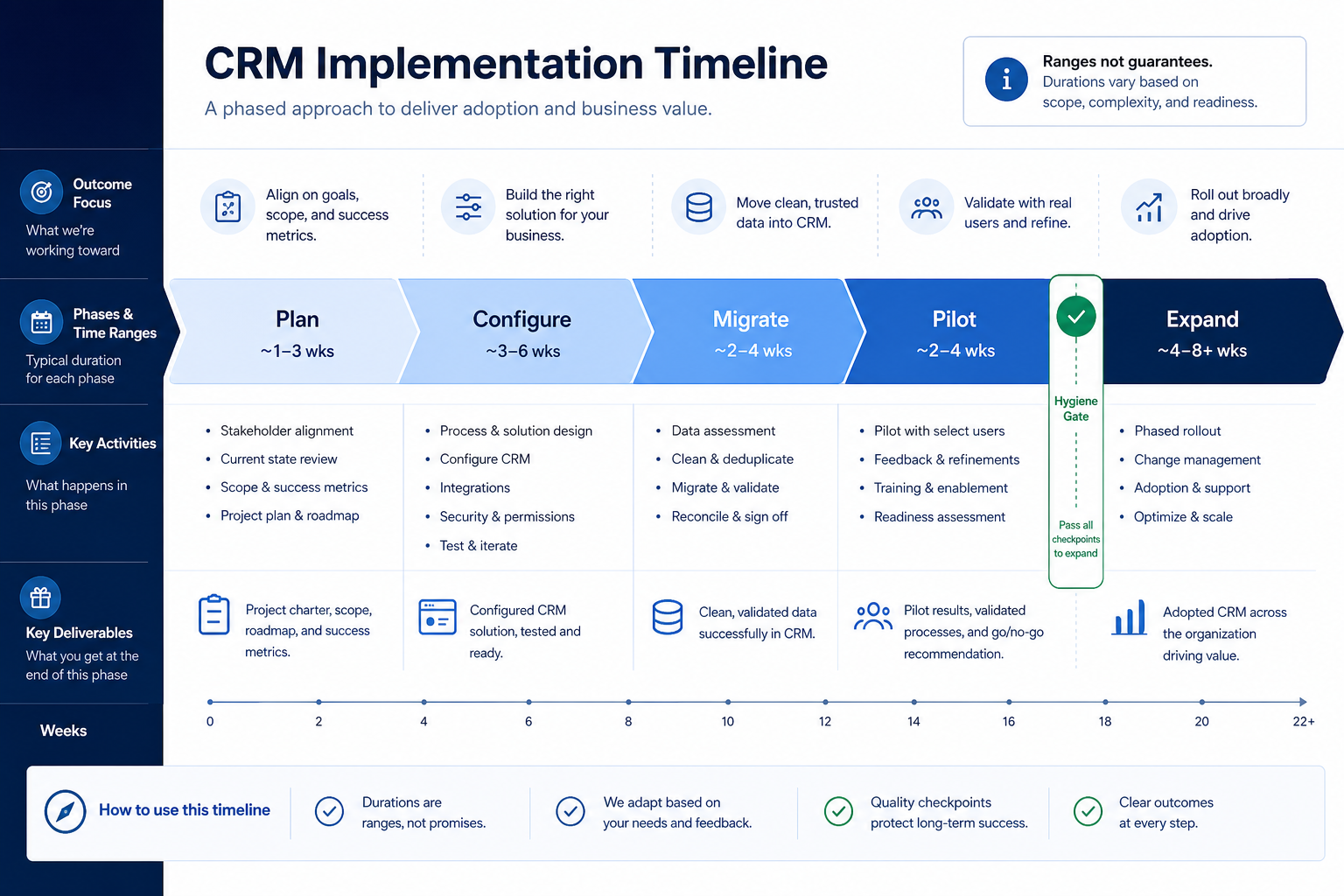
Build CRM implementation timelines as phase ranges with evidence gates — not fixed go-live dates promised from a kickoff slide. Decision rule: calendar configure and pilot ranges, but only schedule firm-wide expansion after two consecutive clean weekly reviews; treat every week number as a planning band, never a vendor guarantee.
Phase ranges
Evidence gates
Pilot before expand
Buffer for data
No fake deadlines
Update weekly
Key takeaways
Ranges beat hard dates — Dirty data and missing admin hours stretch calendars — plan buffers.
Gates > week numbers — Two clean reviews unlock expansion more honestly than “week 6.”
Sequence matters — Configure before import; train after sample records exist.
Update the plan — A timeline that never changes is theater — revise ranges weekly.
Week bands are planning aids — hygiene gates decide when expand actually starts.
What stretches each phase
Must-have
✓Plan freeze (outcomes, RACI, pilot)
✓Configure core loop
✓Migrate / clean pilot slice
✓Pilot + hygiene gate
✓Expand next segment
Nice-to-have
•Heavy automation / AI rollouts
•Full historical archive import
Timeline ready when…
Bring these questions to every demo
Ask vendors to show the workflow live, not just describe it.
1Phases named with ownersPlan, configure, migrate, pilot, expand.
2Week ranges written as bandse.g. configure 1–3 weeks — not “done Friday.”
3Evidence gates definedEspecially two clean weekly reviews before expand.
4Buffers for data cleanup and trainingExplicit — not hidden hope.
5Firm-wide go-live not promised earlyExpansion date stays tentative until gate passes.
6Weekly replan ritual scheduledUpdate ranges from actual blockers.
1. List phases before you assign weeks
Show ranges and gates on one timeline — not a single promised go-live flag.
Sales-led
Pilot AEs before SDRs and CS share the same org.
Services-led
Pilot delivery pod; sales pipeline can follow.
Migration-heavy
Split migrate into clean → test → cutover bands.
Name the workstreams in order: plan freeze → configure core loop → migrate pilot slice → train pilot → hygiene gate → expand → light automation. Dependencies first; dates second.
Example: Cascade Labs, an 18-person SaaS GTM team (6 AEs, 4 SDRs, CS, marketing ops), lists phases with owners: RevOps lead Nina owns configure/migrate; sales manager Omar owns pilot reviews; CS waits until AE board is trusted. They refuse to put “AI scoring” on the critical path.
2. Assign week ranges — label them as ranges
Clean greenfield
Shorter migrate band; still keep a hygiene gate.
Messy Sheets exit
Widen migrate/clean; protect pilot from archive dump.
Part-time admin
Widen every band — calendar hours, not wishful nights.
Use bands that match scope. Illustrative planning bands for a focused GTM pod (not guarantees): plan freeze ~0.5–2 weeks; configure ~1–3 weeks; pilot migrate/clean ~1–4 weeks; pilot live use until two clean reviews ~2–6 weeks; expand per segment ~1–2 weeks. Widen bands when sources are messy or admin hours are part-time.
Example: Cascade plans configure for weeks 1–3, pilot import/clean for weeks 2–5 (overlap allowed for field mapping), and pilot live use starting week 4 with a hygiene gate no earlier than week 6. Omar tells leadership the expand date is “after two clean Tuesdays,” not “week 8 guaranteed.”
3. Place evidence gates on the critical path
Pass
Two clean reviews; overdue view near empty.
Extend
Hygiene huddles; keep expand tentative.
Rework
Stages/fields wrong — pause invites and fix the loop.
Minimum gates: (1) plan artifacts frozen before configure, (2) sync + sample activity proven before broad invites, (3) two consecutive clean weekly reviews before expand, (4) light automation only after expand hygiene holds. Gates can slip the calendar; they should not be skipped.
Example: Cascade’s week-6 review still has twelve overdue next steps. Nina does not “rebaseline expand to week 7 anyway.” They add two hygiene huddles, slip expand by ~1–2 weeks, and keep CS off the timeline until Omar’s board is clean.
4. Buffer data work; parallelize non-critical tracks
Put dirty-data cleanup and field mapping on an explicit buffer. Run archive historical import, marketplace apps, and AI experiments as parallel tracks that cannot block the pilot board. Use the Migration Planner for cutover sequencing when tool-to-tool moves are involved.
Example: Cascade keeps “five years of closed-lost notes” on a parallel track owned by an intern + Nina. The pilot only needs open opportunities and active accounts. Marketing’s form enrichment project stays parallel and cannot move the Tuesday review gate.
5. Replan weekly with blockers, not vibes
On band
Confirm next gate date remains tentative-but-healthy.
At risk
Name the blocker owner and the new range.
Blocked
Escalate capacity (admin hours) before inventing overtime heroes.
Hold a short timeline standup: what slipped, which gate is at risk, what range updates. Publish a one-line status to the sponsor. Keep the Implementation Planner as the living task list.
Example: Cascade’s Friday 15-minute standup updates ranges in the Planner. When duplicate accounts block import, Nina widens migrate by one week and tells Alex (sponsor) in one sentence — no surprise all-hands “we’re delayed” theater later.
Timeline mistakes
Promising a firm-wide go-live in kickoff
You train the org to ignore hygiene gates.
Copying vendor week-1–12 as truth
Your data quality and admin hours are not their sample customer.
Putting automation on the critical path
You delay trust to chase feature theater.
No buffer for cleanup
Duplicate-ridden imports silently consume pilot weeks.
Training before records exist
People practice on empty sandboxes and forget habits.
Never updating the plan
A static Gantt becomes fiction by week three.
Example official vendor setup videos
Optional · 2 examples · collapse if you don’t need them
These are verified vendor tutorials and product demos from the CRM catalogue — examples of how vendors present setup and workflows. They are not SoftwareGlimpse rankings, and they do not replace the independent guidance on this page.
Official vendor tutorial · example
Attio — Attio | How to build your sales pipelines
This video is hosted on YouTube
This content is hosted by YouTube. The player loads only after you allow marketing cookies.
It depends on pilot size, data cleanliness, and admin capacity. Focused pods often prove a core loop in a few weeks; multi-team rollouts often span months. Use phase ranges and hygiene gates — never invent a single guaranteed date.
What is a reasonable pilot duration?
Long enough to complete two consecutive clean weekly reviews — often roughly 2–6 weeks of live use after configure/import, longer if hygiene fails early. Gate on evidence, not a preset week number.
Can configure and migrate overlap?
Yes for field mapping and cleanup prep. Do not invite the full pilot until roles, stages, and sync are stable enough that imports land on a usable model.
When should we schedule firm-wide training?
After the pilot hygiene gate passes and you can train on real patterns from the pilot board. Early all-hands training on empty config rarely sticks.
How do we communicate slips?
Name the blocker, the owner, and the new range in one sentence to the sponsor. Do not skip the hygiene gate to “save the date.”
Where do cost and roles fit on the timeline?
Cost categories and RACI belong in planning before week bands harden. See Planning and Cost guides; keep timeline focused on sequencing and gates.
What should I do next?
Enter phases and ranges in the CRM Implementation Planner, align with the Planning guide’s artifacts, and keep Cost categories visible to the sponsor.