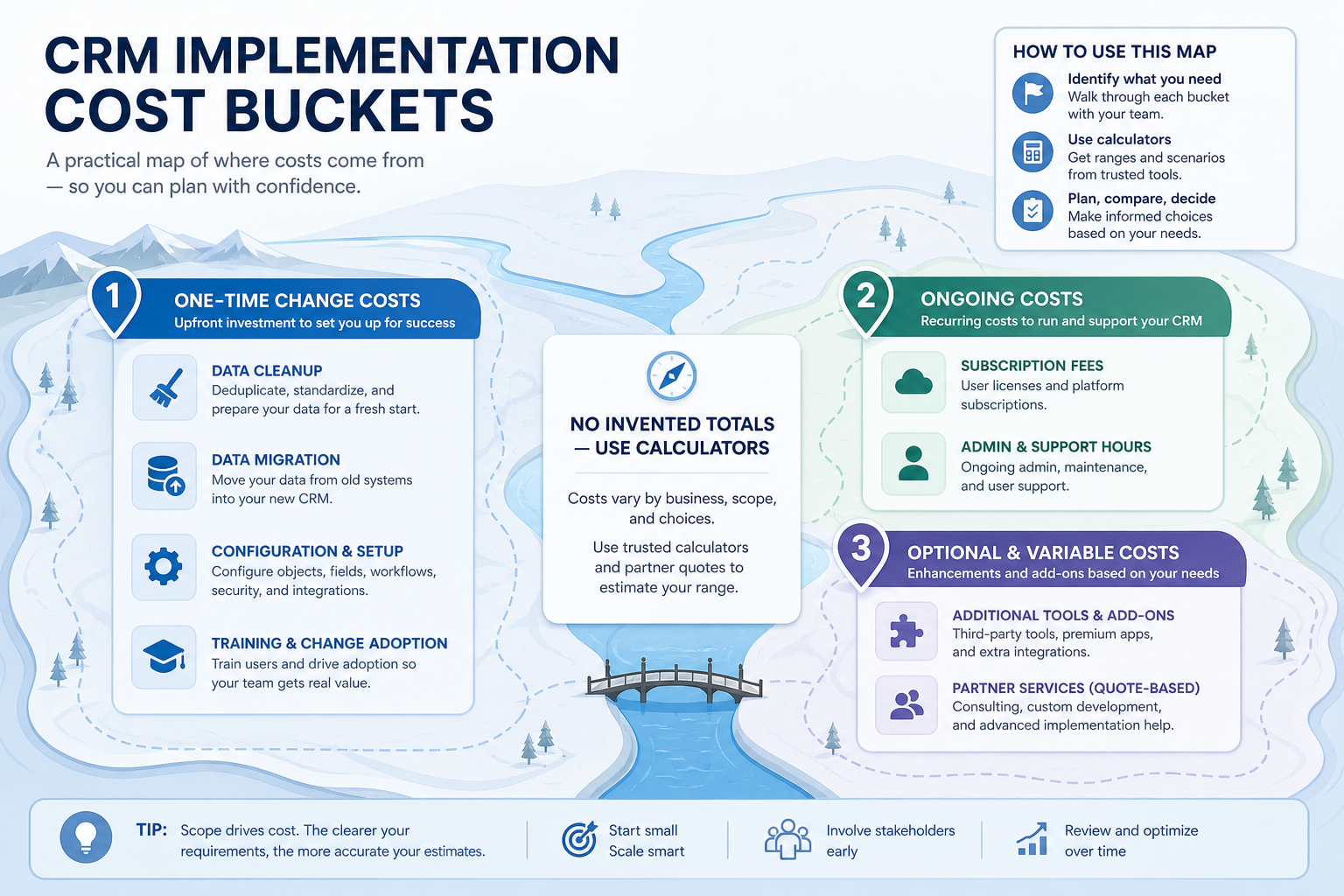
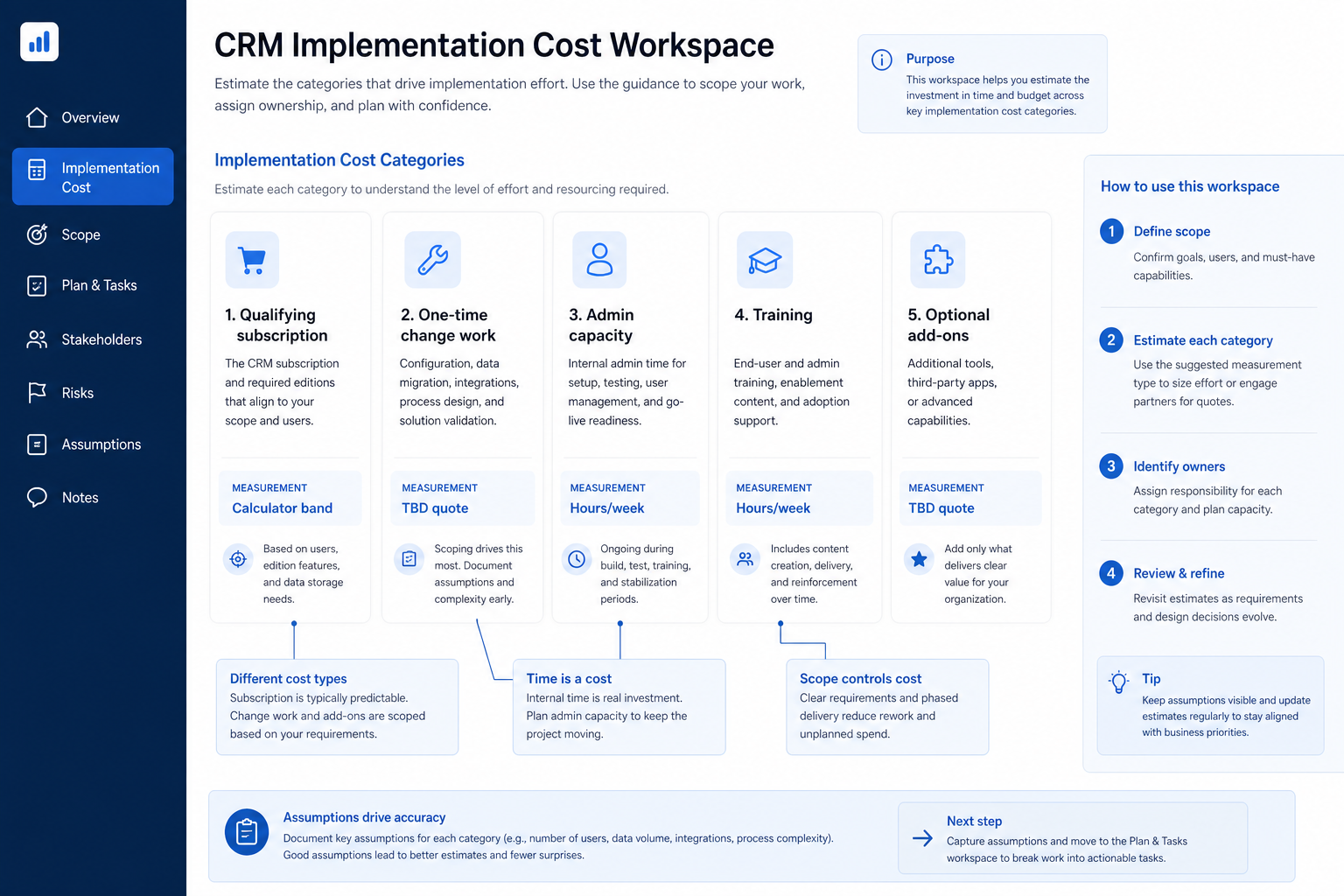
Estimate CRM implementation cost as categories — qualifying subscription, change work, admin capacity, training, and optional add-ons — without inventing dollar totals.
CRM implementation cost is more than seats — it is qualifying subscription plus one-time change work (cleanup, migration, configuration, training) plus ongoing admin capacity and optional add-ons. Decision rule: never present a dollar “implementation total” without listing those categories with owners; quantify subscription via Cost/TCO calculators and keep services qualitative unless you have a real quote.
Subscription band
Admin time
Migration cleanup
Training
Add-ons
No fake totals
Key takeaways
Time is a cost line — Admin hours and seller learning show up as capacity, not invoices.
One-time ≠ ongoing — Separate migrate/configure/train from monthly seats and hygiene.
Cheap seats, expensive sprawl — Complex tools burn admin hours even on “affordable” tiers.
Calculators beat invention — Use Cost and TCO tools for researched bands — never invent totals.
4Optional add-ons parkedNot on critical path or day-zero budget pressure.
5No invented dollar total in the memoLink Cost/TCO calculators; attach real quotes only.
6One-time vs ongoing separatedSponsor sees both horizons.
1. Map qualifying subscription before seat-shopping
Teach categories and owners — never a fake grand-total badge.
Plan gates
Must-haves live on mid/upper tiers — confirm before comparing.
Seat mix
Count who needs login vs view-only carefully.
Annual vs monthly
Note flexibility vs discount — still not “total cost.”
List must-have capabilities, map them to the plan tier that actually includes them, then estimate with the Cost Calculator. Comparing homepage starting prices is not an implementation cost model.
Example: Harbor Desk, an 8-person boutique agency (3 sellers, 3 delivery, founder, ops), needs email sync, multiple pipelines, and shared reporting. Ops lead Riley maps those must-haves to the qualifying plan, runs the Cost Calculator for the seat mix, and refuses to “save money” on a tier that lacks reporting the Monday review requires.
Lower migrate cost; still budget training and admin.
Capture cleanup, field mapping, import/test/cutover, initial configuration, and pilot training as separate lines. Prefer effort descriptions (who, roughly how long) over invented dollars. Use the Migration Planner when history moves from another system.
Example: Harbor Desk lists: Riley ~1 week equivalent for configure + dedupe; two half-day pilot huddles for sellers; founder Sam reviews stage definitions in two sessions. They attach no partner fee because they have no quote — and they do not invent one.
3. Put admin capacity on the memo as ongoing cost
Part-time ops
Widen timeline bands; keep scope minimal.
Shared admin
Document hours so other projects cannot silently steal them.
No admin
No-go for complex tools — fix capacity first.
Implementation does not end at go-live — fields, users, duplicates, and permission exceptions need weekly hours. Write the ongoing band (even if qualitative) so sponsors do not treat CRM as “set and forget.”
Example: Harbor Desk protects ~2–3 hours/week for Riley after expand. When a seller asks for five vanity fields, Riley’s triage rule is: no owner who will keep it accurate → reject. That capacity line is treated as real cost in the sponsor memo beside subscription.
4. Park add-ons and partner fees until evidence exists
Defer
Nice-to-have apps after expand.
Quote-backed
Partner scope in writing; compare to in-house admin hours.
Reject
Add-ons that duplicate unfinished core-loop work.
Marketplace apps, AI packs, premium support, and external implementers can be useful — they are optional until the core loop is trusted. Only put numbers on the memo when you have written quotes; otherwise list as “optional / TBD quote.”
Example: Harbor Desk parks a dialer and an AI writing add-on until two clean Monday reviews. A boutique implementer’s proposal is attached as a quote appendix — SoftwareGlimpse content never invents that fee. Light automation (missing next-step reminder) is built in-product after hygiene holds.
Need quote for partner or plan confirmation in writing.
Rework
Seat tile used instead of qualifying plan — rebuild memo.
Structure: qualifying subscription (Calculator link), one-time change lines with owners, ongoing admin capacity, optional/TBD quotes, and risks (dirty data, missing hours). Link TCO Calculator for ownership categories. Explicitly state what is not included.
Example: Sam receives a one-page Harbor Desk memo: Calculator band for qualifying seats; Riley’s change-work and ongoing hours; training huddles; parked add-ons; Migration Planner note that archive import is out of pilot scope. No single “implementation will cost $X” claim appears — because they refuse to invent one.
Implementation cost mistakes
Using homepage “from” prices as implementation cost
Must-haves often live on another tier.
Ignoring admin time
The CRM “fails” when nobody has hours to keep it honest.
Inventing partner or total dollar figures
Editorial content and memos should not fabricate fees.
Budgeting add-ons on day zero
You pay for complexity before trust exists.
Mixing one-time and ongoing in one blob
Sponsors cannot see what stops after pilot.
Skipping migration effort because “we’ll just import”
Cleanup is the expensive part — plan it as a category.
Example official vendor setup videos
Optional · 2 examples · collapse if you don’t need them
These are verified vendor tutorials and product demos from the CRM catalogue — examples of how vendors present setup and workflows. They are not SoftwareGlimpse rankings, and they do not replace the independent guidance on this page.
Official vendor tutorial · example
Attio — Attio | How to build your sales pipelines
This video is hosted on YouTube
This content is hosted by YouTube. The player loads only after you allow marketing cookies.
There is no universal dollar answer. List categories — qualifying subscription, admin time, migration/cleanup, training, add-ons, optional partner quotes — and quantify only with calculators or real quotes. Decision rule: reject any single invented total.
What is the difference between Cost Calculator and TCO Calculator?
Cost Calculator focuses on researched subscription/plan bands. TCO Calculator helps structure broader ownership categories (time, change, risk). Use both; neither invents a full services bill for you.
Should we hire an implementation partner?
Only when internal admin capacity or migration complexity exceeds what you can protect on the calendar. Compare a real quote to in-house hours — do not invent partner fees in planning docs.
How do we cost admin time without payroll math?
At minimum state hours/week and whose capacity. Advanced finance teams may translate hours internally; SoftwareGlimpse guides keep that qualitative unless you supply your own figures.
Are training costs one-time or ongoing?
Pilot enablement is mostly one-time; coaching and new-hire onboarding are ongoing. Separate them on the memo so expand waves are visible.
How does cost relate to timeline?
Thin admin capacity widens week ranges. Dirty data increases one-time change cost and slips gates. See the Timeline guide for sequencing; do not buy speed by skipping hygiene.
What should I do next?
Run the Cost Calculator for qualifying seats, structure categories in the TCO Calculator, and keep the Implementation Planner aligned to what you can actually staff.