Decide whether to optimize your current CRM or replace it — using adoption, admin debt, plan-gate, and exit signals — then shortlist with Finder only after the decision.
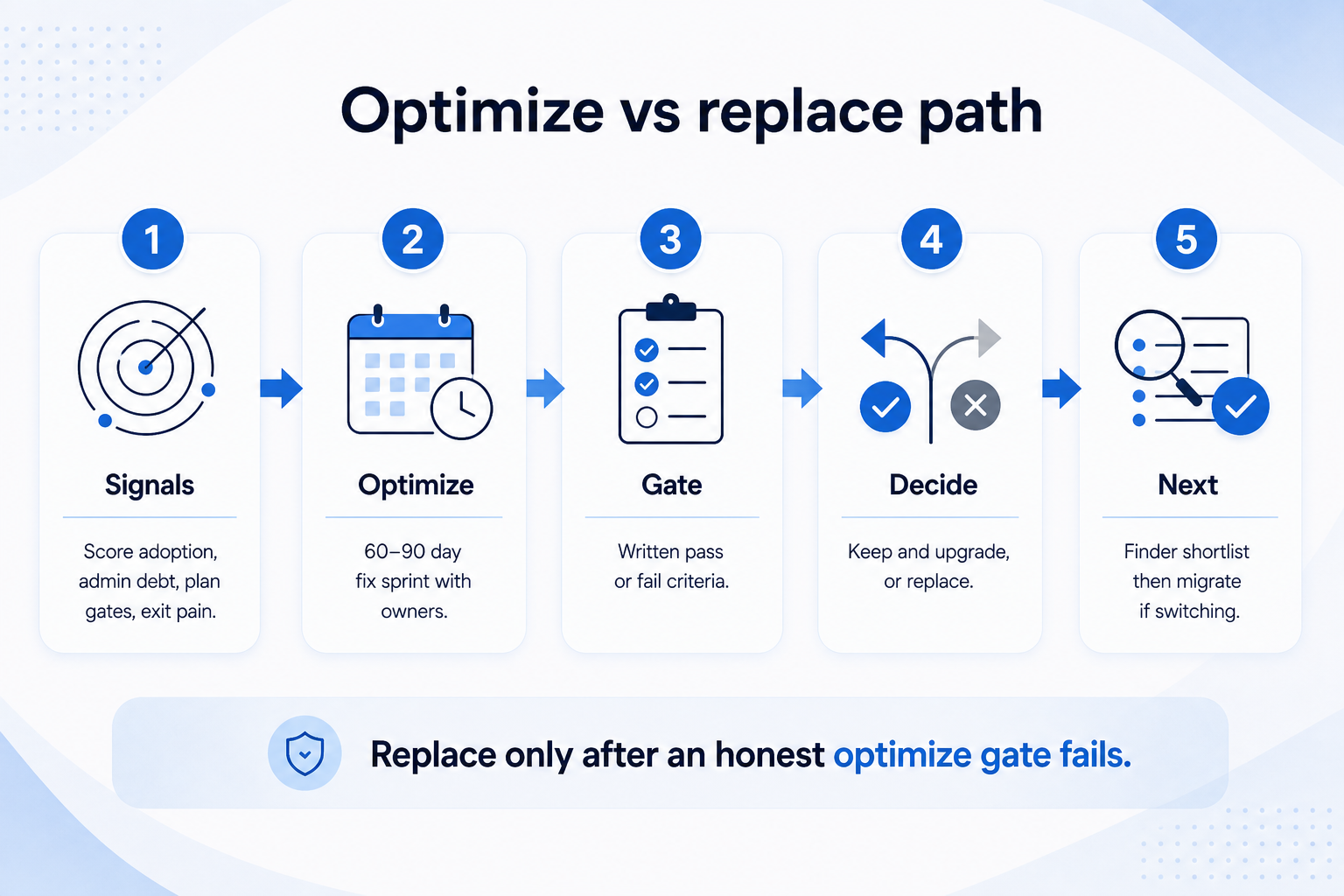
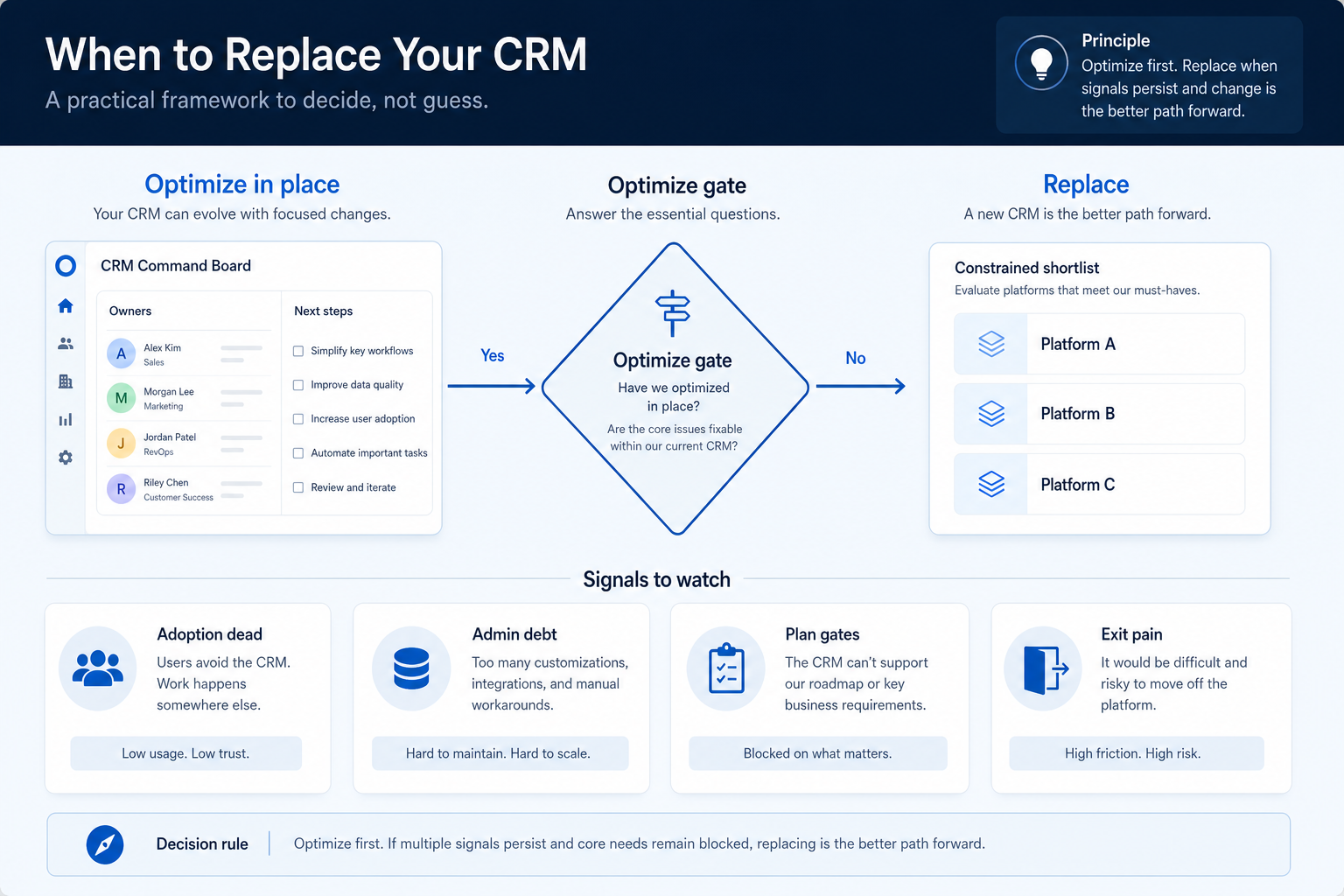
Replace a CRM only when optimize-in-place cannot clear the blockers that make the system unusable as a system of record. Decision rule: if adoption is dead, admin debt is structural, plan gates block must-have work, or exit/export pain is already blocking operations — and a 60–90 day optimize sprint still fails — then replace; otherwise fix ownership, fields, and rituals first.
Try optimize first
Adoption dead?
Admin debt?
Plan gates?
Exit pain?
Then shortlist
Goals
Features
Integrations
Cost
Ease of use
Growth
Key takeaways
Replace is a last-mile decision — Most “bad CRM” pain is process, ownership, or plan-tier debt — not the logo on the login screen.
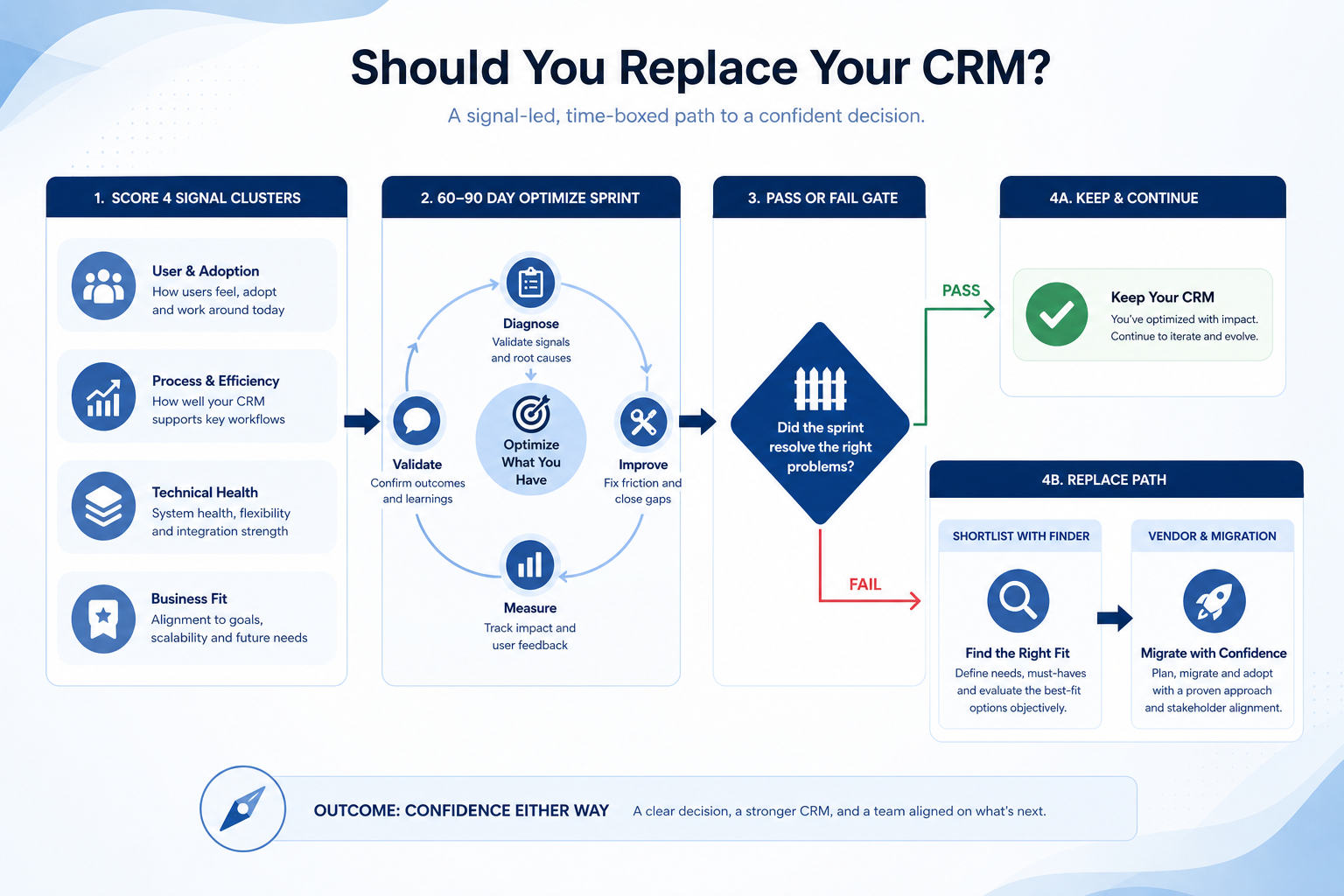
Four signal clusters matter — Adoption dead, structural admin debt, hard plan gates, and exit/export pain — score them honestly.
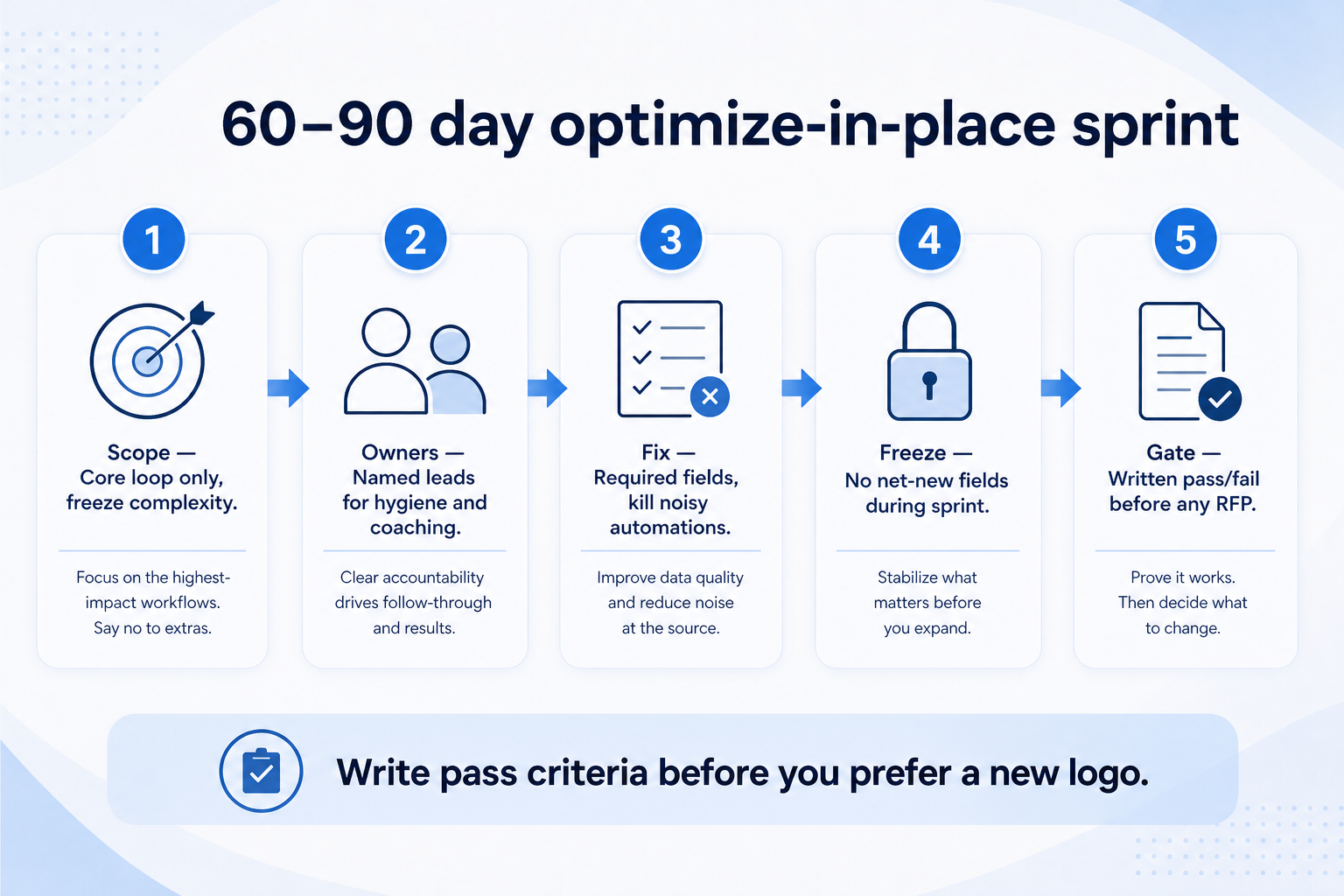
Optimize sprint before RFP — A time-boxed fix of core loop, roles, and hygiene proves whether the product can still work.
Shortlist after the decision — Finder and Compare come after you decide replace — this page does not rank products.
3Sprint evidence reviewedPass/fail against pre-written criteria.
4Export / exit path proved on current CRMSample export before you commit to leave.
5Must-haves + constraints frozen for shortlistSheet ready before Finder/Compare.
6No affiliate-ordered “best CRM” list used as decisionEvidence over marketing order.
1. Score the four replace signals
Four signal cards decide whether you fix the current CRM or earn the right to shortlist a new one.
Adoption dead
Core loop unused; coaching lives outside the CRM.
Admin debt
No RACI; field sprawl; every change is a ticket.
Plan / exit pain
Must-haves gated by tier, or export fails usable tests.
Write evidence for each cluster — not vibes. Adoption dead: open work lacks owners/next steps; weekly review still rebuilds in Sheets. Admin debt: nobody owns fields/roles; every change needs a consultant. Plan gates: must-have sync, reporting, or seats sit behind an unreachable tier. Exit pain: you cannot export usable history or remap users without heroic effort.
Example: Northwind Services, a 22-person B2B ops firm, scored their CRM after two failed “cleanup Fridays.” Adoption: 60% of open deals had no next step; managers coached from a shared Sheet. Admin: one part-time ops lead owned 140 custom fields nobody updated. Plan gates: email sync and board filters lived one tier above budget. Exit: trial export of open deals worked, but activity notes came as opaque blobs. Signals were real — but they still ran an optimize sprint before shopping.
2. Run a 60–90 day optimize-in-place sprint
Write pass/fail criteria before the sprint — not after you already prefer a new vendor.
Pass
Core loop trusted; keep and upgrade plan if needed.
Partial
Adoption fixed but hard product/plan gaps remain — decide consciously.
Fail
Same debt after the sprint — proceed to replace gates.
Before any RFP, time-box a fix: freeze new fields, name R/A for admin, require owner + next step on open work, delete unused automations, clean duplicates on the active book, and force weekly review from the CRM board. Write pass criteria up front (for example: ≥90% open deals with next step; managers coach from CRM views; no side Sheet for pipeline).
Example: Northwind’s ops lead Priya ran 75 days: cut custom fields from 140 to 28, named AE owners, required next-step dates, killed three unused sequences, and moved Friday forecast onto the CRM board. By day 75, adoption recovered for the AE pod — managers stopped the Sheet. Plan-gate pain remained (email sync still one tier up), so they treated “upgrade in place vs replace” as a commercial decision, not a feature tour.
3. When replace wins — and what to do next
Structural product gap
Must-have workflow impossible on any realistic plan.
Exit / compliance gap
Cannot prove usable export or retention needs.
Trust collapse
Team refuses the same system after a fair optimize try.
Replace when the optimize gate fails and at least one structural blocker remains: product cannot support the must-have workflow even on a realistic plan; vendor roadmap/support is a dead end; exit/export risk is already materializing; or trust is so broken that the team will not re-engage the same system. Then freeze a requirements sheet, shortlist with CRM Finder (constraints first), compare finalists fairly, and only then plan vendor migration.
Example: after the sprint, Northwind’s AE pod trusted the board again — but legal required activity retention the current export could not deliver in a usable form, and the qualifying plan for sync + audit still sat outside budget. They froze must-haves, used Finder for a constrained shortlist (no “best CRM” ranking), scored two finalists with the same script, and opened the vendor migration path only after a destination was chosen.
4. When keeping (and optimizing) is the right call
Process debt only
Keep; run adoption + governance fixes.
Plan-tier gap only
Price the qualifying plan before a full switch.
Integration hygiene
Fix sync owners and mappings before blaming the CRM.
Keep when the sprint restores the core loop, admin ownership is named, and remaining gaps are plan upgrades, training, or integration hygiene — not platform replacement. Replacing to escape ownership debt usually relocates the debt. Use Health Check, Adoption, Governance, and Data Quality guides to keep improving.
Example: a sibling 14-person studio scored “replace” in a brainstorm after one missed quarter. Their optimize sprint (owners, next steps, field cut) cleared the board in 45 days. They upgraded one plan add-on for reporting instead of migrating. Six months later the same CRM ran Friday reviews without a side Sheet — replace would have burned a quarter for no decision-quality gain.
Replace-decision mistakes
Shopping before an optimize sprint
Demos feel productive; they hide whether the current CRM could still work.
Treating seat logins as adoption
Replace will not fix empty next steps or Sheet-based coaching.
Using affiliate “best CRM” order as the decision
Constraints and must-haves shortlist tools — marketing order does not.
Ignoring exit proof until after signature
Prove export on the way out of the current system and into the next.
Inventing switch-cost dollar totals
List effort categories (clean, map, train, dual-run) — do not invent fake budgets.
Replacing to escape missing admin ownership
Without R/A, the next CRM becomes the same backlog with new field names.
Example official CRM product videos
Optional · 2 examples · collapse if you don’t need them
Verified vendor product videos from the CRM catalogue for context while you read. They are examples only — not a ranked shortlist — and they do not replace SoftwareGlimpse recommendations on this page.
Official vendor video · example
Attio — Attio | How to build your sales pipelines
This video is hosted on YouTube
This content is hosted by YouTube. The player loads only after you allow marketing cookies.
After an honest optimize-in-place sprint fails and structural blockers remain — adoption that will not recover, admin debt without owners, hard plan gates on must-haves, or exit/export pain. Decision rule: no replace shortlist until the optimize gate is written and reviewed.
How do we know it is process vs product?
If a 60–90 day sprint restores owners, next steps, and CRM-native weekly review, the pain was mostly process. If must-have workflows remain impossible on a realistic plan after that sprint, product/plan fit is in play.
Should we replace because a competitor uses another CRM?
No. Peer logos are not your constraints, data, or admin capacity. Freeze your sheet, then shortlist — do not copy a stack for status.
What comes after we decide to replace?
Freeze requirements, shortlist with CRM Finder, compare finalists fairly, then plan vendor migration (inventory → clean → map → pilot → cutover). Use Compare tools for head-to-heads — not invented rankings on this page.
How long should an optimize sprint last?
Long enough to change habits and prove the core loop — typically 60–90 days with a fixed end date and pass criteria. Shorter “cleanup weekends” rarely change coaching rituals.
Can we upgrade our plan instead of replacing?
Yes when the sprint restores adoption and the remaining gap is a documented plan gate. Price the qualifying plan against switch effort categories before you assume migration is cheaper.
What should I do next?
Score the four signals, run or finish the optimize sprint, then — only if replace wins — open CRM Finder with frozen constraints. If you are already switching vendors, continue with Migrate to Another Vendor and the Migration Planner.