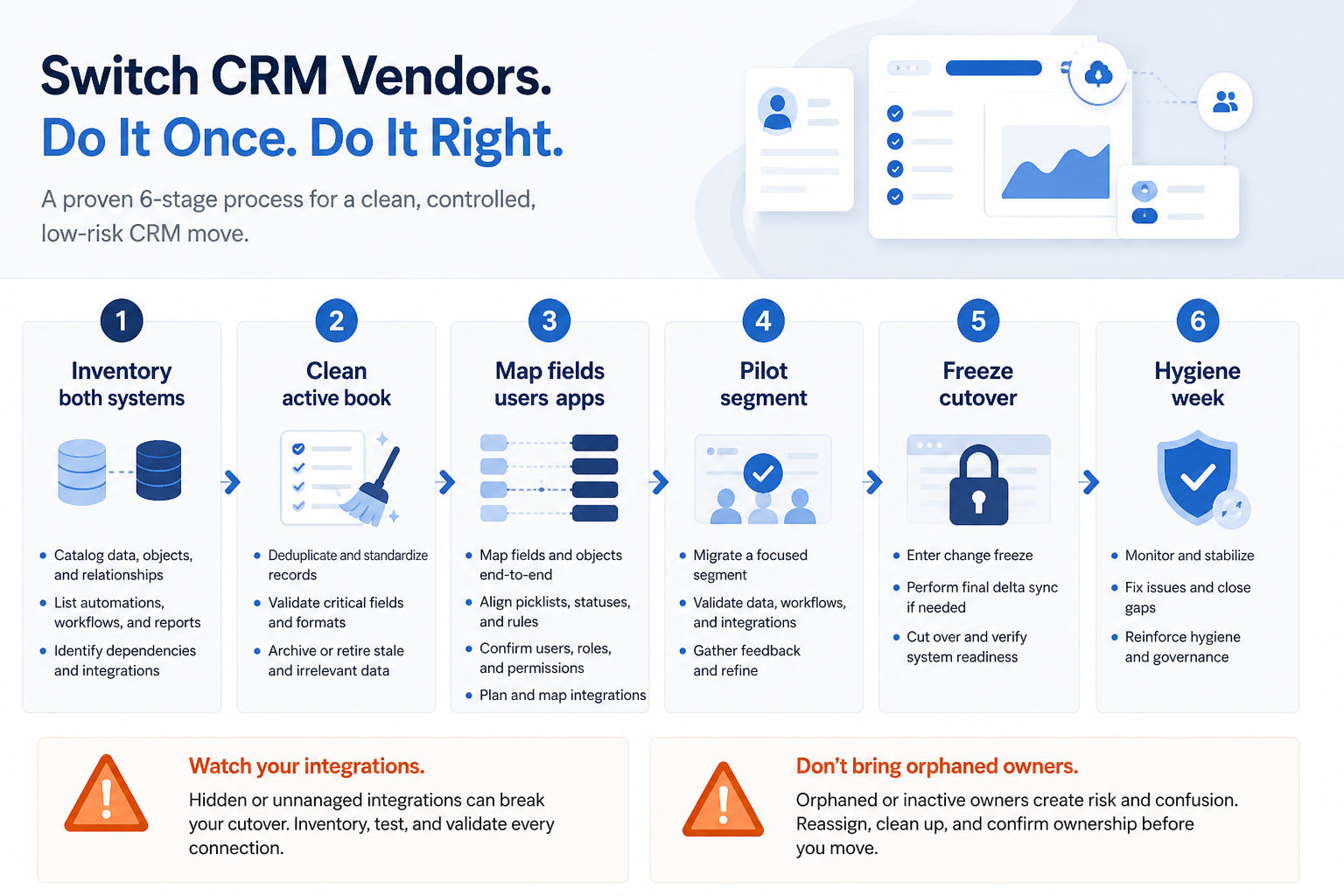
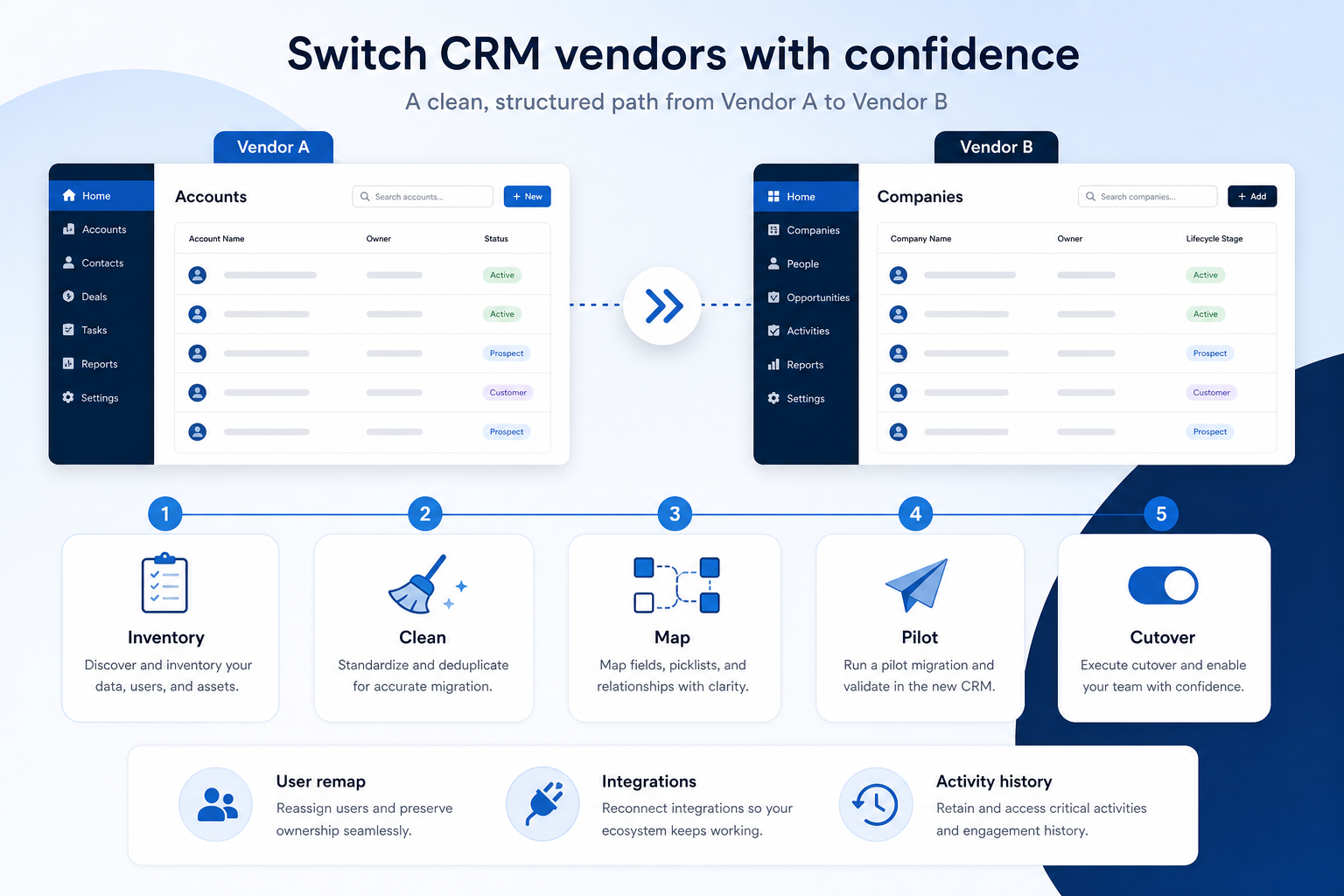
Switch CRM vendors with inventory, cleaning, field/user/integration maps, pilot validation, freeze cutover, and hygiene — emphasizing switch risks beyond a generic data move.
Switch CRM vendors with a gated path: inventory both systems → clean the active book → map fields/users/integrations → pilot a segment → cut over with a freeze — then hygiene until the new board is trusted. Decision rule: do not firm-wide cutover until a pilot proves owners, stages, activity links, and remapped users — and until integration owners confirm what will break on day one.
7Freeze window + rollback note scheduledTeam knows when Vendor A edits stop.
1. Inventory both vendors — not just contacts
Vendor switch success starts with an honest inventory of integrations, users, and activity — not a contact export alone.
Core objects
Companies, contacts, open opportunities.
Integrations
Email, billing, support, automation hubs.
People & seats
Named users vs shared/team inboxes.
List what lives in the source CRM and what the destination expects: companies/contacts, open opportunities, custom objects, notes/emails/tasks, files, reports, automations, and live integrations (email, calendar, billing, support, marketing). Rank each as migrate live, archive export-only, or retire. Vendor switches fail when teams only inventory “contacts and deals.”
Example: Harbor Advisory, a 28-person B2B firm leaving Vendor A for Vendor B, inventories open deals and contacts plus: Gmail sync, Stripe customer IDs on companies, Zendesk ticket links, three Zapier flows posting Slack alerts, and seven shared “team” seats that are not people. They mark Zendesk links as reconnect-after-cutover, retire two unused Zaps, and treat closed-won older than the agreed window as archive-only.
2. Clean the active book, then map fields and users
Field map
Identity keys, stages, required day-one fields.
User remap
Leavers, shared seats, role equivalents.
Integration map
Reconnect / retire / wait — with owners.
Do not map dirty open work into a new vendor. Dedupe, assign owners, require next-step dates, archive inactive records, and fill day-one required fields. Then build three maps: (1) fields — source → destination → transform → rule owner; (2) users — old seats → new seats/roles, including leavers; (3) integrations — reconnect, replace, or retire. Pair with Data Cleaning and Field Mapping; use generic Data Migration for the shared inventory→pilot pattern, but keep vendor risks explicit here.
Example: Harbor’s ops lead Sam runs a cleaning week on open retainers, then maps Sheet/CRM owner conflicts (sheet wins for account owner; Vendor A wins for open stage). User remap sends two leavers’ open deals to a named AE; the “Sales shared” inbox becomes a queue user in Vendor B. Stripe ID maps to a custom company field; Zendesk stays on the reconnect list, not the first import.
3. Pilot with the messiest segment — validate activity too
Link & owner check
Contacts under correct companies; roles correct.
Activity sample
Decide live vs archive for notes/email.
Integration smoke
Test one reconnect path before go-live.
Import a bounded segment into a sandbox or clean destination org. Validate company links, owners, stages, and a sample of notes/emails/tasks if those migrate. Have ops and a frontline lead walk records together. Fix maps before scaling. Historical activity is a vendor-switch risk: some tools export threads poorly; decide what must be live vs archive before promising “everything moves.”
Example: Harbor pilots 40 retainer accounts for AE Nina. Three companies split on nickname matches; two deals land under leavers until the user map is fixed; email bodies for older threads stay archive-only after a sample shows incomplete exports. They re-import the pilot, document “live notes = last 12 months of open accounts,” and only then schedule firm cutover in the Migration Planner.
4. Freeze, cut over, then run hygiene
Freeze
No parallel truth past the cut line.
Validate
Counts, owners, and user remap spot-checks.
Hygiene
Daily board until Vendor B is trusted.
Announce when Vendor A edits stop, who runs the final export, and when Vendor B becomes the only place for new notes and stages. Keep the freeze short. Validate critical counts and spot-check remapped users before the go-live email. After cutover, run hygiene: merge stragglers, fix orphan contacts, require next steps, confirm leavers’ seats are gone, and reconnect integrations on the owned sequence. Pair Implementation Planner for post-cutover expand.
Example: Harbor freezes Friday 4pm on Vendor A; ops exports; Saturday import and validation; Monday 8am sellers open only Vendor B. Gmail sync reconnects Monday morning under Sam; Stripe ID spot-checks pass; Zendesk reconnect waits until Wednesday. For ten business days Sam posts a hygiene board — duplicates, deals missing next step, users still on Vendor A bookmarks. Switch is done when Friday pipeline review no longer opens Vendor A.
Vendor-switch mistakes
Treating switch as “just data migration”
Integrations, users, and activity history need their own maps.
Big-bang import without a pilot
Field and user-map bugs multiply across every account at once.
Promising all historical email will be live
Many vendors export activity poorly — decide archive vs live early.
Skipping user remapping
Leavers and shared seats create orphan ownership on day one.
Running two CRMs without a freeze
Parallel edits guarantee Vendor B is wrong by Tuesday.
Reconnecting every app during cutover hour
Stabilize roles and core loop; sequence integrations with owners.
Example official vendor setup videos
Optional · 2 examples · collapse if you don’t need them
These are verified vendor tutorials and product demos from the CRM catalogue — examples of how vendors present setup and workflows. They are not SoftwareGlimpse rankings, and they do not replace the independent guidance on this page.
Official vendor tutorial · example
Attio — Attio | How to build your sales pipelines
This video is hosted on YouTube
This content is hosted by YouTube. The player loads only after you allow marketing cookies.
How is vendor migration different from data migration?
Data migration covers inventory → clean → map → pilot → cutover for records. Vendor migration adds switch-specific risks: remapping users/seats, reconnecting or retiring integrations, and deciding what historical activity is live vs archive. Use both guides — this one emphasizes the switch risks.
Should we migrate all historical activity?
Migrate enough for people to serve customers without hunting Vendor A daily. Deep closed archaeology can stay export-only if it slows cutover and nobody uses it weekly. Prove a sample export before promising “everything.”
What about integrations during the switch?
Inventory every live connection, name an owner, and classify reconnect / replace / retire. Smoke-test at least one critical path in pilot; do not flip every app during the freeze hour.
How do we remap users and shared seats?
Build an explicit old-seat → new-seat/role table, including leavers and shared inboxes. Validate ownership on the pilot segment before firm-wide cutover.
How long does a CRM vendor switch take?
Duration depends on data quality, integration count, and team size — not a universal calendar. Plan inventory, cleaning, mapping, and pilot before setting a cutover date. Treat “switch this weekend” claims skeptically until the pilot passes.
What if we have not decided whether to replace yet?
Use When to Replace CRM first. Do not start a vendor migration until the optimize-vs-replace gate is decided and destination constraints are frozen.
What should I do next?
Open the CRM Migration Planner to sequence inventory → cutover, use Data Cleaning and Field Mapping for artifacts, keep CRM Data Migration open for the shared path, and use Implementation Planner for post-cutover expand.