ACT! is worth buying when three things hold: it fits how you sell, a normal seller can run real deals in a trial without constant admin help, and the plan you need covers your must-haves. If fit, trial proof, or plan coverage fails, keep looking — don’t invent ROI to justify a shaky buy.
Fit how you sell
Seller can run deals alone
Plan covers must-haves
Admin time is real
No invented ROI
Walking away is fine
Goals
Features
Integrations
Cost
Ease of use
Growth
See ACT! before you decide
Core product overview media for a fit check — still not a substitute for the decision criteria on this page.
See ACT! in action
Official product overview for a fit check — not scoring, pricing, or comparative superiority.
This video is hosted on YouTube
This content is hosted by YouTube. The player loads only after you allow marketing cookies.
Official vendor video
Introduction to Act! CRM
What this shows
✓Act! CRM welcome screen, contacts, and opportunity dashlets
✓Sales, marketing, and service navigation in Act! Cloud
Product screenshots
Product screenshots coming soon
We only publish verified captures from ACT!'s product interface — never stock images, mockups, or teaching diagrams. Screenshots appear here once editorial review confirms them.
What it is — ACT! by Swiftpage — long-standing SMB CRM for contacts, calendars, and sales follow-up; pricing primarily contact-sales.
Best for — Established SMBs already familiar with ACT!; Contact- and activity-centric small sales teams; Buyers evaluating classic SMB CRM continuity
Not ideal for — Modern AI/marketing automation buyers; Enterprise platform CRM; Teams needing transparent SaaS ladders without sales calls
Strengths to verify yourself — Long SMB CRM brand history; Contact/activity CRM fundamentals; Familiar to many established small businesses; Trial paths often available via vendor. Treat each as a claim to test in the trial, not a fact to repeat.
Watch-outs to accept or reject — Pricing transparency weaker than modern SaaS CRMs; Ecosystem and UX less modern than category leaders; Automation/AI story thinner; Scalability ceiling for complex orgs
Editorial recommendation — Choose ACT! when continuity with classic SMB ACT! workflows matters more than modern SaaS CRM ecosystems. Compare HubSpot, Pipedrive, Capsule, or Freshsales for clearer cloud packaging.
Buy ACT! only when fit, trial evidence, and qualifying cost agree.
ACT! checklist
Bring these questions to every demo
Ask vendors to show the workflow live, not just describe it.
1Pass the fit checklistBest-for match; not-ideal patterns do not dominate.
2Prove the non-admin core loopTrial evidence beats the demo.
3Confirm the qualifying planMust-haves on a real tier, capacity included.
4Choose buy · trial · walkWrite the reason; do not invent ROI %.
1. Score the fit checklist honestly
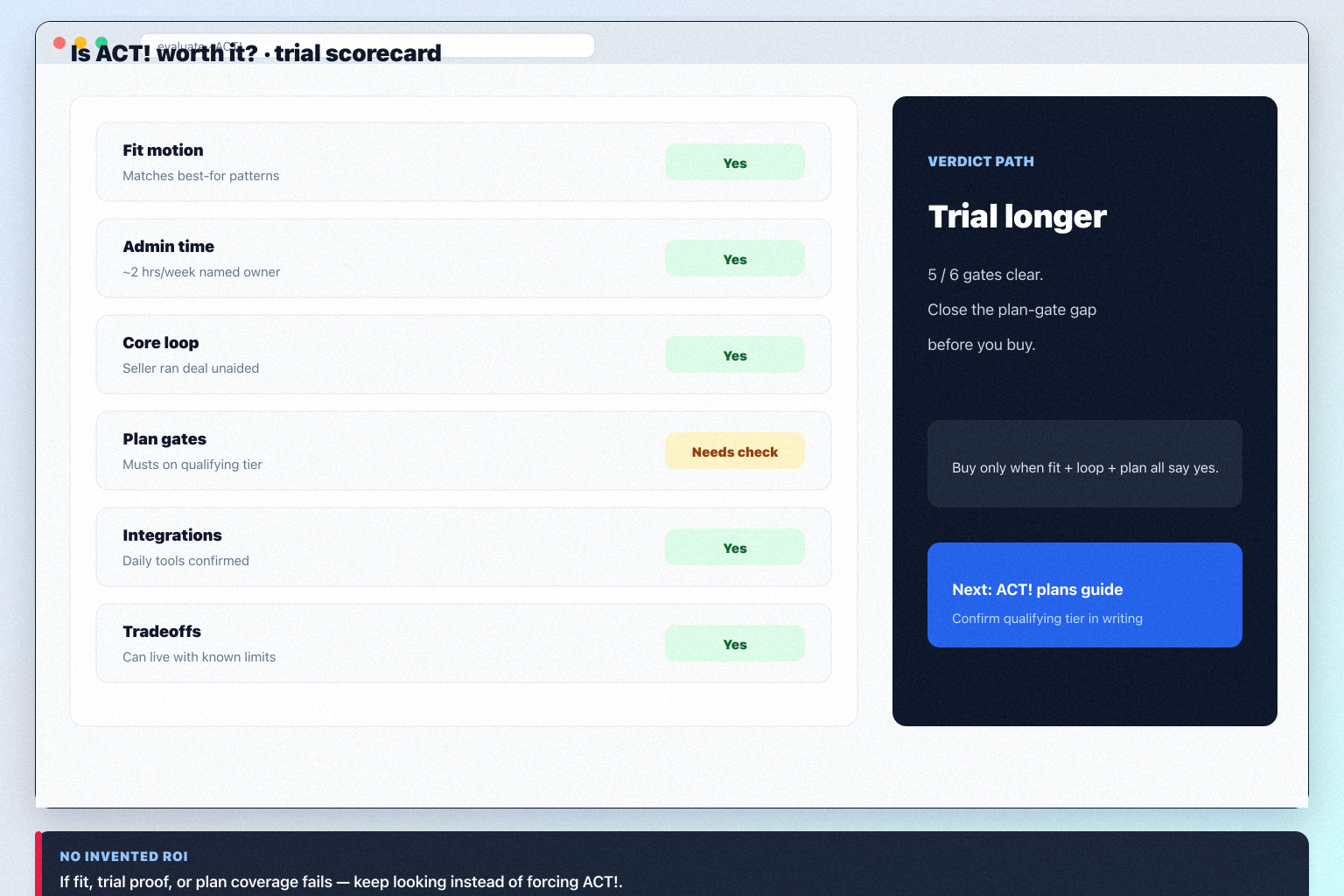
Use this ACT! scorecard — four or more “no” answers means keep looking.
Strong fit
Motion matches Established SMBs already familiar with ACT! and Contact- and activity-centric small sales teams; admin named.
Borderline
Needs are real but admin capacity is thin — trial hard, set a decide-by date.
Poor fit
Poor-fit patterns dominate — compare HubSpot and Pipedrive.
Answer yes or no. Four or more “no” answers means ACT! is the wrong tool right now.
Does your motion match who it serves well? Best for: Established SMBs already familiar with ACT!; Contact- and activity-centric small sales teams; Buyers evaluating classic SMB CRM continuity.
Are you outside the poor-fit patterns? Weaker fit: Modern AI/marketing automation buyers; Enterprise platform CRM; Teams needing transparent SaaS ladders without sales calls.
Do you need contact management, lead management, and pipeline management as day-one work?
Is there an admin with ~2 hours a week?
Can you name the decision better pipeline data would change?
Worked example: a 12-person B2B advisory team scores five yeses for ACT!; the gap is admin capacity, so they fix that before spending.
2. Label every watch-out: acceptable, mitigable, or disqualifying
Sort ACT! watch-outs into buy / trial / walk paths — disqualifying means stop.
Acceptable
You can name why it does not affect your three outcomes.
Mitigable
Owner, cost, and date attached — or it is not a mitigation.
Disqualifying
It blocks an outcome — compare HubSpot and Pipedrive now.
Do not start with the strengths list. Sort each researched watch-out into one bucket — no “we will see.”
List the watch-outs. Start with: Pricing transparency weaker than modern SaaS CRMs; Ecosystem and UX less modern than category leaders; Automation/AI story thinner.
Treat strengths as trial claims, not facts. Verify: Long SMB CRM brand history; Contact/activity CRM fundamentals.
Worked example: a 12-person B2B advisory team marks one ACT! watch-out mitigable (ops owns it), one acceptable, and one disqualifying if it appears in trial.
3. Run a scripted ACT! trial — not a guided demo
Prove a real ACT! deal record works without an admin watching.
Trial pass
Core loop works unaided; sellers finish without babysitting.
Trial ambiguous
Extend once with one written question that would close it.
Trial fail
Sellers need help for basic record work — that does not improve after purchase.
Use real deals and your least enthusiastic seller.
Non-admin loop: create company + person, create deal, log activity, set next step, move stage.
One task each for: Contact management, Activity and calendar CRM, and Sales follow-up tracking.
Run one Friday review inside ACT! — no spreadsheet.
Break something on purpose (reassign, merge, export) and time the recovery.
Our snapshot records no trial length for ACT! — ask for an evaluation window in writing before you commit seats.
Worked example: a 12-person B2B advisory team gives eight scripted tasks to the two sellers least excited about CRM and treats every question as a training-cost line.
ACT! evaluation script
Day 1: Honest workspace
One ACT! pipeline with real stages
Three real open deals with next steps
Confirm which plan the trial runs on
Day 3: Non-admin loop
Seller runs create → log → next step → stage
Log a real call and email
Write down every question asked
Day 7: Weekly review
Test: Contact management and Activity and calendar CRM
Friday review entirely in ACT!
Reassign an owner and export a list
Day 14: Decide
Score fit, trial, plan, admin capacity
Confirm qualifying plan on /pricing/act/
Write buy, extend, or pass with a reason
4. Check the plan gates before you call it good value
Map ACT! must-haves to the cheapest qualifying plan before you talk price.
Plan pass
Must-haves sit on a tier you can accept.
Plan stretch
Qualifying tier is above budget — decide, do not improvise.
Plan fail
Capability or capacity blocks you — compare HubSpot and Pipedrive.
Price the tier your must-haves actually need.
List must-haves the trial proved.
Map each to the lowest ACT! plan. Our research does not flag plan-gated capabilities for ACT!, but confirm your must-haves against the plan you actually intend to buy.
The highest plan on that list is what you are buying.
Check capacity too. Confirm ACT! seat/record caps before you commit.
Estimate that plan in the Cost Calculator — if it breaks budget, the honest answer is “not worth it.”
Worked example: a 12-person B2B advisory team finds forecasting forces a higher ACT! plan than budgeted, so they re-run numbers before deciding.
5. Write the one-page decision: buy, extend, or pass
Buy ACT! only when fit, trial proof, and plan coverage all clear.
Buy
Fit, trial, plan, and owners all green — go to setup.
Extend
One open question, time-boxed, with a written closing condition.
Pass
Keep looking — try HubSpot and Pipedrive. Better than forced ROI maths.
Keep it to one page before anyone argues about renewal.
Fit score + named gaps.
Watch-outs accepted and who owns each mitigation.
Trial evidence (what non-admins could / could not do).
Qualifying plan and the must-have that set it.
Admin owner + hours.
Buy · extend (one closing condition) · or pass — with a re-check date.
Worked example: a 12-person B2B advisory team buys ACT! only after the admin is named with real hours and the qualifying plan is confirmed in writing.
ACT! “worth it” mistakes
Inventing ROI percentages
Use adoption evidence and cost bands. A fabricated payback number loses approval meetings.
Confusing brand polish with fit
Research says ACT! fits Established SMBs already familiar with ACT! and Contact- and activity-centric small sales teams — check yours.
Trialling with your biggest champion
Champions succeed with anything. Give the script to the sceptic.
Calling the entry tile a bargain
Our research does not flag plan-gated capabilities for ACT!, but confirm your must-haves against the plan you actually intend to buy.
Buying without an admin owner
No named owner with real hours means the data decays and the tool gets blamed.
Treating this page as the full review
Read the ACT! review for criterion scores and evidence.
Frequently asked questions
Is ACT! worth it for small teams?
Yes when your motion matches Established SMBs already familiar with ACT! and Contact- and activity-centric small sales teams, someone can admin weekly, and the qualifying plan clears must-haves. No admin capacity means not worth it yet.
Who should not buy ACT!?
Weaker fit: Modern AI/marketing automation buyers; Enterprise platform CRM; Teams needing transparent SaaS ladders without sales calls. Compare HubSpot, Pipedrive, Capsule, or Freshsales for clearer cloud packaging.
What are the main ACT! tradeoffs?
Pricing transparency weaker than modern SaaS CRMs; Ecosystem and UX less modern than category leaders; Automation/AI story thinner. Label each acceptable, mitigable, or disqualifying before you sign.
How do I test ACT! properly?
Scripted trial with real deals and a sceptical seller: non-admin loop, one task per key capability, one Friday review in ACT!, one recovery task. Our snapshot records no trial length for ACT! — ask for an evaluation window in writing before you commit seats.
How is this different from the review?
The review carries verdict and scores. This guide is the decision memo: fit, watch-outs, trial, plan gates, buy/extend/pass.
Which ACT! plan should I price?
The one set by your highest-gated must-have. Our research does not flag plan-gated capabilities for ACT!, but confirm your must-haves against the plan you actually intend to buy. Estimate that plan in the Cost Calculator.
What if we already bought it?
Re-run setup and implementation checklists, measure adoption, and audit plan gates before renewal.
What should I do next?
Read the ACT! review, run plans diligence for the qualifying tier, or shortlist with CRM Finder if the answer is “not yet.”



