Run post-go-live CRM governance as an operating cadence — change tickets for fields and stages, access-review calendar, WIP-capped admin backlog, and weekly standup — not a one-time RACI.
CRM governance ops is the post-go-live operating cadence: change tickets for fields and stages, an access-review calendar, admin backlog triage with a WIP cap, and a weekly governance standup. Decision rule: if configuration can change without a ticket, access is never reviewed, or the admin queue is unlimited, freeze new config until the cadence exists — ownership docs alone are not enough.
Change tickets
Access calendar
WIP-capped backlog
Weekly standup
Freeze on drift
Ops ≠ setup
Key takeaways
Ops is cadence, not a RACI PDF — Governance setup names owners; ops runs the weekly and quarterly rituals that keep them honest.
Every field/stage change needs a ticket — Silent edits recreate drift faster than any policy document can stop it.
Access reviews live on a calendar — Privilege creep is normal — scheduled reviews are the control, not hope.
Admin WIP must be finite — Unlimited yes-queues outrun training, hygiene, and adoption coaching.
4Cap admin WIPFinite in-progress tickets; park and publish parked list.
5Put access reviews on the calendarRoles, exceptions, inactive seats, export rights.
6Tie standup to hygiene glanceOne shared view; escalate to data quality if SLAs miss.
1. Run change tickets for fields and stages
Governance ops is visible operating work — tickets, calendar, WIP, and standup.
Stage rename
Impact review + definition update + manager briefing before go-live.
New required field
Prove filler role and train before hard enforcement.
Automation ask
Park until hygiene and adoption gates hold — noise is config debt.
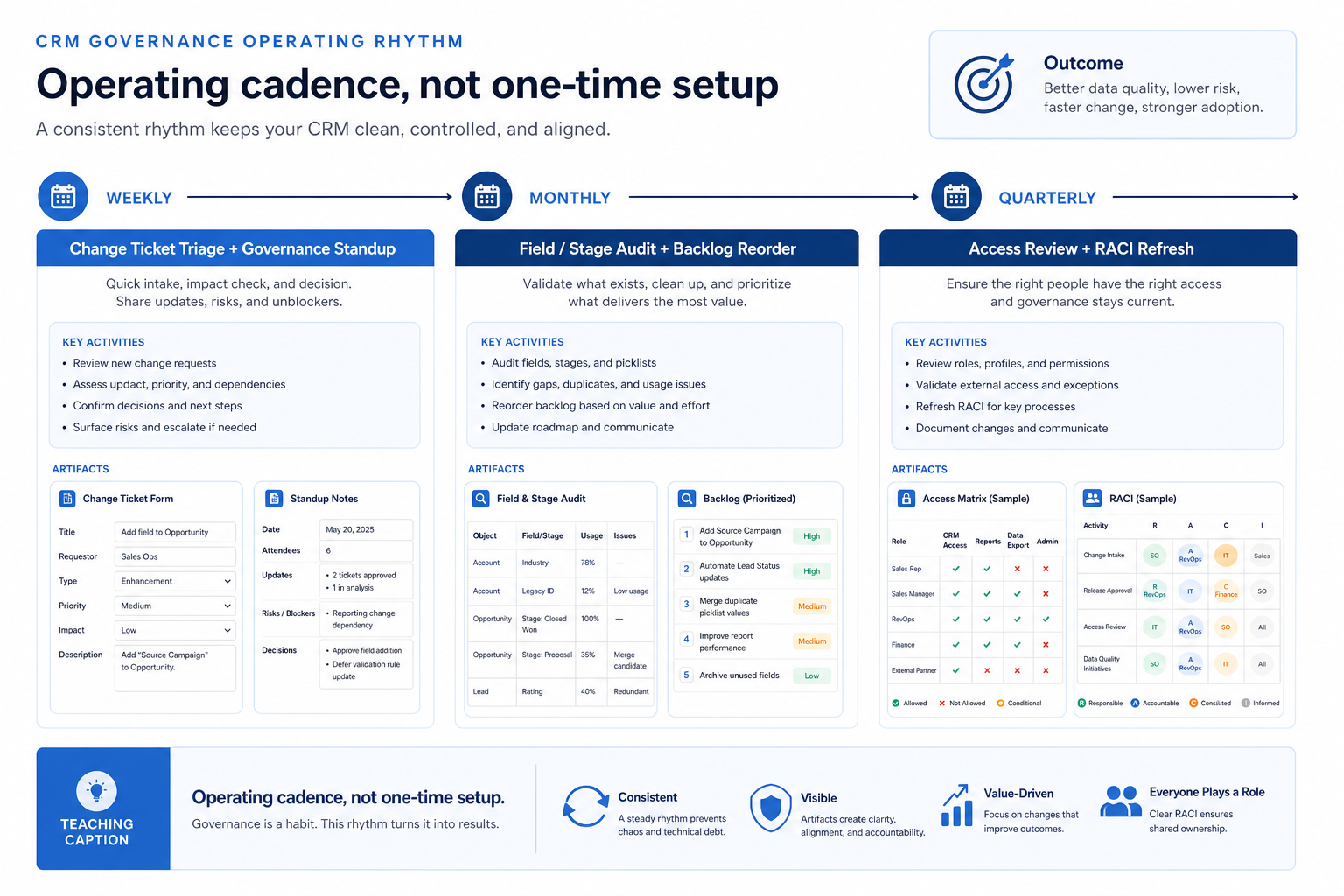
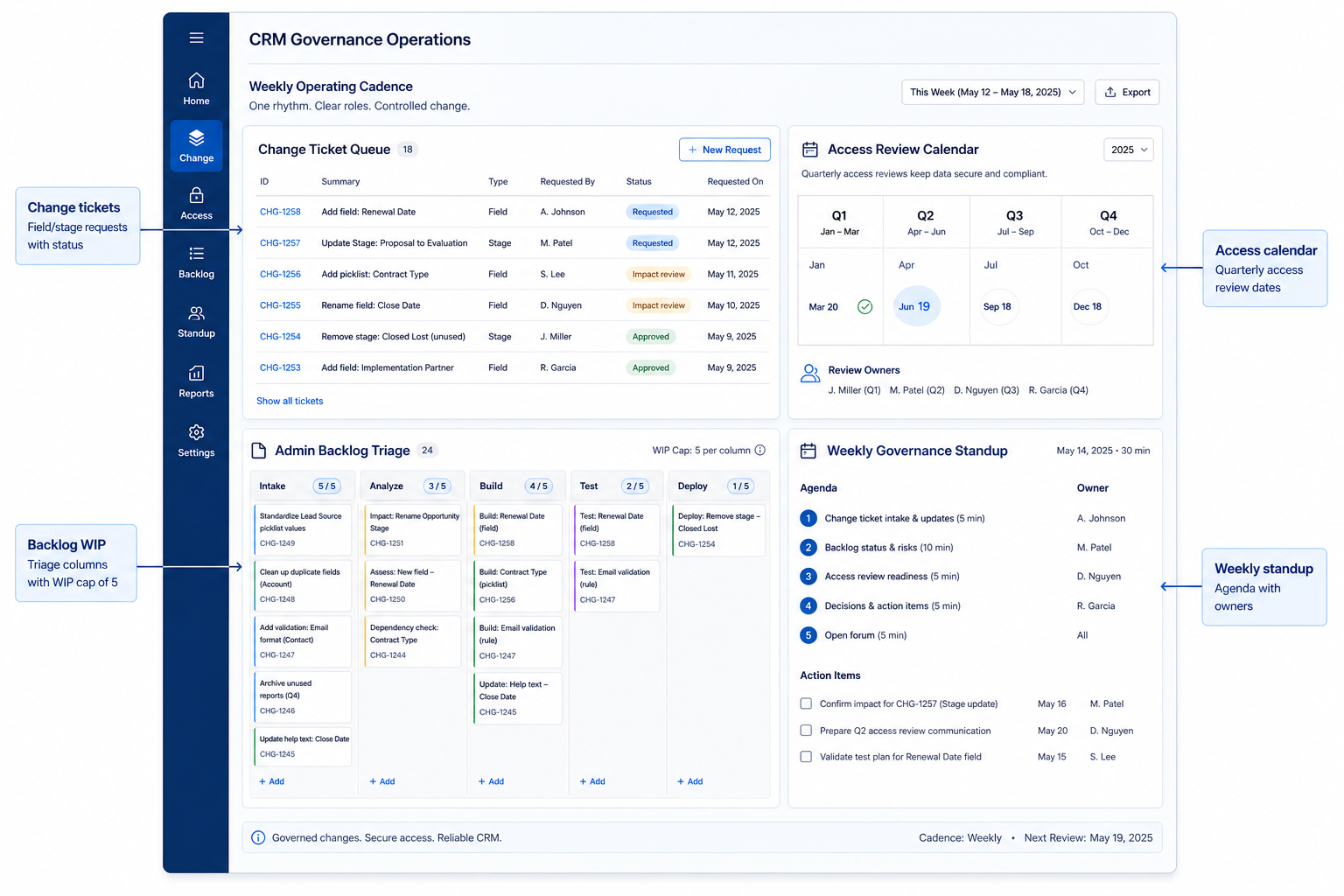
Treat stage edits, required-field changes, permission model changes, and new automations as ticketed work. Flow: request → impact review (who breaks, which reports change) → approve/reject → configure in a controlled window → communicate → short audit. Same-day emergencies still get a written ticket the same day.
Example: Northwind Advisory’s ops lead Mira finds sales managers renaming stages in production. She freezes stage edits, routes requests through a one-page ticket, and clears three backlog renames in the Friday standup after a fifteen-minute impact review with finance reporting.
2. Hold a weekly governance standup
Small team
Same person may wear admin + ops — still run the agenda on the calendar.
Multi-pod
Local champions propose; central admin approves controlled changes.
Busy week
Async ticket board still counts — cancel only if decisions are posted.
Thirty focused minutes: open tickets, WIP status, what to park, and one hygiene glance. Decisions get owners and dates; debate without a ticket goes back to the form. Keep the agenda fixed so the meeting stays operational, not ceremonial.
Example: Meridian Field Services runs Tuesday 9:00 with admin, sales ops, and one pod lead. They approve two field tickets, park an AI-score experiment, and flag duplicate spike for the data-quality ritual — no new config that week without a ticket ID.
Manager coaching views and next-step enforcement next.
Nice-to-haves
Park until gates pass; revisit in monthly reorder.
Unlimited “can you add a field?” queues destroy focus. Cap work-in-progress, group duplicates, prioritize hygiene and adoption blockers over cosmetic asks, and publish what is parked and why. Nice-to-haves wait until gates hold.
Example: Crestview Wealth’s admin backlog had forty open asks. Priya caps WIP at five, merges seven duplicate field requests into one ticket, and parks dashboard cosmetics until next-step fill recovers — requesters see status in a shared note.
4. Keep access reviews on a calendar
Role drift
Compare actual permissions to the access matrix; close gaps.
Inactive seats
Disable users outside your defined activity window.
Sensitive fields
Re-check visibility after org changes and contractor exits.
Privilege creep is normal: contractors linger, managers inherit broad roles, export rights spread. Schedule reviews of roles, exception grants, inactive seats, and sensitive-field visibility. Document exceptions with expiry and approver — not eternal temporary grants.
Example: Harborline Advisory’s quarterly review finds two former contractors still in a reporting role and a “see all households” grant without expiry. Keisha revokes both, adds expiry to future exceptions, and logs the review date on the ops checklist.
5. Deepen with monthly and quarterly passes
Healthy system
Keep light cadence; expand config only when tickets and gates allow.
Watch signals
Run CRM Health Check; intervene on weak dimensions.
Chronic drift
Full CRM Audit → remediation backlog before more features.
Weekly: ticket triage + standup + hygiene glance. Monthly: field/stage audit and backlog reorder. Quarterly: access review and RACI refresh. When health dims, escalate to a full audit or health check instead of adding more config.
Example: Blue Harbor’s monthly audit finds three stages nobody can define. They merge two via change tickets and retrain managers — ops preventing another quarter of dishonest forecasts without a rip-and-replace.
Governance ops mistakes
Confusing setup with ops
A RACI from implementation week does not replace tickets and standups.
Anyone can edit stages live
Pipeline meaning collapses; forecasts become theater.
Infinite admin yes-queue
Configuration sprawl outruns training and hygiene.
Access set once at go-live
Privilege creep is inevitable without calendar reviews.
Silent hotfixes
Uncommunicated changes break habits overnight.
Standups without decisions
Status theater wastes the only control meeting you have.
Example official CRM product videos
Optional · 2 examples · collapse if you don’t need them
Verified vendor product videos from the CRM catalogue for context while you read. They are examples only — not a ranked shortlist — and they do not replace SoftwareGlimpse recommendations on this page.
Official vendor video · example
Attio — Attio | How to build your sales pipelines
This video is hosted on YouTube
This content is hosted by YouTube. The player loads only after you allow marketing cookies.
How is governance ops different from the CRM Governance guide?
The Governance guide stands up ownership, change control, and backlog principles. Governance ops runs the weekly tickets, standup, WIP cap, and access calendar after go-live so those principles stay real.
Who should attend the weekly governance standup?
Admin (or ops) lead plus one business voice that can approve impact. Executives sponsor; they do not need to approve every field rename.
Do small teams need change tickets?
Yes, lightly. A one-page form and a weekly triage still prevent silent stage edits. Formal committees are optional; written decisions are not.
How often should we review access?
Put a recurring review on the calendar — commonly quarterly for many teams, and after role changes or contractor exits. Set your own interval; do not treat an invented industry percentage as a fact.
What WIP cap should we use?
Pick a number your admin can finish while protecting hygiene and adoption. Cap in-progress work, publish parked items, and revisit the number monthly — not by who yelled last.
When should we escalate beyond ops cadence?
When tickets cannot keep up with drift, reporting trust collapses, or access exceptions pile up — run a CRM Health Check or full Audit, and consider replace only after remediation fails.
What should I do next?
Publish the change-ticket form, book the weekly standup, cap admin WIP, and calendar the next access review. Link hygiene to Data Quality and stalled usage to Improve CRM Adoption.