Apptivo Plans: Free vs Paid and Qualifying Tiers
Apptivo cost guide: researched plan structure, who each tier suits, cost scenarios, and value tradeoffs — no invented prices.
Quick answer
Apptivo pricing is plan-gated across 4 researched tiers. No free plan confirmed in SoftwareGlimpse research. No free/trial flag confirmed in SG data — budget a paid pilot. Compare seat/capacity gates and unlocks — not list-price folklore.
- Free plan: not confirmed in SG data
- No free/trial flag confirmed in SG data — budget a paid pilot
- Entry paid tier researched: Lite
Apptivo plan takeaways
- Starting tier ≠ buying tier — Our research does not flag plan-gated capabilities for Apptivo, but confirm your must-haves against the plan you actually intend to buy.
- What each Apptivo plan is for — Lite, Premium, Ultimate, and Enterprise — the vendor highlights Lite, which is a marketing choice, not your requirement.
- Free vs paid is a capability decision — Our snapshot lists no free Apptivo plan — verify on the pricing page rather than assuming one.
- Capacity limits bite before features do — Our snapshot does not publish Apptivo seat or record caps — confirm them before you commit a team size.
- Trial before term — Our snapshot flags a trial on Lite, Premium, and Ultimate without a published length — confirm the window on the Apptivo pricing page.
- Numbers live on pricing tools — Use /pricing/apptivo/ and the Cost Calculator for amounts. This guide deliberately carries no prices, so nothing here goes stale or gets quoted wrongly.
Apptivo plan anatomy
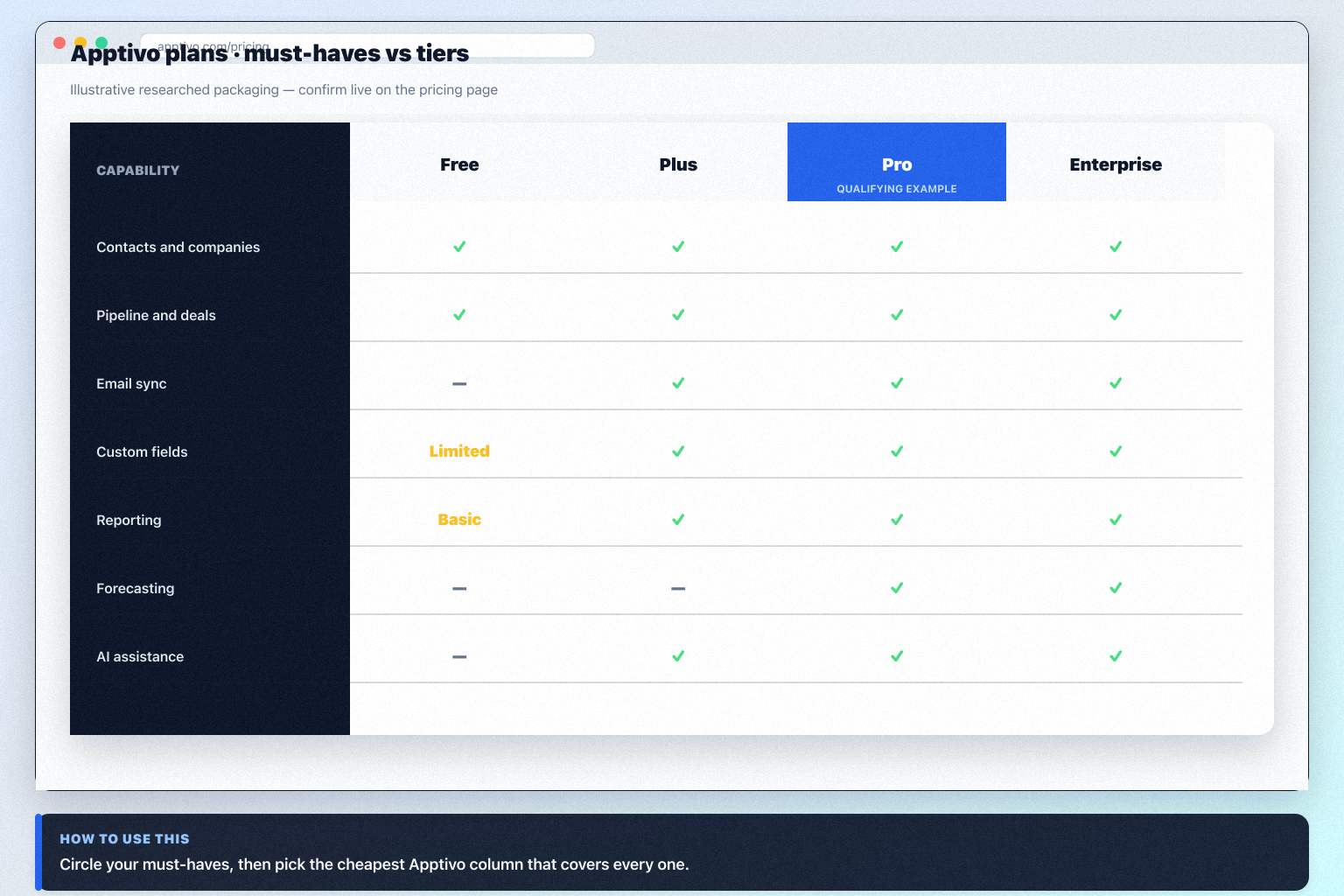
Apptivo checklist
Bring these questions to every demo
Ask vendors to show the workflow live, not just describe it.
- 1List day-one must-havesOutcome language, not feature tours.
- 2Map each must to a researched planLowest tier that clears every gate.
- 3Confirm seats and capacity notesLimits are part of the plan decision.
- 4Estimate with Cost CalculatorThen confirm on the pricing page.
Frequently asked questions
What Apptivo plans exist?
Our researched snapshot lists Lite, Premium, Ultimate, Enterprise. Lite is highlighted by the vendor — treat that as marketing, not as your requirement. Re-check /pricing/apptivo/ for current packaging.
Is there a free Apptivo plan?
No free plan appears in our Apptivo snapshot, so ask for an evaluation window in writing. Confirm current packaging on /pricing/apptivo/.
Which Apptivo plan should a small team choose?
Run the algorithm: lowest plan per must-have, take the highest, check capacity, then count seats. Our research does not flag plan-gated capabilities for Apptivo, but confirm your must-haves against the plan you actually intend to buy.
What is plan-gated in Apptivo?
Our research does not flag plan-gated capabilities for Apptivo, but confirm your must-haves against the plan you actually intend to buy.
How do I estimate cost safely?
Must-haves → qualifying plan name → Cost Calculator seats → TCO categories for admin, migration, and training. Do not invent implementation fees or ROI percentages.
Does Apptivo offer a free trial?
Our snapshot flags a trial on Lite, Premium, and Ultimate without a published length — confirm the window on the Apptivo pricing page.
Is annual billing worth it?
Annual versus monthly is a term and cash-flow choice, not a capability one. While you are still proving adoption, the ability to fail cheaply for one quarter is often worth more than the annual discount.
What should I do next?
Open /pricing/apptivo/, run the Cost Calculator on your qualifying plan, and read the Apptivo worth-it guide before signature.
Apptivo plan matrix and who each tier suits
Structure and trial/free flags come from SoftwareGlimpse pricing research. Dollar amounts appear only when verified — never invent list prices.
- Seats61%
- Add-ons18%
- Implementation12%
- Training5%
- Other4%
Lite
Trial available · Unlocks: contact management, lead management, pipeline management · Suits: teams whose must-have gates appear on this tier
Premium
Trial available · Suits: teams whose must-have gates appear on this tier
Ultimate
Trial available · Suits: teams whose must-have gates appear on this tier
Enterprise
Contact sales · Suits: teams that need custom procurement
1. Apptivo cost scenarios to pressure-test
Lean team / free-or-trial first
Scope a time-boxed pilot; No free/trial flag confirmed in SG data — budget a paid pilot.
Growing team with gated workflows
Map must-have workflows (contact management, lead management, pipeline management) to plan unlocks before expanding seats.
Hidden / extra cost watch
Budget risk: Suite breadth can dilute specialist CRM polish. Also check add-ons, overages, and admin time outside the sticker plan.
Price Apptivo against how you actually buy seats and unlocks — not against a competitor's homepage headline.
Apptivo value rule
Apptivo cost mistakes to avoid
Cost trap 1
Suite breadth can dilute specialist CRM polish
Cost trap 2
Enterprise is custom quote
Cost trap 3
Brand recognition lower than major CRM suites
Cost trap 4
Suite breadth can dilute specialist CRM polish
Cost trap 5
Enterprise is custom quote
Cheaper or clearer alternatives to pressure-test
Compare total cost of ownership vs Apptivo on identical constraints.
- View CRM profile
 Zoho CRM
Affordable multi-edition sales CRM with free tier, automation, and Zia AI across Standard through Ultimate.
- View CRM profile
 Bitrix24
Free-tier all-in-one CRM and collaboration suite with organization-based paid cloud plans.
- View CRM profile
 HubSpot
AI-powered customer platform with free forever CRM, plus paid Smart CRM seats and Sales/Marketing/Service hubs for growing teams.
- View CRM profile
 Freshsales
Freshworks sales CRM for lead management and pipeline workflows.
Catalogue peers only — not commission-ranked.
Apptivo pricing checklist
0/3 dimensions noted — saved in this browser only.
Plan gates you must unlock
Trial / free proof
TCO extras
Was this article helpful?
Have more questions? Contact our support team.
Part of CRM hub · Apptivo review
Related guides
Supporting reading in this topic — not a generic related-posts dump.
- How to Choose the Right CRM for Your BusinessA practical decision framework for picking CRM software: needs, features, size fit, integrations, true cost, adoption, and growth — without vendor hype.
- CRM Pricing Guide: How Plans, Seats, and Add-Ons Really WorkLearn CRM pricing models — per-seat tiers, feature gates, add-ons, and annual vs monthly — with bands and qualifiers, then estimate with the Cost Calculator.
- CRM ROI Guide: Justify Value Without Fake PercentagesFrame CRM return as observable operational gains tied to 90-day outcomes — time saved, fewer dropped leads, cleaner forecasts — without inventing ROI percentages.
- CRM Total Cost Guide: See Beyond Per-Seat SubscriptionMap CRM total cost categories — subscription, admin time, migration, training, add-ons, and switching risk — without inventing dollar totals.
- Is Apptivo Worth It? Fit Scenarios Before You BuyDecide if Apptivo is worth it for your team — fit scenarios, tradeoffs, and when to keep looking — without invented ROI percentages.
Related products
Related comparisons
Related resources
SoftwareGlimpse Updates
Want clearer software shortlists? Get buying guides and comparisons by email.
Newsletter coming soon.