Closely Migration: Move Lists Without Losing Trust
Closely migration guide: inventory → rehearse → freeze → validate integrations — grounded in researched limitations and catalogue peers.
Quick answer
Migrate to Closely by inventorying legacy sales-intelligence fields, mapping them to Closely objects, rehearsing a freeze window, and validating Salesforce, HubSpot, Pipedrive before reopening writes.
- Inventory → map → rehearse → cut over → reopen
- Highest risk: Not a CRM deal-pipeline system of record.
- Success signal: prospecting works for the pilot cohort
Closely migration takeaways
- Lists are the product — LinkedIn + email outbound automation platform with enrichment, AI agents, and white-label options for agencies. A migration that moves rows but breaks suppressions or owners will burn credits and trust.
- Pilot before bulk — One seller’s book or one ICP segment first — fix mapping before volume.
- CRM stays the system of record — Research names Salesforce, HubSpot, Pipedrive, and Gmail on the Closely side — confirm CRM sync and the connectors your daily loop depends on.
- Watch packaging during cutover — Researched plans: Starter, Growth, Essential, Custom. Never invent list prices here — confirm seats, credits, and quote terms on /pricing/closely/.
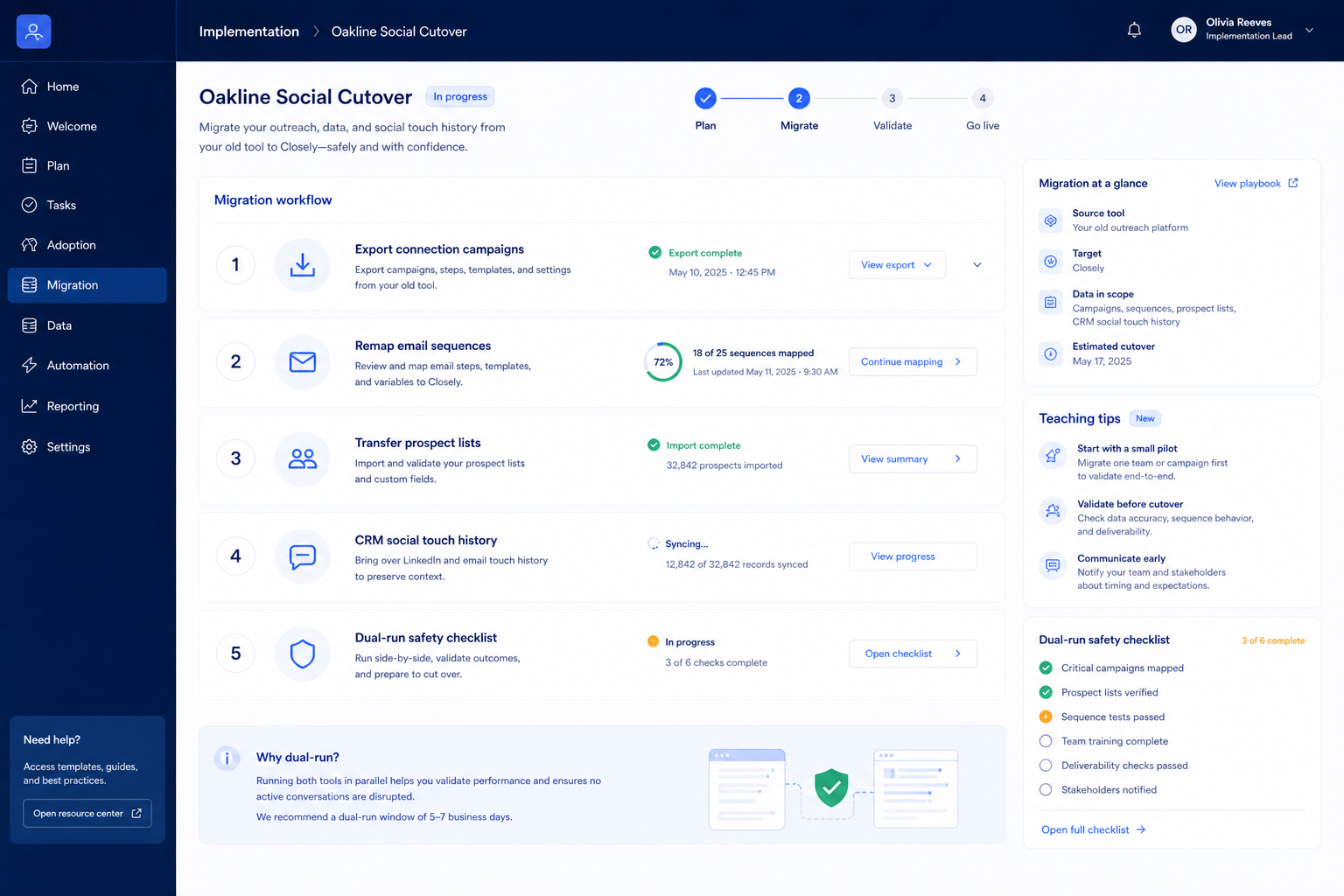
Closely migration map
Closely checklist
Bring these questions to every demo
Ask vendors to show the workflow live, not just describe it.
- 1Inventory source objectsLists, sequences, dialer books, suppressions, owners.
- 2Sign off the field mapTitles, emails, phones, owners, do-not-contact.
- 3Run a pilot importOne segment; fix mapping before bulk.
- 4Dual-run one weekClosely is write-path; old tool is read-only.
- 5Validate with the podSpot-check contacts and CRM sync before cutover.
Frequently asked questions
Should we migrate every historical sequence?
Usually no. Migrate active sequences and suppressions first. Archive cold history unless a compliance need says otherwise.
What breaks most often?
Owner remaps, phone/email field meanings, and CRM sync direction. Pilot those three before bulk.
How do credits factor into migration?
Bulk enrichment during migration can burn a month of credits in a day. Cap enrichment on the pilot, then confirm pack limits on the pricing page.
1. Closely migration cutover playbook
Field inventory
Export legacy fields that power prospecting, data enrichment, email sequences and mark must-map vs archive.
Rehearsal load
Run a non-prod load into Closely; measure match rates before the freeze.
Production freeze
Freeze legacy writes; cut over; validate Salesforce; then reopen.
Migrations fail from optimistic timelines — not from missing motivation.
Migrate to Closely?
Closely migration mistakes
No freeze window
Dual-writing without a freeze creates irrevocable duplicates.
Integrations last
Wire Salesforce in rehearsal — not on Monday morning after cutover.
Data risk 1
Not a CRM deal-pipeline system of record.
Data risk 2
Plans are gated by LinkedIn sender seats and enrichment/AI credit bundles.
Data risk 3
Bonus enrichment/AI credits emphasized on Growth/Essential versus Starter.
Closely migration checklist
0/3 dimensions noted — saved in this browser only.
Mapping
Rehearsal
Cutover
Was this article helpful?
Have more questions? Contact our support team.
Part of Closely review · Sales Intelligence hub
Related guides
Supporting reading in this topic — not a generic related-posts dump.
- Closely Implementation: 30/60/90 Outbound Rollout That SticksPlan a practical Closely rollout — owners, credits/seats, list quality, sequences or dialer, and CRM sync — so outbound becomes a repeatable motion.
- Closely Setup: Day-Zero Path to a Working Outbound LoopSet up Closely for day-zero outbound — seats/credits, one ICP list, sequences or dialer, and CRM sync — before optional enrichment packs.
- Sales Intelligence Migration Guide: Switch VendorsSwitch sales intelligence vendors with export rights, leftover credit planning, CRM field cleanup, parallel run, freeze cutover, and hygiene — without dual write-back fights.
- Sales Intelligence Requirements Guide: Must-Haves, Compliance & CRM Write RulesWrite demo-ready sales intelligence requirements from the primary job, must vs nice features, compliance posture, and CRM write rules — without feature-wishlist shopping.
Related products
Related comparisons
SoftwareGlimpse Updates
Want clearer software shortlists? Get buying guides and comparisons by email.
Newsletter coming soon.