Sales Intelligence Requirements Guide: Must-Haves, Compliance & CRM Write Rules
Write demo-ready sales intelligence requirements from the primary job, must vs nice features, compliance posture, and CRM write rules — without feature-wishlist shopping.
Quick answer
Write sales intelligence requirements from the primary job first (data, enrichment, engagement, or dialer), then split must-have vs nice-to-have against coverage, credits, compliance, and CRM write rules. Decision rule: a requirement is demo-ready only when every must-have has an owner, a pass/fail check, and named overwrite/dedupe rules — if you cannot run a coverage sample from the sheet, keep writing.
- Primary job
- Must vs nice by job
- Coverage & credits
- Compliance posture
- CRM write rules
- Demo-ready sheet
Key takeaways
- Job beats feature wishlists — Vendors claim all four jobs; only the blocking job keeps the shortlist honest.
- Must-haves need pass/fail checks — If you cannot test coverage, credit burn, or sync on your ICP, it is not a requirement yet.
- CRM write rules are requirements — Which fields may write, never overwrite, and how duplicates match — freeze these before any bulk push.
- Compliance is yours to own — Vendor sourcing docs inform the buy; lawful basis for outreach stays with your privacy owner.
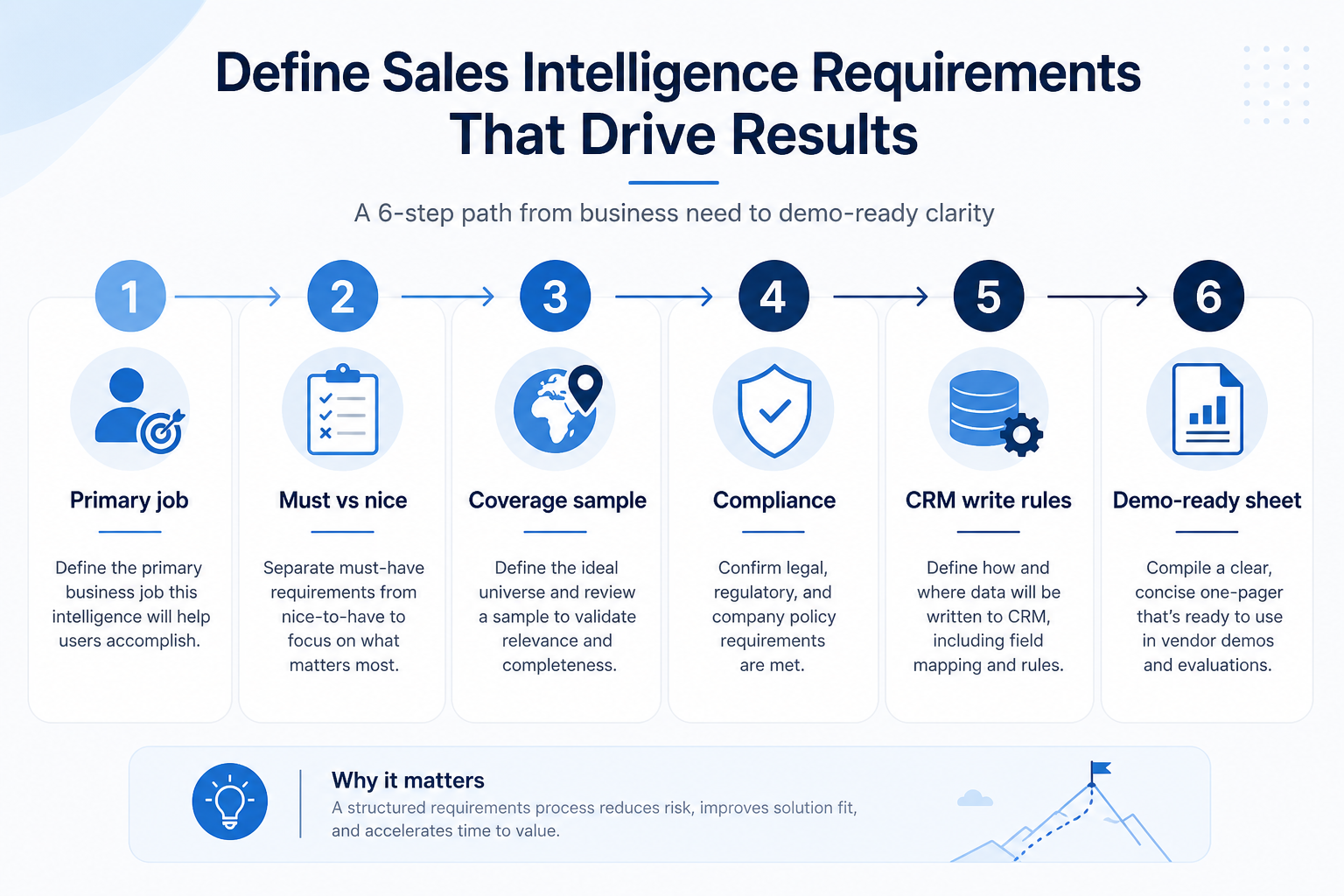
Requirements path
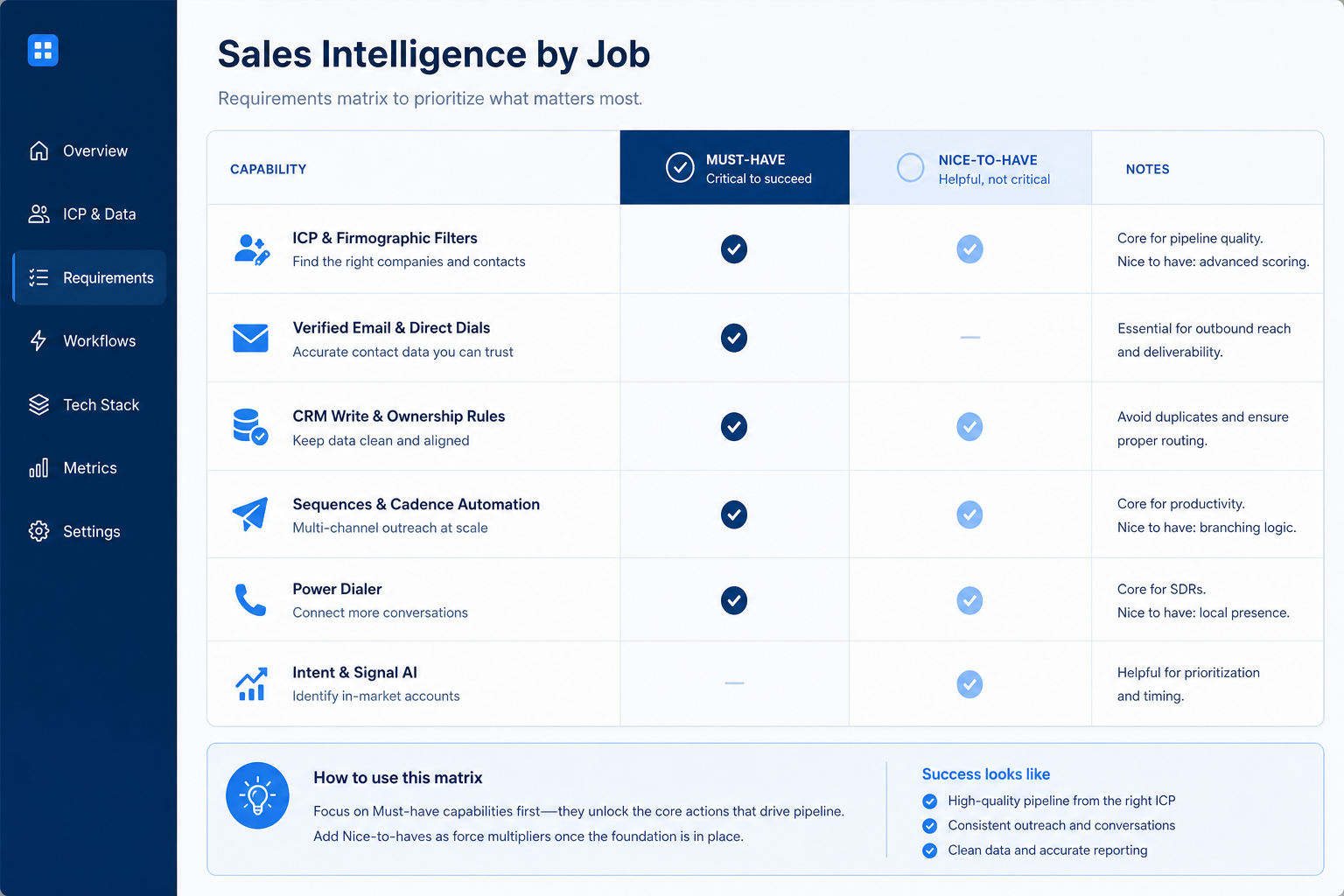
Must-have vs nice-to-have by job
1. Name the primary job and three 90-day outcomes
Data job
Usable contacts for your ICP without rebuilding lists in spreadsheets.
Enrichment job
Match rate and field fill on records you already own.
Engagement / dialer job
Sequences or connect volume that reps finish without admin help.
Pick one blocking job — build net-new lists (data), complete records you own (enrichment), run multichannel sequences (engagement), or dial at volume (dialer). Then write three outcomes your team can observe weekly.
Example: a 4-person SDR pod at a mid-market SaaS company writes: (1) every SDR starts Monday with 150 verified ICP contacts, (2) credits for emails and mobiles stay visible before burn-out, (3) CRM pushes never overwrite AE ownership. Sequencing already works in their stack, so cadence features stay nice-to-have.
2. Freeze compliance posture and CRM write rules
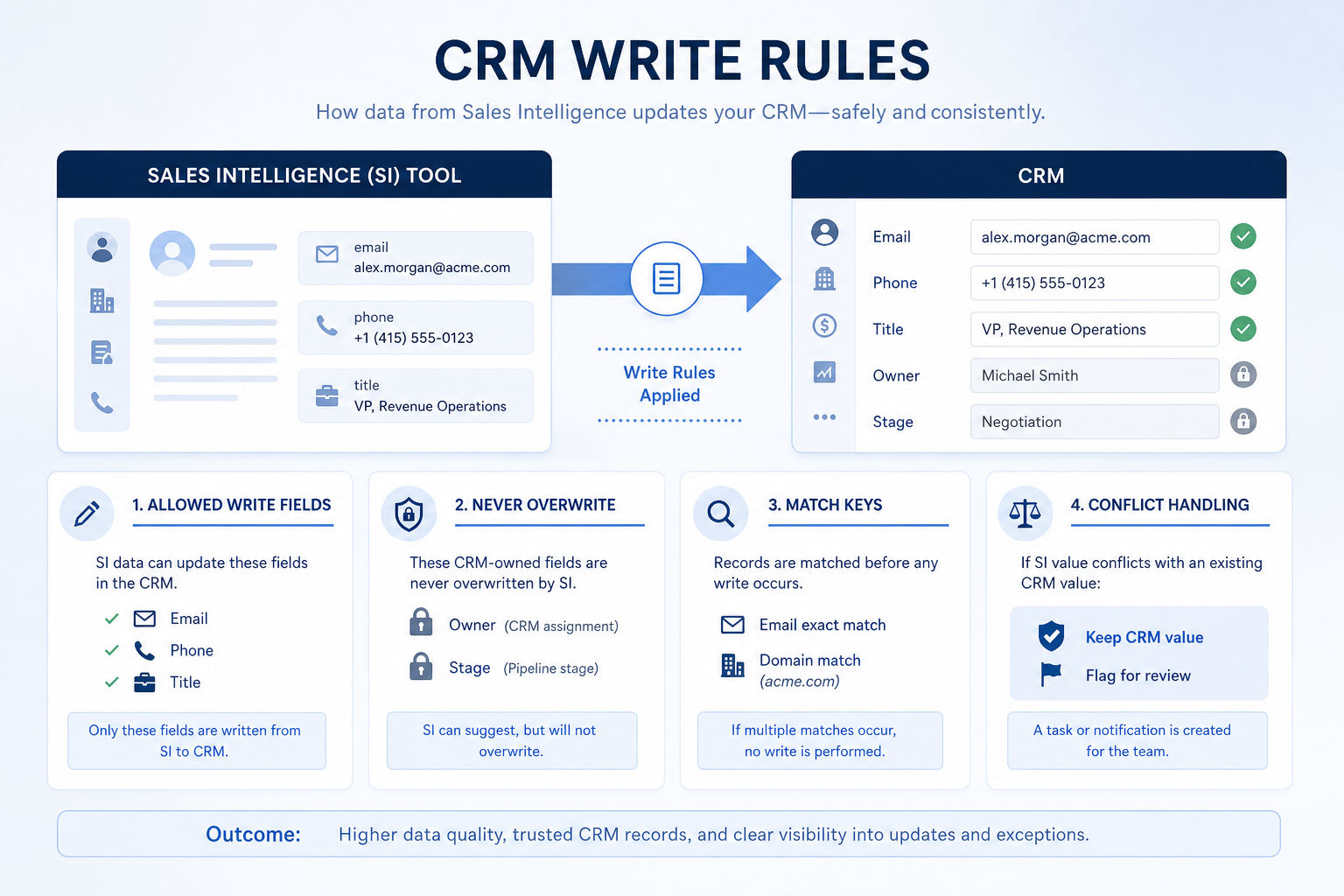
Allowed writes
Contact and firmographic fields only — unless enrichment is the job.
Never overwrite
Owner, stage, and revenue fields stay CRM-owned.
Compliance gate
Sourcing docs + suppression list before first send in regulated regions.
List regions you prospect, who owns privacy review, and what sourcing / opt-out docs you need from vendors. Separately write four CRM rules: fields the tool may write, fields it may never overwrite, duplicate match keys (email, domain, company ID), and what happens when systems disagree.
Example: the same SDR pod names RevOps as CRM owner and legal as privacy reviewer for EU/UK outreach. Write rules: SI may fill email, phone, title, and company size; may never overwrite Owner, Lifecycle Stage, or Deal fields; match on work email then domain; conflicts leave the CRM value and log a review flag.
Must-have vs nice-to-have (starter by job)
- ICP filters that match your market
- Verified work emails (spot-checkable)
- Credit & export visibility
- CRM sync + written overwrite rules
- Suppression / do-not-contact handling
- Multichannel sequences
- Power / parallel dialer
- Intent signals / AI research agents
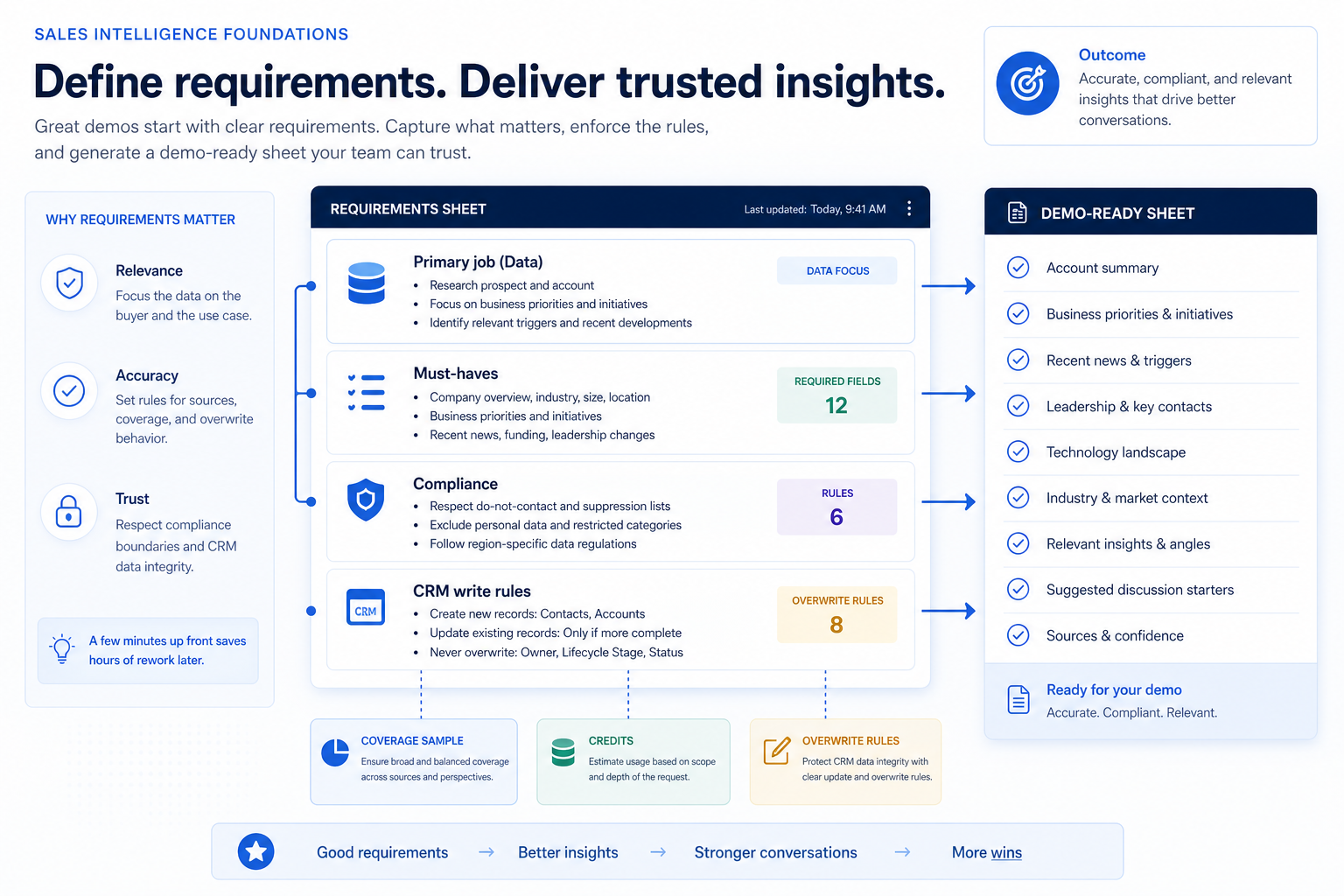
Requirements sheet dimensions
0/5 dimensions noted — saved in this browser only.
Primary job
Coverage tests
Credits & export
Compliance
CRM write rules
Demo-ready requirements sheet
Bring these questions to every demo
Ask vendors to show the workflow live, not just describe it.
- 1Primary job + three 90-day outcomes writtenObservable in a weekly review.
- 2Must vs nice split agreed by jobEach must-have has a pass/fail check.
- 3CRM write / overwrite / dedupe rules writtenTestable on a 50-record push.
- 4Compliance owners and sourcing asks listedRegions, privacy owner, suppression.
Requirements mistakes
Starting from vendor feature grids
You will inflate nice-to-haves and skip the coverage sample vendors cannot fake in a scripted demo.
Must-haves without ICP tests
“Good data” means nothing until you define the 200-account sample and usable-email bar.
Ignoring CRM write and overwrite rules
A perfect database fails if it duplicates contacts or wipes AE ownership on first sync.
Treating vendor compliance claims as your legal basis
Sourcing docs inform the buy; outreach lawfulness stays with your privacy owner.
3. Split must-haves from nice-to-haves in writing
List day-one workflows for this category in two columns: must work before go-live vs can wait until adoption proves out. Must-haves drive plan gates and integrations; nice-to-haves belong on a phase-two sheet so demos do not inflate scope.
Worked example: Harbor People Ops marks SSO and audit logs as must-have, AI summaries as phase-two. Demos that skip the must column get cut from the shortlist early.
4. Map integrations and data boundaries
Name systems that must sync or stay out of scope: identity, payroll, CRM, ecommerce, chat, or data warehouse. For each integration, note whether it is native, API, or manual export — and who owns the connection when it breaks.
Worked example: Northline Finance requires HRIS sync to payroll and refuses tools that need nightly CSV babysitting unless IT signs off.
5. Get a one-page sign-off before trials
Share the must-have sheet with finance, IT, and the team lead who owns the weekly job. Trials should test the signed sheet — not a fresh wishlist from each demo.
Next: /guides/how-to-choose-sales-intelligence/
Frequently asked questions
How do I write sales intelligence requirements?
Start with the primary job and three observable 90-day outcomes, split must vs nice with pass/fail checks, then freeze coverage sample criteria, credit/export asks, compliance owners, and CRM write rules. You are ready for demos when the sheet alone can drive a consistent script across vendors.
What belongs on a sales intelligence requirements sheet?
Primary job, outcomes, must-haves with tests, nice-to-haves, ICP coverage sample, credit/export model, sourcing and opt-out docs, CRM write/overwrite/dedupe rules, and named owners for buyer, daily users, and RevOps/privacy.
How many must-haves should we list?
Prefer a short list tied to the primary job and three outcomes. Long must-have lists recreate feature shopping across data, engagement, and dialer capabilities you will not use.
What are CRM write rules?
Agreed field-level rules for what the sales intelligence tool may write into CRM, what it may never overwrite, how duplicates are matched, and how conflicts are resolved — tested on a small push before any bulk import.
What should I do next?
Use the sheet in the Sales Intelligence Evaluation Guide’s two-week trial scorecard, or shortlist with How to Choose Sales Intelligence and the Best Sales Intelligence Software page once must-haves and constraints are clear.
Was this article helpful?
Have more questions? Contact our support team.
Part of Software buying guides · How to Choose Sales Intelligence Software
Related guides
Supporting reading in this topic — not a generic related-posts dump.
- How to Choose the Right CRM for Your BusinessA practical decision framework for picking CRM software: needs, features, size fit, integrations, true cost, adoption, and growth — without vendor hype.
- CRM Data Hygiene: Weekly Ops That Prevent DecayRun CRM data hygiene as a weekly operating rhythm with named owners, SLAs, and decay-prevention rules — not a one-time cleanup project.
- Sales Intelligence Evaluation Guide: Two-Week Trial ScorecardEvaluate sales intelligence options fairly with weighted criteria and a shared two-week trial — coverage sample, credit burn, CRM sync, and deliverability — so you compare evidence instead of demo theater.
- Sales Intelligence vs Sales Engagement: Data vs SequencingSee how sales intelligence (data layer) differs from sales engagement (sequencing layer) — and how list→cadence handoffs, bundles, and CRM ownership should work together.
- When to Adopt Sales Intelligence: Timing, Pilot & ExpandLearn when to adopt sales intelligence software — after list or enrichment pain appears and owners agree, pilot with real ICP accounts, then expand — without waiting for a perfect persona deck or delaying until CSV chaos piles up.
SoftwareGlimpse Updates
Want clearer software shortlists? Get buying guides and comparisons by email.
Newsletter coming soon.