Sales Intelligence Evaluation Guide: Two-Week Trial Scorecard
Evaluate sales intelligence options fairly with weighted criteria and a shared two-week trial — coverage sample, credit burn, CRM sync, and deliverability — so you compare evidence instead of demo theater.
Quick answer
Evaluate sales intelligence options with the same weighted criteria, the same two-week trial script, and the same scorecard for every shortlisted tool — covering an ICP coverage sample, credit burn, CRM sync, and deliverability. Decision rule: if two products cannot be scored on identical tasks by a non-admin rep, stop and fix the script; do not compare vibes, feature tours, or affiliate rankings.
- Weighted criteria
- Same 2-week script
- Coverage sample
- Credit burn
- CRM sync
- Deliverability
Key takeaways
- Fairness is a shared script — Identical ICP samples and tasks beat sequential “wow” demos each vendor controls.
- Credits and coverage decide the bill — Without measuring burn and usable records on your accounts, seat price is theater.
- Sync and deliverability are day-two risks — Duplicates, overwrite failures, and mailbox hits sink tools that looked fine in a search demo.
- Score before negotiating — Lock scores from the scripted trial; then talk pricing and terms.
Fair evaluation path
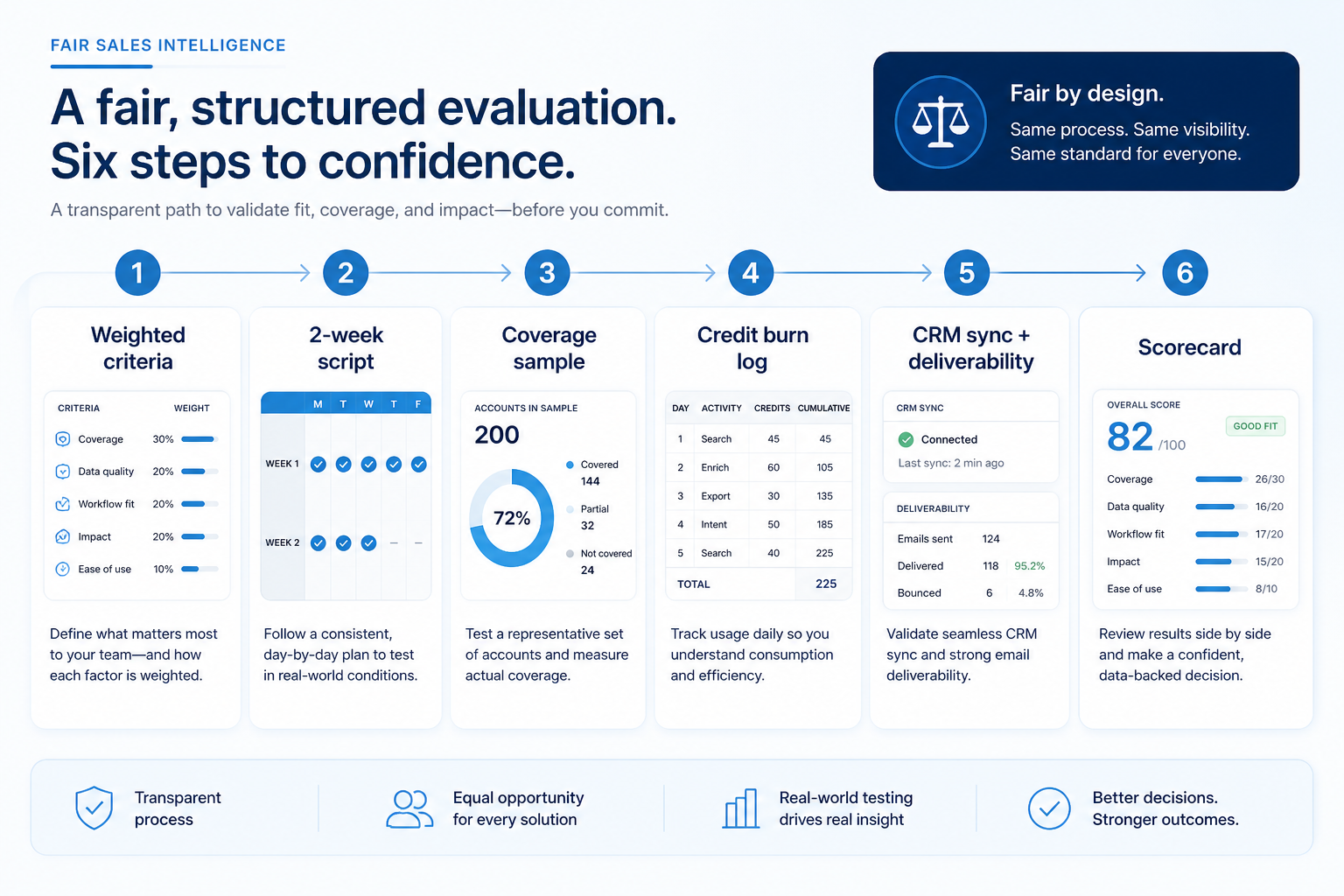
Two-week evaluation scorecard
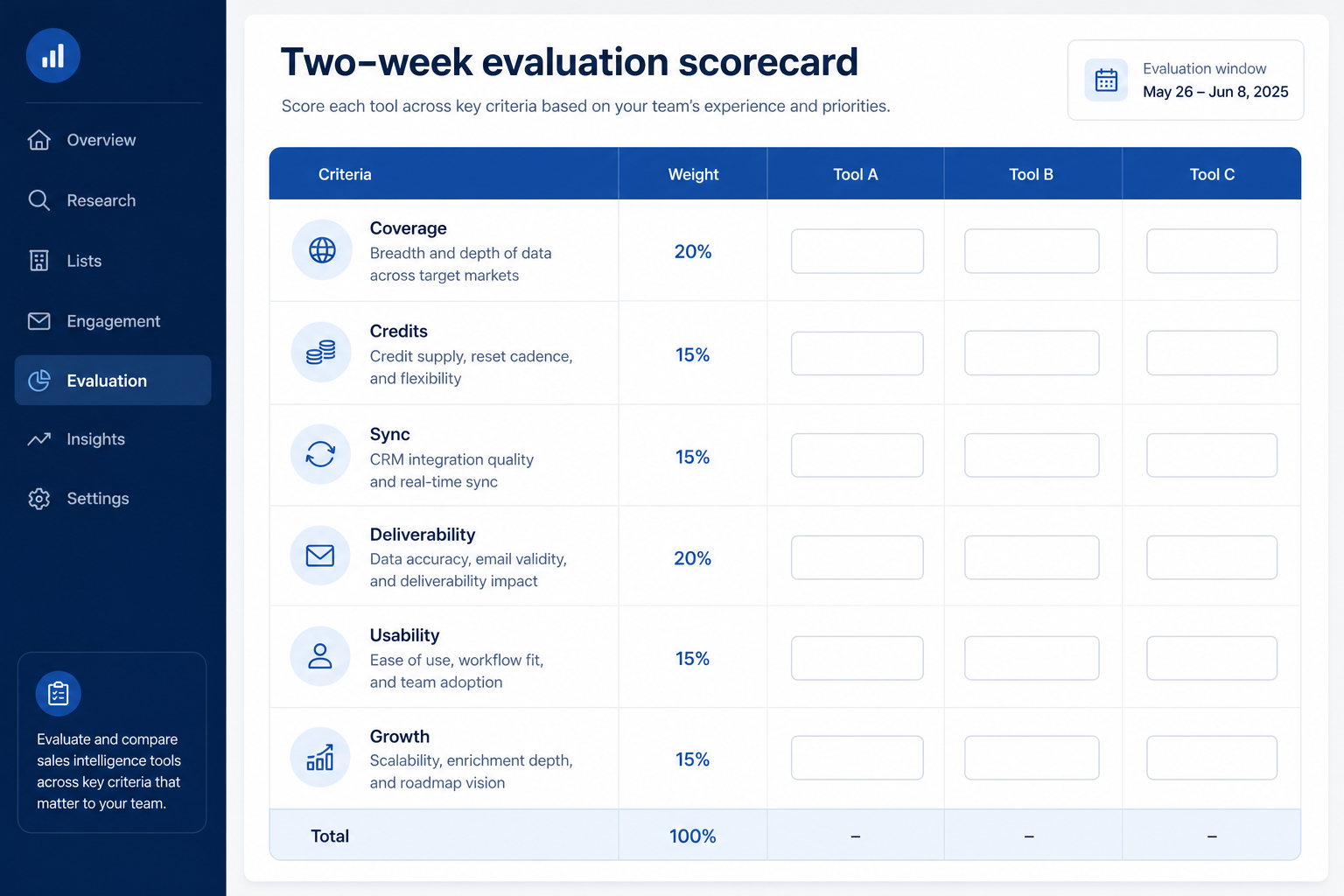
1. Set weighted criteria before demos
ICP coverage
Usable emails and phones on your real target accounts.
Credit burn
You can predict cost for a normal outbound week.
Sync + deliverability
CRM write rules hold; test sends do not tank domains.
Pull must-haves from your requirements sheet and assign weights the team agrees on. Coverage on your ICP and credit clarity usually outrank nice-to-have AI or intent widgets.
Example: a 4-person SDR pod shortlists three tools and agrees weights — ICP coverage (5), credit/export clarity (5), CRM sync reality (4), deliverability / sending hygiene (4), non-admin usability (4), growth headroom (2). They refuse demos until the scorecard and two-week script exist.
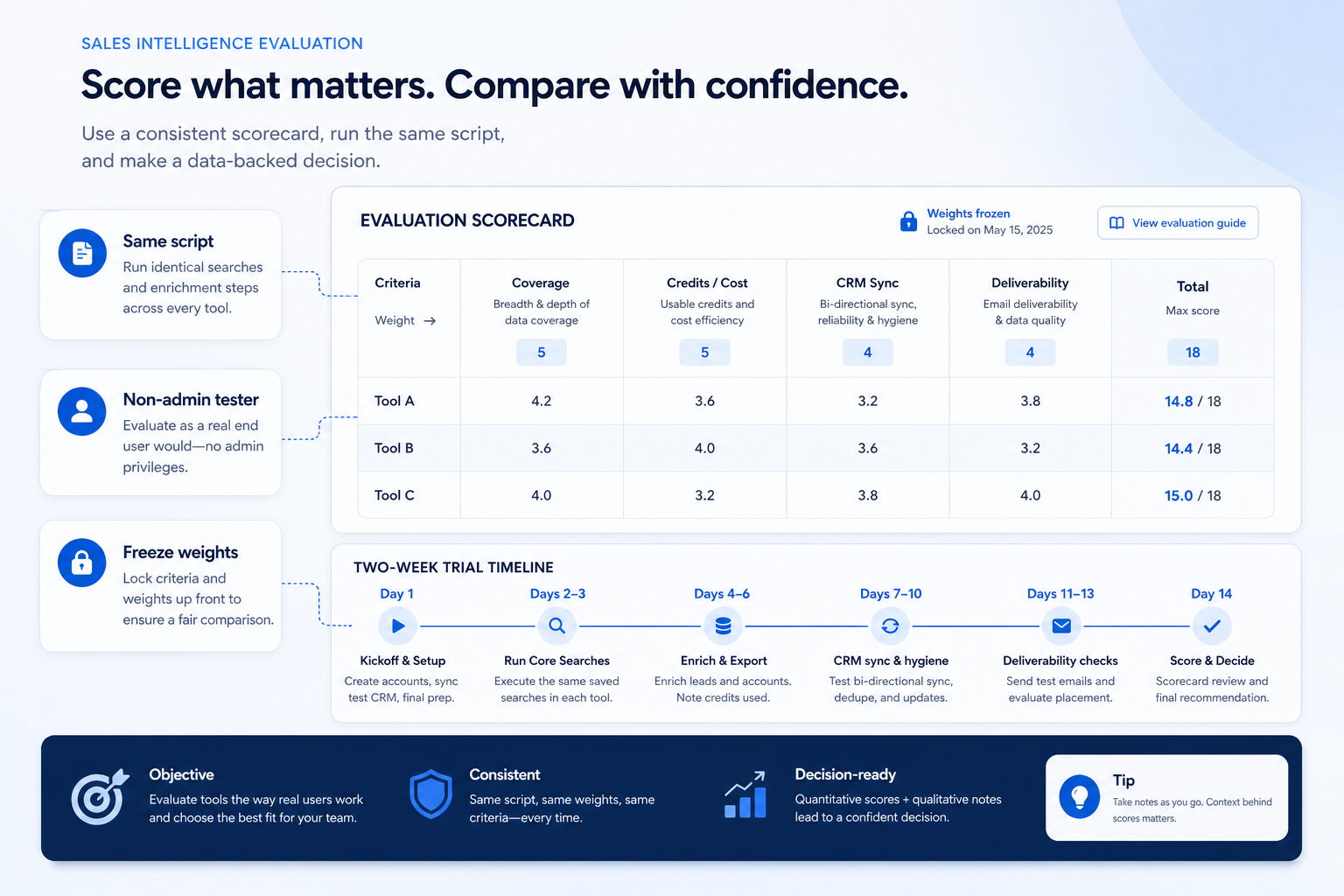
2. Run the same two-week trial script on every tool
Demo theater
Vendors search their strongest markets; your ICP sample exposes thin coverage.
Credit surprise
Seat price looked fine until a normal list week emptied the pool.
Sync / deliverability miss
Duplicates or bounced test sends kill trust before go-live.
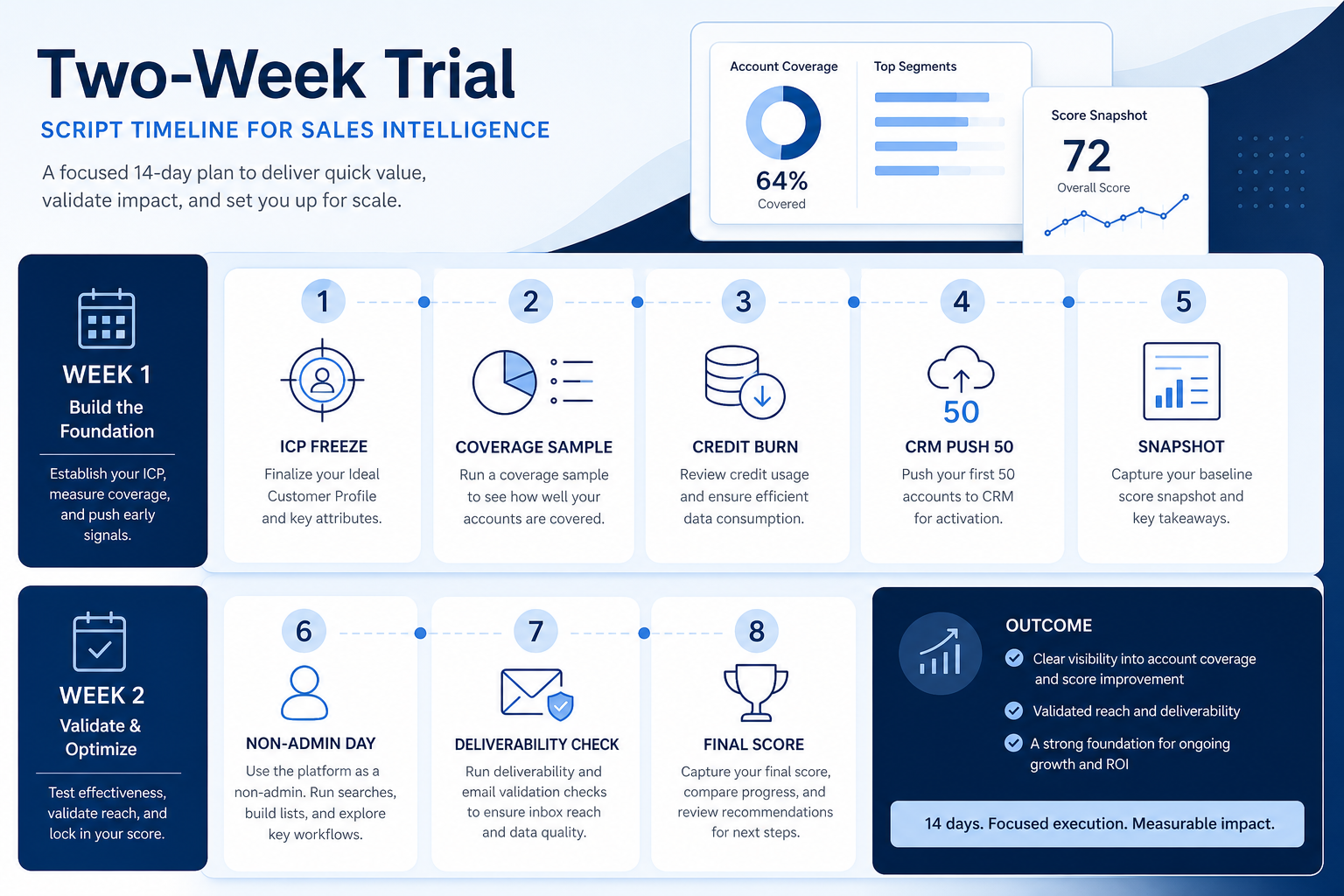
Week 1 focuses on data truth: load or search the same 200 ICP accounts, count usable emails/phones, spot-check 20, push 50 to CRM with your write rules, and log credits spent. Week 2 focuses on motion: one non-admin runs a light cadence or dial block, notes deliverability signals, and fills the shared scorecard the same day each tool finishes.
Example: the SDR pod scores three shortlisted tools. Tool A wins the polished search demo but burns credits fast and overwrites Owner on sync. Tool B clears coverage with slower UI. Tool C fails mailbox warm-up constraints and is dropped — all from the same card, not from memory. Catalogue products such as Apollo.io, BookYourData, or Reply.io are examples of tools you might put through this script — not ranked winners on this page.
Sales intelligence evaluation scorecard (weights)
Score each shortlisted tool 1–5 on the same criteria after the two-week script. Multiply by weight; compare totals — do not invent ROI percentages or affiliate-ordered rankings.
- ICP coverage (usable records) (weight 5)
- Credit & export clarity (weight 5)
- CRM sync / write-rule fidelity (weight 4)
- Deliverability & sending hygiene (weight 4)
- Usability (non-admin) (weight 4)
- Growth headroom (weight 2)
Two-week trial plan (same for each tool)
Day 1: Setup & ICP freeze
- Freeze the same 200 target accounts for every tool
- Invite one non-admin rep + RevOps observer
- Confirm credit balance and what one credit unlocks
Day 2: Coverage sample
- Search the two roles you sell to on those 200 accounts
- Count records found, usable work emails, needed phone types
- Spot-check 20 records by hand
Day 3: Credit burn log
- Build one week’s normal list volume
- Log credits for email vs phone unlocks
- Note export / API caps hit
Day 4: CRM sync (50 records)
- Push 50 contacts with written write/overwrite rules
- Verify owners and never-overwrite fields
- Check duplicate match behavior
Day 5: Week-1 score snapshot
- Fill coverage + credits + sync rows on the shared card
- Capture screenshots of credit UI and sync errors
- Do not change weights
Day 8: Non-admin workflow day
- Rep builds a 50-contact list without admin help
- Runs one cadence step or dial block
- Times list → push → first touch
Day 10: Deliverability check
- Send a small controlled test from warmed domains only
- Note bounce/spam signals and tool warnings
- Confirm suppression list is honored
Day 14: Final score & decide
- Complete remaining scorecard rows the same day
- Discuss gaps with buyer + daily user
- Negotiate only after totals are locked
Fairness checks
- Same 200-account ICP sample across tools
- Credit burn logged for a normal week
- 50-record CRM push with write rules
- Deliverability / suppression check
- Vendor-led “wow” tour first
- Affiliate ranking as primary input
Evaluation mistakes
Letting demos set the agenda
You will score storytelling instead of coverage on your ICP.
Skipping credit burn measurement
Seat price without a normal-week burn log is not a cost decision.
Bulk-pushing before write rules
Duplicates and overwritten owners are cheap at 50 and expensive at 5,000.
No written scores the same day
Memory favors the last polished demo.
3. Run one trial script on every finalist
Pick the workflow that blocked work last quarter. Run it on every shortlist tool the same week: same data shape, same users, same success criteria. Score completion, time-to-done, and where an admin had to rescue the task.
Worked example: Harbor Labs runs the same refactor ticket on three coding tools. Tool C fails SSO on the quoted tier and is dropped before a second meeting.
4. Score on one card the same day
Use the same rubric for every vendor: must-have gates, adoption risk, integration fit, and modeled total cost band. Record who attended and which plan tier was shown — demos often run above the tier you can afford.
5. Write a one-page decision memo
Name the primary job, the qualifying configuration, the winner, and what you are explicitly not buying yet. Link to pricing and requirements guides so finance can audit assumptions later.
Next: /guides/sales-intelligence-requirements-guide/
Frequently asked questions
How do I evaluate sales intelligence software fairly?
Agree weighted criteria and a shared two-week trial script first, then score every shortlisted tool the same way on coverage sample, credit burn, CRM sync, and deliverability with at least one non-admin rep. Decision rule: no identical script means no fair comparison.
How many tools should we shortlist?
Usually two or three that already clear must-haves and hard constraints. More than that burns credits and time without better evidence.
What belongs in the coverage sample?
The same ~200 real target accounts, the two roles you sell to, counts for usable work email and needed phone type, plus a 20-record hand spot-check — on every tool.
Who should score the tools?
At least one daily rep and one buyer/RevOps owner. Average or discuss gaps — do not let only the executive sponsor score usability.
What should I do next?
Move the top-scoring option into vendor diligence (sourcing docs, exit, contract), or return to How to Choose Sales Intelligence and the Best Sales Intelligence Software page if you still need a constrained shortlist.
Was this article helpful?
Have more questions? Contact our support team.
Part of Software buying guides · Sales Intelligence Requirements Guide: Must-Haves, Compliance & CRM Write Rules
Related guides
Supporting reading in this topic — not a generic related-posts dump.
- CRM Data Hygiene: Weekly Ops That Prevent DecayRun CRM data hygiene as a weekly operating rhythm with named owners, SLAs, and decay-prevention rules — not a one-time cleanup project.
- How to Choose Sales Intelligence SoftwareA decision framework for picking sales intelligence software by primary job — contact data, enrichment, engagement, or dialer — then testing coverage, credits, CRM sync, compliance, and rep workflow before you commit.
- Sales Intelligence vs Sales Engagement: Data vs SequencingSee how sales intelligence (data layer) differs from sales engagement (sequencing layer) — and how list→cadence handoffs, bundles, and CRM ownership should work together.
- When to Replace Sales Intelligence: Optimize vs SwitchDecide whether to optimize your current sales intelligence tool or replace it — using coverage, credit, sync/write, and deliverability/exit signals — then shortlist with How to Choose / Best SI only after the decision.
- Sales Intelligence vs LinkedIn Sales Navigator: Social Graph vs Contact DataSee how LinkedIn Sales Navigator (social graph / InMail) differs from sales intelligence platforms (verified contact databases, CRM sync, dialer, sequences) — and when to use one or both.
SoftwareGlimpse Updates
Want clearer software shortlists? Get buying guides and comparisons by email.
Newsletter coming soon.