Sales Intelligence vs LinkedIn Sales Navigator: Social Graph vs Contact Data
See how LinkedIn Sales Navigator (social graph / InMail) differs from sales intelligence platforms (verified contact databases, CRM sync, dialer, sequences) — and when to use one or both.
Quick answer
LinkedIn Sales Navigator is a social-graph prospecting layer — search, InMail, and relationship signals on LinkedIn. Sales intelligence platforms are typically verified contact databases with enrichment, CRM sync, and often dialer or sequence capabilities. Decision rule: if the work is navigating LinkedIn relationships and InMail, Sales Nav fits; if the work is exporting verified emails/phones, dialing, or multichannel sequences outside LinkedIn, you need sales intelligence (or both with clear jobs).
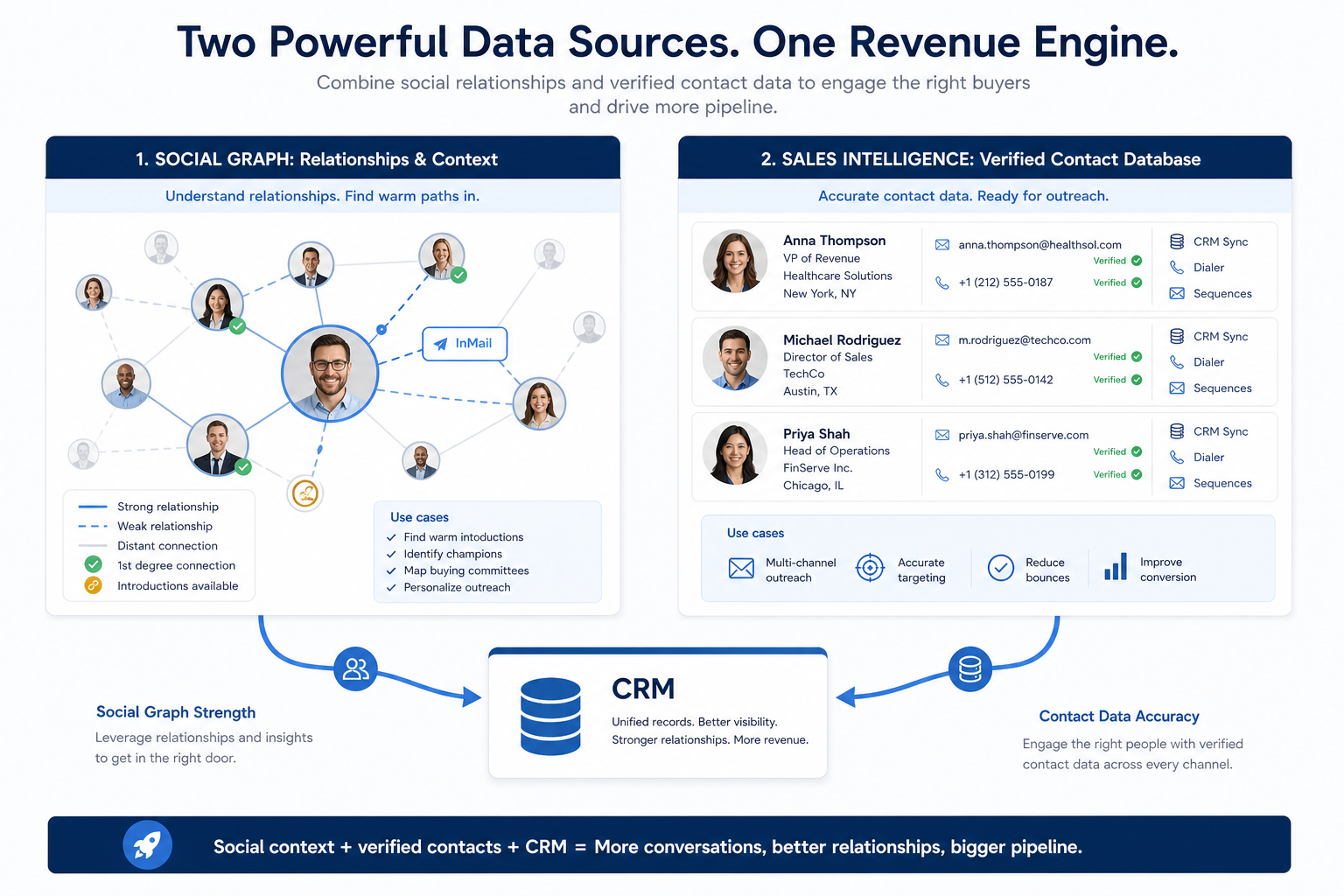
- Sales Nav = social graph
- SI = verified contact DB
- InMail ≠ email sequences
- CRM sync & credits differ
- Often complementary
- Buy for the primary job
Key takeaways
- Different graphs, different outputs — Sales Navigator excels at who is connected and active on LinkedIn; SI tools excel at work emails, direct dials, and CRM-ready exports.
- InMail is not a sequencer — Sales Nav messaging stays inside LinkedIn. Multichannel cadences, mailbox warm-up, and dialers live in engagement/SI stacks.
- Complementary is common — Many teams use Sales Nav for account research and SI for verified contact capture — if admin capacity supports both.
- Do not confuse seat price with coverage — Test your ICP on both: LinkedIn presence ≠ usable email/phone rate.
How to choose (or combine)
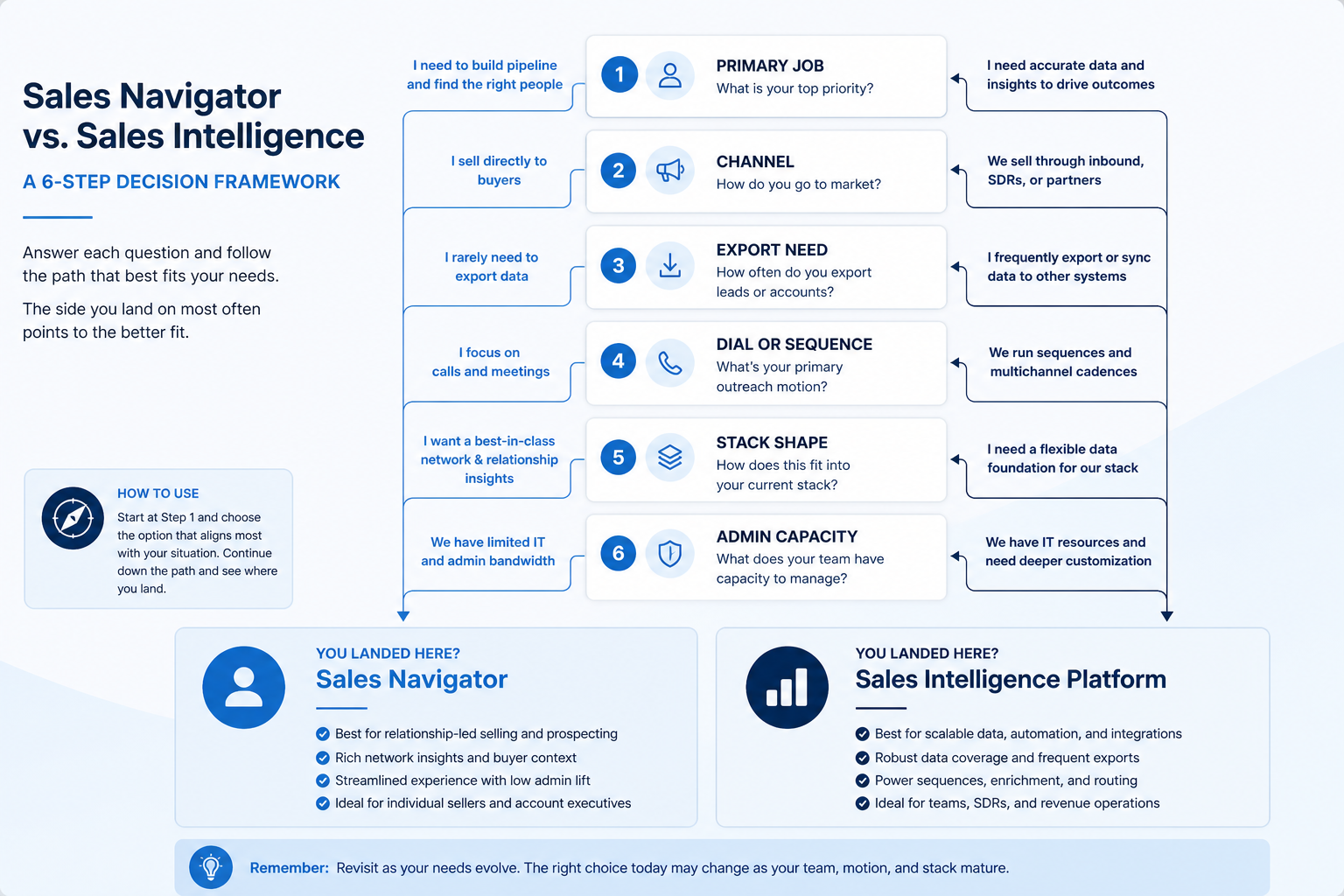
Social graph vs verified contact database
1. Compare the outputs you actually need
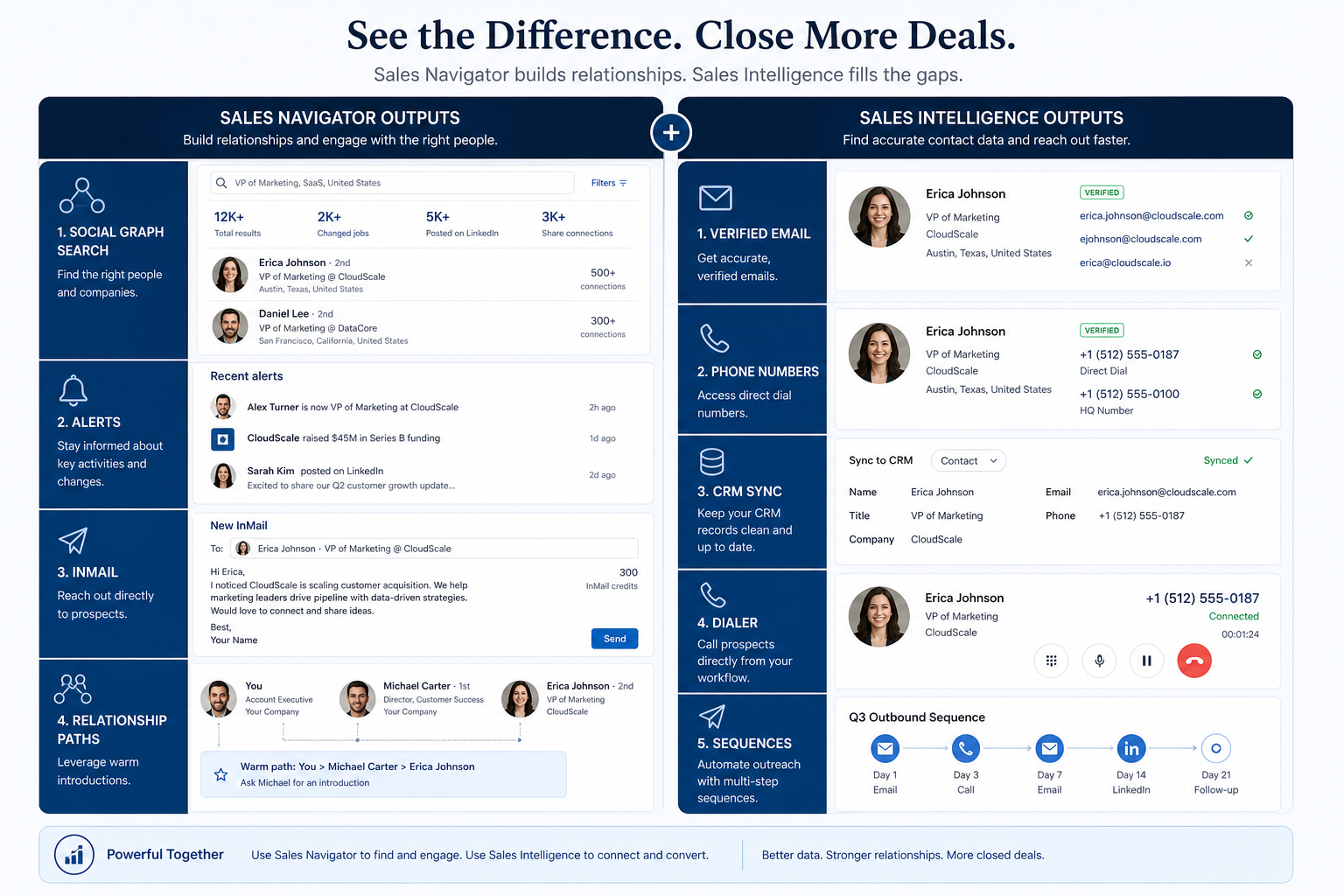
Sales Navigator side
Social graph search, lead/account lists, alerts, InMail, relationship insights.
Sales intelligence side
Verified emails/phones, enrichment, CRM sync, credits, dialer/sequences.
Shared CRM truth
Neither replaces owners and stages — both should respect write rules.
Sales Navigator helps you find people and accounts on LinkedIn, track changes, and message via InMail or connection paths. Sales intelligence tools (catalogue examples include Apollo.io, RocketReach, BookYourData) emphasize searchable contact records, verification, enrichment, CRM push, and often dialer or sequence add-ons.
Example: a three-person SDR pod selling to VP Revenue at 200–1,000-employee SaaS companies uses Sales Nav to map buying committees and warm paths, then unlocks work emails and mobiles in an SI tool before sequencing. When they tried to run volume outbound from InMail alone, reply handling and CRM logging collapsed. When they tried SI without LinkedIn research, account context thinned. Both jobs were real — different tools.
Stack shapes (educational, not rankings)
Sales Navigator only
Best for: Relationship-led selling where LinkedIn is the primary channel and email/phone volume is low.
Avoid when: You need bulk verified emails, dialers, or multichannel sequences outside LinkedIn.
Sales intelligence only
Best for: Email/phone-led outbound with CRM sync, where LinkedIn research is secondary or manual.
Avoid when: Warm paths and InMail are core to how you open deals.
Sales Nav + SI
Best for: Teams that research on LinkedIn and execute verified multichannel outreach — with clear job owners.
Avoid when: No one owns credits, seats, suppression, or CRM write rules across tools.
SI + engagement (Sales Nav optional)
Best for: Pods whose bottleneck is list quality plus cadence execution; LinkedIn is a research add-on.
Avoid when: You assume Sales Nav alone replaces a verified contact database.
Job matrix: Sales Nav vs sales intelligence
- LinkedIn social-graph search & alerts
- Verified work email / direct dial export
- InMail / LinkedIn messaging
- Email sequences, dialer, deliverability tooling
- CRM sync with field mapping
- Replacing SI with Sales Nav for email lists
Fit by team shape
- 01
Founder-led
Sales Nav can open doors; add SI when you need repeatable verified email/phone lists.
- Path selling
- Light credits
- 02
SDR pod
Often both: Nav for accounts, SI for contact capture — only with a Monday ritual that uses both.
- Account maps
- Verified unlocks
- 03
Phone-led team
SI + dialer dominate; Sales Nav is research, not the connect engine.
- Direct dials
- CRM logging
- 04
Enterprise ABM
Sales Nav for buying-committee mapping; SI for coverage and sync at volume.
- Committee maps
- Governance
Common boundary mistakes
Expecting Sales Nav to replace a contact database
Social-graph presence is not the same as verified email/phone coverage on your ICP.
Running volume email from InMail habits
LinkedIn messaging limits and CRM logging differ from mailbox sequences and deliverability controls.
Buying SI and never using LinkedIn context
Verified contacts without account research can produce cold, low-relevance outreach.
Double-paying without job owners
Two prospecting seats with no ritual still produce empty Mondays.
2. Use a when-this / when-other decision rule
Write one sentence for when each product category is the primary purchase.
3. Worked example: same company, two purchases
Harbor Ops buys customer-service software for ticket SLAs and a separate CRM for pipeline — they integrate, but neither replaces the other's core job.
4. Use a one-page checklist before demos
For Sales Intelligence vs LinkedIn Sales Navigator: Social Graph vs Contact Data, list must-haves, owners, integrations, and the weekly ritual this purchase must improve. Share the sheet with finance and IT before you schedule a second demo.
- Name the primary job in one sentence.
- List must-have gates (plans, SSO, data residency, usage caps).
- Name integrations that must work on day one.
- Assign an admin owner and a weekly user champion.
- Define non-admin proof — what a sceptic completes without rescue.
Worked example: Harbor Ops refuses demos until the checklist is signed — cutting evaluation time in half.
5. Avoid the usual buying mistakes
Common failures in sales-intelligence: buying for brand familiarity, comparing entry tiles across different usage units, skipping a fair trial script, and adding scope before adoption proves out.
Run one trial script on every finalist the same week. Score on the same card. Write a one-paragraph decision memo that names what you are not buying yet.
6. Hand off to the category shortlist
When assumptions are frozen, continue on /best/sales-intelligence-software/ with the same headcount, usage band, and must-have gates on every quote.
Frequently asked questions
Is LinkedIn Sales Navigator sales intelligence software?
It is a prospecting product focused on LinkedIn’s social graph and InMail. Broader sales intelligence usually means verified contact databases, enrichment, CRM sync, and often dialer or sequence capabilities. Overlap exists in “finding people,” but outputs and channels differ.
Can Sales Navigator replace Apollo or similar tools?
Only if LinkedIn is your primary channel and you do not need bulk verified emails, phones, dialers, or multichannel sequences. Catalogue products such as Apollo.io are examples of SI-shaped tools — not ranked alternatives on this page.
Do we need both Sales Nav and a sales intelligence tool?
When both jobs are real: social-graph research plus verified multichannel execution. If only one job blocks pipeline, buy that job first.
Where do sequences and dialers fit?
Outside Sales Navigator’s core. They sit in sales engagement / SI platforms — see Sales Intelligence vs Sales Engagement.
What should I read next?
How to Choose Sales Intelligence, then Requirements and Evaluation — or the Best Sales Intelligence Software shortlist.
Was this article helpful?
Have more questions? Contact our support team.
Part of Software buying guides · How to Choose Sales Intelligence Software
Related guides
Supporting reading in this topic — not a generic related-posts dump.
- Sales Intelligence Evaluation Guide: Two-Week Trial ScorecardEvaluate sales intelligence options fairly with weighted criteria and a shared two-week trial — coverage sample, credit burn, CRM sync, and deliverability — so you compare evidence instead of demo theater.
- Sales Intelligence Requirements Guide: Must-Haves, Compliance & CRM Write RulesWrite demo-ready sales intelligence requirements from the primary job, must vs nice features, compliance posture, and CRM write rules — without feature-wishlist shopping.
- Sales Intelligence vs Sales Engagement: Data vs SequencingSee how sales intelligence (data layer) differs from sales engagement (sequencing layer) — and how list→cadence handoffs, bundles, and CRM ownership should work together.
SoftwareGlimpse Updates
Want clearer software shortlists? Get buying guides and comparisons by email.
Newsletter coming soon.