Sales Intelligence Migration Guide: Switch Vendors
Switch sales intelligence vendors with export rights, leftover credit planning, CRM field cleanup, parallel run, freeze cutover, and hygiene — without dual write-back fights.
Quick answer
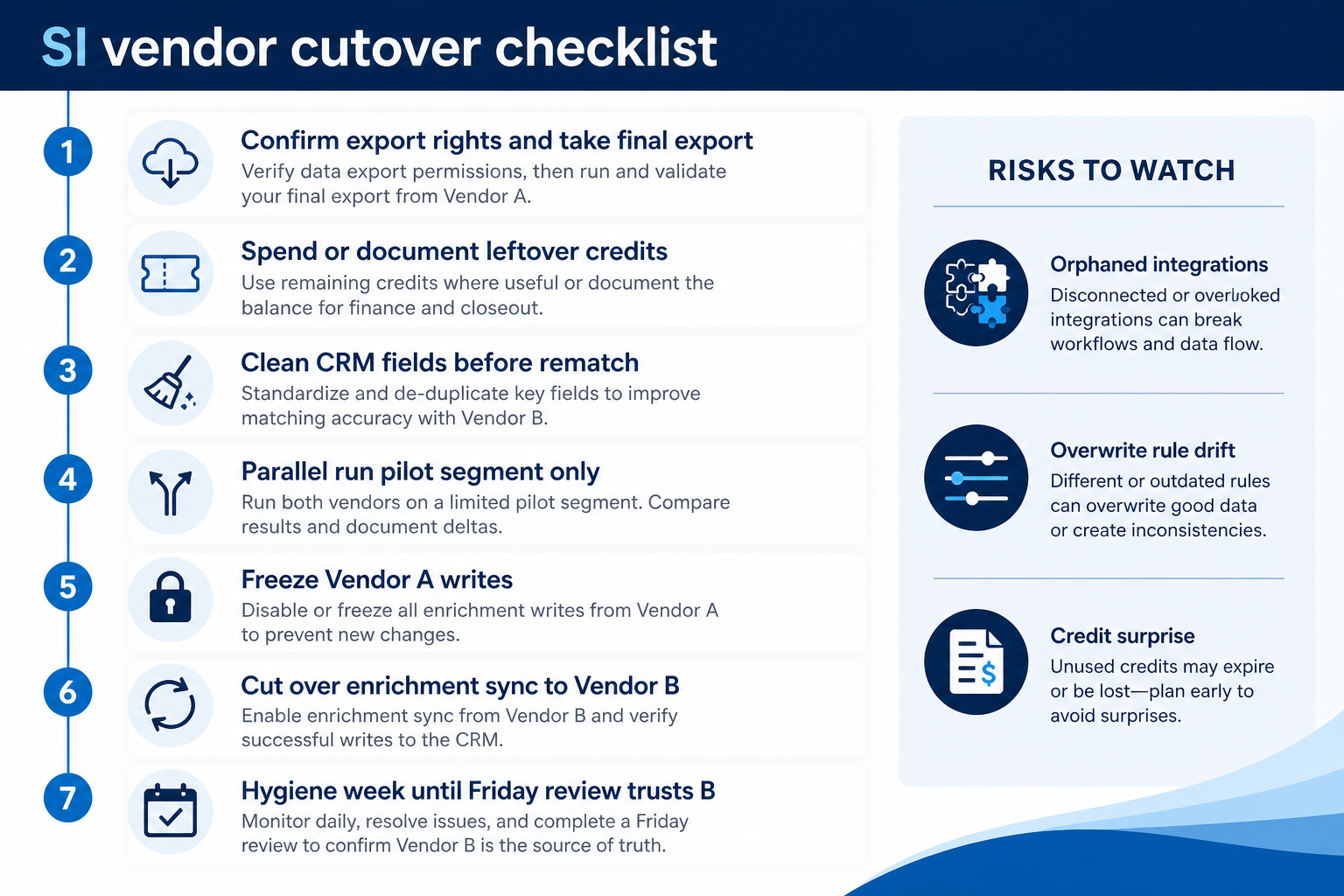
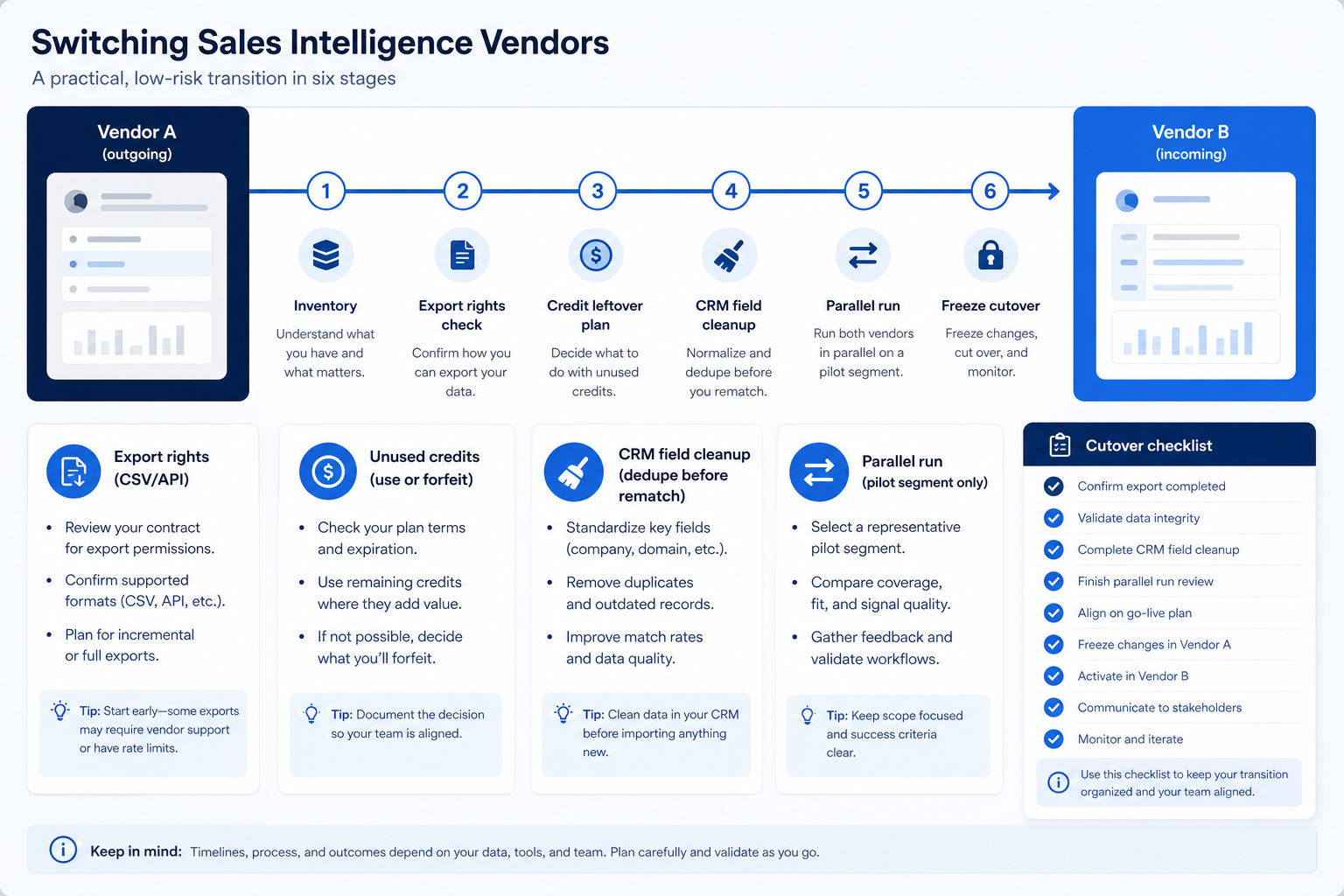
Switch sales intelligence vendors with a gated path: confirm export rights → plan leftover credits → clean CRM fields → parallel-run a pilot segment → freeze Vendor A → cut over sync to Vendor B → hygiene until Friday trusts the new source. Decision rule: do not firm-wide cutover until export samples work, overwrite rules are remapped, and a pilot proves match/fill without dual write-backs fighting in the CRM.
- Export rights
- Credit leftover
- CRM field cleanup
- Parallel run
- Freeze cutover
- Hygiene week
Key takeaways
- Export rights are a contract question — Confirm what you may export and keep before you cancel — do not assume lists survive termination.
- Credits rarely travel — Plan to use, forfeit, or negotiate leftovers explicitly — they usually do not transfer to Vendor B.
- Clean CRM before rematch — Switching SI on a dirty book multiplies duplicates when two enrich engines write back.
- Parallel run needs a freeze — Brief dual running for validation is fine; open-ended dual write-back is not.
SI vendor switch path
Cutover checklist
Vendor-switch readiness checklist
Bring these questions to every demo
Ask vendors to show the workflow live, not just describe it.
- 1Destination vendor chosen with frozen must-havesPrimary job + coverage test done — see how to choose.
- 2Export rights confirmed in contract / admin docsWhat formats, what retention after cancel.
- 3Leftover credit plan written (use / forfeit / negotiate)Named owner; no surprise empty month mid-switch.
- 4Active book cleaned before rematchDedupe, owners, blank critical fields — CRM hygiene.
- 5Field map + overwrite rules for Vendor B approvedDo not inherit Vendor A’s silent always-update defaults.
- 6Parallel pilot passed (ops + frontline)Match/fill sample; no dual write-back fights.
- 7Freeze window + rollback note scheduledTeam knows when Vendor A enrich stops.
1. Confirm export rights and take a usable export
Lists & suppressions
Export what you must keep for compliance and continuity.
CRM already has truth
Prefer CRM as system of record — SI exports are a backup.
Sequences / dialer
Often rebuild — do not assume templates port cleanly.
Before you give notice, read what your agreement and admin UI allow: CSV/API export of saved lists, enrichment history, suppression/opt-out lists, and whether exports remain usable after cancellation. Run a sample export now — do not discover broken exports on cancel week. Rank assets as must-keep live, archive-only, or retire.
Example: Harbor Advisory is leaving Vendor A for Vendor B. Ops lead Sam confirms contract language allows CSV export of saved searches and suppression lists during the term, takes a full export of suppression + open-opportunity contact snapshots, and marks Vendor A sequence templates as rebuild-in-B (not migrate). A sample API pull of 50 rows validates fields before any cancel date is set.
2. Plan leftover credits and clean CRM fields
Burn with a cap
Final enrich of open work only — not the full archive.
Forfeit consciously
If burn would dirty CRM, leave credits and move on.
Field remap
Rebuild overwrite policy for B — do not copy A’s defaults blindly.
Credits almost never transfer. Decide whether to burn remaining credits on a final bounded enrich of open work, leave them unused, or negotiate in writing — then document the choice. In parallel, clean the active CRM book: dedupe, assign owners, fix blank critical fields, and archive junk so Vendor B does not rematch chaos. Pair with CRM data hygiene and the enrichment explained overwrite rules before enabling B’s write-back.
Example: Harbor has unused email credits on A. Sam schedules a final Week enrich only for open retainers (capped), exports results to CRM under fill-blanks rules, and writes “remaining credits forfeited on cancel” in the switch brief. Then a cleaning week merges nickname duplicates and clears ownerless contacts so B’s match keys have a chance.
3. Parallel-run a pilot segment — one writer per field
Match sample
Same accounts on A vs B — usable email/dial counts.
Overwrite sample
Confirm B will not clobber owner edits.
Integration smoke
CRM sync, optional sequencer/dialer — one path each.
Connect Vendor B to a sandbox or to CRM with write-back limited to a pilot segment. Compare match/fill on the same ~200 accounts. Keep Vendor A read-only or enrich-off for that segment once B writes. Validate identity keys, overwrite behavior, and credit burn. Have ops and a frontline lead walk records together. Fix maps before firm cutover.
Example: Harbor pilots 40 retainer accounts on B. Three companies mismatch on trading-name vs legal entity; two emails would have overwritten hand corrections until fill-blanks is enforced. A stays disconnected from write-back on those 40. After a clean re-test, Sam schedules freeze Friday for A enrich org-wide.
4. Freeze, cut over, then run hygiene
Freeze
No dual enrich past the cut line.
Access
Remove A seats/SSO after final export.
Hygiene
Daily board until B is the trusted source.
Announce when Vendor A enrich/export stops, who takes the final export, and when Vendor B becomes the only SI writer into CRM. Keep the freeze short. Spot-check remapped fields and credit meters on Monday. For 1–2 weeks run a hygiene board: duplicates, blank critical fields, reps still logged into A, integrations still pointing at A. Switch is done when Friday review no longer needs Vendor A.
Example: Harbor freezes A Friday 4pm; final suppression export; Saturday B sync validation; Monday 8am sellers use only B. Sam posts a ten-business-day hygiene board. Two reps still bookmark A until Priya removes SSO access. Cutover complete when Friday pipeline review pulls contact fields from CRM fed by B only.
SI vendor-switch mistakes
Canceling before export proof
Sample exports after notice is too late if rights or formats fail.
Ignoring leftover credits
Surprise empty budget mid-quarter kills the new rollout narrative.
Rematching a dirty CRM
Two vendors’ match engines amplify duplicates.
Open-ended parallel write-back
A and B overwrite each other; nobody trusts either.
Copying overwrite defaults from Vendor A
B’s “always update email” may be worse — freeze rules again.
Skipping hygiene week
Reps keep A bookmarks; Friday still rebuilds contact truth in sheets.
Frequently asked questions
How do I migrate between sales intelligence tools?
Confirm export rights, plan leftover credits, clean CRM fields, parallel-run a pilot with one writer per field, freeze Vendor A, cut over sync to Vendor B, then run hygiene until reviews trust the new source. Use how to choose and Best sales intelligence software before you pick B.
Do unused credits transfer to the new vendor?
Usually no. Plan to use them on a bounded final job, forfeit them, or negotiate in writing. Do not invent transfer assumptions.
Should both tools sync to the CRM during the switch?
Only briefly, and with explicit field-level writer rules on a pilot segment. Open-ended dual write-back creates conflicts. Prefer freeze-then-cutover once the pilot passes.
What CRM cleanup is required?
Dedupe active records, assign owners, fill or accept blanks on critical fields, and archive junk before rematch. Ongoing rhythm lives in CRM data hygiene.
How long does an SI vendor switch take?
Duration depends on data quality, credit terms, and integration count — not a universal calendar. Prove export + parallel pilot before setting a firm cutover date.
What should I do next?
Shortlist Vendor B on Best sales intelligence software, freeze export/credit/cleanup owners, run the parallel pilot, then follow the cutover checklist. Re-implement with the SI implementation guide after cutover if seats and budgets need a fresh Week 0–4.
Was this article helpful?
Have more questions? Contact our support team.
Part of Software buying guides · How to Choose Sales Intelligence Software
Related guides
Supporting reading in this topic — not a generic related-posts dump.
- CRM Data Hygiene: Weekly Ops That Prevent DecayRun CRM data hygiene as a weekly operating rhythm with named owners, SLAs, and decay-prevention rules — not a one-time cleanup project.
- Sales Intelligence Enrichment ExplainedLearn how sales intelligence enrichment works: measure match rate on your CRM records, choose which fields to fill, freeze overwrite rules, and know when enrichment is not list building.
- Sales Intelligence Implementation Guide: Week 0–4Roll out sales intelligence in a gated Week 0–4 path — owners, CRM field map, credit budget, pilot pod, and success metrics before firm-wide seats.
SoftwareGlimpse Updates
Want clearer software shortlists? Get buying guides and comparisons by email.
Newsletter coming soon.