Sales Intelligence Implementation Guide: Week 0–4
Roll out sales intelligence in a gated Week 0–4 path — owners, CRM field map, credit budget, pilot pod, and success metrics before firm-wide seats.
Quick answer
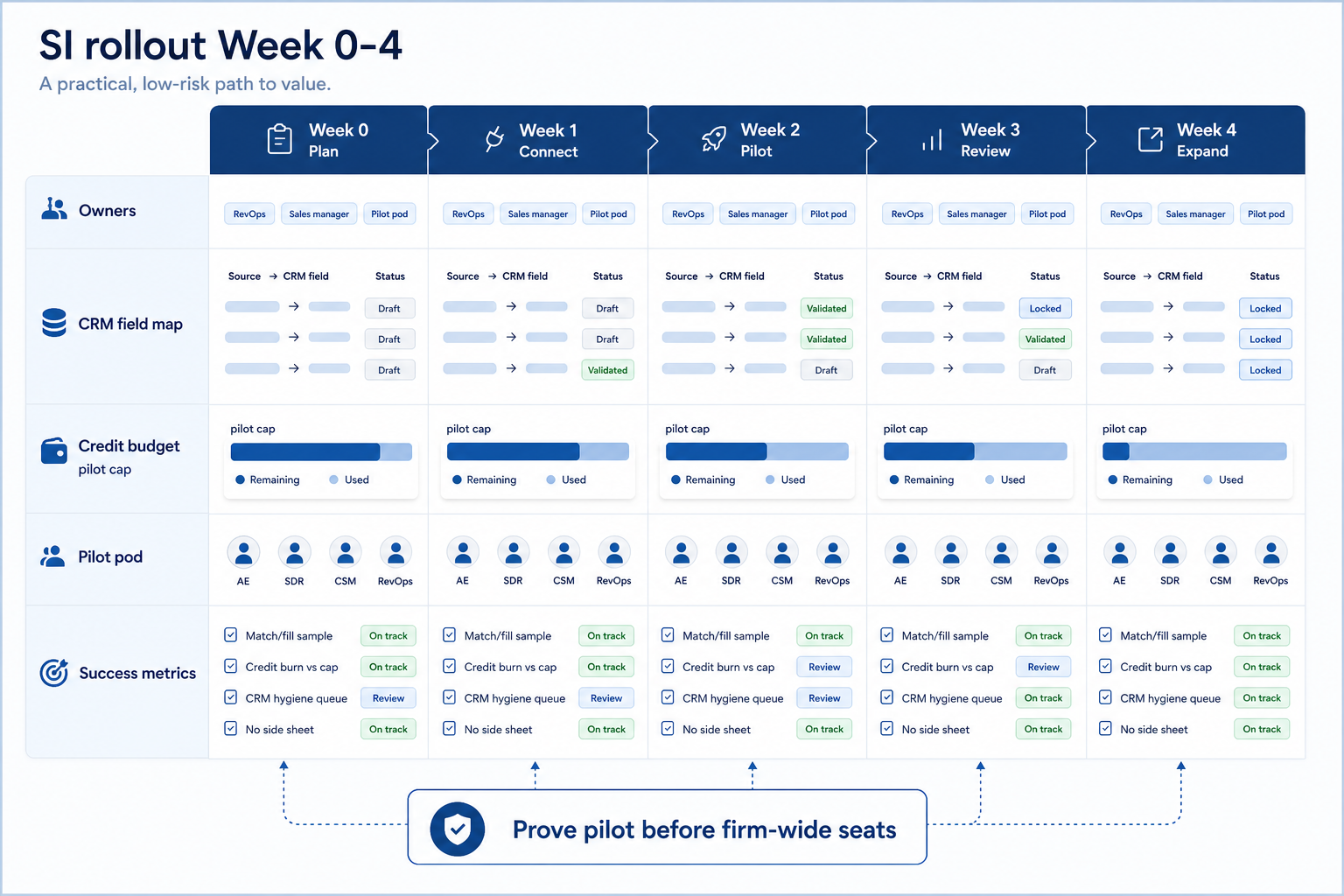
Implement sales intelligence as a gated four-week operating change: name owners, lock the CRM field map and overwrite rules, set a credit budget, run one pilot pod, then expand only after success metrics hold for two weekly reviews. Decision rule: do not firm-wide unlock seats or uncapped enrich jobs until the pilot proves match/fill quality, credit burn stays inside budget, and Friday pipeline work does not need a side spreadsheet of “real” contacts.
- Owners first
- CRM field map
- Credit budget
- Pilot pod
- Success metrics
- Expand last
Key takeaways
- Week ranges are gates, not guarantees — Week 0–4 is a planning scaffold — advance only when evidence from the pilot clears each gate.
- Credits are a shared budget — Without a cap and an owner, one hot campaign empties the month for everyone.
- Field map before seats — Overwrite rules and CRM destinations must exist before reps click Enrich.
- Pilot beats big-bang — One pod proves workflow and hygiene before you inherit every messy process.
SI implementation journey (Week 0–4)
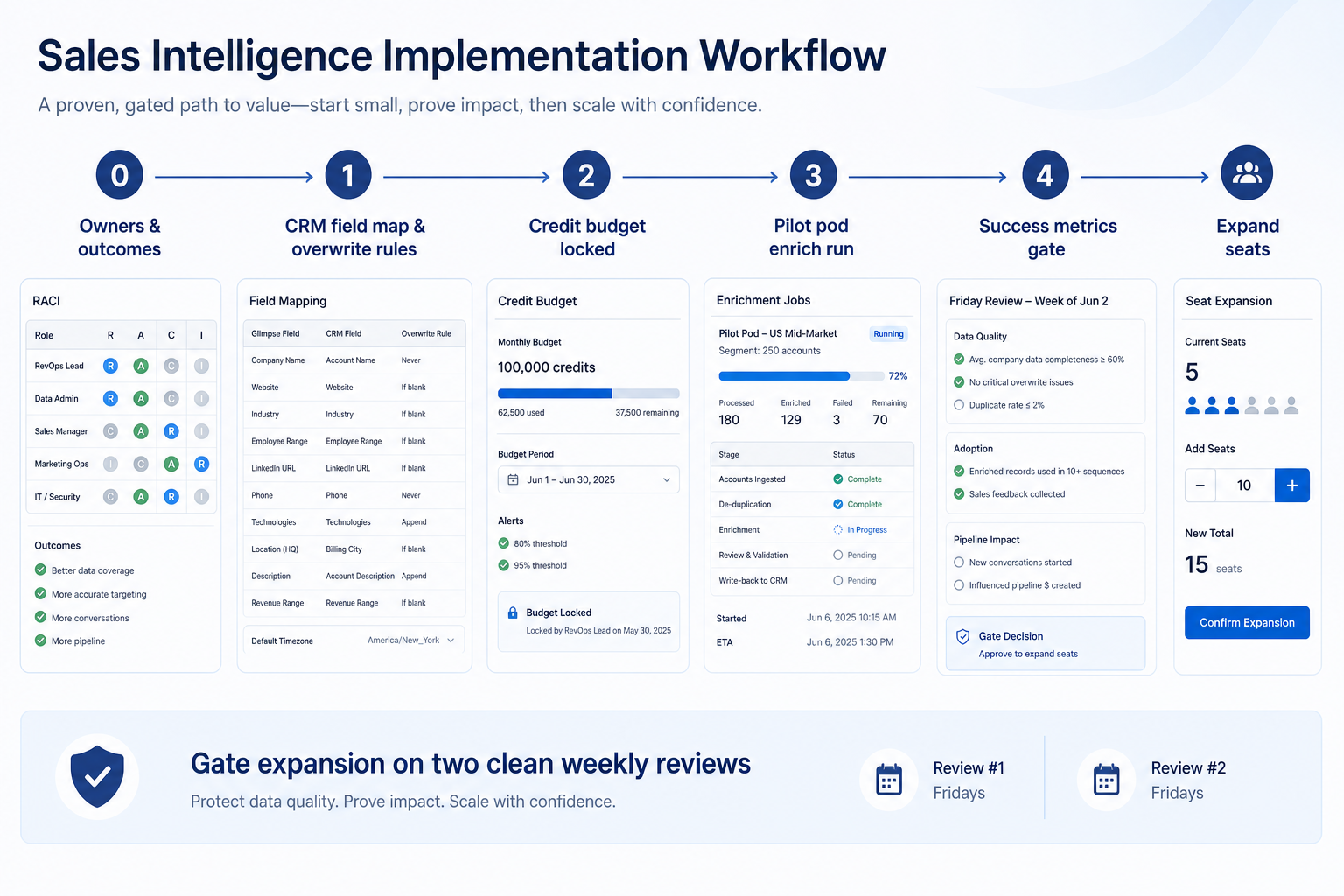
Week 0–4 rollout board
Day-zero vs later configuration
- Named owners (RevOps, sales lead, pilot pod)
- CRM field map + overwrite rules
- Credit budget + burn alerts
- CRM sync for the pilot segment
- Firm-wide seat unlock
- Intent / technographic add-ons
Before Week 0 starts
Bring these questions to every demo
Ask vendors to show the workflow live, not just describe it.
- 1Primary job frozen (enrichment, lists, engagement, dialer)How-to-choose decision done — do not implement the wrong shape.
- 2Three 30-day outcomes writtenObservable in reviews — e.g. open opps have usable email.
- 3RevOps admin + sales sponsor + pilot lead namedHours on the calendar — not “everyone owns data.”
- 4Pilot pod chosen (one team, bounded accounts)Large enough to feel real; small enough to fix fast.
- 5Credit budget and burn owner setWhat one credit buys is documented from the vendor plan.
- 6Success metrics + exit criteria writtenMatch/fill, credit burn, hygiene signals — two clean weeks.
1. Week 0 — Owners, outcomes, and pilot scope
Enrichment-led
Pilot = open opportunities or one segment’s owned book.
List-building-led
Pilot = one SDR’s weekly ICP list + CRM export path.
Founder-led
Pilot = founder book + first hire — prove handoffs early.
Freeze three near-term outcomes, a simple RACI (who is Responsible / Accountable for credits, CRM fields, and training), and a pilot pod. Do not start from a vendor “week 1–12” slide as truth — use it only as a checklist of topics.
Example: Northline Growth, a 14-person B2B services firm, freezes outcomes as (1) every open opportunity contact has a usable work email, (2) pilot SDRs start Monday from CRM — not a personal sheet, (3) monthly credit burn stays inside the agreed cap. RevOps lead Jordan owns admin and credits (~3 hours/week); sales manager Priya owns stage honesty and coaching; founder Sam sponsors scope. They pilot Priya’s four-person outbound pod on ~120 open-opportunity accounts.
2. Week 1 — CRM field map, overwrite rules, connect
Identity keys
Domain, email, LinkedIn — ambiguous matches go to a queue.
Permissions
Pilot seats only; admin can pause enrich jobs.
Compliance note
Lawful basis for outreach is yours — loop privacy before EU/UK volume.
Map SI fields → CRM fields, freeze overwrite rules (fill blanks vs refresh vs never touch), connect CRM for the pilot only, and smoke-test one enrich + one export/list path. Defer marketplace add-ons and firm-wide intent feeds. Deep-dive field intent in the enrichment explained guide; keep ongoing trust with CRM data hygiene.
Example: Northline maps work email and title to Contact; company domain to Account; owner and next-step stay CRM-only. Overwrite = fill blanks for email; monthly title refresh allowed; notes never touched. Jordan connects HubSpot for the pilot pod, runs ten manual enriches, and fixes two mismatched companies before anyone else gets a seat.
3. Week 2 — Pilot enrich (or list) under a credit budget
Enrich job
Bounded account list + credit cap + spot-check.
List job
Same ICP filters every day; count usable verified rows.
Engagement add-on
Only if primary job already clears — sequences on bad data amplify waste.
Run the primary job on the pilot segment only. Cap credits for the week. Have ops and the pilot lead walk records together: match quality, fill quality, CRM write-back, and whether reps still keep a side sheet. Fix maps and rules before inviting more seats.
Example: Northline budgets a fixed credit block for Week 2. Priya’s pod enriches open-opportunity contacts only. Three accounts rematch to the wrong legal entity; Jordan tightens domain matching and re-runs those rows. Credit burn stays under the weekly cap. Two reps still paste emails into a sheet — Priya coaches them onto the CRM view before Week 3 review.
4. Week 3 — Success metrics and the hygiene gate
Match / fill
Sample-based — not vendor dashboard vanity.
Credit burn
Inside budget with a named owner for exceptions.
Hygiene
Duplicates and orphan owners cleared on a schedule.
Review the scorecard you froze in Week 0 — typically: match/fill on the pilot sample, credits used vs budget, % open opps with usable email, duplicate incidents from write-back, and “side sheet still required?” Hold a Friday (or Monday) review from CRM. Fail the gate if metrics miss or reps cannot work without a rebuild sheet.
Example: Northline’s first Friday fails — twelve open contacts still lack email after enrich, and one duplicate cluster appeared. Jordan and Priya run two midweek hygiene huddles, merge duplicates, and re-enrich the misses under the same credit cap. Second Friday clears: board trusted, burn inside budget. Sam approves Week 4 expansion.
5. Week 4 — Expand seats, then light automation
Clone what worked
Same maps, overwrite rules, and review ritual.
Credit governance
Raise caps deliberately; never “unlimited for everyone.”
Ongoing hygiene
Keep the weekly CRM hygiene ritual — enrichment does not replace it.
After two clean weekly reviews, invite the next segment with the same field map and credit rules. Train on the pilot’s real records. Add only light automation that removes proven repetitive work (e.g. blank-email alerts). Park broad historical backfill and AI add-ons until the board stays trusted.
Example: Northline clones roles for the second pod, raises the monthly credit budget with Jordan still as burn owner, and adds one alert when open opportunities lack email for seven days. Full-CRM historical enrich stays parked for a later quarter — see enrichment explained for why match-rate pilots should stay bounded.
High-cost implementation mistakes
Firm-wide seats in Week 1
You inherit every messy process and lose the ability to fix the loop quickly.
No credit owner
One campaign burns the month; trust in the tool collapses.
Syncing before overwrite rules
Vendor defaults overwrite human-corrected emails and notes.
Implementing the wrong primary job
An enrichment rollout will not fix empty top-of-funnel list scarcity.
Treating vendor timelines as guarantees
Week 0–4 is a scaffold — gate on evidence, not slide numbers.
Skipping hygiene after write-back
Duplicates and side sheets return; “implementation” looks done while the board is untrusted.
Frequently asked questions
What is sales intelligence implementation?
The operating change of connecting SI to your CRM, freezing field maps and credit rules, training a pilot pod, proving success metrics in weekly reviews, and expanding. It is not “turning seats on.”
How long does SI implementation take?
A focused pod can prove a core loop in roughly four weeks if owners and maps are ready; multi-team rollouts take longer. Treat Week 0–4 as gated phases — not a guaranteed calendar.
What should we configure on day zero?
Owners, CRM field map, overwrite rules, credit budget, CRM sync for the pilot, and a written success scorecard. Defer firm-wide seats, historical backfill, and add-on signal packs.
How do we set a credit budget?
Document what one credit buys on your plan, estimate pilot volume (enrich rows or exports), set a weekly/monthly cap, and name an exception owner. Do not invent dollar totals — use the vendor’s published credit terms.
Who should own SI implementation?
An executive sponsor for scope, a RevOps/admin owner for sync, fields, and credits, and a sales lead accountable for pilot adoption and honest use in reviews.
What should I do next?
Confirm primary job with how to choose sales intelligence, shortlist on Best sales intelligence software, run Week 0 owners and maps, and keep CRM data hygiene on the calendar after write-back.
Was this article helpful?
Have more questions? Contact our support team.
Part of Software buying guides · How to Choose Sales Intelligence Software
Related guides
Supporting reading in this topic — not a generic related-posts dump.
- CRM Data Hygiene: Weekly Ops That Prevent DecayRun CRM data hygiene as a weekly operating rhythm with named owners, SLAs, and decay-prevention rules — not a one-time cleanup project.
- Sales Intelligence Enrichment ExplainedLearn how sales intelligence enrichment works: measure match rate on your CRM records, choose which fields to fill, freeze overwrite rules, and know when enrichment is not list building.
- Sales Intelligence Migration Guide: Switch VendorsSwitch sales intelligence vendors with export rights, leftover credit planning, CRM field cleanup, parallel run, freeze cutover, and hygiene — without dual write-back fights.
SoftwareGlimpse Updates
Want clearer software shortlists? Get buying guides and comparisons by email.
Newsletter coming soon.