Sales Intelligence Enrichment Explained
Learn how sales intelligence enrichment works: measure match rate on your CRM records, choose which fields to fill, freeze overwrite rules, and know when enrichment is not list building.
Quick answer
Sales intelligence enrichment completes and refreshes records you already own — it is not the same job as building net-new lists. Decision rule: buy and measure enrichment by match rate and fill quality on a sample of your CRM accounts, with written overwrite rules, not by the vendor’s total database size. If the primary job is finding people you do not have yet, you need list building — see how to choose sales intelligence.
- Match rate on your records
- Fields you actually fill
- Overwrite rules first
- Write-back to CRM
- Not list building
- Hygiene after enrich
Key takeaways
- Match rate beats catalog size — Millions of contacts in a vendor database say nothing about how often your known accounts get a usable email or dial.
- Choose fields on purpose — Enrich only the fields reps and reporting will use — every extra write-back is a hygiene risk.
- Overwrite rules are the product — Fill-blanks-only vs always-refresh vs never-touch-owner-edits must be agreed before the first bulk job.
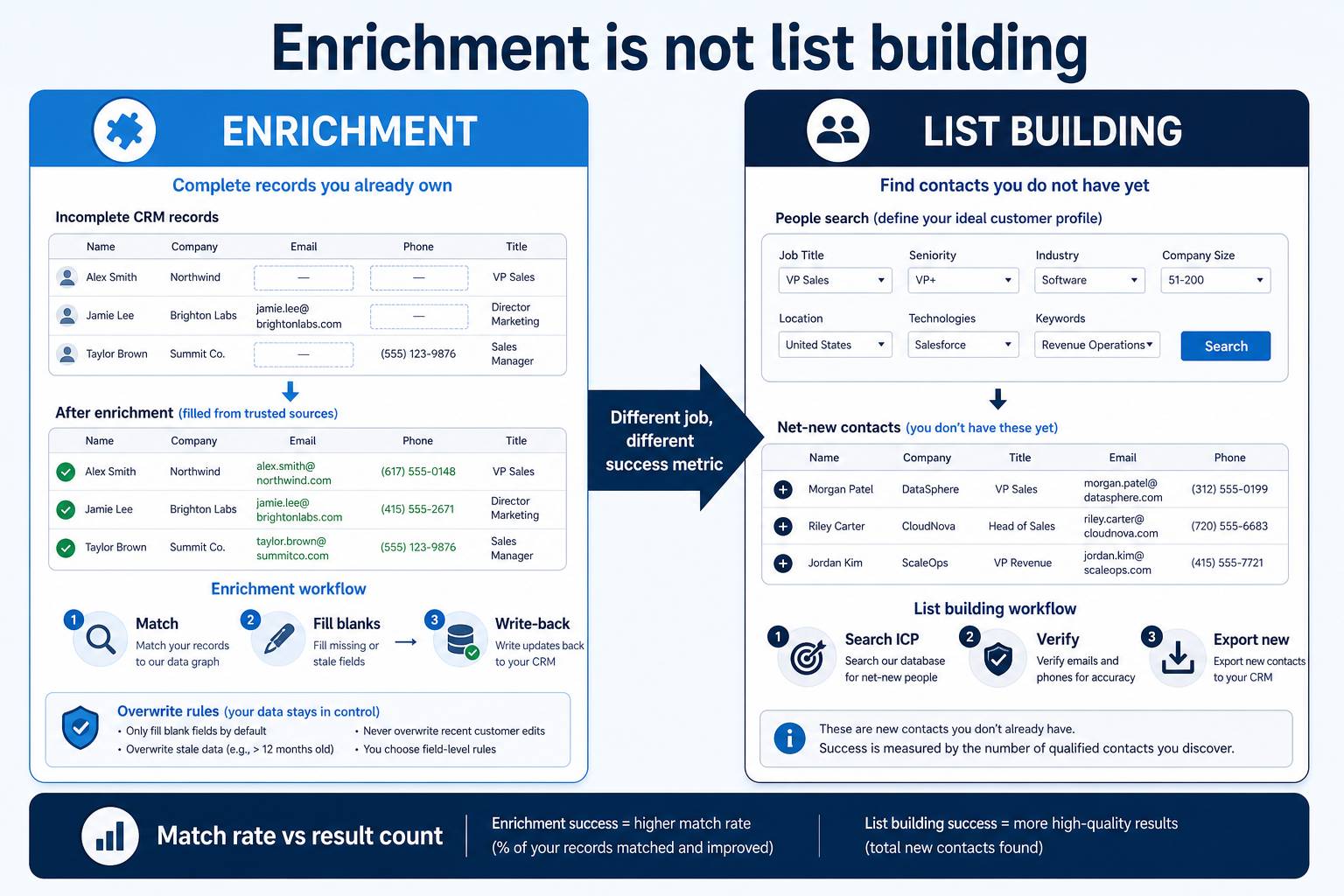
- Enrichment ≠ list building — Completing owned records and searching for net-new contacts are different jobs with different success metrics.
Enrichment operating path
Enrichment is not list building
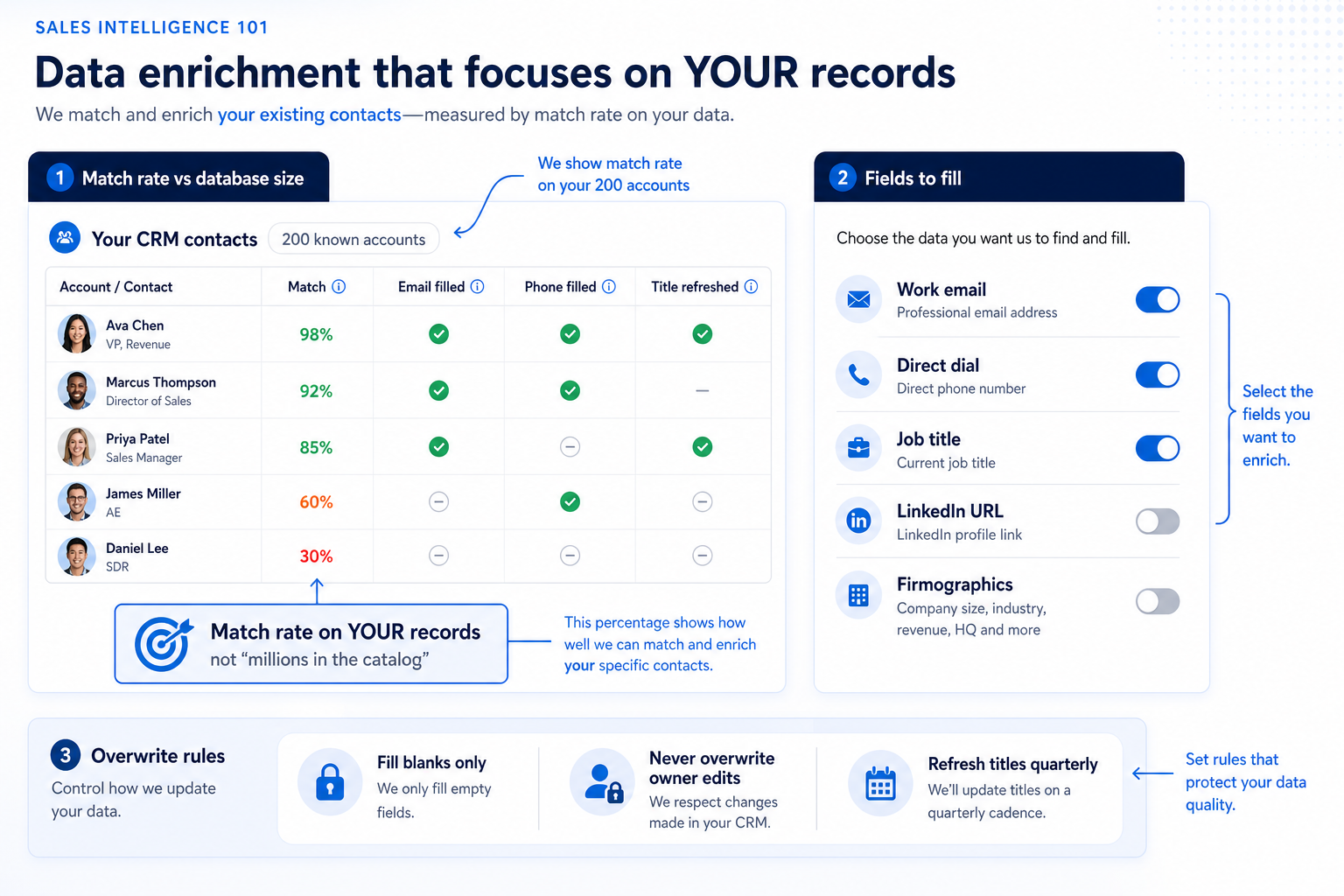
Which fields to fill (typical)
- Work email
- Direct dial / mobile (if you call)
- Current job title + company
- LinkedIn / profile URL
- Firmographics (industry, size, region)
- Technographics / intent signals
Before the first bulk enrich
Bring these questions to every demo
Ask vendors to show the workflow live, not just describe it.
- 1200 known target accounts frozen for the match testReal CRM or spreadsheet rows — not vendor demo lists.
- 2Fill list written (email, dial, title, …)Anything not on the list stays off the sync map.
- 3Overwrite policy signed by RevOps + sales leadFill blanks / refresh titles / never overwrite owner notes.
- 4Match keys agreed (domain, LinkedIn, email, …)Ambiguous matches need a human queue — not silent merges.
- 5Credit cap for the pilot enrich jobPrevent a hot run from emptying the monthly budget.
- 6Hygiene owner named for post-write-back reviewDuplicates and bad overwrites get a weekly queue.
1. Measure match rate on your records — ignore catalog size
CRM backfill
Large owned book, thin emails — enrichment is the primary job.
Title refresh
Contacts exist; titles and companies drift — scheduled refresh beats one-off imports.
Mixed stack
You already buy lists elsewhere — enrichment tools should not be judged as list builders.
Enrichment success is how often the tool correctly identifies a person or company you already have and returns usable fields. Vendor “hundreds of millions of contacts” marketing does not answer that question. Run the same sample across shortlisted tools: take ~200 known accounts or contacts from your CRM, enrich, then count matches, usable work emails, and usable phone numbers of the type you need. Spot-check a subset by hand.
Example: Mira, RevOps at Contour Labs (≈18,000 CRM contacts, outbound-led SaaS), samples 500 open-opportunity contacts. Tool A returns more total “hits” in the catalog UI but fills work email on far fewer of Mira’s rows; Tool B matches fewer catalog rows overall but fills email and title on a higher share of the sample. She shortlists Tool B for enrichment — catalog size never entered the decision.
2. Pick fields and freeze overwrite rules before sync
Fill blanks
Safest pilot default for contact channels.
Scheduled refresh
Titles and firmographics on a calendar — not every night.
Human queue
Ambiguous matches and conflicting emails wait for review.
Decide which fields may be written, who wins on conflict, and whether blank-only or refresh applies. Typical safe default for pilots: fill blanks for email and dial; refresh title and company on a schedule; never overwrite owner, next-step, or free-text notes. Map SI fields to CRM fields explicitly — see CRM data hygiene for the ongoing rhythm after write-back.
Example: Contour Labs freezes: work email = fill blank only; mobile = fill blank only if dialer pod is on; title + company = allow refresh monthly; owner and next-step date = never touch. Mira rejects a vendor default that “always updates email” after a sales manager shows three contacts whose hand-corrected emails would have been overwritten.
3. Know when enrichment is the wrong product
Owned book, thin fields
Enrichment primary — measure match and fill.
Empty pipeline top-of-funnel
List building primary — enrichment is secondary.
Both jobs real
Treat as two decisions — do not force one weaker tool to win both.
If the weekly blocker is “we do not have enough net-new contacts in our ICP,” enrichment will not fix it — you need searchable list building (and possibly engagement or dialer). Enrichment shines when accounts and contacts already live in the CRM or a sheet, but emails, dials, or titles are missing or stale. Teams that buy an enrichment-strong tool to solve list scarcity usually burn credits on rematching the same thin book.
Example: Contour’s SDR lead wanted “more names.” Mira runs a week of enrichment only on existing open opportunities — reply rates improve on refreshed titles, but Monday still lacks a fresh ICP list. They keep the enrichment vendor for CRM fill and separately evaluate a data / list-building primary job using the how-to-choose framework and the Best sales intelligence software shortlist.
4. Write back carefully, then run hygiene
Pilot slice first
Open opportunities or one segment — not the full archive.
Credit guardrails
Cap jobs; review burn in the same weekly ritual as hygiene.
Expand later
Widen the enrich set only after two clean Friday reviews.
After a pilot enrich, spot-check write-backs: correct company links, no owner overwrites, duplicate rate not spiked, credits used within budget. Only then schedule recurring enrichment. Pair with CRM data hygiene so filled fields do not decay into duplicates and conflicting sources of truth.
Example: Contour’s first write-back creates 40 near-duplicate contacts from nickname mismatches. Mira pauses the schedule, tightens match keys to domain + LinkedIn URL, merges the pilot duplicates, and only then turns on a weekly blank-fill for open opportunities — not the whole 18,000-row base.
High-cost enrichment mistakes
Buying on database size
Catalog marketing is not a match-rate claim about your CRM.
Enriching every field the vendor offers
Unused fields become conflicting truth and reporting noise.
No overwrite policy
Vendor defaults that always update email will clobber human corrections.
Treating enrichment as list building
You rematch the same thin book and still start Monday without net-new coverage.
Firm-wide write-back on day one
Match-key bugs multiply across every account before you notice.
Skipping hygiene after sync
Duplicates and blank owners return — enrichment looks “done” while the board is untrusted.
Frequently asked questions
What is sales intelligence enrichment?
Enrichment matches people and companies you already have and fills or refreshes fields (email, phone, title, firmographics) back into your CRM or sheet. It is a data-completion job — not the same as searching a database for net-new contacts.
What is match rate?
The share of your sample records the tool correctly identifies and can enrich. Measure it on your own accounts during a trial. It is not the same as the vendor’s total contact count.
Which CRM fields should enrichment update?
Usually work email, dial (if you call), and current title/company. Defer technographics and intent until core contact fields are trusted. Freeze an overwrite policy before sync.
When is enrichment the wrong buy?
When the blocker is lack of net-new ICP contacts. In that case shortlist list-building (data) tools first — see how to choose sales intelligence and the Best sales intelligence software page.
How does enrichment relate to CRM hygiene?
Write-back without owners, duplicate rules, and a weekly review decays quickly. Use CRM data hygiene for the operating rhythm after enrichment lands.
What should I do next?
Run a 200-account match test, freeze fields and overwrite rules, then compare enrichment-capable tools on the sales intelligence category and Best page. If product shape is still unclear, start with how to choose sales intelligence.
Was this article helpful?
Have more questions? Contact our support team.
Part of Software buying guides · How to Choose Sales Intelligence Software
Related guides
Supporting reading in this topic — not a generic related-posts dump.
- CRM Data Hygiene: Weekly Ops That Prevent DecayRun CRM data hygiene as a weekly operating rhythm with named owners, SLAs, and decay-prevention rules — not a one-time cleanup project.
- Sales Intelligence Implementation Guide: Week 0–4Roll out sales intelligence in a gated Week 0–4 path — owners, CRM field map, credit budget, pilot pod, and success metrics before firm-wide seats.
- Sales Intelligence Migration Guide: Switch VendorsSwitch sales intelligence vendors with export rights, leftover credit planning, CRM field cleanup, parallel run, freeze cutover, and hygiene — without dual write-back fights.
SoftwareGlimpse Updates
Want clearer software shortlists? Get buying guides and comparisons by email.
Newsletter coming soon.