Salesforce Account Engagement Implementation: 30/60/90 Rollout That Sticks
Plan a practical Salesforce Account Engagement rollout — owners, stages, adoption checkpoints, and what to defer so the CRM becomes the system of record.
Quick answer
Roll out Salesforce Account Engagement in three phases: days 1–30 get selling work happening in the CRM, days 31–60 make Friday reviews run from Salesforce Account Engagement, and days 61–90 add only what still isn’t working. If sellers still need an admin for basic deal updates by week two, pause new features and fix that first.
- Freeze 3 outcomes
- Name an admin
- Day 30: live pipeline
- Day 60: light automation
- Day 90: expand carefully
- Adoption before features
Salesforce Account Engagement rollout takeaways
- Implementation is habit work — Salesforce Account Engagement (Pardot) is Salesforce’s B2B marketing automation product for lead nurture, scoring, and Sales Cloud-aligned campaigns — typically packaged with Salesforce editions via custom quote. Marketing is secondary to CRM-primary catalogue… None of that helps until the weekly loop is boring.
- Sequence features to plan gates — Our research does not flag plan-gated capabilities for Salesforce Account Engagement, but confirm your must-haves against the plan you actually intend to buy.
- Enable in this order — Days 1–30: contact management, lead management, pipeline management, and deal management. Days 31–60: reporting and workflow automation. Days 61–90: AI assistance.
- Measure adoption, not configuration — Count deals with a next step, stage moves per seller per week, and activities logged in Salesforce Account Engagement — not modules enabled.
- Know what you inherited — Research watch-outs to plan around: Pricing/packaging via Salesforce sales motion; Not a standalone sales CRM; Admin overhead for MA programs.
- AI is a day-61 decision — Salesforce Account Engagement research mentions AI assistance without naming capabilities. Research places AI assistance on Enterprise.
Salesforce Account Engagement 30/60/90 path
Salesforce Account Engagement implementation walkthrough
Salesforce Account Engagement: must-have vs nice-to-have
- contact management and lead management
- reporting
- workflow automation
- Forecasting
- AI assistance
Salesforce Account Engagement checklist
Bring these questions to every demo
Ask vendors to show the workflow live, not just describe it.
- 1Freeze three 90-day outcomesBusiness language, not module names.
- 2Assign RACI for admin + sales leadResponsible and Accountable names in writing.
- 3Prove the day-30 core loopLive deals, training, Friday review inside the CRM.
- 4Run four weeks of CRM-native reviewsTwo views + at most one automation.
- 5Expand only unmet outcomesConfirm plan gates before new capabilities.
- 6Run the adoption scorecardGreen / amber / red before calling it done.
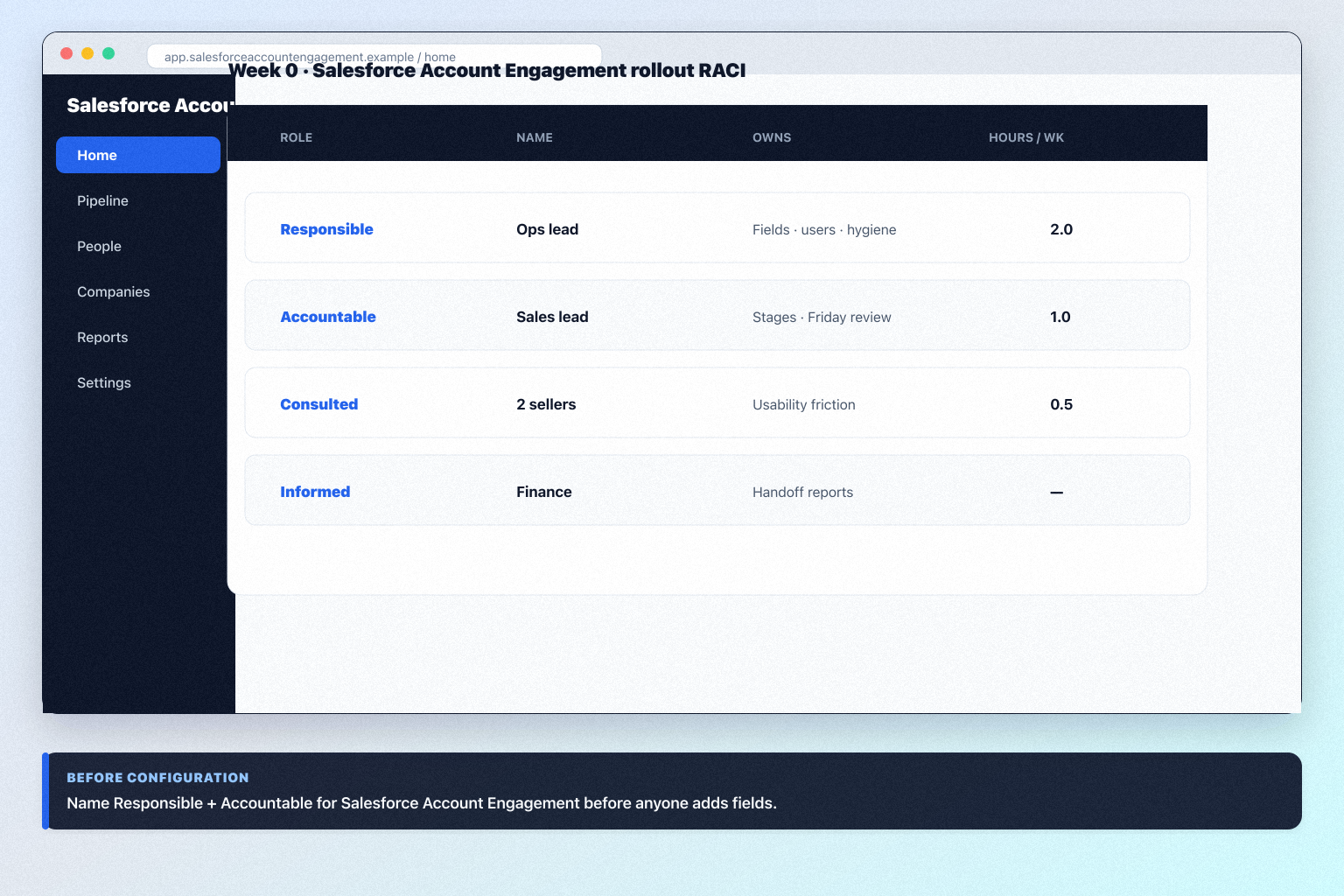
1. Week 0: freeze three outcomes and assign RACI
Lock three 90-day outcomes and name Responsible / Accountable before anyone configures Salesforce Account Engagement.
- Write exactly three 90-day outcomes in business language.
- Assign RACI — Responsible: Salesforce Account Engagement admin owner; Accountable: sales lead; Consulted: two sellers; Informed: finance and delivery.
- Write the “not now” list for anything not tied to the three outcomes.
- Book the day-30 and day-60 reviews in the calendar now.
Worked example: a 12-person B2B advisory team freezes three outcomes for Salesforce Account Engagement, gives ops two hours a week as Responsible, and defers AI assistance to day 61.
2. Days 1–30: make one loop real in Salesforce Account Engagement
In scope
contact management, lead management, and pipeline management and one pipeline.
Out of scope
workflow automation — later phases.
Exit criteria
Every open deal has an owner, a stage, and a dated next step.
- Finish the setup guide's six steps if they are not already done — pipeline, users, required fields, email sync, non-admin loop proof.
- Turn on only what the loop needs. Research supports contact management, lead management, pipeline management, deal management, and custom pipelines on your researched entry tier (Enterprise).
- Move real, current deals in — not a demo dataset. Sellers do not trust fake pipelines.
- Train on the loop, not the product: one 45-minute session where every seller creates a deal, logs an activity, and sets a next step in Salesforce Account Engagement on their own screen.
- Hold one Friday pipeline review inside Salesforce Account Engagement. If anyone reads from a spreadsheet, that is your day-30 defect.
Worked example: a 12-person B2B advisory team imports 40 live deals into Salesforce Account Engagement, runs one training session on their own pipeline, and bans the shadow spreadsheet from the Friday call in week three.
3. Days 31–60: build the weekly rhythm and light automation
Healthy signal
Deals move with notes; the forecast conversation uses CRM numbers.
Warning signal
Empty next steps, or contact lists maintained outside Salesforce Account Engagement.
Hard stop
No admin owner after 30 days — fix staffing before features.
Build the management rhythm in Salesforce Account Engagement before you automate.
- Build two views: open pipeline by stage with next steps, and deals with no activity in 14 days. Reporting is researched across every Salesforce Account Engagement plan we snapshot.
- Run every pipeline review from Salesforce Account Engagement for four consecutive weeks.
- Add automation only where a human forgets something predictable. Workflow automation is researched across every Salesforce Account Engagement plan we snapshot.
- Fix data quality with rules, not nagging.
- In Salesforce Account Engagement, open the reports, dashboards, or automation area — confirm the current control labels in the product, docs, or trial.
Worked example: a 12-person B2B advisory team adds two Salesforce Account Engagement views and one automation that creates a follow-up task when a deal enters proposal — then stops, because hygiene is still at 70%.
4. Days 61–90: expand only what evidence justifies
Expand
An outcome is unmet and the missing capability is the blocker.
Hold
Outcome is met — resist the feature tour.
Escalate to plans
The needed capability is gated. Our research does not flag plan-gated capabilities for Salesforce Account Engagement, but confirm your must-haves against the plan you actually intend to buy.
- Re-read the three outcomes. Expand only where an outcome is still missing.
- Then, in this order: second pipeline or extra objects, forecasting, sequences, enrichment, remaining integrations. Confirm which capabilities your Salesforce Account Engagement plan carries before scheduling this phase.
- Decide on AI deliberately. Salesforce Account Engagement research mentions AI assistance without naming capabilities. Research places AI assistance on Enterprise. Turn on one capability, measure whether reps keep using it after two weeks, then decide on the rest.
- Connect the remaining integrations from your requirements sheet. Our research does not name specific Salesforce Account Engagement integrations, so verify each connector you depend on in the vendor's integration directory before go-live.
- Write down what you chose not to do and why. That list is your renewal-time evidence.
Worked example: a 12-person B2B advisory team adds a second Salesforce Account Engagement pipeline for renewals, enables one AI capability for meeting summaries, and leaves enrichment off because nobody could name the decision it would change.
5. Run the adoption review before anyone says “done”
Score five adoption metrics at day 30, 60, and 90 before you add more Salesforce Account Engagement features.
- Percentage of open deals with a dated next step.
- Stage moves per seller per week.
- Activities logged per seller per week.
- Number of shadow spreadsheets still in use.
- Admin hours actually spent versus the two hours committed.
If three of five are weak, do not add Salesforce Account Engagement features — simplify stages, retrain, or fix ownership.
Worked example: at day 30, two of a 12-person B2B advisory team's sellers still rebuilt Friday in a spreadsheet. The team paused automation, cut two Salesforce Account Engagement stages, retrained in 30 minutes, and hit 90% next-step coverage by day 45.
Salesforce Account Engagement implementation mistakes
Configuring everything in week one
Unused modules create noise and maintenance. Ship contact management, lead management, pipeline management, and deal management first in Salesforce Account Engagement.
No named admin owner
Without Responsible and Accountable names, fields and hygiene rot quietly.
Training managers instead of sellers
A manager demo is not a non-admin walkthrough on a seller's own screen.
Automating a broken process
Workflow automation in Salesforce Account Engagement multiplies whatever process you already have — including the mess.
Enabling gated features you did not buy
Our research does not flag plan-gated capabilities for Salesforce Account Engagement, but confirm your must-haves against the plan you actually intend to buy. Confirm the plan before you put a capability in the rollout plan.
Ignoring a documented tradeoff
Research flags: Not a standalone sales CRM. Decide how you will live with it before day 60.
Frequently asked questions
How long does Salesforce Account Engagement implementation take?
Small teams reach a usable core loop in weeks when outcomes are frozen and an admin is named; the 30/60/90 frame exists for habits, not clicking. Decision rule: do not call it done until non-admins run the loop unaided and a new hire can follow the one-page note.
What should we enable first in Salesforce Account Engagement?
Start with contact management, lead management, pipeline management, and deal management on your entry tier (Enterprise), one pipeline, and required fields. Everything else waits for adoption evidence.
When should we turn on automation?
Days 31–60, after four clean weekly reviews. Workflow automation is researched across every Salesforce Account Engagement plan we snapshot. Automate only predictable human forgetfulness — task creation, owner assignment.
When should we enable AI in Salesforce Account Engagement?
Salesforce Account Engagement research mentions AI assistance without naming capabilities. Research places AI assistance on Enterprise. Enable it in the days 61–90 phase, one capability at a time, and keep it only if reps still use it two weeks later.
What adoption metrics actually matter?
Next-step coverage on open deals, stage moves per seller per week, activities logged per seller, surviving shadow spreadsheets, and real admin hours. Modules enabled is a vanity metric.
Do we need consultants?
Many SMB Salesforce Account Engagement rollouts succeed with an internal admin and a one-page plan. Bring help when integrations, complex permissions, or a large migration exceed that capacity — and scope it in writing against your three outcomes.
What if adoption stalls at day 60?
Stop adding features. Cut stages, re-train on the loop, and check whether the admin owner actually has time. If the core loop still fails, re-open the fit question in the Salesforce Account Engagement worth-it guide and compare HubSpot and Adobe Marketo Engage.
What should I do next?
Use the Salesforce Account Engagement setup guide for day-zero configuration, the migration guide if history is still moving, and the plans guide if a needed capability turns out to be gated.
Was this article helpful?
Have more questions? Contact our support team.
SoftwareGlimpse Updates
Want clearer software shortlists? Get buying guides and comparisons by email.
Newsletter coming soon.