Motion vs Office Timeline
Thesis: Overlapping use cases, different tradeoffs — Motion and Office Timeline share buyer workflows; choose based on documented strengths and limits. Comparison thesis: Overlapping use cases, different tradeoffs. Choose Motion only if your buying job matches “AI calendar + task auto-scheduling (projects, docs, meetings) — Pro AI from $19/seat/mo an” rather than Office Timeline's shape. Choose Office Timeline only if your buying job matches “PowerPoint-native timeline / Gantt specialist (now Lucen Timeline) — Free add-in; Lite fro” rather than Motion's shape. Workflow advantage: Motion leans work-management; Office Timeline leans timeline-reporting. Trade-off: you gain focus on one product's motion at the cost of the other's adjacent coverage — no universal winner. Major differences: - Buyer thesis: Overlapping use cases, different tradeoffs — Motion and Office Timeline share buyer workflows; choose based on documented strengths and limits. - Positioning: Motion is AI calendar + task auto-scheduling (projects, docs, meetings) — Pro AI from $19/seat/mo annual.; Office Timeline is PowerPoint-native timeline / Gantt specialist (now Lucen Timeline) — Free add-in; Lite from $9/user/mo annual.. - Company-size focus: Motion (micro, small-business, mid-market) vs Office Timeline (small-business, mid-market, enterprise). - Workflow coverage skew: Motion-leaning work-management vs Office Timeline-leaning timeline-reporting. - Researched limits: Motion — Premium $19+ seats vs broader Work OS floors; Office Timeline — Not a work OS — no monday/Hive-class boards, automations or workload management. Limitations — Motion: Premium $19+ seats vs broader Work OS floors; AI credit caps and top-ups affect TCO; Office Timeline: Not a work OS — no monday/Hive-class boards, automations or workload management; Centre of gravity is PowerPoint presentation timelines, not live team task execution. Poor-fit cases: Motion is a poor fit when that limitation bites: Premium $19+ seats vs broader Work OS floors · Office Timeline is a poor fit when that limitation bites: Not a work OS — no monday/Hive-class boards, automations or workload management · Avoid Motion if you actually need Office Timeline's motion (PowerPoint-native timeline / Gantt specialist (now Lucen Timeline) — Free add-in) Neither product has a completed hands-on product test on SoftwareGlimpse — this comparison is research/data-based only.

Motion
AI calendar + task auto-scheduling (projects, docs, meetings) — Pro AI from $19/seat/mo annual.
Best for
- • your buying job matches “AI calendar + task auto-scheduling (projects, docs, meetings) — Pro AI from $19/seat/mo an” rather than Office Timeline's shape
- • use-case priority is work-management and Office Timeline is secondary for that motion
Starting from $19.00/user/mo
No free plan
VS
Our verdict
Comparison thesis: Overlapping use cases, different tradeoffs. Choose Motion only if your buying job matches “AI calendar + task auto-scheduling (projects, docs, meetings) — Pro AI from $19/seat/mo an” rather than Office Timeline's shape. Choose Office Timeline only if your buying job matches “PowerPoint-native timeline / Gantt specialist (now Lucen Timeline) — Free add-in; Lite fro” rather than Motion's shape. Workflow advantage: Motion leans work-management; Office Timeline leans timeline-reporting. Trade-off: you gain focus on one product's motion at the cost of the other's adjacent coverage — no universal winner. Motion is a poor fit when that limitation bites: Premium $19+ seats vs broader Work OS floors Office Timeline is a poor fit when that limitation bites: Not a work OS — no monday/Hive-class boards, automations or workload management Hard limitation for Motion when it matters: Premium $19+ seats vs broader Work OS floors. Hard limitation for Office Timeline when it matters: Not a work OS — no monday/Hive-class boards, automations or workload management. Neither product has a completed hands-on product test on SoftwareGlimpse — this comparison is research/data-based only. Pricing threshold: estimate spend with the cost calculator before shortlisting.
Motion is better for
- ✓ Automations
- ✓ AI features
Office Timeline is better for
- ✓ Free plan
- ✓ Timeline / Gantt
- ✓ Reporting
- ✓ Value for money
Tie
- • Ease of use
- • Collaboration
- • Integrations
Choose Motion if: your buying job matches “AI calendar + task auto-scheduling (projects, docs, meetings) — Pro AI from $19/seat/mo an” rather than Office Timeline's shape
Choose Office Timeline if: your buying job matches “PowerPoint-native timeline / Gantt specialist (now Lucen Timeline) — Free add-in; Lite fro” rather than Motion's shape

Office Timeline
PowerPoint-native timeline / Gantt specialist (now Lucen Timeline) — Free add-in; Lite from $9/user/mo annual.
Best for
- • your buying job matches “PowerPoint-native timeline / Gantt specialist (now Lucen Timeline) — Free add-in; Lite fro” rather than Motion's shape
- • use-case priority is timeline-reporting and Motion is secondary for that motion
Starting from $9.00/user/mo
Free plan available
Quick verdict
Start here — then dig into the evidence below.
Choose Motion if…
- your buying job matches “AI calendar + task auto-scheduling (projects, docs, meetings) — Pro AI from $19/seat/mo an” rather than Office Timeline's shape
- use-case priority is work-management and Office Timeline is secondary for that motion
- You prioritize automations
- You prioritize ai features
Choose Office Timeline if…
- your buying job matches “PowerPoint-native timeline / Gantt specialist (now Lucen Timeline) — Free add-in; Lite fro” rather than Motion's shape
- use-case priority is timeline-reporting and Motion is secondary for that motion
- You prioritize free plan
- You prioritize timeline / gantt
Overall recommendation
Comparison thesis: Overlapping use cases, different tradeoffs. Choose Motion only if your buying job matches “AI calendar + task auto-scheduling (projects, docs, meetings) — Pro AI from $19/seat/mo an” rather than Office Timeline's shape. Choose Office Timeline only if your buying job matches “PowerPoint-native timeline / Gantt specialist (now Lucen Timeline) — Free add-in; Lite fro” rather than Motion's shape. Workflow advantage: Motion leans work-management; Office Timeline leans timeline-reporting. Trade-off: you gain focus on one product's motion at the cost of the other's adjacent coverage — no universal winner. Motion is a poor fit when that limitation bites: Premium $19+ seats vs broader Work OS floors Office Timeline is a poor fit when that limitation bites: Not a work OS — no monday/Hive-class boards, automations or workload management Hard limitation for Motion when it matters: Premium $19+ seats vs broader Work OS floors. Hard limitation for Office Timeline when it matters: Not a work OS — no monday/Hive-class boards, automations or workload management. Neither product has a completed hands-on product test on SoftwareGlimpse — this comparison is research/data-based only. Pricing threshold: estimate spend with the cost calculator before shortlisting.
Key trade-off
Motion trades toward automations; Office Timeline trades toward free plan.
Winner by category
Only dimensions with researched evidence for this pair.
| Dimension | Winner | Why |
|---|---|---|
| Free plan | Office Timeline wins | Motion vs Office Timeline on free plan: Motion and Office Timeline share buyer workflows; choose based on documented strengths and limits. Decision edge to Office Timeline on this criterion for this pair — unlike a generic feature matrix, the hinge is the buyer job above. |
| Ease of use | Tie | Motion vs Office Timeline on ease of use: Motion and Office Timeline share buyer workflows; choose based on documented strengths and limits. Decision edge to neither product on this criterion for this pair — unlike a generic feature matrix, the hinge is the buyer job above. |
| Timeline / Gantt | Office Timeline wins | Motion vs Office Timeline on timeline gantt: Motion and Office Timeline share buyer workflows; choose based on documented strengths and limits. Decision edge to Office Timeline on this criterion for this pair — unlike a generic feature matrix, the hinge is the buyer job above. |
| Automations | Motion wins | Motion vs Office Timeline on automations: Motion and Office Timeline share buyer workflows; choose based on documented strengths and limits. Decision edge to Motion on this criterion for this pair — unlike a generic feature matrix, the hinge is the buyer job above. |
| Collaboration | Tie | Motion vs Office Timeline on collaboration: Motion and Office Timeline share buyer workflows; choose based on documented strengths and limits. Decision edge to neither product on this criterion for this pair — unlike a generic feature matrix, the hinge is the buyer job above. |
| Integrations | Tie | Motion vs Office Timeline on integrations: Motion and Office Timeline share buyer workflows; choose based on documented strengths and limits. Decision edge to neither product on this criterion for this pair — unlike a generic feature matrix, the hinge is the buyer job above. |
| AI features | Motion wins | Motion vs Office Timeline on ai features: Motion and Office Timeline share buyer workflows; choose based on documented strengths and limits. Decision edge to Motion on this criterion for this pair — unlike a generic feature matrix, the hinge is the buyer job above. |
| Reporting | Office Timeline wins | Motion vs Office Timeline on reporting: Motion and Office Timeline share buyer workflows; choose based on documented strengths and limits. Decision edge to Office Timeline on this criterion for this pair — unlike a generic feature matrix, the hinge is the buyer job above. |
| Value | Office Timeline wins | Motion vs Office Timeline on value for money: Motion and Office Timeline share buyer workflows; choose based on documented strengths and limits. Decision edge to Office Timeline on this criterion for this pair — unlike a generic feature matrix, the hinge is the buyer job above. |
Side-by-side feature matrix
Normalized availability from product research — empty rows are not shown.
Work planning
| Feature | Motion | Office Timeline |
|---|---|---|
| Task boards & work views | Strong | Moderate |
| Timeline / Gantt | Moderate | Strong |
| Workload & resource management | Moderate | Limited |
| Time tracking | Moderate | Limited |
Execution
| Feature | Motion | Office Timeline |
|---|---|---|
| Automations & workflows | Strong | Limited |
| Docs & collaboration | Strong | Moderate |
| AI assistance | Strong | Limited |
Platform
| Feature | Motion | Office Timeline |
|---|---|---|
| Integrations ecosystem | Strong | Moderate |
| Reporting & dashboards | Moderate | Strong |
Adjacent productivity
| Feature | Motion | Office Timeline |
|---|---|---|
| Document / PDF productivity | Limited | Limited |
| Remote access / screen share | Limited | Limited |
| Desktop workspace organizer | Limited | Limited |
Pricing comparison
Pricing evidence last checked Sep 10, 2026.
Motion
From $19.00/user/mo
- Pro AI$19.00/user/mo
- Business AI$29.00/user/mo
Office Timeline
From $9.00/user/mo
- Free$0.00/user/mo
- Lite$9.00/user/mo
- Plus$17.00/user/mo
- Expert$21.00/user/mo
Seat-count estimates
Labeled estimates from verified starting per-seat pricing — not invoices.
| Seats | Motion | Office Timeline |
|---|---|---|
| 5 | ~$95.00/mo (5 × starting seat) | ~$45.00/mo (5 × starting seat) |
| 10 | ~$190.00/mo (10 × starting seat) | ~$90.00/mo (10 × starting seat) |
| 25 | ~$475.00/mo (25 × starting seat) | ~$225.00/mo (25 × starting seat) |
| 50 | ~$950.00/mo (50 × starting seat) | ~$450.00/mo (50 × starting seat) |
Estimate from verified starting per-seat pricing — actual total depends on plan, annual discounts, and add-ons.
Starting prices not verified for either product Model team cost scenarios in the project-management cost calculator Cost calculator: /tools/project-management-cost-calculator/
Best for
Scenario picks from researched strengths — not a universal ranking.
- → Depends
Prefer Motion when your buying job matches “AI calendar + task auto-scheduling (projects, docs, meetings) — Pro AI from $19/seat/mo an” rather than Office Timeline's shape
Prefer Motion when your buying job matches “AI calendar + task auto-scheduling (projects, docs, meetings) — Pro AI from $19/seat/mo an” rather than Office Timeline's shape
- → Depends
Prefer Motion when use-case priority is work-management and Office Timeline is secondary for that motion
Prefer Motion when use-case priority is work-management and Office Timeline is secondary for that motion
- → Depends
Prefer Office Timeline when your buying job matches “PowerPoint-native timeline / Gantt specialist (now Lucen Timeline) — Free add-in; Lite fro” rather than Motion's shape
Prefer Office Timeline when your buying job matches “PowerPoint-native timeline / Gantt specialist (now Lucen Timeline) — Free add-in; Lite fro” rather than Motion's shape
- → Depends
Prefer Office Timeline when use-case priority is timeline-reporting and Motion is secondary for that motion
Prefer Office Timeline when use-case priority is timeline-reporting and Motion is secondary for that motion
- → Motion
Best for automations
Motion vs Office Timeline on automations: Motion and Office Timeline share buyer workflows; choose based on documented strengths and limits. Decision edge to Motion on this criterion for this pair — unlike a generic feature matrix, the hinge is the buyer job above.
- → Motion
Best for ai features
Motion vs Office Timeline on ai features: Motion and Office Timeline share buyer workflows; choose based on documented strengths and limits. Decision edge to Motion on this criterion for this pair — unlike a generic feature matrix, the hinge is the buyer job above.
The differences that actually matter
Pair-specific analysis for Motion vs Office Timeline — not generic category copy.
Timeline / Gantt
Office Timeline aheadOn timeline / gantt, Office Timeline is ahead. Motion: Trails Office Timeline on this criterion. Office Timeline: Motion vs Office Timeline on timeline gantt: Motion and Office Timeline share buyer workflows; choose based on documented strengths and limits. Decision edge to Office Timeline on this criterion for this pair — unlike a generic feature matrix, the hinge is the buyer job above.. Feature evidence also diverges on Task boards & work views (Motion: Strong; Office Timeline: Moderate); Timeline / Gantt (Motion: Moderate; Office Timeline: Strong); Workload & resource management (Motion: Moderate; Office Timeline: Limited).
Automations
Motion aheadOn automations, Motion is ahead. Motion: Motion vs Office Timeline on automations: Motion and Office Timeline share buyer workflows; choose based on documented strengths and limits. Decision edge to Motion on this criterion for this pair — unlike a generic feature matrix, the hinge is the buyer job above.. Office Timeline: Trails Motion on this criterion.
Integrations
TieMotion and Office Timeline are close on integrations. Motion vs Office Timeline on integrations: Motion and Office Timeline share buyer workflows; choose based on documented strengths and limits. Decision edge to neither product on this criterion for this pair — unlike a generic feature matrix, the hinge is the buyer job above.
Reporting
Office Timeline aheadOn reporting, Office Timeline is ahead. Motion: Trails Office Timeline on this criterion. Office Timeline: Motion vs Office Timeline on reporting: Motion and Office Timeline share buyer workflows; choose based on documented strengths and limits. Decision edge to Office Timeline on this criterion for this pair — unlike a generic feature matrix, the hinge is the buyer job above..
Pros and cons
Product-specific for this pair — derived from researched outcomes and editorial notes.
Motion
Pros
- Stronger on automations
- Stronger on ai features
Cons
- Trails on free plan
- Trails on timeline / gantt
- Trails on reporting
Office Timeline
Pros
- Stronger on free plan
- Stronger on timeline / gantt
- Stronger on reporting
- Stronger on value for money
Cons
- Trails on automations
- Trails on ai features
Implementation & learning curve
Based on researched setup / ease criteria for this pair.
Motion
- Comparable ease of use to Office Timeline
Office Timeline
- Comparable ease of use to Motion
Integrations
Overlaps and exclusives from product integration data when available.
Motion: Strong. Office Timeline: Moderate.
Who should not choose each product
Decision quality improves when we say who should walk away.
Don't choose Motion if…
- You need Office Timeline's stronger free plan more than Motion's strengths
- You need Office Timeline's stronger timeline / gantt more than Motion's strengths
- You need Office Timeline's stronger reporting more than Motion's strengths
- Your primary fit looks closer to: your buying job matches “PowerPoint-native timeline / Gantt specialist (now Lucen Timeline) — Free add-in; Lite fro” rather than Motion's shape
Don't choose Office Timeline if…
- You need Motion's stronger automations more than Office Timeline's strengths
- You need Motion's stronger ai features more than Office Timeline's strengths
- Your primary fit looks closer to: your buying job matches “AI calendar + task auto-scheduling (projects, docs, meetings) — Pro AI from $19/seat/mo an” rather than Office Timeline's shape
- Your primary fit looks closer to: use-case priority is work-management and Office Timeline is secondary for that motion
Alternatives worth considering
When neither product is the right fit.
Cross-functional work management with goals, workflows and AI Studio — Starter from $10.99/user/mo annual.
All-in-one configurable Work OS (tasks, docs, dashboards, ClickUp Brain) — Unlimited from $7/user/mo annual.
Work OS / work management platform with boards, timelines, automations and AI credits — Basic from $9/seat/mo annual (3-seat minimum).
Work management platform with free plan (≤10 members) and Teams from $12/user/mo annual — strong monday.com peer.
Final verdict
Scenario-level close — not a repeat of the intro.
Motion wins when…
your buying job matches “AI calendar + task auto-scheduling (projects, docs, meetings) — Pro AI from $19/seat/mo an” rather than Office Timeline's shape
Office Timeline wins when…
your buying job matches “PowerPoint-native timeline / Gantt specialist (now Lucen Timeline) — Free add-in; Lite fro” rather than Motion's shape
- Prefer Motion when your buying job matches “AI calendar + task auto-scheduling (projects, docs, meetings) — Pro AI from $19/seat/mo an” rather than Office Timeline's shapeDepends
- Prefer Motion when use-case priority is work-management and Office Timeline is secondary for that motionDepends
- Prefer Office Timeline when your buying job matches “PowerPoint-native timeline / Gantt specialist (now Lucen Timeline) — Free add-in; Lite fro” rather than Motion's shapeDepends
- Prefer Office Timeline when use-case priority is timeline-reporting and Motion is secondary for that motionDepends
Which one should you choose?
Choose Motion if:
- your buying job matches “AI calendar + task auto-scheduling (projects, docs, meetings) — Pro AI from $19/seat/mo an” rather than Office Timeline's shape
- use-case priority is work-management and Office Timeline is secondary for that motion
Choose Office Timeline if:
- your buying job matches “PowerPoint-native timeline / Gantt specialist (now Lucen Timeline) — Free add-in; Lite fro” rather than Motion's shape
- use-case priority is timeline-reporting and Motion is secondary for that motion
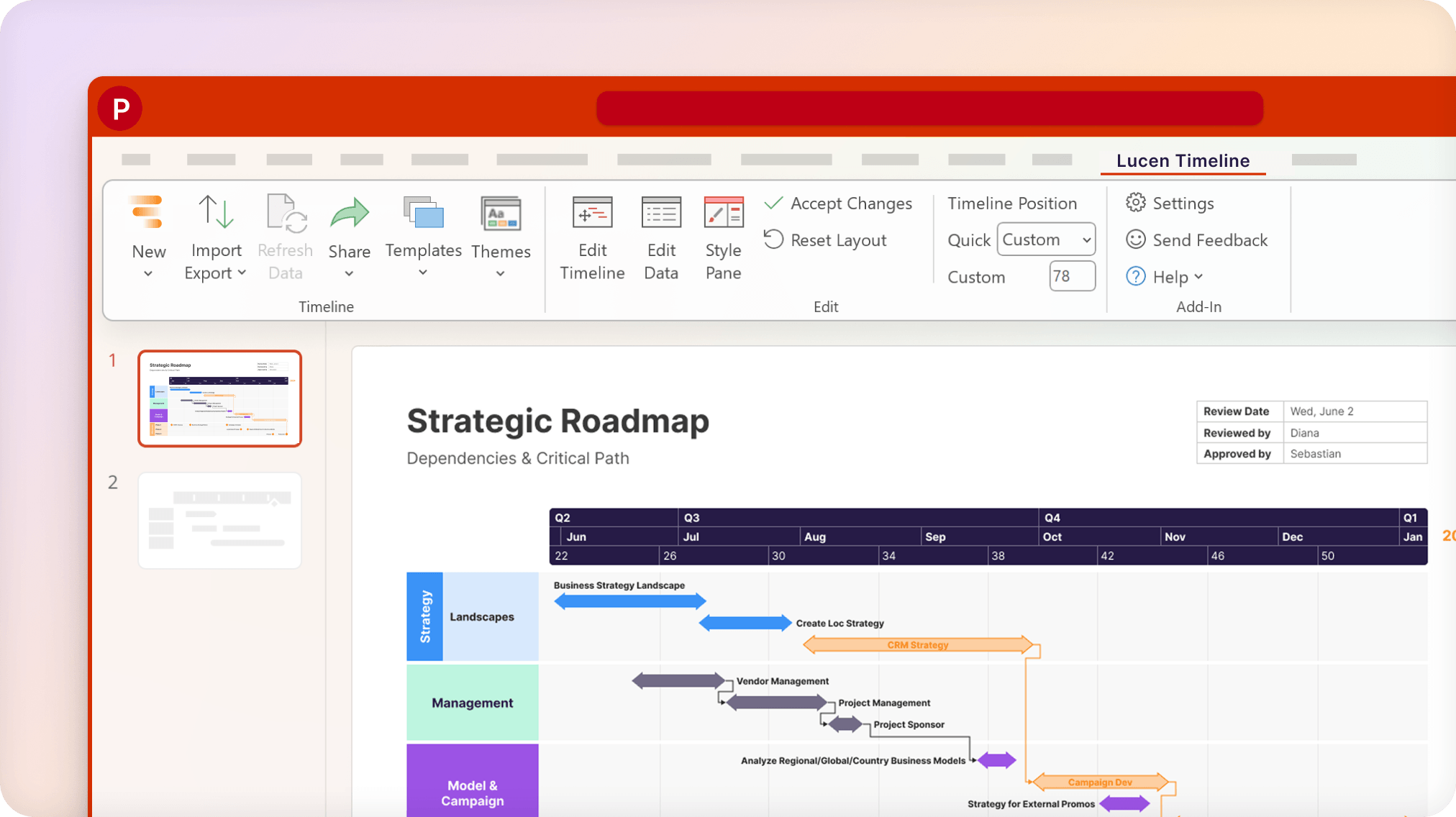
Product screenshots
Real product UI from our media library — no placeholders.
Motion
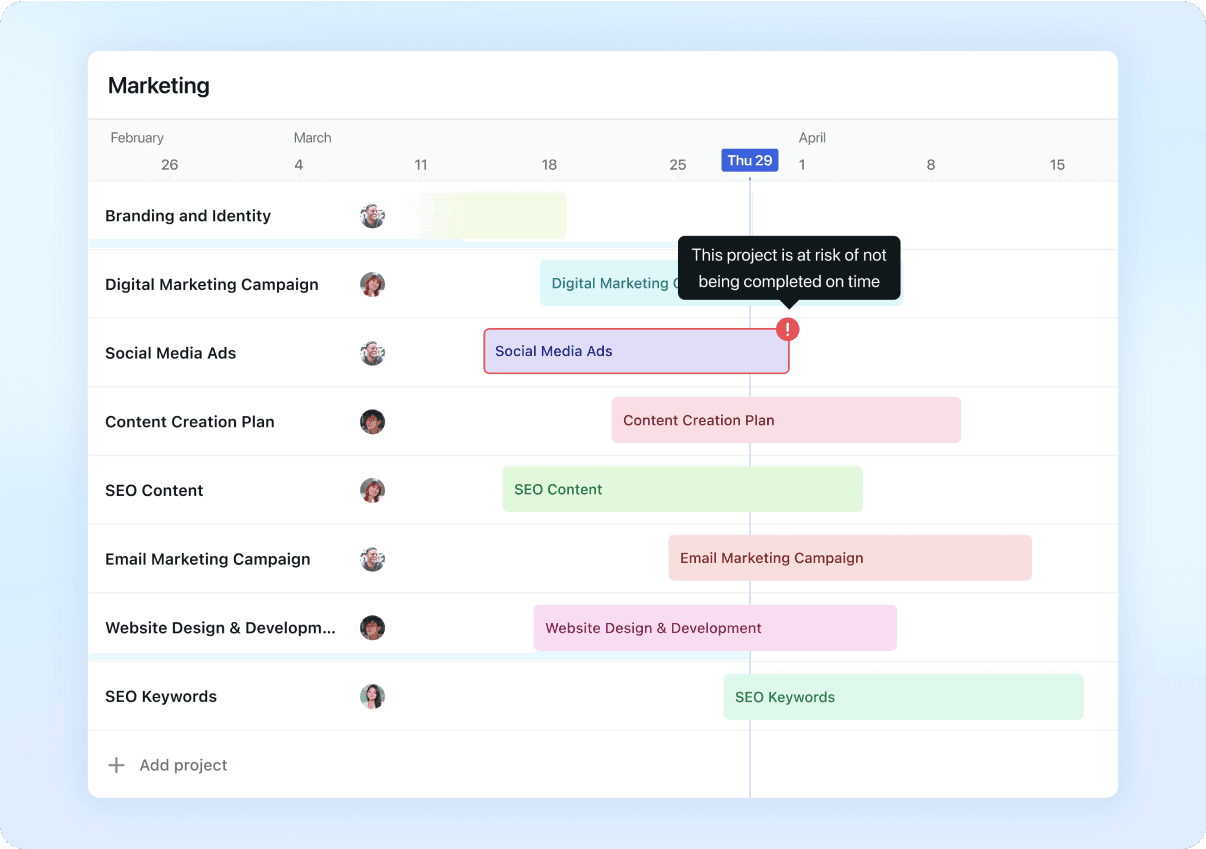
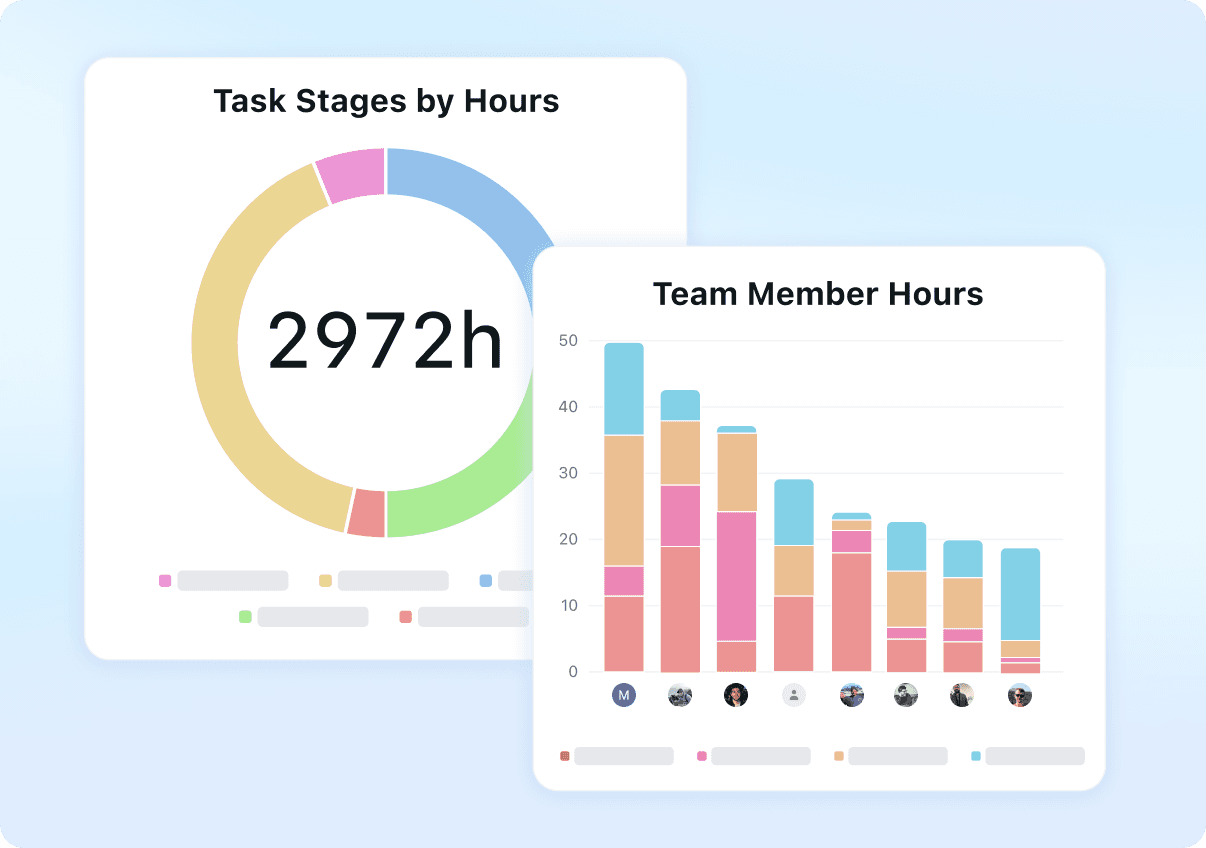
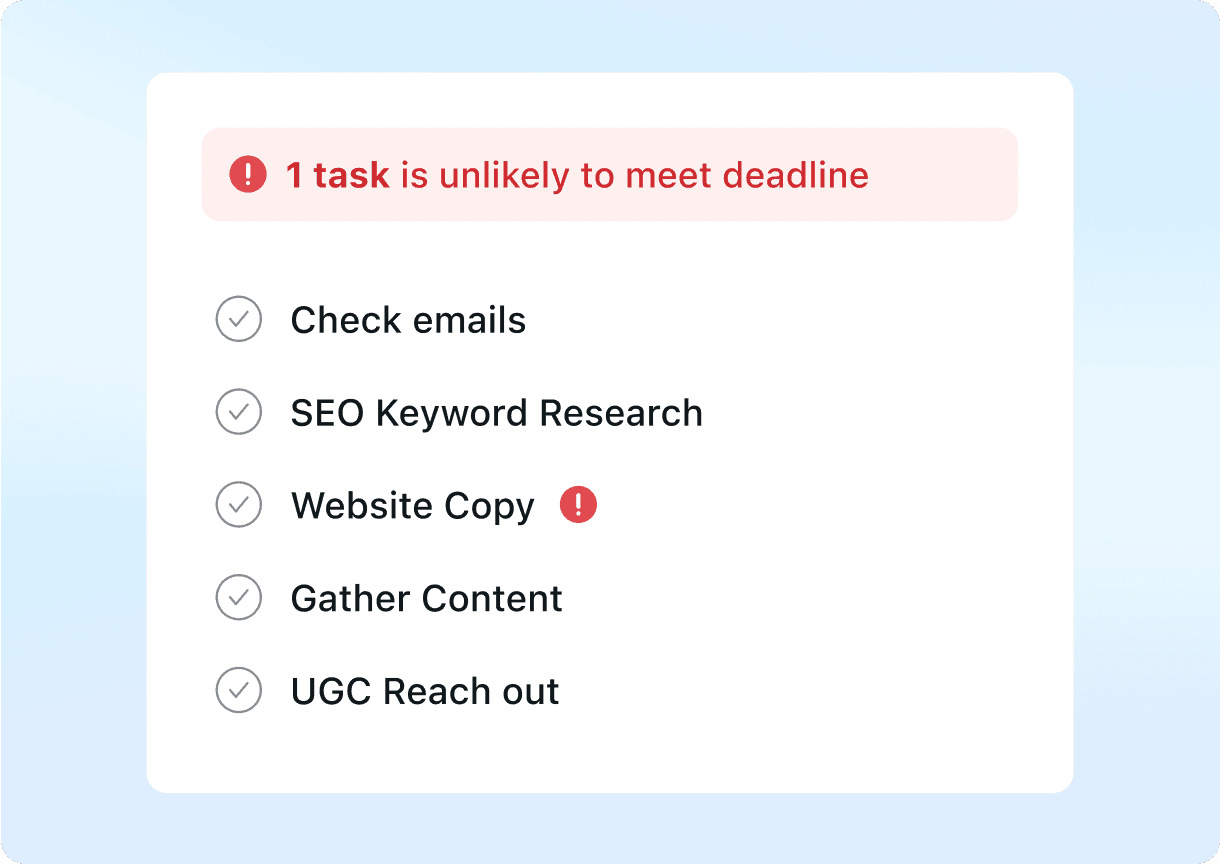
Office Timeline
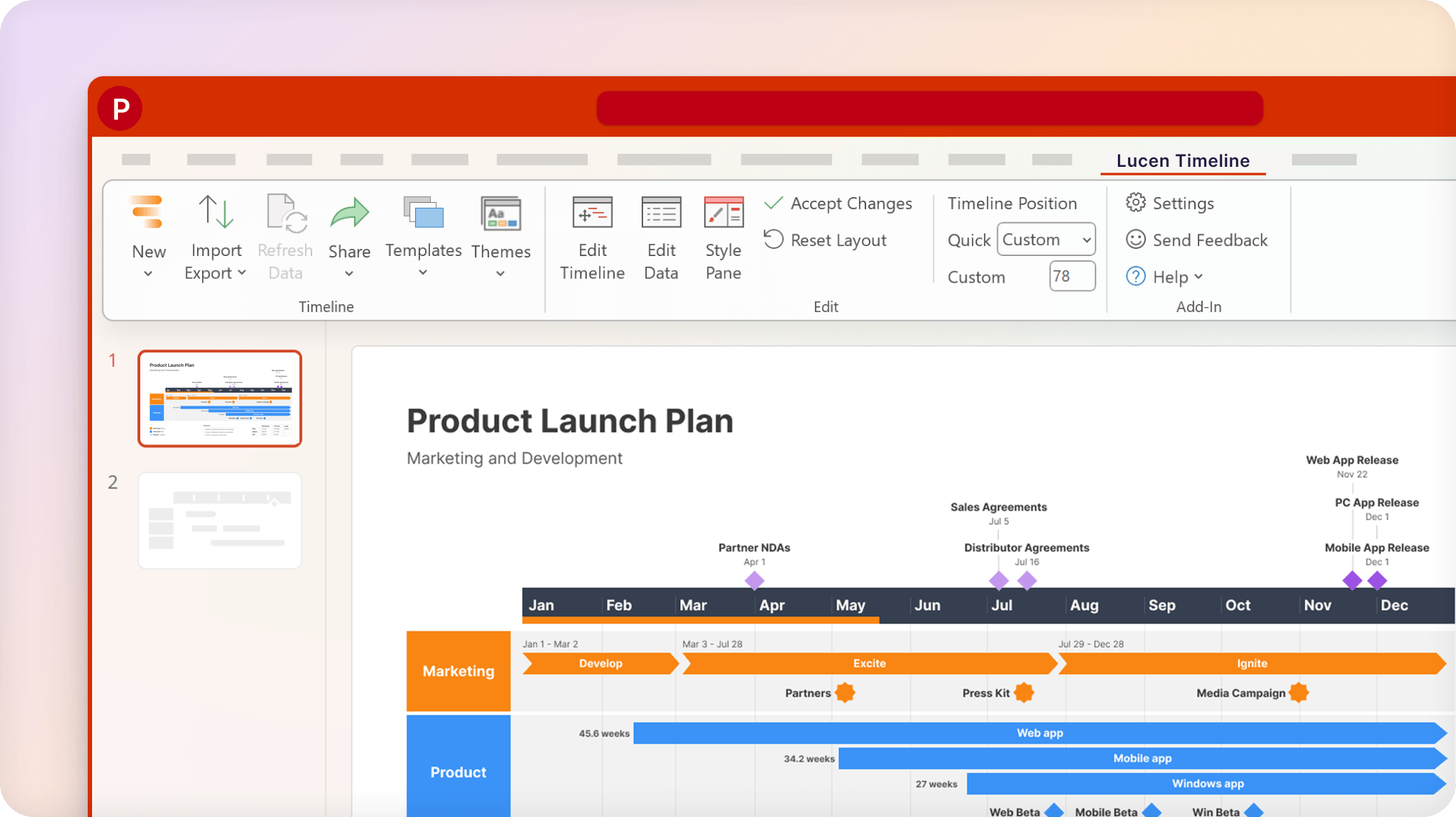
FAQ
- Is Motion better than Office Timeline?
- Comparison thesis: Overlapping use cases, different tradeoffs. Choose Motion only if your buying job matches “AI calendar + task auto-scheduling (projects, docs, meetings) — Pro AI from $19/seat/mo an” rather than Office Timeline's shape. Choose Office Timeline only if your buying job matches “PowerPoint-native timeline / Gantt specialist (now Lucen Timeline) — Free add-in; Lite fro” rather than Motion's shape. Workflow advantage: Motion leans work-management; Office Timeline leans timeline-reporting. Trade-off: you gain focus on one product's motion at the cost of the other's adjacent coverage — no universal winner. Motion is a poor fit when that limitation bites: Premium $19+ seats vs broader Work OS floors Office Timeline is a poor fit when that limitation bites: Not a work OS — no monday/Hive-class boards, automations or workload management Hard limitation for Motion when it matters: Premium $19+ seats vs broader Work OS floors. Hard limitation for Office Timeline when it matters: Not a work OS — no monday/Hive-class boards, automations or workload management. Neither product has a completed hands-on product test on SoftwareGlimpse — this comparison is research/data-based only. Pricing threshold: estimate spend with the cost calculator before shortlisting.
- Which project management fits which team?
- Motion: your buying job matches “AI calendar + task auto-scheduling (projects, docs, meetings) — Pro AI from $19/seat/mo an” rather than Office Timeline's shape Office Timeline: your buying job matches “PowerPoint-native timeline / Gantt specialist (now Lucen Timeline) — Free add-in; Lite fro” rather than Motion's shape
- Does Motion or Office Timeline have a free plan?
- Motion: No free plan. Office Timeline: Free plan available.
- How does Motion vs Office Timeline pricing compare?
- Motion starts from $19.00/user/mo. Office Timeline starts from $9.00/user/mo. Confirm live vendor pricing before purchasing.
- How did SoftwareGlimpse compare these products?
- We map both products to the same category criteria, then evaluate trade-offs using verified product, pricing and feature evidence. Affiliate relationships never change outcomes.
- reviewMotion review
- reviewOffice Timeline review
- pricingMotion pricing
- pricingOffice Timeline pricing
- alternativeAsana alternative
- alternativeClickUp alternative
- alternativemonday.com alternative
- guideWhat Is Project Management Software?
- guideHow to Choose Project Management Software
- guideProject Management Pricing Guide
- categoryproject management hub
- finderBest project management software
- calculatorCost calculator
Related comparisons



Alternatives to consider

Asana
Cross-functional work management with goals, workflows and AI Studio — Starter from $10.99/user/mo annual.

ClickUp
All-in-one configurable Work OS (tasks, docs, dashboards, ClickUp Brain) — Unlimited from $7/user/mo annual.

monday.com
Work OS / work management platform with boards, timelines, automations and AI credits — Basic from $9/seat/mo annual (3-seat minimum).

Hive
Work management platform with free plan (≤10 members) and Teams from $12/user/mo annual — strong monday.com peer.
Still deciding between Motion and Office Timeline?
Use Best project management software for a shortlist matched to your priorities, or build another side-by-side comparison.
- Independent criterion outcomes
- No invented scores or prices
- Affiliate links never change winners
Some visit links may be affiliate links — we may earn a commission at no extra cost to you. Comparison outcomes are never based on commission.
Part of Software comparisons · Project Management Software hub
Try a decision tool
Interactive helpers use recommendation criteria — affiliate status never changes outcomes.