Project Management Pricing Guide
Budget work OS and adjacent productivity tools by qualifying tier — not the advertised starter seat.
Quick answer
Project management pricing is usually a per-seat licence plus everything that sits on top of it: plan minimums, feature gates for timelines and automations, and AI credit or add-on bundles. Decision rule: never compare the advertised per-user tile; compare the total for your real seat count on the tier that unlocks your must-have views and automations.
- Per-seat licence
- Plan / seat minimums
- View & automation gates
- AI credits / add-ons
- Guest / external user rules
- Annual vs monthly
Key takeaways
- Gates are part of the price — A cheap seat that lacks timeline or automation forces an upgrade — budget the qualifying tier.
- AI credits change TCO — When AI is metered, estimate monthly usage instead of treating AI as free marketing copy.
- Guests and viewers matter — Client or contractor access may be free, limited, or billed. Count external collaborators honestly.
- Specialists price differently — PowerPoint add-ins, PDF licences, remote-desktop seats, and desktop shells are not comparable to work OS seats on a per-user tile alone.
Pricing path
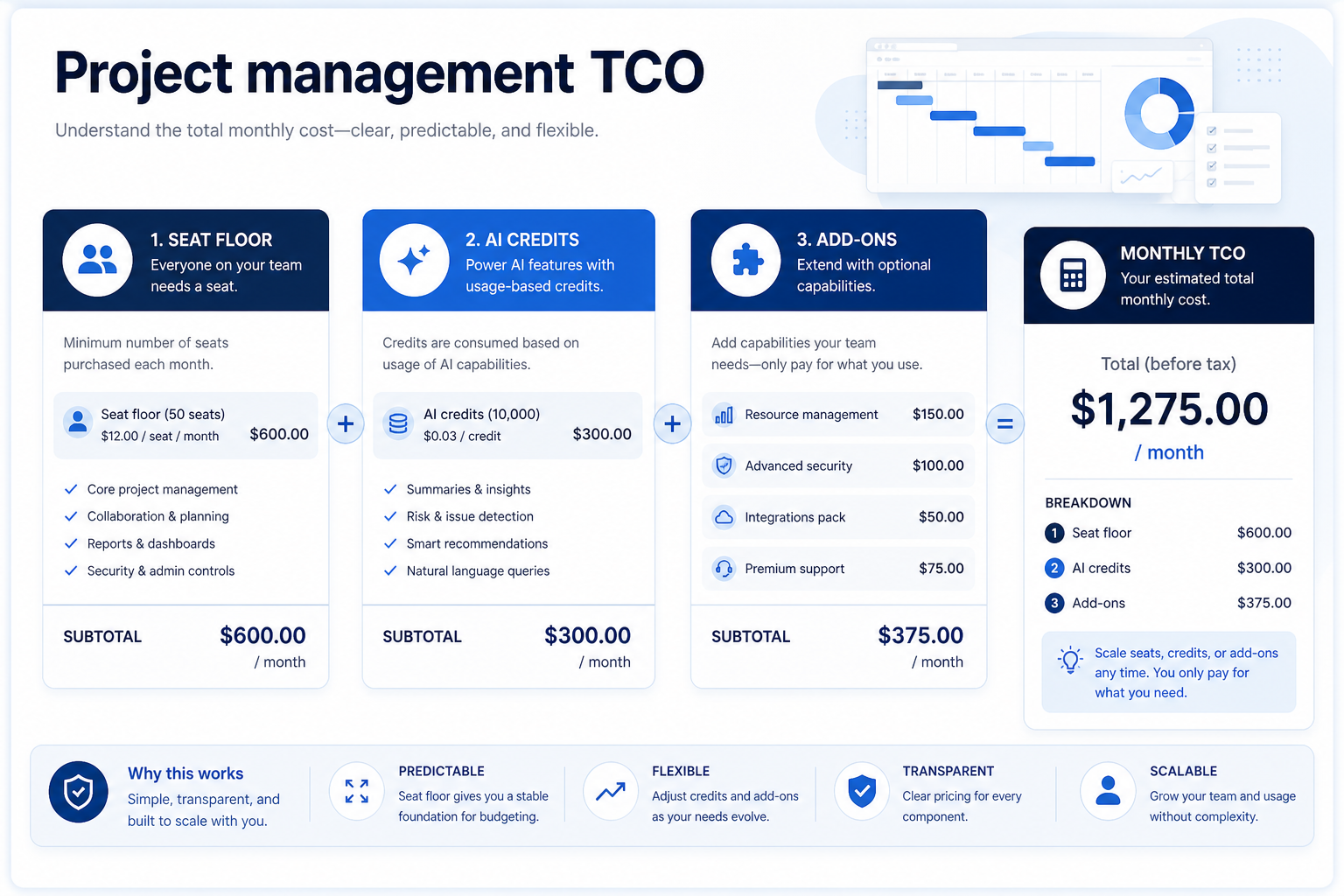
1. Build one comparable total per vendor
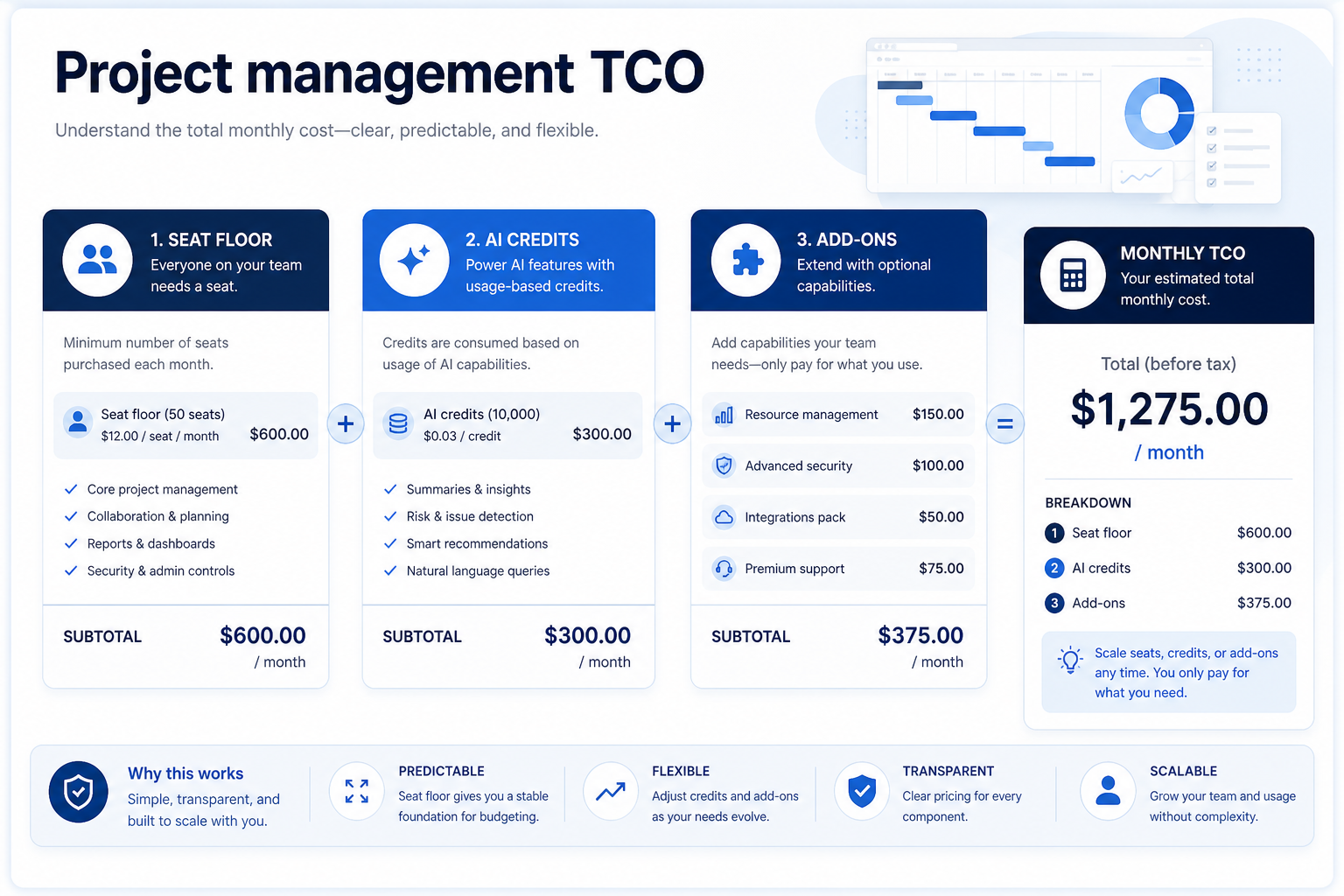
Use one assumption set: seat count, must-have views, expected automations, and whether AI is required. Total the qualifying plan, then add estimated AI/add-ons.
Worked example: Northline Ops needs 12 seats with timeline and automations. Vendor A’s entry plan is cheaper per seat but timeline unlocks mid-tier — so the honest comparison is mid-tier × 12, not the starter tile.
2. Compare written quotes on the same assumptions
Same headcount
Every quote uses the same people who need access — not a pilot subset.
Same usage band
Credits, tokens, GPU hours, or send caps modeled at realistic volume.
Same gates
SSO, agents, stealth modes, or automation depth unlock on named tiers.
For every finalist in project management software, fill one sheet: headcount or list size, must-have gates, usage units you will actually hit, and integrations that must work on day one. Ask each vendor which plan qualifies — then compare those plans only, not homepage tiles.
Worked example: Harbor Ops models the same seat count and credit band for three AI assistants. Vendor A’s personal tier looks cheaper until Business unlocks connectors; Vendor B’s team pack looks expensive until overage on Vendor A is included. The honest compare is qualifying configuration × usage — documented in writing.
3. Budget the first quarter, not the teaser month
Starter tiles optimize for sign-up, not your first 90 days at real scale. Include list or seat growth, seasonal spikes, overage triggers, and add-on SKUs (Copilot layers, credit packs, dedicated IP) before you ask finance to approve spend.
Worked example: Northline Studio adds 20% buffer to image-credit usage for a campaign launch and keeps annual vs monthly side by side when GPU spikes are likely.
4. Hand off to selection with frozen assumptions
When quotes are comparable, move to the selection framework with must-haves frozen. Rank finalists on fit for the weekly job, governance, and the total you modeled — not affiliate availability or brand familiarity.
Next: /guides/how-to-choose-project-management-software/
5. Use a one-page checklist before demos
For Project Management Pricing Guide, list must-haves, owners, integrations, and the weekly ritual this purchase must improve. Share the sheet with finance and IT before you schedule a second demo.
- Name the primary job in one sentence.
- List must-have gates (plans, SSO, data residency, usage caps).
- Name integrations that must work on day one.
- Assign an admin owner and a weekly user champion.
- Define non-admin proof — what a sceptic completes without rescue.
Worked example: Harbor Ops refuses demos until the checklist is signed — cutting evaluation time in half.
6. Avoid the usual buying mistakes
Common failures in project-management: buying for brand familiarity, comparing entry tiles across different usage units, skipping a fair trial script, and adding scope before adoption proves out.
Run one trial script on every finalist the same week. Score on the same card. Write a one-paragraph decision memo that names what you are not buying yet.
7. Hand off to the category shortlist
When assumptions are frozen, continue on /best/project-management-software/ with the same headcount, usage band, and must-have gates on every quote.
8. Use a one-page checklist before demos
For Project Management Pricing Guide, list must-haves, owners, integrations, and the weekly ritual this purchase must improve. Share the sheet with finance and IT before you schedule a second demo.
- Name the primary job in one sentence.
- List must-have gates (plans, SSO, data residency, usage caps).
- Name integrations that must work on day one.
- Assign an admin owner and a weekly user champion.
- Define non-admin proof — what a sceptic completes without rescue.
Worked example: Harbor Ops refuses demos until the checklist is signed — cutting evaluation time in half.
9. Avoid the usual buying mistakes
Common failures in project-management: buying for brand familiarity, comparing entry tiles across different usage units, skipping a fair trial script, and adding scope before adoption proves out.
Run one trial script on every finalist the same week. Score on the same card. Write a one-paragraph decision memo that names what you are not buying yet.
10. Hand off to the category shortlist
When assumptions are frozen, continue on /best/project-management-software/ with the same headcount, usage band, and must-have gates on every quote.
Frequently asked questions
How much does project management software cost?
Work OS products are typically priced per seat with plan tiers. Exact floors change — confirm live vendor pricing. Specialists (timeline add-ins, PDF, remote desktop, desktop shells) use different licence models.
Should I pay annually?
Annual billing is usually discounted but locks seat count. If headcount is uncertain, price both.
Do affiliate deals change our advice?
No. SoftwareGlimpse methodology excludes affiliate economics from rankings and pricing guidance.
Was this article helpful?
Have more questions? Contact our support team.
Part of Software buying guides · What Is Project Management Software?
Related guides
Supporting reading in this topic — not a generic related-posts dump.
- Project Management Requirements GuideA practical requirements sheet for work OS and adjacent productivity purchases.
- Project Management Evaluation GuideA practical evaluation script for work OS peers and adjacent productivity tools.
- Is Office Timeline Worth It? Fit Scenarios Before You BuyDecide if Office Timeline is worth it for your team — job-cluster fit, trial proof, and packaging — without invented ROI percentages.
- Is WebCatalog Worth It? Fit Scenarios Before You BuyDecide if WebCatalog is worth it for your team — job-cluster fit, trial proof, and packaging — without invented ROI percentages.
- monday.com Plans: Seats, Guests, and Qualifying TiersChoose your monday.com plan by mapping must-haves to qualifying tiers — seats, guests, views, and add-ons — not homepage “from” tiles.
- ClickUp Plans: Seats, Guests, and Qualifying TiersChoose your ClickUp plan by mapping must-haves to qualifying tiers — seats, guests, views, and add-ons — not homepage “from” tiles.
- Foxit Plans: Seats, Guests, and Qualifying TiersChoose your Foxit plan by mapping must-haves to qualifying tiers — seats, guests, views, and add-ons — not homepage “from” tiles.
SoftwareGlimpse Updates
Want clearer software shortlists? Get buying guides and comparisons by email.
Newsletter coming soon.