SAP Customer Experience Migration: Move Data Without Losing the Thread
Migrate into SAP Customer Experience with a field map, pilot import, dual-run week, and validation — so history survives and sellers trust the new CRM.
Quick answer
Migrate into SAP Customer Experience by listing what you need, mapping fields, piloting one seller’s book, dual-running for a week, then cutting over only after sellers sign off. If you can’t explain where companies, people, and open deals land — and what you will leave behind — don’t run a bulk import yet.
- Inventory sources
- Map fields & stages
- Pilot one seller
- Dual-run one week
- Seller sign-off
- Keep an exit copy
SAP Customer Experience migration takeaways
- Map to what this product supports — SAP Customer Experience research supports contact management, lead management, pipeline management, and deal management — your object model has to land inside that, not inside your old CRM's shape.
- Pilot beats big-bang — One successful SAP Customer Experience import of a single owner's deals teaches more than a weekend bulk load.
- Stage meaning is the real migration — Columns copy easily; “what qualified means” does not. Agree stage definitions before mapping.
- Custom structure has limits — Custom fields is researched across every SAP Customer Experience plan we snapshot.
- Keep an exit copy — Retain source exports until SAP Customer Experience passes seller spot-checks — and ask the export question before you sign, not at renewal.
- Verify tooling, do not assume it — Import formats, record limits, and API behaviour belong in SAP Customer Experience documentation. Our snapshot records no trial length for SAP Customer Experience — ask for an evaluation window in writing before you commit seats.
SAP Customer Experience migration path
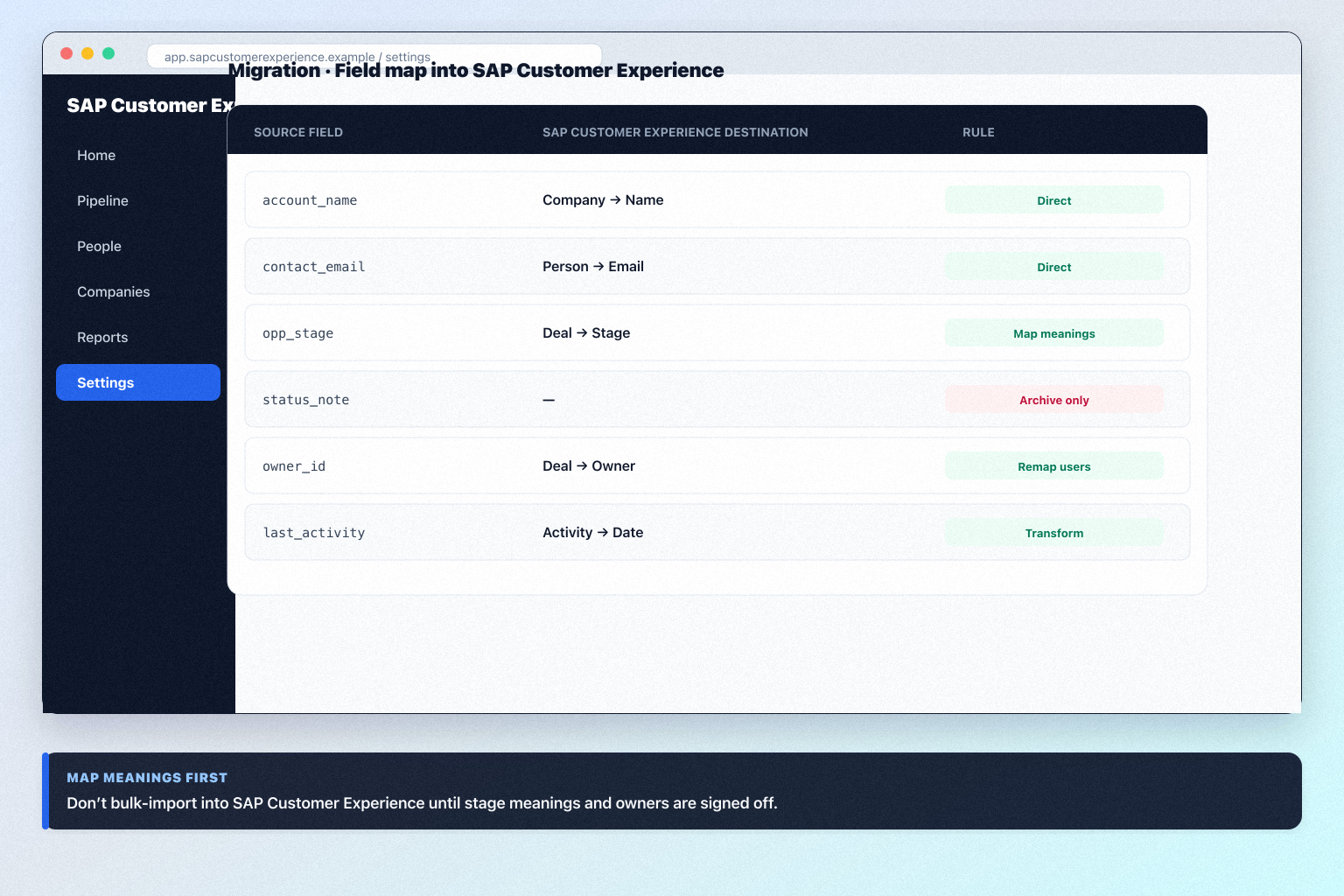
SAP Customer Experience migration map
SAP Customer Experience checklist
Bring these questions to every demo
Ask vendors to show the workflow live, not just describe it.
- 1Inventory sources and objectsCRM, sheets, mailboxes — must/later/archive.
- 2Sign the field mapMeanings before bulk import.
- 3Pilot 20–50 clean recordsSeller spot-check before scale.
- 4Run a dual-run weekSAP Customer Experience as system of record; old system read-only.
- 5Validate counts and samplesOpen deals and seller-critical records.
1. Inventory objects against what SAP Customer Experience supports
Must move
Open deals, active contacts and companies, recent activities.
Later
Closed-won history for reporting — after cutover proves stable.
Archive only
Dead records and fields with no home in SAP Customer Experience. Export, store, move on.
List every source and object before you design a SAP Customer Experience import.
- List every source: previous CRM, spreadsheets, mailboxes, invoicing tool, the one person's laptop.
- List the objects: companies, people, open deals, closed history, activities, tasks, notes, files.
- Map each object to a capability SAP Customer Experience research confirms — contact management, lead management, pipeline management, and deal management are the anchors.
- Classify each object as must-move, later, or archive-only.
- Count records per object.
Worked example: a 12-person B2B advisory team finds 3,100 contacts, 780 companies, 62 open deals, four years of closed history, and two spreadsheets. Only contacts touched in 24 months, all companies, and open deals are must-move into SAP Customer Experience; closed history stays in an exported archive.
2. Write the field map — including stage meanings
One-to-one
Name, email, company, owner, close date — mechanical.
Needs a rule
Stage, status, source, and inconsistent free-text.
Do not migrate
Fields with no owner, no decision, and no report behind them.
Map meanings first. Bulk import second.
- Three columns: source field → SAP Customer Experience destination → transformation rule.
- Map object names honestly (account → company, opportunity → deal).
- Map stages by buyer-verifiable meaning, not labels — merging stages is fine.
- Every record needs an active SAP Customer Experience owner — no ex-employee owners.
- Leftovers: Custom fields is researched across every SAP Customer Experience plan we snapshot — only if someone names the decision it drives.
- In SAP Customer Experience, open the import or data-management area — confirm the current control labels in the product, docs, or trial.
Worked example: a 12-person B2B advisory team maps account → company and opportunity → deal, collapses seven stages into six, reassigns 40 orphaned records, and archives 22 unused columns.
3. Pilot one owner's book in SAP Customer Experience
Pilot pass
Counts match, owners correct, stages sensible, seller recognises their deals.
Pilot fail
Fix the map, clear the sample, re-import. Do not scale a broken mapping.
Tooling limit hit
Confirm SAP Customer Experience import formats and limits in documentation before promising a date.
- Pick one seller with a representative book — roughly 30–60 open deals and their contacts.
- Import companies first, then people, then deals, then activities. Order matters: relationships need their parents to exist.
- Run the import on the plan you actually intend to buy, not just Enterprise if your must-haves live higher. Our snapshot records no trial length for SAP Customer Experience — ask for an evaluation window in writing before you commit seats.
- Check counts against the source before you look at anything else: companies in, people in, deals in, activities in.
- Sit with that seller for 20 minutes. Ask them to find three deals and tell you what looks wrong. Their answer is the acceptance test.
- Fix the map and re-import the sample. Expect to do this twice; that is the point of a pilot.
Worked example: a 12-person B2B advisory team pilots 62 deals into SAP Customer Experience, discovers two stages mapped backwards and every activity timestamped as import day, fixes both, then re-runs the sample before touching the rest of the book.
4. Dual-run for one week, then validate with sellers
Dual-run rule
New work in SAP Customer Experience; source frozen for edits.
Validation owners
Admin checks counts and structure; sellers check their own deals.
Rollback plan
Know exactly how to clear a bad bulk load and re-import from source.
- Announce one rule for the dual-run week: all new activity goes into SAP Customer Experience; the old system is read-only for history.
- Bulk-import the remaining must-move records at the start of that week, in the same object order as the pilot.
- Run the validation checklist in SAP Customer Experience: every open deal has an owner and a stage; deal counts by owner match the source; contacts resolve to companies; no obvious duplicates on the top 50 accounts; activity dates are real, not import dates; required fields are populated.
- Hold a 30-minute seller spot-check — each seller opens their own five biggest deals and signs off or flags. Admin approval is not validation.
- Log every defect with an owner and a fix date. Unowned defects become permanent distrust.
Worked example: a 12-person B2B advisory team dual-runs for six working days, catches 14 duplicate companies and three deals with missing owners in SAP Customer Experience, fixes them all before Friday, and gets verbal sign-off from all eight sellers.
5. Cut over — and do your export diligence now
Cutover ready
Validation passed, sellers signed off, defects closed.
Cutover blocked
Open defects with no owner — hold the date, fix the data.
After cutover
Follow SAP Customer Experience implementation gates; do not start adding apps.
Make SAP Customer Experience the system of record on a named date.
- Cut over; revoke edit access to the old system the same day.
- Store source exports with a note of what they contain and when.
- Confirm in writing how you export companies, people, deals, activities, and files out of SAP Customer Experience — formats, attachments, post-cancellation.
- Schedule the day-30 adoption review from the implementation guide.
- Update the one-pager: what moved, what was archived, who signed off.
Worked example: once Friday’s SAP Customer Experience pipeline matched reality, a 12-person B2B advisory team revoked spreadsheet edits, archived exports, and asked in writing how a future export works — before renewal.
SAP Customer Experience migration mistakes
Big-bang import with no pilot
A weekend bulk load into SAP Customer Experience means Monday surprises and permanent seller distrust.
Bringing every legacy custom field
Clutter migrates faster than value. Custom fields is researched across every SAP Customer Experience plan we snapshot — that is not permission to recreate all of it.
Mapping stage names instead of stage meanings
Identical names hide different definitions; your forecast inherits the confusion.
Skipping seller validation
Admins approve structure; sellers notice their missing deals. Both have to sign off in SAP Customer Experience.
Importing records owned by ex-employees
Every SAP Customer Experience record needs an active owner, or it silently stops being worked.
No retained export and no exit answer
Keep source files until SAP Customer Experience proves trustworthy, and get the export process in writing before you sign.
Frequently asked questions
Can we migrate everything into SAP Customer Experience at once?
You can, but you should not. Decision rule: pilot one owner's book, fix the map, then scale. Bulk-importing an unvalidated map is the most common reason a CRM rollout loses seller trust.
Which objects should we move first?
Companies, then people, then open deals, then recent activities — parents before children. contact management, lead management, pipeline management, and deal management are the SAP Customer Experience anchors in our research; old closed history can stay in an archive export.
How do we map custom fields into SAP Customer Experience?
Custom fields is researched across every SAP Customer Experience plan we snapshot. Recreate a field only when someone can name the decision or report that depends on it; everything else goes to the archive CSV.
How long should the dual-run last?
One week is usually right: long enough to catch mapping defects, short enough that people actually switch. Freeze the old system for edits during that week or you will migrate twice.
Who should own the migration?
The SAP Customer Experience admin owner runs the mechanics; a sales champion owns stage meaning; each seller validates their own book. Not an intern alone with a CSV.
What do we validate before cutting over to SAP Customer Experience?
Deal counts by owner, every open deal has an owner and stage, contacts resolve to companies, no duplicates in the top accounts, activity dates are real rather than import dates, and required fields are populated. Then seller sign-off.
What about getting data back out later?
Ask before you sign: which objects export, in what format, whether notes and attachments come along, and what happens to data after cancellation. Keep your pre-migration exports either way.
What should I do next?
Run the SAP Customer Experience setup guide in parallel with the pilot so the target workspace is ready, then follow the implementation guide's 30/60/90 gates after cutover.
Was this article helpful?
Have more questions? Contact our support team.
Part of SAP Customer Experience review · CRM hub
Related products
Related comparisons
Related resources
SoftwareGlimpse Updates
Want clearer software shortlists? Get buying guides and comparisons by email.
Newsletter coming soon.