monday.com Setup: Day-Zero Path to a Working Work Loop
monday.com implementation guide: day-zero sequence, pilot rules, plan gates, and cutover checks from SoftwareGlimpse research — not generic CRM setup filler.
Quick answer
Implement monday.com by mapping current project-management workflows to monday.com objects, confirming plan gates for time tracking (Free, Basic, Standard, Pro, Enterprise), AI assistance (Free, Basic, Standard, Pro, Enterprise), piloting one team, then cutting over integrations (Slack, Microsoft Teams, Google Workspace) after data checks.
- Start with: task boards
- Gate check: time tracking (Free, Basic, Standard, Pro, Enterprise)
- Integrate after: data quality pass on Slack
What matters in your monday.com setup
- What monday.com actually is — monday.com Work Management is a work OS for boards, timelines/Gantt, workload views, automations, docs and dashboards. Free covers ≤2 seats and ≤3 boards. Paid plans start at a 3-seat minimum: Basic list price Standard list price Pro list price on annual billi…
- Configure these first — Research lists task boards, timeline / Gantt, workload and resources, and automations and workflows as supported — that is your day-zero surface. Core loop: task boards, timeline / Gantt, workload and resources, and automations and workflows.
- Do not treat it as every work-management job — monday.com is work OS / collaborative project tracking. It is not a substitute for a PDF editor, remote-desktop tool, or PowerPoint Gantt add-in.
- Start on the right package — Researched plans: Free, Basic, Standard, Pro, Enterprise. Never invent list prices here — confirm seats, hubs, and quote terms on /pricing/monday/.
- Connect only what the loop needs — Research names Slack, Microsoft Teams, Google Workspace, Salesforce, and Zapier on the monday.com side — confirm the connectors your work loop depends on.
- AI comes after habits — Research lists AI assistant, AI summaries, AI automation, and AI recommendations for monday.com. Research places AI assistance on Free, Basic, Standard, and Pro. Leave it off until the manual loop is boring.
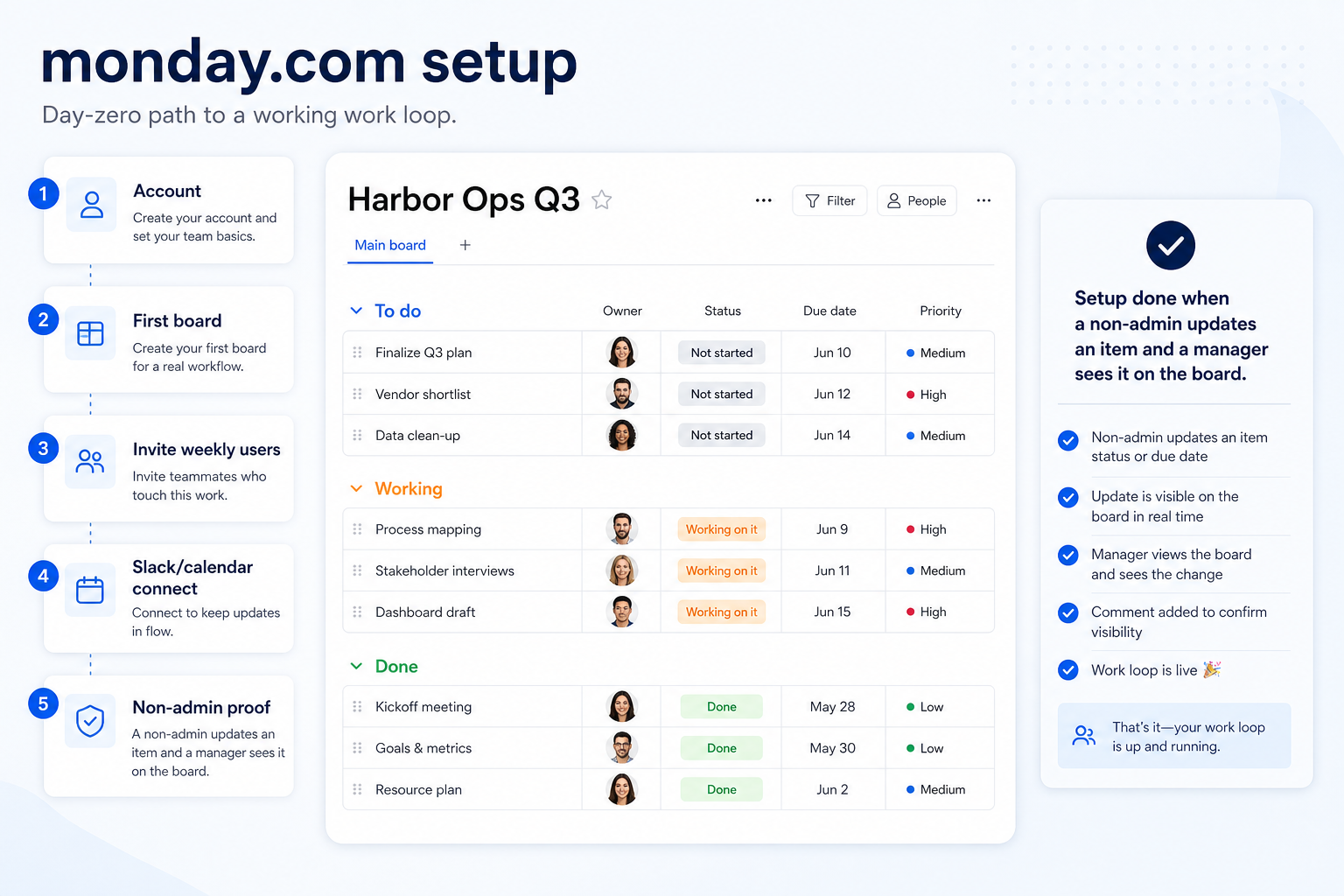
monday.com day-zero path
monday.com must vs nice
- task boards
- Named owners on live work
- timeline / Gantt
- Slack / calendar / files for the loop
- automations and workflows
- AI assistance
monday.com day-zero connectors
Connect only what stand up one board, assign owners, and show status in a second view (timeline or dashboard) needs. Extra apps hide whether the core loop works.
 Slack
Slack- Microsoft Teams
- Google Workspace
- Salesforce
- Zapier
Verify each workflow in a trial — marketplace logos are not proof of fit.
monday.com checklist
Bring these questions to every demo
Ask vendors to show the workflow live, not just describe it.
- 1Qualify monday.com seats and hubsDay-one must-haves on the cheapest researched package.
- 2Name one workspace ownerBoards, users, and hygiene need ~2 hours a week.
- 3Configure one core loopone workspace, one real board, and a weekly update ritual
- 4Invite weekly users onlyRoles before a company-wide invite.
- 5Connect Slack / calendar / filesDocument other gaps instead of wiring everything.
- 6Complete non-admin proofa non-admin updates an item and a manager sees it on the board or timeline
Frequently asked questions
When is setup actually done?
When a non-admin can a non-admin updates an item and a manager sees it on the board or timeline on the package you will buy, and you have a named owner with weekly hours. A decorated workspace is not done.
Should we turn on every monday.com hub on day one?
No. Extra hubs hide whether the core work OS / collaborative project tracking loop works. Add views and automations after a week of real updates.
How long should day-zero take?
A focused team can finish in one working day if package, owner, and the first board are already decided. Multi-week “setup” usually means undecided packaging or missing ownership.
Do we need Slack connected on day one?
Only if the work loop depends on it. Research names Slack, Microsoft Teams, Google Workspace, Salesforce, and Zapier on the monday.com side — confirm the connectors your work loop depends on. Document gaps instead of wiring a marketplace zoo.
Where do we confirm seats and hubs?
Never invent list prices here — confirm seats, hubs, and quote terms on /pricing/monday/.
Is monday.com the same as monday sales CRM?
No. monday sales CRM is CRM-primary. This guide is about work management / work OS — boards, timelines, and delivery visibility.
1. monday.com day-zero to steady-state sequence
Day zero — objects and owners
Define owners for task boards, timeline / Gantt, workload and resources before inviting the whole org.
SMB pilot
One pipeline / one team proves Teams standardising on one Work OS for projects, ops and cross-functional work before company-wide seats.
Cutover
Freeze legacy writes briefly; validate Slack and Microsoft Teams before reopen.
Treat monday.com setup as a controlled rollout — not a weekend dump of CSV files.
monday.com implementation go / no-go
monday.com implementation mistakes
Mistake 1
Paid plans enforce a 3-seat minimum — solo/micro teams pay for unused seats
Mistake 2
AI credits are bundled/paid extras that raise effective TCO beyond the seat floor
Mistake 3
Free plan caps seats (2) and boards (3)
Mistake 4
Time tracking and some advanced views are Pro-gated
Big-bang invite
Inviting every user before object design creates junk data that is expensive to unwind.
monday.com plan gates that affect rollout
Implementation fails when unlocks needed for go-live sit on a higher tier than budgeted.
- Seats61%
- Add-ons18%
- Implementation12%
- Training5%
- Other4%
Free
Free plan · up to 2 seats · Unlocks: task boards, timeline / Gantt, workload and resources · Suits: explore before committing seats
Basic
14-day trial · Suits: teams whose must-have gates appear on this tier
Standard
14-day trial · Suits: teams whose must-have gates appear on this tier
Pro
14-day trial · Suits: teams whose must-have gates appear on this tier
Enterprise
Contact sales · Suits: teams that need custom procurement
monday.com implementation checklist
0/3 dimensions noted — saved in this browser only.
Prep
Pilot
Scale
Was this article helpful?
Have more questions? Contact our support team.
Part of monday.com review · Project Management & Productivity hub
Related guides
Supporting reading in this topic — not a generic related-posts dump.
- monday.com Implementation: 30/60/90 Rollout That SticksPlan a practical monday.com rollout — owners, core work loop, training, and adoption checkpoints — so the product becomes how the team actually ships work.
- Project Management Requirements GuideA practical requirements sheet for work OS and adjacent productivity purchases.
Related products
Related comparisons
SoftwareGlimpse Updates
Want clearer software shortlists? Get buying guides and comparisons by email.
Newsletter coming soon.