
This video is hosted on YouTube
This content is hosted by YouTube. The player loads only after you allow marketing cookies.
Official vendor video
Customize your work management process with monday.com
What this shows
- Official product overview
monday.com implementation guide: day-zero sequence, pilot rules, plan gates, and cutover checks from SoftwareGlimpse research — not generic CRM setup filler.
Implement monday.com by mapping current project-management workflows to monday.com objects, confirming plan gates for time tracking (Free, Basic, Standard, Pro, Enterprise), AI assistance (Free, Basic, Standard, Pro, Enterprise), piloting one team, then cutting over integrations (Slack, Microsoft Teams, Google Workspace) after data checks.
Official setup walkthroughs and product surfaces that matter while you roll out monday.com — not a full product gallery.
Vendor tutorial for onboarding and configuration. It is not a SoftwareGlimpse rollout plan — use this guide for judgment.
This video is hosted on YouTube
This content is hosted by YouTube. The player loads only after you allow marketing cookies.
Official vendor video
Verified captures from monday.com's product interface.
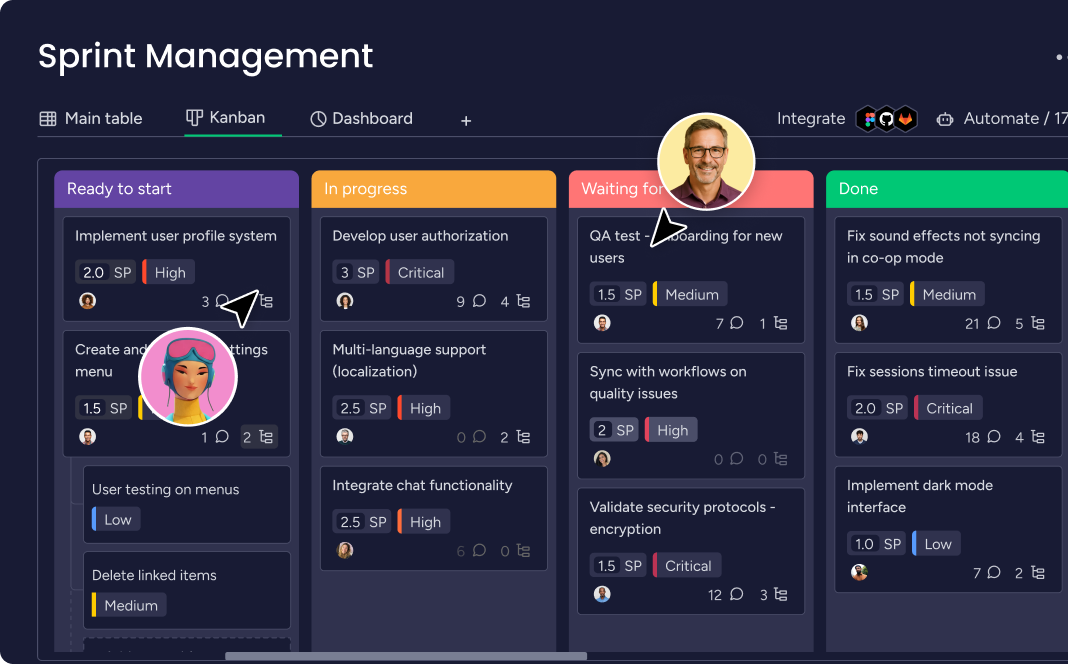
Work board UI from the official monday.com homepage.
Full product screenshots and evidence live on the monday.com research page.
Bring these questions to every demo
Ask vendors to show the workflow live, not just describe it.
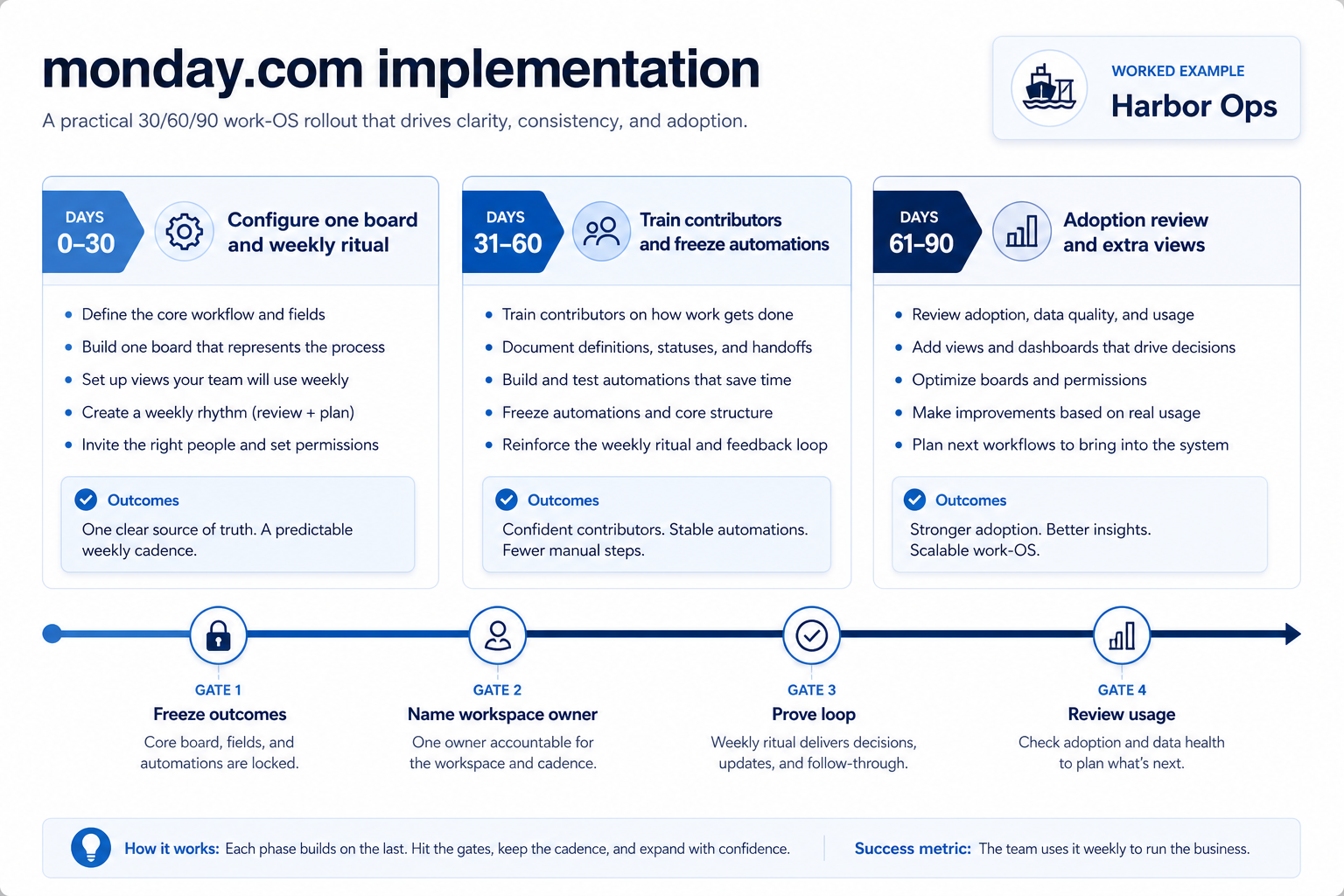
Ninety days is enough for most SMB/mid teams if you freeze the job and defer extras. Longer programmes help when change management is the risk — not when the product is “complex.”
Buy the second job as a second product (or a later wave). monday.com should not be stretched into a PDF editor, remote-desktop tool, or PowerPoint Gantt add-in.
After four weeks of humans completing stand up one board, assign owners, and show status in a second view (timeline or dashboard). Automating a dead board just creates faster garbage.
Only if you cannot name an internal owner. A partner cannot substitute for weekly users. Confirm any implementation fees on the pricing page — do not invent them here.
Do not buy more seats. Cut invited users to the people who must update monday.com, fix permissions, and rerun non-admin proof.
Day zero — objects and owners
Define owners for task boards, timeline / Gantt, workload and resources before inviting the whole org.
SMB pilot
One pipeline / one team proves Teams standardising on one Work OS for projects, ops and cross-functional work before company-wide seats.
Cutover
Freeze legacy writes briefly; validate Slack and Microsoft Teams before reopen.
Treat monday.com setup as a controlled rollout — not a weekend dump of CSV files.
Mistake 1
Paid plans enforce a 3-seat minimum — solo/micro teams pay for unused seats
Mistake 2
AI credits are bundled/paid extras that raise effective TCO beyond the seat floor
Mistake 3
Free plan caps seats (2) and boards (3)
Mistake 4
Time tracking and some advanced views are Pro-gated
Big-bang invite
Inviting every user before object design creates junk data that is expensive to unwind.
Implementation fails when unlocks needed for go-live sit on a higher tier than budgeted.
Free
Free plan · up to 2 seats · Unlocks: task boards, timeline / Gantt, workload and resources · Suits: explore before committing seats
Basic
14-day trial · Suits: teams whose must-have gates appear on this tier
Standard
14-day trial · Suits: teams whose must-have gates appear on this tier
Pro
14-day trial · Suits: teams whose must-have gates appear on this tier
Enterprise
Contact sales · Suits: teams that need custom procurement
0/3 dimensions noted — saved in this browser only.
Prep
Pilot
Scale
Have more questions? Contact our support team.
Part of monday.com review · Project Management & Productivity hub
Supporting reading in this topic — not a generic related-posts dump.
Want clearer software shortlists? Get buying guides and comparisons by email.
Newsletter coming soon.