How to Choose AI Software: Job-First Framework
Choose AI software by primary job — LLM assistant, coding, image, video, meeting notes, or agents — then map plan gates, usage units, SKU identity, and a shared trial script.
Quick answer
Start with the job blocking work this quarter — not the brand on a billboard. “AI software” covers LLM assistants, coding tools, image and video, meeting notes, writing, voice, decks, sites, ads, and agents. Pick one primary job, shortlist tools built for that job, then check seats, credits or tokens, GPU hours, and any Copilot add-on SKU before you demo.
- One primary job to be done
- People who need access
- Usage unit you will hit (seats, credits, GPU)
- Must-have plan gates & integrations
- Copilot / SKU identity check
- Trial on one real workflow
What matters most
- “AI software” is several products — A chat assistant, a coding editor, an image generator, and a meeting-notes tool fail for different reasons. Name the weekly output before you name a vendor.
- Seat vs credit vs GPU math changes cost — Per-seat floors, token packs, GPU hours, and Copilot add-ons often decide total cost. Price the configuration you will actually buy — not the starter tile.
- Identity mix-ups hide on marketing pages — Microsoft 365 Copilot is not GitHub Copilot. GitHub Copilot is not GitHub. Confirm which SKU you are evaluating before the demo.
- Compare peers inside the same job cluster — Once the job is frozen, use requirements, pricing, and evaluation guides — then shortlist on Best AI software with the same assumptions on every finalist.
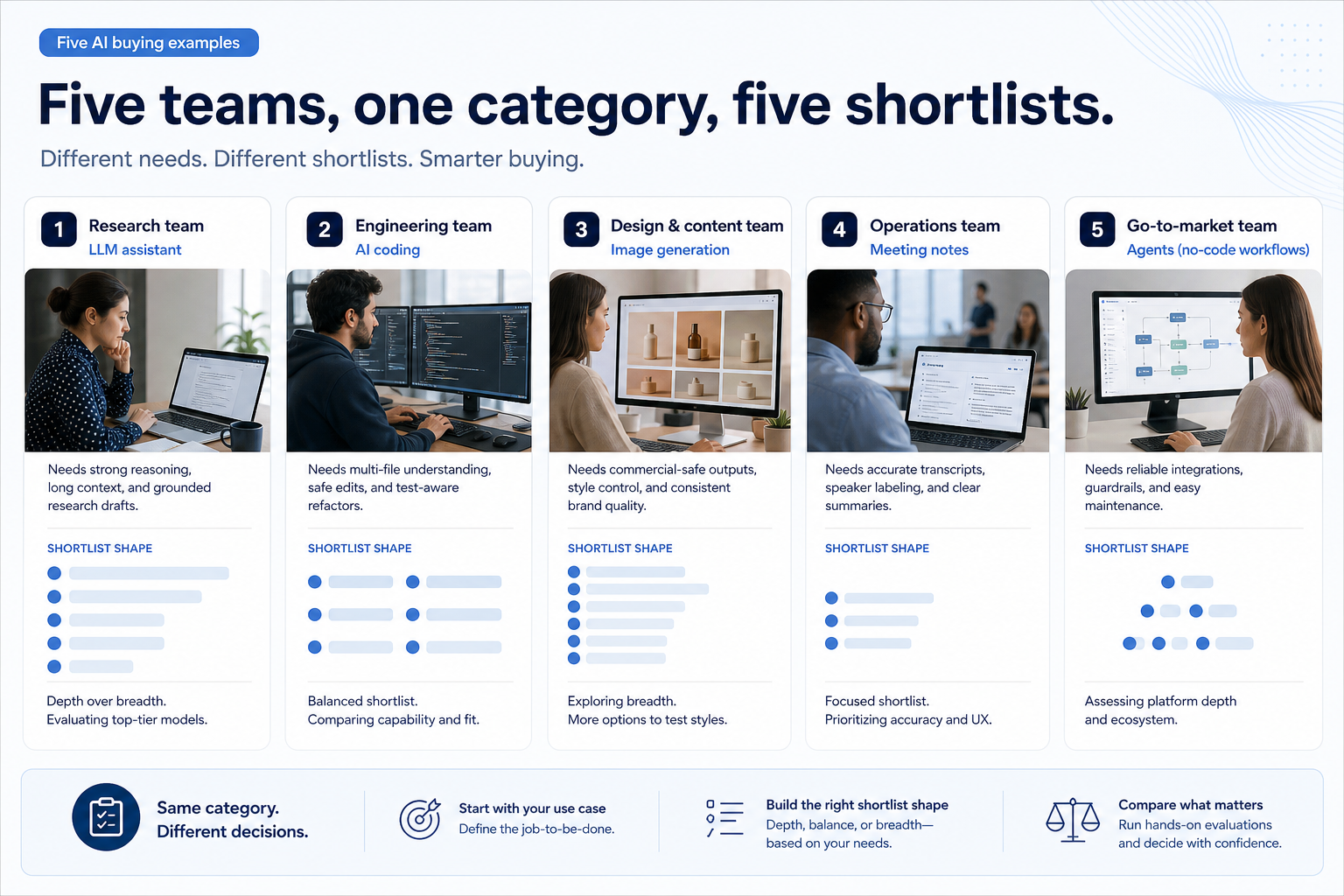
Five worked examples
Interactive AI selection checklist
0/5 dimensions noted — saved in this browser only.
Primary job
People needing access
Usage unit you will hit
Must integrate with
Buying style
Selection workflow
1. Name the job in one sentence
LLM assistant job
Multi-turn research, writing, and Q&A — compare ChatGPT-class tools inside the assistant cluster.
AI coding job
IDE completions and agents — compare Cursor and GitHub Copilot, not Microsoft 365 Copilot.
Media or meeting job
Stills, video, voice, or transcripts as the weekly output — specialist tools, not general chat.
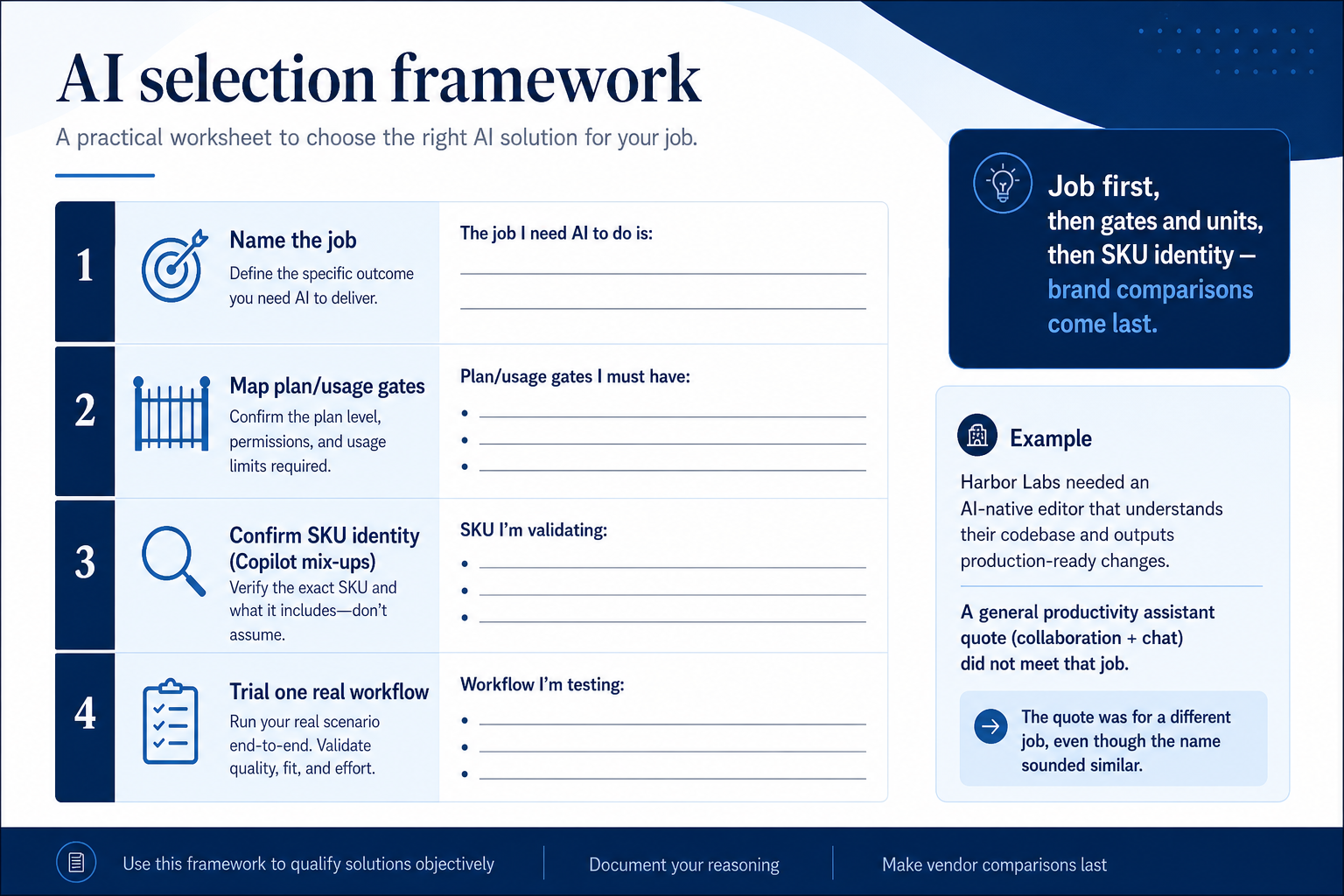
Write: “We need software so that ___ happens every week without tab archaeology.” If the blank is cited research drafts, you are buying an LLM assistant. If it is inline completions or multi-file refactors in the IDE, you are buying AI coding. If it is distinctive stills with defensible IP, you are buying image generation. If it is meeting transcripts your team actually reads, you are buying meeting notes — not a chat tool by default.
Worked example: Northline Studio wrote “every campaign still ships with a commercial IP story we can defend.” That sentence ruled out community image tools before demos started and pointed at Adobe Firefly as a Creative Cloud peer of Midjourney.
2. Map must-haves to plan gates and usage units
List workflows that must work on day one — custom GPTs, SSO, IDE agents, stealth stills, video credits, meeting recap, TTS cloning, or no-code agents — and ask which plan, credit pack, GPU hour, or Copilot SKU unlocks them. Token-cap and GPU vendors need a volume model, not just a seat count.
Worked example: Harbor Labs needed an AI-native editor with multi-file agents; a Microsoft 365 Copilot quote failed that requirement because it is a different product from GitHub Copilot and Cursor.
Do not invent dollar totals from marketing tiles. Compare vendor-written quotes for the same headcount and usage assumption.
3. Run the same trial script on every shortlisted tool
Pick one workflow your team will run weekly. Run it on every finalist the same week: load real (or redacted) context, produce the artifact, check governance hooks you need, and note where the tool breaks. Score every product on the same card the same day.
Worked example: Harbor Labs trials three coding tools on the same refactor ticket. Tool A wins completions but lacks the agent depth on their repo size. Tool B clears agents with slower latency. Tool C fails SSO on the tier they were quoted — dropped from the shortlist without a second meeting.
4. Run one trial script on every finalist
Pick the workflow that blocked work last quarter. Run it on every shortlist tool the same week: same data shape, same users, same success criteria. Score completion, time-to-done, and where an admin had to rescue the task.
Worked example: Harbor Labs runs the same refactor ticket on three coding tools. Tool C fails SSO on the quoted tier and is dropped before a second meeting.
5. Score on one card the same day
Use the same rubric for every vendor: must-have gates, adoption risk, integration fit, and modeled total cost band. Record who attended and which plan tier was shown — demos often run above the tier you can afford.
6. Write a one-page decision memo
Name the primary job, the qualifying configuration, the winner, and what you are explicitly not buying yet. Link to pricing and requirements guides so finance can audit assumptions later.
Next: /guides/how-to-choose-ai-software/
Frequently asked questions
Should I buy an all-in-one AI suite?
Only if you will use multiple hubs weekly. Otherwise a specialist coding tool, image generator, meeting-notes product, or agent builder usually ships faster and clearer total cost.
How do I treat GitHub Copilot on an AI shortlist?
As an AI-coding product. It is not Microsoft 365 Copilot and it is not GitHub the source-control platform. Compare it to Cursor inside the AI-coding cluster.
What should I do next?
Freeze must-haves with the AI requirements guide, model units with the pricing guide, run a fair trial with the evaluation guide, then shortlist on Best AI software.
Was this article helpful?
Have more questions? Contact our support team.
Part of Software buying guides · AI Software Evaluation Guide
Related guides
Supporting reading in this topic — not a generic related-posts dump.
- What Is AI Software?A clear definition of LLM assistants, AI coding, image and video, meeting notes, writing, voice, decks, sites, ads, and agents — and why they are not one ranking.
- Rank Prompt Plans: Seats, Credits, and Qualifying TiersChoose your Rank Prompt plan by mapping must-haves to qualifying tiers — seats, credits, usage packs, and add-ons — not homepage “from” tiles.
- Is AdCreative.ai Worth It? Fit Scenarios Before You BuyDecide if AdCreative.ai is worth it for your team — job-cluster fit, trial proof, and packaging — without invented ROI percentages.
- Is AI InteleKt Worth It? Fit Scenarios Before You BuyDecide if AI InteleKt is worth it for your team — job-cluster fit, trial proof, and packaging — without invented ROI percentages.
- Is Aira Worth It? Fit Scenarios Before You BuyDecide if Aira is worth it for your team — job-cluster fit, trial proof, and packaging — without invented ROI percentages.
- Is ElevenLabs Worth It? Fit Scenarios Before You BuyDecide if ElevenLabs is worth it for your team — job-cluster fit, trial proof, and packaging — without invented ROI percentages.
- AdCreative.ai Plans: Seats, Credits, and Qualifying TiersChoose your AdCreative.ai plan by mapping must-haves to qualifying tiers — seats, credits, usage packs, and add-ons — not homepage “from” tiles.
- AI InteleKt Plans: Seats, Credits, and Qualifying TiersChoose your AI InteleKt plan by mapping must-haves to qualifying tiers — seats, credits, usage packs, and add-ons — not homepage “from” tiles.
SoftwareGlimpse Updates
Want clearer software shortlists? Get buying guides and comparisons by email.
Newsletter coming soon.