What Is AI Software?
A clear definition of LLM assistants, AI coding, image and video, meeting notes, writing, voice, decks, sites, ads, and agents — and why they are not one ranking.
Quick answer
AI software is several jobs — LLM assistants, coding tools, image and video generators, meeting notes, writing and voice, decks and sites, ad creative, agent builders, and workflow automation platforms — not one undifferentiated “best AI” list. Decision rule: name the weekly output first; if it is multi-turn reasoning, buy an LLM assistant; if it is IDE completions or an AI-native editor, buy an AI coding tool; if it is stills, video, transcripts, or TTS, buy that specialist; if it is multi-app triggers and actions with AI steps, buy workflow automation — and never treat Microsoft 365 Copilot, GitHub Copilot, GitHub, Zapier, and MindStudio as the same product.
- LLM assistant
- AI coding
- Image & video
- Meeting / writing / voice
- Decks, sites, ads, agents
- Workflow automation
Key takeaways
- The category holds several jobs — Chat assistants, coding editors, stills, video, meeting notes, paraphrase, TTS, decks, sites, ads, agent builders, and automation platforms fail for different reasons. Naming the job first prevents most bad shortlists.
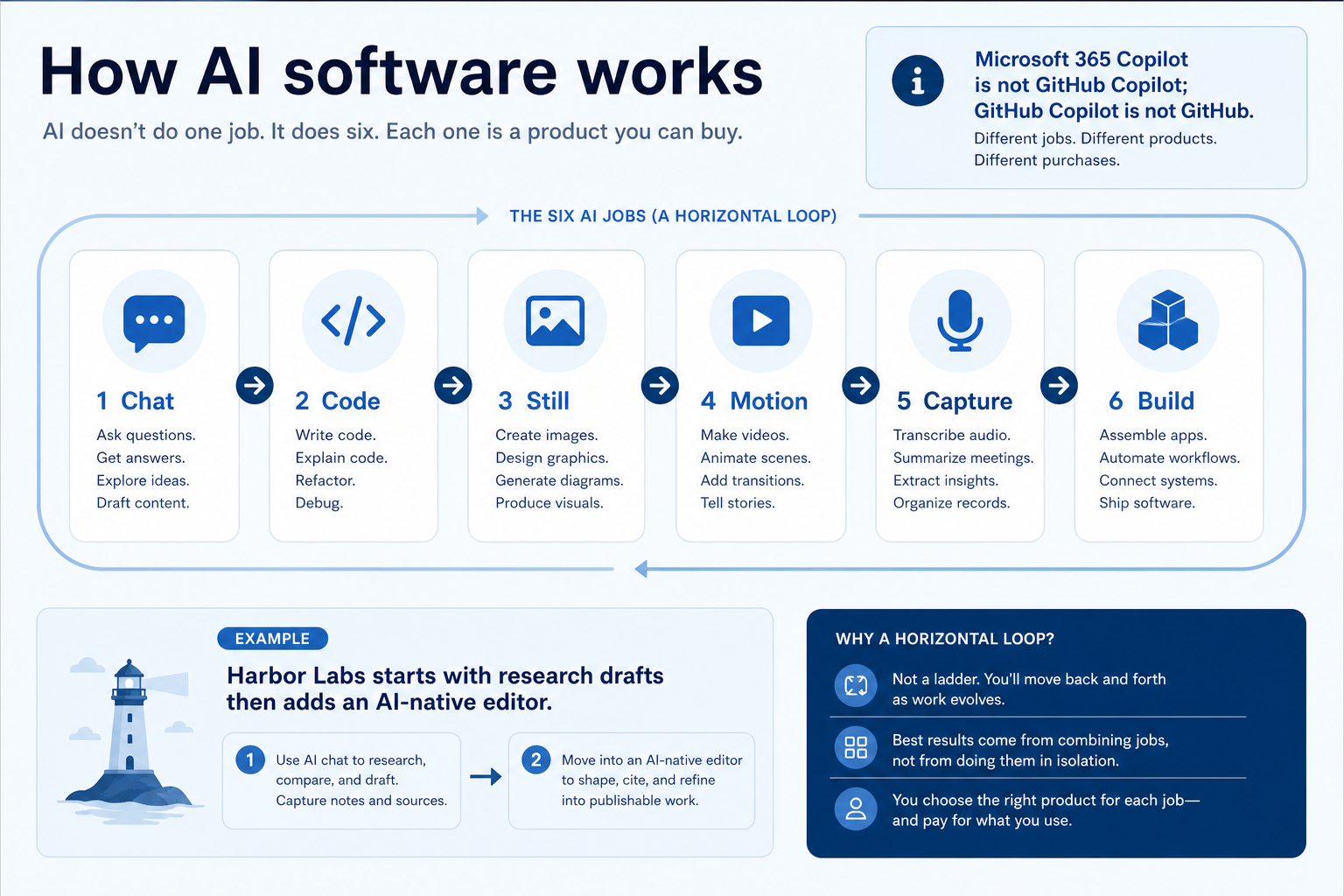
- Copilot is not one SKU — Microsoft 365 Copilot sits in the Microsoft 365 suite. GitHub Copilot sits in the IDE / GitHub. GitHub itself is source control. Rank them only inside their own jobs.
- Pricing units are not interchangeable — Seats, credits and tokens, GPU hours, conversation or minute caps, task/execution packs, and add-on Copilot SKUs change TCO more than the starter tile.
- Specialists are not weaker LLMs — Otter.ai, Fireflies.ai, Synthesia, QuillBot, ElevenLabs, Gamma, Wegic, AdCreative.ai, MindStudio, Zapier, and n8n are cluster peers for their jobs — not ChatGPT substitutes to rank on one list.
AI software building blocks
1. How does AI software work?
Chat
Multi-turn reasoning with projects and connectors.
Code
Completions, agents, and AI-native editors.
Still
Prompt-to-image for creative or commercial work.
Motion
Generative video with credit-priced editors.
Capture
Meeting notes, rewrite, or TTS on their own units.
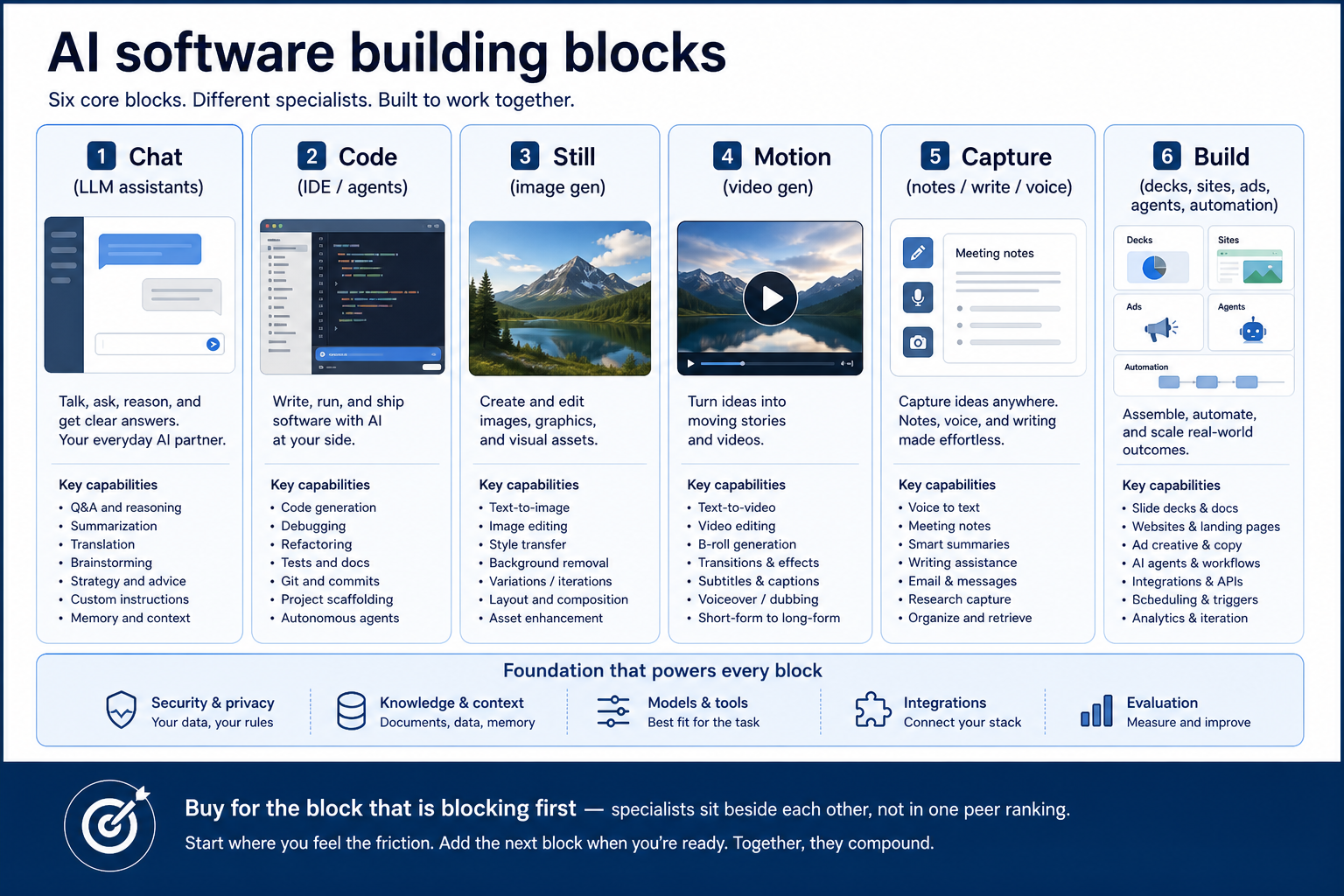
Most AI platforms specialise: LLM assistants run multi-turn chat, projects, and connectors; coding tools complete or refactor inside an editor; image and video products spend GPU or credit pools on media; meeting tools transcribe; writing and voice tools rewrite or speak; deck, site, ad, and agent builders turn prompts into artefacts; automation platforms connect apps with triggers, actions, and AI steps.
Example: Harbor Labs, an 18-person SaaS team, starts with ChatGPT for research drafts, then adds Cursor when engineers need an AI-native editor — without buying Midjourney they do not need yet.
2. What AI software typically includes
Depending on job cluster: chat and model tiers; inline completions and coding agents; stills and commercial IP terms; video credits; meeting transcription; paraphrase and grammar; voice cloning/TTS; prompt-to-deck; prompt-to-site; ad-creative downloads; or no-code agent builders.
Job clusters matter more than brand names: ChatGPT, Claude, Gemini, Microsoft 365 Copilot, and Perplexity are LLM-assistant shapes; Cursor and GitHub Copilot are AI-coding shapes; Midjourney and Adobe Firefly are image shapes; Runway (generative clips) and Synthesia (avatar / L&D video) are video shapes; Otter.ai and Fireflies.ai are meeting-notes shapes; QuillBot, ElevenLabs, Gamma, Wegic, AdCreative.ai, and MindStudio each own a specialist job. Catalogue examples are shapes to compare by primary job — not a ranking.
Common AI software shapes (not rankings)
LLM assistant
Best for: Teams that need multi-turn chat, research, custom GPTs, or Microsoft 365-native copilots.
Avoid when: Your primary job is IDE completions, stills, video, or meeting transcripts.
AI coding
Best for: Engineers who need inline completions, agents, or an AI-native editor.
Avoid when: You only need Microsoft 365 Copilot in Word/Excel, or GitHub as source control.
Image & video generation
Best for: Creative teams that need distinctive stills, Creative Cloud IP posture, or generative video.
Avoid when: Chat reasoning or coding assistance is the real purchase.
Capture, write, voice, build
Best for: Meeting notes, paraphrase, TTS, decks, sites, ad creative, or no-code agents.
Avoid when: You are shopping an undifferentiated “best AI” list against ChatGPT.
3. Name the job AI software should own
AI products are usable when the loop is explicit: name the weekly output, provide context, generate, review with a human, apply governance, then ship into the real stack (docs, IDE, ads, or workflow).
Example: Harbor Legal needs meeting notes with a retention policy — not an image generator and not an ungoverned consumer chatbot pasted into client files.
4. Next: freeze requirements and compare fairly
Move to /guides/how-to-choose-ai-software/ once the job cluster is clear. Compare finalists with the same assumptions — not affiliate-ordered lists.
5. Use a one-page checklist before demos
For What Is AI Software?, list must-haves, owners, integrations, and the weekly ritual this purchase must improve. Share the sheet with finance and IT before you schedule a second demo.
- Name the primary job in one sentence.
- List must-have gates (plans, SSO, data residency, usage caps).
- Name integrations that must work on day one.
- Assign an admin owner and a weekly user champion.
- Define non-admin proof — what a sceptic completes without rescue.
Worked example: Harbor Ops refuses demos until the checklist is signed — cutting evaluation time in half.
6. Avoid the usual buying mistakes
Common failures in ai: buying for brand familiarity, comparing entry tiles across different usage units, skipping a fair trial script, and adding scope before adoption proves out.
Run one trial script on every finalist the same week. Score on the same card. Write a one-paragraph decision memo that names what you are not buying yet.
7. Hand off to the category shortlist
When assumptions are frozen, continue on /best/ai-software/ with the same headcount, usage band, and must-have gates on every quote.
Frequently asked questions
Is Microsoft 365 Copilot the same as GitHub Copilot?
No. Microsoft 365 Copilot is an add-on SKU inside Microsoft 365. GitHub Copilot is an AI coding product. GitHub is a source-control / DevOps platform. Compare each inside its job cluster only.
Do I need one suite or specialist tools?
Buy for the job that creates the most rework this quarter. LLM assistants help when chat is the weekly ritual; specialists win when the output is stills, video, transcripts, voice, decks, sites, ads, or agents.
Where do ChatGPT, Cursor, Midjourney, Synthesia, and Fireflies.ai fit?
They are catalogue cluster leaders or peers for LLM assistant, AI coding, image generation, avatar/L&D video, and meeting notes. Runway remains the generative-filmmaking peer of Synthesia — same cluster, different production job. Compare inside those jobs — see Best AI software for methodology-based editor’s picks.
Was this article helpful?
Have more questions? Contact our support team.
Part of Software buying guides · How to Choose AI Software: Job-First Framework
Related guides
Supporting reading in this topic — not a generic related-posts dump.
- Rank Prompt Plans: Seats, Credits, and Qualifying TiersChoose your Rank Prompt plan by mapping must-haves to qualifying tiers — seats, credits, usage packs, and add-ons — not homepage “from” tiles.
- Is AdCreative.ai Worth It? Fit Scenarios Before You BuyDecide if AdCreative.ai is worth it for your team — job-cluster fit, trial proof, and packaging — without invented ROI percentages.
- Is AI InteleKt Worth It? Fit Scenarios Before You BuyDecide if AI InteleKt is worth it for your team — job-cluster fit, trial proof, and packaging — without invented ROI percentages.
- Is Aira Worth It? Fit Scenarios Before You BuyDecide if Aira is worth it for your team — job-cluster fit, trial proof, and packaging — without invented ROI percentages.
- Is ElevenLabs Worth It? Fit Scenarios Before You BuyDecide if ElevenLabs is worth it for your team — job-cluster fit, trial proof, and packaging — without invented ROI percentages.
- AdCreative.ai Plans: Seats, Credits, and Qualifying TiersChoose your AdCreative.ai plan by mapping must-haves to qualifying tiers — seats, credits, usage packs, and add-ons — not homepage “from” tiles.
- AI InteleKt Plans: Seats, Credits, and Qualifying TiersChoose your AI InteleKt plan by mapping must-haves to qualifying tiers — seats, credits, usage packs, and add-ons — not homepage “from” tiles.
SoftwareGlimpse Updates
Want clearer software shortlists? Get buying guides and comparisons by email.
Newsletter coming soon.